Author Archives: Robins

R: Data frame index error “unexpected token”

Objective: to practice PCA analysis with prcomp function
data set: R comes with iris data set
error reporting content: when removing the “species” column in Iris data set with data frame index, errors are always reported, as follows:

> iris_data <- [,-5] 
Error: Unexpected'[' in "iris_data <- ["

Oh, it’s really a very low-level error. The reason for the error is that the data set is not indicated. After modification, the code is as follows:

iris_data <- iris[,-5]

the second similar problem:
original code:

fviz_pca_ind(iris.pca,
             geom.ind = ("point", "text"), # show points only (nbut not "text")
             col.ind = iris$Species, # color by groups
             palette = c("#00AFBB", "#E7B800", "#FC4E07"),
             addEllipses = TRUE, # Concentration ellipses
             legend.title = "Groups"
             )

report errors:

Error: Unexpected',' in:
"fviz_pca_ind(iris.pca,
             geom.ind = ("point","

Modified code: added “C” in front

fviz_pca_ind(iris.pca,
             geom.ind = c("point", "text"), # show points only (nbut not "text")
             col.ind = iris$Species, # color by groups
             palette = c("#00AFBB", "#E7B800", "#FC4E07"),
             addEllipses = TRUE, # Concentration ellipses
             legend.title = "Groups"
             )

Vue Error: Uncaught (in promise) NavigationDuplicated: Avoided redundant navigation to current location

When I use the route jump, the jump does not work and the browser reports the following error.
Uncaught (in promise) NavigationDuplicated: Avoided redundant navigation to current location: “/main”.
createRouterError vue-router.esm.js:2065
createNavigationDuplicatedError vue-router.esm.js:2035
confirmTransition vue-router.esm.js:2328
transitionTo vue-router.esm.js:2260
push vue-router.esm.js:2704
push vue-router.esm.js:3020
push vue-router.esm.js:3019
The reason for the error is that I did not add.

<router-view></router-view>

Solutions to errors in installing xunsearch engine in centos8.0

When I need to apply full-text search engine to some small projects, I prefer to use xunsu because it is convenient to deploy and easy to call. Today, when I install xunsu for the customer’s deployment system, I reported an error (rarely encountered an error). I spent some time looking up the information, finally solved it, and shared my experience

The first reason is positioning. I have installed xunsu on at least five or six CentOS hosts, and the previous installation has been completed smoothly. Therefore, it should be because there is something wrong with xunsu itself, which is more likely related to the running environment. After a look, this machine is currently installed with CentOS 8.0, and the systems I installed before are all 7. X, so it is most likely related to the operating system It has something to do with the version of the system.

The information in the installation interface is as follows:

bufferevent_openssl.c:237:2: note: (near initialization for 'methods_bufferevent')
bufferevent_openssl.c:228:19: error: storage size of 'methods_bufferevent' isn't known
 static BIO_METHOD methods_bufferevent = {
                   ^~~~~~~~~~~~~~~~~~~
make[2]: *** [Makefile:793: bufferevent_openssl.lo] Error 1
make[2]: Leaving directory '/usr/local/src/xunsearch-full-1.4.14/libevent-2.0.21-stable'
make[1]: *** [Makefile:857: install-recursive] Error 1
make[1]: Leaving directory '/usr/local/src/xunsearch-full-1.4.14/libevent-2.0.21-stable'
make: *** [Makefile:1182: install] Error 2

It seems that there should be an error in the compilation process, which is more difficult. Because this is the code written in C, I can’t directly change its source code, so I can only start from what causes the compilation error. After various queries, I found that a netizen once encountered this problem. The following is the content quoted from this netizen:

The cause of this problem and the solution ideas are as follows.
The reason is that libevent 2.0.x requires openssl < 1.1.0
Several common Linux distributions have upgraded their openssl systems to 1.1.0+
That is, libevent 2.1.x+ is required
And libevent 2.1.x has changed the header file... If you do not change the system openssl version.
Then you can manually download a libevent-2.1.11-stable.tar.gz
convert to bz compressed format (libevent-2.1.11-stable.tar.bz2)
Put it into packages, remembering to delete the original libevent

I didn’t refer to him for the following specific steps, because the xunsu version I used is different from his, and the specific solution is different from his, so let’s continue with my solution process: First of all, download the 2.1. X version of libevent installation package. You can search libevent directly, and then download it on the official website. Most of the time, the official link is on GitHub. If you download it with WGet directly on Linux system, it’s a bit slow. In this case, you can download it on our own browser first, and then upload it through winscp, which is faster. The version I downloaded is libevent2.1.12. The download link is: https://github.com/libevent/libevent/releases/download/release-2.1.12-stable/libevent-2.1.12-stable.tar.gz

After downloading, upload it to the server and put it in the xunsearch directory. My directory is/usr/local/SRC /, then decompress the file and recompress it into bz2 format. The reference code is as follows:

//Unpack libevent first (in order to compress it into the desired format)
tar -zxvf libevent-2.1.12-stable.tar.gz
//compress to bz2 format, which is the format supported by the XunSuo installer
tar -cjf libevent-2.1.12-stable.tar.bz2 libevent-2.1.12-stable
// copy to the packages folder under xunsearch
cp libevent-2.1.12-stable.tar.bz2 xunsearch-full-1.4.15/packages/
// go to the package installation directory and remove the libevent package that comes with it (xunsearch1.4.15 comes with 2.0.X)
cd xunsearch-full-1.4.15/packages/
rm -f libevent-2.0.X
//return to the previous folder (i.e. the root directory of the Xunsearch installation package), then execute setup.sh and you're done.
// XunSoo will automatically check for the libevent package in the installer file, if it doesn't find it, it will report an error, if it finds it, it will automatically unpack and compile it.
cd ..
./setup.sh

Then the installation process is happily completed
Record Stanford corenlp running all the time without error

Record the relevant contents of Stanford corenlp running without error

1. Detection method

NLP handles how to get the code for the cause of the error

from stanfordcorenlp import StanfordCoreNLP
import logging
# Use logging to monitor why errors occur

nlp = StanfordCoreNLP("D:\study\python\Lib\site-packages\stanfordcorenlp\stanford-corenlp-full-2018-02-27", lang='zh',quiet=False,logging_level=logging.DEBUG)
text = "Knowledge background in business management and related industry knowledge."

print('hello')
nlp.close()

2. Reason analysis

“The main problem is that my java environment is 32-bit. The largest memory of the 32-bit Java environment is 4G. And the memory required by Stanford corenlp is 4G. That’s why the Java environment refuses to create a JVM, and that’s why the program can’t run in the end. ” (from a blogger)

Klee Error: Assertion `userMainFn && “unable to get user main“‘ failed

Problem
klee reports an error.

klee: /tmp/klee_src/tools/klee/main.cpp:1068: void createLibCWrapper(std::vector<std::unique_ptrllvm::Module >&, llvm::StringRef, llvm::StringRef): Assertion `userMainFn && “unable to get user main”’ failed.

Cause
The test code added ifdef INCLUDEMAIN, which caused the main function to be skipped and triggered klee’s assertion.

#ifdef INCLUDEMAIN
int main 
.....
.....
#endif

solve

Just comment out those two lines.

Error (1820) if the password is not changed in time after MySQL installation

The password of MySQL was not changed in time when logging in for the first time

When downloading MySQL for the first time, because the password was not changed in time, it was prompted to change the password first.

ERROR 1820 (HY000): You must reset your password using ALTER USER statement before executing this statement.

When changing the password according to the requirements, the following error occurs when executing SQL command:

mysql> alter user 'root'@'localhost' identified by '123456';
ERROR 1819 (HY000): Your password does not satisfy the current policy requirements

The reason is that the password does not conform to the password rules, which is too simple.

Therefore, it is necessary to modify the password policy in time

set global validate_password_policy=0
set global validate_password_length=1;

validate_ password_ polic =
0 or low verify length only
1 or medium verify length, number, case and special characters
2 or strong verify length, number, case, special character and dictionary file

mysql> ALTER USER 'root'@'localhost' IDENTIFIED BY '123456';
Query OK, 0 rows affected (0.00 sec)

Elememt UI introduces components on demand to report errors

Background: the project based on vue-cli3 introduces error reporting on demand

According to the official documents, introduce components as required, as follows:
1. Install: NPM install Babel plugin component – d
2 babel.config.js Modify configuration in

module.exports = {
  presets: [["es2015", { modules: false }]],
  plugins: [
    [
      "component",
      {
        libraryName: "element-ui",
        styleLibraryName: "theme-chalk",
      },
    ],
  ],
};

3. After running, Babel compiles and reports an error:
cannot find module ‘babel-preset-es2015’
4. Query the document and find the following sentence:
this preset is not recommended. If you want to keep it up to date, please use env preset
5. Solution:
1) install NPM install — save dev @ Babel/preset env
2) modify babel.config.js “Es2015” is “@ Babel/preset env”
3)

Official website link reference: https://babel.docschina.org/docs/en/6.26.3/babel-preset-es2015/

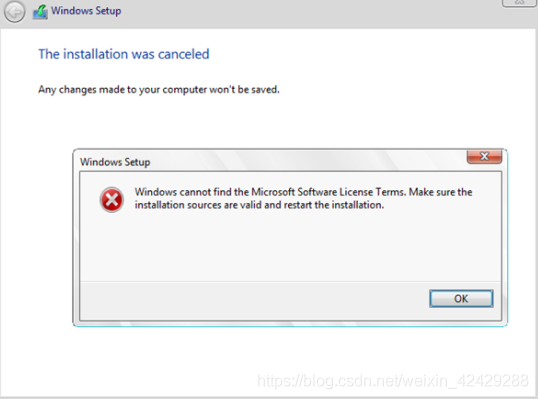
Error report when Hyper-V creates virtual machine

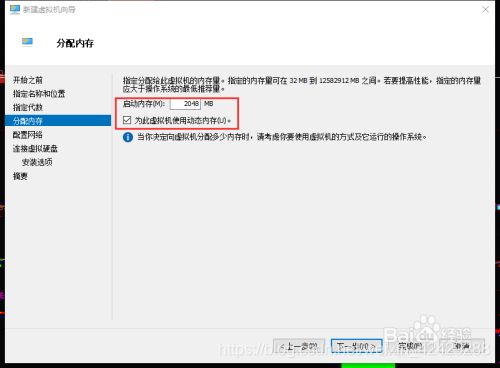
When creating a virtual machine, the following error is reported

Solution:

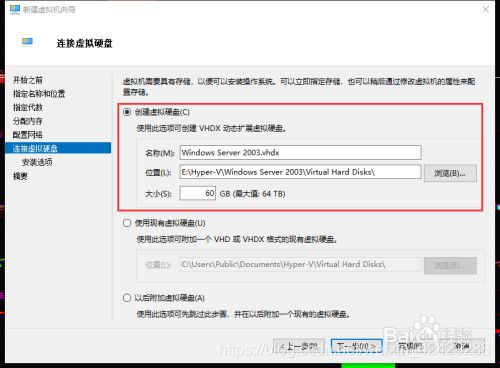
First, shut down the current virtual machine and create a new one,

Don’t allocate so much memory. I allocated 512MB instead

When creating the virtual hard disk, it was a little bigger. I changed it to 60GB


And then there’s no mistake

Reference website

http://woshub.com/windows-cannot-find-microsoft-software-license-terms/

After installing the dual system , Code error

1. After installing the Linux system, the executable code in win10 will report an error. It will display importerror: DLL load failed: this volume does not contain a recognized file system. Make sure that all requested file system drivers are loaded and that the volume is not corrupted

2. Run pychar, do not call the package, for example

print(2+3)

If it runs successfully, pychar is OK , Modify other environments to see if they can run successfully . That’s how I solved it .
 

Error report when installing arpspoof in Kali

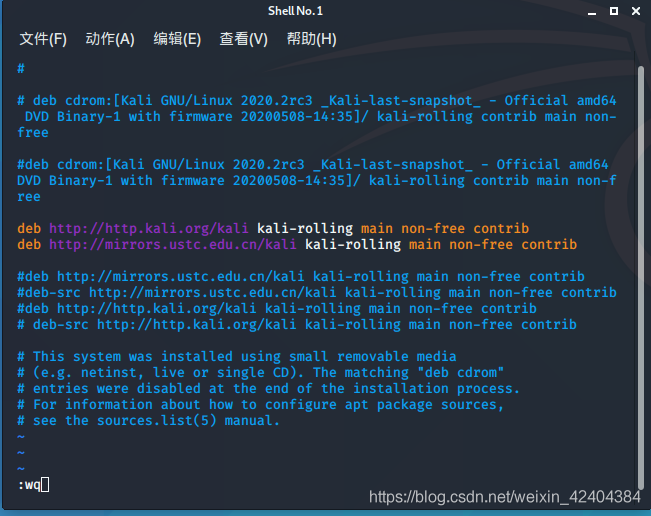
“21040;” 32479;”228411;” sources. (GROANS)

root :$35; cd /
root :/’35; cd etc
root :/etc’35; cd apt
root :/etc/apt’35; vi sources.

“25509;” 30528;”281553deb;” http://www.bing.com/searc….tin-round+rock+texas Kali-rolling main non-free contrib 25110deb http://mirrors.ustc.edu.cn/kali Kali-rolling main non-free contrib -28982;”Esc,”:wq”20445;”23384;”368644;”

egg.js The frame post request reported an error of invalid CSRF token security verification, which has been solved

It has to be said that Alibaba’s egg framework is quite good, with its own security verification.

Problem: get request is normal, post request background will report such an error.

" nodejs.ForbiddenError : invalid csrf token"

There is an official explanation for this problem. Click to jump to the official safety explanation of egg. There is not too much explanation here

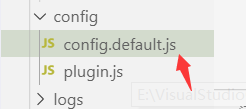
Method 1: in the confit.default.js Add the following code to turn off security verification (not recommended)

config.security = {
    csrf: {
      enable: false,
    },
  };

Method 2: when the front-end initializes the interface, let the front-end get to request an interface first, and the background returns a secret key to the front-end. Let the front-end put it in the headers request header when the post request is made, and the egg will automatically verify the secret key, and the request will succeed only if the verification is successful.

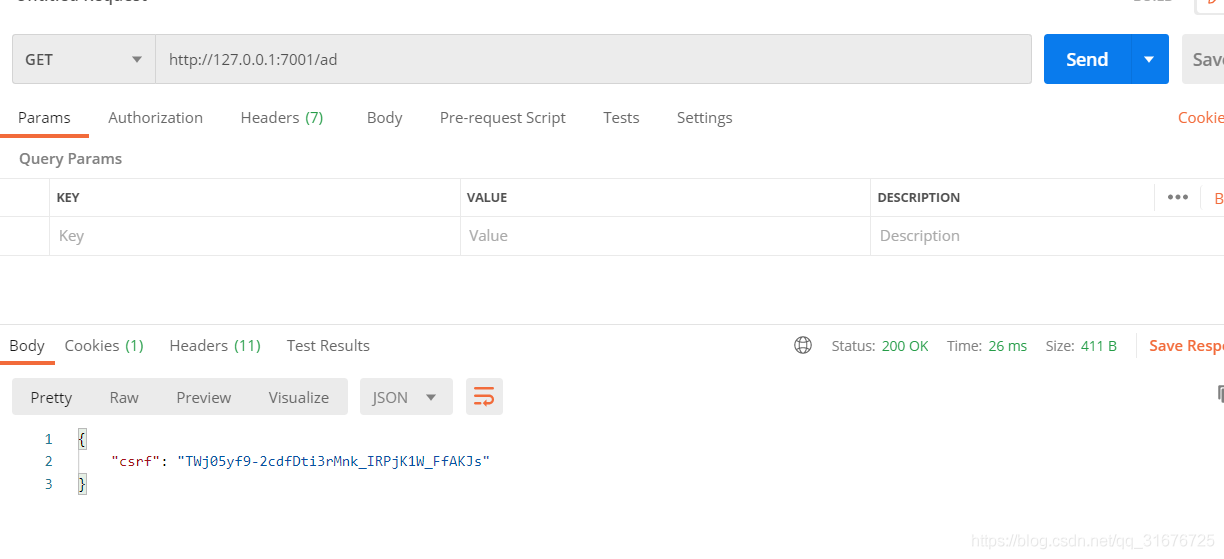
1. Egg background code, get interface returns secret key: 2

async index() {
    const { ctx } = this;
    ctx.body = {
      csrf:ctx.csrf
    };
}

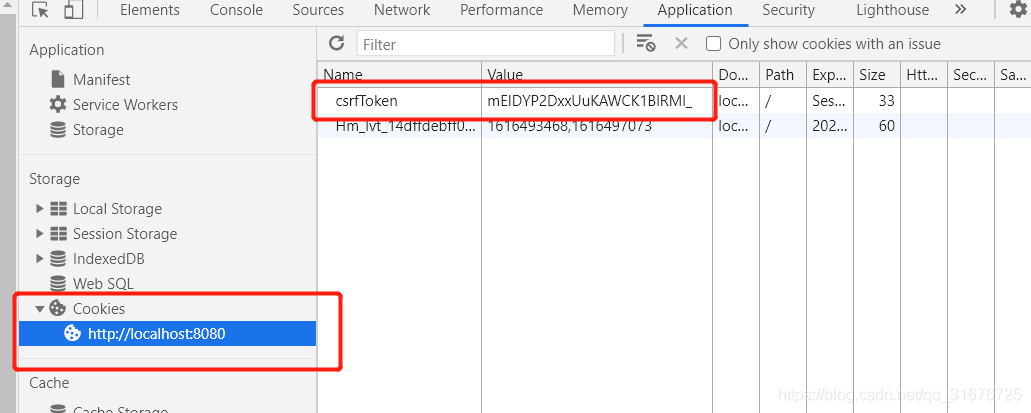
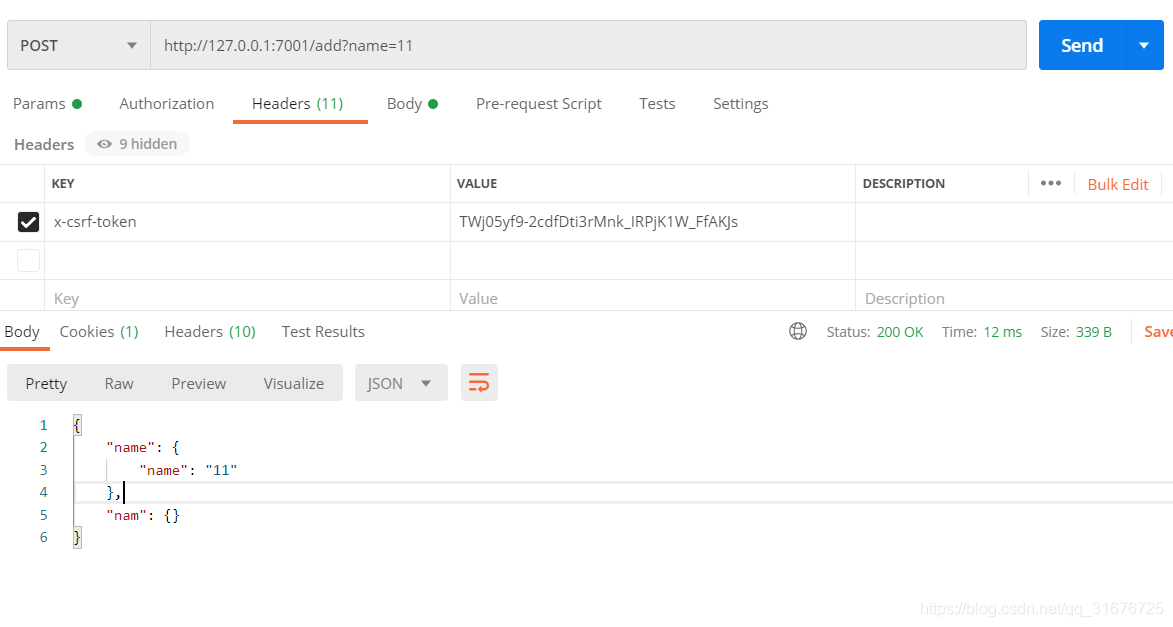
The following two methods are demonstrated. The postman test is as follows. At the same time, if a request is made in the front end, a secret key pair will be generated in the cookies. As shown in the figure below, the secret key will change after each request, so the CSRF obtained in the front end should be put in the headers request header in a global way.

2. Front end secret key request: 2

axios.post('apis/add', data,{headers:{'x-csrf-token': headData}})

The postman test is as follows: directly copy CSRF

OK, successful request, perfect solution, start moving bricks

Eclipse create servlet file error

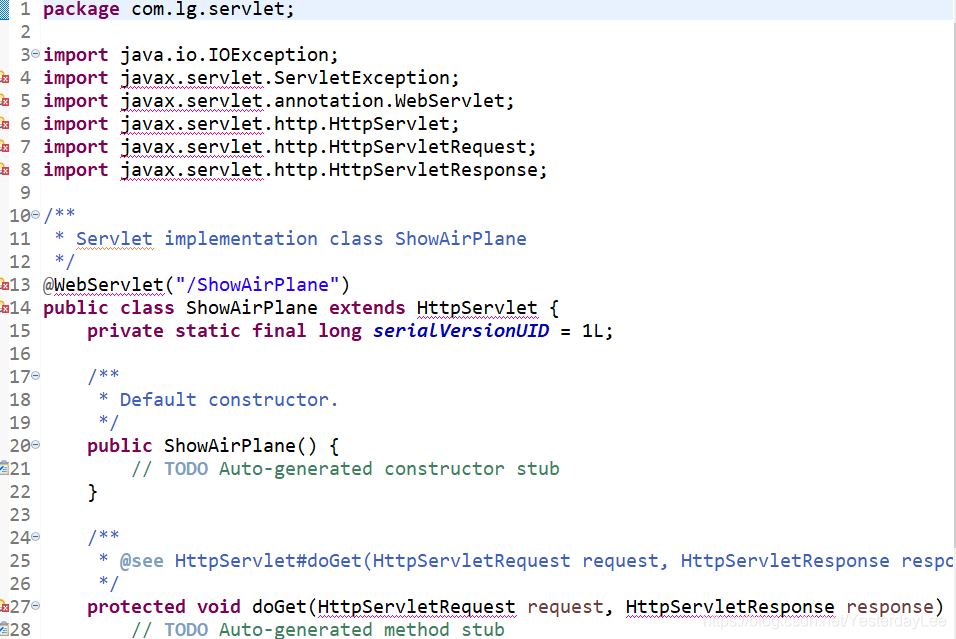
When creating a web project in eclipse, an error is reported when creating a JSP or servlet file, as follows:

the error is: the superclass“ javax.servlet.http . httpservlet “was not found on the Java build path“ javax.servlet.http The. Httpservlet “class cannot be found in the project’s build path, that is, there is no class to send and receive requests.
If you look at the error reported by the servlet file:

is also the error caused by the lack of servlet related classes.
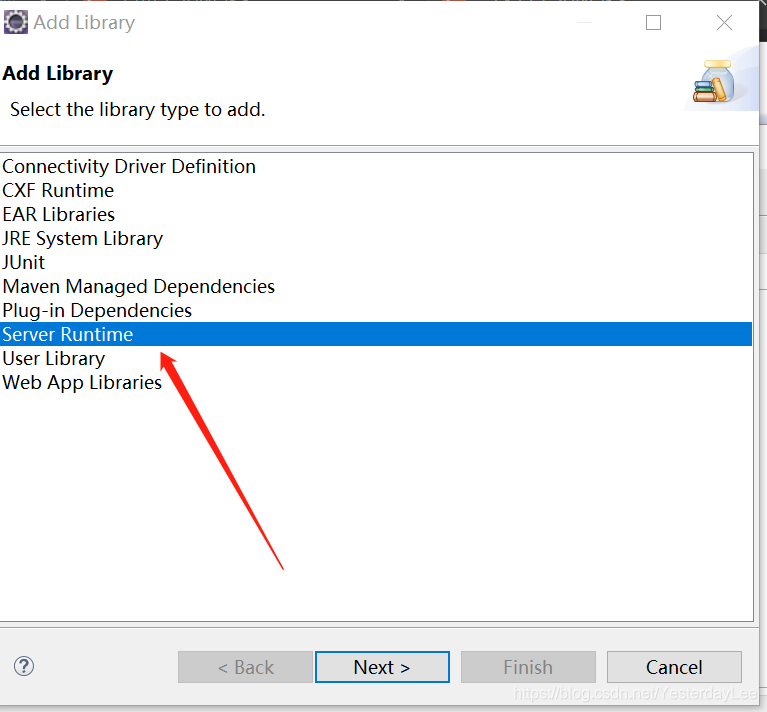
The specific solution is:
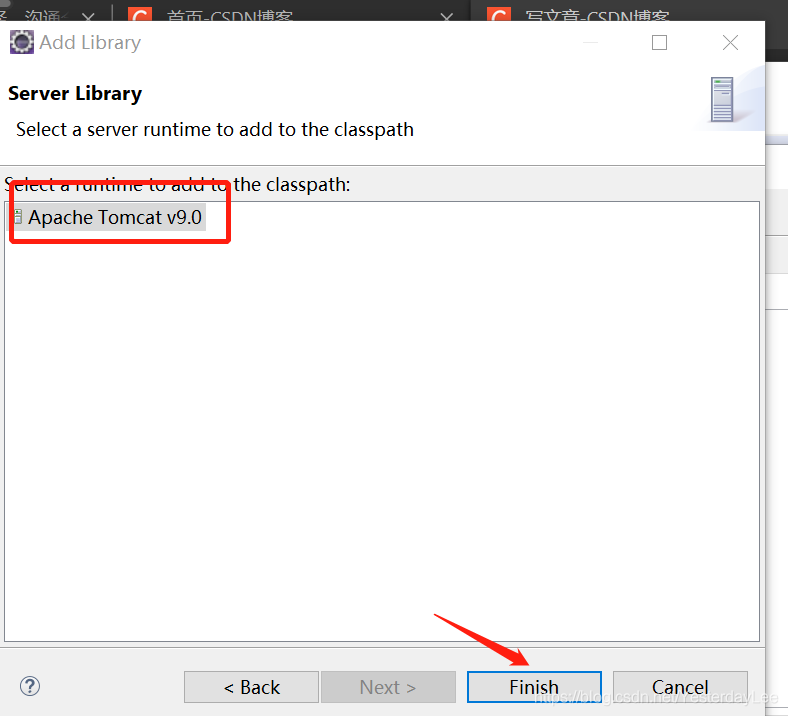
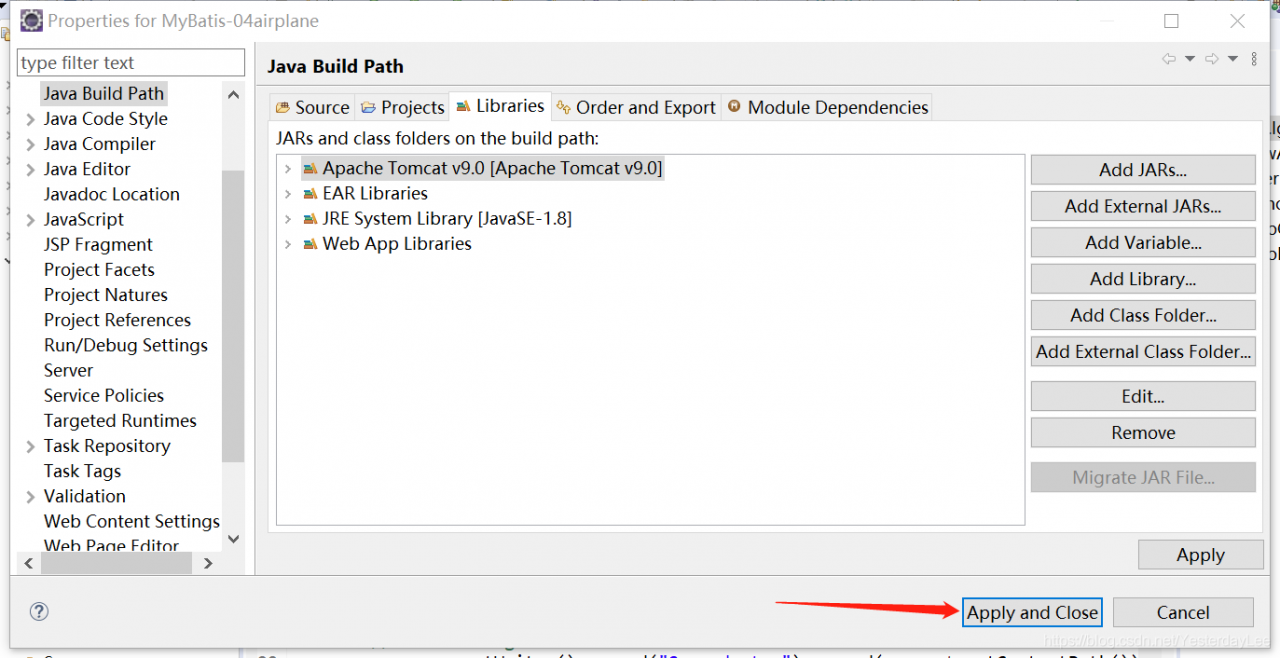
right click on the specific project — & gt; select Properties — & gt; select “Java build path”, and then follow the steps below:

Click next, select the server, click Finish

and then click “apply and close”.