Set the generation policy of ID to @ generatedvalue (strategy = generationtype. Identity)
Author Archives: Robins
Spring boot real time HTML page
Add the following configuration in application. Properties
spring.thymeleaf.cache=false # close cache
Introduce debugging tools into POM. XML and set it to open
<dependency>
    <groupId>org.springframework.boot</groupId>
    <artifactId>spring-boot-devtools</artifactId>
    <optional>true</optional>
</dependency>
alt + ctrl + S open settings:
Build,Execution,Deployment —— Complier:
Check Build project automatically
ctrl + shift + alt + /:
Check Registry
Check compiler.automake.allow.when.app.running
The matching result of Python XPath is null
When writing Python crawlers, in order to save time, you usually open F12 in the browser and right-click to copy XPath.
There is a hole in Google browser, which took half a day
The copied XPath is as follows in
Python:// * [@ id = “mainframe”]/div/table/tbody/TR/TD [1]// text ()
Use the browser plug-in XPath helper to test the match successfully!
In the Python code, you can’t match it, as follows
xxx.xpath('//*[@id="mainFrame"]/div/table/tbody/tr/td[1]//text()')
The matching result is an empty list.
reason:
The browser “optimizes” the XPath, so that the XPath copied directly from the browser can’t be run in Python.
Solution:
Delete the extra tbody. The code is as follows:
#There is an extra tbody, delete it
xxx.xpath('//*[@id="mainFrame"]/div/table/tbody/tr/td[1]//text()')
# The modified code is as follows and successfully matches.
xxx.xpath('//*[@id="mainFrame"]/div/table/tr/td[1]//text()')
Eclipse: Remote System Explorer Operation
eclipse 中 “Remote System Explorer Operation” The solution to the lag is as follows.
Eclipse -> Preferences -> General -> Startup and Shutdown.Uncheck RSE UI.
Eclipse -> Preferences -> Remote Systems. Uncheck Re-open Remote Systems view to previous state.
Playing audio in termux
I have tried all kinds of apt install software, using Python library to write code to run (all kinds of libraries are not available), using java to write code to run (using Android’s own API), all failed. The reasons all point to one point: there is no default audio.
Analysis: because the execution environment is termux, there is no default setting in termux. Android is the real system of the outer system of termux. As long as the sound card, driver, default device and so on are set in termux, they can also be executed after setting.
Here’s a simpler way:
Premise: tinyalsa, root identity, a 44.1KHz audio, turn on the volume
Play command:
./tinyalsa play ~/test.wav
View command:
/tinyalsa tinymix
./tinyalsa tinypcminfo -D /proc/asound/cards
cat /proc/asound/cards
Set the output device to speaker:
/tinyalsa tinymix 0 SPK
Write the play command into a script, give him permission, you can play and use it freely!
After a variety of searches, a better solution was found:
Better and simpler solutions
Breaking the web page to prevent copying
Browsers (web pages) are forbidden to copy, which are usually set in JS or CSS style.
So you can do the following: disable JS cancel user select style
Enter setting , check disable JavaScript (disable JS)
Press F12, search for user select and delete this style
Eclipse gets stuck saving copy and paste
When editing long code in eclipse, eclipse often gets stuck for a long time when using Ctrl.
the guess is that you can click and jump to the variable definition after holding down Ctrl in eclipse, so when you press Ctrl, eclipse will generate this mapping. When the file is large, this behavior will take a lot of time. You can set shortcut keys by the following methods.
Eclipse — Windows-> Preferences-> General-> Editors-> Text Editors-> Hyperlinking:
Remove this option: enable on demand hyperlinks style navigation
CANNOT LINK EXECUTABLE: cannot locate symbol
This problem occurs in termux. You can’t locate the link library, that is, you can’t find the dependent library file. You just need to put the corresponding library in the environment variable.
If his error message contains Referenced by/system/lib64 /, then add the corresponding location to the environment variable and execute the following command
export LD_LIBRARY_PATH=$LD_LIBRARY_PATH:/system/lib64/
Termux installing redis
When I compile and install redis under termux, there are such errors as use of undeclared identifier.. my CC compiler and its dependent components are the latest version, but there are still problems. The reason is unknown. It indicates that the method is not declared at compile time. It is estimated that the CPU is weak and the compile execution order is related. It is just a guess.
Use the following solution directly:
apt install redis
That’s it. The bin executor is placed in usr/bin by default, and the configuration file is in usr/etc.
termux Failed to initialize runtime
Failed to initialize runtime solution appears when using ECJ or DX command in termux
The error report said that I had to check the log. Because I didn’t know much about Android system, I chose to check what ECJ did
Enter the path as shown in the figure
cd ~/../usr/bin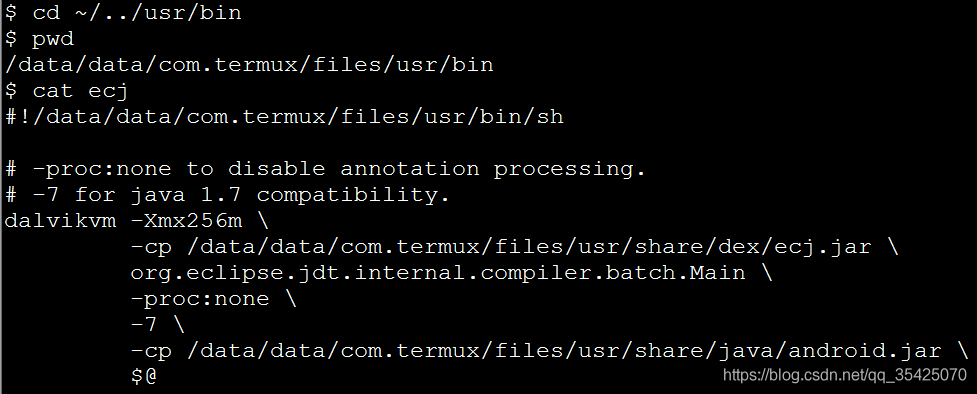
Cat ECJ later found that he was actually executing the command dalvikvm
So cat dalvikvm finds the following in this command
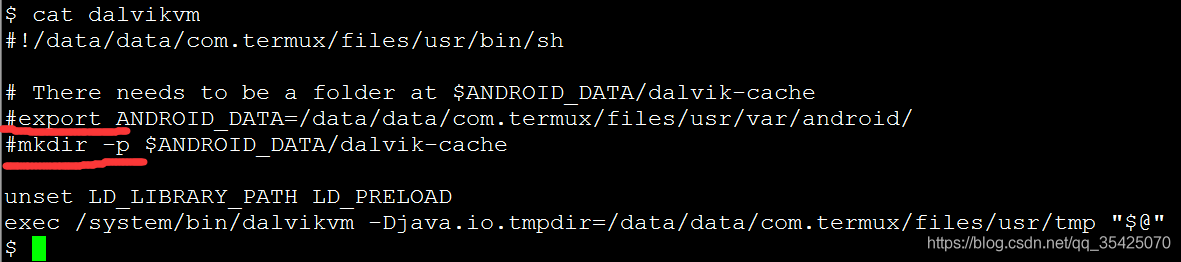
The two lines I marked had no comments
Open dalvikvm through VI or vim and comment out the above two lines. You can use it normally
Note out the following two lines
export ANDROID_ DATA=/data/data/com.termux/files/usr/var/android/
mkdir -p $ANDROID_ DATA/dalvik-cache
)You can use ECJ
Cause analysis:
Because the directory will exist after being used, the execution fails
Here is the original: https://github.com/termux/termux-packages/issues/1107
Java garbage collection
Most of the source network, I summarize, mainly in the interview garbage collection related to high frequency questions and answers
Common garbage collection algorithms
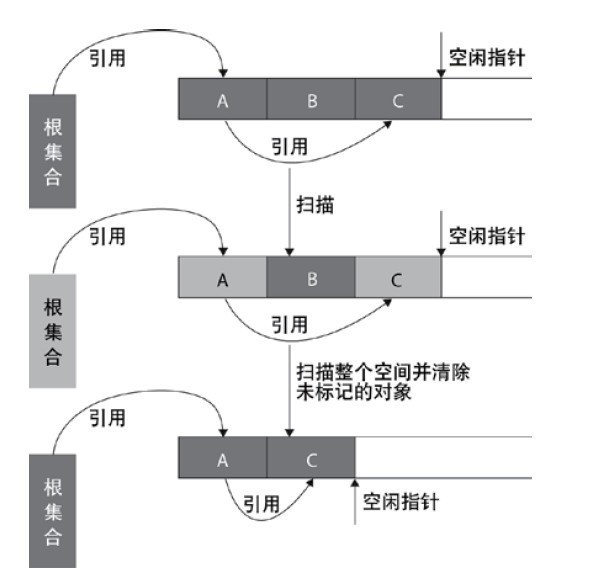
Mark clear algorithm
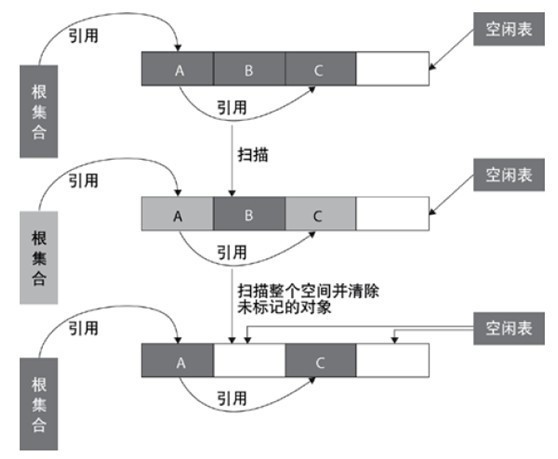
mark clear algorithm scans from the root set (GC roots) to mark the surviving objects. After marking, it scans the unmarked objects in the whole space for recycling, as shown in the figure below. Mark and clear algorithm does not need to move objects, but only needs to deal with the non surviving objects. It is very efficient when there are many surviving objects. However, because mark and clear algorithm directly recycles the non surviving objects, it will cause memory fragmentation.
Replication algorithm
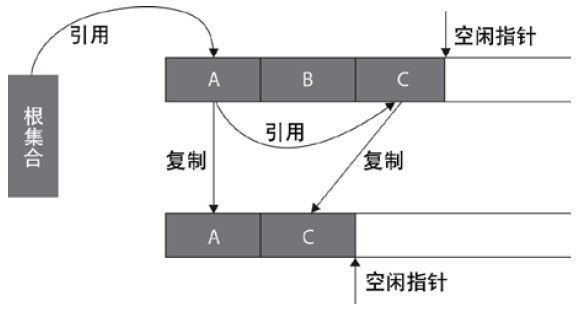
replication algorithm is proposed to overcome the overhead of handle and solve the problem of memory fragmentation. At the beginning, the heap is divided into one object surface and several free surfaces. The program allocates space for the object from the object surface. When the object is full, the garbage collection based on copying algorithm scans the active objects from the GC roots and copies each active object to the free surface (so that there is no free hole between the memory occupied by the active objects), so that the free surface becomes the object surface, The original object face becomes a free face, and the program allocates memory in the new object face.
Mark tidy algorithm
mark clean algorithm uses the same way as mark clean algorithm to mark objects, but it is different in cleaning. After reclaiming the space occupied by the non surviving objects, it will move all the surviving objects to the left free space, and update the corresponding pointer. Mark and clean algorithm is based on mark and clean algorithm, and moves objects, so the cost is higher, but it solves the problem of memory fragmentation. The specific process is shown in the figure below:
Generational collection algorithm
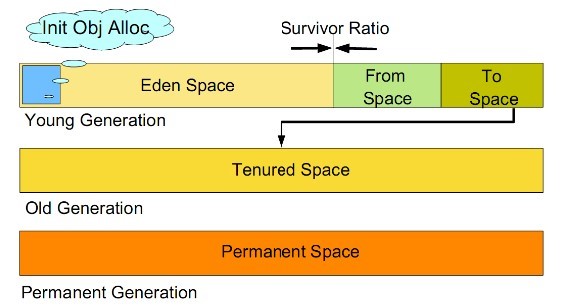
generational collection algorithm is currently used by most JVM garbage collectors. Its core idea is to divide the memory into several different regions according to the life cycle of the object. In general, the reactor area is divided into the aged generation and the young generation, and there is another generation outside the reactor area that is the permanent generation. The characteristics of the old era is that only a small number of objects need to be recycled in each garbage collection, while the characteristics of the new generation is that a large number of objects need to be recycled in each garbage collection, so the most suitable collection algorithm can be adopted according to the characteristics of different generations.
Recycling algorithm of young generation
a) All newly generated objects are first placed in the younger generation. The goal of the young generation is to collect the objects with short life cycle as quickly as possible.
b) The Cenozoic memory is divided into one Eden area and two survivor (survivor0, survivor1) areas according to the ratio of 8:1:1. One Eden area and two survivor areas (generally speaking). Most of the objects are generated in the Eden area. When recycling, first copy the surviving objects in the Eden area to a survivor0 area, and then empty the Eden area. When the survivor0 area is also full, copy the surviving objects in the Eden area and survivor0 area to another survivor1 area, and then empty the Eden area and the survivor0 area. At this time, the survivor0 area is empty, and then exchange the survivor0 area with survivor1 area, that is, keep the survivor1 area empty, So back and forth.
c) When survivor1 is not enough to store the surviving objects of Eden and survivor0, the surviving objects are directly stored in the old age. If the old age is full, a full GC will be triggered, that is, the new generation and the old generation will recycle.
d) Cenozoic GC is also called minor GC. Minor GC occurs more frequently (not necessarily when Eden area is full).
Recycling algorithm of old generation
a) Objects that survive n garbage collections in the younger generation will be put into the older generation. Therefore, it can be considered that the objects stored in the old generation are all objects with long life cycle.
b) The memory is also much larger than that of the Cenozoic generation (the ratio is about 1:2). When the memory of the old generation is full, the major GC, or full GC, is triggered. The frequency of full GC is relatively low, and the survival time of objects in the old generation is relatively long, and the survival rate is high.
Recycling algorithm of permanent generation
used to store static files, such as Java classes, methods, etc. Persistent generations have no significant impact on garbage collection, but some applications may dynamically generate or call some classes, such as hibernate. In this case, a large persistent generation space needs to be set to store these new classes.
Garbage collector
1、 Seven kinds of garbage collectors
(1) Serial (serial GC) – XX: + useserialgc
(Replication Algorithm)
the new generation of single threaded collector, marking and cleaning are single threaded, and its advantage is simple and efficient. It is the default GC mode of client level, which can be specified by - XX: + useserialgc .
(2) Parnew (parallel GC) – XX: + useparnewgc
(stop copy algorithm)
the new generation collector can be considered as the multithreaded version of serial collector, which has better performance than serial in multi-core CPU environment.
(3) Parallel scavenge (GC)
(stop copy algorithm)
parallel collector pursues high throughput and efficient utilization of CPU. Throughput is generally 99%, throughput = user thread time/(user thread time + GC thread time). It is suitable for background applications and other scenes with low interaction requirements. It is the default GC mode of server level, which can be specified by - XX: + useparallelgc , and the number of threads can be specified by - XX: parallelgcthreads = 4 .
(4) Serial old (MSc) (serial GC) – XX: + useserialgc
(tag collation algorithm)
the older generation of single threaded collector, the older version of serial collector.
(5) CMS (concurrent GC) – XX: + useconcmarksweepgc
(Mark clean algorithm)
high concurrency, low pause, pursuit of the shortest GC recovery pause time, high CPU occupation, fast response time, short pause time, multi-core CPU pursuit of high response time.
(6) Parallel old (parallel GC) – XX: + useparallelold GC
(stop copy algorithm)
The old version of collector, parallel collector, throughput first.
(7) G1 (jdk1.7update14 can be used for commercial use)
2、 1 ~ 3 is used for garbage collection of young generation: garbage collection of young generation is called minor GC
3、 4 ~ 6 is used for the garbage collection of the old generation (of course, it can also be used for the garbage collection of the method area): the garbage collection of the old generation is called full GC
G1 independently completes “generation by generation garbage collection”
Note: parallelism and concurrency
Parallel: multiple garbage collection threads operate simultaneously
Concurrency: the garbage collection thread operates with the user thread
4、 Five common combinations
Serial/Serial Old
Parnew/serial old: compared with the above, it’s just more multithreaded garbage collection than the younger generation
Parnew/CMS: a more efficient combination at present
Parallel scavenge/parallel old: a combination of automatic management
G1: the most advanced collector, but need jdk1.7update14 or above
5、 Serial/serial old
The young generation serial collector uses a single GC thread to implement the “copy” algorithm (including scan and copy)
The old generation of serial old collector uses a single GC thread to implement the “mark and tidy” algorithm
Both serial and serial old suspend all user threads (STW)
explain:
STW (stop the world): when compiling code, inject safepoint into each method (the point at which the loop ends and the method execution ends). When pausing the application, you need to wait for all user threads to enter safepoint, then pause all threads, and then garbage collection.
Applicable occasions:
CPU cores & lt; 2, physical memory & lt; 2G machine (in short, single CPU, the new generation of small space and STW time requirements are not high)
-20: Useserialgc: forces the use of this GC combination
-20: Printgcapplicationsstoppedtime: View STW time
6、 Parnew/serial old:
Parnew is the same as serial except that it uses multiple GC threads to implement the replication algorithm. However, the serial old in this combination is a single GC thread, so it is an awkward combination. It is not as fast as serial/serial old in the case of single CPU (because parnew needs to switch multiple threads), In the case of multi CPU, it is not as fast as the following three combinations (because serial old is a single GC thread), so it is not used much.
-20: Parallelgcthreads: Specifies the number of parallelgcthreads. By default, it is the same as the number of CPU cores. This parameter may also be used in CMS GC combination
7、 Parallel scavenge/parallel old:
characteristic:
The younger generation parallel sweep collector uses multiple GC threads to implement the “copy” algorithm (including scanning and copying). The older generation Parallel old collector uses multiple GC threads to implement the “mark collate” algorithm. Both parallel sweep and parallel old suspend all user threads (STW)
explain:
Throughput: CPU running code time/(CPU running code time + GC time) CMS mainly focuses on the reduction of STW (the shorter the time, the better the user experience, so it is mainly used to handle a lot of interactive tasks). Parallel scavenge/parallel old mainly focuses on throughput (the larger the throughput, the higher the CPU utilization, So it is mainly used to deal with a lot of CPU computing tasks and less user interaction tasks.)
Parameter setting:
-20: + useparalleloldgc: use this GC combination
-20: Gctimeratio: set the throughput directly. Suppose it is set to 19, then the maximum GC time allowed accounts for 1/(1 + 19) of the total time. The default value is 99, that is, 1/(1 + 99)
-20: Maxgcpause millis: maximum GC pause time. The smaller the parameter, the better
-20: + useadaptive sizepolicy: turn on this parameter, – XMN/- XX: survivorratio/- XX: preemptsizethhreshold these parameters will not work. The virtual opportunity will automatically collect monitoring information and dynamically adjust these parameters to provide the most appropriate pause time or maximum throughput (GC adaptive adjustment strategy). What we need to set is – Xmx, -20: + useparalleloldgc or – XX: gctimeratio (of course, – XMS is also specified to be the same as – Xmx)
be careful:
-20: Gctimeratio and – XX: maxgcpausemillis just set one
If – XX: + useadaptive sizepolicy, – XMN/- XX: survivorratio/- XX: preteuresizethreshold is not enabled, these parameters can still be configured. Take the rest server as an example
-Xms2048m -Xmx2048m -Xmn512m -Xss1m -XX:PermSize=256M -XX:MaxPermSize=256M -XX:SurvivorRatio=8 -XX:MaxTenuringThreshold=15 -XX:+UseParallelOldGC -XX:GCTimeRatio=19 -XX:+PrintGCDetails -XX:+PrintGCTimeStamps View Code
Applicable occasions:
In the case of many CPU computing tasks and few user interaction tasks, I don’t want to pay more attention to GC parameters, and I want to let the virtual machine do its own tuning work
When did GC trigger (one of the most common interview questions)
because the objects are processed by generations, the garbage collection area and time are also different. There are two types of GC: scavenge GC and full GC.
Scavenge GC
in general, when a new object is generated and Eden fails to apply for space (if it is larger than the maximum space, start the guarantee mechanism. You can learn about the guarantee mechanism), scavenge GC will be triggered to GC the Eden area, clear the non living objects, and move the surviving objects to the survivor area. And then sort out the two areas of survivor. This way GC is for the younger generation
Springboot time zone problem
1. Add the
@PostConstruct
void setDefaultTimezone() {
TimeZone.setDefault(TimeZone.getTimeZone(“Asia/Shanghai”));
}
2. Add the
## json setting
spring.jackson.date-format=yyyy-MM-dd HH:mm:ss
spring.jackson.time-zone=Asia/Shanghai
3. Add the
public static void main(String[] args) {
TimeZone.setDefault(TimeZone.getTimeZone(“Asia/Shanghai”));
SpringApplication.run(BaseMicroServiceApplication.class, args);
}
// Otherwise, there will be 8-hour time difference on the server
Or in the database:
After logging in as root, set global time_ zone=’+8:00′;
Mysql database has time zone setting, and the system time zone is used by default
You can query the current time zone through the following statement
show variables like ‘%time_ zone%’;