Author Archives: Robins

The drone settings page is not trusted

The drone settings page is not trusted

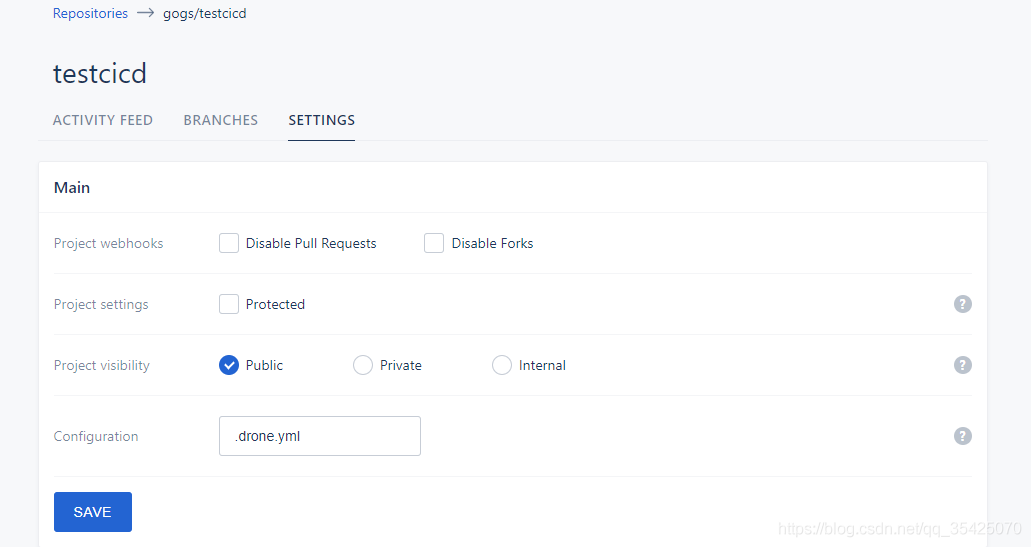
In the tutorial of building the drone cicd system, check trusted in the main part of settings. The normal page is like this

If you don’t have a trusted page, like this

It means that the user who logs in to drone is not an administrator, so you can’t see the option of trusted.

Solution

Check if there is drone in the docker running parameter of drone_ USER_ Create , as shown in the figure below

docker run \
  --volume=/opt/bin/drone/data:/data \
  --env=DRONE_GIT_ALWAYS_AUTH=true \
  --env=DRONE_GIT_USERNAME=xxx \
  --env=DRONE_GIT_PASSWORD=xxx \
  --env=DRONE_GOGS=true \
  --env=DRONE_GOGS_SKIP_VERIFY=false \
  --env=DRONE_GOGS_SERVER=http://xxx \
  --env=DRONE_PROVIDER=gogs \
  --env=DRONE_RPC_SECRET=xxx \
  --env=DRONE_USER_CREATE=username:yourUsername,admin:true \
  --env=DRONE_SERVER_PROTO=http \
  --publish=xxx:80 \
  --publish=xxx:443 \
  --restart=always \
  --detach=true \
  --name=drone \
  -h drone \
  drone/drone:1

--env=DRONE_ USER_ CREATE= username:yourUsername , admin:true this line is very important. After that, you can log in to drone with your user name and become an administrator. If you don’t add it, you won’t see the trusted button.

At that time, the -- env in my line was written as - env which resulted in that the parameters in this line did not take effect and that I did not run drone as an administrator, so I could not see the option of trusted.

Others: how to restart drone after it has been run?

docker rm -f drone # Delete the original image
# Run the above docker run to build a new image and run it

[Solved] fatal: could not read Username for

Total: could not read username for ‘http:// solution

After deploying the clone (cicd software), when the commit is triggered, the problem occurs when the clone runner executes the pull warehouse code (on his deployed gogs)

Initialized empty Git repository in /drone/src/.git/
+ git fetch origin +refs/heads/master:
fatal: could not read Username for 'http://ip:port': terminal prompts disabled

The reason is that you need to enter the user name and password, but because this is cicd software, there is no time to enter the password, so there are two solutions:

Using SSH, you can produce git public key on the server where drone is located and upload it to code hosting (I use the gogs built by myself here, but there will also be GitHub, gitea, gitee, gitlab, etc.), so that you don’t need to download and upload the user name and password, and use the memory password mechanism of GIT to save the user name and password

Enter the server where the drone is located, log in with the drone process user, enter the home directory ( Cd ~ ) and execute git clone [your git code path] , and find that you need to enter a password, Ctrl + C interrupt execution touch. Git credentials create. Git credentials file execute vim. Git credentials edit the file, press I key to enter edit mode, enter: HTTP (s):// {your user name}: {your password} @ your git server address [Note: select HTTPS/HTTP, Remove curly brackets] press ESC Enter : WQ save and exit to execute git config -- global credential.helper store cat ~ /. Gitconfig found one more item:

[credential]
helper = store

Explain that it has been configured. Try again git clone [your git code path] no need to enter a password

Fatal: could not read username for ‘http://…’: terminal prompts disabled problem solving~

Maven plugin development report error- plugin:3.2 :descriptor fai

Maven plugin error execution default descriptor of goal org. Apache. Maven plugins:maven-plugin-plugin :3.2:descriptor failed

The above error occurred when writing Maven plug-in.

Solution

Display the version number of the specified Maven plugin plugin in POM. XML

<build>
        <plugins>
            <plugin>
                <groupId>org.apache.maven.plugins</groupId>
                <artifactId>maven-plugin-plugin</artifactId>
                <version>3.5.2</version>
            </plugin>
        </plugins>
    </build>

other error
[ERROR] Failed to execute goal org.apache.maven.plugins:maven-plugin-plugin:3.2:descriptor (default-descriptor) on project maven-project: Error extracting plugin descriptor: ‘No mojo definitions were found for plugin
How to Solve
Show the version number of the specified maven-plugin-plugin in pom.xml

<build>
        <plugins>
            <plugin>
                <groupId>org.apache.maven.plugins</groupId>
                <artifactId>maven-plugin-plugin</artifactId>
                <version>3.5.2</version>
                <configuration>
                    <!-- Or add a descriptor to the mojo class comment -->
                    <skipErrorNoDescriptorsFound>true</skipErrorNoDescriptorsFound>
                </configuration>
            </plugin>
        </plugins>
    </build>

[ERROR] Failed to execute goal org.apache.maven.plugins:maven-compiler-plugin:3.8.1:testCompile (default-testCompile) on project xxx: Fatal error compiling: basedir D:\xxx\target\generated-test-sources\test-annotations does not exist -> [Help 1]

Solution
Skip the test during installation

mvn install -DskipTests=true

Docker mysql8 modify password

Docker mysql8 modify password

Set skip password login

docker exec -it mysql /bin/sh
# Note: The configuration file for editing is docker.cnf
vi /etc/mysql/conf.d/docker.cnf
exit

Restart MySQL container

docker restart mysql

Restart MySQL container

The old version of the command is invalid:
update user set password = password (‘a123456 ‘), where user =’root'</ s>
correct:

UPDATE mysql.user SET authentication_string='' WHERE user='root' and host='localhost';
-- Change the password for use without expiration
ALTER USER 'root'@'%' IDENTIFIED BY 'password' PASSWORD EXPIRE NEVER; 
flush privileges;

Error handling

ERROR 2059 (HY000): Authentication plugin ‘caching_ sha2_ password’ cannot be loaded: /usr/lib64/mysql/plugin/caching_ sha2_ password.so: cannot open shared object file: No such file or directory

Maybe the password is not set and will never expire. Maybe the database client version under Linux is too low. I tried to connect to mysql8 of docker in server B on server a, but the connection was successful by using DataGrid in windows.

Creating users and authorizations

create user  'nacos'@'%' identified by '123';
grant all on mid_nacos.* to 'nacos'@'localhost' ;
flush privileges;

Here, all the permissions of the table are granted, and all the items that can be authorized are explained and referenced https://www.cnblogs.com/yinzhengjie/p/10263692.html

Solve the error of operation create user failed for ‘user’ @ ‘%

It may be that the user already exists, you can delete and recreate it to
check whether the user exists: select user from user
delete: drop user 'user' @ '%

Solving com.mysql.cj.exceptions.unabletoconnectexception: public key retrieval is not allowed

Add & amp; after the connection information; allowPublicKeyRetrieval=true

Jmeter Error java.net.BindException: Address already in use: connect

resolvent:

1. Open the registry: Ctrl + R, enter regedit
2, enter – Computer \ HKEY_ LOCAL_ 3. Create a new DWORD value, name:TcpTimedWaitDelay , value:30 (decimal) set to 30 seconds
4. Create a new DWORD value, name:MaxUserPort , value:65534 (decimal) maximum number of connections 65534

If there is still a problem after modification, restart the machine and the problem disappears.

Notes for migrating Oracle jdk8 to openjdk11

Java 8 upgrade Java 11

Because orcle stopped the free follow-up security update of jdk8, the decision to upgrade JDK to 11 was adopted after the decision.

Specific version:

current version

java -version
java version "1.8.0_201"
Java(TM) SE Runtime Environment (build 1.8.0_201-b09)
Java HotSpot(TM) 64-Bit Server VM (build 25.201-b09, mixed mode)

Target version

java -version
openjdk version "11.0.2" 2019-01-15
OpenJDK Runtime Environment AdoptOpenJDK (build 11.0.2+9)
OpenJDK 64-Bit Server VM AdoptOpenJDK (build 11.0.2+9, mixed mode)

Upgrade process:

Download and install jdk11

JDK download
the selection of jdk11 version is: adptopen JDK 11.0.2 + 9
1 https://github.com/AdoptOpenJDK/openjdk11-binaries/releases/tag/jdk-11.0.2+9
Download
https://github.com/AdoptOpenJDK/openjdk11-binaries/releases/download/jdk-11.0.2%2B9/OpenJDK11U-jdk_ x64_ windows_ hotspot_ 11.0.2_ 9. Zip
latest or more versions: GitHub view all the released versions of open JDK (change the environment variable to jdk11, if you don’t start a java program such as Tomcat on the command line, you can skip this step, generally you don’t need to use ide on Windows)

Add jdk11: Ctrl Shift Alt + s — & gt; SDKs –> + Select JDK — & gt; Make sure that the compiler of the specified project in the directory is jdk11: Ctrl Shift Alt + S – & gt; Project ——> The project SDK and project SDK level are changed to the newly added 11, and the rest remain unchanged (the project is controlled by Maven’s pom.xml)
update the project compiler to jdk11pom.xml. See the following for the detailed process

Pom.xml transformation

<plugin>
    <groupId>org.apache.maven.plugins</groupId>
    <artifactId>maven-compiler-plugin</artifactId>
    <version>3.8.0</version>
    <configuration>
        <release>11</release>
    </configuration>
</plugin> 

This plug-in is used to compile the source code; The configuration in it represents the use of 11 to compile

<plugin>
    <groupId>org.apache.maven.plugins</groupId>
    <artifactId>maven-failsafe-plugin</artifactId>
    <version>2.22.0</version>
    <configuration>
        <argLine>
            --illegal-access=permit
        </argLine>
    </configuration>
</plugin>

Surefire plug-in is used to execute unit test of an application in the test phase of Maven build life cycle. It will produce two different forms of test results

<dependency>
    <groupId>org.javassist</groupId>
    <artifactId>javassist</artifactId>
    <version>3.23.1-GA</version>
</dependency>

The questions are listed as follows:

if the method provided in this paper can not be solved, you can try the following </ H6>
    1. clean the whole project/project and recompile it with Java 11
    1. in idea:
    1. build — build artifacts — all — clean
    1. build — build artifacts — all — build delete the corresponding components under Tomcat/webapps (clear the cache) </ OL>

Question 1

Symptom
resource cannot be resolved to a type
javax. Annotation. Resource
cause
resource class cannot be found; Java 11 has been removed as an alternative solution

Solutions

Add in pom.xml:

<dependency>
    <groupId>javax.annotation</groupId>
    <artifactId>javax.annotation-api</artifactId>
    <version>1.3.1</version>
</dependency>

Reference from stack overflow


Question 2

E rror:java : symbol not found
symbol: class resource
location: package javax.annotation

Solution:

        <dependency>
			<groupId>javax.annotation</groupId>
			<artifactId>javax.annotation-api</artifactId>
			<version>1.3.1</version>
		</dependency>   


Question 3

JAXB (Java. XML. Bind) problems are as follows:

Error:(10, 33) java: Package javax.xml.bind.annotation does not exist
Error:(24, 2) java: Symbol not found
  Symbol: Class XmlRootElement
Error:(28, 6) java: Symbol not found
  Symbol: Class XmlElement
  Location: Class com.xxx.xxx.xxxx.xxx.entity.xxx
  .....

Reasons
openjdk11 has deleted some packages. The following is an announcement:

Removal Of Java EE Modules
There used to be a lot of code in Java SE that was actually related to Java EE. It ended up in six modules that were deprecated for removal in Java 9 and removed from Java 11. Here are the removed technologies and packages:)
 
 
the JavaBeans Activation Framework (JAF) in javax.activation
CORBA in the packages javax.activity, javax.rmi, javax.rmi.CORBA, and org.omg.*
the Java Transaction API (JTA) in the package javax.transaction
JAXB in the packages javax.xml.bind.*   ############ This package is the cause of the problem
JAX-WS in the packages javax.jws, javax.jws.soap, javax.xml.soap, and javax.xml.ws.*
Commons Annotation in the package javax.annotation

The corresponding version is as follows:

<!-- Java 6 = JAXB version 2.0   -->
<!-- Java 7 = JAXB version 2.2.3 -->
<!-- Java 8 = JAXB version 2.2.8 -->
<!-- Java 9 = JAXB version 2.3.0 -->

Note: before the project is which version of JDK to introduce which version, for example, I was java8, so I want to introduce the JAXB version of 2.2.8

<dependency>
    <groupId>javax.xml.bind</groupId>
    <artifactId>jaxb-api</artifactId>
    <version>2.2.8</version>
</dependency>
<dependency>
    <groupId>com.sun.xml.bind</groupId>
    <artifactId>jaxb-core</artifactId>
    <version>2.2.8</version>
</dependency>
<dependency>
    <groupId>com.sun.xml.bind</groupId>
    <artifactId>jaxb-impl</artifactId>
    <version>2.2.8</version>
</dependency>

Reference from stack overflow


Question 4

Warning: (54,44) newinstance() in Java: Java. Lang. class is obsolete

Solution:

Check the source code of newinstance() in open JDK 11 Java. Lang. class. Some comments are as follows

    /* can be replaced by
     *
     * <pre>{@code
     * clazz.getDeclaredConstructor().newInstance()
     *}</pre>
     */

It can be replaced by the above method

clazz.newInstance();

replace with

clazz.getDeclaredConstructor().newInstance();

Question 5
After starting Tomcat
Artifact upm-web:war: Error during artifact deployment. See server log for details.
View the logs as follows.

19-Mar-2019 09:50:31.061 [RMI TCP Connection(3)-127.0.0.1] org.apache.catalina.core.StandardContext.listenerStart Error configuring application listener of class [com.xxx.xxx.xxx.WebContextLoaderListener]
 java.lang.UnsupportedClassVersionError: com/xxx/xxx/xxx/WebContextLoaderListener has been compiled by a more recent version of the Java Runtime (class file version 55.0), this version of the Java Runtime only recognizes class file versions up to 52.0 (unable to load class [com.xxx.xxx.xxx.WebContextLoaderListener])
	at org.apache.catalina.loader.WebappClassLoaderBase.findClassInternal(WebappClassLoaderBase.java:2377)
	at org.apache.catalina.loader.WebappClassLoaderBase.findClass(WebappClassLoaderBase.java:846)
	...
19-Mar-2019 09:50:31.061 [RMI TCP Connection(3)-127.0.0.1] org.apache.catalina.core.StandardContext.listenerStart Skipped installing application listeners due to previous error(s)

Reason
according to the description of exception information (unsupported version of XXX. Class), it means that the current class version to be loaded is 55 (Java 11), which cannot be loaded. The current Java runtime supports 52 (Java 8) versions of. Class files at most
where the java version corresponds to the class version as follows:

J2SE 11 = 55 (0x33 hex),
J2SE 10 = 54 (0x33 hex),
J2SE 9 = 53 (0x33 hex),
J2SE 8 = 52 (0x33 hex),
J2SE 7 = 51 (0x33 hex),
J2SE 6.0 = 50 (0x32 hex),
J2SE 5.0 = 49 (0x31 hex),
JDK 1.4 = 48 (0x30 hex),
JDK 1.3 = 47 (0x2F hex),
JDK 1.2 = 46 (0x2E hex),
JDK 1.1 = 45 (0x2D hex).

It can be seen that the actual cause of the problem is that the program compiled by java8 (Tomcat) calls the program compiled by java11.

Solution:

Using higher version Tomcat 9

Detailed process:

Go to Tomcat official website to download tomcat9, unzip the downloaded zip (modify the Tomcat environment variable and do not use it in the command line, which can be skipped). Modify the Tomcat set in IDE to the newly installed tomcat9. Take idea as an example:

Run edit configurations on the top right — configure on the right side of application server… Click on the top left + add the file location of newly installed tomcat9, OK, confirm to save the modification below, change JRE to newly added JDK 11, save the settings (note whether there are errors in the prompt area below) and run to check whether the configuration is correct


The above is my JDK version upgrade problems. Welcome to add!
There is more than one Web fragment with the same name: “spring_web”.

There is more than one web fragment with the same name: “spring”_ Web “. Error
software used: idea

Error location:

According to the error prompt, say there are duplicate modules, that is, find the duplicate module and delete it.

Solution:

In the upper right running setting of idea, open edit configuration – select your Tomcat server on the left – Deployment – select your component – Pencil Icon on the right – arts to see if there is any extra XXX explored (XXX is the project name)

Monitoring session to determine whether the user is online or not

Contents of articles

Scenario description session container add session remove session logout session failure

Supplement: listen to the change of session property. Session is independent of other session sharing schemes

Scene description

In the spring boot project, in order to simplify the message module, if there is a new message, write it to the database first. If the user is online, set newmessage flag = true in the session of the user receiving the message. The front end only needs to poll the session each time, and does not need to visit the database each time
the session needs to be obtained according to the user ID, so if the user logs in successfully, call the put method, log out or if the session fails, call remove.

Session container

Stores the session of the logged in user

public class LoggedUserSessionContext{
	//The default capacity is 16, you can set a reasonable initial value according to the number of visits to your site to avoid frequent expansion at the beginning.
    private static Map<Integer, HttpSession> sessionMap = new ConcurrentHashMap<>(128);

    public static HttpSession putIfAbsent(Integer userId, HttpSession session) {
    	// previously logged in a client, then return that session, to achieve multi-party login session sharing
	    return sessionMap.putIfAbsent(userId, session);        
    }

    public static void remove(Integer userId) {
        sessionMap.remove(userId);
    }
 
    public static HttpSession getSession(Integer userId) {
        return sessionMap.get(userId);
    }

}

Add session

After the user logs in successfully, execute the following code snippet

HttpSession session = LoggedUserSessionContext.getSession(user.getId());
            if(session != null){
                //Use the previously logged in id
                SpringUtil.setCookie("JSESSIONID", session.getId(), 60 * 30);
			}else{
				session = SpringUtil.getRequest().getSession();
				session.setAttribute(SessionKey.USER, user);
				LoggedUserSessionContext.putIfAbsent(user.getId(), session);
			}

After successful registration, execute the following code snippet

HttpSession session = SpringUtil.getRequest().getSession();
			session.setAttribute(SessionKey.USER, user);
			LoggedUserSessionContext.putIfAbsent(user.getId(), session);

Remove session

On cancellation

User user = (User)session.getAttribute(SessionKey.USER);
LoggedUserSessionContext.remove(user.getId());
session.invalidate();

When session fails

Use the listener to monitor the implementation of session and implement the HttpSessionListener interface


import javax.servlet.annotation.WebListener;
import javax.servlet.http.HttpSession;
import javax.servlet.http.HttpSessionEvent;
import javax.servlet.http.HttpSessionListener;

@WebListener
public class SessionListener implements HttpSessionListener {

    //Note: HttpServletRequest's getSession() method, if the current request does not correspond to the session will automatically create a session.
    //Using getSession(false) will not create session, if there is no session corresponding to the current request, it will return null.

   
    //New session created if unknown user browsing
    @Override
    public void sessionCreated(HttpSessionEvent event) {

    }

    //session Destroy User offline, logout login
    @Override
    public void sessionDestroyed(HttpSessionEvent event) throws ClassCastException {
        HttpSession session = event.getSession();
        Object userObj = session.getAttribute(SessionKey.USER);
        if(userObj != null){
        	User user = (User)userObj;
        	LoggedUserSessionContext.remove(user.getId());
        }
        
    }

}

Supplement:

Listen for the change of session property


With HttpSessionAttributeListener * * it is not recommended to listen to HttpSessionAttributeListener * * because it is too frequent

import java.util.HashSet;

import javax.servlet.ServletContext;
import javax.servlet.annotation.WebListener;
import javax.servlet.http.HttpSession;
import javax.servlet.http.HttpSessionAttributeListener;
import javax.servlet.http.HttpSessionBindingEvent;
import javax.servlet.http.HttpSessionEvent;
import javax.servlet.http.HttpSessionListener;

@WebListener
public class SessionListener implements HttpSessionListener, HttpSessionAttributeListener {

    //注Meaning: HttpServletRequest's getSession() method, if the current request does not correspond to the session will automatically create a session.
    //use getSession(false) will not create session, if there is no session corresponding to the current request, it will return null.

    //add property user login 
    @Override
    public void attributeAdded(HttpSessionBindingEvent httpSessionBindingEvent) {
        HttpSession session = httpSessionBindingEvent.getSession();
    }

    //Delete Properties User Logout
    @Override
    public void attributeRemoved(HttpSessionBindingEvent httpSessionBindingEvent) {
        logger.info("--attributeRemoved--");
    }

    //Property substitution Information change
    @Override
    public void attributeReplaced(HttpSessionBindingEvent httpSessionBindingEvent) {
        
    }

    //New session creation If unknown user browsing
    @Override
    public void sessionCreated(HttpSessionEvent event) {
        HttpSession session = event.getSession();
        MySessionContext.AddSession(event.getSession());
    }

    //session Destroy User offline, logout login
    @Override
    public void sessionDestroyed(HttpSessionEvent event) throws ClassCastException {
        HttpSession session = event.getSession();
        MySessionContext.DelSession(session);
    }

}

Session independence

Instead of sharing sessions, you can use code logic to set pseudo sharing and change the container and data structure where sessions are stored

 private static Map<Integer, List<HttpSession>> sessionMap  = new ConcurrentHashMap<>(128);

In this way, each terminal can use session without affecting each other.

Destructor abnormal stuck bug

The cause of the bug

When sending messages, this interface needs to be rewritten. If the rewritten method throws an exception and does not capture it, the program will be stuck and will not execute the
Destroy source code

package com.lmax.disruptor;

public interface EventTranslatorVararg<T> {
    void translateTo(T var1, long var2, Object... var4);
}

Problem code

public class Main {
    public static void main(String[] args) {
        Disruptor<Message> disruptor = new Disruptor<>(
                Message::new,
                1024,
                (ThreadFactory) Thread::new);
        disruptor.handleEventsWith((EventHandler<Message>) (message, l, b) -> {
            System.out.println("Handling messages " + message);
        });
        disruptor.start();
        RingBuffer<Message> ringBuffer = disruptor.getRingBuffer();

        for(int i = 0; i<10; i++){
            Message message = new Message(String.valueOf(i));
            ringBuffer.publishEvent((m, l) -> 
            	throw new RuntimeException();
            );// Throwing exceptions without catching and finding that the program cannot be terminated
        }

        System.out.println("hi");	//hi Will not output
        disruptor.shutdown();//shutdown the disruptor, the method will block until all events have been handled.
    }
    
}

result:

The main thread exits, but the program continues to run without stopping

solve:

Handle exceptions on call

public class Main {
    public static void main(String[] args) {
        Disruptor<Message> disruptor = new Disruptor<>(
                Message::new,
                1024,
                (ThreadFactory) Thread::new);
        disruptor.handleEventsWith((EventHandler<Message>) (message, l, b) -> {
            System.out.println("Handling messages " + message);
        });
        disruptor.start();
        RingBuffer<Message> ringBuffer = disruptor.getRingBuffer();

        for(int i = 0; i<10; i++){
            Message message = new Message(String.valueOf(i));
            ringBuffer.publishEvent((m, l, m2) -> {
                try {
                    throw new RuntimeException();
                }catch (Exception e){
                    e.printStackTrace();
                }
            });// Handle exceptions, find program print exceptions and can end
        }

        System.out.println("hi");
        disruptor.shutdown();//Close the disruptor and the method will block until all events have been processed.
    }
    
}

Message.java

public class Message {
    String id;

    public Message(String id) {
        this.id = id;
    }

    public Message() {
    }

    public String getId() {
        return id;
    }

    public void setId(String id) {
        this.id = id;
    }

    @Override
    public String toString() {
        return "Message{" +
                "id='" + id + '\'' +
                '}';
    }

}

Error:Cannot build artifact xxx:war exploded’ because it is included into a circular dependency

Error:Cannot build artifact xxx:war exploded’ because it is included into a circular dependency solution
IDEA error: Error:Cannot build artifact xxx:war exploded’ because it is included into a circular dependency

How to Solve:
ctrl + alt + shift + s Open project structure (or ctrl alt + a to search for project structure)
Click on the left artifacts and delete the two extra ones, which are
xxx:warxxx:war exploded
Delete is OK

Termux setting path environment variable

Problem description

When using termux, it is found that the permissions are not enough by using commands. After switching to root by using Su, it is found that many previous commands cannot be used

First, echo $path to view the environment variable of root

Results: in/SBIN/Su/Su/bin/Su/xbin/system/bin/system/xbin

It is found that these three are all in the root path, without/data/data/com.termux/files/usr/bin, so the command here can’t be executed naturally

Exit switch to normal user.

Echo $path view environment variables

The value is/data/data/com. Termux/files/usr/bin/data/data/com. Termux/files/usr/bin/applets

That is to say, you just need to tell root the variables of ordinary users

Here is the solution——————————————————————————————-

In order to ensure the security of the system, the temporary variable is used to save the error

export PATH=/data/data/com.termux/files/usr/bin:/data/data/com.termux/files/usr/bin/applets:$PATH

(tell root the executable

Note that there is no space beside the equal sign, the colon in English: segmentation, the front part is the path value of ordinary users: the Lib path of ordinary users (because some commands also need the library files we download), just paste it

export LD_ LIBRARY_ PATH=/data/data/com.termux/files/usr/lib

(link LIB)

be careful!! For the sake of safety, the operation I posted is temporary. Exit will restore the original identity or turn it off or reopen it. But it’s absolutely safe.

For your convenience, you can create a script to quickly use the downloaded function.

Cd ~ (home directory)

VIM getmytermuxorders (create a file)

Enter the following:

#!/bin/bash
export PATH=/data/data/com.termux/files/usr/bin:/data/data/com.termux/files/usr/bin/applets:$PATH
export LD_LIBRARY_PATH=/data/data/com.termux/files/usr/lib
echo "LYM_nb" 

: WQ save exit

Then exit returns to the original user

When you want to use the root permission again in the future:

Su or TSU comes to root

Run the source command directly in the home directory

source getMyTermuxOrders

If output lym_ NB means that all bin functions of termux have been obtained

You can also use export, echo $path, env and other commands to confirm