Author Archives: Robins

[Solved] Win10 Warning: ModuleNotFoundError: No module named ‘win32con‘ and No module named ‘antlr4‘

In the last article, win10 installs detectron2 (0.1 or 0.4.1) based on Python 1.8.1 and cuda11.1.1. After installing detectron2, run the test Demo:

python demo/demo.py --config-file configs/COCO-InstanceSegmentation/mask_rcnn_R_101_FPN_3x
.yaml   --input predict\input\1.jpg   --output predict\output --opts MODEL.WEIGHTS weights/e2e_mask_rcnn_R-101-FPN_1x.pkl

The following error occurred:

No module named ‘win32con’ and no module named ‘antlr4’

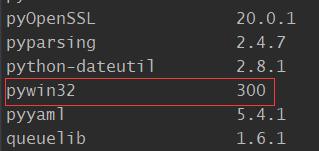
It is useless to install through pip, but there are two libraries through PIP list query

By directly looking at the file addresses of the above two packages, we found that there was no relevant py file in them. Finally, we successfully solved the problem by installing the compiled binary WHL file

pip install antlr4_python3_runtime-4.9.2-py3-none-any.whl
pip install pywin32-300-cp36-cp36m-win_amd64.whl

Run the command again to get the output:

[Solved] error: Failed dependencies libcrypto.so.10()(64bit) is needed, libssl.so.10()(64bit) is needed

Premise: I install percona-server-shared-compat-8.0.23-14.1.el8.x86 in percona server for MySQL 8.0 bundle on CentOS 8_ 64. RPM package, even if the latest version of OpenSSL (version: 1:1.1.1g-15.el8) is installed_ 3) It doesn’t help

error:Failed Dependencies
		libcrypto.so.10()(64bit) is needed by percona-server-shared-compat-8.0.23-14.1.el8.x86_64.rpm
		libcrypto.so.10(libcrypto.so.10)(64bit) is needed by percona-server-shared-compat-8.0.23-14.1.el8.x86_64.rpm
		libssl.so.10()(64bit) is needed by percona-server-shared-compat-8.0.23-14.1.el8.x86_64.rpm
		libssl.so.10(libssl.so.10)(64bit) is needed by percona-server-shared-compat-8.0.23-14.1.el8.x86_64.rpm

Process : Found the library when googling
https://pkgs.org/download/libcrypto.so.10()(64bit)
I found compat-openssl10 and an explanation to the effect that compat-openssl10 contains only libraries and provides compatibility with earlier versions and software that does not support compilation with OpenSSL-1.1.

The OpenSSL toolkit provides support for secure communications between machines. This version of OpenSSL package contains only the libraries and is provided for compatibility with previous releases and software that does not support compilation with OpenSSL-1.1.

From stackoverflow, we can find that openssl provides libcrypto.so.10 without the module name, making the system think that the dependency is missing

In your case, openssl seems to provide only libcrypto.so.10 without any module name, making geramer-server believe that dependency is missing as it requires libcrypto.so.10 from module libcrypto.so.10.

https://stackoverflow.com/questions/20518183/dependency-resolution-fails-on-installed-library

Solution:
yum install compat-openssl10
or
yum install http://mirror.centos.org/centos/8/AppStream/x86_64/os/Packages/compat-openssl10-1.0.2o-3.el8.x86_64.rpm

Result:

Ubuntu: How to deal with the fatal: the remote end hung up unexpected error of GIT clone Android kernel

Questions

Use git command to clone Android kernel from Tsinghua open source software image station in Ubuntu, but the following error is reported:

$ git clone https://aosp.tuna.tsinghua.edu.cn/kernel/goldfish
Cloning into 'goldfish'...
remote: Enumerating objects: 116, done.
remote: Counting objects: 100% (116/116), done.
remote: Compressing objects: 100% (69/69), done.
error: RPC failed; curl 56 GnuTLS recv error (-9): Error decoding the received TLS packet.
fatal: The remote end hung up unexpectedly
fatal: early EOF
fatal: index-pack failed

Treatment method

After querying some blogs, this error is summed up as the reason why the file is too large

According to the method of the first problem in reference 1, execute the following commands respectively to solve the problem:

Set git minimum speed
$ git config --global http.lowSpeedLimit 0
$ git config --global http.lowSpeedTime 999999
Set http cache
$ git config --global http.postBuffer 1048576000

Among them, postbuffer is used to set HTTP cache, which can be set larger, such as 1g: git config — global http.postbuffer 1048576000, or 3G 3194304000

[Solved] Minidlna Error: checking for avformat_open_input in -lavformat -lavcodec -lavutil -lz… no

I have installed FFmpeg, but when I configured minidlna1.3.0, I found an error when I executed. /configure and found an error
checking for avformat_open_input in -lavformat -lavcodec -lavutil -lz… no
configure: error: Could not find libavformat – part of ffmpeg
Opening the configuration results file config.log reveals various errors.
For example.
libavformat/rtmpproto.c:1077: undefined reference to ‘inflateInit_’
libavcodec/vaapi_encode_h264.c:871: Undefined reference to ‘vaQueryVendorString’.

So the configure file needs to be modified

as_ac_Lib=`$as_echo "ac_cv_lib_avformat -lavcodec -lavutil -lz''_av_open_input_file" | $as_tr_sh`
modify to
as_ac_Lib=`$as_echo "ac_cv_lib_avformat -lavcodec -lavutil -lz -lm -lbz2 -lswresample -llzma -lX11 -lva -lva-x11 -lva-drm''_avformat_open_input" | $as_tr_sh`

LIBS="-lavformat -lavcodec -lavutil -lz  $LIBS"
modify to
LIBS=" -lpthread -lavformat -lavcodec -lavutil -lz  -lm -lbz2 -lswresample -llzma -lX11 -lva -lva-x11 -lva-drm $LIBS"

if test x"$ac_cv_lib_avformat__lavcodec__lavutil__lz___av_open_input_file" != x"yes" &&
test x"$ac_cv_lib_avformat__lavcodec__lavutil__lz___avformat_open_input" != x"yes"; then

modify to
if eval test \"x\$"$as_ac_Lib"\" != x"yes"; then

Debug record 2: debug error in ec20cehg Linux [How to Solve]

Debugging error in ec20cehg Linux

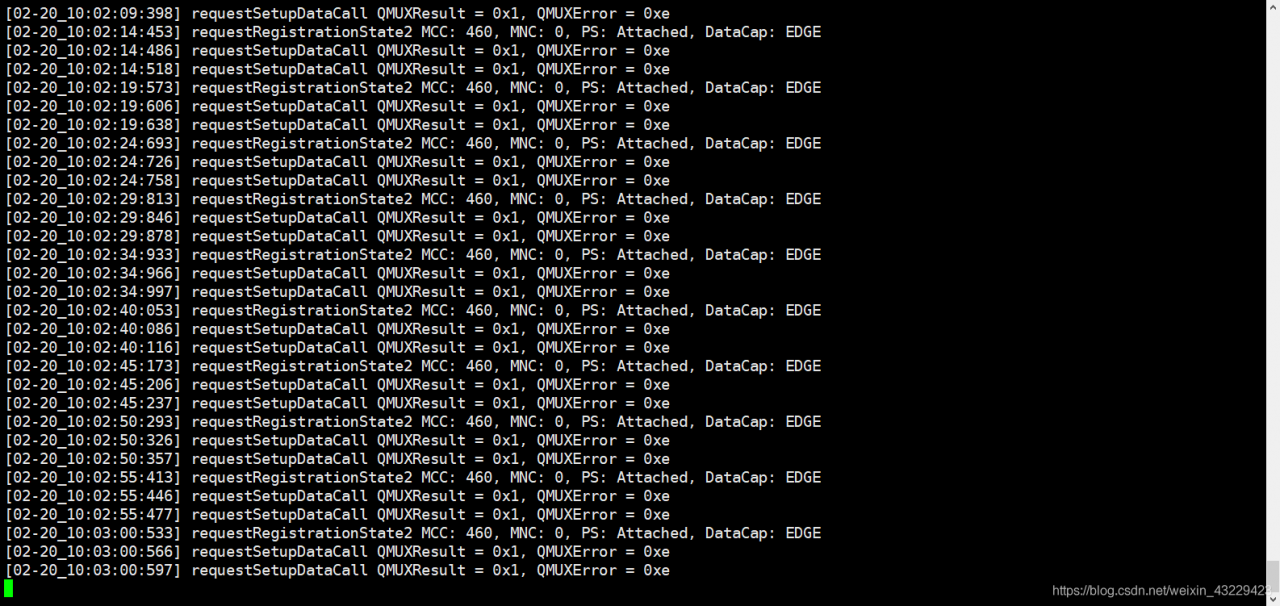
Run quectel CM & amp
requestRegistrationState2 MCC: 460, MNC: 0, PS: Attached, DataCap: EDGE
requestSetupDataCall QMUXResult = 0x1, QMUXError = 0xe
requestSetupDataCall QMUXResult = 0x1, QMUXError = 0xe`

Solution

1: When the Internet of things is locked, it needs to be unblocked
2: does the receiving and transmitting frequency bands of the antenna match

	 I encountered the first situation, replace the IoT card to solve, try the following with their own cell phone card, get the IP address to connect to the Internet can communicate.

Android Studio Warning: Process ‘command ‘git‘‘ finished with non-zero exit value 1

At first, I thought it was a JDK problem. Later, I changed the JDK version and did not fix it. Looking up the information on the Internet, we found that it might be a git problem.

Enter git config user. Name in terminal   No corresponding user name was output.

Then configure the user name and mailbox

$ git config --global user.name usename
$ git config --global user.password password
$ git config --global user.password email

[Solved] module ‘numpy.random‘ has no attribute ‘default_rng‘ gensim.model

I see that some bloggers have said to upgrade numpy
but my numpy is up-to-date
numpy 1.21.0
but still can’t
to get to the point directly
* * my solution may be limited to gensim *
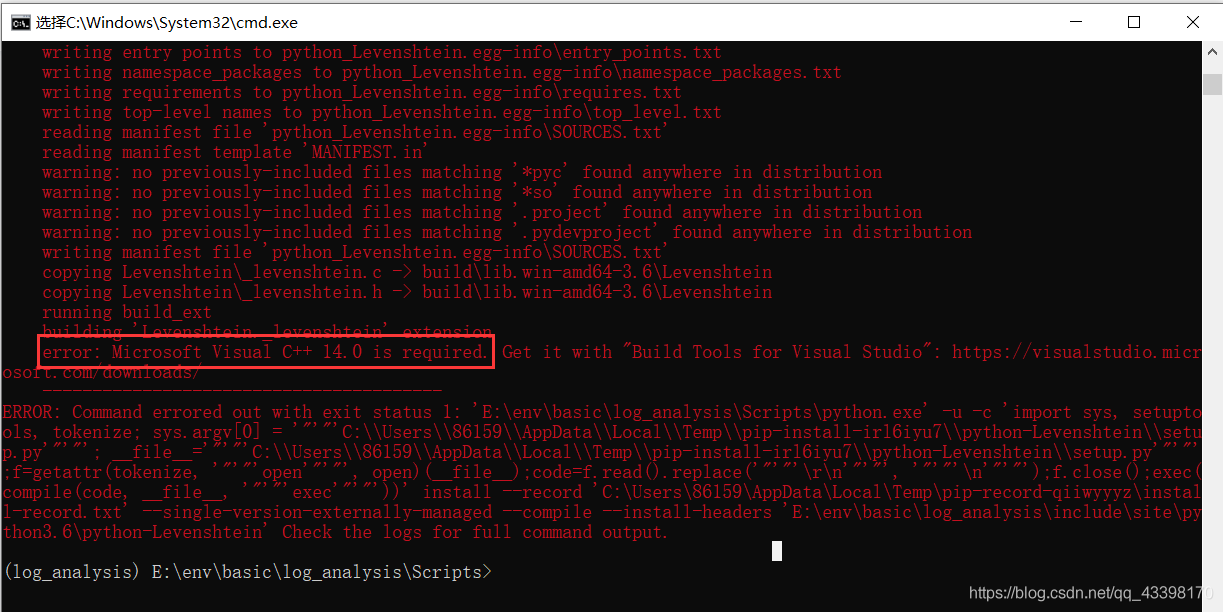
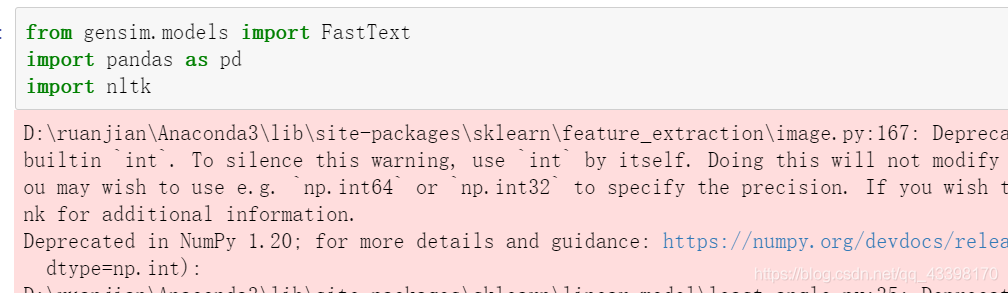
(1) in Python, from gensim.models import fasttext shows that a file is disabled, PIP install Python Levenshtein can solve the problem, However, the following errors occurred during the installation process, which means that visual c + + 14.0 is missing or upgraded.

(2) in order to avoid this problem, install the WHL file directly and download it according to your own Python version. After 64 bit and 34 bit
PIP install path + WHL file, you can successfully install

(3) Restart Jupiter notebook
must restart, I don’t know why, restart not report error
solution

NoClassDefFoundError: org/codehaus/jackson/map/ObjectMapper

Problem solving:

o.s.b.w.s.support.ErrorPageFilter - Forwarding to error page from request 
[/marketing/fastRide] due to exception [org/codehaus/jackson/map/ObjectMapper] 
java.lang.NoClassDefFoundError: org/codehaus/jackson/map/ObjectMapper

Cause of the problem:
there is a conflict between the imported version of jeckson jar and the version of jeckson introduced by other jars
or there is no imported version of jeckson
solution:
introduce this version of jeckson jar

<dependency>
   <groupId>org.codehaus.jackson</groupId>
   <artifactId>jackson-mapper-asl</artifactId>
   <version>1.9.2</version>
</dependency>
<dependency>
   <groupId>org.codehaus.jackson</groupId>
   <artifactId>jackson-core-asl</artifactId>
   <version>1.9.2</version>
</dependency>

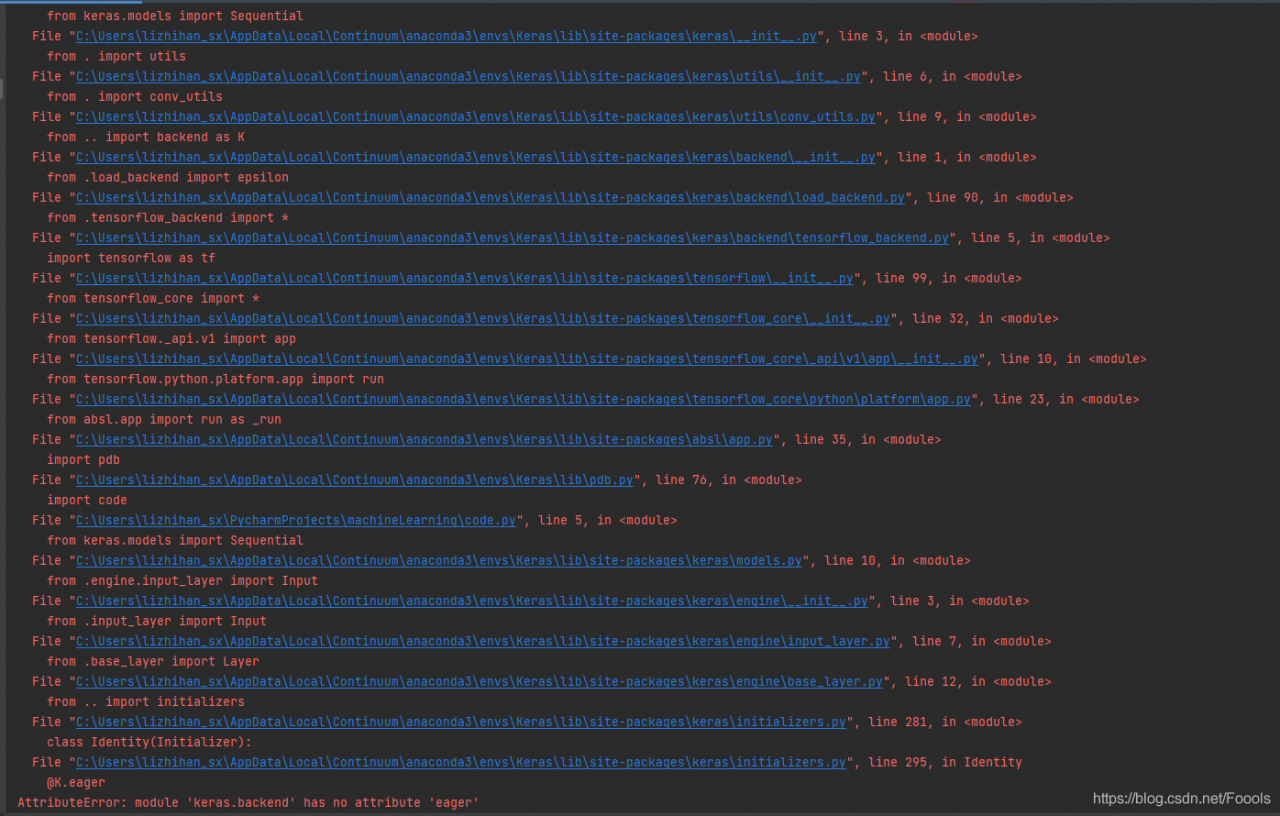
AttributeError: module ‘keras.backend‘ has no attribute ‘eager‘

Project scenario:

under Windows environment, python 3.6, the versions of each CONDA package are as follows 0

\# Name                    Version                   Build  Channel
absl-py                   0.13.0                    <pip>
astor                     0.8.1                     <pip>
cached-property           1.5.2                     <pip>
certifi                   2021.5.30        py36ha15d459_0    https://mirrors.tuna.tsinghua.edu.cn/anaconda/cloud/conda-forge
cycler                    0.10.0                    <pip>
dataclasses               0.8                       <pip>
gast                      0.2.2                     <pip>
google-pasta              0.2.0                     <pip>
grpcio                    1.38.1                    <pip>
h5py                      3.1.0                     <pip>
importlib-metadata        4.6.0                     <pip>
joblib                    1.0.1                     <pip>
Keras                     2.3.1                     <pip>
Keras-Applications        1.0.8                     <pip>
Keras-Preprocessing       1.1.2                     <pip>
kiwisolver                1.3.1                     <pip>
Markdown                  3.3.4                     <pip>
matplotlib                3.3.4                     <pip>
numpy                     1.19.5                    <pip>
opt-einsum                3.3.0                     <pip>
pandas                    1.1.5                     <pip>
Pillow                    8.2.0                     <pip>
pip                       21.1.3             pyhd8ed1ab_0    https://mirrors.tuna.tsinghua.edu.cn/anaconda/cloud/conda-forge
protobuf                  3.17.3                    <pip>
pyparsing                 2.4.7                     <pip>
python                    3.6.13          h39d44d4_0_cpython    https://mirrors.tuna.tsinghua.edu.cn/anaconda/cloud/conda-forge
python-dateutil           2.8.1                     <pip>
python_abi                3.6                     2_cp36m    https://mirrors.tuna.tsinghua.edu.cn/anaconda/cloud/conda-forge
pytz                      2021.1                    <pip>
PyYAML                    5.4.1                     <pip>
scikit-learn              0.24.2                    <pip>
scipy                     1.5.4                     <pip>
seaborn                   0.11.1                    <pip>
setuptools                49.6.0           py36ha15d459_3    https://mirrors.tuna.tsinghua.edu.cn/anaconda/cloud/conda-forge
six                       1.16.0                    <pip>
sklearn                   0.0                       <pip>
tensorboard               1.15.0                    <pip>
tensorflow                1.15.0                    <pip>
tensorflow-estimator      1.15.1                    <pip>
termcolor                 1.1.0                     <pip>
threadpoolctl             2.1.0                     <pip>
typing-extensions         3.10.0.0                  <pip>
ucrt                      10.0.20348.0         h57928b3_0    https://mirrors.tuna.tsinghua.edu.cn/anaconda/cloud/conda-forge
vc                        14.2                 hb210afc_5    https://mirrors.tuna.tsinghua.edu.cn/anaconda/cloud/conda-forge
vs2015_runtime            14.29.30037          h902a5da_5    https://mirrors.tuna.tsinghua.edu.cn/anaconda/cloud/conda-forge
Werkzeug                  2.0.1                     <pip>
wheel                     0.36.2             pyhd3deb0d_0    https://mirrors.tuna.tsinghua.edu.cn/anaconda/cloud/conda-forge
wincertstore              0.2             py36ha15d459_1006    https://mirrors.tuna.tsinghua.edu.cn/anaconda/cloud/conda-forge
wrapt                     1.12.1                    <pip>
zipp                      3.4.1                     <pip>

Problem Description:

it seems that the version of the library that has been adjusted for a long time has finally run through a LSTM demo, but if you want to open a new test file for testing, the following problems appear


Solution:

the solution to stackoverflow is to use the current keras library and tensorflow Library of unitall, because the higher version of keras library may be used, but the running code is of lower version. Note that you need to install tensorflow before installing keras

The specific steps of stackoverflow with the most likes are as follows:
delete tenorflow delete tenorflow

pip uninstall tensorflow

Update PIP version

pip install --upgrade pip

install keras

pip install Keras

install tensorflow

pip install tensorflow

Apart from this method, I want to say that my final solution is: I found the import statement of the keras library

from keras.models import Sequential
from keras.layers import LSTM, Dense, Activation

Cannot appear in two. Py files!!! Even if you just don’t use import, you will still report this error. It’s too bad. I found this problem after reloading it, so when testing the code, you should either create a new project or write the import statement in a file.

Error running ‘** [install]‘: No valid Maven installation found. Either set the home director

Problem situation

In idea, Maven could not be packaged. This error was reported
error running ‘* * [install]’: no valid Maven installation found. Neither set the home director

Cause of the problem

1. The environment variables of mavden are not configured properly,
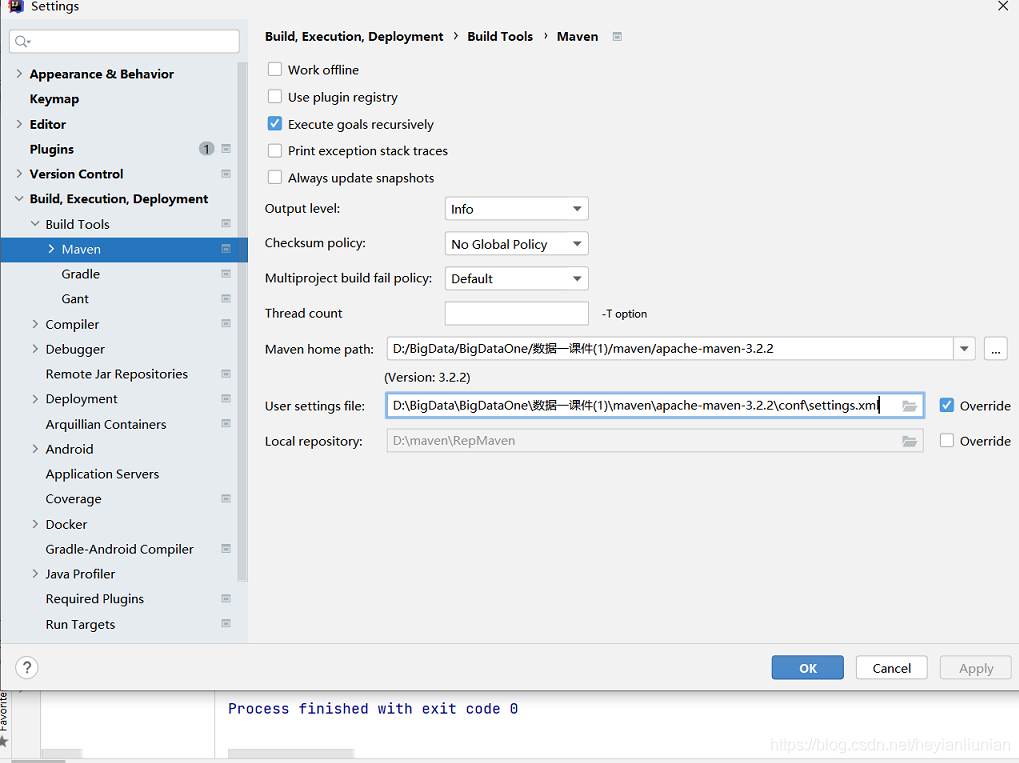
2. The Maven path is not configured correctly in idea

resolvent

The first solution is to configure the environment variable of mavden: m2_ Home = Maven installation path add% M2_ HOME%;
2 and enter Maven in the search box. For example, my Maven path is D: bigdata, bigdataone, datacourseware (1): maven, apache-maven-3.2.2

search my computer for Apache maven, get your file path, import it and click OK

In the HTML page request Ajax times 400 error, solve Yii submit post form 400 error, and Ajax post request 400 problem (example code)

Post form 400 error:

Right way:

Add this in the head section of your layout:

= Html::csrfMetaTags() ?& gt;

———————————

It is not recommended to cancel CSRF token verification as follows:

Add this in your controller:

public $enableCsrfValidation = false;

Other methods:

The original problem is CSRF verification, because the form is written by itself. In the framework of Yii, in order to prevent CSRF attacks, CSRF token verification is encapsulated in the form data of post.

Solution turn off CSRF verification

Method 1: close in the funding document

‘components‘=> array(

‘request‘=> array(

// Enable Yii Validate CSRF Token

‘enableCsrfValidation‘ => true,

),

),

When using the Yii form to generate a page, if the form is submitted by post, a hidden field will be added to the page, which is the CSRF token verification field

When users submit the form, they submit the field to the server. The Yii framework will send the hidden field submitted by the client and the Yii in the cookie submitted by the client_ CSRF_ The value of token was compared.

If it is the same, it will continue to execute. If it is not the same, it will throw a 400 exception: “the CSRF token could not be verified.”.

So the above problem appears. If you write your own form, you can add a hidden token verification field to the form on the view page

Method 2: add hidden verification fields in the form

If you don’t want CSRF verification, modify the true of method 1 to false, so that Yii won’t do post form verification.

Ajax post 400 error:

Ajax post is also used in movies recently. So I’m looking for answers on the Internet. Finally, I found the answer in Yii from unintentionally_ CSRF_ Token, because I have enabled enable csrfvalidation ‘= & gt; true  , So CSRF verification is added to the request. So when Ajax makes an Ajax post request, it can’t pass the verification.

Solution: just add Yii manually when you request_ CSRF_ Just token!

For example:

//Send Ajax $. Ajax ({type: “post”, datatype: “JSON”, URL: “index. PHP?R = movie/insertfavorite”, data: {movie_ id‘:‘<?php echo $_ GET[‘id‘]?& gt;‘,‘ YII_ CSRF_ TOKEN‘:‘<?php echo ii::app()-> request-> csrfToken>‘}, cache: false, error: function (XMLHttpRequest, textStatus, errorThrown) { alert(errorThrown); }, success:function(data){ var result=eval(“(“+data+”)”); alert(data) }, });