Author Archives: Robins

[Solved] TypeError: Object of type ‘bytes’ is not JSON serializable

After I read the data from the mat file with python, I get a dictionary array. I want to store this dictionary array in a json file, so the json data should be encoded first, so the json.dumps function is used for encoding, but I use json. It is found that there will be problems during the dumps function:

TypeError: Object of type 'bytes' is not JSON serializable

Later, after consulting related materials, I found that many data types of the default encoding function cannot be encoded, so you can write an encoder yourself to inherit jsonencoder, so that it can be encoded.

For example, the above problem is because the json.dumps function found that there are bytes type data in the dictionary, so it cannot be encoded. Just write an encoding class before the encoding function. As long as the data of the bytes type is checked, it will be converted. Into str type.

class MyEncoder(json.JSONEncoder):
    def default(self, obj):
        if isinstance(obj, bytes):
            return str(obj, encoding='utf-8');
        return json.JSONEncoder.default(self, obj)

This solved the problem.

Later, similar problems were found during encoding:

TypeError: Object of type 'ndarray' is not JSON serializable

This is the same processing method. When the ndarray data is checked, it is converted into list data:

class MyEncoder(json.JSONEncoder):
    def default(self, obj):
        if isinstance(obj, np.ndarray):
            return obj.tolist()
        elif isinstance(obj, bytes):
            return str(obj, encoding='utf-8');
        return json.JSONEncoder.default(self, obj)

In this way, the data is encoded.

Put the final code for your reference:

import scipy.io as sio
import os
import json
import numpy as np
 
load_fn = '2%.mat'
load_data = sio.loadmat(load_fn)
print(load_data.keys())
 
class MyEncoder(json.JSONEncoder):
    def default(self, obj):
        if isinstance(obj, np.ndarray):
            return obj.tolist()
        elif isinstance(obj, bytes):
            return str(obj, encoding='utf-8');
        return json.JSONEncoder.default(self, obj)
 
save_fn = os.path.splitext(load_fn)[0] + '.json'
file = open(save_fn,'w',encoding='utf-8');
file.write(json.dumps(load_data,cls=MyEncoder,indent=4))
file.close()
 

AttributeError: module ‘numpy‘ has no attribute ‘getbuffer‘

Numpy. Getbuffer (a) is written in python2, but not in python3. Where a is the numpy array
the following methods can be used instead: a.tobytes(), a.data.tobytes(), memoryview (a). Tobytes(), bytes (a.data), bytes (memoryview (a)) reference link:
https://stackoverflow.com/questions/21821045/numpy-getbuffer-causes-attributeerror-module-object-has-no-attribute-getbuff

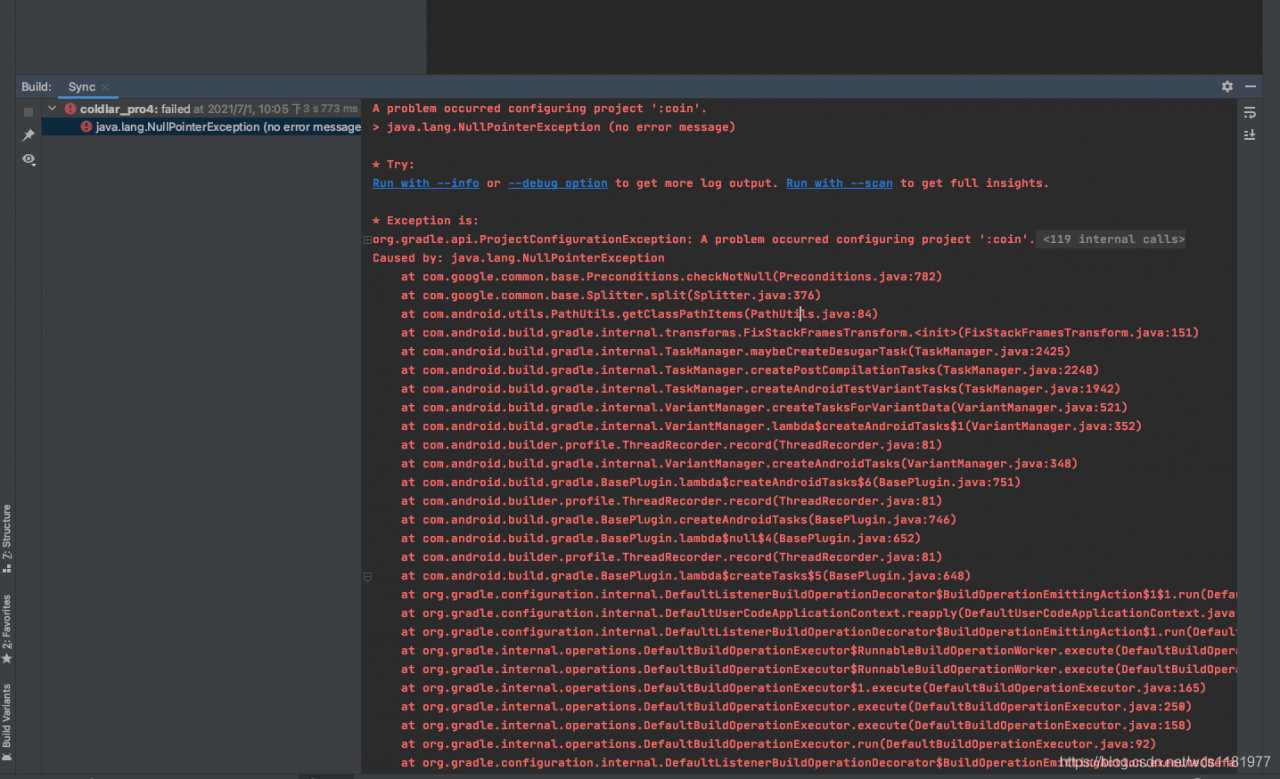
A problem occurred configuring project ‘:x x x‘. > java.lang.NullPointerException (no error message)

This error is reported after upgrading androidsudio4.2.2, my Mac is OK, and my colleagues report this error
after my colleagues demote androidsudio4.1.3, it may be because the imported project is old, and the gradle version is too old and does not match the new version. Other posts say that it is the problem of NDK path, and the gradle version does not match NDK, which may be quite big

HTML method IE8 reports an error, IE8 jQuery Ajax obtains static resources reports an error, typeerror denies access

Problem code/* * * request static HTML template * @ param URL * @ param $jquerydiv: one of the four main div * @ param templatehandle: custom, used to use dot JS template function *@

1. Problem code

/***

*Request static HTML template

* @param url

*@ param $jquerydiv: one of the four major divs

*@ param templatehandle: custom, used to use dot JS template function

*@ param callback: used to bind events after template implementation

*@ param templatedata: return data of CIA

*/

ajaxHtml: function (url, $jqueryDiv, templateHandle, callback, templateData) {

xhr.ajaxHtmlCommon(url, $jqueryDiv, null, templateHandle, callback, templateData);

},

/***

*Ajax requests static HTML files

* @param url

* @param $jqueryDiv

* @param data

*@ param callback: the callback function is executed after the updatehtml method

*/

ajaxHtmlCommon: argument_ length = arguments.length;

var isHasCallback = (argument_ length > 4 && amp; callback && amp; typeof callback === ‘function’);

var options22 = {

url: url,

type: “GET”,

timeout: 18000,

dataType: ‘html’,

success: function (html) {

updateHtml($jqueryDiv, html, templateHandle, templateData);

/* var $formInput = jqueryObj.find(‘textarea:first’);// Focus the textarea in subcontent

if ($formInput.length != 0) {//judge whether the textarea can be obtained first

$formInput.get(0).focus();

}*/

if (isHasCallback) {

callback($jqueryDiv, html);

}

},

error: (er.statusText == ‘timeout’) {

updateHtml($jqueryDiv, ”

Connection to server timeout!

“);

} else {

var errorMessage2;

if (er.responseText) {

errorMessage2 = er.responseText;

} else {

errorMessage2 = er.statusText;

}

console.log(‘error:’ + errorMessage2);

updateHtml($jqueryDiv, errorMessage2, templateHandle, templateData);

}

if (isHasCallback) {

callback($jqueryDiv, er);

}

}

};

if (argument_ length > 2 && amp; requestData != null && amp; requestData != undefined) {

options22.data = requestData;

options22.type = “POST”;

}

$.ajax(options22);

}

Browser version: IE8

Error in getting HTML template:

var ajaxHtml4IE8 = function () {

xhr.ajaxHtml(‘cross_ domain.html’, $(‘#crossDiv’), null, null, null);

}

Error message: access denied by typeerror

2. Solutions:

(1) In the header of JS file, add:

jQuery.support.cors = true;

(2) Introduce jquery.xdomainrequest.js into HTML file

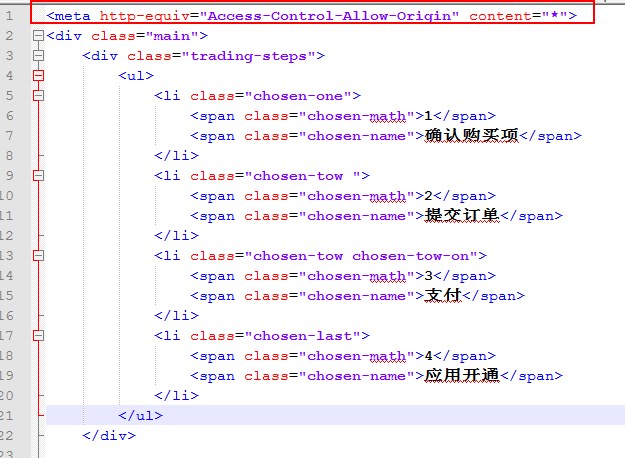
(3) Add in front of static HTML template:

< meta http-equiv=”Access-Control-Allow-Origin” content=”*”>

be careful:

(1) Static HTML template should be added before, indicating that the server supports cross domain

(2) Only IE8 has the problem of cross domain access denial, so when introducing a third-party JS file, you should use & lt;! –[ if IE 8]>

(3) Jquery-1.11.1.js and above does not support IE8

Jquery.xdomainrequest.js is attached

reference resources: https://github.com/MoonScript/jQuery-ajaxTransport-XDomainRequest ,

type of the byte recordError: webpackMerge is not a function

Error message:

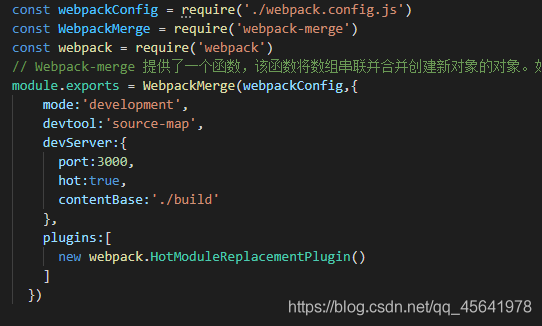
WebpackMerge is not a function


It is found that webpack merge cannot be used directly according to the error report

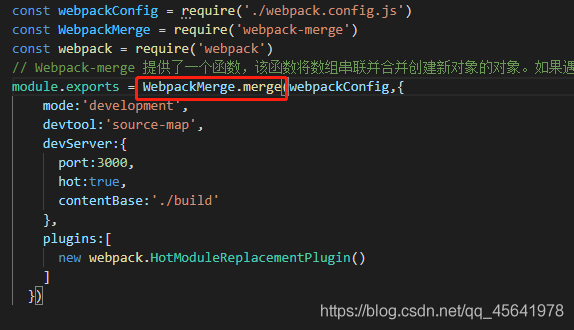
After viewing the document

Change it to webpackmerge. Merge and there will be no error

Webpack step on the road to record   If you want to see the actual combat article of webpack, please click

Errors encountered by elasticsearch in creating index and mapping

         According to station B black horse programmer’s es video tutorial operation, because the version used is the latest version, encountered in the video did not appear in the error.

Address:

http://127.0.0.1:9200/blog

  Request body:

{
  "settings": {
    "number_of_shards": 5,
    "number_of_replicas": 1
  },
  "mappings": {
    "hello": {
      "properties": {
		"id": {
			"type": "long",
			"store": true
		},
		"title": {
			"type": "text",
			"store": true,
			"index": true,
			"analyzer":"standard"
		},
		"content": {
			"type": "text",
			"store": true,
			"index": true,
			"analyzer":"standard"
		}
      }
    }
  }
}

Error message:

{
    "error": {
        "root_cause": [
            {
                "type": "mapper_parsing_exception",
                "reason": "Root mapping definition has unsupported parameters:  [hello : {properties={id={store=true, type=long}, title={analyzer=standard, index=true, store=true, type=text}, content={analyzer=standard, index=true, store=true, type=text}}}]"
            }
        ],
        "type": "mapper_parsing_exception",
        "reason": "Failed to parse mapping [_doc]: Root mapping definition has unsupported parameters:  [hello : {properties={id={store=true, type=long}, title={analyzer=standard, index=true, store=true, type=text}, content={analyzer=standard, index=true, store=true, type=text}}}]",
        "caused_by": {
            "type": "mapper_parsing_exception",
            "reason": "Root mapping definition has unsupported parameters:  [hello : {properties={id={store=true, type=long}, title={analyzer=standard, index=true, store=true, type=text}, content={analyzer=standard, index=true, store=true, type=text}}}]"
        }
    },
    "status": 400
}

Solution: after the request address, add?include_ type_ name=true

http://127.0.0.1:9200/blog?include_type_name=true

result:  

{
    "acknowledged": true,
    "shards_acknowledged": true,
    "index": "blog"
}

Solutions to the problem of using sudo caused by Ubuntu’s wrong modification of sudoers

Original address

When using Ubuntu, we often use the sudo command. However, when using Ubuntu users to log in and use the sudo command, we often need to enter a password. For convenience, we may modify the/etc/sudors file under the root user so that the sudo command does not need to enter a password. At this time, it is inevitable to enter an error, resulting in the sudo command not being used, An error similar to the following appears

	>>> /etc/sudoers: syntax error near line 31 <<<
	sudo: parse error in /etc/sudoers near line 31
	sudo: no valid sudoers sources found, quitting
	sudo: unable to initialize policy plugin

Sudo doesn’t work. Under Ubuntu, you usually don’t set the root password, so you can’t enter the root user at all.

At this time, the normal way is to restart the system, enter grub interface, then enter recovery mode, modify sudors file, and restart the system.

But sometimes, the host is not controlled by itself, and only has the permission of SSH login system.

At this time, the following method is the Savior:

Use the following command to edit the sudoers file

pkexec visudo

However, the following errors were reported:

==== AUTHENTICATING FOR org.freedesktop.policykit.exec ===
Authentication is needed to run `/usr/sbin/visudo' as the super user
Authenticating as: ceshi,,, (ceshi)
Password: 
polkit-agent-helper-1: error response to PolicyKit daemon: GDBus.Error:org.freedesktop.PolicyKit1.Error.Failed: No session for cookie
==== AUTHENTICATION FAILED ===
Error executing command as another user: Not authorized

This incident has been reported.

What should I do?What’s the problem?I don’t know. The correct opening mode is as follows:

1. Open the two SSH terminals and log in with the Ubuntu user

2. Enter the following command at the first terminal to get PID

echo $$

3. At the second terminal, enter:

pkttyagent --process {pid}

Here {PID} is the PID value obtained in the second part (PS: remember to remove {})

4. At this time, the second terminal will be stuck, and input the following at the first terminal:

pkexec visudo

5. Then, the second terminal is also the card owner. When you return to the first terminal, you will be prompted to enter the current user password and enter the

6. OK, after inputting the password, the first terminal card is owned. When you go back to the second terminal, you will find that the content of sudoers appears. If there is any editing error, just save it.

7. Complete the task, modify it, and find that you can continue to use the sudo command, over

PS: the editor used here is nano. Here is a simple way to save nano:

To exit in edit mode under Linux, press Ctrl + X, there are two situations:
① if the file is not modified, exit directly

[Solved] Pyinstaller packaged exe error: “failed to execute script XXX”

Recently I wrote a small interface program with PyQt5, which needs to be packaged into exe for use on other windows. At the beginning, I used python 3.7 64-bit, packaged the exe with pyinstaller, and it ran normally on a 64-bit machine. But the target computer is 32-bit, so a 32-bit exe needs to be packaged, and then the problem occurs.

Package a 32-bit exe. Although there are online tutorials that use Anaconda to generate a python’s 32-bit environment, I tried it, but it was unsuccessful. Instead, I chose to uninstall the 64-bit python. It is better to install the 32-bit python directly and still use pyinstaller to package

Although there were a few warnings during packaging, it seemed that it went smoothly. I clicked on the exe and reported “failed to execute script XXX”. I changed multiple python versions, unloaded and unloaded, and turned over a lot of information, but I didn’t solve it, so I decided to self-reliance.

As we all know, you can use this command to package exe without console:

pyinstaller -w -F xxx.py 

But in this way, there is no way to see the error, so keep the console:

pyinstaller -F xxx.py 

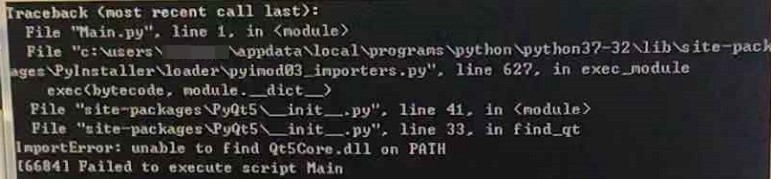
After packaging, the program flashed by. I opened the video on my mobile phone and recorded it (60fps). The picture quality is stale but I still can’t miss the “unable to find QtCore.dll on PATH”:

The problem should be that the PyQt library is missing. If it is missing, just make it up~ Copy this dll directly to C:\Windows\System32, and then open the exe happily, the problem is solved~….. solve……

You need to add python’s PyQt5 library path to the environment variable PATH. This time, you can really run it. I am very happy (actually I have been tossing this step for a long time), but it is estimated that PyQt5 needs to be installed on the target computer, and then Adding environment variables, although a little troublesome, can be used.

That’s how things came to an end…


It didn’t come to an end. I was not reconciled. Why 64-bit runs well and 32-bit loses dll. Why does the command line run normally and exe loses something? And I went to the temporary directory of the exe and looked at it. In fact, Qt5Core.dll and other libraries are all lying in it, but why did it say that it could not be found, and then I tried

1. Forcibly repackage Qt5Core.dll in the exe, this can be achieved by editing the spec file, and changing the datas is OK, no!

2. Try to adjust the running path during runtime, or add a temporary path, so that the program can recognize the dlls originally in the same directory, but no similar tutorials were found (this requirement is originally weird?)

3. Changed to another one and tried it, built a virtual machine and tried it, to rule out system differences, it didn’t work.

4. I changed to a lower version of python and tried it, but it didn’t work

5. Try to replace the packaging software. It seems that most of them are pyinstaller, as well as py_win32, cx_Freeze, etc. py_win32 seems to need to rewrite the interface, and cx_Freeze runs according to the routine and has no effect at all.

It can be seen that the title is very close. In fact, it is enough to reduce the version of PyQt5. It seems that there is no need to reduce the version of pyinstaller (3.5) as in this blog post. After packaging, it can run normally without adding environment variables, and the exe size is also reduced. Half…

At the beginning, I used PyQt5.13.0 to package 32-bit error, and it was no problem if it was reduced to 5.9.2. By the way, remember that pip installs the specified version of the library:

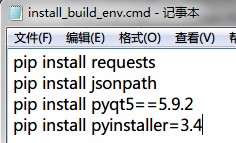
pip install pyqt5==5.9.2

I like to write all kinds of dependent libraries in a cmd file. When I need to install the environment, double click and it will be done.


To summarize:

When Pyinstaller is packaging the PyQt5 program, if it prompts that the dll file is missing, you can try to reduce the version of PyQt5, such as the combination of pyinstaller3.5 + PyQt5.9.2 (@Windows 7 x64 SP1 + python 3.7.4 x32)

ModuleNotFoundError: No module named ‘apt_pkg‘

reason

Upgrading to python3.6 will result in confusion of references to Python libraries

resolvent

Select Delete Python apt first

apt-get remove --purge python-apt 

Install Python apt

apt-get install -f -y python-apt

Copy the apt PKG *. So name of python3.5 and rename it apt PKG *. So of python3.6

cd /usr/lib/python3/dist-packages/
cp apt_pkg.cpython-35m-x86_64-linux-gnu.so apt_pkg.cpython-36m-x86_64-linux-gnu.so

Uncaught syntax error: unexpected token ‘< 0‘

Background

Vue and Vue cli versions for the project

“vue”: “^2.6.11”
“@vue/cli”: “~4.5.0”

I created a static directory in SRC directory to store JS and CSS, and then call it in code.

c.href = '../static/css/he-standard.css';
s.src = '../static/js/he-standard.js';

An error was found after running the project

Uncaught SyntaxError: Unexpected token '<'

solve

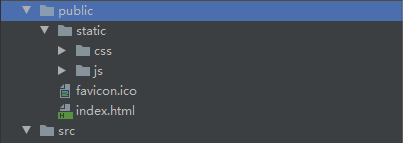
Put the static folder under public

c.href = '/static/css/he-standard.css';
s.src = '/static/js/he-standard.js';

Reference:
https://blog.csdn.net/weixin_43742708/article/details/110594790