Author Archives: Robins

Error in pyinstall package Python program: jinja2.exceptions.templatenotfound: Chart_ Solution to component.html

Recently, I wrote a visualization program in Python and used the daopycharts Library in the middle. There is no problem running it alone. However, after using pyinstall to package it into a separate EXE file, the running program reported an error: jinja2.exceptions.templatenotfound: chart_ component.html

After searching for relevant information on the Internet, it is said that pyinstaller and pyecarts are incompatible. The solutions after trying are as follows:

1. Change the packaging method and use the – D parameter to package it into a file instead of using the – f parameter to package it directly into an EXE file

as   pyinstaller -D -p d:\path run.py

-p   d: \ path is the site packages path of the imported package in your file. If the path of the pyecarts library on the computer is C: \ Python 37 \ lib \ site packages, it is written here as – P   C:\Python37\Lib\site-packages

Run.py is the target entry file that needs to be packaged

2. After pyinstaller is packaged, it will generate two folders: build and dist. open the dist folder and copy the pyecarts folder under C: \ Python 37 \ lib \ site packages to this directory

Run the packaged exe program, and the error message disappears

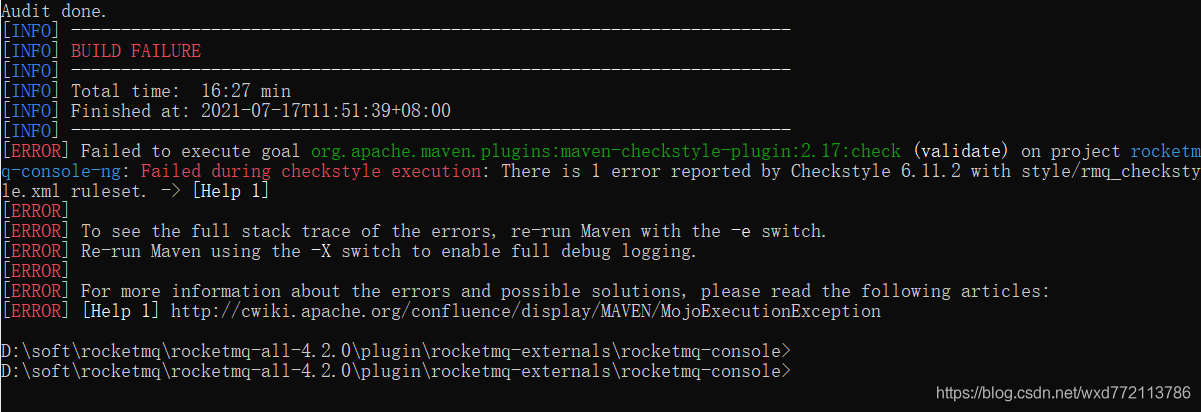
RocketMQ Failed to execute goal org.apache.maven.plugins:maven-checkstyle-plugin:2.17:check…

Question

Analysis: according to the error prompt, it should be the problem of maven checkstyle plugin.

solve

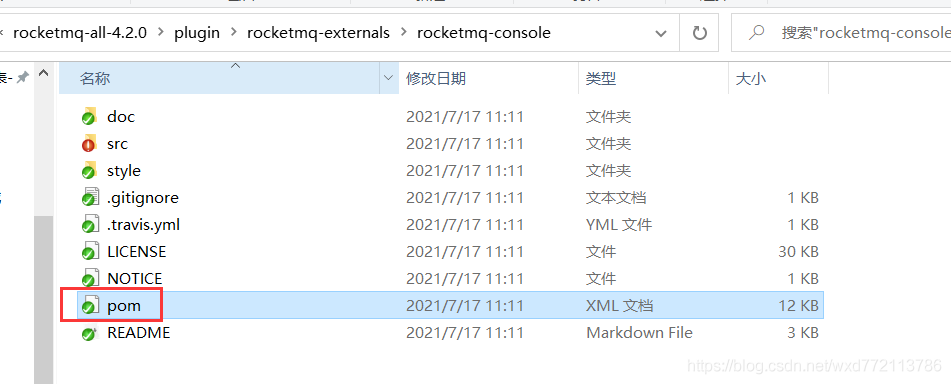
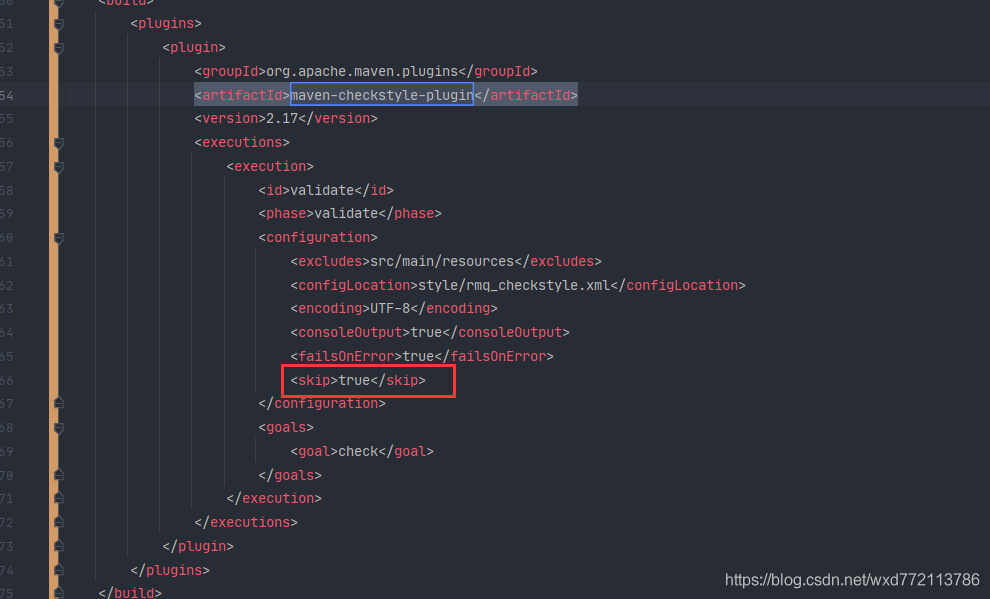
Method 1: find the plug-in maven checkstyle plugin: 2.17 and add the skip attribute.

  Modify pom.xml

  Method 2: find the plug-in tag corresponding to maven checkstyle plugin: 2.17 and comment it out.

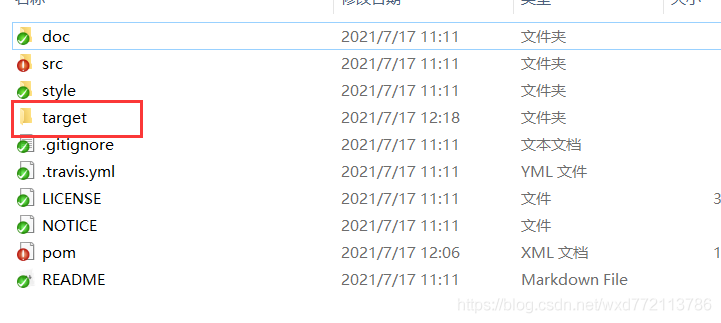
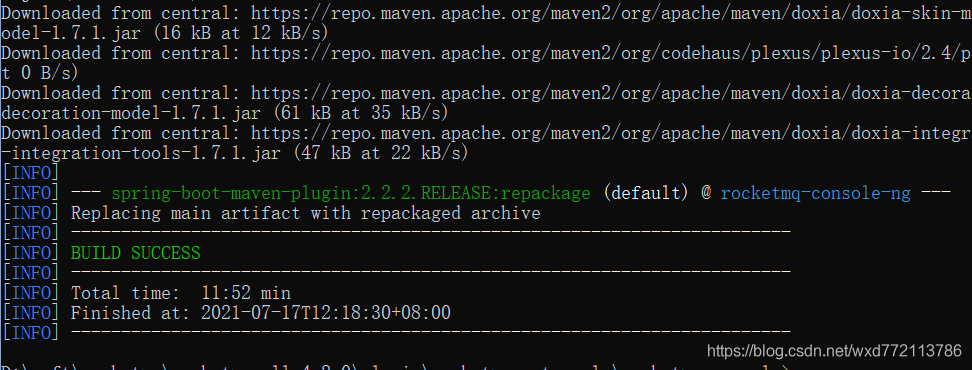
Clear the original target directory and recompile it!

maven_ Unable to create servlet file under Java Web project

Add the following code in pom.xml:

<!-- https://mvnrepository.com/artifact/javax.servlet/javax.servlet-api -->
<dependency>
   <groupId>javax.servlet</groupId>
   <artifactId>javax.servlet-api</artifactId>
   <version>4.0.1</version>
   <scope>provided</scope>
</dependency>
 
<!-- https://mvnrepository.com/artifact/jstl/jstl -->
<dependency>
   <groupId>jstl</groupId>
   <artifactId>jstl</artifactId>
   <version>1.2</version>
</dependency>

Terminal appears after anconda is installed on MAC (base)

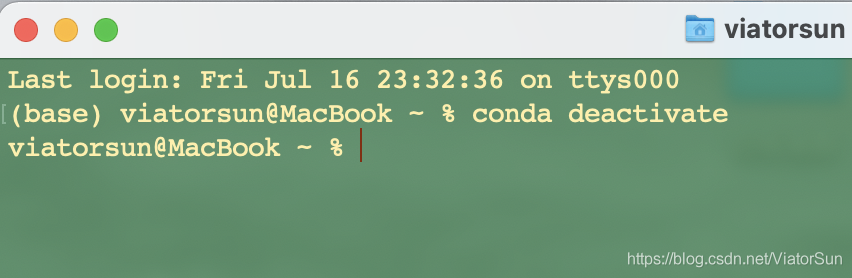
After MAC reinstalls anaconda, it is found that each time terminal is opened, anconda’s environment is started by default. However, I don’t want to use anconda’s environment by default, as shown in the following figure.

The closing method is as follows

Method 1:

Every time you exit the base environment through CONDA deactivate on the command line, return to the automatic environment of the system

Method 2

1. By setting Auto_ activate_ Set the base parameter to false to implement:

conda config --set auto_activate_base false

2. If you want to enter, you can use CONDA activate base

3. If you go back and hope to keep it all the time, pass

conda config --set auto_activate_base true

recovery

Cannot resolve plugin org.springframework .boot:xxx

   During development, sometimes when you open a project to install a dependency, or create a new springboot project to install some dependencies, the following errors appear inexplicably:

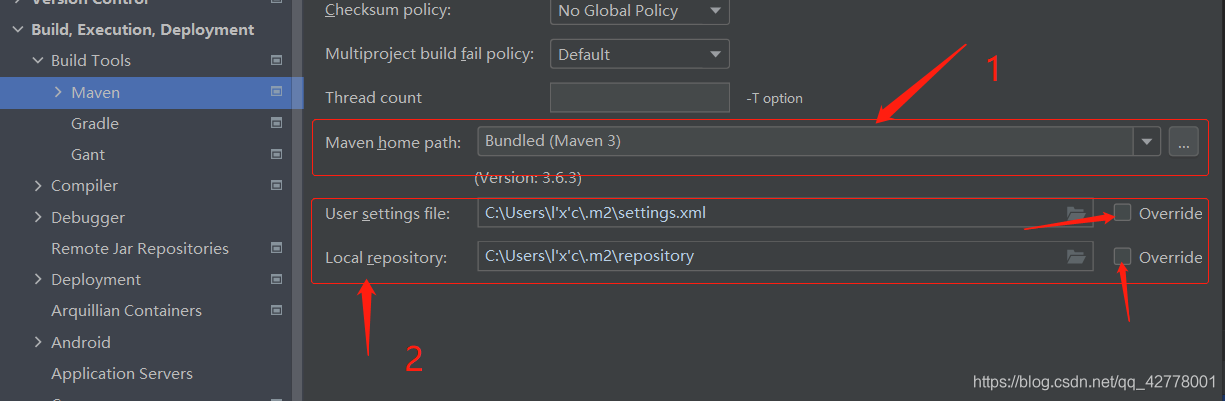
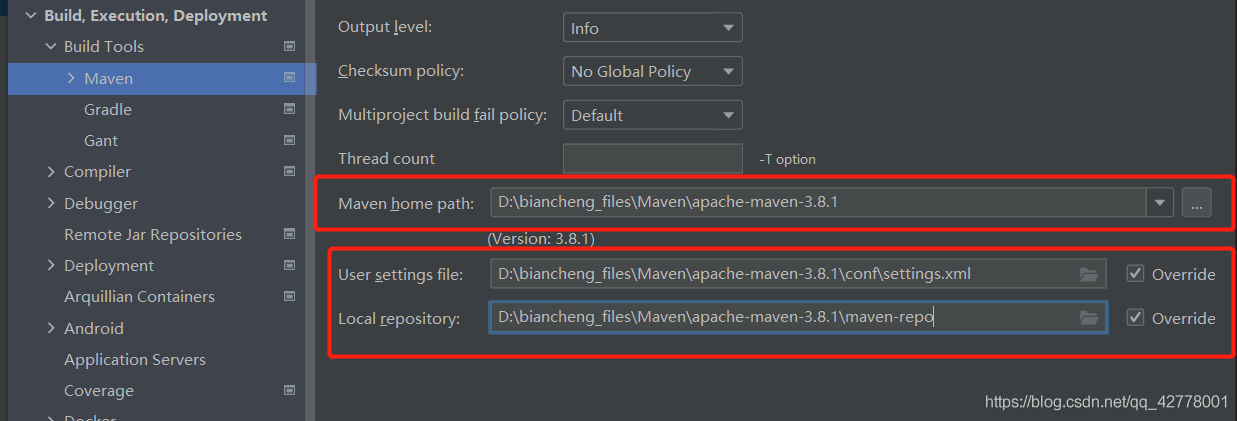
First check whether there is a problem with the network. If the network is normal, 99% of the problems occur in the Maven configuration of the idea. Open it   settings   -& gt; Find the location of the screenshot below and modify the following two places:

Maven home path: the installation directory of Maven
user setttings file:   Maven installation directory – & gt; conf -> Setting.xml file path
local repository: This is a customized Maven local repository after downloading Maven. Mine is in the Maven installation directory.

   After these three settings are completed, click apply, OK and refresh.


Error reporting – the project directly introduces the error reporting and solution of. SCSS file

   in recent projects, SCSS has been directly used, and it is found that an error is reported. Up to now, I don’t know the cause, but I probably know that it is node, but the solution has been found. Let’s share:

1、 Error reporting

./src/components/alert_tip/alert_tip.scss (./node_modules/css-loader??ref--6-oneOf-5-1!./node_modules/postcss-loader/src??postcss!./node_modules/sass-loader/lib/loader.js!./src/components/alert_tip/alert_tip.scss)
Error: ENOENT: no such file or directory, scandir 'C:\Users\Administrator\Desktop\xxx\xxx\xxx\xxx\xxx-elm\node_modules\node-sass\vendor'

2、 Solution

  just run the following code directly:

	npm rebuild node-sass

hope to help you

(error when importing database): MySQL 2006-mysql server has gone away

Method 1 (verified to be correct):

Find the my.ini configuration file in the installation directory and add the following code:

max_allowed_packet=500M

wait_timeout=288000

interactive_timeout = 288000

The three parameters are annotated as follows:

max_ allowed_ Packet is the largest packet allowed by mysql, that is, the request you send;

wait_ Timeout is the maximum waiting time. You can customize this value. However, if the time is too short, a MySQL server has gone away #2006 error will appear after the timeout.

max_ allowed_ The packet parameter is used to control the maximum length of its communication buffer

Method 2 (online extract is not verified temporarily):

Open tools in the menu of Navicat, select server monitor, then select in the left column, and click variable in the right column to find max_ allowed_ Packet and increase its value.

In the Chinese version: in the menu, tools – & gt; Server monitoring – & gt; Tick in front of the database list on the left – & gt; Find Max in the variable on the right_ allowed_ Packet, increase the value, such as 999999999

MySQL settings are case insensitive:

MySQL under Linux is case sensitive by default. You can make MySQL case insensitive by the following settings:
1. Log in with root and modify/etc/my.cnf
2. Under the [mysqld] node, add a line: lower_ case_ table_ Names = 1
3. Restart MySQL;

Where lower_ case_ table_ The name = 1 Parameter defaults to 1 in windows and 0 in UNIX. Therefore, the problem will not be encountered in windows. Once it reaches Linux, the cause of the problem will occur (especially when MySQL names the table with uppercase letters, but when querying with uppercase letters, there will be an error that cannot be found, which is really puzzling)

View the maximum length of the communication buffer:

show global variables like ‘max_ allowed_ packet’;

The default maximum is 1m. You can modify the maximum length of the communication buffer to 16m:

set global max_ allowed_ packet=1024102416;

Query again:

Next, import again. Import succeeded!

Note: the modification is only valid for the current. If MySQL is restarted, it will still restore the original size. If you want to take effect permanently, you can modify the configuration file and add or modify the configuration in my.ini (under Windows) or my.cnf (under Linux):

max_ allowed_ packet = 16M

Restart MySQL service
<info> peer_manager_handler: Connection security failed

During the development of Nordic 52810, after the softdevice is re written, when nrfconnect for Mobile Connect is used, the connection fails, and the mobile phone displays peer removed pairing information. Device side log information:

< info> peer_ manager_ handler: Connection security failed: role: Peripheral, conn_ handle: 0x0, procedure: Encryption, error: 4102

Solution: in the Bluetooth settings of the mobile phone, find the device to be connected, select “ignore this device”, and re connect with nrfconnect. Success!

[Solved] Rabbitmq injection failed, bean creation failed, error creating bean with name ‘rabbitconnectionfactory’‘

Error creating bean with name ‘spring.rabbitmq-org.springframework.boot.autoconfigure.amqp.RabbitProperties’

org.springframework.beans.factory.UnsatisfiedDependencyException: Error creating bean with name 'rabbitConnectionFactory' defined in class path resource [org/springframework/boot/autoconfigure/amqp/RabbitAutoConfiguration$RabbitConnectionFactoryCreator.class]: Unsatisfied dependency expressed through method 'rabbitConnectionFactory' parameter 0; nested exception is org.springframework.beans.factory.BeanCreationException: Error creating bean with name 'spring.rabbitmq-org.springframework.boot.autoconfigure.amqp.RabbitProperties': Lookup method resolution failed; nested exception is java.lang.IllegalStateException: Failed to introspect Class [org.springframework.boot.autoconfigure.amqp.RabbitProperties] from ClassLoader [sun.misc.Launcher$AppClassLoader@18b4aac2]
	at org.springframework.beans.factory.support.ConstructorResolver.createArgumentArray(ConstructorResolver.java:800)
	at org.springframework.beans.factory.support.ConstructorResolver.instantiateUsingFactoryMethod(ConstructorResolver.java:541)
	at org.springframework.beans.factory.support.AbstractAutowireCapableBeanFactory.instantiateUsingFactoryMethod(AbstractAutowireCapableBeanFactory.java:1336)
	at org.springframework.beans.factory.support.AbstractAutowireCapableBeanFactory.createBeanInstance(AbstractAutowireCapableBeanFactory.java:1179)
	at org.springframework.beans.factory.support.AbstractAutowireCapableBeanFactory.doCreateBean(AbstractAutowireCapableBeanFactory.java:571)
	at org.springframework.beans.factory.support.AbstractAutowireCapableBeanFactory.createBean(AbstractAutowireCapableBeanFactory.java:531)
	at org.springframework.beans.factory.support.AbstractBeanFactory.lambda$doGetBean$0(AbstractBeanFactory.java:335)
	at org.springframework.beans.factory.support.DefaultSingletonBeanRegistry.getSingleton(DefaultSingletonBeanRegistry.java:234)
	at org.springframework.beans.factory.support.AbstractBeanFactory.doGetBean(AbstractBeanFactory.java:333)
	at org.springframework.beans.factory.support.AbstractBeanFactory.getBean(AbstractBeanFactory.java:208)
	at org.springframework.beans.factory.support.DefaultListableBeanFactory.preInstantiateSingletons(DefaultListableBeanFactory.java:944)
	at org.springframework.context.support.AbstractApplicationContext.finishBeanFactoryInitialization(AbstractApplicationContext.java:923)
	at org.springframework.context.support.AbstractApplicationContext.refresh(AbstractApplicationContext.java:588)
	at org.springframework.boot.web.servlet.context.ServletWebServerApplicationContext.refresh(ServletWebServerApplicationContext.java:144)
	at org.springframework.boot.SpringApplication.refresh(SpringApplication.java:767)
	at org.springframework.boot.SpringApplication.refresh(SpringApplication.java:759)
	at org.springframework.boot.SpringApplication.refreshContext(SpringApplication.java:426)
	at org.springframework.boot.SpringApplication.run(SpringApplication.java:326)
	at org.springframework.boot.SpringApplication.run(SpringApplication.java:1311)
	at org.springframework.boot.SpringApplication.run(SpringApplication.java:1300)
	at com.ata.sms.simulator.Application.main(Application.java:14)
Caused by: org.springframework.beans.factory.BeanCreationException: Error creating bean with name 'spring.rabbitmq-org.springframework.boot.autoconfigure.amqp.RabbitProperties': Lookup method resolution failed; nested exception is java.lang.IllegalStateException: Failed to introspect Class [org.springframework.boot.autoconfigure.amqp.RabbitProperties] from ClassLoader [sun.misc.Launcher$AppClassLoader@18b4aac2]
	at org.springframework.beans.factory.annotation.AutowiredAnnotationBeanPostProcessor.determineCandidateConstructors(AutowiredAnnotationBeanPostProcessor.java:289)
	at org.springframework.beans.factory.support.AbstractAutowireCapableBeanFactory.determineConstructorsFromBeanPostProcessors(AbstractAutowireCapableBeanFactory.java:1286)
	at org.springframework.beans.factory.support.AbstractAutowireCapableBeanFactory.createBeanInstance(AbstractAutowireCapableBeanFactory.java:1203)
	at org.springframework.beans.factory.support.AbstractAutowireCapableBeanFactory.doCreateBean(AbstractAutowireCapableBeanFactory.java:571)
	at org.springframework.beans.factory.support.AbstractAutowireCapableBeanFactory.createBean(AbstractAutowireCapableBeanFactory.java:531)
	at org.springframework.beans.factory.support.AbstractBeanFactory.lambda$doGetBean$0(AbstractBeanFactory.java:335)
	at org.springframework.beans.factory.support.DefaultSingletonBeanRegistry.getSingleton(DefaultSingletonBeanRegistry.java:234)
	at org.springframework.beans.factory.support.AbstractBeanFactory.doGetBean(AbstractBeanFactory.java:333)
	at org.springframework.beans.factory.support.AbstractBeanFactory.getBean(AbstractBeanFactory.java:208)
	at org.springframework.beans.factory.config.DependencyDescriptor.resolveCandidate(DependencyDescriptor.java:276)
	at org.springframework.beans.factory.support.DefaultListableBeanFactory.doResolveDependency(DefaultListableBeanFactory.java:1380)
	at org.springframework.beans.factory.support.DefaultListableBeanFactory.resolveDependency(DefaultListableBeanFactory.java:1300)
	at org.springframework.beans.factory.support.ConstructorResolver.resolveAutowiredArgument(ConstructorResolver.java:887)
	at org.springframework.beans.factory.support.ConstructorResolver.createArgumentArray(ConstructorResolver.java:791)
	... 20 common frames omitted
Caused by: java.lang.IllegalStateException: Failed to introspect Class [org.springframework.boot.autoconfigure.amqp.RabbitProperties] from ClassLoader [sun.misc.Launcher$AppClassLoader@18b4aac2]
	at org.springframework.util.ReflectionUtils.getDeclaredMethods(ReflectionUtils.java:481)
	at org.springframework.util.ReflectionUtils.doWithLocalMethods(ReflectionUtils.java:321)
	at org.springframework.beans.factory.annotation.AutowiredAnnotationBeanPostProcessor.determineCandidateConstructors(AutowiredAnnotationBeanPostProcessor.java:267)
	... 33 common frames omitted
Caused by: java.lang.NoClassDefFoundError: org/springframework/amqp/rabbit/connection/AbstractConnectionFactory$AddressShuffleMode
	at java.lang.Class.getDeclaredMethods0(Native Method)
	at java.lang.Class.privateGetDeclaredMethods(Class.java:2701)
	at java.lang.Class.getDeclaredMethods(Class.java:1975)
	at org.springframework.util.ReflectionUtils.getDeclaredMethods(ReflectionUtils.java:463)
	... 35 common frames omitted
Caused by: java.lang.ClassNotFoundException: org.springframework.amqp.rabbit.connection.AbstractConnectionFactory$AddressShuffleMode
	at java.net.URLClassLoader.findClass(URLClassLoader.java:382)
	at java.lang.ClassLoader.loadClass(ClassLoader.java:424)
	at sun.misc.Launcher$AppClassLoader.loadClass(Launcher.java:349)
	at java.lang.ClassLoader.loadClass(ClassLoader.java:357)
	... 39 common frames omitted

Error reason: spring boot is used, but MQ. In spring boot is not used

Original dependence

<dependency>
    <groupId>org.springframework.amqp</groupId>
    <artifactId>spring-rabbit</artifactId>
    <version>2.2.5.RELEASE</version>
</dependency>

Amend to read

<dependency>
    <groupId>org.springframework.boot</groupId>
    <artifactId>spring-boot-starter-amqp</artifactId>
</dependency>

Mac Pyaudio Installation fatal error: ‘portaudio.h‘ file not found

I’m about to cry by myself.
first of all, install portaudio

brew install portaudio

Secondly, find the installation path of portaudio

sudo find/-name "portaudio.h"

In my example, my path is stored in /opt/Hometree/cellular/portaudio/19.7.0/include/portaudio. H

Finally, replace the portaudio path with your own and run the following code

pip install --global-option='build_ext' --global-option='-I/opt/homebrew/Cellar/portaudio/19.7.0/include' --global-option='-L/opt/homebrew/Cellar/portaudio/19.7.0/lib' pyaudio

Initializing the Kubernetes master node ERROR: failed to pull image registry.aliyuncs.com/google_containers/coredns:v1.8.0

run kubeadm init –config=kubeadm.yml –upload-certs | tee kubeadm-init.log command error: failed to pull image registry.aliyuncs.com/google_containers/coredns:v1.8.0
full error message as below:

kubeadm init --config=kubeadm.yml --upload-certs | tee kubeadm-init.log

[init] Using Kubernetes version: v1.21.2
[preflight] Running pre-flight checks
        [WARNING IsDockerSystemdCheck]: detected "cgroupfs" as the Docker cgroup driver. The recommended driver is "systemd". Please follow the guide at https://kubernetes.io/docs/setup/cri/
        [WARNING Hostname]: hostname "node" could not be reached
        [WARNING Hostname]: hostname "node": lookup node on 127.0.0.53:53: server misbehaving
[preflight] Pulling images required for setting up a Kubernetes cluster
[preflight] This might take a minute or two, depending on the speed of your internet connection
[preflight] You can also perform this action in beforehand using 'kubeadm config images pull'
error execution phase preflight: [preflight] Some fatal errors occurred:
        [ERROR ImagePull]: failed to pull image registry.aliyuncs.com/google_containers/coredns:v1.8.0: output: Error response from daemon: manifest for registry.aliyuncs.com/google_containers/coredns:v1.8.0 not found: manifest unknown: manifest unknown
, error: exit status 1
[preflight] If you know what you are doing, you can make a check non-fatal with `--ignore-preflight-errors=...`
To see the stack trace of this error execute with --v=5 or higher

Prompt to pull registry.aliyuncs.com/google_ Containers/coredns: v1.8.0 this image failed
use kubedm config images list — config kubedm.yml to query the image to be downloaded

kubeadm config images list --config kubeadm.yml

registry.aliyuncs.com/google_containers/kube-apiserver:v1.21.2
registry.aliyuncs.com/google_containers/kube-controller-manager:v1.21.2
registry.aliyuncs.com/google_containers/kube-scheduler:v1.21.2
registry.aliyuncs.com/google_containers/kube-proxy:v1.21.2
registry.aliyuncs.com/google_containers/pause:3.4.1
registry.aliyuncs.com/google_containers/etcd:3.4.13-0
registry.aliyuncs.com/google_containers/coredns:v1.8.0

Use the docker images command to query images

docker images

registry.aliyuncs.com/google_containers/kube-apiserver            v1.21.2    106ff58d4308   3 weeks ago     126MB
registry.aliyuncs.com/google_containers/kube-controller-manager   v1.21.2    ae24db9aa2cc   3 weeks ago     120MB
registry.aliyuncs.com/google_containers/kube-scheduler            v1.21.2    f917b8c8f55b   3 weeks ago     50.6MB
registry.aliyuncs.com/google_containers/kube-proxy                v1.21.2    a6ebd1c1ad98   3 weeks ago     131MB
registry.aliyuncs.com/google_containers/pause                     3.4.1      0f8457a4c2ec   6 months ago    683kB
registry.aliyuncs.com/google_containers/etcd                      3.4.13-0   0369cf4303ff   10 months ago   253MB

It is found that there is no registry.aliyuncs.com/google in the downloaded image_ Containers/coredns: v1.8.0
use the docker command to pull the image

docker pull registry.aliyuncs.com/google_containers/coredns:1.8.0

Kubernetes needs registry.aliyuncs.com/google_ Containers/coredns: v1.8.0, rename the image with the docker tag command

# rename
docker tag registry.aliyuncs.com/google_containers/coredns:1.8.0 registry.aliyuncs.com/google_containers/coredns:v1.8.0
# detele all mirror
docker rmi registry.aliyuncs.com/google_containers/coredns:1.8.0

Run the initialization command again

kubeadm init --config=kubeadm.yml --upload-certs | tee kubeadm-init.log

Prompt success

Your Kubernetes control-plane has initialized successfully!

To start using your cluster, you need to run the following as a regular user:

  mkdir -p $HOME/.kube
  sudo cp -i /etc/kubernetes/admin.conf $HOME/.kube/config
  sudo chown $(id -u):$(id -g) $HOME/.kube/config

Follow the above prompts to configure kubectl

mkdir -p $HOME/.kube
cp -i /etc/kubernetes/admin.conf $HOME/.kube/config

# NOT ROOT 
chown $(id -u):$(id -g) $HOME/.kube/config

Verify success

kubectl get node

# The ability to print out node information indicates success
NAME   STATUS     ROLES                  AGE   VERSION
node   NotReady   control-plane,master   31m   v1.21.2