Author Archives: Robins

ModuleNotFoundError: No module named ‘ahocorasick‘ [100% Work Method]

ModuleNotFoundError: No module named ‘ahocorasick‘,
Install:

pip install pyahocorasick -i HTTPS://mirrors.aliyun.com/pypi/simple/

The following are the errors I encountered during installation:
error: Microsoft Visual C + + 14.0 is required. Get it with "Microsoft Visual C + + build tools,
Microsoft Visual C + + 14.0 needs to be installed

Recently, I was engaged in the knowledge mapping of natural language processing
but when building the system, I used a AC automaton word filtering , which is to remove sensitive words, such as

these sensitive words, which need to be replaced by some implied words or symbols such as * *. There are many ways to do this

- 1, AC automata
- 2, DFA filtering algorithm
- 3, replace filtering
- 4, regular expression filtering
for AC automata filtering, you need to use ahocorasick this library, now pyahocorasick

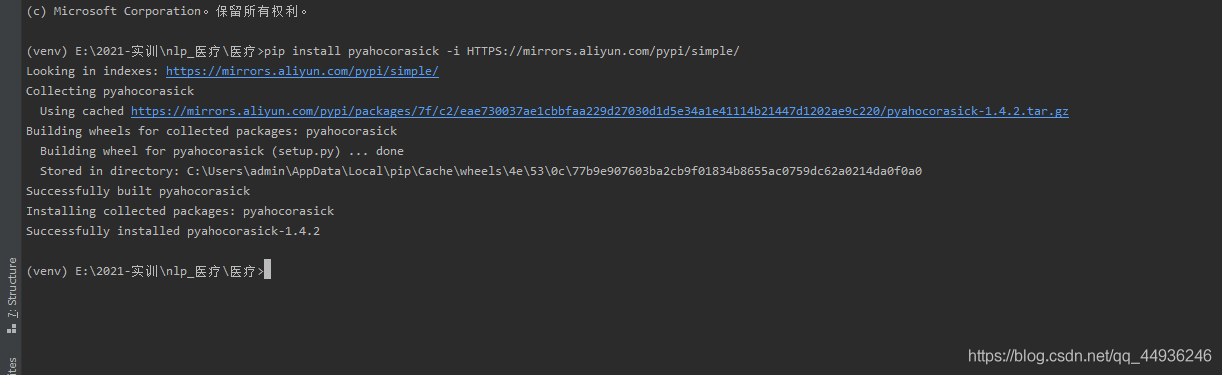
pip install pyahocorasick -i HTTPS://mirrors.aliyun.com/pypi/simple/

However, when installing pyahocorasick, it reported an error
that we need to install it

This is recommended to you error: Microsoft Visual C + + 14.0 is required. Get it with “Microsoft Visual C + + build tools, pro test 100% installation
it is offline installation, there will be no damage to the installation package;

The following is my successful installation of pyahocorasick:

[Solved] Elasticsearch error: cannot downgrade a node from version [7.xx.x] to version [7.xx.x]

Accident scene

First, install elasticsearch 7.13.3 , then uninstall it, and then install elasticsearch 7.13.2 , start to report an error:

java.lang.IllegalStateException: cannot downgrade a node from version [7.13.3] to version [7.13.2]
	at org.elasticsearch.env.NodeMetadata.upgradeToCurrentVersion(NodeMetadata.java:83) ~[elasticsearch-7.13.2.jar:7.13.2]
	at org.elasticsearch.env.NodeEnvironment.loadNodeMetadata(NodeEnvironment.java:423) ~[elasticsearch-7.13.2.jar:7.13.2]
	at org.elasticsearch.env.NodeEnvironment.<init>(NodeEnvironment.java:320) ~[elasticsearch-7.13.2.jar:7.13.2]
	at org.elasticsearch.node.Node.<init>(Node.java:368) ~[elasticsearch-7.13.2.jar:7.13.2]
	at org.elasticsearch.node.Node.<init>(Node.java:278) ~[elasticsearch-7.13.2.jar:7.13.2]
	at org.elasticsearch.bootstrap.Bootstrap$5.<init>(Bootstrap.java:217) ~[elasticsearch-7.13.2.jar:7.13.2]
	at org.elasticsearch.bootstrap.Bootstrap.setup(Bootstrap.java:217) ~[elasticsearch-7.13.2.jar:7.13.2]
	at org.elasticsearch.bootstrap.Bootstrap.init(Bootstrap.java:397) [elasticsearch-7.13.2.jar:7.13.2]
	at org.elasticsearch.bootstrap.Elasticsearch.init(Elasticsearch.java:159) [elasticsearch-7.13.2.jar:7.13.2]
	at org.elasticsearch.bootstrap.Elasticsearch.execute(Elasticsearch.java:150) [elasticsearch-7.13.2.jar:7.13.2]
	at org.elasticsearch.cli.EnvironmentAwareCommand.execute(EnvironmentAwareCommand.java:75) [elasticsearch-7.13.2.jar:7.13.2]
	at org.elasticsearch.cli.Command.mainWithoutErrorHandling(Command.java:116) [elasticsearch-cli-7.13.2.jar:7.13.2]
	at org.elasticsearch.cli.Command.main(Command.java:79) [elasticsearch-cli-7.13.2.jar:7.13.2]
	at org.elasticsearch.bootstrap.Elasticsearch.main(Elasticsearch.java:115) [elasticsearch-7.13.2.jar:7.13.2]
	at org.elasticsearch.bootstrap.Elasticsearch.main(Elasticsearch.java:81) [elasticsearch-7.13.2.jar:7.13.2]

Cause of the accident

The elasticsearch 7.13.3 is not unloaded completely, and some data remains in the /var/lib/elasticsearch path, which needs to be deleted at the same time;


PHP file download, download failed, nginx open() nginx / fastcgi_ temp/2/10/0000000102“ failed (13: Permission denied)

summary

The file download failed when testing the project

Check the problem

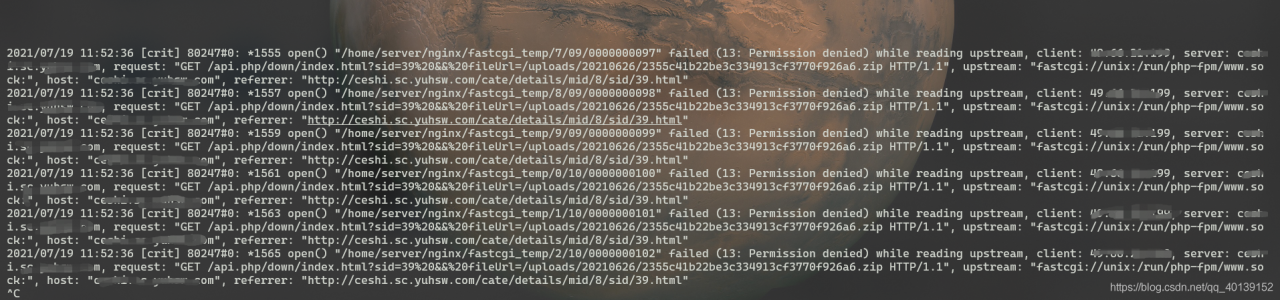
After investigation, it is found that nginx gives error information
open() "/ home/server/nginx/fastcgi_ Temp/2/10/0000000102 "failed (13: permission denied) while reading upstream
nginx prompts us that we do not have permission to operate

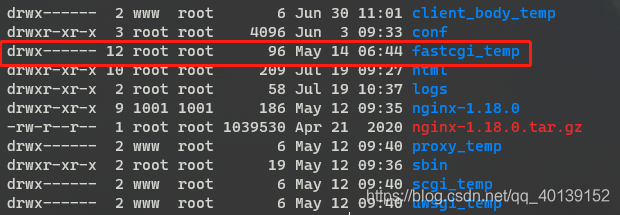
and then we enter the directory /home/server/nginx to check fastcgi_ Temp file owner, our name is the root user of root group

we will check the user group and user name of nginx worker again

ps -ef | grep nginx
# We can see that the worker process of nginx is the www user
root 80246 1 0 10:37 ?       00:00:00 nginx: master process /home/server/nginx/sbin/nginx
www 80247 80246 0 10:37 ?       00:00:00 nginx: worker process
root 82877 82840 0 13:56 pts/7 00:00:00 grep --color=auto nginx
# View the group that the www user is in, and the members of the group
groups www
# Ours is the www user of the www user group
www:www

solve the problem

When we download, the nginx worker process is sending the fastcgi_ Temp does not have permission to write to the cache
so we just need to give fastcgi_ The start-up user with the permission of nginx to modify the temp directory WWW: www

chown -R www:www fastcgi_temp/

This limit can be set by changing the [search.max_open_scroll_context] setting

[2021-07-16T08:57:41,025][WARN ][r.suppressed             ] [CNHQ-20018523N] path: /.kibana_task_manager/_update_by_query, params: {ignore_unavailable=true, refresh=true, conflicts=proceed, index=.kibana_task_manager}
org.elasticsearch.action.search.SearchPhaseExecutionException: all shards failed
at org.elasticsearch.action.search.AbstractSearchAsyncAction.onPhaseFailure(AbstractSearchAsyncAction.java:661) [elasticsearch-7.13.3.jar:7.13.3]
at org.elasticsearch.action.search.AbstractSearchAsyncAction.executeNextPhase(AbstractSearchAsyncAction.java:384) [elasticsearch-7.13.3.jar:7.13.3]
at org.elasticsearch.action.search.AbstractSearchAsyncAction.onPhaseDone(AbstractSearchAsyncAction.java:694) [elasticsearch-7.13.3.jar:7.13.3]
at org.elasticsearch.action.search.AbstractSearchAsyncAction.onShardFailure(AbstractSearchAsyncAction.java:467) [elasticsearch-7.13.3.jar:7.13.3]
at org.elasticsearch.action.search.AbstractSearchAsyncAction.access$000(AbstractSearchAsyncAction.java:62) [elasticsearch-7.13.3.jar:7.13.3]
at org.elasticsearch.action.search.AbstractSearchAsyncAction$1.onFailure(AbstractSearchAsyncAction.java:316) [elasticsearch-7.13.3.jar:7.13.3]
at org.elasticsearch.action.ActionListener$Delegating.onFailure(ActionListener.java:66) [elasticsearch-7.13.3.jar:7.13.3]
at org.elasticsearch.action.ActionListenerResponseHandler.handleException(ActionListenerResponseHandler.java:48) [elasticsearch-7.13.3.jar:7.13.3]
at org.elasticsearch.action.search.SearchTransportService$ConnectionCountingHandler.handleException(SearchTransportService.java:400) [elasticsearch-7.13.3.jar:7.13.3]
at org.elasticsearch.transport.TransportService$5.handleException(TransportService.java:738) [elasticsearch-7.13.3.jar:7.13.3]
at org.elasticsearch.transport.TransportService$ContextRestoreResponseHandler.handleException(TransportService.java:1283) [elasticsearch-7.13.3.jar:7.13.3]
at org.elasticsearch.transport.TransportService$DirectResponseChannel.processException(TransportService.java:1392) [elasticsearch-7.13.3.jar:7.13.3]
at org.elasticsearch.transport.TransportService$DirectResponseChannel.sendResponse(TransportService.java:1366) [elasticsearch-7.13.3.jar:7.13.3]
at org.elasticsearch.transport.TaskTransportChannel.sendResponse(TaskTransportChannel.java:50) [elasticsearch-7.13.3.jar:7.13.3]
at org.elasticsearch.transport.TransportChannel.sendErrorResponse(TransportChannel.java:45) [elasticsearch-7.13.3.jar:7.13.3]
at org.elasticsearch.action.support.ChannelActionListener.onFailure(ChannelActionListener.java:40) [elasticsearch-7.13.3.jar:7.13.3]
at org.elasticsearch.action.ActionRunnable.onFailure(ActionRunnable.java:77) [elasticsearch-7.13.3.jar:7.13.3]
at org.elasticsearch.common.util.concurrent.ThreadContext$ContextPreservingAbstractRunnable.onFailure(ThreadContext.java:720) [elasticsearch-7.13.3.jar:7.13.3]
at org.elasticsearch.common.util.concurrent.AbstractRunnable.run(AbstractRunnable.java:28) [elasticsearch-7.13.3.jar:7.13.3]
at java.util.concurrent.ThreadPoolExecutor.runWorker(ThreadPoolExecutor.java:1142) [?:1.8.0_131]
at java.util.concurrent.ThreadPoolExecutor$Worker.run(ThreadPoolExecutor.java:617) [?:1.8.0_131]
at java.lang.Thread.run(Thread.java:748) [?:1.8.0_131]
Caused by: org.elasticsearch.ElasticsearchException: Trying to create too many scroll contexts. Must be less than or equal to: [500]. This limit can be set by changing the [search.max_open_scroll_context] setting.
at org.elasticsearch.search.SearchService.createAndPutReaderContext(SearchService.java:676) ~[elasticsearch-7.13.3.jar:7.13.3]
at org.elasticsearch.search.SearchService.createOrGetReaderContext(SearchService.java:661) ~[elasticsearch-7.13.3.jar:7.13.3]
at org.elasticsearch.search.SearchService.executeQueryPhase(SearchService.java:434) ~[elasticsearch-7.13.3.jar:7.13.3]
at org.elasticsearch.search.SearchService.lambda$executeQueryPhase$2(SearchService.java:411) ~[elasticsearch-7.13.3.jar:7.13.3]
at org.elasticsearch.action.ActionRunnable.lambda$supply$0(ActionRunnable.java:47) ~[elasticsearch-7.13.3.jar:7.13.3]
at org.elasticsearch.action.ActionRunnable$2.doRun(ActionRunnable.java:62) ~[elasticsearch-7.13.3.jar:7.13.3]
at org.elasticsearch.common.util.concurrent.ThreadContext$ContextPreservingAbstractRunnable.doRun(ThreadContext.java:732) ~[elasticsearch-7.13.3.jar:7.13.3]
at org.elasticsearch.common.util.concurrent.AbstractRunnable.run(AbstractRunnable.java:26) ~[elasticsearch-7.13.3.jar:7.13.3] 

Solution:
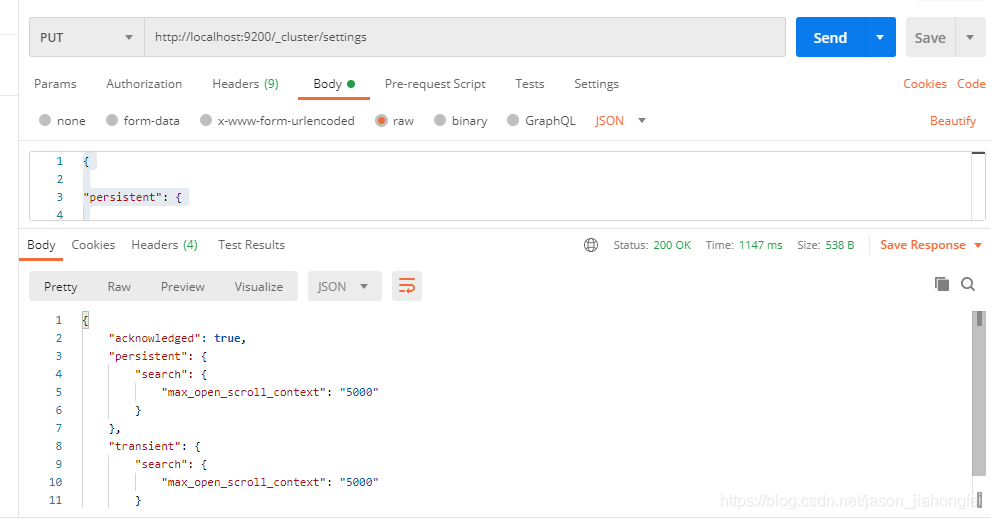
http://localhost:9200/_cluster/settings
Set the value of the variable: search.max_open_scroll_context

{

"persistent": {

    "search.max_open_scroll_context": 5000

},

"transient": {

    "search.max_open_scroll_context": 5000

}

}

Linux solves nohup: ignoring input and appending output to “nohup. Out” and nohup: ignoring input redirection error to standard output

1. Direct execution document

nohup ./test.sh

Prompt appears:

 Ignore the input and append the output to the "nohup.out"

And input the output result into the default file nohup. Out

2. Redirecting standard output to a file

nohup ./test.sh > a.txt

Prompt appears:

 nohup: Ignore input redirection errors to the standard output

Output the result to the specified file a.txt

3. Redirecting standard error output to a file

nohup ./test.sh > a.txt 2>&1 &

No hint

[Solved] jQuery Error: Uncaught TypeError: this.attr is not a function

$(".answer").on("click", function () {
  console.log(this) 
  console.log(this.attr("class")) //error this.attr is not a function
});

JQ calls the method with JQ object. Method name (xxx)

$(".answer").on("click", function () {
  console.log($(this)) 
  console.log($(this).attr("class")) 
});

If the callback function is of the following form

()=>{
....
}

It should be written as

$(".answer").on("click", (el)=>{
  console.log($(el.target)) 
  console.log($(el.target).attr("class")) 
});

Note: DOM object obj is converted to JQ object — & gt$( obj)

Vue modifies the value passed by props error: Avoid mutating a prop directly since the value will be overwritten whenever the par

When doing a project, you will sometimes encounter this kind of error
this sentence means to avoid changing the prop directly, because as long as the parent component is re rendered, the value will be overridden. Instead, use data or calculate properties based on the prop value
you can’t directly change the props passed by the parent component, so what can you do?You can use emit to trigger the events of the parent component
parent component

<template>
    <div class="class">
        <Student :show="isShow" @hideStudent="hideStudent" />
        <button @click="showStudent">点我显示学生</button>
    </div>
</template>

<script>
import Student from "./student";
export default {
    name: "class",
    components: { Student },
    data() {
        return {
            isShow: false,
        };
    },

    methods: {
        showStudent() {
            this.isShow = true;
        },
        hideStudent() {
            this.isShow = false;
        },
    },
};
</script>

Subcomponents

<template>
    <div class="student" v-show="show">
        <nav>Mike</nav>
        <button @click="close">点我关闭student</button>
    </div>
</template>

<script>
export default {
    name: "student",
    props: {
        show: {
            type: Boolean,
            default:false
        },
    },
    methods: {
        close() {
            this.$emit("hideStudent");
        },
    },
};
</script>

Of course, subcomponents can also write like this, using watch to listen

<template>
    <div class="student" v-show="showStudent">
        <nav>Mike</nav>
        <button @click="close">点我关闭student</button>
    </div>
</template>

<script>
export default {
    name: "student",
    props: {
        show: {
            type: Boolean,
            default:false
        },
    },
    data() {
        return {
            showStudent:false
        };
    },
    watch:{
        show(){
            this.showStudent=this.show
        },
    },
    methods: {
        close() {
            this.$emit("hideStudent");
        },
    },
};
</script>

Finally, let’s take a look at the rendering


for more details about the value transmission of vueprops, see the value transmission of Vue parent-child components

-bash: sqlplus: command not found [How to Solve]

Error description

$ sqlplus/as sysdba
-bash: sqlplus: command not found

Treatment method

View environment.bash_ Profile configuration

$ find -name .bash_profile
./.bash_profile
$ pwd
/home/oracle
$ vi .bash_profile
# .bash_profile

# Get the aliases and functions
if [ -f ~/.bashrc ]; then
        . ~/.bashrc
fi

# User specific environment and startup programs

PATH=$PATH:$HOME/.local/bin:$HOME/bin

export PATH

#add by rui on 20210715
export ORACLE_BASE=/oracle/app
export ORACLE_HOME=$ORACLE_BASE/oracle/product/12.1.0/dbhome_1 --Configuration error, change to [1]
export ORACLE_SID=rui1
export PATH=$HOME/bin:$ORACLE_HOME/bin:$PATH
export LD_LIBRARY_PATH=$ORACLE_HOME/lib:/usr/lib

[1] export ORACLE_ HOME=$ORACLE_ BASE/product/12.1.0/dbhome_ one

Open a new window and enter the command again

$ sqlplus/as sysdba

SQL*Plus: Release 12.1.0.2.0 Production on Thu Jul 15 04:42:11 2021

Copyright (c) 1982, 2014, Oracle.  All rights reserved.


Connected to:
Oracle Database 12c Enterprise Edition Release 12.1.0.2.0 - 64bit Production
With the Partitioning, OLAP, Advanced Analytics and Real Application Testing options

SQL>

It can be seen that the problem has been successfully solved
the reason for this error is $oracle_ Home configuration error.

Solve Google browser font reduction to 12px

The solution of browser font less than 12px

1. Zoom through transform: scale()

<div class="box text1">The font size is 12px</div>
<! -- inside before adding the span tag, because transform:scale scales the width and height of the outer div -->
<div class="box text2">
    <span> The font size is 8px</span> 
</div>
Copy code
.box{
    width: 200px;
    height:100px;
    margin-bottom: 10px; 
    border: 1px solid red ;
}
.text1{
    font-size: 12px;
}
.text2 span{
    display: inline-block;/*transform:scale()这This attribute scales only the elements whose width and height can be defined. */
    font-size: 16px;
    transform: scale(0.5) ;/* font-size: 16*0.5=8px  */
    transform-origin: left top;/* Adjustment of position*/
}