Author Archives: Robins

[Solved] kernel: nvme nvme0: I/O xxx QID xxx timeout, aborting

The server with 10Gbps port installed 2 NVME hard disks, and the
result of frequent problems occurred. The

log of the problem of disk drop is as follows

Mar 10 13:10:10 10Gbps kernel: nvme nvme0: I/O 183 QID 3 timeout, aborting
Mar 10 13:10:10 10Gbps kernel: nvme nvme0: Abort status: 0x0
Mar 10 13:10:13 10Gbps kernel: nvme nvme0: I/O 384 QID 4 timeout, aborting
Mar 10 13:10:13 10Gbps kernel: nvme nvme0: Abort status: 0x0
Mar 10 13:10:14 10Gbps kernel: nvme nvme0: I/O 626 QID 5 timeout, aborting
Mar 10 13:10:14 10Gbps kernel: nvme nvme0: Abort status: 0x0
Mar 10 13:10:15 10Gbps kernel: nvme nvme0: I/O 879 QID 7 timeout, aborting
Mar 10 13:10:15 10Gbps kernel: nvme nvme0: Abort status: 0x0
Mar 10 13:10:28 10Gbps kernel: nvme nvme0: I/O 221 QID 5 timeout, aborting
Mar 10 13:10:28 10Gbps kernel: nvme nvme0: Abort status: 0x0
Mar 10 13:10:34 10Gbps kernel: nvme nvme0: I/O 510 QID 1 timeout, reset controller
Mar 10 13:10:55 10Gbps kernel: nvme nvme0: Device not ready; aborting reset, CSTS=0x1
Mar 10 13:10:55 10Gbps kernel: blk_update_request: I/O error, dev nvme0n1, sector 271133736 op 0x0:(READ) flags 0x80700 phys_seg 4 prio class 0
Mar 10 13:10:55 10Gbps kernel: blk_update_request: I/O error, dev nvme0n1, sector 2052266888 op 0x0:(READ) flags 0x80700 phys_seg 4 prio class 0
Mar 10 13:10:55 10Gbps kernel: blk_update_request: I/O error, dev nvme0n1, sector 2175930376 op 0x0:(READ) flags 0x80700 phys_seg 4 prio class 0
Mar 10 13:10:55 10Gbps kernel: blk_update_request: I/O error, dev nvme0n1, sector 7072889400 op 0x0:(READ) flags 0x80700 phys_seg 17 prio class 0
Mar 10 13:10:55 10Gbps kernel: blk_update_request: I/O error, dev nvme0n1, sector 238328656 op 0x0:(READ) flags 0x80700 phys_seg 4 prio class 0
Mar 10 13:10:55 10Gbps kernel: blk_update_request: I/O error, dev nvme0n1, sector 3954686056 op 0x0:(READ) flags 0x80700 phys_seg 4 prio class 0
Mar 10 13:10:55 10Gbps kernel: blk_update_request: I/O error, dev nvme0n1, sector 6440531640 op 0x0:(READ) flags 0x80700 phys_seg 4 prio class 0
Mar 10 13:10:55 10Gbps kernel: blk_update_request: I/O error, dev nvme0n1, sector 7301389616 op 0x0:(READ) flags 0x80700 phys_seg 4 prio class 0
Mar 10 13:10:55 10Gbps kernel: blk_update_request: I/O error, dev nvme0n1, sector 6288979456 op 0x0:(READ) flags 0x80700 phys_seg 4 prio class 0
Mar 10 13:10:55 10Gbps kernel: blk_update_request: I/O error, dev nvme0n1, sector 2149595472 op 0x0:(READ) flags 0x80700 phys_seg 6 prio class 0
Mar 10 13:11:16 10Gbps kernel: nvme nvme0: Device not ready; aborting reset, CSTS=0x1
Mar 10 13:11:16 10Gbps kernel: nvme nvme0: Removing after probe failure status: -19
Mar 10 13:11:36 10Gbps kernel: nvme nvme0: Device not ready; aborting reset, CSTS=0x1
Mar 10 13:11:36 10Gbps kernel: print_req_error: 6 callbacks suppressed
Mar 10 13:11:36 10Gbps kernel: blk_update_request: I/O error, dev nvme0n1, sector 2000203632 op 0x0:(READ) flags 0x1000 phys_seg 4 prio class 0
Mar 10 13:11:36 10Gbps kernel: blk_update_request: I/O error, dev nvme0n1, sector 68158880 op 0x0:(READ) flags 0x1000 phys_seg 4 prio class 0
Mar 10 13:11:36 10Gbps kernel: blk_update_request: I/O error, dev nvme0n1, sector 4036854464 op 0x0:(READ) flags 0x1000 phys_seg 4 prio class 0
Mar 10 13:11:36 10Gbps kernel: blk_update_request: I/O error, dev nvme0n1, sector 78773728 op 0x0:(READ) flags 0x1000 phys_seg 4 prio class 0
Mar 10 13:11:36 10Gbps kernel: blk_update_request: I/O error, dev nvme0n1, sector 1987798736 op 0x0:(READ) flags 0x1000 phys_seg 4 prio class 0
Mar 10 13:11:36 10Gbps kernel: blk_update_request: I/O error, dev nvme0n1, sector 1986001320 op 0x0:(READ) flags 0x1000 phys_seg 1 prio class 0
Mar 10 13:11:36 10Gbps kernel: blk_update_request: I/O error, dev nvme0n1, sector 4082978496 op 0x0:(READ) flags 0x1000 phys_seg 4 prio class 0
Mar 10 13:11:36 10Gbps kernel: blk_update_request: I/O error, dev nvme0n1, sector 5906970992 op 0x0:(READ) flags 0x1000 phys_seg 1 prio class 0
Mar 10 13:11:36 10Gbps kernel: blk_update_request: I/O error, dev nvme0n1, sector 3962823040 op 0x0:(READ) flags 0x1000 phys_seg 4 prio class 0
Mar 10 13:11:36 10Gbps kernel: blk_update_request: I/O error, dev nvme0n1, sector 6902965512 op 0x1:(WRITE) flags 0x100000 phys_seg 40 prio class 0
Mar 10 13:11:36 10Gbps kernel: XFS (nvme0n1): metadata I/O error in “xfs_trans_read_buf_map” at daddr 0x160153970 len 8 error 5
Mar 10 13:11:36 10Gbps kernel: XFS (nvme0n1): metadata I/O error in “xfs_trans_read_buf_map” at daddr 0xf09d82c0 len 32 error 5
Mar 10 13:11:36 10Gbps kernel: XFS (nvme0n1): metadata I/O error in “xfs_trans_read_buf_map” at daddr 0x98fd6a0 len 32 error 5
Mar 10 13:11:36 10Gbps kernel: XFS (nvme0n1): metadata I/O error in “xfs_trans_read_buf_map” at daddr 0x4b1fde0 len 32 error 5
Mar 10 13:11:36 10Gbps kernel: XFS (nvme0n1): xfs_imap_to_bp: xfs_trans_read_buf() returned error -5.
Mar 10 13:11:36 10Gbps kernel: nvme0n1: writeback error on inode 6619987520, offset 0, sector 6902965832
Mar 10 13:11:36 10Gbps kernel: XFS (nvme0n1): log I/O error -5
Mar 10 13:11:36 10Gbps kernel: XFS (nvme0n1): metadata I/O error in “xfs_trans_read_buf_map” at daddr 0xec33e180 len 32 error 5
Mar 10 13:11:36 10Gbps kernel: XFS (nvme0n1): xfs_do_force_shutdown(0x2) called from line 1250 of file fs/xfs/xfs_log.c. Return address = 00000000147aed99
Mar 10 13:11:36 10Gbps kernel: XFS (nvme0n1): xfs_imap_to_bp: xfs_trans_read_buf() returned error -5.
Mar 10 13:11:36 10Gbps kernel: XFS (nvme0n1): Log I/O Error Detected. Shutting down filesystem
Mar 10 13:11:36 10Gbps kernel: XFS (nvme0n1): Please unmount the filesystem and rectify the problem(s)
Mar 10 13:11:36 10Gbps kernel: XFS (nvme0n1): log I/O error -5
Mar 10 13:11:36 10Gbps kernel: XFS (nvme0n1): xfs_imap_to_bp: xfs_trans_read_buf() returned error -5.
Mar 10 13:11:36 10Gbps kernel: nvme0n1: writeback error on inode 77133302, offset 0, sector 684881640
Mar 10 13:11:36 10Gbps kernel: XFS (nvme0n1): xfs_imap_to_bp: xfs_trans_read_buf() returned error -5.
Mar 10 13:11:39 10Gbps kernel: VFS: busy inodes on changed media or resized disk nvme0n1
Mar 10 13:11:39 10Gbps kernel: nvme nvme0: failed to set APST feature (-19)
Mar 10 13:11:39 10Gbps systemd[1]: Stopped target Local File Systems.

analyzed that
most of the reasons are caused by intensive reading and writing.
This is a CDN cache node. Type reading
NVME temperature is relatively high, if it continues, it will start to throttle
and then slowly collapse.
And because this is ADATA’s XPG consumer product, it is not an enterprise-level

problem-solving
1. Replaced with Samsung’s PRO series, because the other two use Samsung There is no problem with the product
2. Try to increase heat dissipation
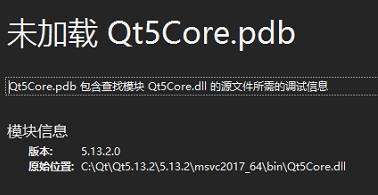

Qt5core.pdb is not loaded [How to Solve]

When releasing the version, windeployqt is used to generate the corresponding library, but it is inadvertently directly in C: \ QT \ qt5.13.2 \ 5.13.2 \ msvc2017_ Generated in 64 \ bin, overwriting qt5core.dll, resulting in debugging failure

it can be solved by replacing the original qt5core.dll.

The ADB server port is changed to 10001, and appium cannot connect to the device

After modifying the ADB server port to 10001, enter ADB devices – L in CMD to successfully detect the device:

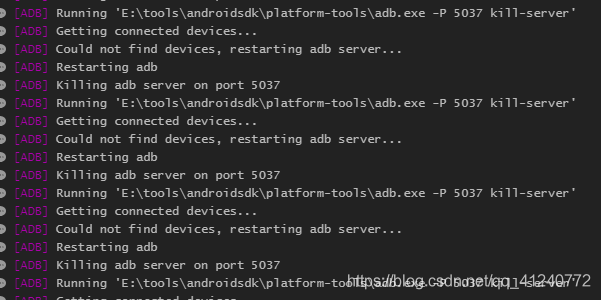
Open appium and run the script. The appium running log shows that the device cannot be connected and has been killing the port number 5037 ADB server. The error information is as follows:

I changed the port number of the ADB server to 10001. Why do I still kill 5037?

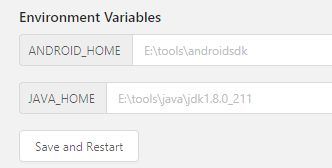
Seeing this error, when I first thought about it, the environment variable of the modified port was not configured to appium. Click the edit configurations button of appium, and I found that there were no new buttons, but only the default environment variable:

I searched a lot of information on the Internet and found no solution. Finally, I found a solution in an appium Chinese user guide,   Put the guide link here: appium Chinese User Guide – Jianshu (Jianshu. Com)

Modify the running script and add ‘adbport’: ‘10001’ to desired_ In caps Dictionary:

Restart appium, run the script again, connect the device successfully, and solve the problem!

PS: when using appium, you can familiarize yourself with the above instructions and have a general understanding of appium; Then, when running, you should pay attention to the running log. Many problems can be located step by step through the error reporting of the log

Doris decommission be node stuck [How to Solve]

Question

In Doris 0.13.15 precompiled version

Doris decommission three be nodes stuck

alter system decommission backend "be_host-1:9050"
alter system decommission backend "be_host-2:9050"
alter system decommission backend "be_host-3:9050"

Stuck

analysis

To view the source code, you need to adjust the catalog_ trash_ expire_ Second parameter
for other parameters, you can view the Chinese description of Doris Fe configuration
the significance of this parameter is that it provides a protection mechanism. After deleting the database (Table/partition), you can use this catalog_ trash_ expire_ Use recover stmt to recover it within the second time
this parameter specifies the maximum data retention time. After a period of time, the data will be permanently deleted

this is for protection. I'm afraid someone deleted the data and regretted that it was too late to recover the data

because someone deleted the table, some table partitions were deleted, but the be commitment stuck in the recycle area

Source code analysis


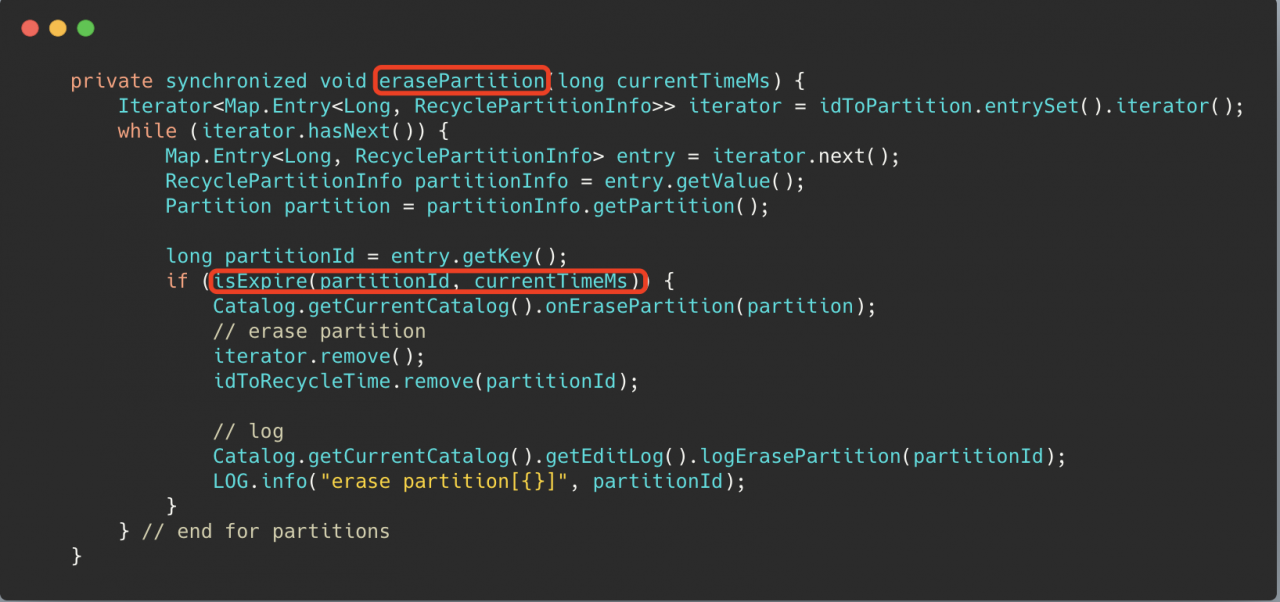
Isexpire () in the erasepartition() method uses this parameter to determine whether a partition can be deleted, of course, it must be greater than a minimum deletion delay time mineraselatency (10min)

solve

Set the parameter
catalog_ trash_ expire_ Second (the default value is 86400, 1 day)
set a small point. After the partition data to be recycled expires, the decommission can be completed

Follow up questions

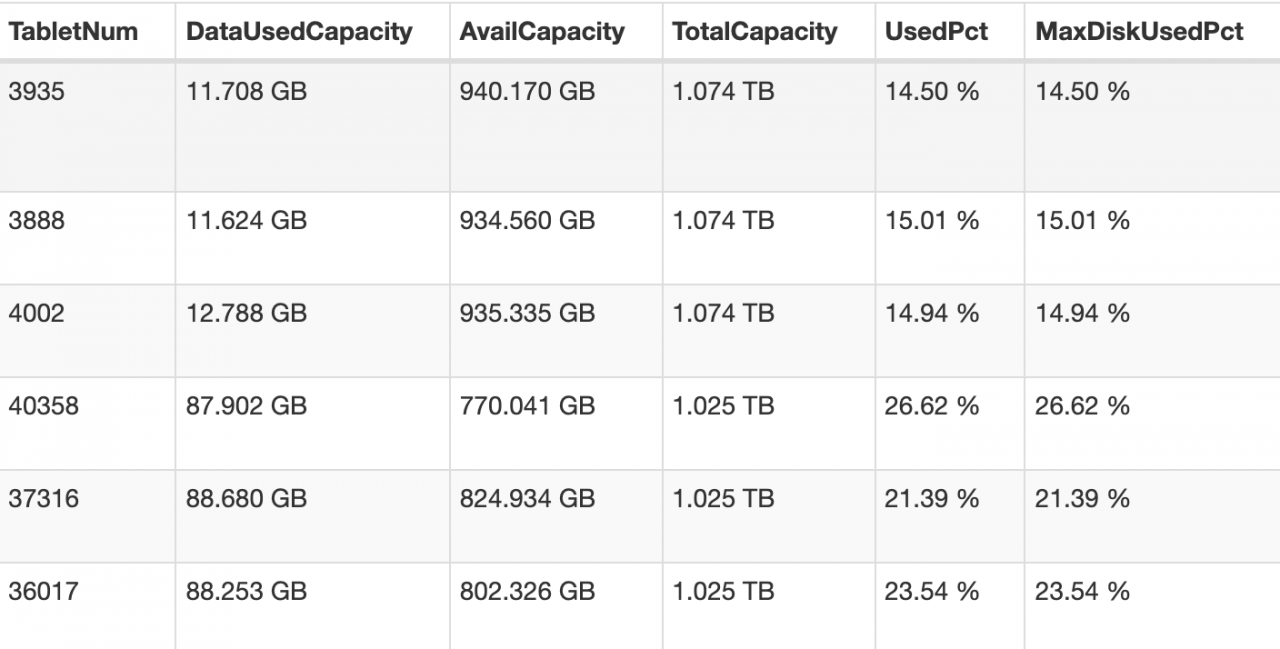
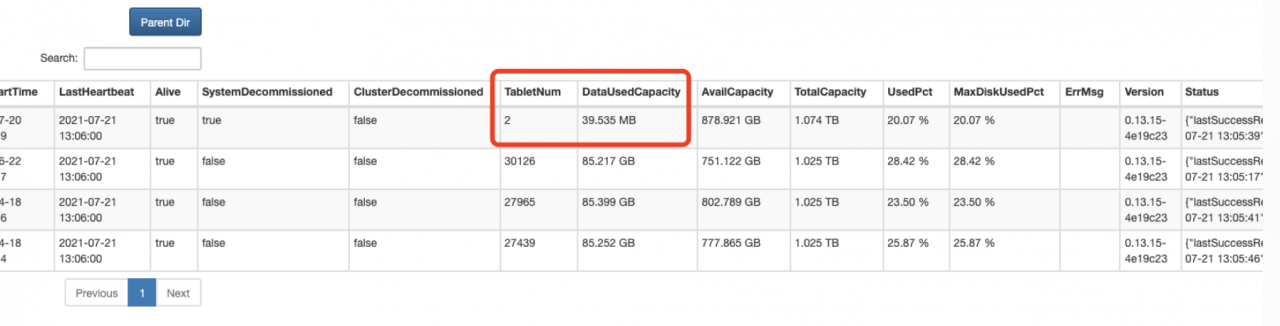
After the parameter is adjusted small, 2 of the three offline nodes have been successfully offline, but another be node is stuck in the state of 2 remaining tablets

terms of settlement

CANCEL DECOMMISSION BACKEND "be_host-1:9050";

Wait for show proc ‘/ statistical’; After the unhealthy tablet in is reduced to 0, you can go offline again. Of course, you can also try to execute the offline command without waiting for the unhealthy tablet to be reduced to 0

alter system decommission backend "be_host-1:9050"

Solve the problem that WSL occupies too much C disk

It can be installed to other disks

Download Ubuntu installation package

Manually download Windows Subsystem for Linux (WSL) Distros | Microsoft Docs

Change the suffix (zip) and unzip it to another disk.

Open Ubuntu *. Exe and install it

Something went wrong

one

Error 0x800701bc WSL 2 ??????????????????

two  

Error 0x80370102

The first problem is that the windows service required by WSL is not enabled

Solution

Start the corresponding service in settings

The following services need to be enabled: 1. Hyper-V     2. Virtual machine platform       3. Windows subsystem for Linux

PS: windows11 setting steps,   Application – & gt; Optional function (pull to the bottom) – & gt; More windows services

The second problem is that the required files are not installed when wsl1 is upgraded to wsl2

Solution

Download the installation package and install it.

https://wslstorestorage.blob.core.windows.net/wslblob/wsl_ update_ x64.msi

When installing in other paths, the boot subsystem is the root user. If you don’t want to start WSL, the default is the root user. You can follow the steps below.

1. Add a new user,

sudo add username

2. Grant permission (nothing can be done without permission)

sudo usermod -a -G adm username

sudo usermod -a -G sudo username

3. Default user configuration for Ubuntu

.\ubuntu2004.exe config --default-user username

If the author enters PowerShell under the installation directory, the absolute path can be used for configuration without entering the installation directory.

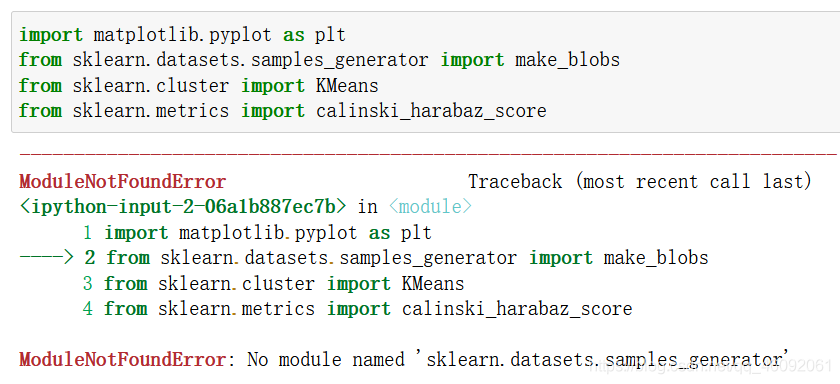
ModuleNotFoundError: No module named ‘sklearn.datasets.samples_generator‘

No module named ‘sklearn.datasets.samples_ generator’

Causes and solutions of error reporting

Problem reporting error

from sklearn.datasets.samples_generator import make_blobs

reason

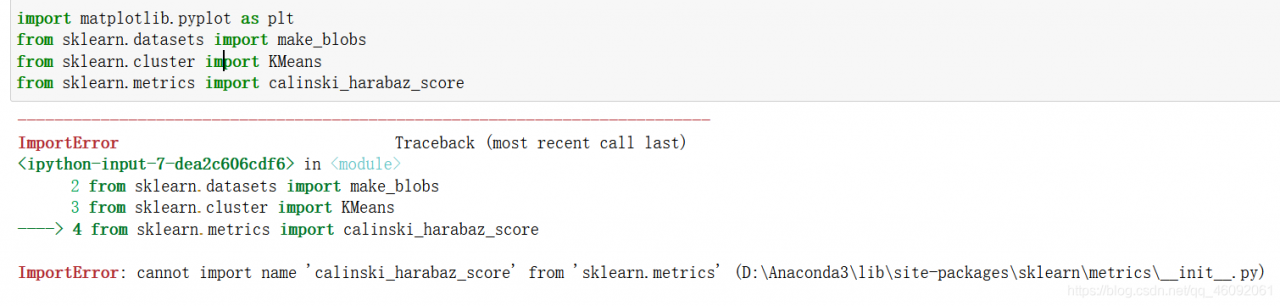
samples_ The generator module has been removed in the new version of scikit learn .

samples_ The corresponding classes/functions in the generator module can be imported directly from sklearn. Datasets .

resolvent

Method 1:

Import make directly from sklearn. Datasets _ blobs

from sklearn.datasets import make_blobs

Method 2:

Version problem, reduce version

pip install scikit-learn==0.22.1

Reference: link

come on

thank you

work hard

The. Exe crashed program ends abnormally when the QT project is copied to the new environment

Tip: if the project has been successfully compiled and run on a computer, the code of the project itself is OK

Based on such preconditions, the problem should be directly located in the direction of environment configuration.

The third-party library I use this time is opencv:

        1. Include the opencv path in the project pro file and add the corresponding library file

INCLUDEPATH += D:/openCV/opencv/build/include

LIBS += D:/openCV/opencv/build/x64/vc15/lib/opencv_world451.lib
LIBS += D:/openCV/opencv/build/x64/vc15/lib/opencv_world451d.lib

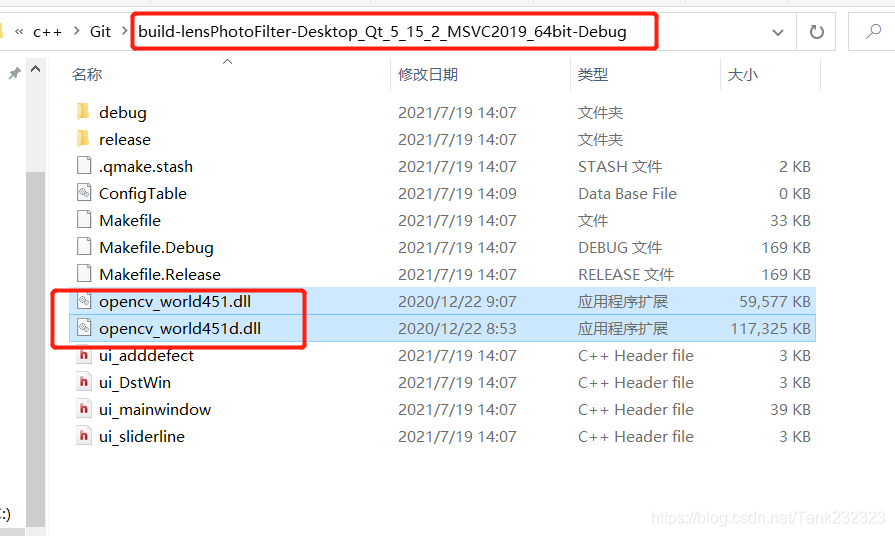
        2. Find the corresponding. DLL file from the opencv installation path and copy it to the running program path generated by the project


The too many open files solution appears in stream classes such as files.list

Problem scenario

In the background code of the blog, the design without database is adopted, and all information is based on the file system. When it comes to traversing some file information, the java.nio.file.files class and files.list are used for traversal. However, for stream methods such as files.list, if the resource is not closed, an error of too many open files will appear over time.

Solution

Use try with resource to automatically free resources.

Not improved:

...
Files.list(path).forEach(...)
...

Improved writing:

try (Stream<Path> fileList = Files.list(path)) {
    fileList.forEach(...)
} catch (Exception a) {
    ......
}

In this way, the open files will be automatically closed when using files.list to prevent errors. Similarly, it can also be used on other classes that inherit autoclosable, and subsequent problems will be sorted out.

Conclusion

The efficiency and rationality of the code still need to be considered, otherwise the preliminary test can’t see the problem, and it’s too late to regret for a long time.

The spring boot project directly replaces the referenced jar package

Shiro was used in an old spring boot project. Recently, Shiro broke a security vulnerability. So we need to upgrade the Shiro version in the project. However, this project was developed by former employees a long time ago, and the source code can no longer be found. So try to upgrade Shiro by replacing jar directly.

Wrong attempt

Usually, HTML can be replaced directly. JS can directly open WinRAR and replace the file directly. I thought jar packages can also be replaced directly. If you find that the jar is directly replaced, an error will be reported.

The error information is as follows:

java -jar spring-zs-1.0-update.jar                                                          [18:02:05]
Exception in thread "main" java.lang.IllegalStateException: Unable to open nested entry 'BOOT-INF/lib/shiro-web-1.5.3.jar'. It has been compressed and nested jar files must be stored without compression. Please check the mechanism used to create your executable jar file
	at org.springframework.boot.loader.jar.JarFile.createJarFileFromFileEntry(JarFile.java:285)
	at org.springframework.boot.loader.jar.JarFile.createJarFileFromEntry(JarFile.java:260)
	at org.springframework.boot.loader.jar.JarFile.getNestedJarFile(JarFile.java:248)
	at org.springframework.boot.loader.jar.JarFile.getNestedJarFile(JarFile.java:237)
	at org.springframework.boot.loader.archive.JarFileArchive.getNestedArchive(JarFileArchive.java:103)
	at org.springframework.boot.loader.archive.JarFileArchive.getNestedArchives(JarFileArchive.java:87)
	at org.springframework.boot.loader.ExecutableArchiveLauncher.getClassPathArchives(ExecutableArchiveLauncher.java:72)
	at org.springframework.boot.loader.Launcher.launch(Launcher.java:49)
	at org.springframework.boot.loader.JarLauncher.main(JarLauncher.java:51)

Correct steps

Unpack through jar command

My project jar name is spring-zs-1.0. Jar

jar -xvf spring-zs-1.0.jar

After decompression, replace the jar package in./boot-inf/lib directory. I replaced Shiro — 1.2.2.jar with Shiro — 1.5.3.jar

Repackage

jar -cfM0 new.jar ./

This will generate a new jar package!

If you also use MacOS system, you should pay attention to one thing. The MacOS system will automatically generate
. DS in some directories_ Store files, so you should delete these hidden. DS files before repackaging_ Store, otherwise an error will be reported.

reference resources

https://blog.csdn.net/weixin_ 45417347/article/details/101539040

[XMR] Could NOT find HWLOC (missing: HWLOC_LIBRARY HWLOC_INCLUDE_DIR)

【XMR】Could NOT find HWLOC (missing: HWLOC_ LIBRARY HWLOC_ INCLUDE_ DIR

Analysis and solution of error reporting details

Error reporting details

After installing centos8.4 minimal , compile xmrig mining program without pumping, and execute:

cmake .. -DCMAKE_BUILD_TYPE=Release -DUV_LIBRARY=/usr/lib64/libuv.a

Error after compilation:

-- The C compiler identification is GNU 8.4.1
-- The CXX compiler identification is GNU 8.4.1
-- Detecting C compiler ABI info
-- Detecting C compiler ABI info - done
-- Check for working C compiler: /usr/bin/cc - skipped
-- Detecting C compile features
-- Detecting C compile features - done
-- Detecting CXX compiler ABI info
-- Detecting CXX compiler ABI info - done
-- Check for working CXX compiler: /usr/bin/c++ - skipped
-- Detecting CXX compile features
-- Detecting CXX compile features - done
-- Looking for syslog.h
-- Looking for syslog.h - found
CMake Error at /usr/share/cmake/Modules/FindPackageHandleStandardArgs.cmake:165 (message):
  Could NOT find HWLOC (missing: HWLOC_LIBRARY HWLOC_INCLUDE_DIR)
Call Stack (most recent call first):
  /usr/share/cmake/Modules/FindPackageHandleStandardArgs.cmake:458 (_FPHSA_FAILURE_MESSAGE)
  cmake/FindHWLOC.cmake:25 (find_package_handle_standard_args)
  src/backend/cpu/cpu.cmake:30 (find_package)
  src/backend/backend.cmake:1 (include)
  CMakeLists.txt:37 (include)
  
-- Configuring incomplete, errors occurred!
See also "/root/xmrig/build/CMakeFiles/CMakeOutput.log".

Problem analysis

The error message is very clear. The hwloc module cannot be found.

terms of settlement

The solution is simple: install the hwloc module. Unfortunately, centos8.4 minimal can’t be installed directly through Yum at present. You can only download the source code and compile it yourself.

First, we download the hwloc module code:

git clone https://github.com/open-mpi/hwloc.git

Then enter the hwloc source code directory and execute the compilation and installation statement:

./autogen.sh
./configure
make
make install

Then execute the cmake statement

cmake .. -DCMAKE_BUILD_TYPE=Release -DUV_LIBRARY=/usr/lib64/libuv.a

Able to execute successfully:

-- The C compiler identification is GNU 8.4.1
-- The CXX compiler identification is GNU 8.4.1
-- Detecting C compiler ABI info
-- Detecting C compiler ABI info - done
-- Check for working C compiler: /usr/bin/cc - skipped
-- Detecting C compile features
-- Detecting C compile features - done
-- Detecting CXX compiler ABI info
-- Detecting CXX compiler ABI info - done
-- Check for working CXX compiler: /usr/bin/c++ - skipped
-- Detecting CXX compile features
-- Detecting CXX compile features - done
-- Looking for syslog.h
-- Looking for syslog.h - found
-- Found HWLOC: /usr/local/lib/libhwloc.so  
-- Found UV: /usr/lib64/libuv.a  
-- Looking for __builtin___clear_cache
-- Looking for __builtin___clear_cache - found
-- WITH_MSR=ON
-- argon2: detecting feature 'sse2'...
-- Performing Test FEATURE_sse2_NOFLAG
-- Performing Test FEATURE_sse2_NOFLAG - Success
-- argon2: feature 'sse2' detected!
-- argon2: detecting feature 'ssse3'...
-- Performing Test FEATURE_ssse3_NOFLAG
-- Performing Test FEATURE_ssse3_NOFLAG - Failed
-- Performing Test FEATURE_ssse3_FLAG
-- Performing Test FEATURE_ssse3_FLAG - Success
-- argon2: feature 'ssse3' detected!
-- argon2: detecting feature 'xop'...
-- Performing Test FEATURE_xop_NOFLAG
-- Performing Test FEATURE_xop_NOFLAG - Failed
-- Performing Test FEATURE_xop_FLAG
-- Performing Test FEATURE_xop_FLAG - Success
-- argon2: feature 'xop' detected!
-- argon2: detecting feature 'avx2'...
-- Performing Test FEATURE_avx2_NOFLAG
-- Performing Test FEATURE_avx2_NOFLAG - Failed
-- Performing Test FEATURE_avx2_FLAG
-- Performing Test FEATURE_avx2_FLAG - Success
-- argon2: feature 'avx2' detected!
-- argon2: detecting feature 'avx512f'...
-- Performing Test FEATURE_avx512f_NOFLAG
-- Performing Test FEATURE_avx512f_NOFLAG - Failed
-- Performing Test FEATURE_avx512f_FLAG
-- Performing Test FEATURE_avx512f_FLAG - Success
-- argon2: feature 'avx512f' detected!
-- Found OpenSSL: /usr/lib64/libcrypto.so (found version "1.1.1g")  
-- The ASM compiler identification is GNU
-- Found assembler: /usr/bin/cc
-- Configuring done
-- Generating done
-- Build files have been written to: /root/xmrig-base/build

Postscript

If you have any questions, please leave a message below.