Author Archives: Robins

[Solved] Mujoco Error: Missing path to your environment variable.

Using mujoco to report an error: missing path to your environment variable

Question:

Recently, you want to use pycharm to run the server program in the local server environment. Follow https://www.jb51.net/article/195691.htm After step configuration, try running Import mujoco_Py , error reported:

Missing path to your environment variable.  
Current values LD_LIBRARY_PATH= 
Please add following line to .bashrc: 
export LD_LIBRARY_PATH=$LD_LIBRARY_PATH:/root/.mujoco/mujoco200/bin

But I’ve added environment variables to ~ /. Bashrc

Solution:

Finally, the error reporting is solved by manually adding environment variables for the current operating environment:

In the menu bar -> Run -> Edit Configurations -> Add the corresponding environment variables to environment variables

Name Value
LD_ LIBRARY_ PATH $LD_ LIBRARY_ PATH:/root/.mujoco/mujoco200/bin


[Solved] Syntax Error: TypeError: this.getOptions is not a function

Syntax Error: TypeError: this.getOptions is not a function

Scenario:

Error reporting when running Vue project

Error message:

Syntax Error: TypeError: this.getOptions is not a function

 @ ./node_modules/vue-style-loader??ref--8-oneOf-1-0!./node_modules/css-loader/dist/cjs.js??ref--8-oneOf-1-1!./node_modules/vue-loader/lib/loaders/stylePostLoader.js!./node_modules/postcss-loader/src??ref--8-oneOf-1-2!./node_modules/sass-loader/dist/cjs.js??ref--8-oneOf-1-3!./node_modules/cache-loader/dist/cjs.js??ref--0-0!./node_modules/vue-loader/lib??vue-loader-options!./src/pages/article/article.vue?vue&type=style&index=0&id=53e7acee&lang=scss&scoped=true& 4:14-480 15:3-20:5 16:22-488
 @ ./src/pages/article/article.vue?vue&type=style&index=0&id=53e7acee&lang=scss&scoped=true&
 @ ./src/pages/article/article.vue
 @ ./src/router/config.js
 @ ./src/router/index.js
 @ ./src/main.js
 @ multi (webpack)-dev-server/client?http://192.168.3.101:8080&sockPath=/sockjs-node (webpack)/hot/dev-server.js babel-polyfill whatwg-fetch ./src/main.js

reason:

The probability is that the installed version of SCSS loader is too high

Solution:
uninstall the original too high version and install the lower version

npm uninstall --save sass-loader // uninstall
npm i -D [email protected] // install
npm uninstall --save node-sass //uninstall
npm i [email protected] // install

Project Startup Error: It was loaded from the following location

Dependency conflict

Problem: the parent project uses the control dependent version, and an error is reported when starting

Description:

......

It was loaded from the following location:

	file:/C:/Users/259876/.m2/repository/com/alibaba/nacos/nacos-api/1.2.0/nacos-api-1.2.0.jar

Solution: delete the last dependency [dependency conflict?] according to the prompt

Gunicorn timeout error: [1] [critical] worker timeout [How to Solve]

1. Problem description

In a web project built with gunicorn + flash, because the machine learning model is used, the model needs to be loaded when requesting the interface for the first time. The model is loaded quickly when running locally, so it runs normally. The application is deployed to the server using docker (the model is mounted to the container through volume), The first request to load the model takes a long time, and the following errors are reported:

[2021-09-11 07:22:33 +0000] [1] [CRITICAL] WORKER TIMEOUT (pid:12)
[2021-09-11 07:22:35 +0000] [12] [INFO] Worker exiting (pid: 12)

Gunicorn ‘green Unicorn’ is a python WSGI HTTP server for UNIX. It is a pre forked worker model transplanted from Ruby’s Unicorn project. Gunicorn server is widely compatible with various web frameworks, with simple implementation, less use of server resources and quite fast speed.

2. Cause analysis

It can be seen from the error message that gunicorn’s worker process timed out, causing the process to exit and restart
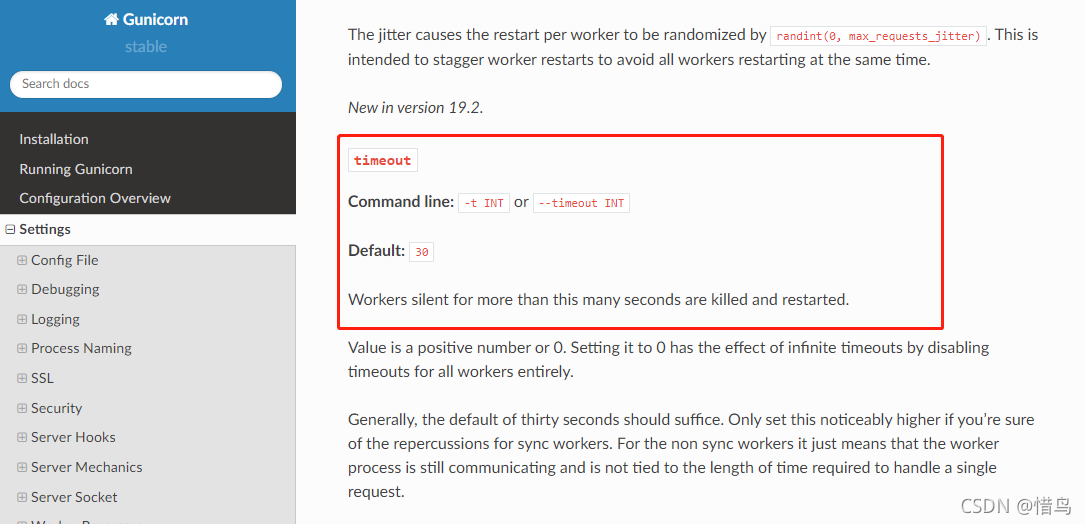
refer to the official document of gunicorn and the description shown in the figure below:
3. Solution

From the documentation on the official website, we can know that the default timeout of gunicorn is 30s. If it exceeds 30s, the worker process will be killed and restarted.

Therefore, to solve this problem, you only need to set a large timeout: gunicorn to set the timeout

gunicorn -w 2 -b 0.0.0.0:4343  manage:app --timeout 120 

Add: -- timeout 120 to gunicorn’s startup command, indicating that the timeout is set to 120 seconds. Configure the timeout in the gunicorn. Conf.py configuration file of gunicorn

workers = 4  # Define the number of processes to be opened for processing requests at the same time, adjusted appropriately according to site traffic
worker_class = "gevent" # Use the gevent library to support asynchronous processing of requests and improve throughput
bind = "0.0.0.0:8500" # Listen to IP relaxation to facilitate communication between Dockers and between Dockers and hosts
timeout = 120 # Set the timeout to 120 seconds

For more configuration of the gunicorn. Conf.py file, see the official website
JMeter JDBC Error: No pool found named: ‘test‘ [How to Solve]

No pool found named

JMeter JDBC error reporting: no pool found named error information reason solution

JMeter JDBC reports an error: no pool found named

Error message

No pool found named: ‘test’, ensure Variable Name matches Variable Name of JDBC Connection Configuration

Reason

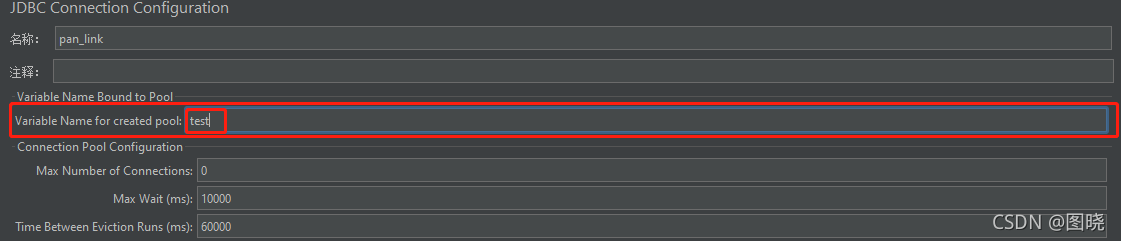
The JDBC request needs to connect to the database and needs the corresponding configuration information. If the database configuration information is not found, this error will be reported, Find the configuration information through the value filled in variable name of pool declared in JDBC connection configuration JDBC connection configuration provides the configuration information through the value filled in variable name of created pool. When there are multiple database configuration information, use variable name of pool declared in JDBC connection configuration and variable name of created pool, Ensure that the query request is not confused with the connected database

Solution

Fill the variable name of pool declared in JDBC connection configuration in the JDBC request and the variable name of created pool in the corresponding JDBC connection configuration into the same value

[Solved] Pycharm Use pip Error: Script file ‘D:\Anaconda3\envs\pytorch\Scripts\pip-script.py‘ is not present

Problem Description:

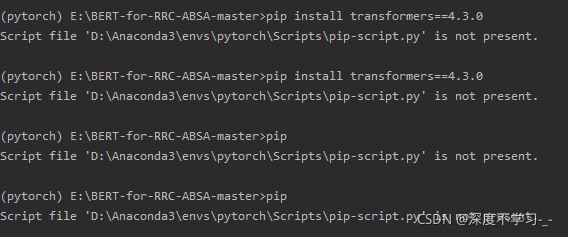
error reporting 1: error reporting for PIP installation: script file’d:\anaconda3\envs \ pytorch\scripts\PIP script. Py ‘is not present.
error reporting 2: PIP upgrade failed: script file’d:\anaconda3\envs\pytorch\scripts\PIP script. Py’ is not present.
as shown in the following figure:


Solution:

Baidu has had the following solutions for a long time:

# Method 1: Use the command line to go to the Anconda3\Scripts\ directory and execute the command, or if it is a virtual environment, go to the \Scripts\ directory under the virtual environment

    easy_install pip # I tried this method, but it didn't work for me 
    
# Method 2: Also go to the directory and execute the following statement

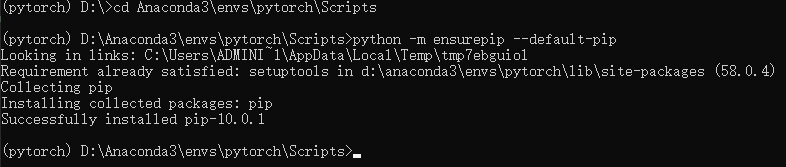
    python -m ensurepip --default-pip # Perfect solution

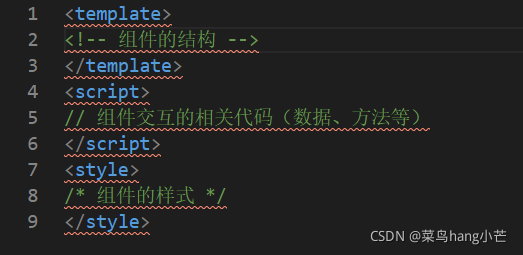
Create xxx.vue file with vscode, add comments and report error

Create xxx.vue file with vscode, add comments and report error

Create a. Vue file

When we use vscode to create. Vue files, we need to install relevant plug-ins that support Vue, such as vetur

    after installing the plug-in,
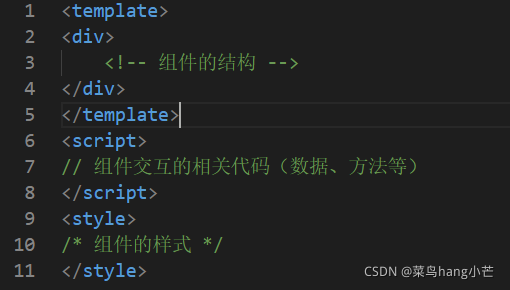
    there will be an error in adding comments. This should be due to some conflict in the installed plug-in. To solve the error in adding comments, you can add a div tag to the template tag, that is

An error is reported about import Java. SQL. *; problem

Many people always have this problem during package guide when learning java to connect to MySQL database

The package java.sql is not accessible

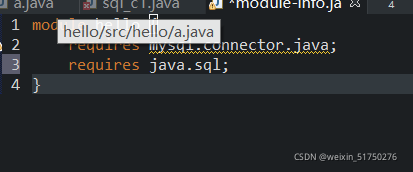
This problem is a problem with the Java version. Since java9, Java has become modular. You need to declare the use of the module package in the module file, otherwise you can’t find the class.

In module-info.java   Add requires java.sql; Just

  So the problem is solved