Author Archives: Robins

Vscode automatically formats the code when an error is reported

Use default

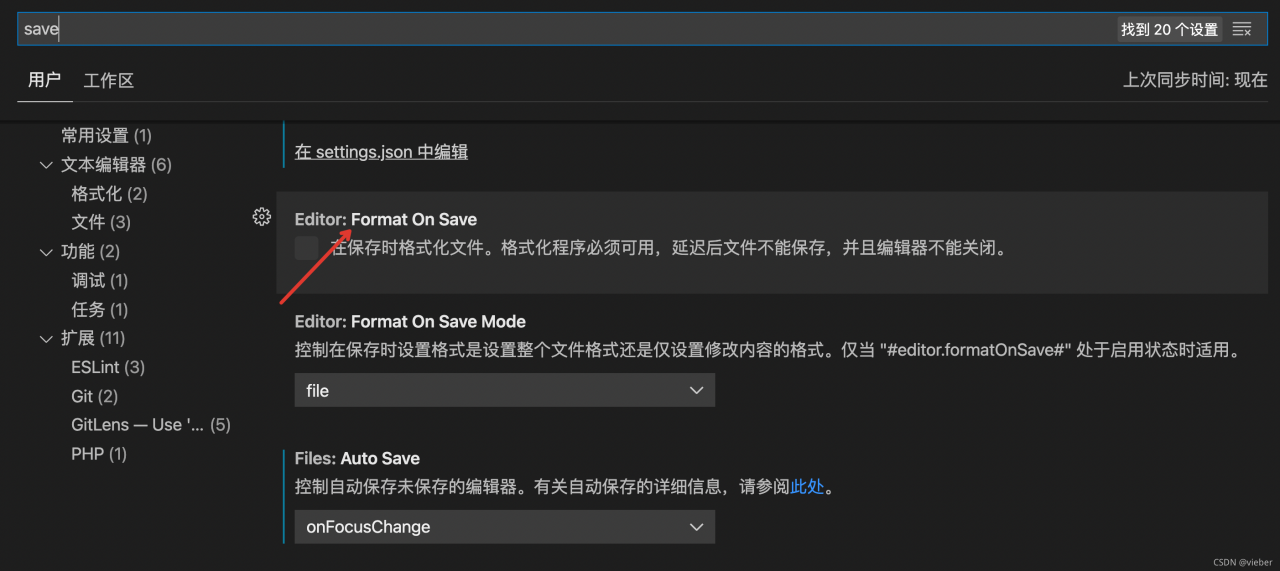
Prettier vscode save code auto format plug-in used by vscode
select formatonsave in vscode settings or modify it in setting.json

"editor.formatOnSave": true,
Use eslint for automatic formatting

Sometimes your front-end project uses eslint, which has automatic formatting configuration. We want to use the project’s own eslint configuration. We can use the format of eslint when saving automatically.

Let’s install the eslint plug-in first

Then set it in vscode

"editor.codeActionsOnSave": {
        "source.fixAll.eslint": true
 }

Add this configuration. In this way, the eslint configuration of the project itself will be used when saving.
Mysql database error (communications link failure)

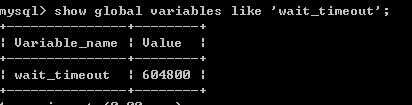
Reason: mysql5 defaults the wait_timeout of its connection to 8 hours
modify the configuration file. The steps are as follows:

【1】 Log in to MySQL and CMD
MySQL – H host address – U user name – P user password (for example, MySQL – hlocalhost – uroot – p123456)

【2】 View wait_ Timeout, CMD command:
show global variables like ‘wait_ timeout’;

[3] if wait_ Timeout is too small to be modified. CMD command:
set global wait_ timeout=604800;
set global interactive_ timeout=604800;
after modification, you can test.

Error reported by nested installation esxi host in vsan environment

preface

In the simulation vsan experiment in the physical vsan environment, an error will be reported when installing the esxi host. You need to modify the default parameters of the host. CAI can install it.

Modify parameters

The following commands need to be executed on each physical host. After execution, the esxi server needs to be restarted to take effect.

esxcli system settings advanced set -o /VSAN/FakeSCSIReservations -i 1

How to Solve null/hadoopbinary/wintils.exe Error

Null/Hadoop binary/wintils.exe reports an error
because Windows lacks Hadoop common package, you need to download and unzip hadoop-common-2.2.0-bin-master package

Set the environment variable in the environment variable,
1. Create Hadoop in the user variable_Home variable name, variable value is the location of common package
2. Add% Hadoop in the system variable path_HOME%\bin;
click OK to save and restart the computer

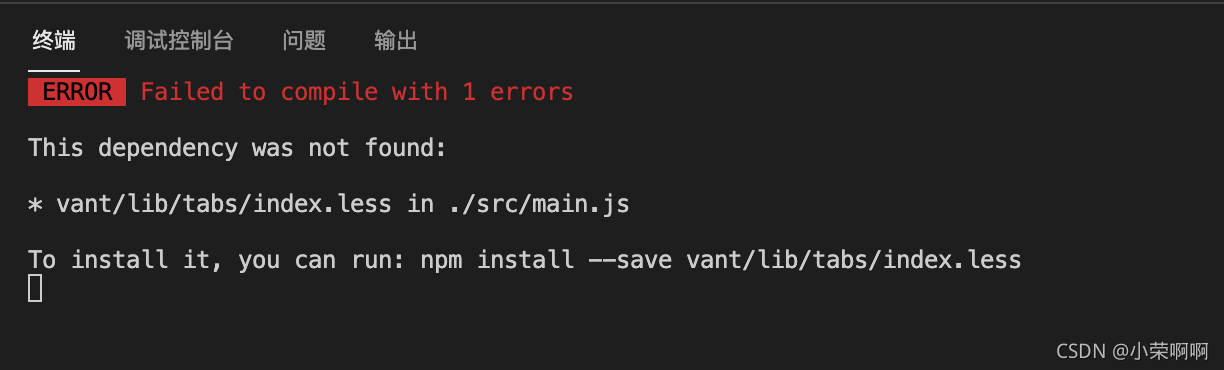
An error is reported when the less file is introduced into main.js

Today, in a Vue project, I planned to modify the theme of vant, and then an unexpected error occurred. I introduced the less file into main.js, and an error was reported when the project was started.

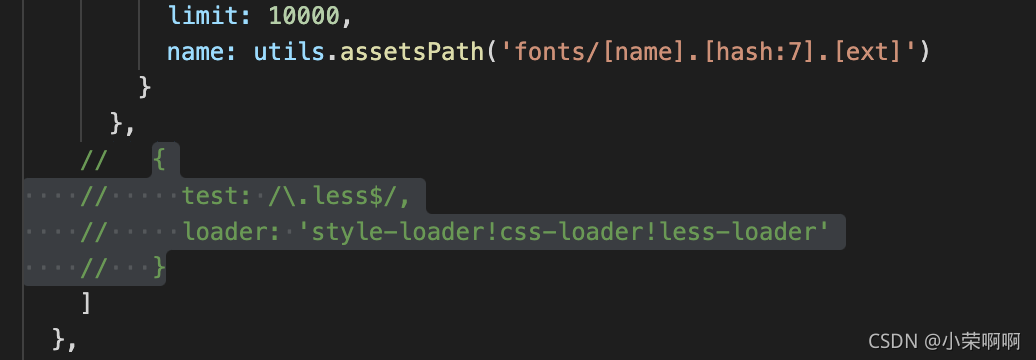
After looking for the reason, I didn’t find out. Then I tried on the previous old project. From here, I can know that it must be the reason for the version of something. Finally, I found that it is the scaffolding. The new version of Vue cli has helped us configure the less loader and put it in util.js, We just need to modify the webpack.base.conf.js file under the build file, delete or comment out this code, and the project can run normally.

How to Solve “Vue is not defined” Error

Background there is a problem in the introduction of Axios
code

import Vue from 'vue'
import App from './App.vue'
import router from './router'
import store from './store'
import axios from 'axios'


import ElementUI from 'element-ui';
import 'element-ui/lib/theme-chalk/index.css';
import './reset.css'

Vue.config.productionTip = false
Vue.use(ElementUI);
axios.default.baseURL = 'https://www.fastmock.site/mock/ad1bc58516abb5f0f452402035be2443/houtai'
Vue.prototype.$http = axios

This is because the order of the two lines of code is wrong
change to

import Vue from 'vue'
import App from './App.vue'
import router from './router'
import store from './store'
import axios from 'axios'
import ElementUI from 'element-ui';
import 'element-ui/lib/theme-chalk/index.css';
import './reset.css'
axios.default.baseURL = 'https://www.fastmock.site/mock/ad1bc58516abb5f0f452402035be2443/houtai'
Vue.prototype.$http = axios
Vue.config.productionTip = false
Vue.use(ElementUI);

Solve the error in installing aclocal-1.6 for splint

//splint-3.1.1/config/missing: line 46: aclocal-1.6: command not found
WARNING: `aclocal-1.6' is needed, and you do not seem to have it handy on your
         system.  You might have modified some files without having the
         proper tools for further handling them.  Check the `README' file,
         it often tells you about the needed prerequirements for installing
         this package.  You may also peek at any GNU archive site, in case
         some other package would contain this missing `aclocal-1.6' program

Solution:
1. Install automake sudo apt get install automake
2. If automake is installed, the version should not correspond. If you manually enter aclocal without an error, modify the makefile of splint, and manually delete the version number after aclocal and automake, followed by