Author Archives: Robins

Flume receives an error when a single message is too large

org.apache.kafka.common.errors.RecordTooLargeException: The request included a message larger than the max message size the server will accept.

Java client tuning: Max_ REQUEST_ SIZE_ CONFIG

Kafka server side adjustment: message. Max. bytes = 2147483640 is close to the max of int, because the maximum range of this value is int

Special note: after the parameter is adjusted, it has no effect on the created topic
adjust the parameter of the created topic: set to the maximum integer value of 2147483647

bin/kafka-configs.sh --zookeeper localhost:2181  --alter --topic topic_name   --add-config  max.message.bytes=2147483647

Problem solving
 

How to Solve 0xc1900101 Error (Win10 upgrade Win11)

Open PowerShell with administrator privileges and execute the following statement:

net stop wuauserv
net stop cryptSvc
net stop bits
net stop msiserver
ren C:\\Windows\SoftwareDistribution SoftwareDistribution.old
ren C:\\Windows\System32\catroot2 catroot2.old
net start wuauserv
net start cryptSvc
net start bits
net start msiserver

Opencv detection yolov4 target detection video stream error

I encountered a bug today. I didn’t have a problem before, but I have a problem today

There is no problem with yolov4 target detection image. There is a problem with this test video or calling camera detection

Report the following error:

TypeError: Expected cv::UMat for argument ‘src’

src data type = 17 is not supported

Repeated installation of OpenCV and numpy versions keeps reporting this error

Later, I thought it might be because the dataset pictures were in Chinese, so I renamed the pictures and re labeled them. The labels were also in English, and then I trained. After training, I found that there were still problems.

Finally, it is found that the result of Yolo prediction code is not directly returned to the picture,

images = yolo.detect_ image(image)
r_ image = images.get(‘image’)

The picture is in the dictionary

When the video is called

frame = np.array(yolo.detect_image(frame))

It needs to be changed to

frame = yolo.detect_ image(frame)
frame = np.array(frame.get(‘image’))

Moreover, Chinese pictures and Chinese labels have no effect.
About the error of base64decoder reference in eclipse

Problems encountered:

        Pull Maven project from Git   The base64decoder import file appears   But it keeps reporting errors

Solution:

        After searching for a long time, the solution is probably

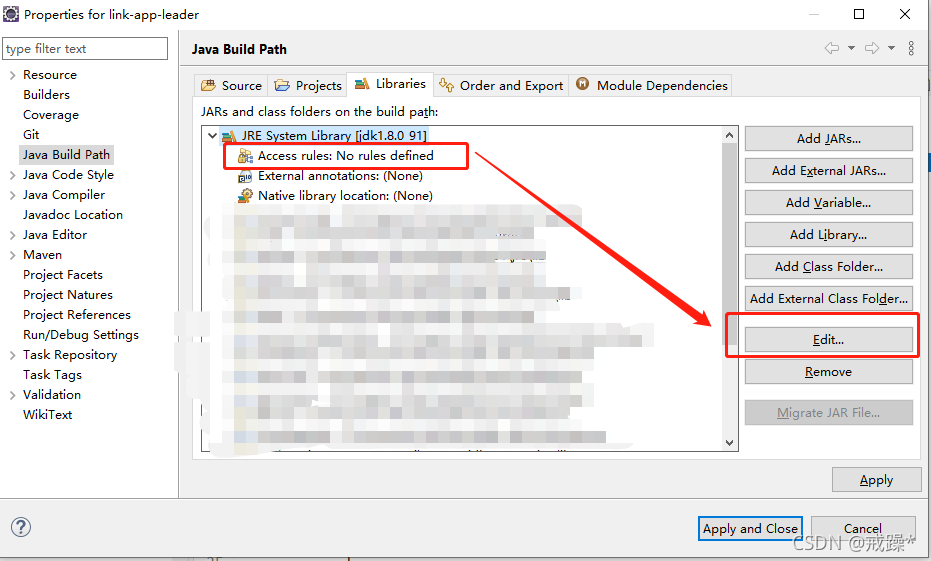
                1. Right click the project, build path – & gt; Config Build Path

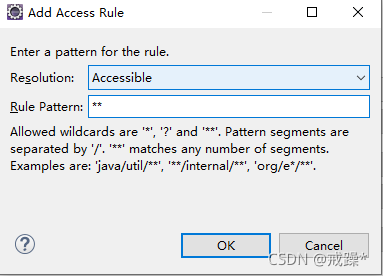
                2. Select JRE system library to expand and select access rules: no rules define  


                3. Click edit on the right  

                4. Click Add

                5. Modify as shown in the figure  

                6. Then OK   Then save the configuration (it is said on the Internet that it is OK to complete this step, but mine is not successful. Next, follow up operations)

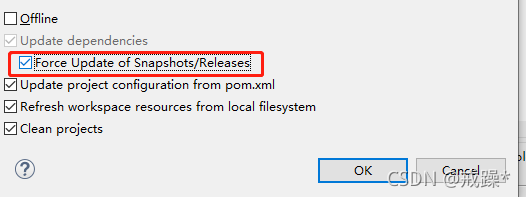
                7. Right click item – & gt; MAVEN —> Update project…..

                Remember to add this item


If there are any questions     Take a look at the JDK version   A search found an article saying  

OK. My problem is solved~

Ambqpioexception of rabbitmq error: java.io.ioexception

org.springframework.amqp.AmqpIOException: java.io.IOException

at org.springframework.amqp.rabbit.support.RabbitExceptionTranslator.convertRabbitAccessException(RabbitExceptionTranslator.java:71)
at org.springframework.amqp.rabbit.connection.RabbitAccessor.convertRabbitAccessException(RabbitAccessor.java:116)
at org.springframework.amqp.rabbit.core.RabbitTemplate.doExecute(RabbitTemplate.java:2103)
at org.springframework.amqp.rabbit.core.RabbitTemplate.execute(RabbitTemplate.java:2050)
at org.springframework.amqp.rabbit.core.RabbitTemplate.execute(RabbitTemplate.java:2030)
at org.springframework.amqp.rabbit.core.RabbitAdmin.initialize(RabbitAdmin.java:591)

The error reports are as follows:
if this problem occurs because you are writing the expired section, it is probably because you are in the same queue.

1. The expiration time of the previous queue is modified in the later code

2. When declaring the queue, the exclusive attribute is specified as true. This attribute indicates whether there can be exclusive. There can only be one consumer listener queue. When cnnection is closed. Whether to delete the queue. If true is set, an error will be reported when multiple services are connected to the consumer

Front end project construction error unexpected character ‘@’ solution

After I imported the CSS file of bootstrap, the following error messages appeared in the construction project:

ERROR in ./src/util/bootstrap/bootstrap.min.css
Module parse failed: D:\eclipseWorkspace\mbos\mbos-portal\webContent\src\util\bootstrap\bootstrap.min.css Unexpected character '@' (1:0)
You may need an appropriate loader to handle this file type.
SyntaxError: Unexpected character '@' (1:0)
    at Parser.pp$4.raise (D:\eclipseWorkspace\mbos\mbos-portal\webContent\node_modules\webpack\node_modules\acorn\dist\acorn.js:2221:15)
    at Parser.pp$7.getTokenFromCode (D:\eclipseWorkspace\mbos\mbos-portal\webContent\node_modules\webpack\node_modules\acorn\dist\acorn.js:2756:10)
    at Parser.pp$7.readToken (D:\eclipseWorkspace\mbos\mbos-portal\webContent\node_modules\webpack\node_modules\acorn\dist\acorn.js:2477:17)
    at Parser.pp$7.nextToken (D:\eclipseWorkspace\mbos\mbos-portal\webContent\node_modules\webpack\node_modules\acorn\dist\acorn.js:2468:15)

The reason is that the CSS file contains the @ symbol, and the configuration file does not specify a loader for the CSS file,

Solution: specify loader for CSS file:


{ 
	test: /\.css$/,
	loader: 'style-loader!css-loader' 
},

(a)’21442;’32771;65306;
styles.css Unexpected character’

Python reads the configuration file. Ini and resolves the error

Python reads the configuration file. Ini and reports an error raise nosectionerror (section) from none configparser. Nosectionerror: no section: ‘log’

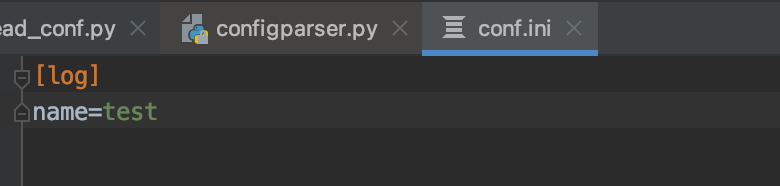
My profile:

read profile code:
from configparser import configparser

1. Instantiate the configparser class

conf = ConfigParser()

2. Read configuration file

conf.read(“conf_ini”,encoding=‘utf-8’)

3. Read a configuration value: get, all of which are strings

Value = conf.get (‘log ‘, “name”)
error after running:
raise nosectionerror (section) from none
configparser. Nosectionerror: no section:’ log ‘
reason: the. Ini configuration file is not read
solution:
fill in the absolute path directly

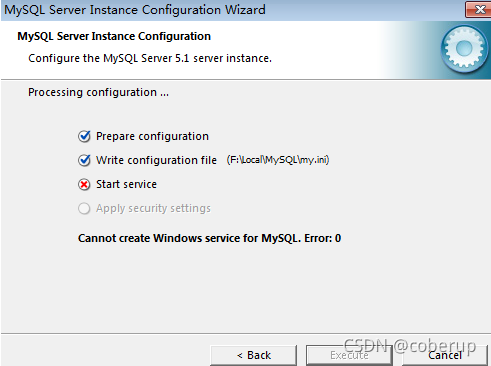
An error was reported during MySQL 6.0 installation: start service failed

Existing problem:
an error is reported during MySQL 6.0 installation: start service failed, as shown in the figure


Solution:
you need to delete the relevant registry and reinstall it
1) uninstall MySQL that failed to install, uninstall MySQL in control panel → programs and functions, and delete relevant folders and files under the installation path
2) delete the MySQL related directory under the programdata directory on disk C. if it cannot be found, you need to “show hidden folder” operation
3) delete the relevant registry
(1) start → run → CMD → regedit to enter the registry list
(2) delete the following three places in sequence:

HKEY_ LOCAL_ MySQL directory under machine/system/controlset001/services/eventlog/applications; HKEY_ LOCAL_ MySQL directory under machine/system/controlset002/services/eventlog/applications; HKEY_ LOCAL_ MySQL directory under machine/system/currentcontrolset/services/eventlog/applications.

4) Restart the computer and reinstall mysql6.0.

Error when Python rarfile decompresses. Rar file: badrarfile

Python decompresses the. Rar file using the rarfile module. An error is reported:

raise BadRarFile("Failed the read enough data: req=%d got=%d" % (orig, len(data)))
rarfile.BadRarFile: Failed the read enough data: req=1151 got=52

Solution:
install the necessary modules:

pip install rarfile
pip install unrar

Download: unrar.exe
link: https://pan.baidu.com/s/1St0XHD3wMB8v6CrDsvLK4g
Extraction code: 9hr5

Put unrar.exe in the same record as the PY file you wrote, and you can successfully run and unzip the rar file.

The reason is probably:
the algorithm of RAR compression package is not open source and is not disclosed to the public. Therefore, if other software wants to compress or decompress rar files, it must call rar.exe through CMD. Therefore, it is suspected that rarfile is actually called rar.exe or unrar.exe

Reference:
unzip the rar file in Python

Methods to avoid fail to allocate bitmap errors in pyplot

1. Problem recurrence

After repeated drawing (mainly creating figure ), even if only the local variables inside the function are defined, or the drawing has been closed with
PLT. Close() , pyplot still retains some contents, but the specific part has not been found yet.

The following is a bug recurrence fragment from GitHub:

import matplotlib.pyplot as plt
import numpy as np
image = np.random.randn(256, 256, 3)
image= np.array(image/image.max()*255, dtype= np.uint8)
for i in range(500):
    print(i)
    plt.cla()
    plt.imshow(image)
    plt.close()

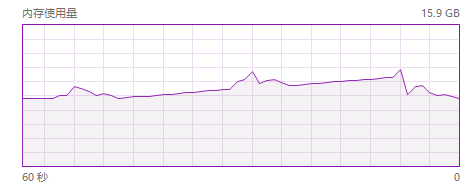
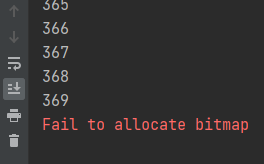
After running, an error will be reported when I = 369 , and the memory will continue to rise before the error is reported.

memory usage change

error screenshot

2. Reason speculation

The drawing library based on Matplotlib may create window objects during drawing, but the related objects are not released when close() , resulting in continuous memory accumulation.

3. Solutions

Define a figure and axes object and reuse it. Use cla() to clear the previous drawing content before each redrawing
example 1:

import matplotlib.pyplot as plt
import numpy as np
image = np.random.randn(256, 256, 3)
image= np.array(image/image.max()*255, dtype= np.uint8)
fig, axes= plt.subplots()
for i in range(500):
    print(i)
    axes.cla()
    axes.imshow(image)

Example 2:

import matplotlib.pyplot as plt
import numpy as np

class __:
    def __init__(self):
        self.fig, self.axes= plt.subplots()

    def imshow(self, x):
        self.axes.cla()
        self.axes.imshow(image)


_= __()
image = np.random.randn(256, 256, 3)
image= np.array(image/image.max()*255, dtype= np.uint8)
for i in range(500):
    print(i)
    _.imshow(image)