Author Archives: Robins

nested exception is org.apache.ibatis.builder.BuilderException: Error evaluating expression [Solved]

This exception is usually a problem with dynamic SQL. Find the corresponding SQL and check the dynamic SQL syntax according to the following prompt information.

Problem description

Exception information:
needed exception is org.apache.ibatis.builder.builderexception: error evaluating expression 'ides'. Return value (806) was not Iterable.

According to the exception prompt information, find the dynamic SQL statement where ides is located.

<foreach  collection="ides"  index="index" item="ides" open="(" separator="," close=")">
     #{ides}
</foreach>

...
<foreach  collection="ides"  index="index" item="ides" open="(" separator="," close=")">
     #{ides}
</foreach>

Finally, it is found that
two <foreach></ foreach> Statement operates on the same item variable, resulting in the failure of dynamic SQL splicing of the latter.

Solution:

Change the item property in any statement to a different value.

<foreach  collection="ides"  index="index" item="idess" open="(" separator="," close=")">
     #{idess}
</foreach>
...
<foreach  collection="ides"  index="index" item="ides" open="(" separator="," close=")">
     #{ides}
</foreach>
AAPT: error: attribute cardBackgroundColor (aka com.x.x:cardBackgroundColor) not found.

* What went wrong:
Execution failed for task ':launcher:processReleaseResources'.
> Android resource linking failed
  C:\Users\Administrator\.gradle\caches\transforms-2\files-2.1\a3890adfdb75cc00c9c342ba929acf1b\res\layout\com_facebook_device_auth_dialog_fragment.xml:22: AAPT: error: attribute cardBackgroundColor (aka com.test.k22:cardBackgroundColor) not found.
      
  C:\Users\Administrator\.gradle\caches\transforms-2\files-2.1\a3890adfdb75cc00c9c342ba929acf1b\res\layout\com_facebook_device_auth_dialog_fragment.xml:22: AAPT: error: attribute cardElevation (aka com.test.k22:cardElevation) not found.
      
  C:\Users\Administrator\.gradle\caches\transforms-2\files-2.1\a3890adfdb75cc00c9c342ba929acf1b\res\layout\com_facebook_smart_device_dialog_fragment.xml:22: AAPT: error: attribute cardBackgroundColor (aka com.test.k22:cardBackgroundColor) not found.
      
  C:\Users\Administrator\.gradle\caches\transforms-2\files-2.1\a3890adfdb75cc00c9c342ba929acf1b\res\layout\com_facebook_smart_device_dialog_fragment.xml:22: AAPT: error: attribute cardElevation (aka com.test.k22:cardElevation) not found.

https://mvnrepository.com/artifact/androidx.cardview/cardview/1.0.0

Download cardview-1.0.0.aar and import it into Assets/Plugins/Android directory.

[Solved] RuntimeError: Expected object of scalar type Float but got scalar type Double for argument #2 ‘mat1‘

Error Message (Error Codes below):
RuntimeError: Expected object of scalar type Float but got scalar type Double for argument #2 ‘mat1’ in call to _th_addmm

for epoch in range(num_epochs):
    # Convert numpy arrays to torch tensors
    inputs = torch.from_numpy(x_train)
    targets = torch.from_numpy(y_train)
    # Forward pass
    outputs = model(inputs)
    loss = criterion(outputs, targets)
    
    # Backward and optimize
    optimizer.zero_grad()
    loss.backward()
    optimizer.step()
    
    print("Epoch [{}/{}] Loss: {:.4f}".format(epoch+1, num_epochs, loss.item()))

Solution:

Method 1. Add

inputs = inputs.float()
targets = targets.float()
model = model.float()

Complete code

for epoch in range(num_epochs):
    # Convert numpy arrays to torch tensors
    inputs = torch.from_numpy(x_train)
    targets = torch.from_numpy(y_train)
    inputs = inputs.float()
    targets = inputs.float()
    model = model.float()
    # Forward pass
    outputs = model(inputs)
    loss = criterion(outputs, targets)
    
    # Backward and optimize
    optimizer.zero_grad()
    loss.backward()
    optimizer.step()
    
    print("Epoch [{}/{}] Loss: {:.4f}".format(epoch+1, num_epochs, loss.item()))

Method 2. Add

inputs = inputs.double()
targets = inputs.double()
model = model.double()

Complete code

for epoch in range(num_epochs):
    # Convert numpy arrays to torch tensors
    inputs = torch.from_numpy(x_train)
    targets = torch.from_numpy(y_train)
    inputs = inputs.double()
    targets = inputs.double()
    model = model.double()
    # Forward pass
    outputs = model(inputs)
    loss = criterion(outputs, targets)
    
    # Backward and optimize
    optimizer.zero_grad()
    loss.backward()
    optimizer.step()
    
    print("Epoch [{}/{}] Loss: {:.4f}".format(epoch+1, num_epochs, loss.item()))

[Solved] OpenCV ERROR: The minSdk version should not be declared in the android manifest file

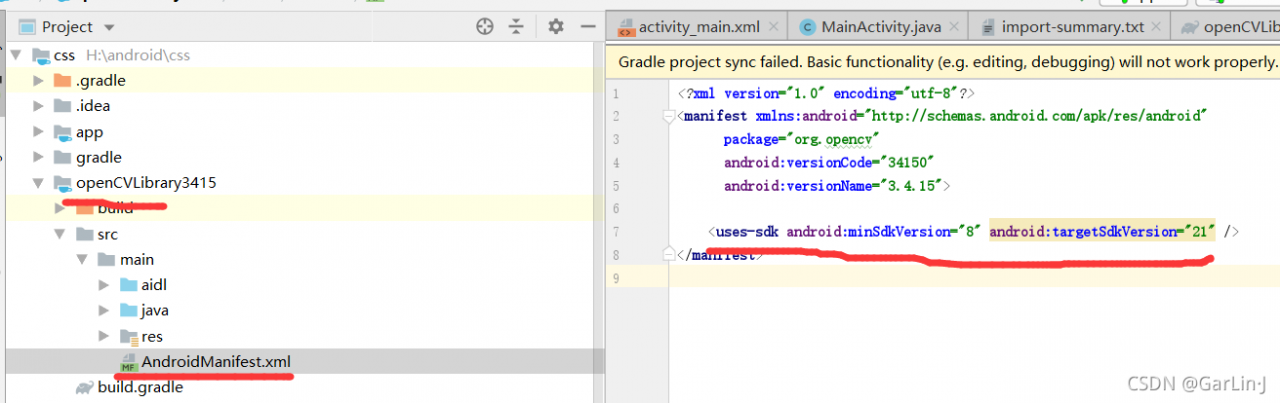
ERROR: The minSdk version should not be declared in the android manifest file. You can move the version from the manifest to the defaultConfig in the build.gradle file.
Remove minSdkVersion and sync project
Affected Modules: openCVLibrary3415


Solution: Just comment it out and run it again!!!
ERROR: The minSdk version should not be declared in the android manifest file. You can move the version from the manifest to the defaultConfig in the build.gradle file.
Remove minSdkVersion and sync project
Affected Modules: openCVLibrary3415

[Solved] Vscode Connect SSH Error: Error Running the contributed command ‘_workbench.downloadResource

Question

An error occurred while connecting with vscode error: running the contributed command: '"_ workbench.downloadResource

Solution

Using common online solutions does not solve the problem. The last reason is that the remote network has not been updated for a long time, and the local network has been updated automatically. Therefore, the local vscode cannot be connected to the remote because the remote has not been updated.

I only need to connect the local computer and the remote computer to the same network (must be able to access the Internet), and then use the local vscode to connect to the remote. The remote will automatically update the connected service.

result = e.symbols[symb] KeyError: b‘system‘ [How to Solve]

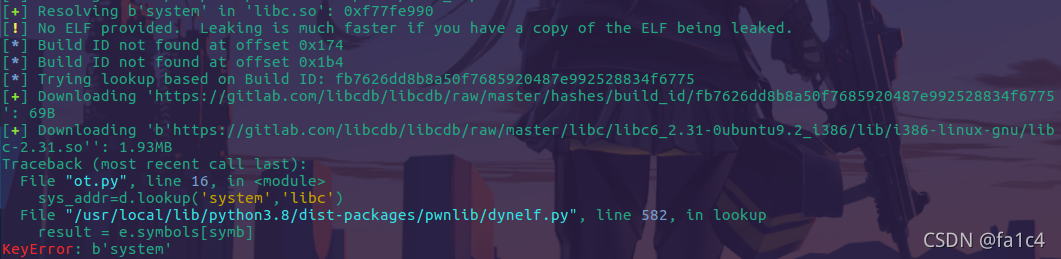
problem

Traceback (most recent call last):
  File "ot.py", line 16, in <module>
    sys_addr=d.lookup('system','libc')
  File "/usr/local/lib/python3.8/dist-packages/pwnlib/dynelf.py", line 582, in lookup
    result = e.symbols[symb]
KeyError: b'system'

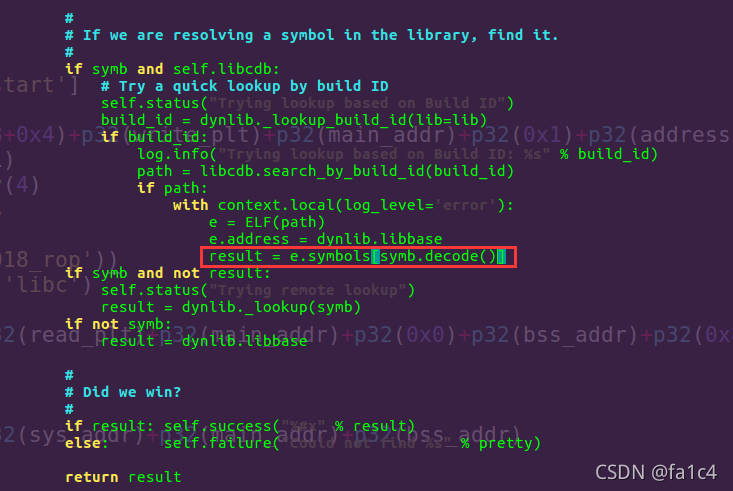
This is a problem that python3 is incompatible with dynelf modules. The biggest difference between python3 and python2 (PWN) is that the bytes and STR types are not common. Therefore, for scripts that can run in python2, the problem of type conversion must be considered in python3. This is also the reason for the error reporting in dynelf

Solution:

vim /usr/local/lib/python3.8/dist-packages/pwnlib/dynelf.py

Find the dynelf.py file, find the error line, and modify the source code

result = e.symbols[symb]

by

result = e.symbols[symb.decode()]

Fixed

error: src refspec master does not match anyerror: failed to push some refs to

When pushing a local project to gitee for the first time, a similar error occurs:

error: src refspec master does not match any
error: failed to push some refs to 'https://gitee.com/xxx/irojects.git'

The solution is to pull first and then push:

git pull origin master

I thought it would be OK to push again, but it’s not:

% git push
fatal: The current branch master has no upstream branch.
To push the current branch and set the remote as upstream, use

Then you still have to operate like this:

git push -u origin master

Successful push!

Welcome to my official account and exchange study.

esp32:A fatal error occurred: Timed out waiting for packet header

Question

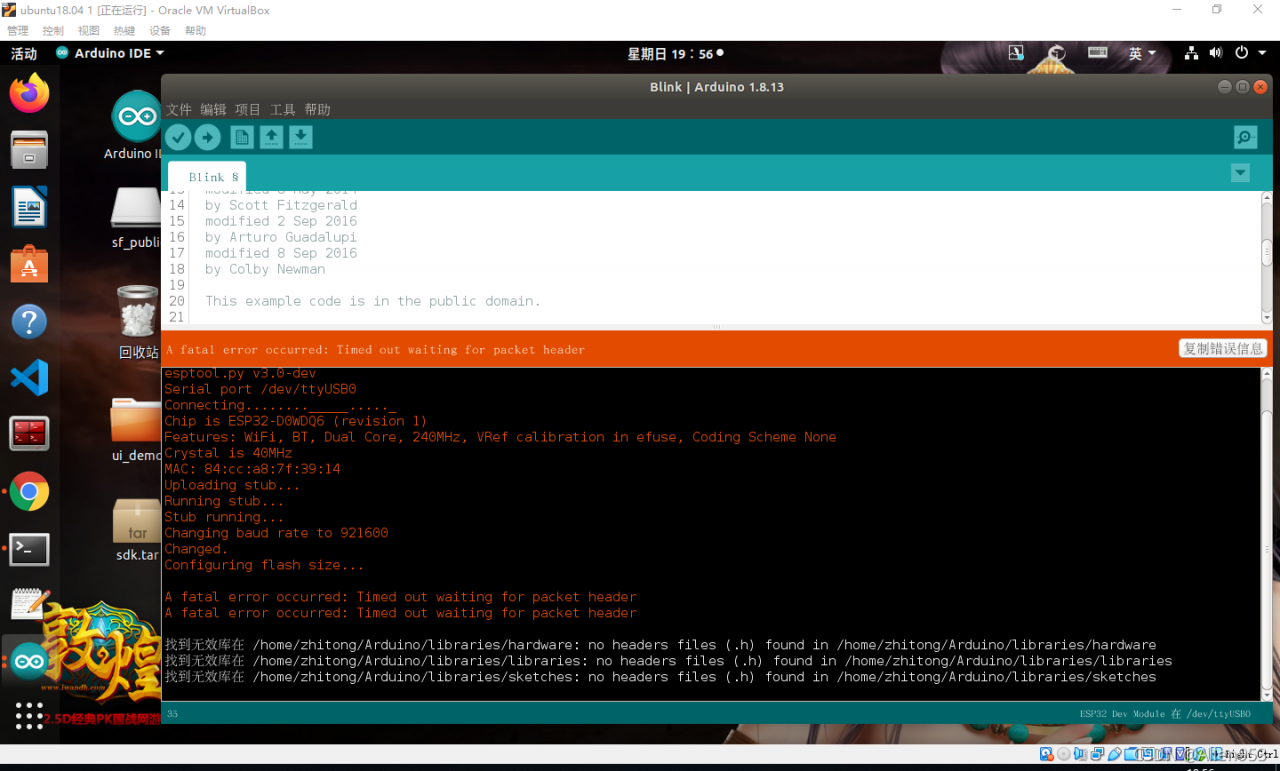
When I download the program to esp32 with Arduino IDE, the following error message appears:

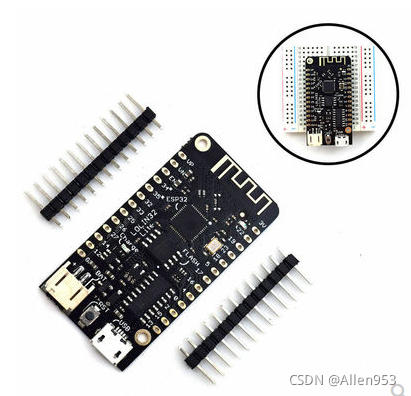
My board is the following Board:


Causes and Solutions

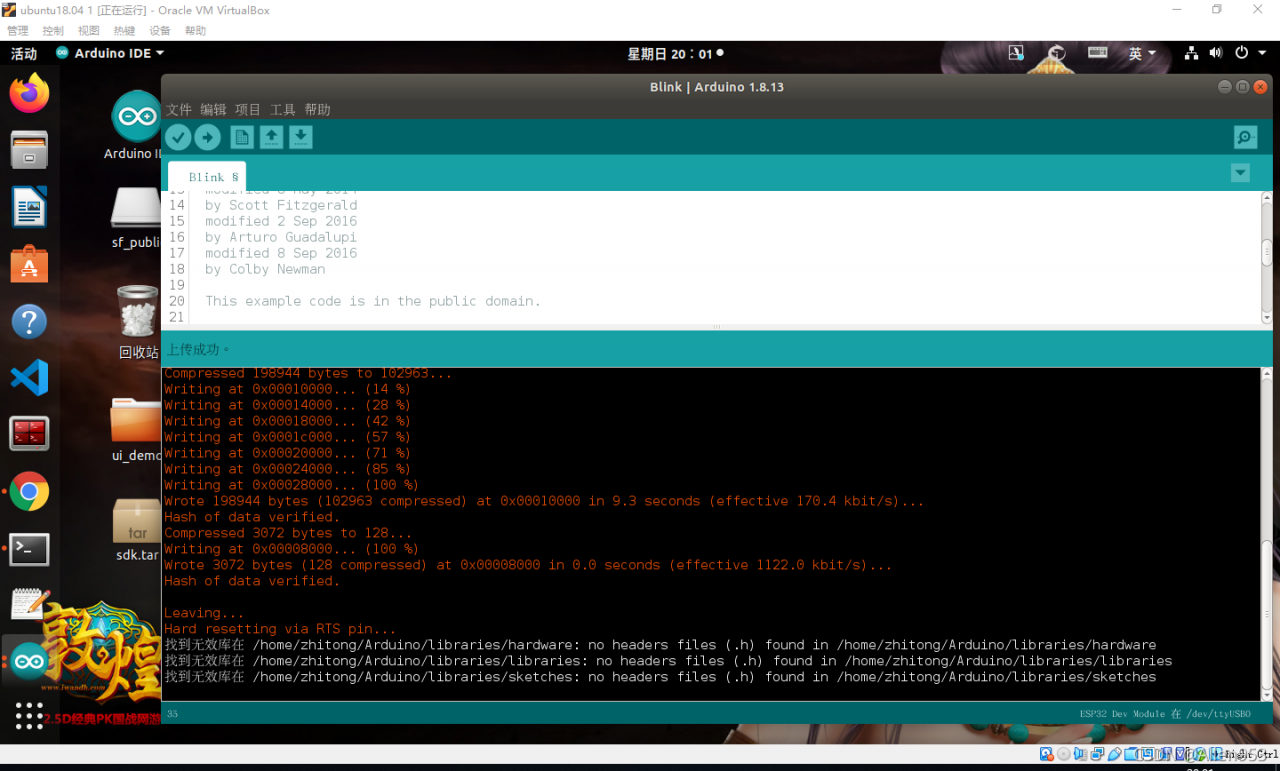
The reason is that there is an error in the baud rate selection. The baud rate I selected is 921600 by default. In fact, 115200 should be selected. In this way, you can download normally after downloading again.

As shown in the figure below, it is successful.


Error during job, obtaining debugging information [How to Solve]

Error:

ERROR : Ended Job = job_1631679144970_1574917 with errors
ERROR : Error during job, obtaining debugging information...
ERROR :
Task with the most failures(4):
-----
Task ID:
task_1631679144970_1574917_m_000158

URL:
http://0.0.0.0:8088/taskdetails.jsp?jobid=job_1631679144970_1574917&tipid=task_1631679144970_1574917_m_000158
-----
Diagnostic Messages for this Task:
Container [pid=18442,containerID=container_1631679144970_1574917_01_003316] is running beyond physical memory limits. Current usage: 4.1 GB of 4 GB physical memory used; 5.8 GB of 80 GB virtual memory used. Killing container.

I checked the written information on the Internet and said it was
java.lang.outofmemoryerror: Java heap space. The reason is that the memory space of the namenode is not enough and the JVM is not enough. It is caused by the start of a new job
the solution is to set the local mode

set hive.exec.mode.local.auto=true;

The specific error reported by me is running beyond physical memory limits. Current usage: 4.1 GB of 4 GB physical memory used
the physical memory size is insufficient

Solution:

set mapreduce.map.memory.mb=8192;
set mapreduce.reduce.memory.mb=8192;