Author Archives: Robins

Windows11 Install Ubuntu Error: WslRegisterDistribution failed with error: 0x800701bc

Installing, this may take a few minutes...
WslRegisterDistribution failed with error: 0x800701bc
Error: 0x800701bc WSL 2 ??????????????????https://aka.ms/wsl2kernel

Press any key to continue...

Need to upgrade the WSL kernel, download and install on it
https://wslstorestorage.blob.core.windows.net/wslblob/wsl_update_x64.msi

Jmeter not-GUI Run Error: Error generaing the report:java.langNullPointerException

Error generating the report: java.langnullpointerexception when JMeter runs on the command line

This error is caused by CSV. Error reading CSV file path,   The CSV set file is not found, and there is no result after running. This error will occur only when an error is reported in the generated report, so you only need to configure the correct file path to run successfully. During distributed pressure measurement, the file path on the slave machine is used and placed in the bin directory. The file paths of multiple slave machines are consistent. Problem solving.

How to Solve QT error: LNK1158: Cannot Run “rc.exe”

[problem description]

Qt5.9.11 is installed on windows10, and the compilation error is: error: lnk1158: unable to run “RC. Exe”

[problem location]

The path of rc.exe is not put into the environment variable

[solution]

Add the path “C:\program files (x86)\windows kits\8.1\bin\x86” to the environment variable path.

Restart qtcreator and the compilation is successful.

[Solved] Pytorch Error: RuntimeError: Trying to backward through the graph a second time

During Gan’s training, we often encounter this problem: runtimeerror: trying to backward through the graph a second time, but the saved intermediate results have already been free

The description of this error is that when you are propagating in the direction, the cache is released in advance. Many solutions are to change loss. Backward() to loss. Backward (retain_graph = true). In fact, most of the code problems are not here, and the retention of the calculation chart may cause the cache to accumulate rapidly and lead to the explosion of the video memory, In fact, the real reason is that the discriminator and the producer share the same variables. Just add detach () when using variables for the first time.

#### Update Discriminator ###
real_preds = netD(real_gt)
fake_preds = netD(fake_coarse)


#### Update Generator #####
real_preds = netD(real_gt)
fake_preds = netD(fake_coarse)

Change to:

#### Update Discriminator ###
real_preds = netD(real_gt.detach())
fake_preds = netD(fake_coarse.detach())


#### Update Generator #####
real_preds = netD(real_gt)
fake_preds = netD(fake_coarse)

It’s not easy to find the method. Thank you for your support

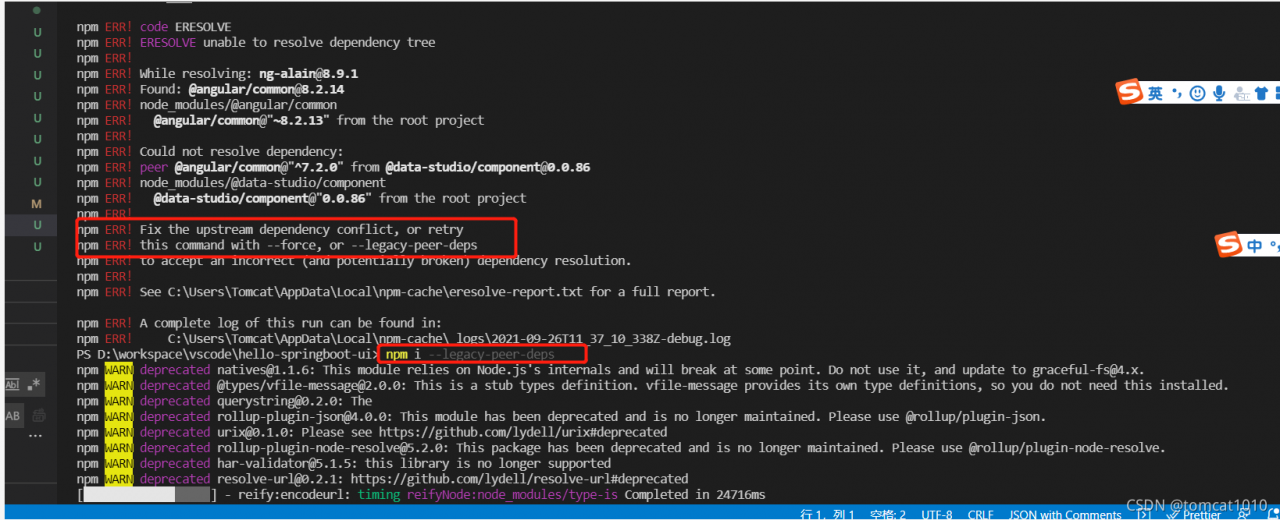
[Solved] Npm install Error: verbose stack Error: unable to resolve dependency tree

[environment]

[email protected]

[email protected]

1. Analysis reason:

After investigation, 1. It is found that there is peer dependency in package.json, indicating the version of angular 7. X, which is incompatible with the version of angular 8. X that the current project depends on, resulting in compilation errors.

2, in addition, the original use of npm 6.x install is no problem, because npm 7.x on peer dependency compatibility requirements are higher, so the error is reported.

2. Solution:

Method 1: — force or — legacy peer DEPs

npm install –force

npm   install –legacy-peer-deps

Method 2:

Modify the dependency definition package.json of the problem component and the component version that peer dependency depends on.

file_name.sh: 3: Syntax error: “(“ unexpected [How to Solve]

An error was encountered

Execute the command $./example03. Sh error:
./example03. Sh: 3: syntax error: “(” unexpected
check the document

#!/bin/sh
#function hello
function hello(){
    echo "hello SXU."
}
#main
hello	
exit 0

Confirm again and again that there is no error.

Find the reason

Related to the actual shell version used
use the command LS - L/bin/* sh to print and view. For example:
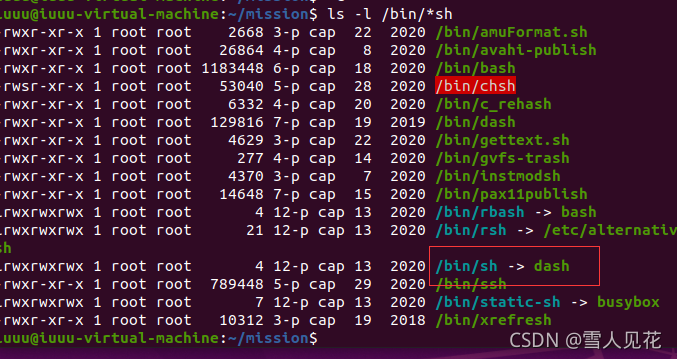
you can see that SH is redirected to dash. Therefore, if./example.sh is executed, dash is used.

Solution:

bash example. Sh the first line of the script #/ Change bin/sh to: #/ Bin/bash, and then execute./example. Sh. The code is correct for standard bash, because Ubuntu/Debian uses dash instead of traditional bash in order to speed up startup. The solution is to cancel Dash: sudo dpkg reconfigure dash , and select no in the selection, choose one of the three methods to succeed.

The docker export container cannot be run after being imported: error response from daemon: no command specified

The docker export container cannot be run after being imported. An error is reported: error response from daemon: no command specified

According to the error message, the command can be run without specifying the command

[root@localhost ~]# docker images
REPOSITORY          TAG                 IMAGE ID            CREATED             SIZE
docker.io/ubuntu    latest              fb52e22af1b0        3 weeks ago         72.8 MB

[root@localhost ~]# docker run -itd docker.io/ubuntu:latest
7ce403eba8d89127395e057eb4d6cf7eb2374e40214ce6575a29e755b707ca23

[root@localhost ~]# docker ps
CONTAINER ID        IMAGE                     COMMAND             CREATED             STATUS              PORTS               NAMES
7ce403eba8d8        docker.io/ubuntu:latest   "bash"              4 seconds ago       Up 3 seconds                            hungry_babbage
[root@localhost ~]# docker export -o test.tar 7ce403eba8d8

[root@localhost ~]# ls
anaconda-ks.cfg  test.tar

[root@localhost ~]# docker import test.tar test/ubuntu:v0.1
sha256:c3d604273769f7a74126b27f29c8cecd055fc18b10c943da0c0528dc28520a60

[root@localhost ~]# docker images
REPOSITORY          TAG                 IMAGE ID            CREATED             SIZE
test/ubuntu         v0.1                c3d604273769        4 seconds ago       72.8 MB
docker.io/ubuntu    latest              fb52e22af1b0        3 weeks ago         72.8 MB

[root@localhost ~]# docker run -itd test/ubuntu:v0.1
/usr/bin/docker-current: Error response from daemon: No command specified.
See '/usr/bin/docker-current run --help'.

# add /bin/bash work
[root@localhost ~]# docker run -itd test/ubuntu:v0.1 /bin/bash
5b7dca448a1400716fa931463c2c314e0e59c7888fa77d5b182e72d911122966

[root@localhost ~]# docker ps
CONTAINER ID        IMAGE                     COMMAND             CREATED             STATUS              PORTS               NAMES
5b7dca448a14        test/ubuntu:v0.1          "/bin/bash"         3 seconds ago       Up 2 seconds                            zen_varahamihira
7ce403eba8d8        docker.io/ubuntu:latest   "bash"              5 minutes ago       Up 5 minutes                            hungry_babbage

JAVA Connect Redis Error: stop-writes-on-bgsave-error option

(error) MISCONF Redis is configured to save RDB snapshots, but it is currently not able to persist on disk. Commands that may modify the data set are disabled, because this instance is configured to report errors during writes if RDB snapshotting fails (stop-writes-on-bgsave-error option). Please check the Redis logs for details about the RDB error.

Go to the redis installation directory and find src

./redis-cli -a redis password

Then execute

127.0.0.1:6379> config set stop-writes-on-bgsave-error no

That’s it

However, this method will fail after restarting

Module build failed: Error: Node Sass version 6.0.0 is incompatible with ^4.0.0

When executing the named NPM run dev to start the front-end project, the following error is reported

Module build failed: Error: Node Sass version 6.0.0 is incompatible with ^4.0.0.

From the prompt, I downloaded the latest dependency. The current version is incompatible. Later, I checked the relevant documents, which is really caused by the high version;

The simple way is to find the appropriate version and install the specified version (try it several times if you don’t know the version)

The processing steps are as follows:

#uninstall
npm uninstall node-sass

#install with the version
npm install [email protected] --save-dev

Run NPM run dev again

Golang Error: fatal error: concurrent map read and map writ

The reason for the error is that the map is thread unsafe and an error will be reported when there are concurrent reads and writes
solution: use the read-write lock sync.rwmutex:
golang read-write lock
rules
when the read lock exists, other read locks can exist together, but the write lock needs to wait
when the write lock exists, both the read lock and the write lock need to wait
the read lock can be concurrent, and the read lock and the write lock are mutually exclusive, Write lock and write lock are mutually exclusive

var rw sync.RWMutex
//Read lock and locking
rw.Rlock()
//Read lock and unlocking
rw.Runlock()