Author Archives: Robins

Keil Compile Error: ..\OBJ\USART.axf: error: L6002U: Could not open file ..\obj\sys.o: No such file or directory

This is not the first time that this problem has occurred. When I go to the Internet for help, it mostly refers to the problem of environment variables. After I change it, I find that keil flashes back. When I see someone saying that it is impossible to generate. O files, I add them manually, but my intuition tells me that this is the most correct choice. After consulting the data, I find that the following problems occur.

One reason for the error is that your computer user name is Chinese, which is the problem of environment variables, but I did not report an error when running the routine, indicating that there is no problem with my environment;

Another reason is that there was a low version of keil software installed before, and the registry was not deleted after uninstallation. At this time, just delete it.

My problem is that I didn’t pay attention when creating a new project. I copied the routine directly, and then added the file manually, resulting in an existing. O file. At this time, I compiled it again, resulting in a problem. Because preprocessing, compilation, assembly and linking are indispensable, the. O file is generated in the assembly stage. If it already exists, it will trigger the error report. I would like to remind you that the new project should not be as easy as me, but step by step

[Solved] VUE Error: Error in mounted hook: “TypeError: Cannot read properties of undefined (reading ‘$on‘)“

vue error:
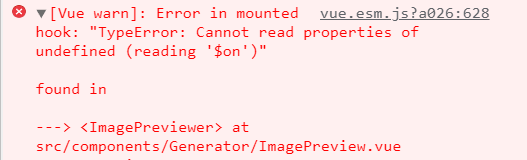
vue.esm.js?a026:628 [Vue warn]: Error in mounted hook: “TypeError: Cannot read properties of undefined (reading ‘$on’)”

Solution: Add the following codes in main.js

// The event Bus is used for communication between unrelated components.
Vue.prototype.$bus = new Vue()

[Solved] VScode sftp Code synchronizate Error: Error: No such file

Cause

After the extension is successfully installed, the file upload prompt error: no such file
but the code has actually been uploaded successfully**

Solution:

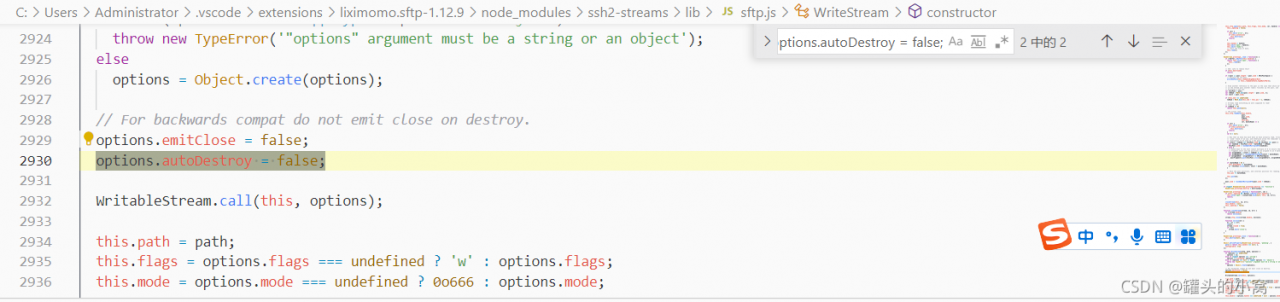
Open ~ /.Vscode/extensions/liximomo.sftp-1.12.9/node_modules/ssh2streams/lib/sftp.js

search

options.emitClose= false;

Add under each search term

options.autoDestroy = false;

Remember to restart vscode for the changes to take effect.

Code screenshot

[Solved] Hadoop Error: Exception in thread “main“ java.io.IOException: Error opening job jar: /usr/local/hadoop-2.

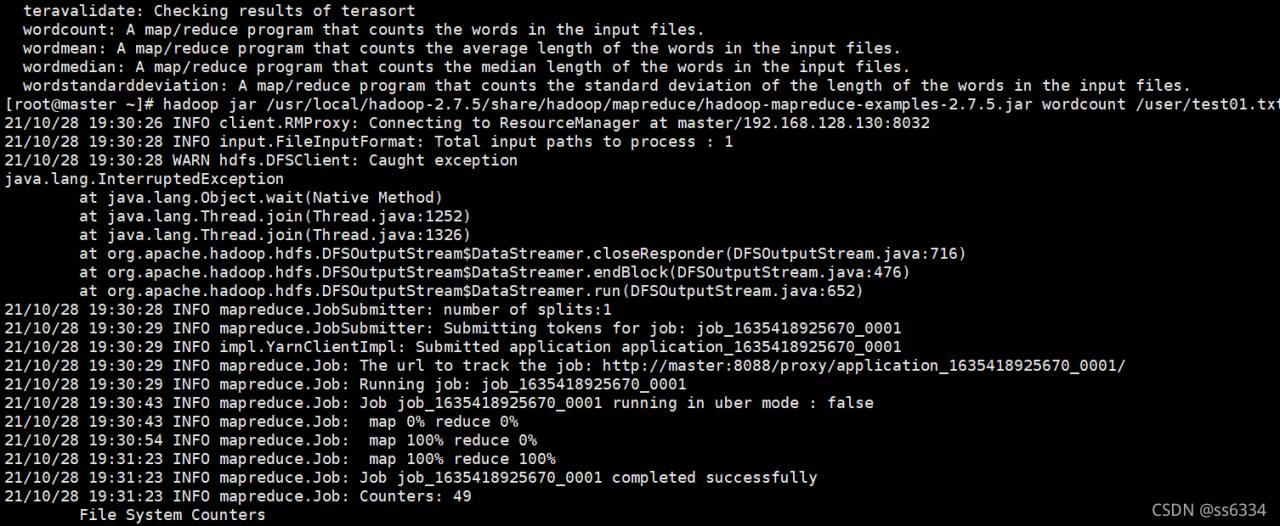
An exception occurred while running MapReduce task today:
at first, I thought it was my JDK version. The JDK version of Linux was 1.8 and my windows JDK version was 11.0. I changed the JDK environment variable to 1.8, but the problem remained the same after running.

Later, I checked the size of the jar package and found that it was 0kb. Er… I checked the size of other jar packages, no problem. Then I think the jar package is damaged
I transported it through the window again, and it can succeed later

I hope this article is helpful to you~

Project Startup Error: Error running ‘xxxApplication‘;Command line is too long, Shoerten command line for……..

Springboot startup project error

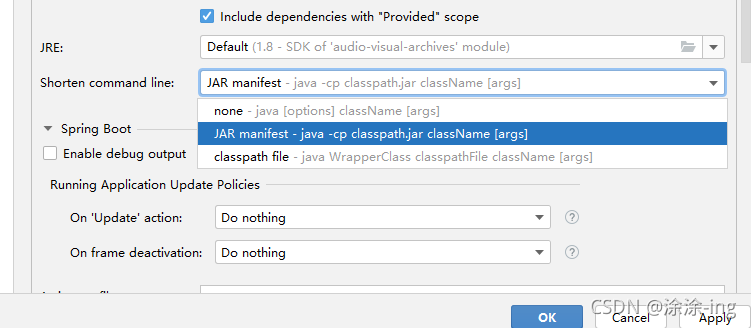
When you start a project, you can’t start it all the time. The name of the startup class is too long. As shown in the figure below

Error running'XxxApplication';
Command line i stoo long. Shorten command line for XxxApplication or also for Spring Boot default configuration?

Modify idea configuration information

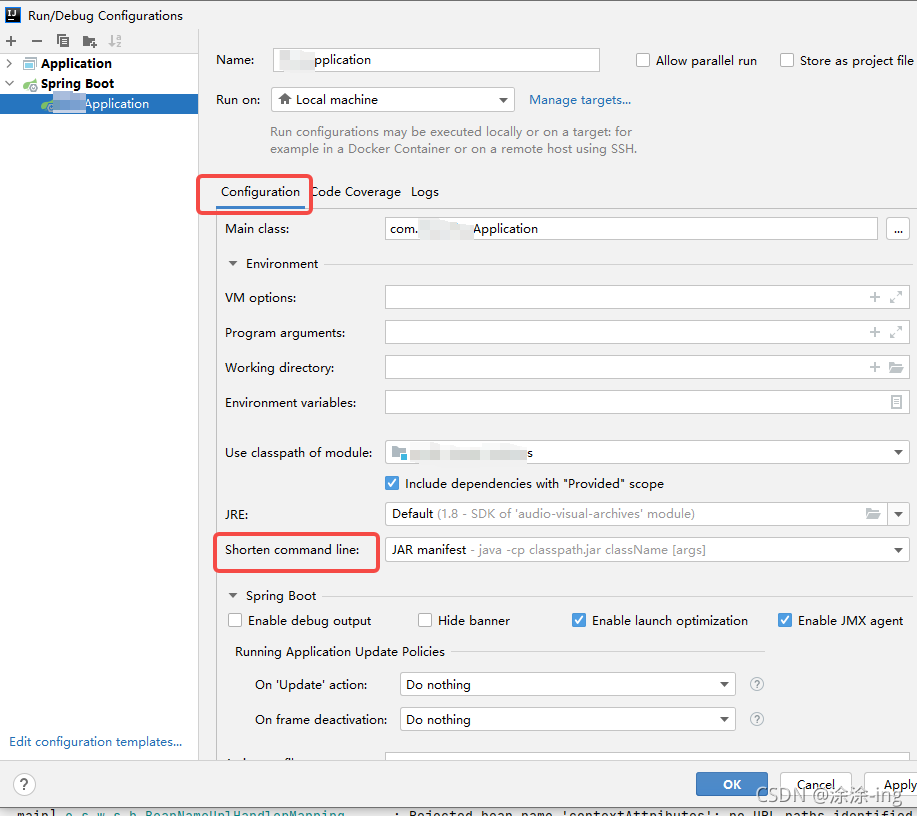
Enter the startup class configuration, click eidt configurations, and find the startup class:
in the short command line option, select the jar manifest option, because the default is the first none,

Explanation:

none :

 This is the default option and idea will not shorten the command line. If the command line exceeds the OS limit, the idea will not run your application, but the tooltip will suggest configuring a shortener.

JAR manifest:

idea passes long class paths through a temporary classpath.jar. The original class path is defined in MANIFEST.MF as the class path property in classpath.jar.

classpath file:

idea writes a long class path to a text file.

Online advice is to choose the third option, classpath file. You can choose according to your project needs

How to Solve All masterha_check_repl Error


1. Troubleshooting ideas

[root@DBMysql ~]#masterha_check_repl --conf=/etc/masterha/app1.cnf

There are two main reasons for the following error reports:

① MySQL is installed with the source code, resulting in the inconsistency between the MySQL directory and the MHA default directory. The solution is to use ln – s as the relevant soft connection. Note: my MySQL database is installed by MySQL user and MHA is installed by root user. If I install it under the same user, I wonder whether such problems can be avoided

② The user permissions corresponding to the candidate_master are insufficient.

2. error 1

[root@data01 ~]# masterha_check_repl--conf=/etc/masterha/app1.cnf
Tue Apr 7 22:31:06 2015 - [warning] Global configuration file/etc/masterha_default.cnf not found. Skipping.
Tue Apr 7 22:31:07 2015 - [info] Reading application default configuration from/etc/masterha/app1.cnf..
Tue Apr 7 22:31:07 2015 - [info] Reading server configuration from/etc/masterha/app1.cnf..
Tue Apr 7 22:31:07 2015 - [info] MHA::MasterMonitor version 0.56.
Tue Apr 7 22:31:07 2015 - [error][/usr/local/share/perl5/MHA/Server.pm,ln303] Getting relay log directory orcurrent relay logfile from replication table failed on192.168.52.130(192.168.52.130:3306)!
Tue Apr 7 22:31:07 2015 - [error][/usr/local/share/perl5/MHA/MasterMonitor.pm,ln424] Error happened on checking configurations. at /usr/local/share/perl5/MHA/ServerManager.pmline 315
Tue Apr 7 22:31:07 2015 - [error][/usr/local/share/perl5/MHA/MasterMonitor.pm,ln523] Error happened on monitoring servers.
Tue Apr 7 22:31:07 2015 - [info] Got exit code 1 (Not master dead).

MySQL Replication Health is NOT OK!

Solution:

On 192.168.52.130, vim /etc/my.cnf and add
relay-log=/home/data/mysql/binlog/mysql-relay-bin
Then restart mysql, and then go to reset the slave connection.
STOP SLAVE;
RESET SLAVE;
CHANGE MASTER TOMASTER_HOST='192.168.52.129',MASTER_USER='repl',MASTER_PASSWORD='repl_1234',MASTER_LOG_FILE='mysql-bin.000178',MASTER_LOG_POS=459;
START SLAVE;

2. error 2

[root@data01 perl]# masterha_check_repl--conf=/etc/masterha/app1.cnf
Thu Apr 9 00:54:32 2015 - [warning] Global configuration file/etc/masterha_default.cnf not found. Skipping.
Thu Apr 9 00:54:32 2015 - [info] Reading application default configuration from/etc/masterha/app1.cnf..
Thu Apr 9 00:54:32 2015 - [info] Reading server configuration from/etc/masterha/app1.cnf..
Thu Apr 9 00:54:32 2015 - [info] MHA::MasterMonitor version 0.56.
Thu Apr 9 00:54:32 2015 - [error][/usr/local/share/perl5/MHA/Server.pm,ln306] Getting relay log directory orcurrent relay logfile from replication table failed on 192.168.52.130(192.168.52.130:3306)!
Thu Apr 9 00:54:32 2015 - [error][/usr/local/share/perl5/MHA/MasterMonitor.pm,ln424] Error happened on checking configurations. at/usr/local/share/perl5/MHA/ServerManager.pm line 315
Thu Apr 9 00:54:32 2015 - [error][/usr/local/share/perl5/MHA/MasterMonitor.pm,ln523] Error happened on monitoring servers.
Thu Apr 9 00:54:32 2015 - [info] Got exit code 1 (Not master dead).

MySQL Replication Health is NOT OK!

Solution:

/etc/masterha/app1.cnf file inside the parameter configuration, user and repl_user are mysql account, need to create a good, here is only created repl_user but not create a good user account: user=manager
user=manager
password=manager_1234
repl_user=repl
repl_password=repl_1234

On the mysql node, create the "manager manager" account that allows manager access to the database, mainly for SHOW SLAVESTATUS,RESET SLAVE; so you need to execute the following command.
GRANT SUPER,RELOAD,REPLICATIONCLIENT,SELECT ON *.* TO manager@'192.168.52.%' IDENTIFIED BY 'manager_1234';

3. error 3

[root@oraclem1 ~]# masterha_check_repl--conf=/etc/masterha/app1.cnf
Thu Apr 9 23:09:05 2015 - [warning] Global configuration file/etc/masterha_default.cnf not found. Skipping.
Thu Apr 9 23:09:05 2015 - [info] Reading application default configuration from/etc/masterha/app1.cnf..
Thu Apr 9 23:09:05 2015 - [info] Reading server configuration from/etc/masterha/app1.cnf..
Thu Apr 9 23:09:05 2015 - [info] MHA::MasterMonitor version 0.56.
Thu Apr 9 23:09:05 2015 - [error][/usr/local/share/perl5/MHA/ServerManager.pm,ln781] Multi-master configuration is detected, but two or more masters areeither writable (read-only is not set) or dead! Check configurations fordetails. Master configurations are as below:
Master 192.168.52.130(192.168.52.130:3306),replicating from 192.168.52.129(192.168.52.129:3306)
Master 192.168.52.129(192.168.52.129:3306),replicating from 192.168.52.130(192.168.52.130:3306)
Thu Apr 9 23:09:05 2015 - [error][/usr/local/share/perl5/MHA/MasterMonitor.pm,ln424] Error happened on checking configurations. at/usr/local/share/perl5/MHA/MasterMonitor.pm line 326
Thu Apr 9 23:09:05 2015 - [error][/usr/local/share/perl5/MHA/MasterMonitor.pm,ln523] Error happened on monitoring servers.
Thu Apr 9 23:09:05 2015 - [info] Got exit code 1 (Not master dead).

MySQL Replication Health is NOT OK!

Solution:

mysql> set global read_only=1;
Query OK, 0 rows affected (0.00 sec)

4. error 4

Thu Apr 9 23:54:32 2015 - [info] Checking SSH publickey authentication andchecking recovery script configurations on all alive slave servers..
Thu Apr 9 23:54:32 2015 - [info] Executing command : apply_diff_relay_logs --command=test--slave_user='manager' --slave_host=192.168.52.130 --slave_ip=192.168.52.130--slave_port=3306 --workdir=/var/tmp --target_version=5.6.12-log--manager_version=0.56 --relay_dir=/home/data/mysql/data--current_relay_log=mysqld-relay-bin.000011 --slave_pass=xxx
Thu Apr 9 23:54:32 2015 - [info] Connecting to [email protected](192.168.52.130:22)..
Can't exec "mysqlbinlog": No suchfile or directory at /usr/local/share/perl5/MHA/BinlogManager.pm line 106.
mysqlbinlog version command failed with rc1:0, please verify PATH, LD_LIBRARY_PATH, and client options
at/usr/local/bin/apply_diff_relay_logs line 493
Thu Apr 9 23:54:32 2015 - [error][/usr/local/share/perl5/MHA/MasterMonitor.pm,ln205] Slaves settings check failed!
Thu Apr 9 23:54:32 2015 - [error][/usr/local/share/perl5/MHA/MasterMonitor.pm,ln413] Slave configuration failed.
Thu Apr 9 23:54:32 2015 - [error][/usr/local/share/perl5/MHA/MasterMonitor.pm,ln424] Error happened on checking configurations. at /usr/local/bin/masterha_check_repl line 48
Thu Apr 9 23:54:32 2015 - [error][/usr/local/share/perl5/MHA/MasterMonitor.pm,ln523] Error happened on monitoring servers.
Thu Apr 9 23:54:32 2015 - [info] Got exit code 1 (Not master dead).
MySQL Replication Health is NOT OK!

Solution:

All nodes are executed once
[root@data02 ~]# type mysqlbinlog
mysqlbinlog is/usr/local/mysql/bin/mysqlbinlog
[root@data02 ~]# ln -s/usr/local/mysql/bin/mysqlbinlog /usr/bin/mysqlbinlog

5. error 5

Thu Apr 9 23:57:24 2015 - [info] Connecting to [email protected](192.168.52.130:22)..
Checking slave recovery environment settings..
Relay log found at /home/data/mysql/data, up to mysqld-relay-bin.000013
Temporary relay log file is /home/data/mysql/data/mysqld-relay-bin.000013
Testing mysql connection and privileges..sh: mysql: command not found
mysql command failed with rc 127:0!
at/usr/local/bin/apply_diff_relay_logs line 375
main::check()called at /usr/local/bin/apply_diff_relay_logs line 497
eval{...} called at /usr/local/bin/apply_diff_relay_logs line 475
main::main()called at /usr/local/bin/apply_diff_relay_logs line 120
Thu Apr 9 23:57:24 2015 - [error][/usr/local/share/perl5/MHA/MasterMonitor.pm,ln205] Slaves settings check failed!
Thu Apr 9 23:57:24 2015 - [error][/usr/local/share/perl5/MHA/MasterMonitor.pm,ln413] Slave configuration failed.
Thu Apr 9 23:57:24 2015 - [error][/usr/local/share/perl5/MHA/MasterMonitor.pm,ln424] Error happened on checking configurations. at /usr/local/bin/masterha_check_repl line 48
Thu Apr 9 23:57:24 2015 - [error][/usr/local/share/perl5/MHA/MasterMonitor.pm,ln523] Error happened on monitoring servers.
Thu Apr 9 23:57:24 2015 - [info] Got exit code 1 (Not master dead).

MySQL Replication Health is NOT OK!

Solution:

#All nodes are executed once
ln -s /usr/local/mysql/bin/mysql /usr/bin/mysql

6. error 6

#The user permissions of the switched machine do not match

Fri Apr 10 00:58:36 2015 - [info] Executing command : apply_diff_relay_logs--command=test --slave_user='manager' --slave_host=192.168.52.130--slave_ip=192.168.52.130 --slave_port=3306 --workdir=/var/tmp--target_version=5.6.12-log --manager_version=0.56--relay_dir=/home/data/mysql/data--current_relay_log=mysqld-relay-bin.000011 --slave_pass=xxx
Fri Apr 10 00:58:36 2015 - [info] Connecting to [email protected](192.168.52.130:22)..
Checking slave recovery environment settings..
Relay log found at /home/data/mysql/data, up to mysqld-relay-bin.000013
Temporary relay log file is/home/data/mysql/data/mysqld-relay-bin.000013
Testing mysql connection and privileges..Warning: Using a password onthe command line interface can be insecure.
ERROR 1142 (42000) at line 1: CREATEcommand denied to user 'manager'@'192.168.52.130' for table'apply_diff_relay_logs_test'
mysql command failed with rc 1:0!
at/usr/local/bin/apply_diff_relay_logs line 375
main::check()called at /usr/local/bin/apply_diff_relay_logs line 497
eval{...} called at /usr/local/bin/apply_diff_relay_logs line 475
main::main()called at /usr/local/bin/apply_diff_relay_logs line 120
Fri Apr 10 00:58:37 2015 -[error][/usr/local/share/perl5/MHA/MasterMonitor.pm, ln205] Slaves settingscheck failed!
Fri Apr 10 00:58:37 2015 -[error][/usr/local/share/perl5/MHA/MasterMonitor.pm, ln413] Slave configurationfailed.
Fri Apr 10 00:58:37 2015 -[error][/usr/local/share/perl5/MHA/MasterMonitor.pm, ln424] Error happened onchecking configurations. at/usr/local/bin/masterha_check_repl line 48
Fri Apr 10 00:58:37 2015 -[error][/usr/local/share/perl5/MHA/MasterMonitor.pm, ln523] Error happened onmonitoring servers.
Fri Apr 10 00:58:37 2015 - [info] Got exitcode 1 (Not master dead).

MySQL Replication Health is NOT OK!

Solution:

#Execute the following authorization statement sql
GRANT CREATE,INSERT,UPDATE,DELETE,DROP ON*.* TO manager@'192.168.52.%';

How to Solve JUnit Debugging initializationerror ERROR

**When I was doing the unit test @test, I suddenly found that the execution could not be done, and the following showed Junit initialization error initializationError!
Notes.
1. test method must be modified with public
2. The return value must be void
3. The method can not have parameters
4. The package can not have the class name Test class
5. Delete the path to the package from the new package, select JUnit4 or JUnit5 switch debugging
6. Remove the @Ignore annotation on the main class, if you add the following failure and do not execute **
package com.test.junit;
import static org.junit.Assert.*;
import org.junit.Ignore;
import org.junit.Test;
@Ignore 
public class FirstTest {
	String str1 = "===========TEST1===============";
	String str2 = "===========TEST2===============";
	@Test
	public void test1() {
		System.out.println(str1);	
	}
	@Test
	public void test2() {
		System.out.println(str2);
	}

**7. Some people say to reduce the version of JUnit, and others say to import other jar packages. Attach the version **

		<dependency>
			<groupId>org.hamcrest</groupId>
			<artifactId>hamcrest-core</artifactId>
			<version>1.3</version>
			<type>pom</type>
		</dependency>
		<dependency>
			<groupId>org.hamcrest</groupId>
			<artifactId>hamcrest-library</artifactId>
			<version>1.3</version>
			<type>pom</type>
		</dependency>

**Eclipse users, all know the Ctrl + S save and three clean, maven Update object, object clean and so on,
If it does not work, create a new identical project -> according to the previous content of the exact same import
(project file is small, it is recommended to import manually, do not copy and paste to avoid the previous error) -> run on success **

[Solved] ParserError: NULL byte detected. This byte cannot be processed in Python‘s native csv library

ParserError: NULL byte detected. This byte cannot be processed in Python’s native csv library at the moment, so please pass in engine=’c’ instead


Error:

file_name = os.listdir(base_dir)[0]

col_list = [feature list]
col = col_list
#encoding
#data = pd.read_csv("D:\\test\\repo\\data.csv",sep = ',',encoding="GBK",usecols=range(len(col)))
    
data = pd.read_csv("D:\\test\\repo\\data.csv",sep = ',',encoding = 'unicode_escape', engine ='python')


#data = pd.read_csv("D:\\test\\repo\\data.csv",sep = ',',encoding = 'utf-8', engine ='python')

path = "D:\\test\\repo\\data.csv"

Solution:

engine =’c’

file_name = os.listdir(base_dir)[0]

#encoding
#data = pd.read_csv("D:\\test\\repo\\data.csv",sep = ',',encoding="GBK",usecols=range(len(col)))
    
data = pd.read_csv("D:\\test\\repo\\data.csv",sep = ',',encoding = 'unicode_escape', engine ='c')


#data = pd.read_csv("D:\\test\\repo\\data.csv",sep = ',',encoding = 'utf-8', engine ='python')

path = "D:\\test\\repo\\data.csv"

Full Error Messages:
—————————————————————————

Error                                     Traceback (most recent call last)
D:\anaconda\lib\site-packages\pandas\io\parsers.py in _next_iter_line(self, row_num)
2967             assert self.data is not None
-> 2968             return next(self.data)
2969         except csv.Error as e:
Error: line contains NULL byte
During handling of the above exception, another exception occurred:
ParserError                               Traceback (most recent call last)
<ipython-input-12-c5d0c651c50e> in <module>
85                    ]
86
---> 87     data = inference_process(data_dir)
88     #print(data.head())
89     f=open("break_model1.pkl",'rb')
<ipython-input-12-c5d0c651c50e> in inference_process(base_dir)
18     #encoding
19 #     data = pd.read_csv("D:\\test\\repo\\data.csv",sep = ',',encoding="GBK",usecols=range(len(col)))
---> 20     data = pd.read_csv("D:\\test\\repo\\data.csv",sep = ',',encoding = 'unicode_escape', engine ='python')
21 #     data = pd.read_csv("D:\\test\\repo\\data.csv",sep = ',',encoding = 'utf-8', engine ='python')
22
D:\anaconda\lib\site-packages\pandas\io\parsers.py in read_csv(filepath_or_buffer, sep, delimiter, header, names, index_col, usecols, squeeze, prefix, mangle_dupe_cols, dtype, engine, converters, true_values, false_values, skipinitialspace, skiprows, skipfooter, nrows, na_values, keep_default_na, na_filter, verbose, skip_blank_lines, parse_dates, infer_datetime_format, keep_date_col, date_parser, dayfirst, cache_dates, iterator, chunksize, compression, thousands, decimal, lineterminator, quotechar, quoting, doublequote, escapechar, comment, encoding, dialect, error_bad_lines, warn_bad_lines, delim_whitespace, low_memory, memory_map, float_precision, storage_options)
608     kwds.update(kwds_defaults)
609
--> 610     return _read(filepath_or_buffer, kwds)
611
612
D:\anaconda\lib\site-packages\pandas\io\parsers.py in _read(filepath_or_buffer, kwds)
460
461     # Create the parser.
--> 462     parser = TextFileReader(filepath_or_buffer, **kwds)
463
464     if chunksize or iterator:
D:\anaconda\lib\site-packages\pandas\io\parsers.py in __init__(self, f, engine, **kwds)
817             self.options["has_index_names"] = kwds["has_index_names"]
818
--> 819         self._engine = self._make_engine(self.engine)
820
821     def close(self):
D:\anaconda\lib\site-packages\pandas\io\parsers.py in _make_engine(self, engine)
1048             )
1049         # error: Too many arguments for "ParserBase"
-> 1050         return mapping[engine](self.f, **self.options)  # type: ignore[call-arg]
1051
1052     def _failover_to_python(self):
D:\anaconda\lib\site-packages\pandas\io\parsers.py in __init__(self, f, **kwds)
2308                 self.num_original_columns,
2309                 self.unnamed_cols,
-> 2310             ) = self._infer_columns()
2311         except (TypeError, ValueError):
2312             self.close()
D:\anaconda\lib\site-packages\pandas\io\parsers.py in _infer_columns(self)
2615             for level, hr in enumerate(header):
2616                 try:
-> 2617                     line = self._buffered_line()
2618
2619                     while self.line_pos <= hr:
D:\anaconda\lib\site-packages\pandas\io\parsers.py in _buffered_line(self)
2809             return self.buf[0]
2810         else:
-> 2811             return self._next_line()
2812
2813     def _check_for_bom(self, first_row):
D:\anaconda\lib\site-packages\pandas\io\parsers.py in _next_line(self)
2906
2907             while True:
-> 2908                 orig_line = self._next_iter_line(row_num=self.pos + 1)
2909                 self.pos += 1
2910
D:\anaconda\lib\site-packages\pandas\io\parsers.py in _next_iter_line(self, row_num)
2989                     msg += ". " + reason
2990
-> 2991                 self._alert_malformed(msg, row_num)
2992             return None
2993
D:\anaconda\lib\site-packages\pandas\io\parsers.py in _alert_malformed(self, msg, row_num)
2946         """
2947         if self.error_bad_lines:
-> 2948             raise ParserError(msg)
2949         elif self.warn_bad_lines:
2950             base = f"Skipping line {row_num}: "
ParserError: NULL byte detected. This byte cannot be processed in Python's native csv library at the moment, so please pass in engine='c' instea

[Solved] Git error: inflate: data stream error (invalid block type) error: corrupt loose object

Error reported when using git push
error: Insert: data stream error (invalid block type)
error: corrupt loose object ‘c8b7f5f344dbfe7d5b7339b977873c21f71478aa’

I tried many methods. Finally, I cleared the local git, fetched it and pushed it again:

rm -rf .git # Delete the local git repository
# Resume local git repository
git init 
git remote add origin Your repository link
git fetch # git pull = git fetch + git merge
git reset --hard origin/master 
git branch --set-upstream-to=origin/master master