Author Archives: Robins

How to Solve [error] malformed \uxxxx encoding Error

Run the project with idea today. When you want to package directly, the result is that the packaging fails and an error is always reported   [ERROR] Malformed \uxxxx encoding.

After checking on the Internet, it has been said that there are paths that use errors when using slashes. It’s good to replace “\” with “/”, but there is no “\” in my configuration file and POM file.

In addition, let’s change the Maven warehouse and download the jar package again, but there are a lot of jars in my project, and some jars need to be imported manually. It must be unrealistic to download again with another Maven.

Until I saw an article later, MacOS – java.lang.illegalargumentexception: malformed \ uxxxx encoding while MVN install – stack overflow
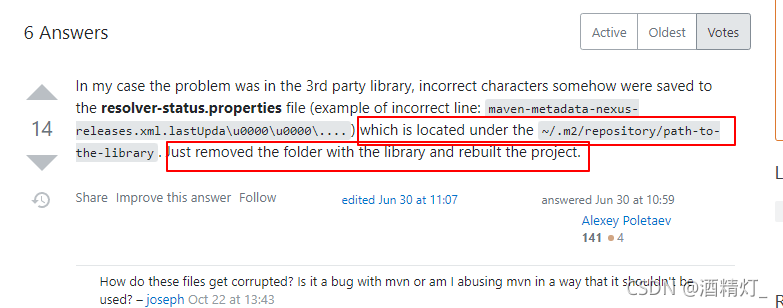
The solution given in the article is to find the path to the library in the./m2/folder and delete it.

But

I still don’t have this folder.

Later, I searched the resolver-status.properties file globally using everthing, and found several. And look at the generation time, it was generated in the process of my packaging failure.

When I opened the file, I found that the error information of each package was recorded, and some of them were garbled.

So I deleted all resolver-status.properties generated during my packaging failure,

Then MVN install again with idea, and the project is packaged successfully.

So unify the following online solutions

1. First, check whether there are path errors in the. Properties,. YML, pom.xml, logback and other configurations of the project

2. Update the Maven repository and download the jar package again

3. Delete the path to the library or resolver-status.properties file

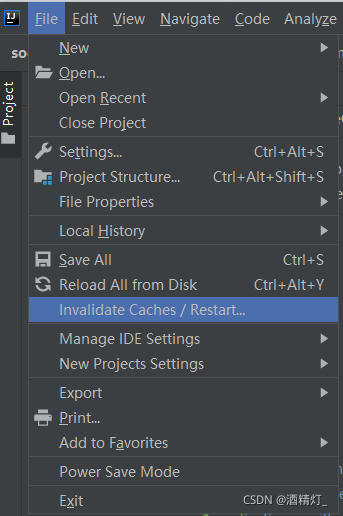
In either case, it is recommended to restart the editor. For idea, directly click the invalidate caches/restart button to clean up the cache and restart the idea
Like the second, it is unnecessary to update Maven warehouse. It is not necessary to download all jars again. You can download some jar packages that have not been downloaded successfully again.

How to judge whether the dependent download failed

Generally, unsuccessful downloading of dependencies will generate a file with the suffix not .Lastupdated. Once this file is generated, the dependencies will always fail to download. No matter how to reload Maven warehouse, the download will fail. It seems that when Maven checks the local library and checks the suffix file, it doesn’t seem to download the current dependency again.

Changing the Maven warehouse address is actually a new empty folder. In this way, the dependency will be downloaded again. Changing the dependent version is actually a new empty folder. Because the dependencies of each version will be placed in a separate folder
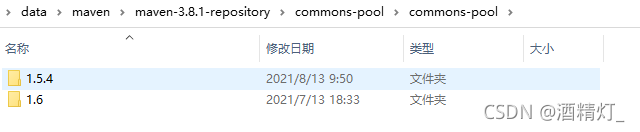
In this way, deleting files with the suffix .Lastupdated directly eliminates the need to update the Maven warehouse. In this way, successful downloads do not need to be downloaded again.

Of course, sometimes, we don’t know that the dependencies are not downloaded successfully, and only the .Lastupdated file is generated. Then, we can write a bat script to traverse all dependencies under the Maven warehouse, check whether the file suffix is .Lastupdated, and delete it if necessary. After the deletion is completed, use idea reload to the Maven warehouse again to download the dependencies again.

The script is as follows:

@echo off
::REPOSITORY_PATH replace with your own maven address
set REPOSITORY_PATH=D:\data\maven\maven-3.8.1-repository
echo %REPOSITORY_PATH%
for /f "delims=" %%i in ('dir /b /s "%REPOSITORY_PATH%\*lastUpdated*"') do (
    del /s /q %%i
)
pause

1. Create a new TXT file on the desktop, copy the contents above, and replace your Maven warehouse address.

2. Change the suffix of TXT file to. Bat and save the file

3. Double click to run the bat script.

This will delete all the .Lastupdated files in your Maven warehouse, and then you can download the jar package again
org.apache.ibatis.exceptions.PersistenceException: ### Error building SqlSession. ### The error may

org.apache.ibatis.exceptions.PersistenceException:
Error building SqlSession.
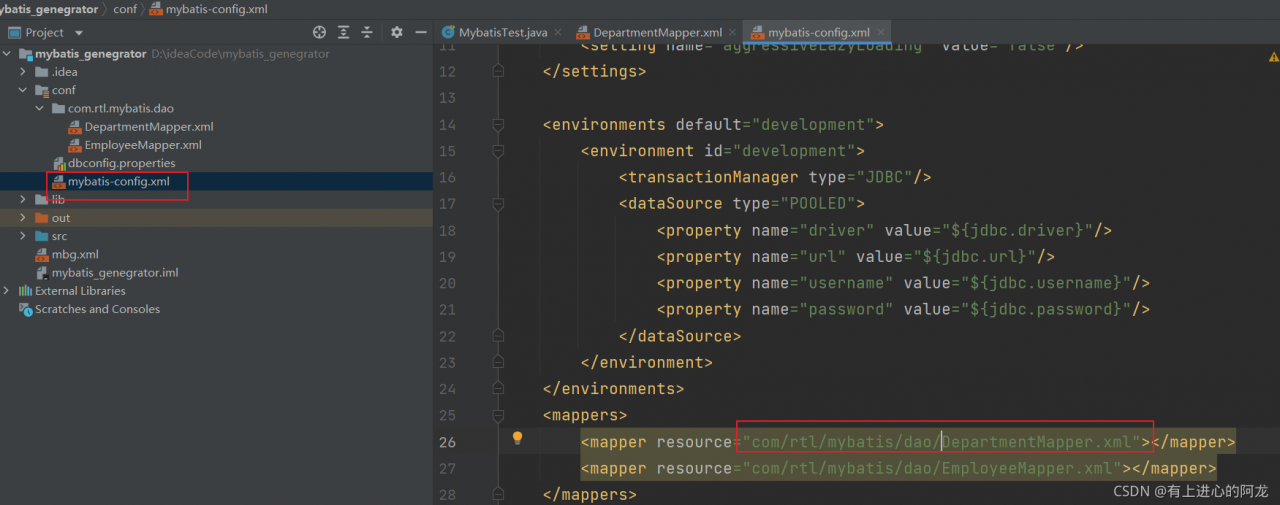
The error may exist in DepartmentMapper.xml
Cause: org.apache.ibatis.builder.BuilderException: Error parsing SQL Mapper Configuration. Cause: java.io.IOException: Could not find resource DepartmentMapper.xml

at org.apache.ibatis.exceptions.ExceptionFactory.wrapException(ExceptionFactory.java:30)
at org.apache.ibatis.session.SqlSessionFactoryBuilder.build(SqlSessionFactoryBuilder.java:80)
at org.apache.ibatis.session.SqlSessionFactoryBuilder.build(SqlSessionFactoryBuilder.java:64)
at com.rtl.mybatis.test.MybatisTest.getSqlSessionFactory(MybatisTest.java:26)
at com.rtl.mybatis.test.MybatisTest.test2(MybatisTest.java:43)
at sun.reflect.NativeMethodAccessorImpl.invoke0(Native Method)
at sun.reflect.NativeMethodAccessorImpl.invoke(NativeMethodAccessorImpl.java:62)
at sun.reflect.DelegatingMethodAccessorImpl.invoke(DelegatingMethodAccessorImpl.java:43)
at java.lang.reflect.Method.invoke(Method.java:498)
at org.junit.runners.model.FrameworkMethod$1.runReflectiveCall(FrameworkMethod.java:45)
at org.junit.internal.runners.model.ReflectiveCallable.run(ReflectiveCallable.java:15)
at org.junit.runners.model.FrameworkMethod.invokeExplosively(FrameworkMethod.java:42)
at org.junit.internal.runners.statements.InvokeMethod.evaluate(InvokeMethod.java:20)
at org.junit.runners.ParentRunner.runLeaf(ParentRunner.java:263)
at org.junit.runners.BlockJUnit4ClassRunner.runChild(BlockJUnit4ClassRunner.java:68)
at org.junit.runners.BlockJUnit4ClassRunner.runChild(BlockJUnit4ClassRunner.java:47)
at org.junit.runners.ParentRunner$3.run(ParentRunner.java:231)
at org.junit.runners.ParentRunner$1.schedule(ParentRunner.java:60)
at org.junit.runners.ParentRunner.runChildren(ParentRunner.java:229)
at org.junit.runners.ParentRunner.access$000(ParentRunner.java:50)
at org.junit.runners.ParentRunner$2.evaluate(ParentRunner.java:222)
at org.junit.runners.ParentRunner.run(ParentRunner.java:300)
at org.junit.runner.JUnitCore.run(JUnitCore.java:157)
at com.intellij.junit4.JUnit4IdeaTestRunner.startRunnerWithArgs(JUnit4IdeaTestRunner.java:69)
at com.intellij.rt.junit.IdeaTestRunner$Repeater.startRunnerWithArgs(IdeaTestRunner.java:33)
at com.intellij.rt.junit.JUnitStarter.prepareStreamsAndStart(JUnitStarter.java:235)
at com.intellij.rt.junit.JUnitStarter.main(JUnitStarter.java:54)
Caused by: org.apache.ibatis.builder.BuilderException: Error parsing SQL Mapper Configuration. Cause: java.io.IOException: Could not find resource DepartmentMapper.xml
at org.apache.ibatis.builder.xml.XMLConfigBuilder.parseConfiguration(XMLConfigBuilder.java:120)
at org.apache.ibatis.builder.xml.XMLConfigBuilder.parse(XMLConfigBuilder.java:98)
at org.apache.ibatis.session.SqlSessionFactoryBuilder.build(SqlSessionFactoryBuilder.java:78)
… 25 more
Caused by: java.io.IOException: Could not find resource DepartmentMapper.xml
at org.apache.ibatis.io.Resources.getResourceAsStream(Resources.java:114)
at org.apache.ibatis.io.Resources.getResourceAsStream(Resources.java:100)
at org.apache.ibatis.builder.xml.XMLConfigBuilder.mapperElement(XMLConfigBuilder.java:366)
at org.apache.ibatis.builder.xml.XMLConfigBuilder.parseConfiguration(XMLConfigBuilder.java:118)
… 27 more
Process finished with exit code -1

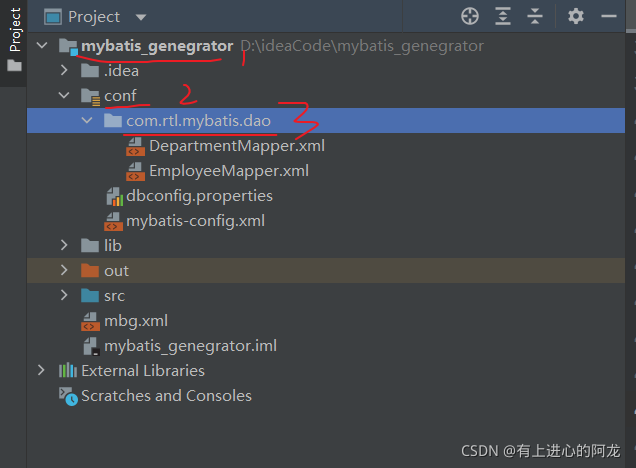
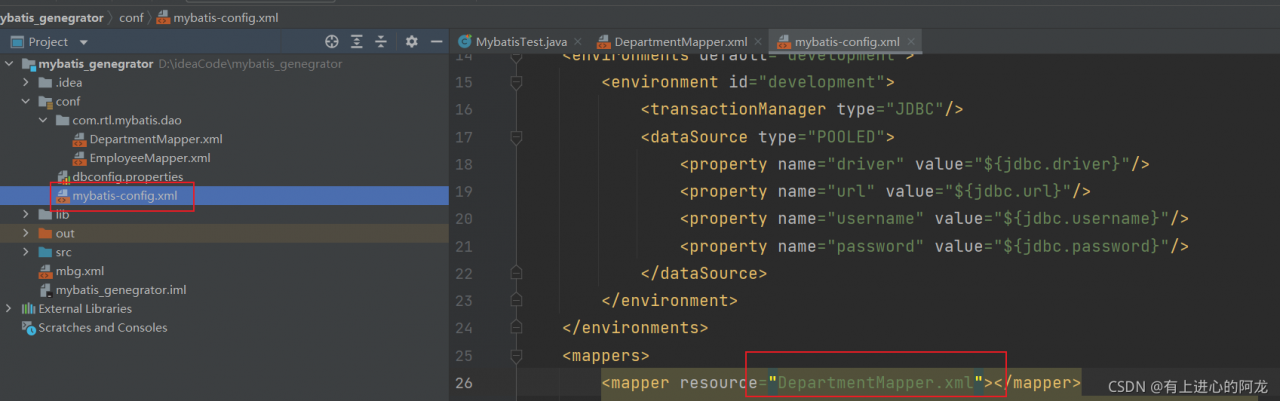
The reason for this problem is.

It is not correct to write this below.

It should look like this.

[Solved] CentOS installs MySQL and starts MySQL with error 2002 (HY000)

MYSQL Startup error: ERROR 2002 (HY000): Can’t connect to local MySQL server through socket ‘/var/lib/mysql/mysql.sock’ (111)

[root@iZ2zei01n7f2wrecqn5249Z ~]# sudo service mysqld status
Redirecting to /bin/systemctl status mysqld.service
● mysqld.service - MySQL Community Server
   Loaded: loaded (/usr/lib/systemd/system/mysqld.service; enabled; vendor preset: disabled)
   Active: inactive (dead)
[root@iZ2zei01n7f2wrecqn5249Z ~]# mysqladmin -u root password '123456'
mysqladmin: connect to server at 'localhost' failed
error: 'Can't connect to local MySQL server through socket '/var/lib/mysql/mysql.sock' (2)'
Check that mysqld is running and that the socket: '/var/lib/mysql/mysql.sock' exists!
[root@iZ2zei01n7f2wrecqn5249Z ~]# sudo mysqladmin -u root password '123456'
mysqladmin: connect to server at 'localhost' failed
error: 'Can't connect to local MySQL server through socket '/var/lib/mysql/mysql.sock' (2)'
Check that mysqld is running and that the socket: '/var/lib/mysql/mysql.sock' exists!
[root@iZ2zei01n7f2wrecqn5249Z ~]# mysql -u root
ERROR 2002 (HY000): Can't connect to local MySQL server through socket '/var/lib/mysql/mysql.sock' (2)
[root@iZ2zei01n7f2wrecqn5249Z ~]# lsof -i:3306
-bash: lsof: command not found
[root@iZ2zei01n7f2wrecqn5249Z ~]# mysql -uroot -h 127.0.0.1 -p
Enter password: 
ERROR 2003 (HY000): Can't connect to MySQL server on '127.0.0.1' (111)
[root@iZ2zei01n7f2wrecqn5249Z ~]# mysql -uroot -h 127.0.0.1 -p
Enter password: 
ERROR 2003 (HY000): Can't connect to MySQL server on '127.0.0.1' (111)
[root@iZ2zei01n7f2wrecqn5249Z ~]# netstat -ntlp 
Active Internet connections (only servers)
Proto Recv-Q Send-Q Local Address           Foreign Address         State       PID/Program name    
tcp        0      0 0.0.0.0:22              0.0.0.0:*               LISTEN      950/sshd            
tcp        0      0 127.0.0.1:25            0.0.0.0:*               LISTEN      969/master          
tcp6       0      0 ::1:25                  :::*                    LISTEN      969/master          
[root@iZ2zei01n7f2wrecqn5249Z ~]# service mysqld start
Redirecting to /bin/systemctl start mysqld.service
[root@iZ2zei01n7f2wrecqn5249Z ~]# service mysqld status
Redirecting to /bin/systemctl status mysqld.service
● mysqld.service - MySQL Community Server
   Loaded: loaded (/usr/lib/systemd/system/mysqld.service; enabled; vendor preset: disabled)
   Active: active (running) since Mon 2021-11-01 19:27:48 CST; 14s ago
  Process: 1724 ExecStartPost=/usr/bin/mysql-systemd-start post (code=exited, status=0/SUCCESS)
  Process: 1664 ExecStartPre=/usr/bin/mysql-systemd-start pre (code=exited, status=0/SUCCESS)
 Main PID: 1723 (mysqld_safe)
   CGroup: /system.slice/mysqld.service
           ├─1723 /bin/sh /usr/bin/mysqld_safe --basedir=/usr
           └─1890 /usr/sbin/mysqld --basedir=/usr --datadir=/var/lib/mysql --plugin-dir=/usr/lib64/mysql/plugin --log-error=/var/log/mysqld.log --pid-file=/var/run/mysqld/mysqld.pid --socket=/var/...

Nov 01 19:27:47 iZ2zei01n7f2wrecqn5249Z mysql-systemd-start[1664]: Support MySQL by buying support/licenses at http://shop.mysql.com
Nov 01 19:27:47 iZ2zei01n7f2wrecqn5249Z mysql-systemd-start[1664]: Note: new default config file not created.
Nov 01 19:27:47 iZ2zei01n7f2wrecqn5249Z mysql-systemd-start[1664]: Please make sure your config file is current
Nov 01 19:27:47 iZ2zei01n7f2wrecqn5249Z mysql-systemd-start[1664]: WARNING: Default config file /etc/my.cnf exists on the system
Nov 01 19:27:47 iZ2zei01n7f2wrecqn5249Z mysql-systemd-start[1664]: This file will be read by default by the MySQL server
Nov 01 19:27:47 iZ2zei01n7f2wrecqn5249Z mysql-systemd-start[1664]: If you do not want to use this, either remove it, or use the
Nov 01 19:27:47 iZ2zei01n7f2wrecqn5249Z mysql-systemd-start[1664]: --defaults-file argument to mysqld_safe when starting the server
Nov 01 19:27:47 iZ2zei01n7f2wrecqn5249Z mysqld_safe[1723]: 211101 19:27:47 mysqld_safe Logging to '/var/log/mysqld.log'.
Nov 01 19:27:47 iZ2zei01n7f2wrecqn5249Z mysqld_safe[1723]: 211101 19:27:47 mysqld_safe Starting mysqld daemon with databases from /var/lib/mysql
Nov 01 19:27:48 iZ2zei01n7f2wrecqn5249Z systemd[1]: Started MySQL Community Server.

Start it.

service mysqld start

Recheck status

service mysqld status

Just as shown above
set the password

mysqladmin -u root password '123456'

Sign in

mysql -u root -p

Memory write error at 0x100000. MMU section translation fault [How to Solve]

The following error is reported when debugging the MZ702P board using vitis2020.2 JTAG.
The reason is that the boot mode is not set to JTAG boot.

Downloading Program – F:/FPGA/Project/vitis_workspace/helloWorld/Debug/helloWorld.elf
section, .text: 0x00100000 - 0x00100a1f
section, .init: 0x00100a20 - 0x00100a2b
section, .fini: 0x00100a2c - 0x00100a37
section, .rodata: 0x00100a38 - 0x00100a77
section, .data: 0x00100a78 - 0x00100ee7
section, .eh_frame: 0x00100ee8 - 0x00100eeb
section, .mmu_tbl: 0x00104000 - 0x00107fff
section, .init_array: 0x00108000 - 0x00108003
section, .fini_array: 0x00108004 - 0x00108007
section, .bss: 0x00108008 - 0x0010802f
section, .heap: 0x00108030 - 0x0010a02f
section, .stack: 0x0010a030 - 0x0010d82f
0% 0MB 0.0MB/s ??:??ETA
aborting, 2 pending requests…
aborting, 1 pending requests…
Failed to download F:/FPGA/Project/vitis_workspace/helloWorld/Debug/helloWorld.elf
Memory write error at 0x100000. MMU section translation fault

or report the error below:

21:50:53 INFO : Checking for BSP changes to sync application flags for project ‘helloWorld’…
21:51:32 INFO : Connected to target on host ‘127.0.0.1’ and port ‘3121’.
21:51:32 INFO : Jtag cable ‘Digilent JTAG-HS1 210249856275’ is selected.
21:51:32 INFO : ‘jtag frequency’ command is executed.
21:51:32 INFO : Context for ‘APU’ is selected.
21:51:32 INFO : System reset is completed.
21:51:35 INFO : ‘after 3000’ command is executed.
21:51:35 INFO : Context for ‘APU’ is selected.
21:51:35 INFO : Hardware design and registers information is loaded from ‘F:/FPGA/Project/vitis_workspace/MZ702P/export/MZ702P/hw/MZ702P_wrapper.xsa’.
21:51:35 INFO : ‘configparams force-mem-access 1’ command is executed.
21:51:35 INFO : Context for ‘APU’ is selected.
21:51:35 INFO : Sourcing of ‘F:/FPGA/Project/vitis_workspace/helloWorld/_ide/psinit/ps7_init.tcl’ is done.
21:51:36 ERROR : Memory read error at 0xE0001034. AP transaction timeout
21:51:36 INFO : ----------------XSDB Script----------------
connect -url tcp:127.0.0.1:3121
targets -set -nocase -filter {name =~“APU*”}
rst -system
after 3000
targets -set -nocase -filter {name =~“APU*”}
loadhw -hw F:/FPGA/Project/vitis_workspace/MZ702P/export/MZ702P/hw/MZ702P_wrapper.xsa -mem-ranges [list {0x40000000 0xbfffffff}] -regs
configparams force-mem-access 1
targets -set -nocase -filter {name =~“APU*”}
source F:/FPGA/Project/vitis_workspace/helloWorld/_ide/psinit/ps7_init.tcl
ps7_init
----------------End of Script----------------
21:51:36 ERROR : Memory read error at 0xE0001034. AP transaction timeout

PHP: The Difference between \Throwable, \Error and \Exception

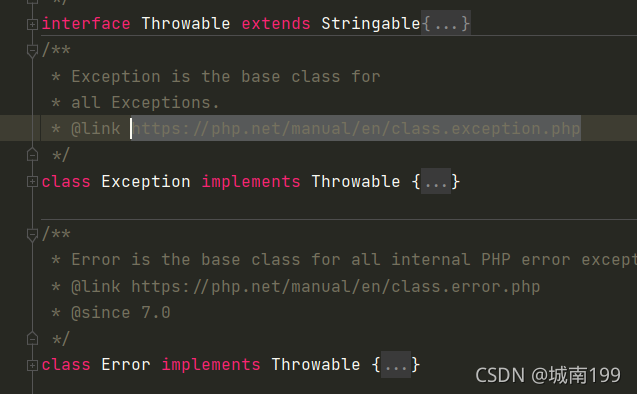
\Throwable

It is the exception class that begins to appear in php7.0, and it is the parent class of \error \exception

\Error

Inherited \throwable to handle some internal errors of the system, such as memory overflow

\Exception

Inherited \throwable to handle error reports during program execution, or actively throw exceptions (\error can also throw exceptions)

Weboffice Warning: OLE error 800A01A8 [How to Solve]

Solution:

This problem can be solved by reinstalling office
precautions:
1. Install the full version of office
2. After the installation of office is completed, create a new document and open it. If you open the document for the first time, you will be prompted whether to use the recommended settings. Select Yes or no, because in the process of WebOffice calling office, if a pop-up window appears in office, the call will fail.

Transaction check error during docker CE installation [How to Solve]

Installing docker CE under CentOS is
this is because I have installed docker more than once on the machine. Some dependency conflicts are caused by version reasons. You need to find the conflicting dependencies and delete the old dependencies:

# View conflicting dependency packages
yum list installed | grep docker

Delete and reinstall the specified other version:
rpm -e docker-client.x86_64 and rpm -e docker-common.x86_64

urllib.error.URLError: <urlopen error [Errno -3] Temporary failure in name resolution>

When training the model, load some pre training models, such as VGg. The code is as follows

model = torchvision.models.vgg19(pretrained=True)

Train will display

Downloading: "https://download.pytorch.org/models/vgg19-dcbb9e9d.pth" to /root/.cache/torch/checkpoints/vgg19-dcbb9e9d.pth

Then an error occurred:

socket.gaierror: [Errno -3] Temporary failure in name resolution
and
urllib.error.URLError: <urlopen error [Errno -3] Temporary failure in name resolution>

This is because the pre training model cannot be downloaded, so it needs to be downloaded from the Internet
therefore, it is more convenient to download the model first, find a way to connect to the Internet, and then input the link automatically https://download.pytorch.org/models/vgg19-dcbb9e9d.pth
Then put the downloaded. PTH model file under a fixed path, such as

/home/team/torch/models/pre_ model/vgg19-dcbb9e9d.pth

Finally, change the code to

model = torchvision.models.vgg19(pretrained=False)
pthfile = r'/home/team/torch/models/pre_model/vgg19-dcbb9e9d.pth'
model.load_state_dict(torch.load(pthfile))```

[Solved] Git push Warning: error: RPC failed; HTTP 413 curl 22 The requested URL returned error: 413

1. Error Messages:

execute git push http://git.xxx.com/app/guanghe-app.git –all reward

Error Messages:
error: RPC failed; HTTP 413 curl 22 The requested URL returned error: 413
fatal: the remote end hung up unexpectedly
Everything up-to-date

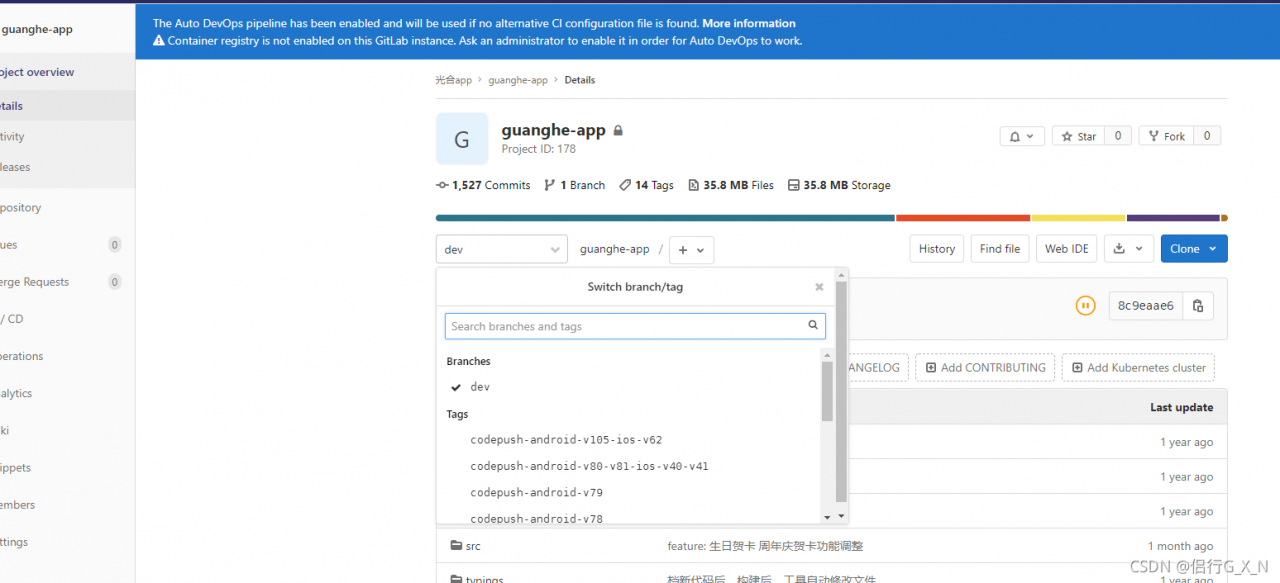
The above problem is caused by the size limitation of HTTP push files. Just submit them in SSH.

2. Upload via SSH

git push ssh://git @10.1.8.121:1122/app/guanghe-app.git –all

Enumerating objects: 15951, done.
Counting objects: 100% (15951/15951), done.
Delta compression using up to 6 threads
Compressing objects: 100% (2863/2863), done.
Writing objects: 100% (15951/15951), 35.04 MiB | 23.89 MiB/s, done.
Total 15951 (delta 12568), reused 15905 (delta 12533)
remote: Resolving deltas: 100% (12568/12568), done.
To ssh://10.1.8.151:1122/app/guanghe-app.git
 * [new branch]      dev -> dev

The warehouse has been uploaded successfully

[Solved] error LNK2005: ___pInvalidArgHandler Already defined in libcmtd.lib(invarg.obj)

Started generation...
1>------ has been started: Project: Bosch_EDC7, Configuration: Debug Win32 ------
1>edc7.lib(Bosch_EDC7.obj) : MSIL .netmodule or module compiled with /GL found; link is being restarted with /LTCG; adding /LTCG to link command line to improve linker performance
1>LINK : warning LNK4075: ignore "/INCREMENTAL" (due to "/LTCG" specification)
1>Bosch_EDC7.obj : warning LNK4075: ignore "/EDITANDCONTINUE" (due to "/OPT:ICF" specification)
1>LIBCMT.lib(invarg.obj) : error LNK2005: ___pInvalidArgHandler has been defined in libcmtd.lib(invarg.obj)
1>LIBCMT.lib(invarg.obj) : error LNK2005: __initp_misc_invarg has been defined in libcmtd.lib(invarg.obj)
1>LIBCMT.lib(invarg.obj) : error LNK2005: __call_reportfault has been defined in libcmtd.lib(invarg.obj)
1>LIBCMT.lib(invarg.obj) : error LNK2005: __set_invalid_parameter_handler has been defined in libcmtd.lib(invarg.obj)
1>LIBCMT.lib(invarg.obj) : error LNK2005: __get_invalid_parameter_handler has been defined in libcmtd.lib(invarg.obj)
1>LIBCMT.lib(invarg.obj) : error LNK2005: __invoke_watson has been defined in libcmtd.lib(invarg.obj)
1>LIBCMT.lib(invarg.obj) : error LNK2005: "void __cdecl _invoke_watson(unsigned short const *,unsigned short const *,unsigned short const *, unsigned int,unsigned int)" (? _invoke_watson@@YAXPBG00II@Z) is already defined in libcmtd.lib(invarg.obj)
1>LIBCMT.lib(invarg.obj) : error LNK2005: __invalid_parameter has been defined in libcmtd.lib(invarg.obj)
1>LIBCMT.lib(invarg.obj) : error LNK2005: "void __cdecl _invalid_parameter(unsigned short const *,unsigned short const *,unsigned short const *, unsigned int,unsigned int)" (? _invalid_parameter@@YAXPBG00II@Z) is already defined in libcmtd.lib(invarg.obj)
1>nafxcw.lib(objcore.obj) : error LNK2005: "public: static struct CRuntimeClass const CObject::classCObject" (?classCObject@CObject@@ 2UCRuntimeClass@@B) is already defined in nafxcwd.lib(objcore.obj)
1>nafxcw.lib(objcore.obj) : error LNK2005: "public: virtual struct CRuntimeClass * __thiscall CObject::GetRuntimeClass(void)const " (? GetRuntimeClass@CObject@@UBEPAUCRuntimeClass@@XZ) already defined in nafxcwd.lib(objcore.obj)
1>nafxcw.lib(objcore.obj) : error LNK2005: "public: class CObject * __thiscall CRuntimeClass::CreateObject(void)" (?CreateObject@ CRuntimeClass@@QAEPAVCObject@@XZ) already defined in nafxcwd.lib(objcore.obj)
1>nafxcw.lib(objcore.obj) : error LNK2005: "public: int __thiscall CObject::IsSerializable(void)const " (?IsSerializable@CObject@@QBEHXZ) already defined in nafxcwd.lib(objcore.obj)
1>nafxcw.lib(objcore.obj) : error LNK2005: "public: int __thiscall CRuntimeClass::IsDerivedFrom(struct CRuntimeClass const *)const " (? IsDerivedFrom@CRuntimeClass@@QBEHPBU1@@Z) already defined in nafxcwd.lib(objcore.obj)
1>nafxcw.lib(objcore.obj) : error LNK2005: "public: int __thiscall CObject::IsKindOf(struct CRuntimeClass const *)const " (?IsKindOf@CObject@@@ QBEHPBUCRuntimeClass@@@Z) is already defined in nafxcwd.lib(objcore.obj)
1>nafxcw.lib(objcore.obj) : error LNK2005: "class CObject * __cdecl AfxDynamicDownCast(struct CRuntimeClass *,class CObject *)" (? AfxDynamicDownCast@@YAPAVCObject@@PAUCRuntimeClass@@PAV1@@Z) already defined in nafxcwd.lib(objcore.obj)
1>nafxcw.lib(objcore.obj) : error LNK2005: "void __stdcall AfxClassInit(struct CRuntimeClass *)" (?AfxClassInit@@@YGXPAUCRuntimeClass@@@Z) already defined in nafxcwd.lib(objcore.obj)
1>nafxcw.lib(winmain.obj) : error LNK2005: "class CWinApp * __stdcall AfxGetApp(void)" (?AfxGetApp@@YGPAVCWinApp@@XZ) is already defined in nafxcwd.lib(afxinl2 .obj) is defined in
1>LINK : warning LNK4098: Default library "LIBCMT" conflicts with other libraries; please use /NODEFAULTLIB:library
1>LINK : warning LNK4098: The default library "nafxcw.lib" conflicts with other libraries; please use /NODEFAULTLIB:library
1>D:\A-Working\VS10_Projects\Bosch_EDC7\Bosch_EDC7\Debug\Bosch_EDC7.exe : fatal error LNK1169: One or more multi-defined symbols found
1> The operation to generate the project "Bosch_EDC7.vcxproj" has been completed - failed.
========== Generated: 0 successful, 1 failed, 2 latest, 0 skipped ==========

Solution:
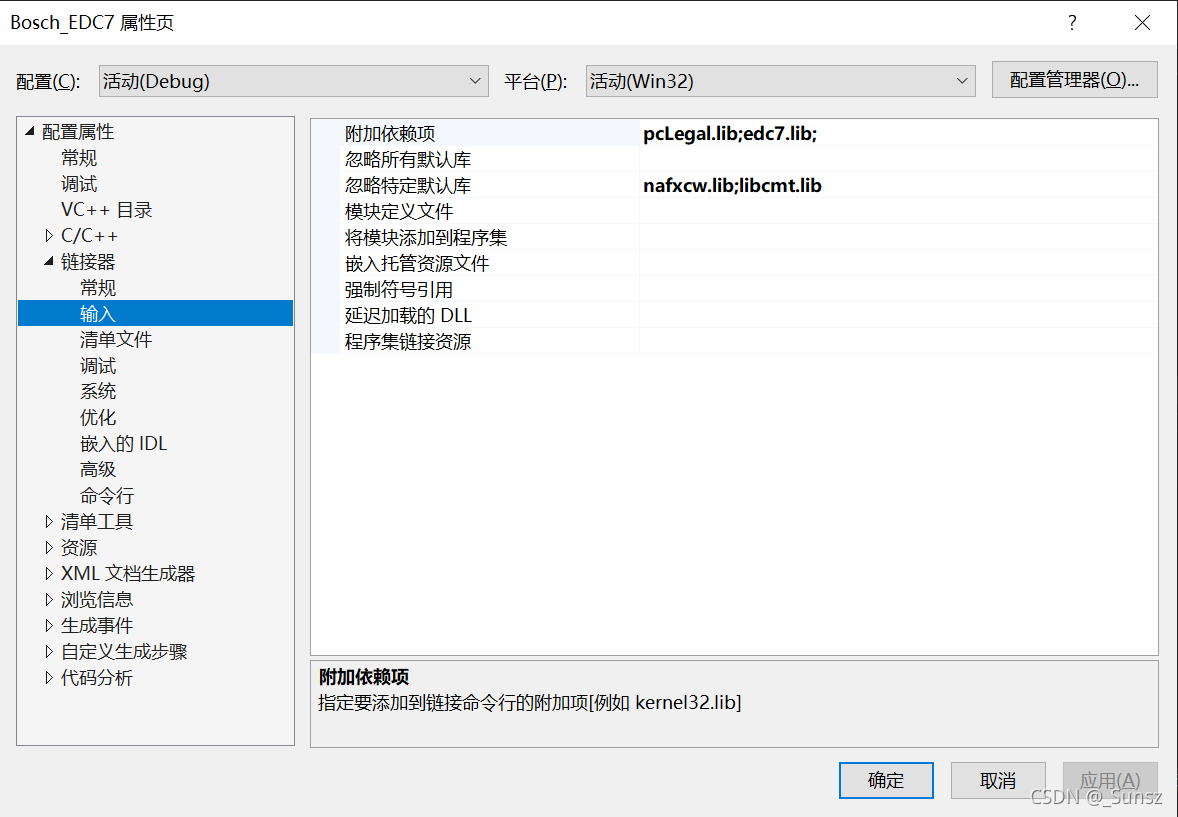
The reason is that in Debug mode, some libraries are used in conflict, we just ignore the conflicting libraries.
Project Project Properties —> Linker —> Input —> Ignore specific default libraries —>

nafxcw.lib;libcmt.lib