Idea reports an Error 404. The project ssmbuild is unavailable/the target resource cannot be found
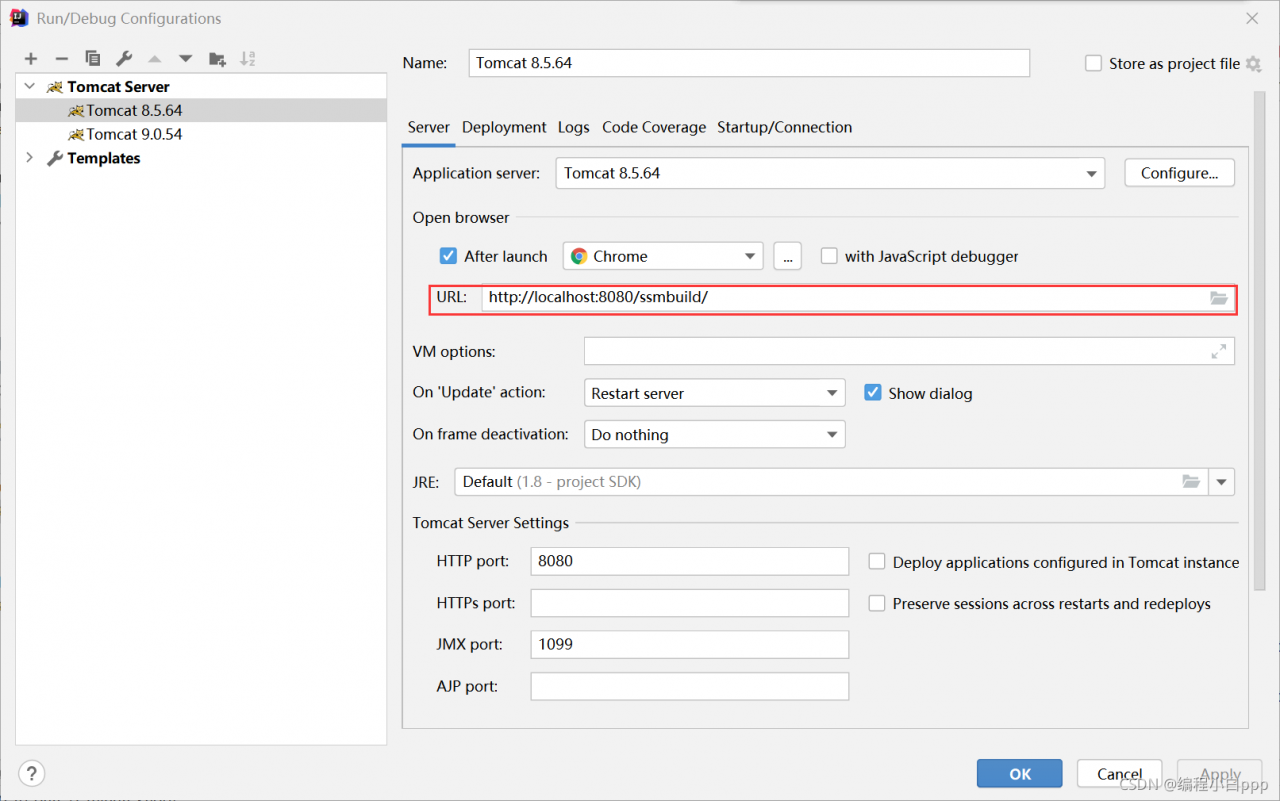
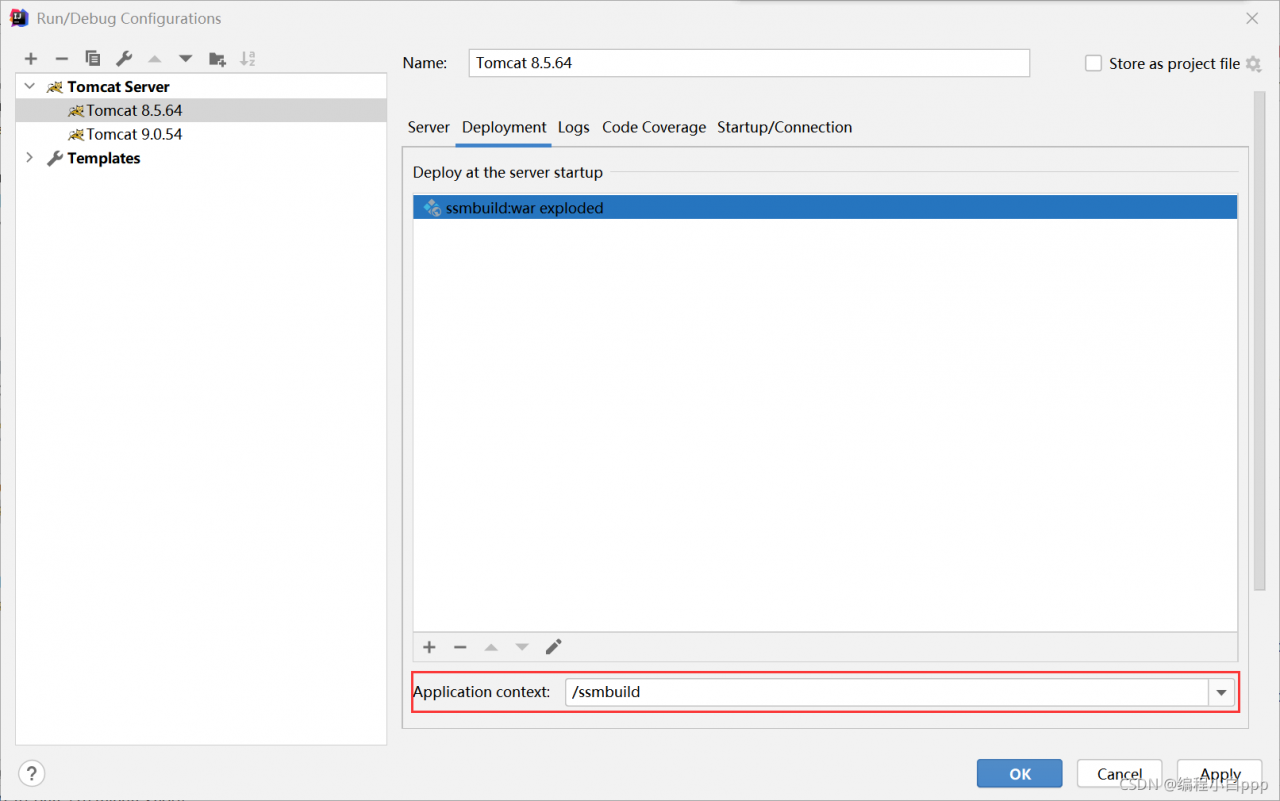
the ssmbuild in the two locations shown in the figure should be the same
Author Archives: Robins
[Solved] Vue create error: ERROR: command failed: npm install –loglevel error
Vue create reports an error
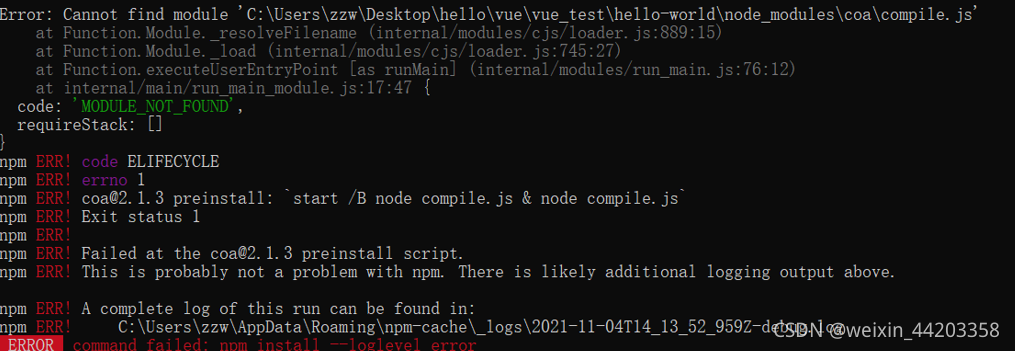
Solution: https://stackoverflow.com/questions/53934852/vue-cli-3-command-failed-npm-install-loglevel-error
It should be noted that the article provides two main solutions:
1. NPM cache clean -- force or manually delete the NPM cache in the appdata folder
2.npm config set registry=" http://registry.npmjs.org/" after running this command, you can create your own project.
After I tried the first scheme unsuccessfully, I tried to combine the two schemes successfully, but I don’t know the specific principle. I hope someone with good intentions can help me solve what’s wrong
Error in loading online pictures on billboard in cesium tainted canvas may not be loaded
There is no problem loading the pictures in the project. An error will be reported when loading the online pictures
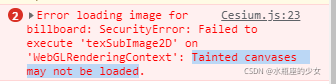
resolvent:
image.setAttribute(‘crossOrigin’, ‘anonymous’);
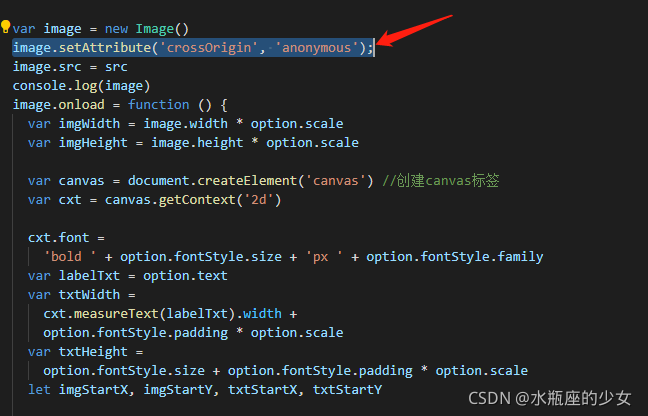
Reason: when canvas is drawn, online pictures involve cross domain problems.
Of course, while setting the front end, you also need to set it in the background to allow cross domain access to pictures.
Eslint error handling: ‘QQ’ is not defined
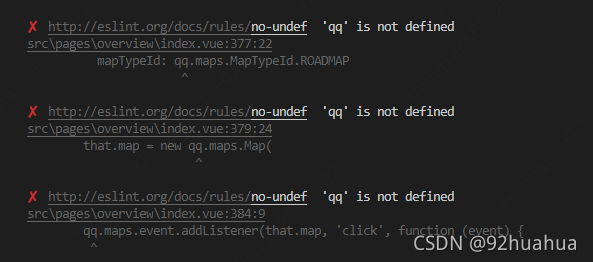
Handle the above eslint error and configure . Eslintrc.js, add the following configuration:
globals: { "qq": true },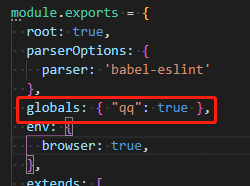
An error is reported when installing the package directly in pycharm, but it can be installed through the terminal. Error non zero exit code (2)
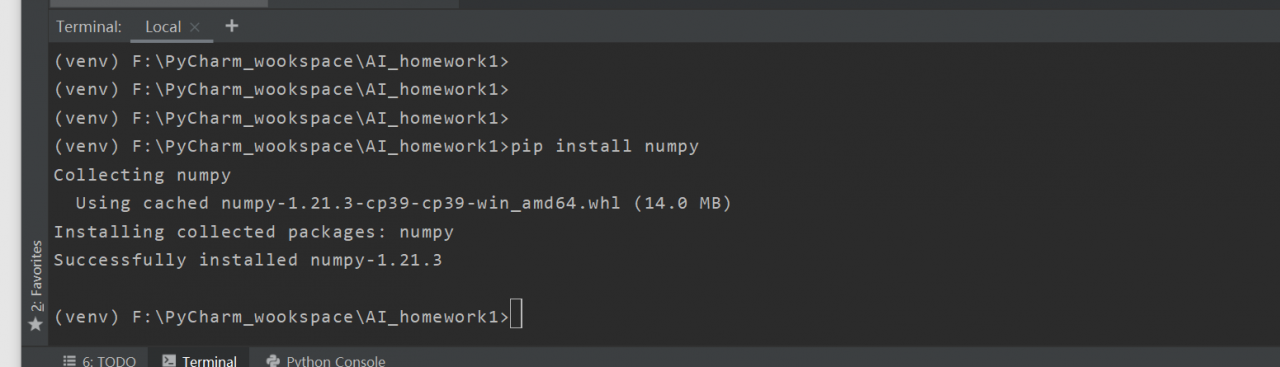
An error is reported when installing the package directly in pycharm, but it can be installed through the terminal
The problem description is shown in the figure below:
Error content: non zero exit code (2) direct installation will report the following error 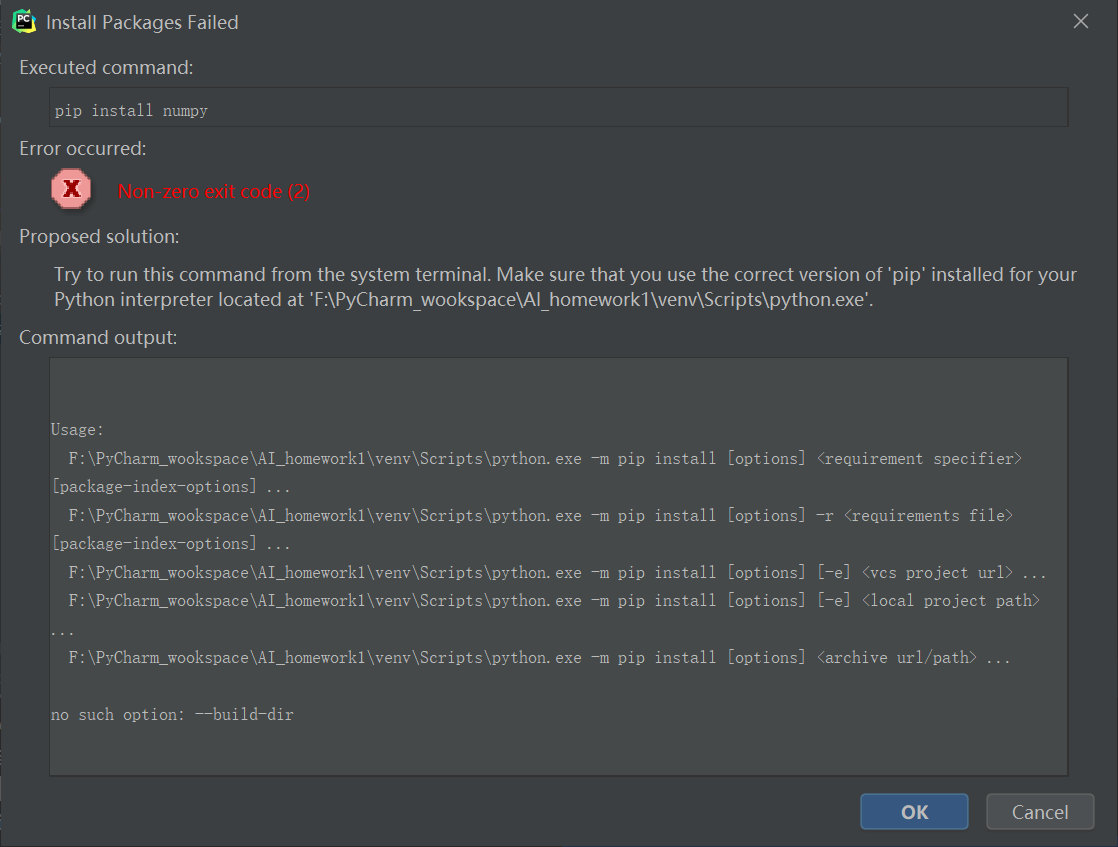 , but you can use the command to install in the terminal in pycharm, but it is too troublesome to install every time, which is not applicable to
  problem analysis
The PIP I use here is version 21.3.1. I checked my previous projects and found that pip21.2.4 can be installed normally without error, so I reduced the PIP version of this project to pip21.2.4. However, I don’t know the specific reason why pip21.3.1 can’t be used. The problem is solved
- enter the directory where the project environment is located
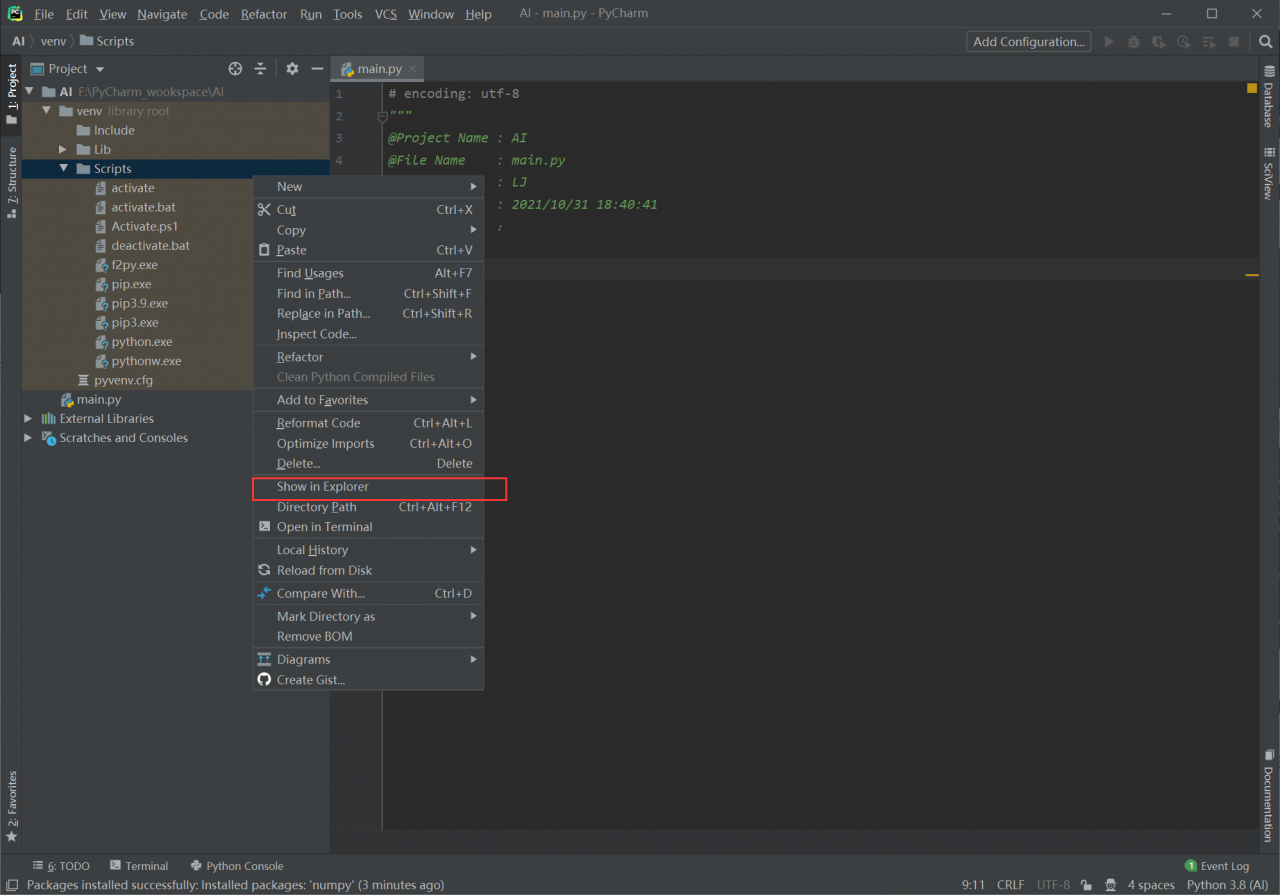 open windows PowerShell in administrator mode and enter the directory where the environment is located. Use python.exe in the project to run the command
 - M PIP install PIP = = 21.2.4
The goal here is to use the python execution command in the project instead of the global Python execution command 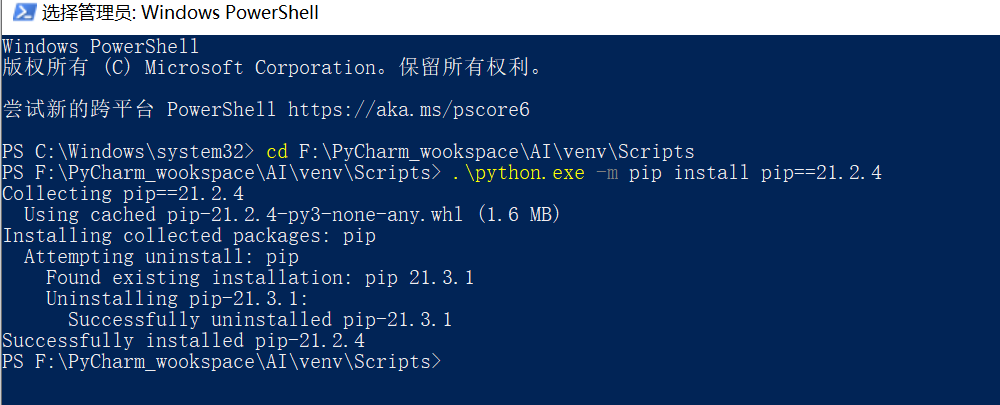 . Enter pycharm to view the PIP version
 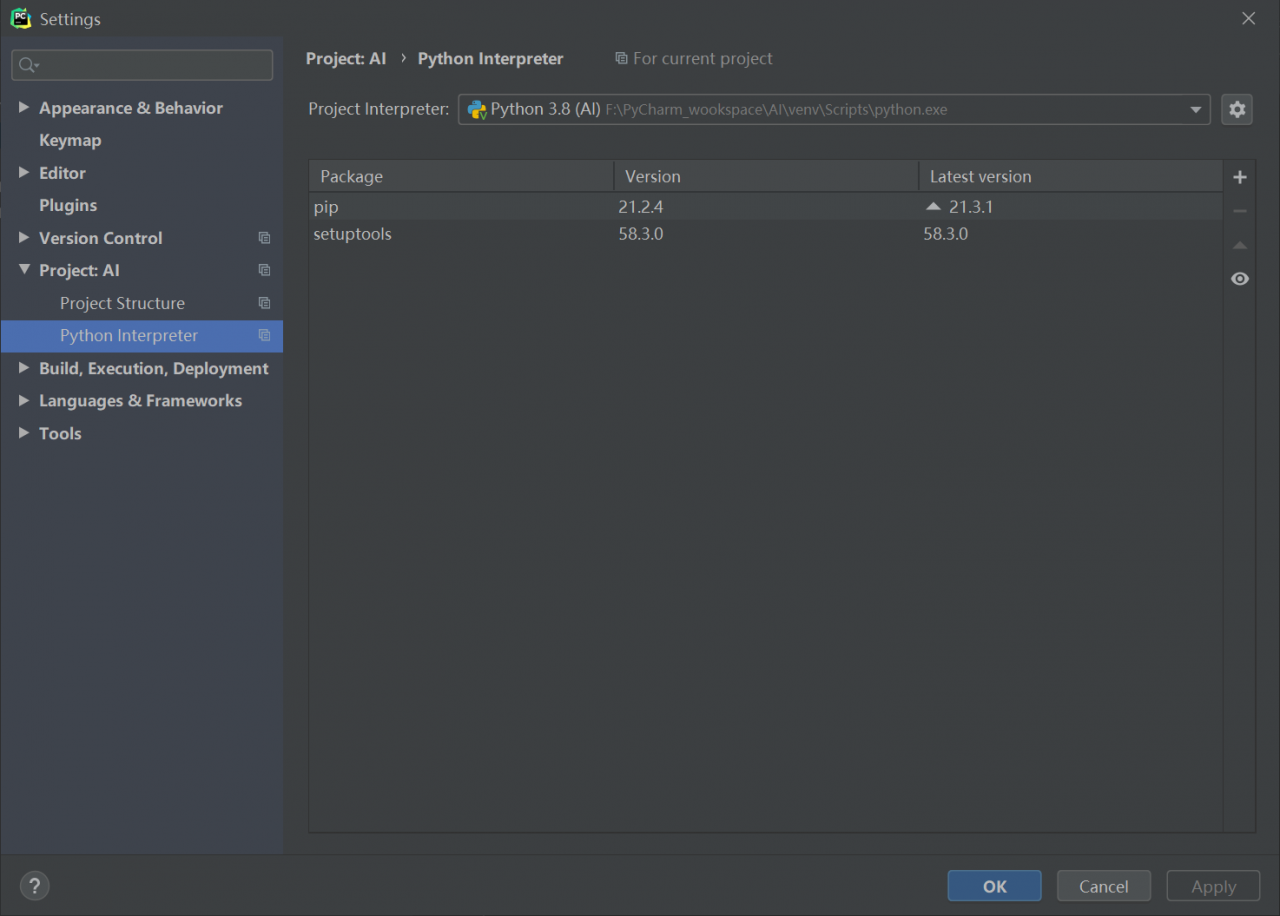 installation package
 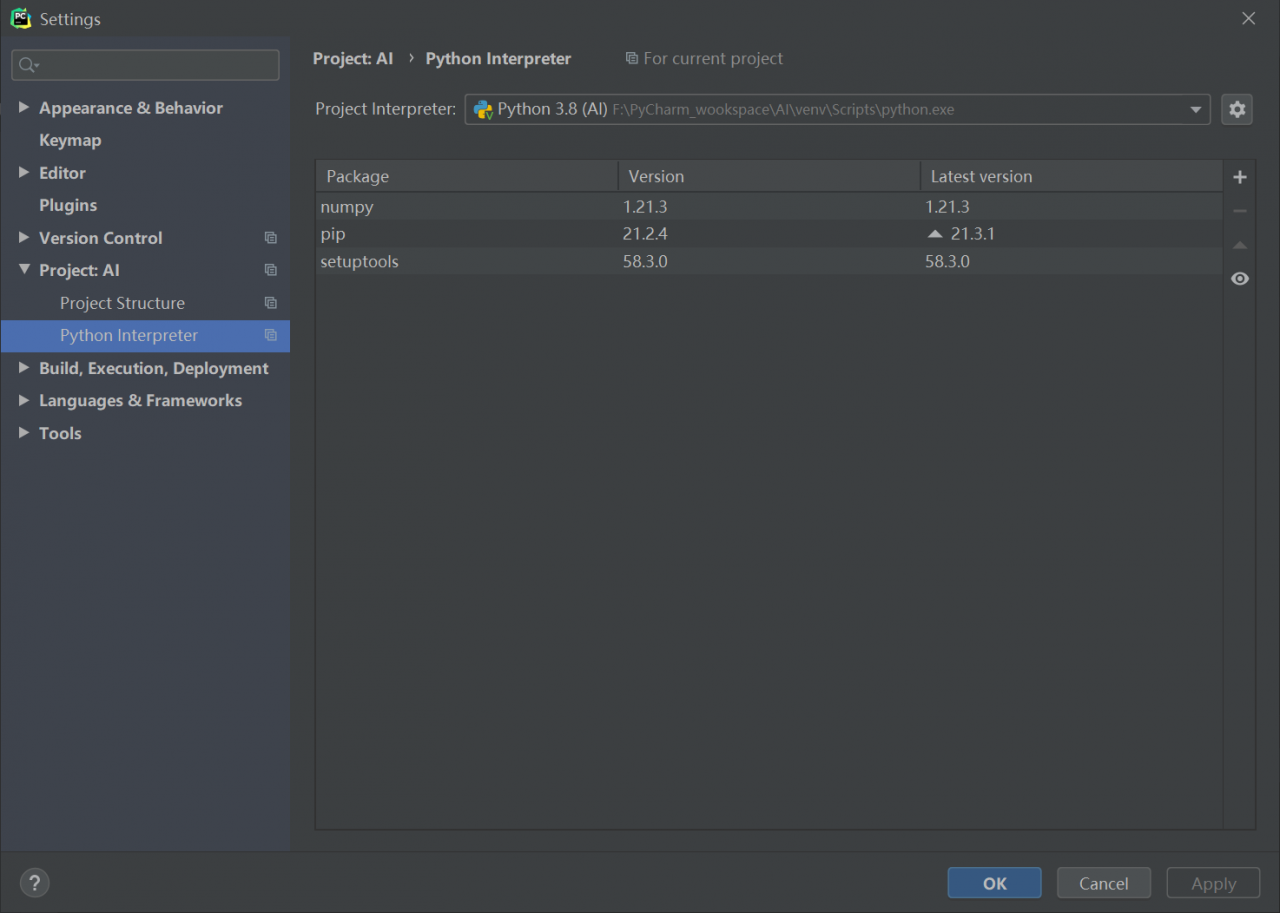 . If there is no accident, it can be solved. I solved the problem in this way. At this time, if you like, you can upgrade PIP again. I try to upgrade pip to 21.3.1 again, which can be installed normally
Reference blog
- https://blog.csdn.net/CNWorldisyourFC/article/details/110468251?utm_ medium=distribute.pc_ relevant.none-task-blog-title-2& spm=1001.2101.3001.4242. https://blog.csdn.net/weixin_ 51119842/article/details/110469060.
After vscode installs ts, TSC compiles and generates JS, and an error is reported (repeated variables, etc.)
1、 Open the command line under the TS file sibling directory, and enter
tsc --init

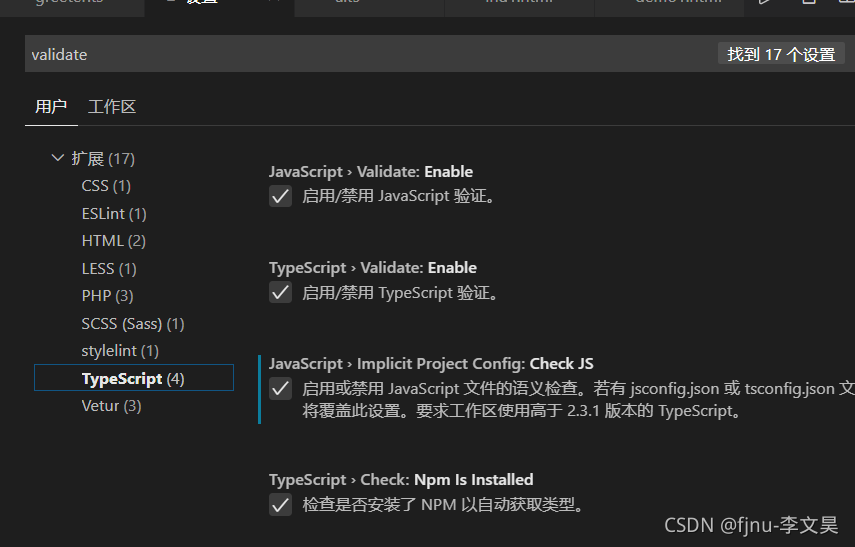
2、 File – preferences – settings
to search for validate, you should check the third one. Then compile TSC again. If so, check these preferences
[Solved] Failed to install PIP for MacOS, prompt: syntax error: invalid syntax
Use the command easy_ Install install pip
Use the command sudo easy_Install PIP installing PIP failed. The information of executing the command is as follows:
➜  ~ sudo easy_install pip
Password:
Searching for pip
Reading https://pypi.org/simple/pip/
Downloading https://files.pythonhosted.org/packages/da/f6/c83229dcc3635cdeb51874184241a9508ada15d8baa337a41093fab58011/pip-21.3.1.tar.gz#sha256=fd11ba3d0fdb4c07fbc5ecbba0b1b719809420f25038f8ee3cd913d3faa3033a
Best match: pip 21.3.1
Processing pip-21.3.1.tar.gz
Writing /tmp/easy_install-8XXfb1/pip-21.3.1/setup.cfg
Running pip-21.3.1/setup.py -q bdist_egg --dist-dir /tmp/easy_install-8XXfb1/pip-21.3.1/egg-dist-tmp-5cqtMF
Traceback (most recent call last):
# ...
  File "/System/Library/Frameworks/Python.framework/Versions/2.7/Extras/lib/python/setuptools/sandbox.py", line 44, in _execfile
    code = compile(script, filename, 'exec')
  File "/tmp/easy_install-8XXfb1/pip-21.3.1/setup.py", line 7
    def read(rel_path: str) -> str:
                     ^
SyntaxError: invalid syntax
Solution
Download the script file get-pip.py:
curl 'https://bootstrap.pypa.io/get-pip.py' > get-pip.py
Then execute the script file get-pip.py with the command python3:
sudo python3 get-pip.py
This completes the installation.
The process information of executing the command is as follows:
➜  ~ curl 'https://bootstrap.pypa.io/get-pip.py' > get-pip.py
  % Total    % Received % Xferd  Average Speed   Time    Time     Time  Current
                                 Dload  Upload   Total   Spent    Left  Speed
100 2108k  100 2108k    0     0  2571k      0 --:--:-- --:--:-- --:--:-- 2568k
➜  ~ sudo python3 get-pip.py
Password:
WARNING: The directory '/Users/liaowenxiong/Library/Caches/pip' or its parent directory is not owned or is not writable by the current user. The cache has been disabled. Check the permissions and owner of that directory. If executing pip with sudo, you should use sudo's -H flag.
DEPRECATION: Configuring installation scheme with distutils config files is deprecated and will no longer work in the near future. If you are using a Homebrew or Linuxbrew Python, please see discussion at https://github.com/Homebrew/homebrew-core/issues/76621
Collecting pip
  Downloading pip-21.3.1-py3-none-any.whl (1.7 MB)
     |████████████████████████████████| 1.7 MB 1.0 MB/s
Installing collected packages: pip
  Attempting uninstall: pip
    Found existing installation: pip 21.2.4
    Uninstalling pip-21.2.4:
      Successfully uninstalled pip-21.2.4
DEPRECATION: Configuring installation scheme with distutils config files is deprecated and will no longer work in the near future. If you are using a Homebrew or Linuxbrew Python, please see discussion at https://github.com/Homebrew/homebrew-core/issues/76621
Successfully installed pip-21.3.1
WARNING: Running pip as the 'root' user can result in broken permissions and conflicting behaviour with the system package manager. It is recommended to use a virtual environment instead: https://pip.pypa.io/warnings/venv
➜  ~ pip --version
pip 21.3.1 from /usr/local/lib/python3.9/site-packages/pip (python 3.9)
A simpler command to execute is as follows:
curl https://bootstrap.pypa.io/get-pip.py | python3
Uninstall pip
sudo pip uninstall pip
[Solved] IE Browser Error: unhandled promise rejection error: access is denied. File stream Download
There are many export files and download files in the project. The front end adopts the file stream download method, requests the back-end interface and returns the file stream
at first, it was not clear that the ordinary dynamic creation a tag method was not compatible with ie. later, the bug “unhandled promise rejection error: access denied” appeared in the test on ie. after seeing this problem, it was directly copied to Baidu, and then the result was that the promise method might be wrong. After changing all the promise methods, an error was reported, Later, I thought about whether the way to create a tag was not compatible with ie, and Baidu adopted the method of downloading file stream compatible with ie. sure enough, I got the following solution and recorded it.
IE browser has Microsoft’s own mssaveblob method. The download of a tag is not compatible with ie.
//Since the method is used in several places in the page, it is wrapped as a component
// Don't forget to set the responseType='blob' in the request header, the react project is already encapsulated in the request
export const exportSaveData = (data, filename) => {
    let blob = new Blob([data], { type: 'application/x-www-form-urlencoded' });
    let blobUrl = window.URL.createObjectURL(blob);
    if (window.navigator.msSaveBlob) { // determine if the method is available for Internet Explorer
        try {
            window.navigator.msSaveBlob(blob, filename)
        } catch (e) {
            console.log(e);
        }
    } else {
        // Google Chrome Create a tag Add download attribute to download
        const aElement = document.createElement('a'); // create a tag dynamically
        document.body.appendChild(aElement); // append the created a tag to the body
        aElement.style.display = 'none'; //you can set the a tag not to be visible
        aElement.href = blobUrl; a tag's href is the processed blob
        aElement.download = filename;
        aElement.click();
        document.body.removeChild(aElement);
        window.URL.revokeObjectURL(blobUrl); //release the blob object
    }
}
Perfectly solve the problem that IE cannot export
TensorRT model quantization error: Error Code 1: Cuda Runtime (an illegal memory access was encountered)
When using tensorrt for model quantization on A10 graphics card, the following error is reported.
[W] [TRT] Calibration Profile is not defined. Running calibration with Profile 0
[I] calib data processed : 0/4680batch
[E] [TRT] 1: [calibrator.cpp::add::779] Error Code 1: Cuda Runtime (an illegal memory access was encountered)
[E] [TRT] [executionContext.cpp::commonEmitDebugTensor::1258] Error Code 1: Cuda Runtime (an illegal memory access was encountered)
[E] [TRT] [executionContext.cpp::executeInternal::610] Error Code 1: Cuda Runtime (an illegal memory access was encountered)
[F] [TRT] [defaultAllocator.cpp::free::85] Error Code 1: Cuda Runtime (an illegal memory access was encountered)
[F] [TRT] [defaultAllocator.cpp::free::85] Error Code 1: Cuda Runtime (an illegal memory access was encountered)
[F] [TRT] [defaultAllocator.cpp::free::85] Error Code 1: Cuda Runtime (an illegal memory access was encountered)
terminate called after throwing an instance of 'nvinfer1::CudaRuntimeError'
  what():  an illegal memory access was encountered
Aborted
This is because the architecture does not match. Add 86 to a10
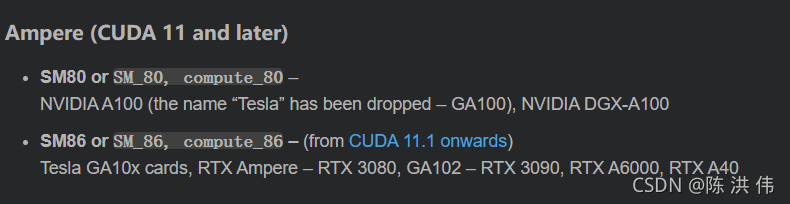
Therefore, modify my makefile. Here is my makefile fragment, originally SMS= 60 61 62 70 72 75, I added 86
# Gencode arguments
SMS ?= 60 61 62 70 72 75 86

ifeq ($(GENCODE_FLAGS),)
# Generate SASS code for each SM architecture listed in $(SMS)
$(foreach sm,$(SMS),$(eval GENCODE_FLAGS += -gencode arch=compute_$(sm),code=sm_$(sm)))[Solved] PSPICE Error: ERROR(ORPSIM-16276): Can‘t find library
Pspice encountered error (orpsim-16276): can’t find library
The nom.lib file is shown in the figure. In the correct position, the components are also dragged out of the library, but the error is still reported. 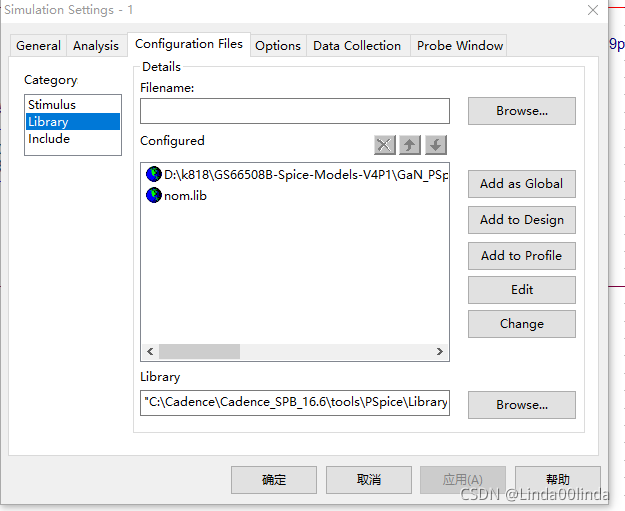 Solution: select the nom.lib file and add as global again. It will pop up saying that it has been added and ignored directly. Then click apply and then click OK to solve the error
this error is encountered many times later. I don’t know the reason, Delete the original and add it again
error: expected ‘;‘ at end of member declaration and expected ‘)‘ before ‘&‘ toke Errors
error: expected ‘;’ at end of member declaration
error: expected ‘)’ before ‘&’ Token
error reporting
When developing c + + in Linux environment, the following compilation errors or other inexplicable errors occur while ensuring that there are no errors in the code
	error: expected ';' at end of member declaration
	error: expected ‘)’ before ‘&’ toke
Solution:
check whether the header file contains circularly. For example, a.cpp contains B.H, b.cpp contains C.H, and c.cpp contains A.H to form a ring. In this case, an error will be reported.
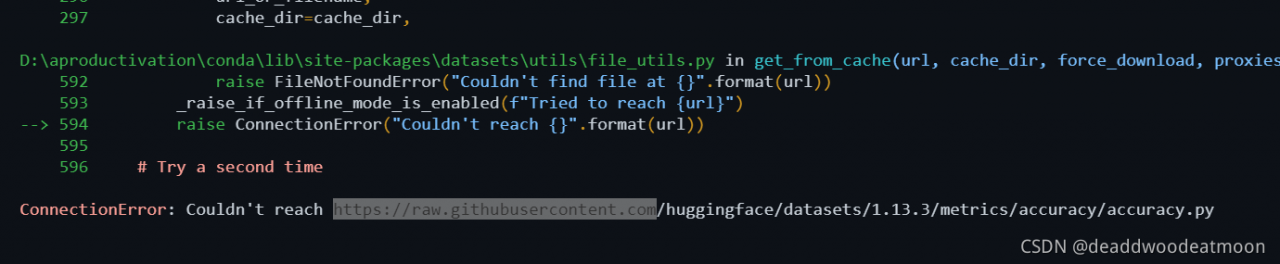
[Solved] Connection Error: couldn‘t reach http://raw.githubusercontent.com/huggingface/…
1. Log in to the website and enter raw.githubusercontent.com to query IPv4 address
2. Find the windows directory C:/Windows/systen32/Drives/etc/hosts file, open with Notepad:
3. Add last line 185.199.108.133 raw.githubusercontent.com
4. After saving and exiting, the operation does not report an error