Author Archives: Robins

How to Solve QT and PCIe interactive loading setupapi.H error

Setupapi.H relies on these header files

#include <Windows.h>
#include <assert.h>
#include <stdlib.h>
#include <stdio.h>
#include <strsafe.h>
#include <stdint.h>
#include <SetupAPI.h>
#include <INITGUID.H>
#include <WinIoCtl.h>
//#include <AtlBase.h>
#include <io.h>
#include "xdma_public.h"
#include "pcie_fun.h"

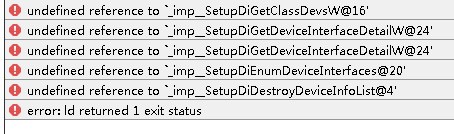
1. The error is reported as follows:

the loading sequence of the adjustment header file is as follows:

#include <SetupAPI.h>
#include <strsafe.h>

About to #include & lt; strsafe.h> Put #include & lt; SetupAPI.h> Just behind.

2. Then continue to report an error

because it is not linked to the setupapi.lib library
Library location: C:\program files (x86)\Microsoft SDKs\windows\v7.1a\lib\setupapi.lib

Solution: load the library into the project.

1. Create a new lib folder under the project path, copy the library to the Lib folder, and add it in the project * * *. Pro

LIBS +=  -L$$PWD/lib/  -lSetupAPI

2. A simpler way is to add directly

LIBS += -lSetupAPI

[PostgreSQL tutorial] · PostgreSQL error prompt: “error 42501” or “permission denied”

Article catalog

1. Problem overview 2. Solution

1. Problem overview

log in to the PostgreSQL database service with the PSQL command. When querying data, you receive an error log prompt, as follows:

“Error 42501” or “Permission Denied”

2. Solution

PostgreSQL error code 42501 is a common error, which sometimes occurs when responding to PostgreSQL database queries. In most cases, the error code 42501 indicates that the user has insufficient permissions on the database. PostgreSQL responds with an error message whenever a user with insufficient permissions makes a query

to solve this problem, please check the database user permissions. If the user trying to query lacks permission, just change the permission accordingly. You can use “ grant select on table_name to public; ” to grant permission to the public. Or use the command “ grant select on table_name to user_name; ” for only a few users

SAP RETAIL WA01 Creative Distribution List Error – Plant 0000000039 Confirmation date not maintained. –

SAP retail wa01 create allocation report error – plant 0000000039 confirmation date not maintained-

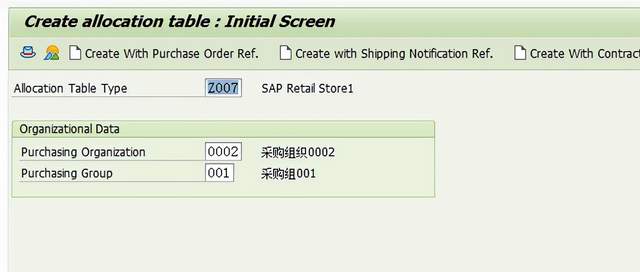
In SAP retail system, try to execute transaction code wa01 to create an allocation table,

Allocation table type z007, purchase organization 0002, purchase group 001.

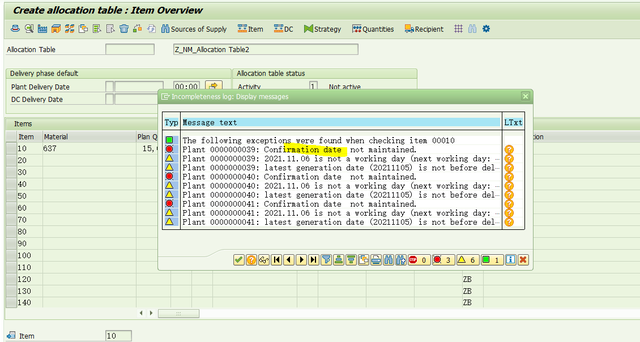
Press enter to enter the create allocation table interface, enter relevant data and click Save to get the following error reports:

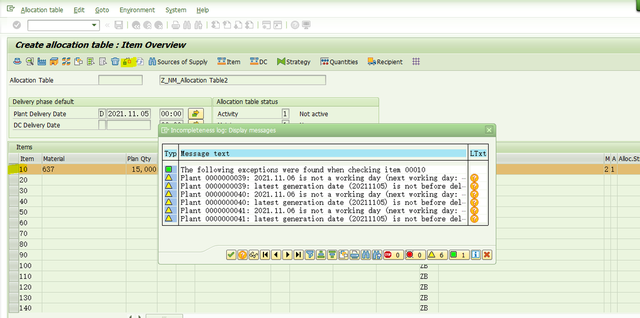
Error report: plant 0000000039: confirmation date not maintained

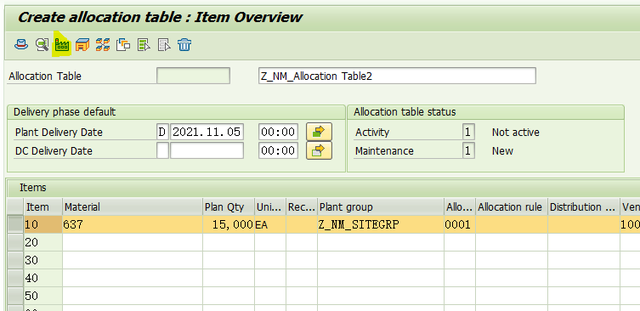
terms of settlement:

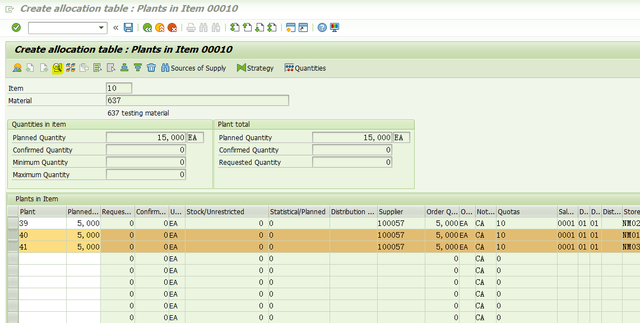
Select item and click the button

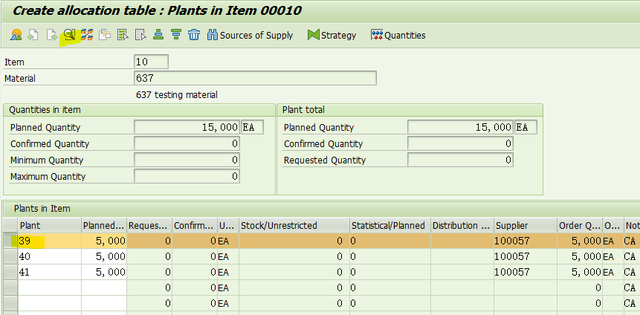
, enter the following interface,

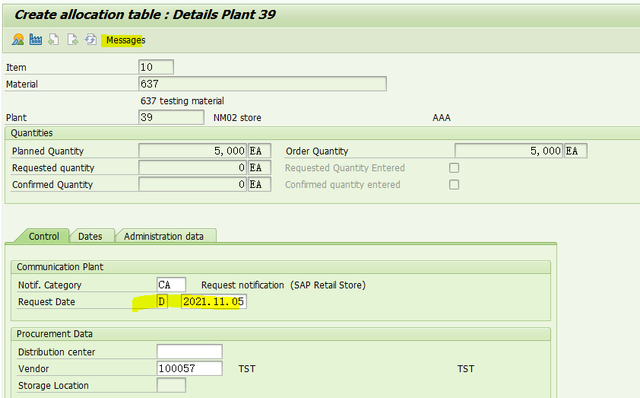
Select the first item and click the button,

, enter the following interface,

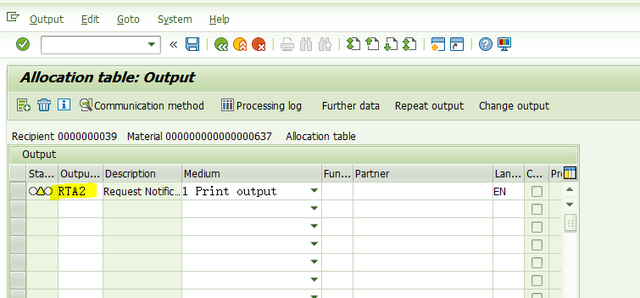
In the control tab, select d after the request date field, and then enter a date. Then click the message button,

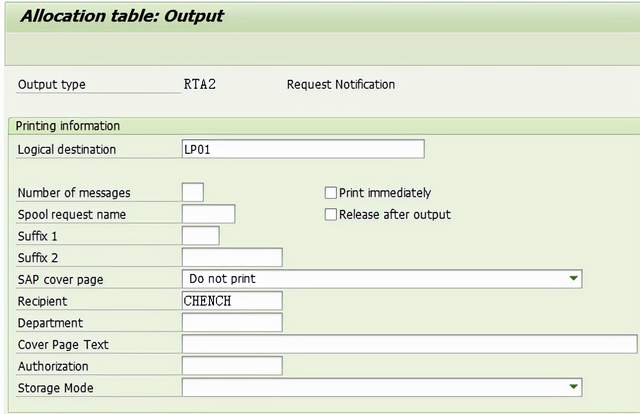
Maintain an output message and click the communication method button to enter the following interface,

Specify a local destination, such as LP01, as shown in the figure above.

Back, back.

Process the remaining items in the same way.

Finally, in the following interface, select item and click Check,

No more mistakes. Now you can save the allocation table data,

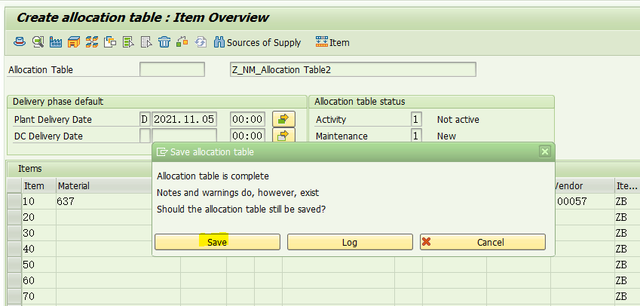
Click save,

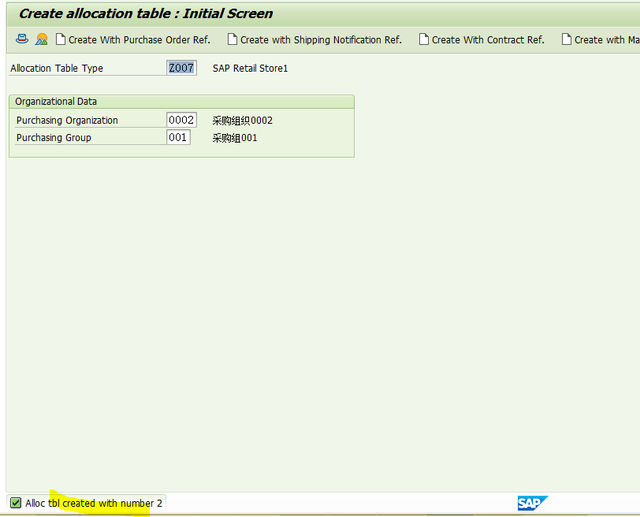
The allocation table is successfully created as you wish!

-Finish-

2021-11-4 written in residence.

How to Solve Brew install golangci-lint Error

Brew install golangci lint reports an error

Installation command:

brew install golangci-lint

report errors:

Error: No such file or directory @ rb_sysopen - /Users/...-go-1.16.6.big_sur.bottle.tar.gz

reason:

Go version problem

go 1.16.5 is already installed but outdated

Solution:

install go first and then golangci lint

brew install go
brew install golangci-lint

Scanf_S always reports errors [How to Solve]

First let me make complaints about it.

scanf_s. You really wasted a lot of my time

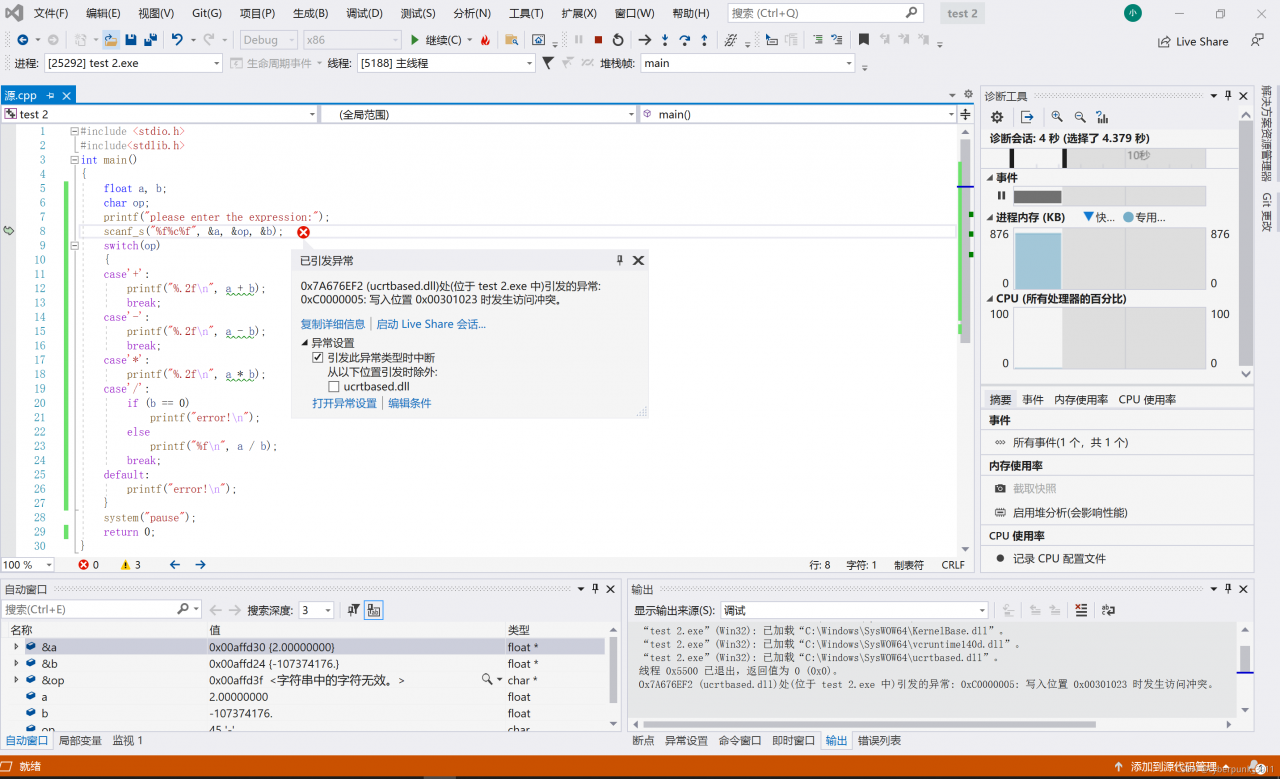
At first I was going to use scanf_S when inputting floating-point data and character data, the system always reports an error, that is, there is no error in the generation solution, but debugging is not good, eh, it is not good.

That’s it. I didn’t know at first. I thought it was a floating point problem. As a result, I haven’t worked it out for a long time,

Later, by chance, I found that it was actually the problem of character data. When I was using scanf_s, the length of character data should be specified, otherwise an error will be reported, but scanf is not used. In other words, the eighth line should be changed in this way

scanf_s("%f%c%f", &a, &op,1, &b);

The specified character length is one.

I’ll check the information and update it.

Raspberry pie startup self startup opencv program script and error analysis

1. Make test script

First, we need to make a script to test whether the self startup is effective.

pi@raspberry :~ $ nano /home/pi/start.sh

The contents of start.sh are as follows:

/usr/bin/python3 /home/pi/GeometryOperations.py

Here, you must pay attention to the use of absolute paths, otherwise there is a probability that the load will fail.

Then add an execution file to the script file

pi@raspberry :~ $ chmod 777 start.sh

Test the script function

pi@raspberry :~ $ ./start.sh

If you observe that the program is running normally, you can continue to the next step

2. Add self start

Modify rc.local file

pi@raspberry :~ $ sudo nano /etc/rc.local

Find exit 0 in the text. The code added before will be executed at startup. Add a line of code before exit 0:

su pi -c “exec /home/pi/start.sh &”

CTRL + O to save, Ctrl + X to exit and restart.

pi@raspberry :~ $ sudo reboot

After restart, the program can run.

3.DEBUG

If the raspberry pie does not respond after restart, you can check the status of RC local through systemctl

pi@raspberry :~ $ sudo systemctl status rc-local

After you go in, you can see the status of each step after you start up and check where the error will be reported.

4. Possible error reports

Process:454 ExecStart=/etc/rc.local start (code=exited,status=1/FAILURE)

This error is probably due to the script file
if you just start, you must write the file path as an absolute path, otherwise an error will be reported.

error: (-2:Unspecified error) Can’t initialize GTK backend in function ‘cvInitSystem’

This error will be reported if the self startup program contains code with window operation such as OpenCV

The reason is caused by the following sentence

su pi -c “exec /home/pi/start.sh &”

If your command needs to run for a long time (such as an endless loop) or cannot exit after running, you must ensure that the “& amp;” symbol is added at the end of the command to make the command run in its background

If the code contains window interface operations similar to the following

cv2.namedWindow(‘Cap’)
cv2.imshow(‘Cap’, frame)

It will conflict with the background operation, so that the back end of GTK cannot be initialized and an error will be caused
the solution is to delete all the operations related to the interface and window, and the program can run well!

An error is reported when kettle connects Oracle database and MySQL database

1. An error is reported when kettle connects to Oracle database

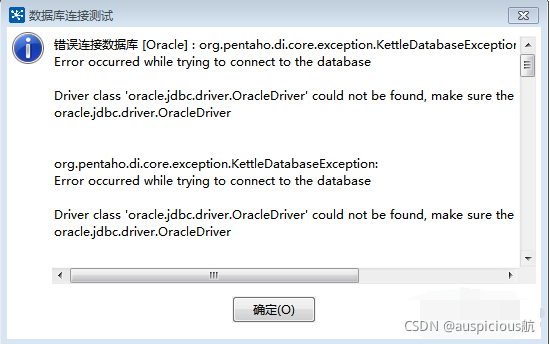
When kettle connects to Oracle database for the first time, it reports an error “wrong connection to database [Oracle]  ”, This is because spoon lacks the jar package corresponding to Oracle. If Oracle or Oracle client is installed, you can copy the corresponding jar file from their installation directory to solve the error problem.

Solution:

Copy and paste all files starting with ojdbc in Oracle database, such as ojdbc5 and ojdbc6.jar, into the spoon directory, such as D: \ kettle \ data-integration-8.2.0.7-719 \ lib\   Just under the path.

2. An error is reported when kettle connects to MySQL database

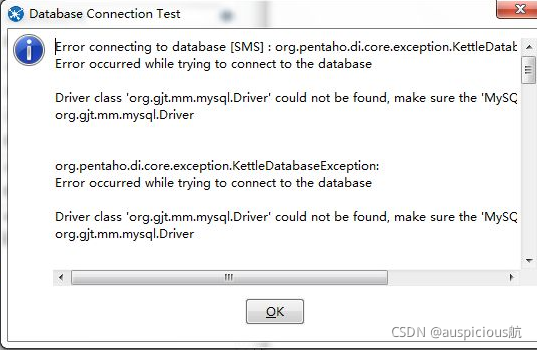
The error contents are as follows:

  This is caused by the missing jar connection package of MySQL.

Solution:

You need the jar connection package of MySQL database, such as mysql-connector-java-8.0.11.jar, copy and paste it into the spoon directory, such as D: \ kettle \ data-integration-8.2.0.7-719 \ lib\   Just under the path.

The attachment download link is as follows:

Kettle driver. TXT other document resources CSDN Download

[PostgreSQL tutorial] · out of memory issue

Article catalog

1. Problem description 2. Solution

1. Problem description

the PostgreSQL server running on the server receives an error log prompt message:

ERROR: out of memory 2021-11-24 
DETAIL: Failed on request of size 1880.

2. Solution

the memory of each system is limited. When there is no memory left, PostgreSQL’s memory allocation function begins to fail. Please check your hardware configuration and limitations

Vue agent reports an Error 404 nginx configuration method

The error points are different and the solutions are different. Use them after understanding

Recently, I was working on a personal blog. There was a music box function that called the API of Netease cloud music.

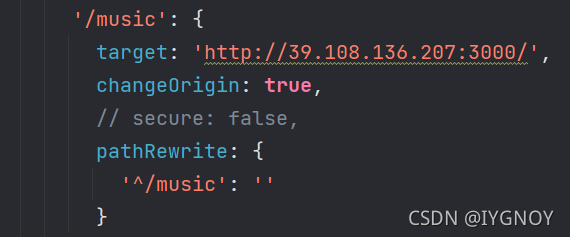
Agent configured in Vue

There is no problem with the local NPM run serve

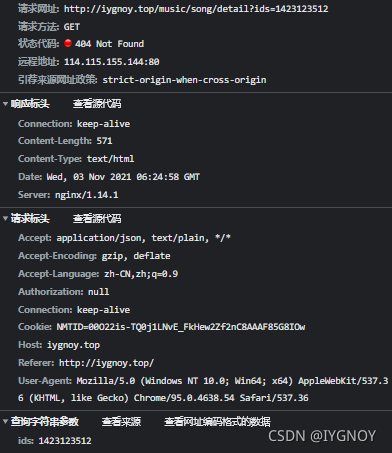
But after packing in nginx

The API of the agent will report 404

  terms of settlement:

Configuration in nginx.config

location /music/ {
        proxy_pass http://39.108.136.207:3000/;
        
	   }

  Pit point:

        proxy_ Pass cannot be placed directly on the IP + port

        Additional and/or corresponding methods are required


Troubleshooting of errors in the installation and use of scienceplots

Troubleshooting of errors in the installation and use of scienceplots

Configure
Python 3.8.5
Anaconda
Spyder 4

Spyder editor has a good graphical interface. The drawn graphics are directly fed back in the interface. When the terminal and pycharm run Python drawing, the image will be displayed only after plot
therefore, I am used to using Spyder.

1. Scienceplots installation

(1) The scienceplots toolkit needs to install latex in advance. If latex has been used before, it is ignored. It is recommended to download and install the miktex link on the official website: link.
this step is very important. Installing latex in CONDA is not enough. You must install latex in win10. See the next section for details.

(2) Install scienceplots
GitHub link: link. Provides three methods, all of which are OK.

The easiest way to install SciencePlots is by using `pip`:

```bash
# to install the lastest release (from PyPI)
pip install SciencePlots

# to install the latest commit (from GitHub)
pip install git+https://github.com/garrettj403/SciencePlots

# to clone and install from a local copy
git clone https://github.com/garrettj403/SciencePlots.git
cd SciencePlots
pip install -e .

(3) Test it. It can be used to indicate that the installation is successful.

import matplotlib.pyplot as plt
plt.style.use('science')
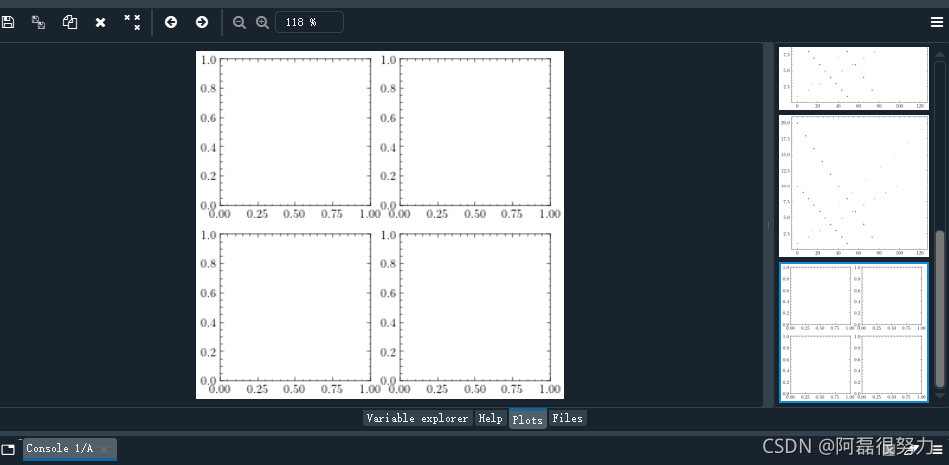
fig, axe = plt.subplots(2, 2, figsize=(5,5))  

2. Problems encountered

Two main errors were encountered:

File "C:\Users\dell\anaconda3\lib\subprocess.py", line 1307, in _execute_chi

RuntimeError: Failed to process string with tex because latex could not be found)

Two errors occur in sequence. Error reporting means that the first error directly leads to the second error… I thought it was a kernel error. I changed the bug crazily. Anaconda uninstalled and reinstalled. Jupyter, spyder editor, xlrd, Matplotlib, scienceplots and other packages uninstalled and reinstalled crazily. Finally, I finally determined that these things were ok…..

During installation, I noticed the prompt in read me that latex needs to be installed in advance. I thought I had installed latex in anaconda, but I didn’t pay attention to this sentence. Finally, I tried all the methods. I suddenly realized that latex should be installed under win. Sure enough, there is no error when running the drawing code again after installing miktex. After running for a few seconds, you will be prompted to install some real macros in the latex package. After installation, you can run!

Really special pit… It took so long to fix the bug. In fact, it’s just such a small problem. Reflect on yourself. In the future, you must think more seriously!

How to Solve DB2 uses Limit Error

preface

Prepare DB2 to use a simple limit query, and the result reports an error
Baidu has a wave. The previous articles are of no use at all, but they still report errors
later, we finally found a correct one and recorded a wave.

Text

SQL sample for DB2:

select * from sname.usertable fetch first 10 rows only

DB2 uses fetch first 10 rows only to return the first 10 rows of data
MySQL uses limit 10 to return the first 10 rows of data
Oracle uses rownum & lt= 10 returns the first 10 rows of data.