Author Archives: Robins

Error attempting to get column ‘xxxxx’ from result set — after Lombok is annotated with builder, mybatis cannot recognize the correct type of field

Pit stepping record – after Lombok is annotated with builder, mybatis cannot recognize the correct type of field

After adding Lombok to the entity class, sometimes we will use @ builder annotation, so we don’t need to write too many set methods to define the attribute content, which makes our code more elegant. Once the @ builder annotation is added to the entity class, it will cause problems in our mybatis mapping database fields

The questions are as follows

org.springframework.dao.DataIntegrityViolationException: Error attempting to get column 'username' from result set.  Cause: java.sql.SQLDataException: Cannot determine value type from string 'zhangsa'
; Cannot determine value type from string 'zhangsa'; nested exception is java.sql.SQLDataException: Cannot determine value type from string 'zhangsa'

note: when using @ builder annotation, a full parameter structure will be generated, resulting in the disappearance of no parameter structure

terms of settlement

    we can directly remove @ builder annotation, and there will be no problem for mybatis to query the database. We can generate parametric and nonparametric constructs in entity classes (you can add them manually or add annotations @ allargsconstructor , @ noargsconstructor )

    if it is still abnormal, you should check whether your entity class and database type mapping do not correspond

    Hold fireworks to seek life, poetic to seek love

error CS0234: The type or namespace name ‘UI‘ does not exist in the namespace ‘UnityEngine‘

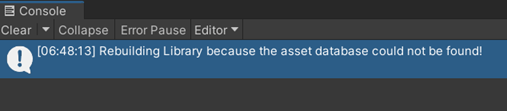
1. After opening the project, an error is reported: error cs0234: the type or namespace name ‘UI’ doors not exist in the namespace ‘unityengine’

2. Solution: close untiy, delete the Library folder, and then reopen the project

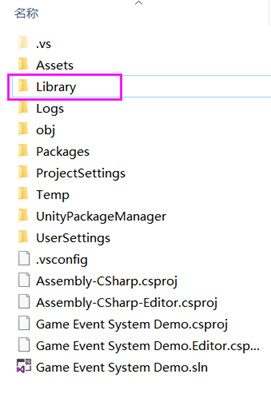
[1] Close the project and delete the folder library. The location is as follows:

[2] . reopen the project and unity will automatically rebuild the relevant DLL

error: unrecognized argument in option ‘-mabi=apcs-gnu‘

This is the problem I encountered when compiling rtl8723du and executing makefile:

aarch64-buildroot-linux-gnu-gcc.br_real: error: unrecognized argument in option '-mabi=apcs-gnu'
aarch64-buildroot-linux-gnu-gcc.br_real: note: valid arguments to '-mabi=' are: ilp32 lp64
aarch64-buildroot-linux-gnu-gcc.br_real: error: unrecognized command line option '-mapcs'
aarch64-buildroot-linux-gnu-gcc.br_real: error: unrecognized command line option '-mno-sched-prolog'
aarch64-buildroot-linux-gnu-gcc.br_real: error: unrecognized command line option '-msoft-float'

Let me say the conclusion first. In fact, this is the problem of conflict between the compilation target architecture. The tool chain I use is aarch64 builderoot Linux GNU GCC, which is the tool chain for compiling arm64 architecture, but the architecture in makefile is arch: = arm. Therefore, my modification is to change the architecture to arm64, that is, arch: = arm64.

Syntaxerror: unexpected end of JSON input [How to Solve]

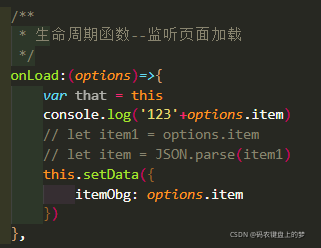
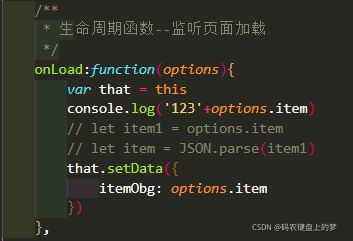
Onload executes only once
SetData stores data in the page cache
if the data is undefined, you may need that = this. After the curly braces, the of these changes
e in the event function is an event, which refers to the event of this operation
options are objects.

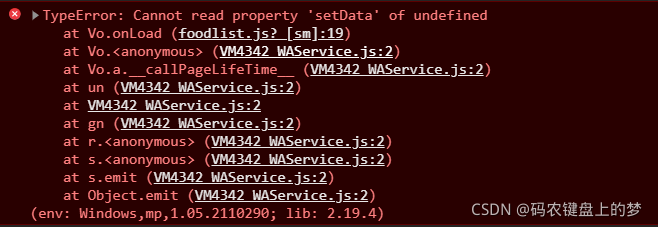
If it is written like this, an error will be reported: syntax error: unexpected end of JSON input

At this time, do not use the arrow function!

So there is no error!

[Solved] PyCharm Error: Cannot open Local Terminal Failed to start [powershell.exe] in C:\Users\…….

1. Whether there is a problem with the set path (it is only possible, and sometimes it can be modified without modification)

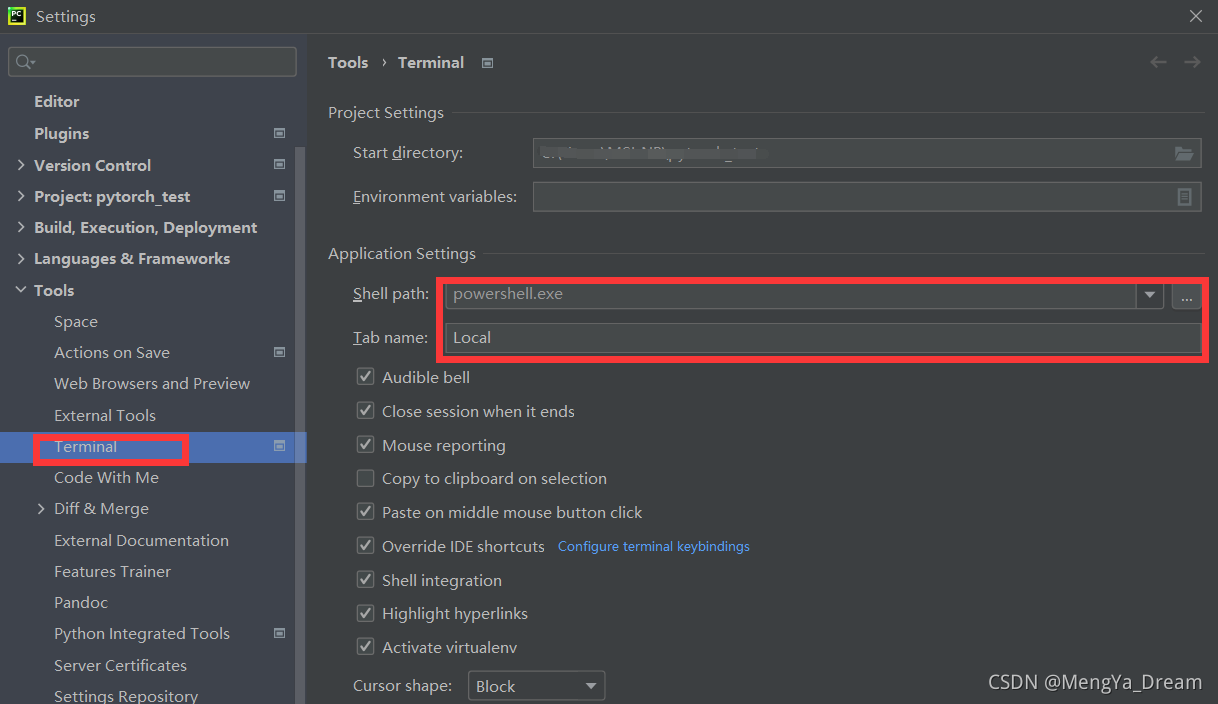
File–  Settings  –  Terminal Modify shell path powershell.exe to   C:\Windows\System32\cmd.exe.

2. Check the computer environment variables (here is the key point)

This computer – properties – advanced system settings – environment variables – path check environment

C:\Windows\system32
C:\Windows
C:\Windows\System32\Wbem
C:\Windows\System32\WindowsPowerShell\v1.0\

Qt Error: Debug Assertion Failed [How to Solve]

Purpose

I want to batch write controls into a layout. Qlabel and QWidget have about 20. It’s too hard to write line by line.

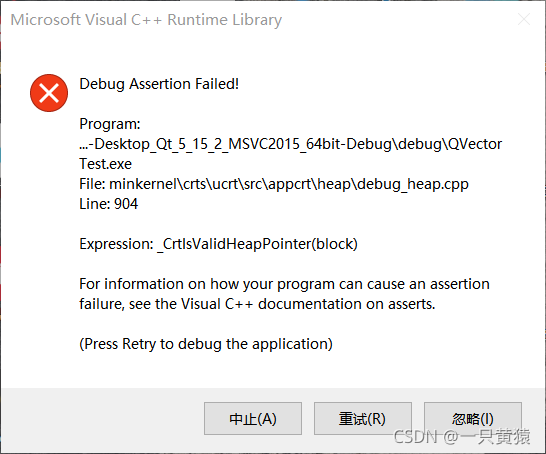
Qt Debug Assertion Failed! Error reporting reason

It is estimated that it is a wild pointer or a memory leak, because I often have the problem of memory access out of bounds when I use an array. As shown in the figure:

My error code

    QVBoxLayout* layout = new QVBoxLayout;//new creates a layout
    QLabel* labels = new QLabel[3];// here new an array of three QLabels;
    QStringList qstrList;
    qstrList<<u8 "Event list" << u8 "Assessment criteria" <<u8 "Subject list";//three strings
    for(int i = 0; i<3;i++){
        labels[i].setText(qstrList.at(i));//QLabel set text
        //---- set Qss----
        //---- set the font ----
    }
    for(int i = 0;i<3;i++){
        layout->addWidget(&labels[i]);//add QLabel to the layouts
    }

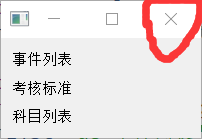
If it can be displayed, an error will be reported on the X of the closed window at the point, as shown in the figure:


My labels variable is not a member variable, which does not involve the problem of destruct before closing the window. If you change release to close the window, the word program abnormal end will also appear.

My solution

I’m used to using C + + arrays before. It’s better to replace QT batch setting components with containers such as qvector and qlist. Resolved Code:

QVBoxLayout* layout = new QVBoxLayout;//new has a layter
QVector<QLabel*> labels(3);//1. Now I know I have to use three so I limited it to three to prevent memory copies. You can also try the QList container 
//2. The type in the container can't be a component, only a pointer to a component.


    QStringList qstrList;
    qstrList<<u8 "EventList" << u8 "Assessment Criteria" <<u8 "SubjectList";//three strings
    for(int i = 0; i<3;i++){
        QLabel* label = new QLabel(qstrList.at(i));
        //---- set Qss----
        //---- set the font ----
    labels.append(label);
    }
    for(int i = 0;i<labels.size();i++){
        layout->addWidget(labels.at(i));
    }

Close the window again and there will be no error. I think the previous error report is the cause of the layout. I saw qtcreate warn me not to use the new control array.

[Solved] java.util.concurrent.ExecutionException: org.apache.catalina.LifecycleException: Failed to start component [StandardEngine[Tomcat].StandardHost[localhost].StandardContext[]]

Error Messages:

java.util.concurrent.ExecutionException: org.apache.catalina.LifecycleException: Failed to start component [StandardEngine[Tomcat].StandardHost[localhost].StandardContext[]]
.......
Caused by:
             org.apache.catalina.LifecycleException: Failed to start component [StandardEngine[Tomcat].StandardHost[localhost].StandardContext[]]
......
Caused by:
             java.lang.ClassCastException: class org.springframework.web.SpringServletContainerInitializer cannot be cast to class javax.servlet.ServletContainerInitializer (org.springframework.web.SpringServletContainerInitializer is in unnamed module of loader org.apache.catalina.loader.WebappClassLoader @1e0295e0; javax.servlet.ServletContainerInitializer is in unnamed module of loader org.codehaus.plexus.classworlds.realm.ClassRealm @3d88e6b9)
......


cause:
I imported the following dependencies in the project’s pom.xml and found that the tomcat7 plugin can’t run
E.g:

<dependency>
  <groupId>javax.servlet</groupId>
  <artifactId>javax.servlet-api</artifactId>
  <version>4.0.1</version>
</dependency>
<dependency>
  <groupId>javax.servlet.jsp</groupId>
  <artifactId>javax.servlet.jsp-api</artifactId>
  <version>2.3.3</version>
</dependency>

Check:

1. Check whether the current port is occupied by the process

2. Check whether there is a problem with the servlet mapping URL path in web.xml

3. Check for dependency conflicts

reason:

The servlet dependent version imported in the current Maven configuration file is too high and incompatible with tomcat7

Solution:

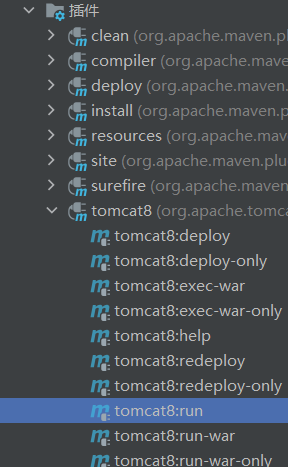
The tomcat7 plug-in in pom.xml can be upgraded to tomcat8

reference:

<pluginRepositories>
  <pluginRepository>
    <id>alfresco-public</id>
    <url>https://artifacts.alfresco.com/nexus/content/groups/public</url>
  </pluginRepository>
  <pluginRepository>
    <id>alfresco-public-snapshots</id>
    <url>https://artifacts.alfresco.com/nexus/content/groups/public-snapshots</url>
    <snapshots>
      <enabled>true</enabled>
      <updatePolicy>daily</updatePolicy>
    </snapshots>
  </pluginRepository>
  <pluginRepository>
    <id>beardedgeeks-releases</id>
    <url>http://beardedgeeks.googlecode.com/svn/repository/releases</url>
  </pluginRepository>
</pluginRepositories>
<build>
  <plugins>
    <plugin>
      <groupId>org.apache.tomcat.maven</groupId>
      <artifactId>tomcat8-maven-plugin</artifactId>
      <version>3.0-r1655215</version>
      <configuration>
        <port>80</port>
        <path>/</path>
      </configuration>
    </plugin>
  </plugins>
</build>

last:

Refresh the Maven management tool, recompile the Maven project, and then start it with tomcat8!

[Solved] gyp verb `which` failed Error: not found: python2

Problems with yarn install

1. No yarn
NPM install – G yarn
2. An error is reported and phthon is not found

yarn install v1.22.17
warning package-lock.json found. Your project contains lock files generated by tools other than Yarn. It is advised not to mix package managers in order to avoid resolution inconsistencies caused by unsynch
ronized lock files. To clear this warning, remove package-lock.json.
[1/4] Resolving packages...
[2/4] Fetching packages...
[3/4] Linking dependencies...
warning " > [email protected]" has unmet peer dependency "css-loader@*".
warning " > [email protected]" has unmet peer dependency "webpack@^3.0.0 || ^4.1.0 || ^5.0.0-0".
warning " > [email protected]" has unmet peer dependency "webpack@^2.0.0 || ^3.0.0 || ^4.0.0".
warning " > [email protected]" has unmet peer dependency "webpack@^3.0.0 || ^4.0.0".
[4/4] Building fresh packages...
[7/7] ⠈ ant-design-vue
[-/7] ⠁ waiting...
[6/7] ⠁ node-sass
[4/7] ⠁ yorkie
error E:\HuaDi\Projects\mrpc-inline\ant-design-vue-supermap\node_modules\node-sass: Command failed.
Exit code: 1
Command: node scripts/build.js
Arguments:
Directory: E:\HuaDi\Projects\mrpc-inline\ant-design-vue-supermap\node_modules\node-sass
Output:
Building: E:\develop\node.js\node.exe E:\HuaDi\Projects\mrpc-inline\ant-design-vue-supermap\node_modules\node-gyp\bin\node-gyp.js rebuild --verbose --libsass_ext= --libsass_cflags= --libsass_ldflags= --libs
ass_library=
gyp info it worked if it ends with ok
gyp verb cli [
gyp verb cli   'E:\\develop\\node.js\\node.exe',
gyp verb cli   'E:\\HuaDi\\Projects\\mrpc-inline\\ant-design-vue-supermap\\node_modules\\node-gyp\\bin\\node-gyp.js',
gyp verb cli   'rebuild',
gyp verb cli   '--verbose',
gyp verb cli   '--libsass_ext=',
gyp verb cli   '--libsass_cflags=',
gyp verb cli   '--libsass_ldflags=',
gyp verb cli   '--libsass_library='
gyp verb cli ]
gyp info using [email protected]
gyp info using [email protected] | win32 | x64
gyp verb command rebuild []
gyp verb command clean []
gyp verb clean removing "build" directory
gyp verb command configure []
gyp verb check python checking for Python executable "python2" in the PATH
gyp verb `which` failed Error: not found: python2
gyp verb `which` failed     at getNotFoundError (E:\HuaDi\Projects\mrpc-inline\ant-design-vue-supermap\node_modules\which\which.js:13:12)
gyp verb `which` failed     at F (E:\HuaDi\Projects\mrpc-inline\ant-design-vue-supermap\node_modules\which\which.js:68:19)
gyp verb `which` failed     at E (E:\HuaDi\Projects\mrpc-inline\ant-design-vue-supermap\node_modules\which\which.js:80:29)
gyp verb `which` failed     at E:\HuaDi\Projects\mrpc-inline\ant-design-vue-supermap\node_modules\which\which.js:89:16
gyp verb `which` failed     at E:\HuaDi\Projects\mrpc-inline\ant-design-vue-supermap\node_modules\isexe\index.js:42:5
gyp verb `which` failed     at E:\HuaDi\Projects\mrpc-inline\ant-design-vue-supermap\node_modules\isexe\windows.js:36:5
gyp verb `which` failed     at FSReqCallback.oncomplete (fs.js:175:21)
gyp verb `which` failed  python2 Error: not found: python2
gyp verb `which` failed     at getNotFoundError (E:\HuaDi\Projects\mrpc-inline\ant-design-vue-supermap\node_modules\which\which.js:13:12)
gyp verb `which` failed     at F (E:\HuaDi\Projects\mrpc-inline\ant-design-vue-supermap\node_modules\which\which.js:68:19)
gyp verb `which` failed     at E (E:\HuaDi\Projects\mrpc-inline\ant-design-vue-supermap\node_modules\which\which.js:80:29)
gyp verb `which` failed     at E:\HuaDi\Projects\mrpc-inline\ant-design-vue-supermap\node_modules\which\which.js:89:16
gyp verb `which` failed     at E:\HuaDi\Projects\mrpc-inline\ant-design-vue-supermap\node_modules\isexe\index.js:42:5
gyp verb `which` failed     at E:\HuaDi\Projects\mrpc-inline\ant-design-vue-supermap\node_modules\isexe\windows.js:36:5
gyp verb `which` failed     at FSReqCallback.oncomplete (fs.js:175:21) {
gyp verb `which` failed   code: 'ENOENT'
gyp verb `which` failed }
gyp verb check python checking for Python executable "python" in the PATH
gyp verb `which` failed Error: not found: python
gyp verb `which` failed     at getNotFoundError (E:\HuaDi\Projects\mrpc-inline\ant-design-vue-supermap\node_modules\which\which.js:13:12)
gyp verb `which` failed     at F (E:\HuaDi\Projects\mrpc-inline\ant-design-vue-supermap\node_modules\which\which.js:68:19)
gyp verb `which` failed     at E (E:\HuaDi\Projects\mrpc-inline\ant-design-vue-supermap\node_modules\which\which.js:80:29)
gyp verb `which` failed     at E:\HuaDi\Projects\mrpc-inline\ant-design-vue-supermap\node_modules\which\which.js:89:16
gyp verb `which` failed     at E:\HuaDi\Projects\mrpc-inline\ant-design-vue-supermap\node_modules\isexe\index.js:42:5
gyp verb `which` failed     at E:\HuaDi\Projects\mrpc-inline\ant-design-vue-supermap\node_modules\isexe\windows.js:36:5
gyp verb `which` failed     at FSReqCallback.oncomplete (fs.js:175:21)
gyp verb `which` failed  python Error: not found: python
gyp verb `which` failed     at getNotFoundError (E:\HuaDi\Projects\mrpc-inline\ant-design-vue-supermap\node_modules\which\which.js:13:12)
gyp verb `which` failed     at F (E:\HuaDi\Projects\mrpc-inline\ant-design-vue-supermap\node_modules\which\which.js:68:19)
gyp verb `which` failed     at E (E:\HuaDi\Projects\mrpc-inline\ant-design-vue-supermap\node_modules\which\which.js:80:29)
gyp verb `which` failed     at E:\HuaDi\Projects\mrpc-inline\ant-design-vue-supermap\node_modules\which\which.js:89:16
gyp verb `which` failed     at E:\HuaDi\Projects\mrpc-inline\ant-design-vue-supermap\node_modules\isexe\index.js:42:5
gyp verb `which` failed     at E:\HuaDi\Projects\mrpc-inline\ant-design-vue-supermap\node_modules\isexe\windows.js:36:5
gyp verb `which` failed     at FSReqCallback.oncomplete (fs.js:175:21) {
gyp verb `which` failed   code: 'ENOENT'
gyp verb `which` failed }
gyp verb could not find "python". checking python launcher
gyp verb could not find "python". guessing location
gyp verb ensuring that file exists: C:\Python27\python.exe
gyp ERR! configure error
gyp ERR! stack Error: Can't find Python executable "python", you can set the PYTHON env variable.
gyp ERR! stack     at PythonFinder.failNoPython (E:\HuaDi\Projects\mrpc-inline\ant-design-vue-supermap\node_modules\node-gyp\lib\configure.js:484:19)
gyp ERR! stack     at PythonFinder.<anonymous> (E:\HuaDi\Projects\mrpc-inline\ant-design-vue-supermap\node_modules\node-gyp\lib\configure.js:509:16)
gyp ERR! stack     at callback (E:\HuaDi\Projects\mrpc-inline\ant-design-vue-supermap\node_modules\graceful-fs\polyfills.js:295:20)
gyp ERR! stack     at FSReqCallback.oncomplete (fs.js:175:21)
gyp ERR! System Windows_NT 10.0.19042
gyp ERR! command "E:\\develop\\node.js\\node.exe" "E:\\HuaDi\\Projects\\mrpc-inline\\ant-design-vue-supermap\\node_modules\\node-gyp\\bin\\node-gyp.js" "rebuild" "--verbose" "--libsass_ext=" "--libsass_cfla
gs=" "--libsass_ldflags=" "--libsass_library="
gyp ERR! cwd E:\HuaDi\Projects\mrpc-inline\ant-design-vue-supermap\node_modules\node-sass
gyp ERR! node -v v14.1.0

Solution:
1. Install low version node.js
2.npm install -g node-gyp
3.yarn install

[Solved] Unity package Error: CommandInvokationFailure: Gradle build failed.

CommandInvokationFailure: Gradle build failed.
F:/Program Files/Unity/2017.4.31f/Editor/Data/PlaybackEngines/AndroidPlayer/Tools\OpenJDK\Windows\bin\java.exe -classpath “F:\Program Files\Unity\2017.4.31f\Editor\Data\PlaybackEngines\AndroidPlayer\Tools\gradle\lib\gradle-launcher-4.6.0.jar” org.gradle.launcher.GradleMain “-Dorg.gradle.jvmargs=-Xmx4096m” “assembleRelease”


Solution:

if there is where in the error message: followed by garbled characters, it means that the path is wrong, and neither the project nor the signature can be in English.

[Vue warn]: Failed to resolve directive: XXX [How to Solve]

There are two reasons for this error:

1. Misspelling of instruction words

2. Vue.Directive() is not written before new Vue

// Wrong

import Vue from 'vue';
import App from './app.vue';

new Vue({ 
  render: h => h(App),
}).$mount('#A-demo');
 
Vue.directive('focus', {
  inserted(el){
    el.focus();
  }
})


// Right

import Vue from 'vue';
import App from './app.vue';

Vue.directive('focus', {
  inserted(el){
    el.focus();
  }
})

new Vue({ 
  render: h => h(App),
}).$mount('#A-demo');
 

Manifest merger failed with multiple errors, see logs [How to Solve]

Today, when accessing an Android SDK, I reported a problem of manifest merge failed with multiple errors, see logs. Google said that this problem often occurs when introducing a third-party SDK. In fact, it is a dependency conflict
you can see the specific error information above the error, as shown below

it indicates that there is a com.tencent.mid conflict. Just exclude

[Solved] Tensorflow Error: failed to create cublas handle: CUBLAS_STATUS_ALLOC_FAILED

Tensorflow failed to create cublas handle: cublas_ STATUS_ ALLOC_ FAILED

Foreword problem description problem solving reference link

preface

After many days of in-depth learning, I finally learned to use GPU. I was very happy, but I chatted with my classmates and learned that my 1660ti running in-depth learning is nothing. Dunton doesn’t hold any hope. It’s good to use notebooks for learning. If you really run in-depth learning, you have to use laboratory computers. Alas, there’s still no money

Problem description

An error occurred while using GPU

2021-11-09 20:43:26.114720: I tensorflow/stream_executor/platform/default/dso_loader.cc:44] Successfully opened dynamic library cublas64_100.dll
2021-11-09 20:43:26.386261: E tensorflow/stream_executor/cuda/cuda_blas.cc:238] failed to create cublas handle: CUBLAS_STATUS_ALLOC_FAILED
2021-11-09 20:43:26.386617: E tensorflow/stream_executor/cuda/cuda_blas.cc:238] failed to create cublas handle: CUBLAS_STATUS_ALLOC_FAILED
2021-11-09 20:43:26.386735: W tensorflow/stream_executor/stream.cc:1919] attempting to perform BLAS operation using StreamExecutor without BLAS support
Traceback (most recent call last):
  File "first.py", line 30, in <module>
    gpu_time = timeit.timeit(gpu_run,number=10)
  File "D:\Anaconda\Anaconda3\envs\tensorflow2_0_0_gpu\lib\timeit.py", line 233, in timeit
    return Timer(stmt, setup, timer, globals).timeit(number)
  File "D:\Anaconda\Anaconda3\envs\tensorflow2_0_0_gpu\lib\timeit.py", line 177, in timeit
    timing = self.inner(it, self.timer)
  File "<timeit-src>", line 6, in inner
  File "first.py", line 21, in gpu_run
    c = tf.matmul(gpu_a,gpu_b)
  File "D:\Anaconda\Anaconda3\envs\tensorflow2_0_0_gpu\lib\site-packages\tensorflow_core\python\util\dispatch.py", line 180, in wrapper
    return target(*args, **kwargs)
  File "D:\Anaconda\Anaconda3\envs\tensorflow2_0_0_gpu\lib\site-packages\tensorflow_core\python\ops\math_ops.py", line 2765, in matmul
    a, b, transpose_a=transpose_a, transpose_b=transpose_b, name=name)
  File "D:\Anaconda\Anaconda3\envs\tensorflow2_0_0_gpu\lib\site-packages\tensorflow_core\python\ops\gen_math_ops.py", line 6126, in mat_mul
    _six.raise_from(_core._status_to_exception(e.code, message), None)
  File "<string>", line 3, in raise_from
tensorflow.python.framework.errors_impl.InternalError: Blas GEMM launch failed : a.shape=(10000, 1000), b.shape=(1000, 2000), m=10000, n=2000, k=1000 [Op:MatMul] name: MatMul/

I was in a hurry to find out the reason. I didn’t have enough video memory, and the GPU didn’t run full

Solution:

There are two main reasons
1. The versions of cudnn and CUDA and tensorflow are not applicable, but mine are based on the tutorial and confirmed several times to ensure that they are OK. This excludes the shortage of GPU video memory. It can be solved through the method on the official website: t because ensorflow 2.0 supports two GPU computing methods:
(1) dynamically allocate video memory
(2) set hard video memory (for example, only 1g video memory can be used, and others can play games
set the mode to (1) dynamic allocation, and the code is;

import tensorflow as tf

gpus = tf.config.experimental.list_physical_devices(device_type='GPU')
tf.config.experimental.set_memory_growth(gpus[0], True)