Author Archives: Robins

[Solved] Gurobi–Error code: 10005. Unable to retrieve attribute solved ‘Pi‘

Gurobi code

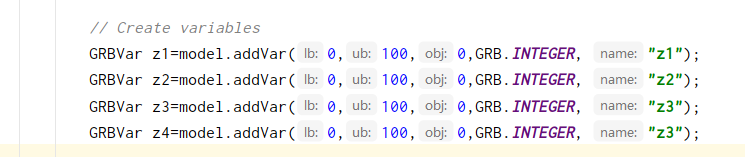
Question code:

I wanted to get the dual space of variables,

double[] dual=model.get(GRB.DoubleAttr.Pi,model.getConstrs());

Error code: 10005. Unable to retrieve attribute ‘Pi’

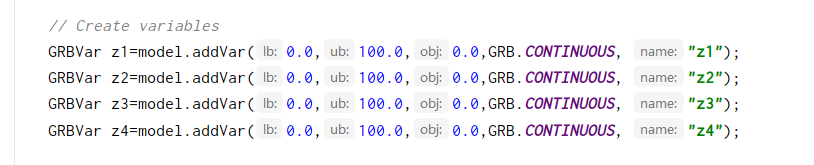
The reason is that in gurobi, binary variables and integer variables have no dual space. Change integer to continuous, as follows:

ERROR: dependencies ‘curl’, ‘openssl’ are not available for package ‘httr’

ERROR: dependencies ‘curl’, ‘openssl’ are not available for package ‘httr’
removing ‘/usr/local/lib/R/site-library/httr’

apt-get install openssl
apt-get install openssl-devel

apt-get install libcurl

Or:

wget https://www.openssl.org/source/openssl-1.1.1i.tar.gz

tar -xvf  openssl-1.1.1i.tar.gz

cd openssl-1.1.1i/

./config 

make && make install

./config shared 

make clean

make  && make install

‘curl’:

wget  http://curl.haxx.se/download/curl-7.38.0.tar.gz

tar -xzvf curl-7.38.0.tar.gz

cd curl-7.38.0

./configure

make

make install

net start mysql System error 2 has occurred. The system cannot find the file specified.

https://www.jianshu.com/p/6d8ed7c36e6f
368160;-net start mysql29616;- 38169;- 35823s;

error 2 has occurred.  The system cannot find the file specified.

Solution:
run as an administrator and enter the installation path of CD + MySQL bin directory on the command line

C:\WINDOWS\system32>cd C:\softerwaresetting\mySQL\mysql-8.0.11-winx64\bin

C:\softerwaresetting\mySQL\mysql-8.0.11-winx64\bin>mysqld --remove
Service successfully removed.

C:\softerwaresetting\mySQL\mysql-8.0.11-winx64\bin>mysqld --install
Service successfully installed.

C:\softerwaresetting\mySQL\mysql-8.0.11-winx64\bin>net start mysql
The MySQL service is starting.
The MySQL service was started successfully.

Error in v-on handler (Promise/async): “[object Object]“

Put the request processing in main.js:

axios.interceptors.response.use(
  response => {
    if (response.data.code != 0) {
      return Promise.reject(response);
    }
    return response.data
  }
)

It is found that when the code returned by the back end is not zero, that is, when return promise.rehect (response) is executed, although the code runs normally, the console will report an error:

vue.runtime.esm.js?2b0e:619 [Vue warn]: Error in v-on handler (Promise/async): "[object Object]"

found in

---> <Login> at src/views/Login.vue
       <App> at src/App.vue
         <Root>

Find the problem on the Internet and find that the exception of promise.rehect (response) needs to be captured, but most of them are captured in the component. Isn’t it meaningless to put the judgment in the main file, so you can put the capture processing in the main file, as follows:


axios.interceptors.response.use(
  response => {
    if (response.data.code != 0) {
      Message({content: response.data.message});
      return Promise.reject(response).catch(()=>{});
    }
    return response.data
  },
 )

That is, add . Catch (() = & gt; {}) directly after promise. Rehect (response) , which is currently valid for personal testing.

[Solved] AttributeError: DataFrame object has no attribute’xxx’

Problem Description:

After reading a column of information in the table (full [‘power ‘]. Describe()),

Error ‘dataframe’ object has no attribute ‘power’ occurred


Problem-solving:

Find the table header and find that there is more space in “power” when naming the header. Delete the space

IAR Compile Error: Error[Li005]: no definition for [How to Solve]

after transplanting the program today, there was an error report of “error [li005]: no definition for” during compilation, which was encountered and solved before. Today, I’m going to officially record the causes and solutions of this error.

1. Reasons

just look at the error reminder given by IAR, “error [li005]: no definition for xxxxx”, which means that xxxxx is not defined (all cases I encounter refer to a function), but find the problem yourself, and you will find that this xxxxx has been defined in other C files, and this xxxxx function has been declared in the header file corresponding to this C file, And the path of the header file has been included in the IAR settings. There should be no problem! Then I began to wonder.

2. Solutions

let’s talk about the solution to this problem:

2.1 the C file where the xxxxx function is located is not added in the project

most of this happens because you accidentally removed the C file from the project, and you haven’t noticed it. The solution is very simple. Add the C file to the project again and recompile it.

2.2 when using conditional compilation, the xxxxx function is not compiled

this is why I have this problem this time. Let me give you an example:

#define FANJIE 1

#if FANJIE
void Get_Fans(void)
{
    for(int i  = 0; i<100;i++);
}
#endif

Take the simple function above as an example, when FANJIE is 1, call Get_Fans() in other c files, and no error will be reported, but when FANJIE is 0, call Get_Fans() in other c files Function, it will report the error “Error[Li005]: no definition for Get_Fans”.
The solution is also very simple, just make sure that the conditional compilation can be compiled normally.
[Solved] Hbase Error: ERROR: KeeperErrorCode = NoNode for /hbase/master

Reason: power failure (including computer sleep, etc.) caused Hmaster to fail to connect, and no master node could be found in zookeeper

Solution: delete the hbase node in zookeeper, open hbase will automatically create this node
1) log in to the zookeeper client: zkCli.sh
2) delete the hbase node: deleteall /hbase

The most critical step: restart hbase, restart zookeeper
1) close zookeeper: my_zk.sh stop This is my script to start zk, don’t copy
2) close hbase: stop-hbase.sh is invalid, use the jps command to find each in the cluster The port number of the hmaster and hregionserver of the machine, kill -9 + port number one by one kills the hbase process, which is equivalent to manually closing hbase
3) Open zookeeper and hbase, my_zk.sh start start-hbase.sh
hdfs does not need to be moved, If yours doesn’t work, hdfs can also be restarted.

Dev C++ Error: error: ld returned 1 exit status [How to Solve]

There are several reasons for this error: error: ld returned 1 exit status


Solution (Four Methods to Solve, Not All):

1.undefined reference to `__gxx_personality_v0

Or compile with g++

To compile with gcc, add -lstdc++ to the edit option linker command

2. Close the program connected to the running dev

3. Definition error

4. Compile other settings issues

dpkg-deb: error: paste subprocess was killed by signal (Broken pipe)

1. Problem description

The following error occurred while attempting to install CUDA 10.2 on Ubuntu 18.04

dpkg-deb: error: paste subprocess was killed by signal (Broken pipe)
Errors were encountered while processing:
 /var/cache/apt/archives/nvidia-cuda-dev_9.1.85-3ubuntu1_amd64.deb
E: Sub-process /usr/bin/dpkg returned an error code (1)

2. Problem solving

1. Open the terminal and input sudo dpkg - I -- force overwrite XXX

 sudo dpkg -i --force-overwrite /var/cache/apt/archives/nvidia-cuda-dev_9.1.85-3ubuntu1_amd64.deb

2. Repair the damaged package

sudo apt-get -f install

3. Sprinkle flowers after completion

Unity Error:InvalidCastException: Cannot cast from source type to destination type.

Error:
when I use system.data.dll to parse excel table; Encountered this error:

wrong positioning:
this is an excel problem; The error is reported in: excel reader. Asdataset() is due to the problem of Excel format;

Solution:
you can solve this problem by setting the cell format as text in Excel table;

Reference website:
Yusong Momo cross platform analysis Excel

AttributeError: ‘NoneType‘ object has no attribute ‘shape‘

When training poly-yolo, the environment is debugged, but this bug will appear in the training. Generally, the picture path is not set or set incorrectly.

solve:

In the simulator_ Absolute path is added in front of each line of image in dataset/simulator-train.txt file, such as:

/home/arl/lc/poly-yolo-master/simulator_ dataset/imgs/img_ r_ 12.png

The validation set is the same as above
