Author Archives: Robins

Ureport opens the report files Error: baseMapper [How to Solve]

Initial exception

org.springframework.http.converter.HttpMessageNotWritableException: No converter for [class com.cdw.common.core.model.Resp] with preset Content-Type 'text/json;charset=UTF-8'

Solution:

Set ↓

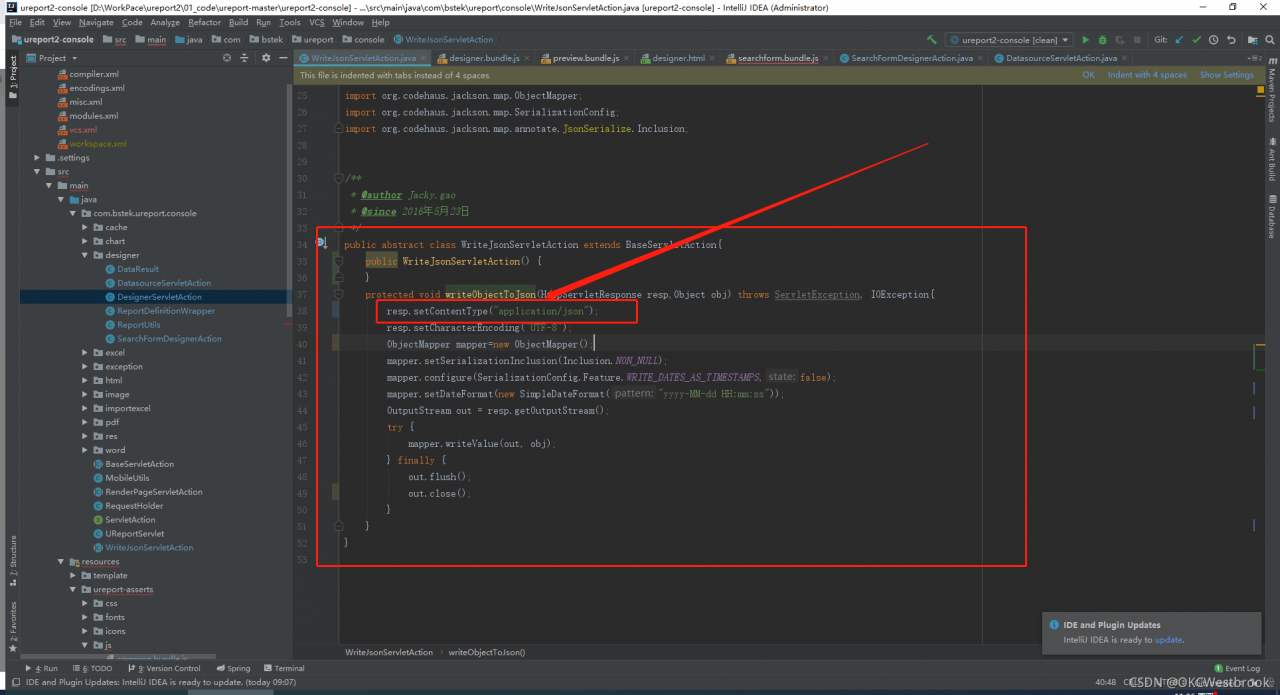
resp.setContentType("text/json");

Change to ↓

resp.setContentType("application/json");

Then another exception occurs


java.lang.IllegalStateException: getOutputStream() has already been called for this response

Solution:

Set ↓

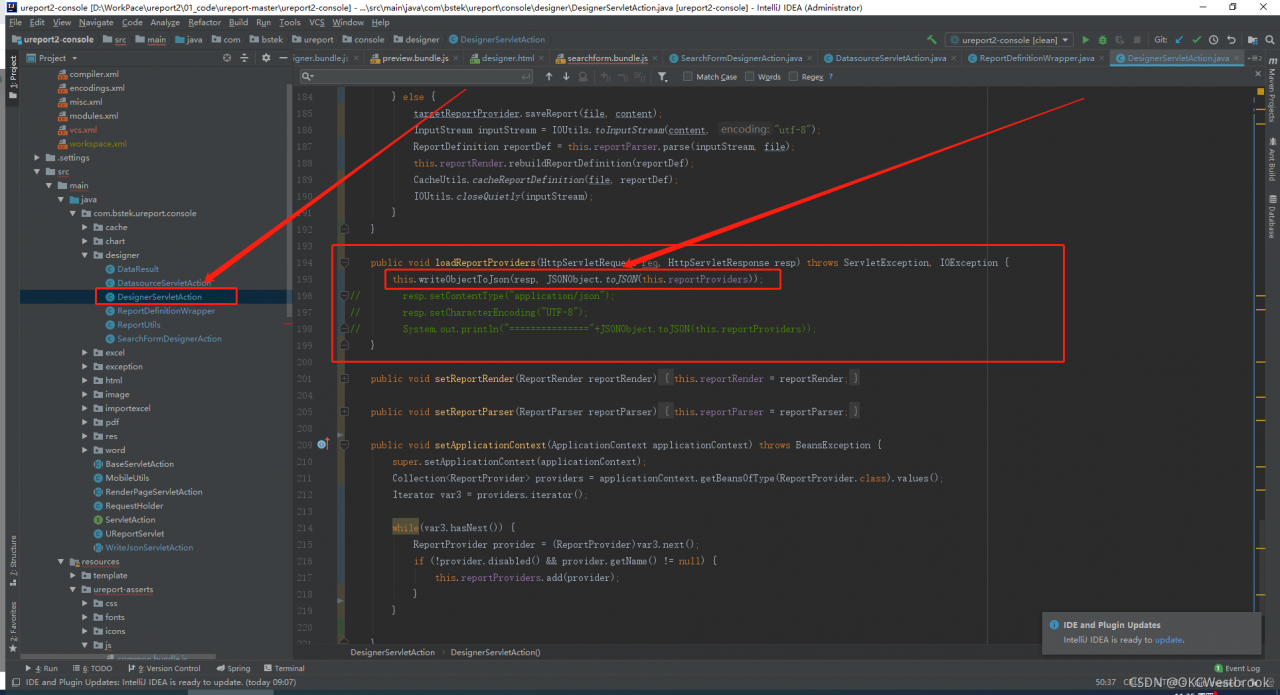
this.writeObjectToJson(resp, this.reportProviders);

Change to ↓

this.writeObjectToJson(resp, JSONObject.toJSON(this.reportProviders));

Full screenshot after modification:

SAP mm receives the purchase order and reports an error – table t169p entry znmi does not exist-

SAP mm receives the purchase order and reports an error – table t169p entry znmi does not exist-

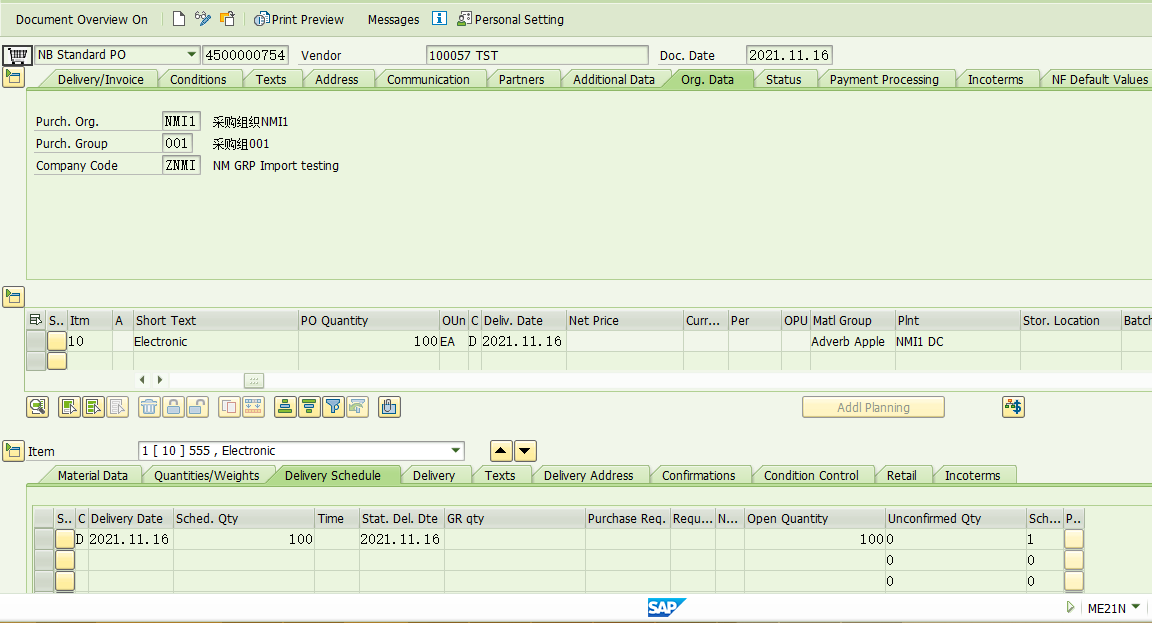
The following purchase order 4500000754,

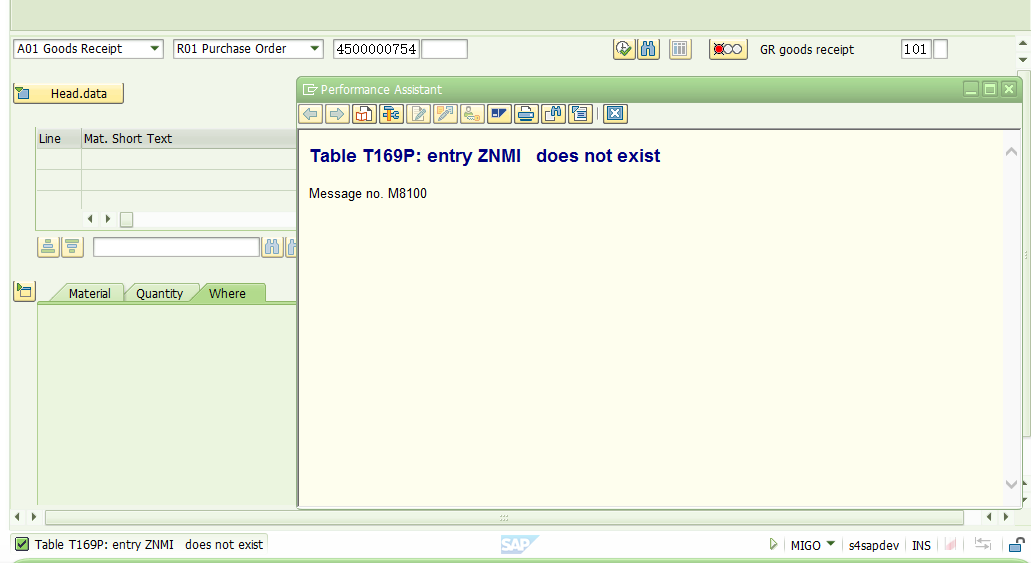
Execute the transaction code Migo. For the receipt of 101, the error is reported as follows:

Error message: table t169p: entry znmi does not exist

Znmi is a newly created company code. This error is likely to be missed in some configurations.

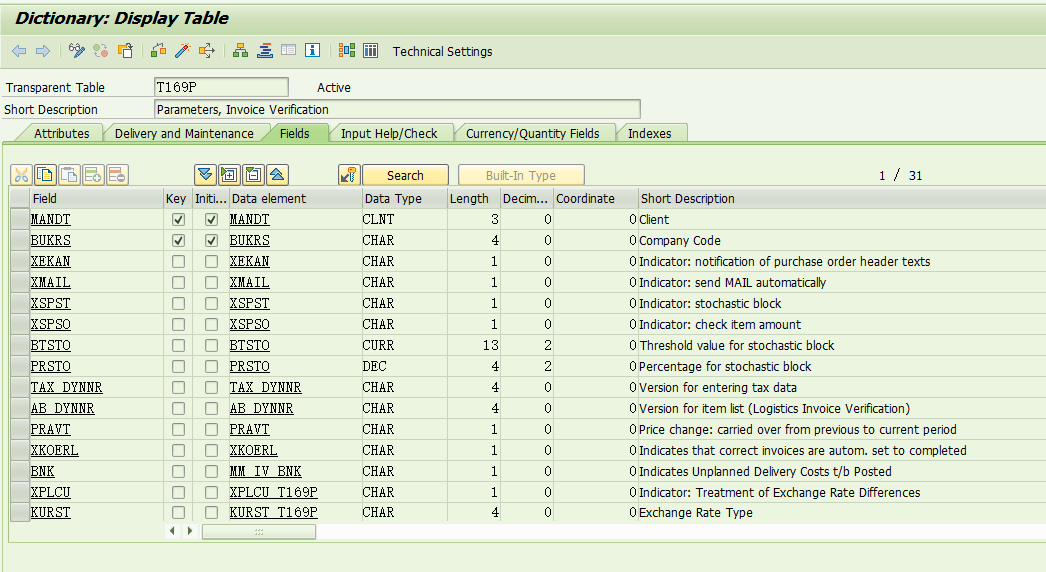
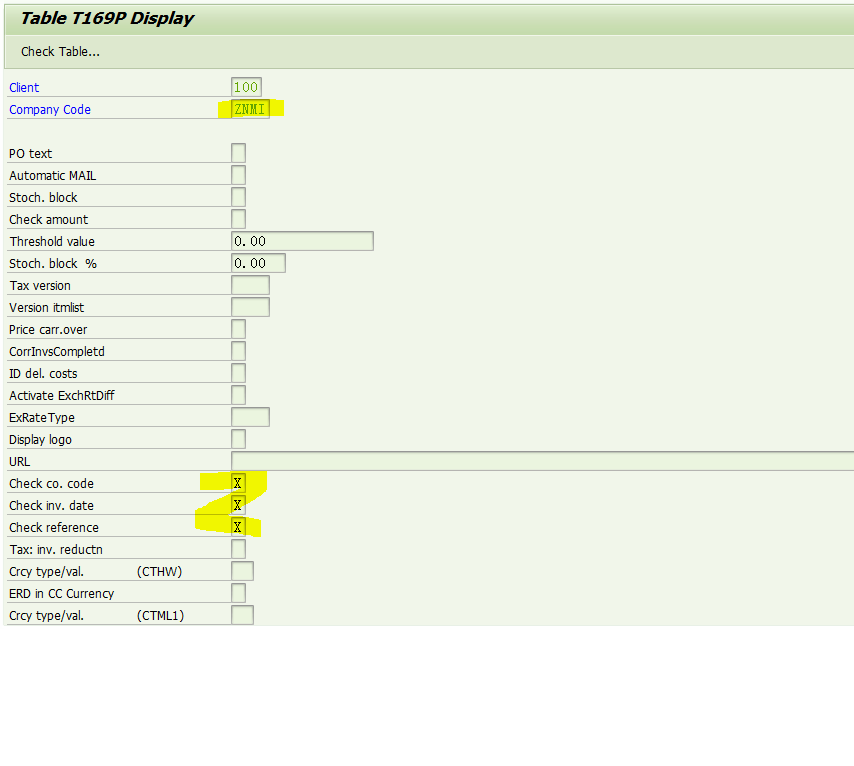
Se12 look at this t169p table,

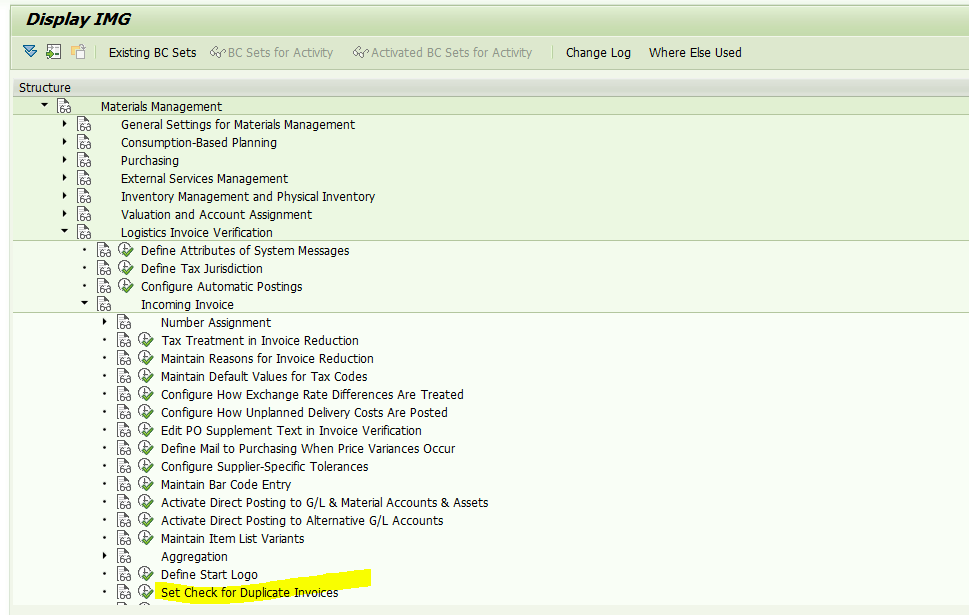
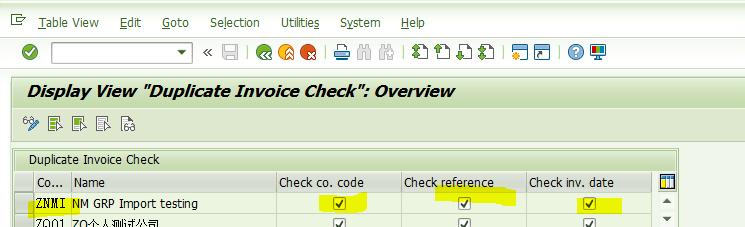
It seems that something related has been omitted. After investigation, the following configurations need to be completed:

Maintain a new entry, as shown in the figure above.

Then there is data in t169p table, as shown in the following figure:

Try Migo receiving again and it will be successful!

-Finish-

Written on November 15, 2021

[Solved] Linux — 9 — txt files are copied from windows to Linux and read error

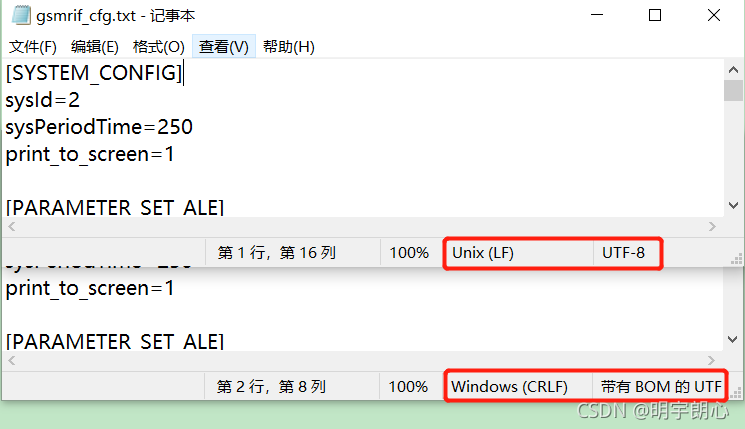
Reason: different coding methods

Solution:

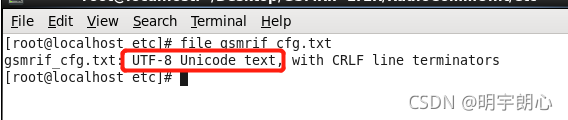
Modify the CFG configuration file in Linux, create a new CFG text file, copy and paste it into the new CFG. File file name to view the encoding method of the file.

How to convert in Linux?

Convert CFG files in folders 1 and 2 [UTF-8 (with BOM) to UTF-8]:

#!/bin/bash

function cfg_change()
{
	dir=./etc/xxx/"$1"/
	find $dir -type f -name "cfg.txt" -print | xargs -i sed -i '1 s/^\xef\xbb\xbf//' {}
	echo "-------Convert Succeed-------"
	file ./etc/xxx/"$1"/cfg.txt
}

case "$1" in
	-1)
		cfg_change 1;
    ;;
	-2)
		cfg_change 2;
	;;
	*)
		echo "Usage: $0 -1|-2"
esac

exit 0

MAC: How to Solve VirtualBox cannot open Issues

Mac solves the problem that VirtualBox cannot open and reports an error

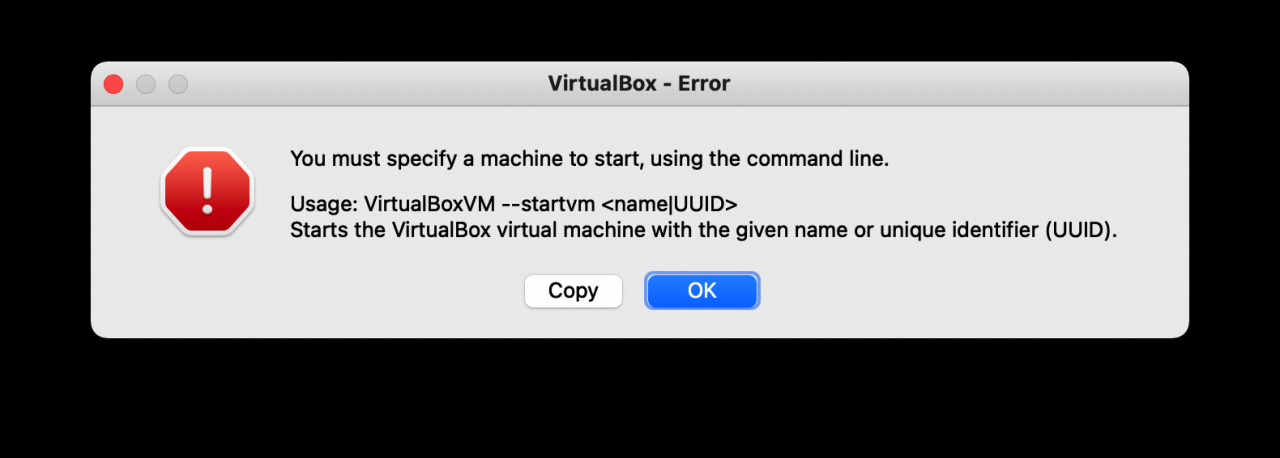
You must specify a machine to start, using the command line.

Solution:

Open MAC terminal
1. cd to the directory where VBox is installed
2. VBoxManage list vms lists virtual machine directories
3. VirtualBoxVM –startvm (space) + the number of the virtual machine you want to open

So you can open it

Kafkaconsumer calls seek() method error [How to Solve]

When receiving the offset specified by calling the seek method in development, the following error is reported:

java.lang.IllegalStateException: No current assignment for partition xxx

Error reporting means that the partition does not have the offset you specified, but from the perspective of Kafka visualization tool, why is this error reported
originally, subscribe() and assign() are lazy – therefore, you need to make a “virtual call” to poll() before you can use seek().

How to Solve idea com.baomidou Error

Completely solve the error reported by com.baomidou in idea

Add in pom.xml:

		<dependency>
			<groupId>com.baomidou</groupId>
			<artifactId>mybatis-plus-boot-starter</artifactId>
			<version>3.4.2<ersion>
		</dependency>

Clear all mybatis and mybatis plus related configurations in the YML file and add:

mybatis-plus:
  type-aliases-package: com.peanut.entity
  mapper-locations: classpath:mappers

Select the item and right-click Maven -> Reload project
as shown in the figure, com.baidu no longer turns red:

Namenode startup error: outofmemoryerror: Java heap space

1. Find problems

Phenomenon: restart the Hadoop cluster, and the namenode reports an error and cannot be started.

Error reported:

2. Analyze problems

         As soon as you see the word “outofmemoryerror: Java heap space” in the error report, it should be the problem of JVM related parameters. Go to the hadoop-env.sh configuration file when. The configuration file settings are as follows:

export HADOOP_NAMENODE_OPTS="-Dhadoop.security.logger=${HADOOP_SECURITY_LOGGER:-INFO,RFAS} -Dhdfs.audit.logger=${HDFS_AUDIT_LOGGER:-INFO,NullAppender} $HADOOP_NAMENODE_OPTS" 
export HADOOP_DATANODE_OPTS="-Dhadoop.security.logger=ERROR,RFAS $HADOOP_DATANODE_OPTS"

         It can be seen from the above that the size of heap memory is not set in the parameter.

         The default heap memory size of roles (namenode, secondarynamenode, datanode) in the HDFS cluster is 1000m

3. Problem solving

         Change the parameters to the following, start the cluster again, and the start is successful.

export HADOOP_NAMENODE_OPTS="-Xms4096m -Xmx4096m -Dhadoop.security.logger=${HADOOP_SECURITY_LOGGER:-INFO,RFAS} -Dhdfs.audit.logger=${HDFS_AUDIT_LOGGER:-INFO,NullAppender} $HADOOP_NAMENODE_OPTS" 
export HADOOP_SECONDARYNAMENODE_OPTS="-Xms4096m -Xmx4096m -Dhadoop.security.logger=${HADOOP_SECURITY_LOGGER:-INFO,RFAS} -Dhdfs.audit.logger=${HDFS_AUDIT_LOGGER:-INFO,NullAppender} $HADOOP_NAMENODE_OPTS" 
export HADOOP_DATANODE_OPTS="-Xms2048M -Xmx2048M -Dhadoop.security.logger=ERROR,RFAS -Xmx4096m $HADOOP_DATANODE_OPTS"

Parameter Description:

        – Xmx4096m   Maximum heap memory available

        – Xms4096m   Initial heap memory

Reference: HDFS memory configuration – flowers are not fully opened * months are not round – blog Park
Kali starts SSH service error [How to Fix]

Kali starts SSH service and resolves error reports

1. Open the SSH configuration file (remember sudo)

sudo vim /etc/ssh/sshd_config

2. #permitrotlogin is changed to

PermitRootLogin yes

That is, remove #, and change the proposal password to yes
3. #passwordauthentication line to

PasswordAuthentication yes

4. Enter after saving and exiting

sudo /usr/sbin/sshd

Errors may be encountered

Missing privilege separation directory: /run/sshd

Solution:

sudo mkdir /run/sshd

Dca1000 reports an error and the SPI port cannot be connected

Dca1000 reports an error and the SPI port cannot be connected

Article catalog

Dca1000 reports an error and the SPI port cannot be connected. Problem Description: problem cause: solution:

Problem Description:

When using dca1000evm board and mmwave Studio software to measure AWR/IWR board data, SPI cannot be connected

Cause of problem:

The possible causes are problems with the 60 pin HD cable of the dca1000evm, or problems with the SPI pin of the FPGA on the board

resolvent:

    replace the 60 pin HD cable. At present, TI company not only provides additional 60 pin HD cable. Therefore, it is necessary to re purchase the board or find other 60 pin HD connection lines to replace it. At present, it is known that the 60 pin HD connection line of mmwave Devpack can be used with the 60 pin HD connection line of dca1000evm to replace the FPGA chip on the board, or check whether there is faulty soldering and additional connection at the pin (metal wire may be attached to the pin)

[Solved] Vue item error: Regeneratorruntime is not defined

Project scenario:

The company’s official website project built with Vue scaffold


Problem Description:

async/await is used when processing asynchrony. It is found that the console reports an error regeneratorruntime is not defined


Cause analysis:

The project uses Babel, and Babel needs some auxiliary functions when translating ES6 syntax. When there is no module to encapsulate these auxiliary functions, it will report similar not defined.

Regeneratorruntime is an auxiliary function generated by Babel for async/await compatible syntax. Regenerator runtime is not defined. Obviously, the package of regenerator runtime is missing.


Solution:

    1. install transform runtime
yarn add  @babel/plugin-transform-runtime -D

Configure Babel (I use Babel 7.0 as Babel.Config.JS)

plugins: [
    
    [
      "@babel/plugin-transform-runtime"
    ]
    
  ]

Restart the service and find that there is no error when running