Author Archives: Robins

[Solved] Linux executes SQL script Error: Syntax error

Demand scenario:

when deploying the production environment, you need to run the SQL script uploaded locally


Problem Description:

the local script runs normally, and liunux reports syntax error </ font>

syntax error

Cause analysis:

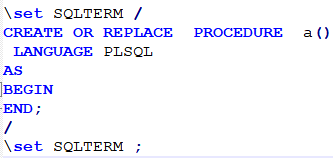
when running stored procedures or a long string of SQL scripts in Linux, you need to add fixed syntax at the beginning and end
beginning: \set sqlterm/
end:/\ set sqlterm


Solution:

add fixed statements \set sqlterm/and
/\ set sqlterm
as shown in the figure:
 

Error: EEXIST file already exists open [How to Solve]

problem

Mobile compilation Preview

If an error is reported: error: eexist file already exists open/users/dream/library/Application Support/wechat developer tool/50a7d9210159a32f006158795f893857/weapdest/1613806926253/pages/demofile/demofile js

solution:

Update the applet development tool and upgrade to the latest version 1.03 – < 1.05 >

[Solved] fatal error: Eigen/Geometry: No such file or directory

Error encountered when compiling the program of Aubo manipulator. Eigen cannot be found

/opt/ros/melodic/include/moveit/robot_model/joint_model.h:47:10: fatal error: Eigen/Geometry: No such file or directory
#include <Eigen/Geometry>

Reason:
the location of eigin library is/usr/include/eigin3/eigen. The system cannot find this location. We need to link it manually

Solution:
manually create a soft link to the upper level directory

sudo ln -sf /usr/include eigen3/Eigen /usr/include/Eigen
sudo ln -sf /usr/include/eigen3/unsupported /usr/include/unsupported

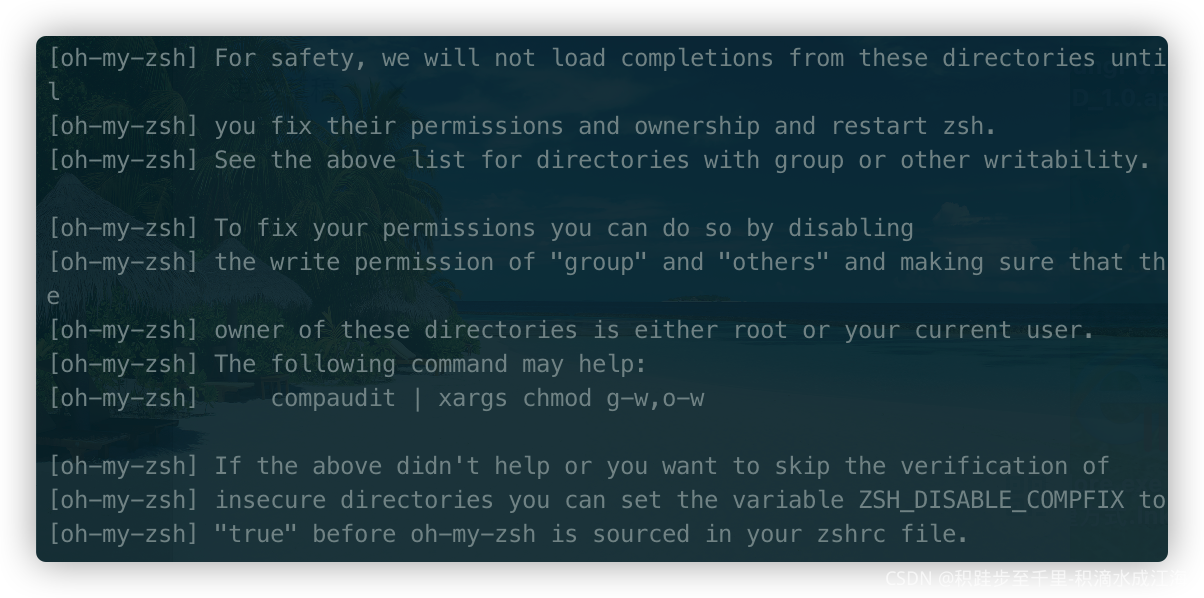
[Solved] Source Zsh error: zsh problem: compinit:503: no such file or directory

zsh problem: compinit:503: no such file or directory: /usr/local/share/zsh/site-functions/_brew
[oh-my-zsh]  Solution:

## zsh problem: compinit:503: no such file or directory: /usr/local/share/zsh/site-functions/_brew

Solution:

```zsh
sudo ln -fsv /opt/homebrew/completions/zsh/_brew /usr/local/share/zsh/site-functions/_brew

brew cleanup && source ~/.zshrc
```

Then it was solved.

[Solved] Kafka Start Log Error: WARN Found a corrupted index file due to requirement failed: Corrupt index found

Go straight to the theme, and the personal test is effective!!

Error content

WARN Found a corrupted index file due to requirement failed: Corrupt index found   A corrupt index file was found and the request failed

WARN Found a corrupted index file due to requirement failed: Corrupt index found, index file (/tmp/kafka-logs/__consumer_offsets-13/00000000000000000000.index) has non-zero size but the last offset is 0 which is no larger than the base offset 0.}. deleting /tmp/kafka-logs/__consumer_offsets-13/00000000000000000000.timeindex, /tmp/kafka-logs/__consumer_offsets-13/00000000000000000000.index, and /tmp/kafka-logs/__consumer_offsets-13/00000000000000000000.txnindex and rebuilding index... (kafka.log.Log)
[2021-11-27 10:02:24,168] INFO Recovering unflushed segment 0 in log __consumer_offsets-13. (kafka.log.Log)
[2021-11-27 10:02:24,168] INFO Loading producer state from offset 0 for partition __consumer_offsets-13 with message format version 2 (kafka.log.Log)
[2021-11-27 10:02:24,169] INFO Completed load of log __consumer_offsets-13 with 1 log segments, log start offset 0 and log end offset 0 in 2 ms (kafka.log.Log)
[2021-11-27 10:02:24,172] WARN Found a corrupted index file due to requirement failed: Corrupt index found, index file (/tmp/kafka-logs/test-0/00000000000000000000.index) has non-zero size but the last offset is 0 which is no larger than the base offset 0.}. deleting /tmp/kafka-logs/test-0/00000000000000000000.timeindex, /tmp/kafka-logs/test-0/00000000000000000000.index, and /tmp/kafka-logs/test-0/00000000000000000000.txnindex and rebuilding index... (kafka.log.Log)

Error reporting reason

The Kafka broker is abnormally closed and stopped, resulting in index corruption

Solutions

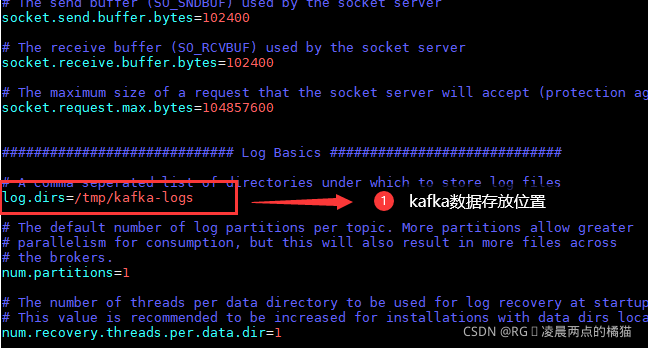
Step 1:   Enter the Kafka home directory of your installation and execute the following command to view the storage directory of Kafka data (Kafka log configuration)

vim config/server.properties

Step 2: directly delete the/TMP/Kafka LOHS folder

rm -rf /tmp/kafka-logs/

Result verification

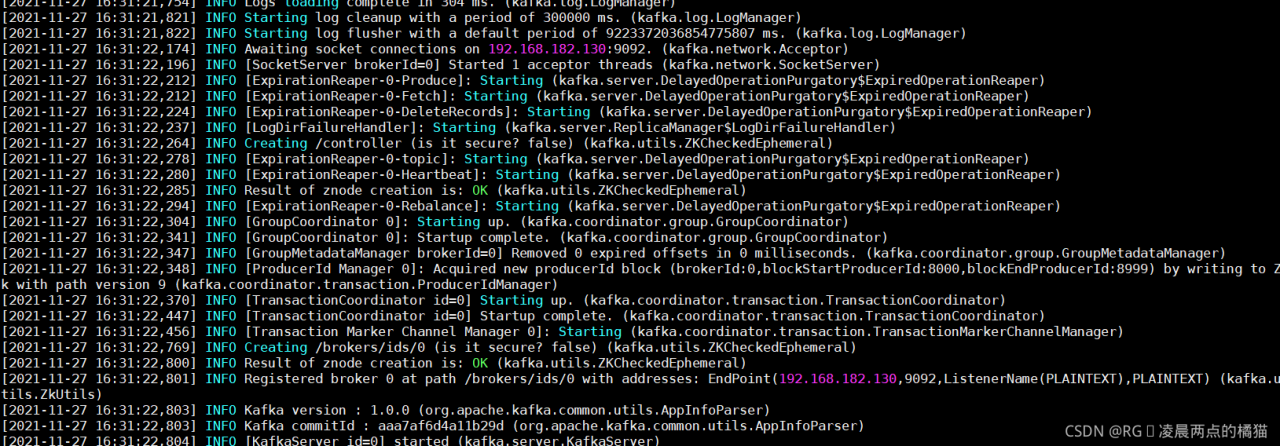
Restart Kafka and check the log to verify that the problem has been solved

Check the Kafka log and confirm that the error has been resolved


To solve the problem, a problem is derived

deleting the Kafka data file is equivalent to starting Kafka for the first time. When you start up with the zookeeper provided by Kafka, you may report an error by viewing logs/zookeeper.out under the log information.

Using ts-node to Execute .ts files Error [Solved]

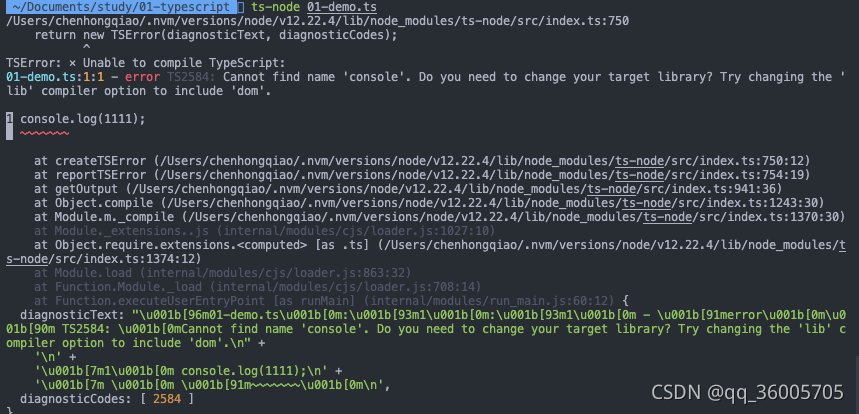
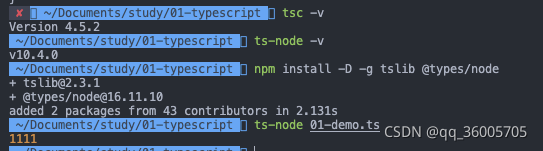
When learning typescript, you want to execute the TS file. First install the TS package, then use the TSC command to execute it, compile it into a JS file, and use node xxx.js to execute it. However, this is troublesome. Later, you want to use TS node to directly execute it and simplify the steps. An error is reported:

It is found that the corresponding package needs to be installed to compile:

Solution:
 
npm install -D tslib @types/node

[Solved] Websocket Error: WebSocket is already in CLOSING or CLOSED state

When the front-end project communicates with the back-end Java websocket for a long time, sometimes the browser will report an error

WebSocket is already in CLOSING or CLOSED state.

This problem may be caused by the data length passed by websocket being greater than 8192   After websocket establishes a connection, the length of JSON passed should be & lt= 8192, otherwise an error will be reported    Websocket is already in closing or closed state.

1. At this point, we can add some code in web.xml to limit the parameter length limit in websocket.

# Limit WebSocket pass data size to 50M
<context-param>
         <param-name>org.apache.tomcat.websocket.textBufferSize</param-name>
         <param-value>5242800</param-value>
</context-param>

<context-param>
         <param-name>org.apache.tomcat.websocket.binaryBufferSize</param-name>
         <param-value>5242800</param-value>
</context-param>

After adding the above code, you can modify the size and length of the transfer parameters of websocket, which is limited to 50m.

2. The above method is not available for the springboot project because there is no web.xml file in the project directory. At this time, we can put the following code into the springboot project under the context directory of the project (or create a new code class or block at will)

import org.springframework.boot.autoconfigure.EnableAutoConfiguration;
import org.springframework.boot.web.servlet.ServletContextInitializer;
import org.springframework.context.annotation.ComponentScan;
import org.springframework.context.annotation.Configuration;
import org.springframework.web.util.WebAppRootListener;

import javax.servlet.ServletContext;
import javax.servlet.ServletException;

/**
 * Add WebSocket pass data size limit of 50M
 */
@Configuration
@ComponentScan
@EnableAutoConfiguration
public class WebSocketConfig implements ServletContextInitializer {

    //Configure websocket transfer size, 50M
    @Override
    public void onStartup(ServletContext servletContext) throws ServletException {
        servletContext.addListener(WebAppRootListener.class);
        servletContext.setInitParameter("org.apache.tomcat.websocket.textBufferSize","52428800");
        servletContext.setInitParameter("org.apache.tomcat.websocket.binaryBufferSize","52428800");
    }
}

The above code can solve the problem of websocket is already in closing or closed state

You can successfully modify the size limit of websocket transmission data to 50m.

Note: a problem was found during use. If the above configuration is started with the built-in Tomcat in springboot, there is no problem, but the operation using the external Tomcat after war does not take effect. Finally, it is found that the problem is due to the external Tomcat version. The problem version is tomcat8.0.xx, but there is no problem using tomcat8.5.xx

[Solved] Android 12 error: Manifest merger failed : android:exported needs to be explicitly specified for .

Error Messages:
Manifest merger failed : android:exported needs to be explicitly specified for <activity>. Apps targeting Android 12 and higher are required to specify an explicit value for `android:exported` when the corresponding component has an intent filter defined.


Solution:
1.AndroidManifest.xml set according to the following document, Not Work.
https://developer.android.com/guide/topics/manifest/activity-element#exported
2. Not Work
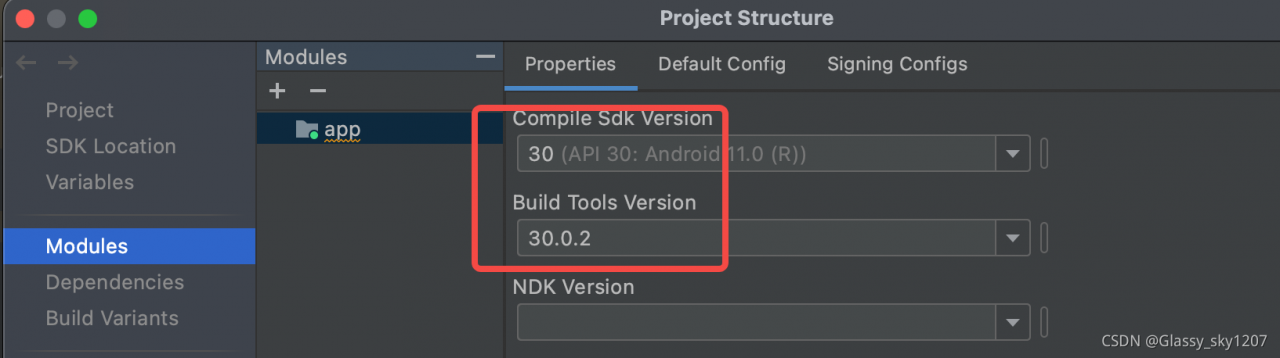
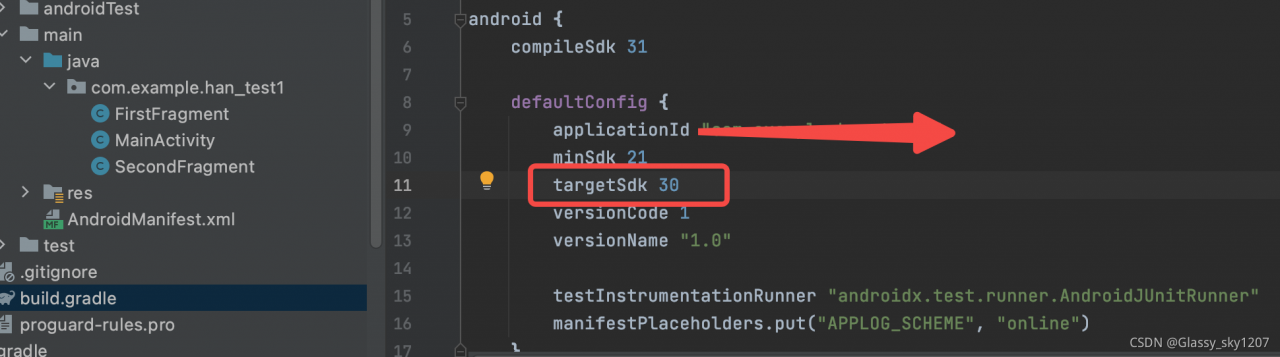
3. Modify the parameters in the red box under the premise of the above operation, Worked!

[Solved] RSA decrypt error: the data to be decrypted exceeds the maximum 128 bytes of this module

RSA decryption error: the data to be decrypted exceeds the maximum 128 bytes of this module

            RSACryptoServiceProvider rsa = new RSACryptoServiceProvider();
            byte[] cipherbytes;
            rsa.FromXmlString(privatekey);
            cipherbytes = rsa.Decrypt(Encoding.UTF8.GetBytes(content), false);
            var Text=Encoding.UTF8.GetString(cipherbytes);

cipherbytes = rsa.Decrypt(Encoding.UTF8.GetBytes(content), false);
Modify to:
cipherbytes = rsa.Decrypt(Convert.FromBase64String(content), false);

Python Use PIP to install pyinstaller Error [Solved]

1. Error reporting using pip

D:\date\IDEA\Game\PyInstaller-3.4>pip install pyinstaller
'pip' is not an internal or external command, nor is it a runnable program
or batch file.

Solution: add environment variables

Add new system variables.
Variable name: PYTHON_HOME
Variable value: D:\software\anaconda3\Scripts
Modify the path variable.
	Add:%PYTHON_HOME%

2. Error when installing pyinstaller with PIP

D:\date\IDEA\Game\PyInstaller-3.4>pip install pyinstaller
WARNING: pip is configured with locations that require TLS/SSL, however the ssl module in Python is not available.
Looking in indexes: https://pypi.tuna.tsinghua.edu.cn/simple
WARNING: Retrying (Retry(total=4, connect=None, read=None, redirect=None, status=None)) after connection broken by 'SSLError("Can't connect to HTTPS URL because the SSL module is not available.")': /simple/pyinstaller/
WARNING: Retrying (Retry(total=3, connect=None, read=None, redirect=None, status=None)) after connection broken by 'SSLError("Can't connect to HTTPS URL because the SSL module is not available.")': /simple/pyinstaller/
WARNING: Retrying (Retry(total=2, connect=None, read=None, redirect=None, status=None)) after connection broken by 'SSLError("Can't connect to HTTPS URL because the SSL module is not available.")': /simple/pyinstaller/
WARNING: Retrying (Retry(total=1, connect=None, read=None, redirect=None, status=None)) after connection broken by 'SSLError("Can't connect to HTTPS URL because the SSL module is not available.")': /simple/pyinstaller/
WARNING: Retrying (Retry(total=0, connect=None, read=None, redirect=None, status=None)) after connection broken by 'SSLError("Can't connect to HTTPS URL because the SSL module is not available.")': /simple/pyinstaller/
Could not fetch URL https://pypi.tuna.tsinghua.edu.cn/simple/pyinstaller/: There was a problem confirming the ssl certificate: HTTPSConnectionPool(host='pypi.tuna.tsinghua.edu.cn', port=443): Max retries exceeded with url: /simple/pyinstaller/ (Caused by SSLError("Can't connect to HTTPS URL because the SSL module is not available.")) - skipping
ERROR: Could not find a version that satisfies the requirement pyinstaller (from versions: none)
ERROR: No matching distribution found for pyinstaller
WARNING: pip is configured with locations that require TLS/SSL, however the ssl module in Python is not available.
Could not fetch URL https://pypi.tuna.tsinghua.edu.cn/simple/pip/: There was a problem confirming the ssl certificate: HTTPSConnectionPool(host='pypi.tuna.tsinghua.edu.cn', port=443): Max retries exceeded with url: /simple/pip/ (Caused by SSLError("Can't connect to HTTPS URL because the SSL module is not available.")) - skipping

Solution: add trust source

D:\date\IDEA\Game\PyInstaller-3.4>pip install  pyinstaller  --index-url http://pypi.douban.com/simple/    --trusted-host pypi.douban.com
Looking in indexes: http://pypi.douban.com/simple/
Collecting pyinstaller
  Downloading http://pypi.doubanio.com/packages/da/98/ba0071620a2bd672cd98b398653517a296f988a8271d9d2f365a7922a51b/pyinstaller-4.7-py3-none-win_amd64.whl (2.0 MB)
     |████████████████████████████████| 2.0 MB 2.2 MB/s
Requirement already satisfied: pywin32-ctypes>=0.2.0 in d:\software\anaconda3\lib\site-packages (from pyinstaller) (0.2.0)
Collecting pyinstaller-hooks-contrib>=2020.6
  Downloading http://pypi.doubanio.com/packages/80/74/4c885df43604c4ae570610e187052f29d806d582e398c2e48b83dad74610/pyinstaller_hooks_contrib-2021.4-py2.py3-none-any.whl (215 kB)
     |████████████████████████████████| 215 kB ...
Collecting pefile>=2017.8.1
  Downloading http://pypi.doubanio.com/packages/ee/e1/a7bd302cf5f74547431b4e9b206dbef782d112df6b531f193bb4a29fb1b9/pefile-2021.9.3.tar.gz (72 kB)
     |████████████████████████████████| 72 kB ...
Collecting altgraph
  Downloading http://pypi.doubanio.com/packages/84/3f/1a5c9bef54cac9bf41edd6f4aaf61cd52ed578e10ccc607e0278012cb4a5/altgraph-0.17.2-py2.py3-none-any.whl (21 kB)
Requirement already satisfied: setuptools in d:\software\anaconda3\lib\site-packages (from pyinstaller) (58.0.4)
Requirement already satisfied: future in d:\software\anaconda3\lib\site-packages (from pefile>=2017.8.1->pyinstaller) (0.18.2)
Building wheels for collected packages: pefile
  Building wheel for pefile (setup.py) ... done
  Created wheel for pefile: filename=pefile-2021.9.3-py3-none-any.whl size=68844 sha256=139bf21106643db9019b3f0c33e2da41e2bda609170130bb24491cf1a5eeba0a
  Stored in directory: c:\users\edz\appdata\local\pip\cache\wheels\7b\f8\a2\c28c8f2797bf32ae30e18da14e5a5ab9cfbfb72da03593426d
Successfully built pefile
Installing collected packages: pyinstaller-hooks-contrib, pefile, altgraph, pyinstaller
Successfully installed altgraph-0.17.2 pefile-2021.9.3 pyinstaller-4.7 pyinstaller-hooks-contrib-2021.4
[Solved] Gitee generates public key error: Enter file in which to save the key…

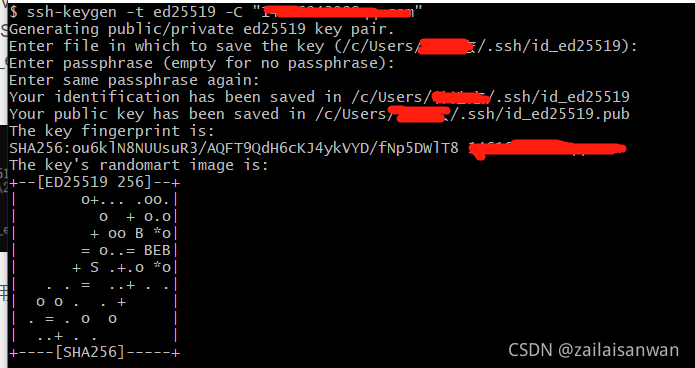
Directly report an error using a local command prompt:
Enter file in which to save the key (C:\Users\files?.ssh/id_ed25519): Could not create directory 'C:\\Users\\\346\236\227\346\265\251\345\256\217/.ssh': Invalid argument Enter passphrase (empty for no passphrase): Enter same passphrase again: Saving key "C:\\Users\\\346\236\227\346\265\251\345\256\217/.ssh/id_ed25519" failed: No such file or directory


Solution: Press shiftjian + right click under the corresponding file, select git to open it, and use git to generate