Author Archives: Robins

[Solved] hive sql Error: ParseException in subquery source

hive sql error: ParseException in subquery source
org.apache.hadoop.hive.ql.parse.ParseException:line 368:18 cannot recognize input near ‘group’ ‘by’ ‘order_phone_num’ in subquery source
sql:

     customer_Flag as (

                  select order_phone_num,
                         concat_ws(';', collect_list(c)) as a,
                         sum(customer_flag)              as b
                  from (
                           select order_phone_num,
                                  customer_flag,
                                  concat_ws(',', collect_list(cast(r_diff as string))) as c
                            from add_payment_period
                           group by order_phone_num,
                                    customer_flag
                       )
                  group by order_phone_num

     ),

Solution: give the outermost group by order_phone_Num plus an alias C1

     customer_Flag as (

                  select order_phone_num,
                         concat_ws(';', collect_list(c)) as a,
                         sum(customer_flag)              as b
                  from (
                           select order_phone_num,
                                  customer_flag,
                                  concat_ws(',', collect_list(cast(r_diff as string))) as c
                            from add_payment_period
                           group by order_phone_num,
                                    customer_flag
                       ) c1
                  group by order_phone_num

     ),
[Solved] docker Start jar package and Set JVM parameter Error

Error Messages:
Unrecognized option: -server -XX:MetaspaceSize=256m -XX:MaxMetaspaceSize=256m -Xms512m -Xmx1024m -Xmn512m -Xss256k -XX:SurvivorRatio=8 -XX:+UseConcMarkSweepGC -Dtask=true
Error: Could not create the Java Virtual Machine.
Background:
Setting JVM parameters and then using docker file to start jar package reported an error.
Solution:
Use the ENTRYPOINT exec command.
ENV jvm_opts=”-server -XX:MetaspaceSize=256m -XX:MaxMetaspaceSize=256m -Xms512m -Xmx1024m -Xmn512m -Xss256k -XX:S
urvivorRatio=8 -XX:+UseConcMarkSweepGC -Dtask=true”

ENTRYPOINT exec java -jar $jvm_opts trade-chat.jar $app_arg

[Solved] Springboot uses redis to add LocaldateTime Java 8 error

To store an object in redis, you need to serialize the object. If a field is of localdatetime type, an error will appear

com.fasterxml.jackson.databind.exc.InvalidDefinitionException: Java 8 date/time type `java.time.LocalDateTime` not supported by default: add Module "com.fasterxml.jackson.datatype:jackson-datatype-jsr310" to enable handling (through reference chain: com.gd.base.vo.redis.RedisSysUser["Corresponding fields"])

The program needs to deserialize the data in redis. The deserializer I use here is the following:

@Configuration
@EnableCaching//Allow us to use the cache
public class RedisConfig {
    /**
     * Cache expiration time (seconds)
     */
    public static final long CACHE_EXPIRE_SECEND = 3600 * 2;

    @Bean // At this point, load our redisTemplate into the context of our spring, applicationContext
    public RedisTemplate<String,Object> redisTemplate(RedisConnectionFactory factory){
        //1. Initialize a redisTemplate
        RedisTemplate<String,Object> redisTemplate=new RedisTemplate<String,Object>();
        //2. Serial words (generally used for key values)
        RedisSerializer<String> redisSerializer=new StringRedisSerializer();
        //3. Introduce the json string conversion class (generally used for value processing)
        Jackson2JsonRedisSerializer jackson2JsonRedisSerializer=new Jackson2JsonRedisSerializer(Object.class);
        ObjectMapper objectMapper=new ObjectMapper();
        //3.1 Set the access rights of objectMapper
        objectMapper.setVisibility(PropertyAccessor.ALL, JsonAutoDetect.Visibility.ANY);
        //3.2 Specify the serialized input type, that is, store the data in the database to the redis cache according to certain types.
        </objectMapper.enableDefaultTyping(ObjectMapper.DefaultTyping.NON_FINAL);// Recently upgraded SpringBoot, found that enableDefaultTyping method expired. You can use the following method instead
        objectMapper.activateDefaultTyping(LaissezFaireSubTypeValidator.instance,ObjectMapper.DefaultTyping.NON_FINAL, JsonTypeInfo.As. WRAPPER_ARRAY);
        jackson2JsonRedisSerializer.setObjectMapper(objectMapper);
        //4. Create the link
        redisTemplate.setConnectionFactory(factory);
        //4.1 redis key value serialization
        redisTemplate.setKeySerializer(redisSerializer);
        //4.2 value serialization, because most of our values are converted through objects, so use jackson2JsonRedisSerializer
        redisTemplate.setValueSerializer(jackson2JsonRedisSerializer);
        // 4.3 Serialization of value, serialization of hashmap
        redisTemplate.setHashValueSerializer(jackson2JsonRedisSerializer);
        return redisTemplate;
    }

    @Bean
    public CacheManager cacheManager(RedisConnectionFactory factory){
        // 1. Serial words (generally used for key values)
        RedisSerializer<String> redisSerializer=new StringRedisSerializer();
        //2. Introduce the json string conversion class (generally used for value processing)
        Jackson2JsonRedisSerializer jackson2JsonRedisSerializer=new Jackson2JsonRedisSerializer(Object.class);
        ObjectMapper objectMapper=new ObjectMapper();
        //2.1 Set the access rights of objectMapper
        objectMapper.setVisibility(PropertyAccessor.ALL, JsonAutoDetect.Visibility.ANY);
        //2.2 Specify the serialized input type, that is, store the data in the database to the redis cache according to a certain type.
        </objectMapper.enableDefaultTyping(ObjectMapper.DefaultTyping.NON_FINAL);// Recently upgraded SpringBoot, found that enableDefaultTyping method expired. You can use the following method instead
        objectMapper.activateDefaultTyping(LaissezFaireSubTypeValidator.instance,ObjectMapper.DefaultTyping.NON_FINAL, JsonTypeInfo.As. WRAPPER_ARRAY);
        jackson2JsonRedisSerializer.setObjectMapper(objectMapper);
        //3. Serialization configuration, garbled problem solving and timeliness of our cache
        RedisCacheConfiguration config=RedisCacheConfiguration.defaultCacheConfig().
                entryTtl(Duration.ofSeconds(CACHE_EXPIRE_SECEND)). // Cache timeliness setting
                serializeKeysWith(RedisSerializationContext.SerializationPair.fromSerializer(redisSerializer)). //key serialization
                serializeValuesWith(RedisSerializationContext.SerializationPair.fromSerializer(jackson2JsonRedisSerializer)). //value serialization
                disableCachingNullValues();//null values are not stored in the cache
        //4. Create the cacheManager link and set the properties
        RedisCacheManager cacheManager= RedisCacheManager.builder(factory).cacheDefaults(config).build();
        return cacheManager;
    }

}

Processing error reports:
① add comments to the corresponding fields

    @JsonFormat(pattern = "yyyy-MM-dd HH:mm:ss")
    @JsonDeserialize(using = LocalDateTimeDeserializer.class)
    @JsonSerialize(using = LocalDateTimeSerializer.class)

The error report is gone

Springcloud builds a gateway and starts Error [Solved]

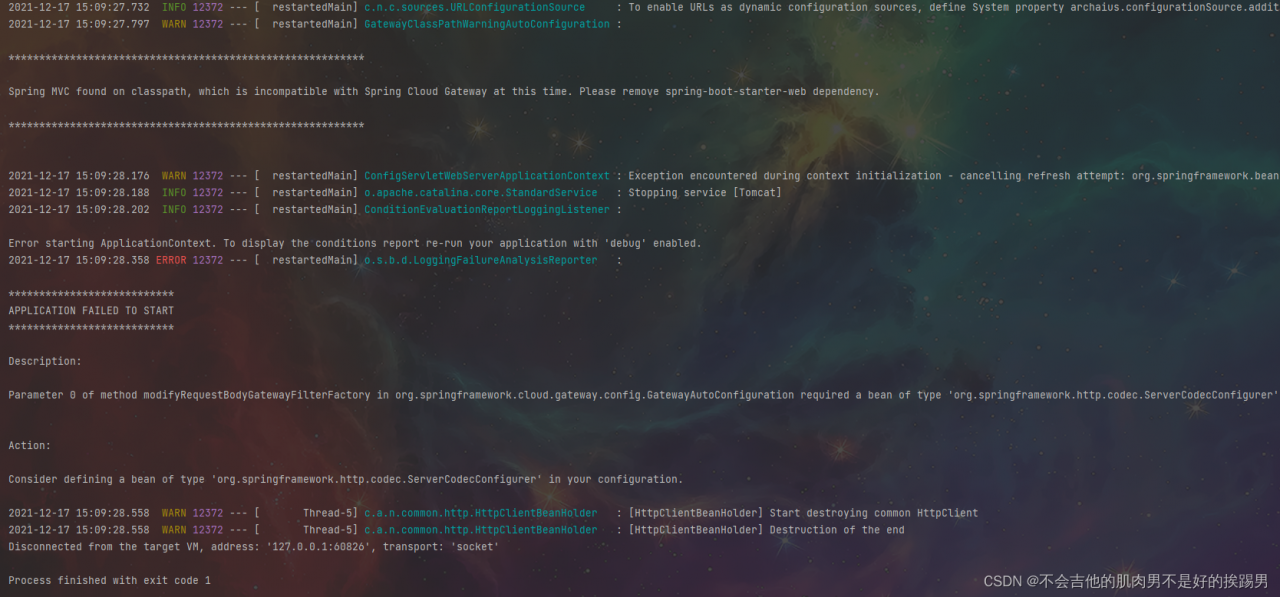
1.Spring MVC found on classpath, which is incompatible with Spring Cloud Gateway at this time. Please remove spring-boot-starter-web dependency.

Solution:

           <exclusion>
                    <groupId>org.springframework.boot</groupId>
                    <artifactId>spring-boot-starter-web</artifactId>
                </exclusion>

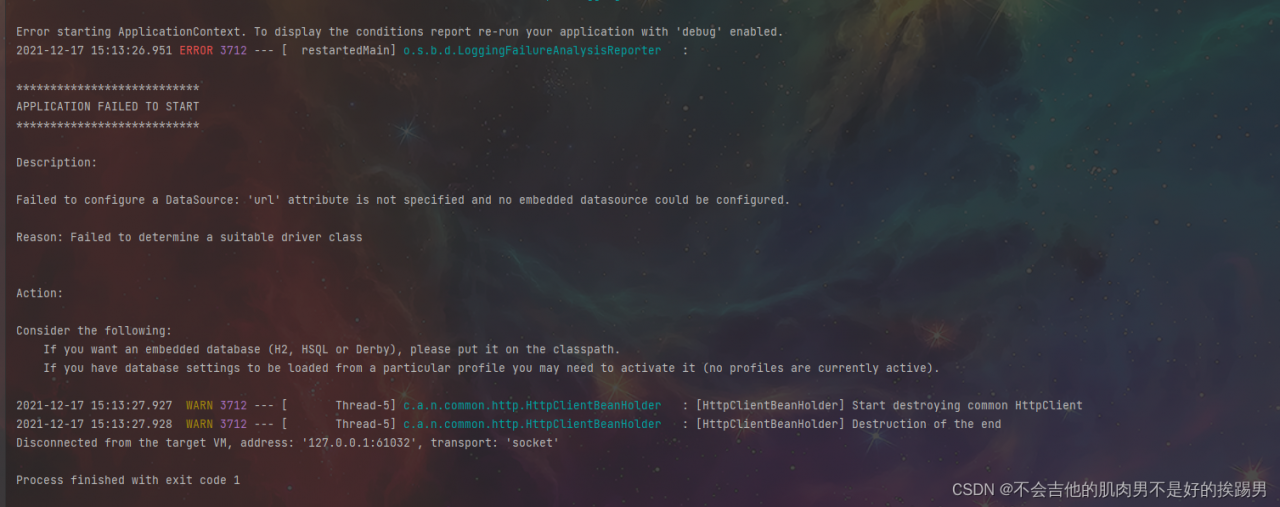
2. Failed to configure a DataSource: ‘url’ attribute is not specified and no embedded datasource could be configured.

Solution:

             <exclusion>
                    <groupId>org.springframework.boot</groupId>
                    <artifactId>spring-boot-starter-jdbc</artifactId>
                </exclusion>

IDEA pom.xml dependency version error [How to Solve]

Self problem solving record, tossed all morning and finally solved:

I tried other solutions first, but there was no response. You can still try:

1. Modify the Maven version number, download the old version again, configure the environment variables, and install cleanLastUpdated.bat small script to clear the package that has not been downloaded successfully/completely. It is useless

Share this script:

Copy to Notepad and save the file as cleanLastUpdated.bat, select the file format as all file formats.

set REPOSITORY_PATH=Absolute path to your own local repository
rem is searching...
for /f "delims=" %%i in ('dir /b /s "%REPOSITORY_PATH%\*lastUpdated*"') do (
    del /s /q %%i
)
rem search completed
pause

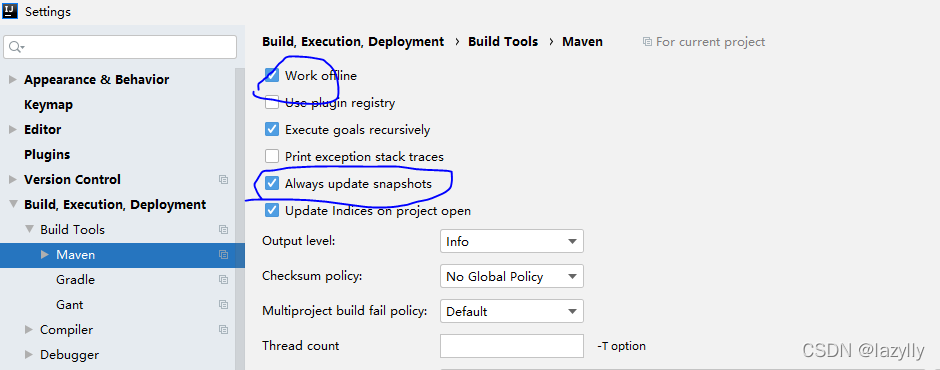
2. Re-check other configurations in settings \ Maven and check these two again. It’s useless

3. Final solution

I went to the local warehouse and found that the jar package had been downloaded, but it was inconsistent with the version number that my pom.xml relied on, so the modification was over.

pytorch model.load_state_dict Error [How to Solve]

When pytorch loads the model, if some judgment is used in the model, the judgment is used as the selection execution condition, but it is also saved in the model. However, when calling, the network in the judgment condition is not selected and load_state_Dict is used will report an error. Some operators cannot find the name. For example:

if backbone == "mobilenet":
    self.backbone = mobilenet()
    flat_shape = 1024
    elif backbone == "inception_resnetv1":
    self.backbone = inception_resnet()
else:
    raise ValueError('Unsupported backbone - `{}`, Use mobilenet, inception_resnetv1.'.format(backbone))
    self.avg = nn.AdaptiveAvgPool2d((1,1))
    self.Bottleneck = nn.Linear(flat_shape, embedding_size,bias=False)
    self.last_bn = nn.BatchNorm1d(embedding_size, eps=0.001, momentum=0.1, affine=True)
    if mode == "train": # Judgment condition, test without loading full connection
        self.classifier = nn.Linear(embedding_size, num_classes)

The strict = false option can be added to avoid operators not called in the network:

model2.load_state_dict(state_dict2, strict=False)

[Solved] Mac starts redis error: there is no specified conf file

Errors are reported as follows:

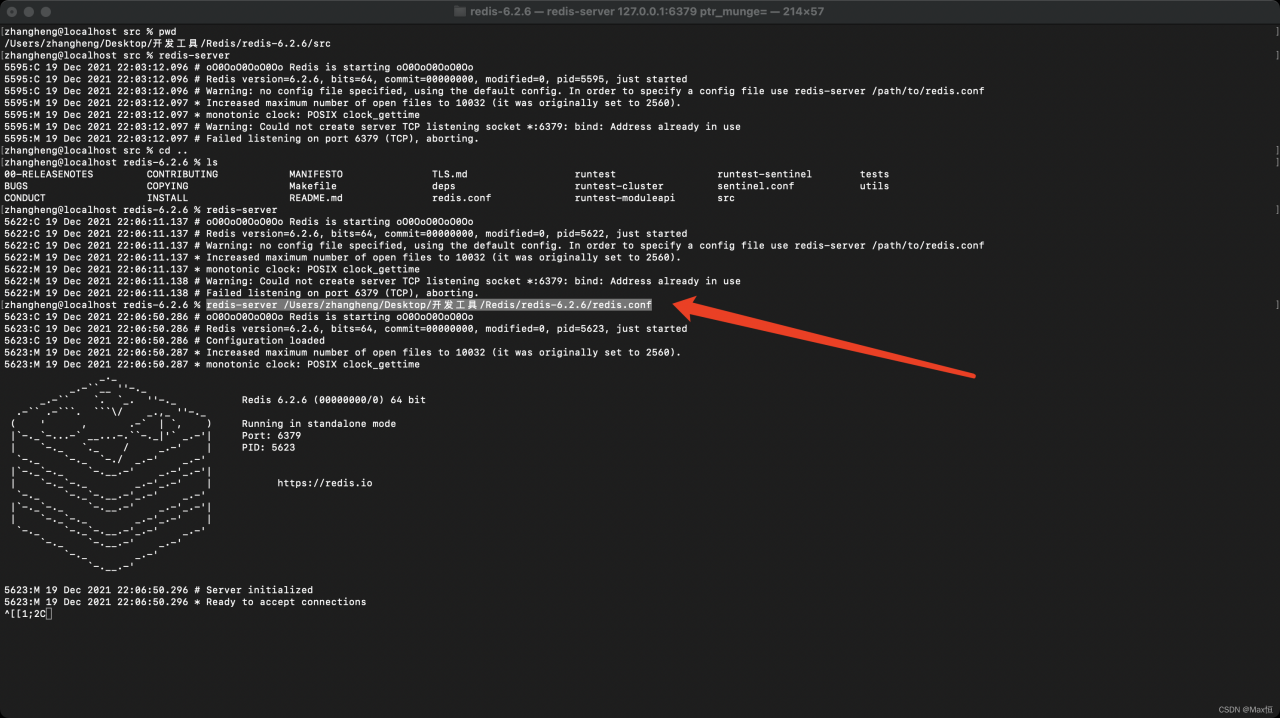
Warning: no config file specified, using the default config. In order to specify a config file use redis-server /path/to/redis.conf

The reason for the error is that the corresponding conf file needs to be specified during startup. The
startup command is as follows

redis-server /Absolute path/to/redis.conf

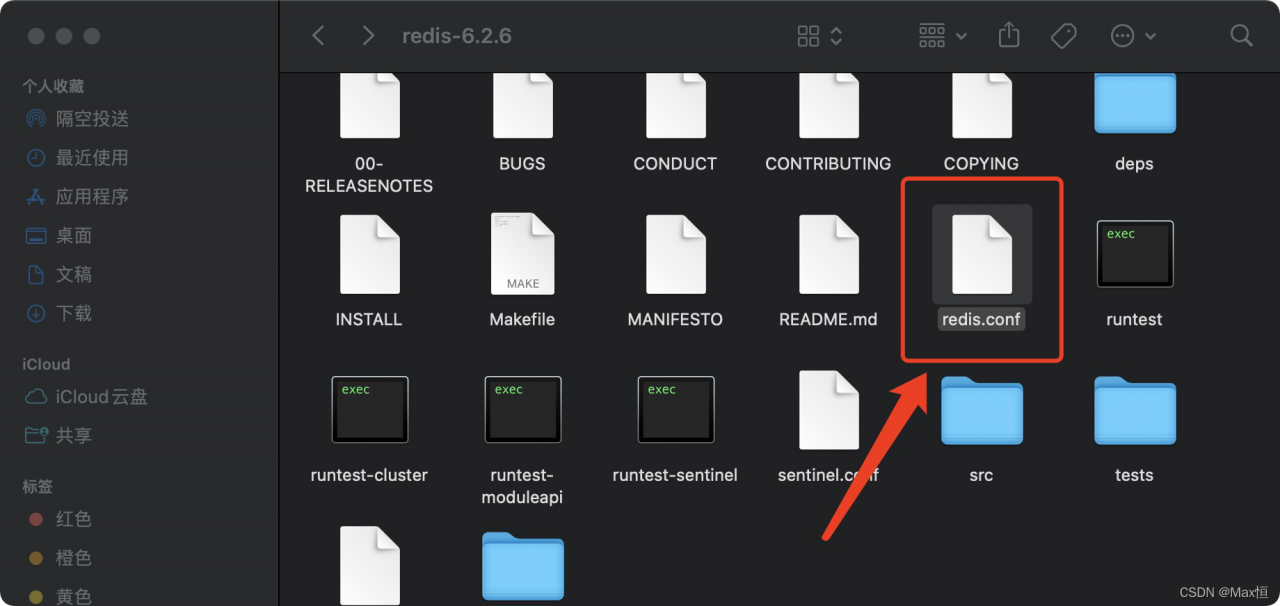
Find redis in this machine as shown below The conf path is then copied down

Start the MAC terminal CD to the redis path. Enter:

redis-server /Users/zhangheng/Desktop/Tools/Redis/redis-6.2.6/redis.conf

Press enter after input to start redis normally

[Solved] Spring upload file Error: Multipartfile Transferto() reported an error FileNotFoundException

When uploading files, use multipartfile Transferto() saves the file to the local path:

report errors:

java.io.IOException: java.io.FileNotFoundException: C:\Users\XXXXX\AppData\Local\Temp\tomcat. 8350081478984499756.8080\work\Tomcat\localhost\ROOT\app\file\xxxx. Xlsx (the system cannot find the specified path.)

    @Override
    public String store(MultipartFile file, String fileName) throws IOException {

        String destPath "/app/file/";
        File filePath = new File(destPath);
        File dest = new File(filePath, fileName);
        if (!filePath.exists()) {
            filePath.mkdirs();
        }
        try {
            file.transferTo(dest);
            log.info("file save success");
        } catch (IOException e) {
            log.error("File upload Error: ", e);
            throw e;
        }
        return dest.getCanonicalPath();
    }

Cause analysis:

file. When the transferto method is called, it is judged that if it is a relative path, the temp directory is used as the parent directory
so it is saved in the temporary work directory of Tomcat.

Solution:

Use absolute path: filepath.getAbsolutePath()

    @Override
    public String store(MultipartFile file, String fileName) throws IOException {

        String destPath "/app/file/";
        File filePath = new File(destPath);
        
        // Convert to absolute path
        File dest = new File(filePath.getAbsolutePath(), fileName);
        if (!filePath.exists()) {
            filePath.mkdirs();
        }
        try {
            file.transferTo(dest);
            log.info("file save success");
        } catch (IOException e) {
            log.error("File upload Error: ", e);
            throw e;
        }
        return dest.getCanonicalPath();
    }

Supplement:

You can also file Getbytes() gets the byte array, or file Getinputstream() performs stream data operation and writes it to disk.

Access to uploaded files

spring:
	resources:
    	static-locations: file:/app/file/  #Access external system resources and map the files in this directory to the system

or

import java.io.File;
import java.util.concurrent.TimeUnit;

import org.springframework.context.annotation.Configuration;
import org.springframework.http.CacheControl;
import org.springframework.web.servlet.config.annotation.ResourceHandlerRegistry;
import org.springframework.web.servlet.config.annotation.WebMvcConfigurer;

@Configuration
public class WebMvcConfig implements WebMvcConfigurer {

    public void addResourceHandlers(ResourceHandlerRegistry registry) {
        String absolutePath = new File("/app/file/").getAbsolutePath();
        
        registry.addResourceHandler("/upload/**") // External Access Addresses
                .addResourceLocations("file:" + absolutePath)// SpringBoot needs to add the file protocol prefix
                .setCacheControl(CacheControl.maxAge(30, TimeUnit.MINUTES));// set the browser cache
    }
}

OpenFeignClient Use Object to Receive text/plain Type Return Error

report errors

Could not extract response: no suitable HttpMessageConverter found for
response type [classxxxx] and content type [text/plain]

reason

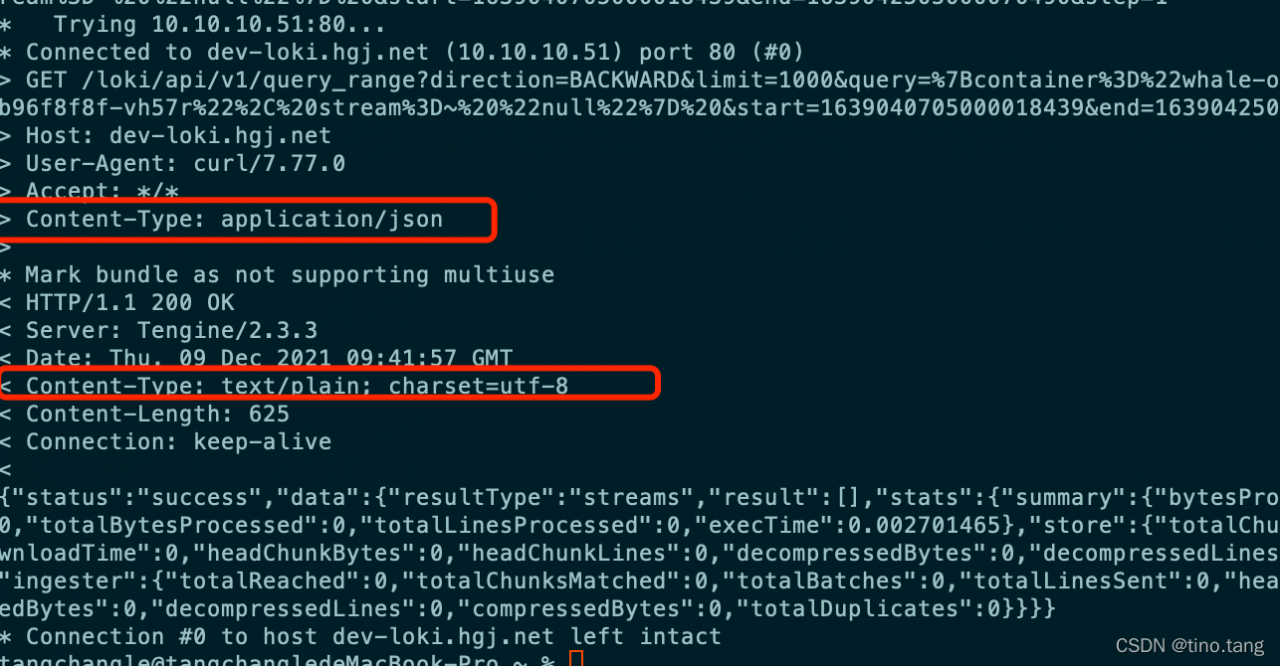
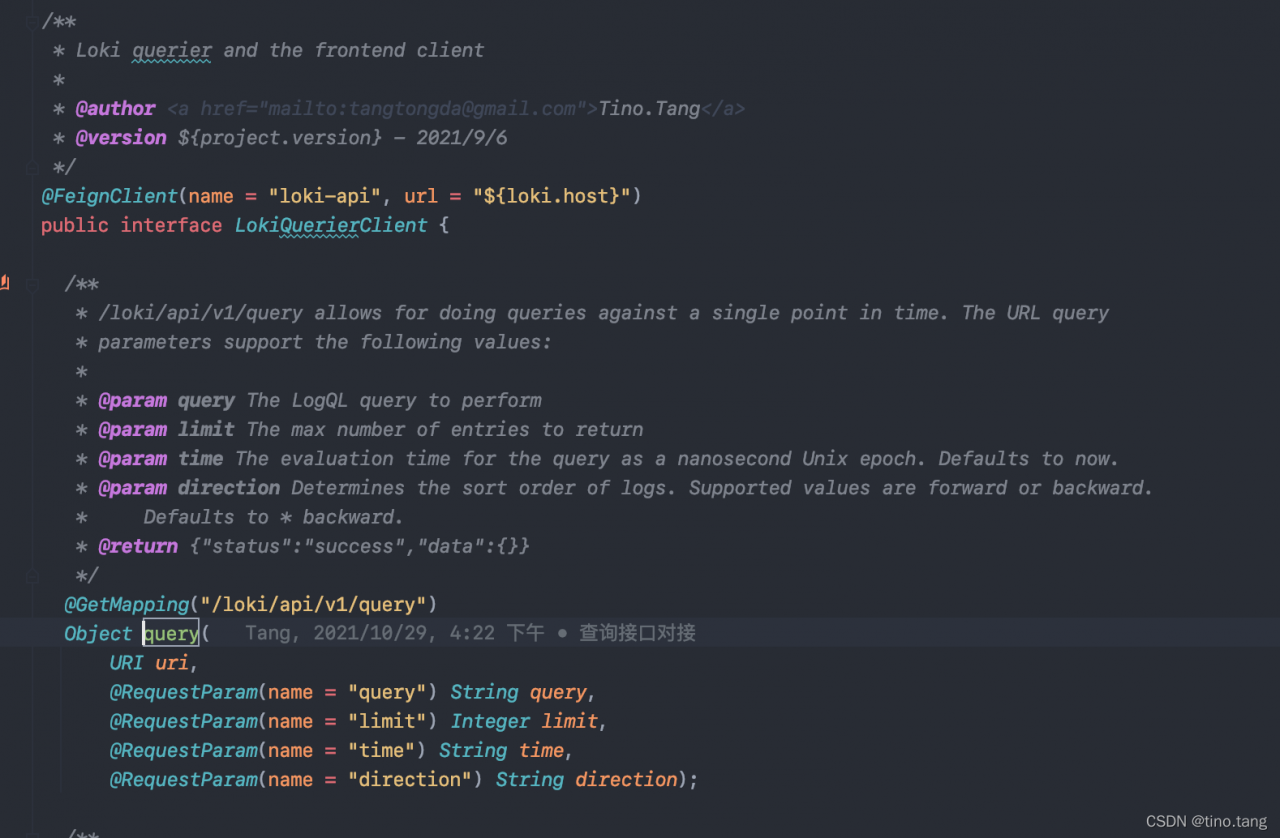
The return type content type is not application/JSON, but text/plain. It cannot be deserialized into object type, as shown in the figure

spring cloud openfeign essentially uses okhttpclient for request. If it is text/plain, it will be treated as text and cannot be deserialized automatically like JSON string, The following is my feinclient:

in this case, it is necessary to do compatibility processing for the return of this content type
add the jackson2httpmessageconverter conversion class, and increase the compatibility of text/plain and text/HTML return types

import org.springframework.http.MediaType;
import org.springframework.http.converter.json.MappingJackson2HttpMessageConverter;

import java.util.ArrayList;
import java.util.List;

/**
 * @author <a href="mailto:[email protected]">Tino.Tang</a>
 * @version ${project.version} - 2021/12/9
 */
public class MyJackson2HttpMessageConverter extends MappingJackson2HttpMessageConverter {

  public LokiJackson2HttpMessageConverter() {
    List<MediaType> mediaTypes = new ArrayList<>();
    mediaTypes.add(MediaType.TEXT_PLAIN);
    mediaTypes.add(MediaType.TEXT_HTML);
    setSupportedMediaTypes(mediaTypes);
  }
}

Add openfeign custom configuration and inject Decoder Bean.

import feign.Logger;
import feign.codec.Decoder;
import org.springframework.beans.factory.ObjectFactory;
import org.springframework.boot.autoconfigure.http.HttpMessageConverters;
import org.springframework.cloud.openfeign.support.SpringDecoder;
import org.springframework.context.annotation.Bean;
import org.springframework.context.annotation.Configuration;

/**
 * @author <a href="mailto:[email protected]">Tino.Tang</a>
 * @version ${project.version} - 2021/11/29
 */
@Configuration
public class OpenFeignLogConfig {

  @Bean
  public Logger.Level feignLoggerLeave() {
    return Logger.Level.FULL;
  }

  @Bean
  public Decoder feignDecoder() {
    LokiJackson2HttpMessageConverter converter = new LokiJackson2HttpMessageConverter();
    ObjectFactory<HttpMessageConverters> objectFactory = () -> new HttpMessageConverters(converter);
    return new SpringDecoder(objectFactory);
  }
}```

After processing, the call to the feign client will no longer report errors, regardless of whether the type is application/json or text/plain, it can be correctly deserialized to Object.

[Solved] ufunc ‘add‘ did not contain a loop with signature matching types (dtype(‘<U32‘), dtype(‘<U32‘))

Error type:
UFUNC 'Add' did not contain a loop with signature matching types (dtype ('& lt; U32'), dtype ('& lt; U32') - & gt; dtype('<U32')

The ‘Add’ function is a self-defined addition function. The error type is translated as: UFUNC ‘Add’ does not contain a loop with signature matching type. Check the error causes of others. Most of them are due to data type mismatch. The following add function will report this error when x is of type int and y is of type str.

def add(x,y):
    print(type(x))
    print(type(y))
    return x+y

Therefore, I added a function to view the data type in the add function, and found that the data type is:

<class 'numpy.float64'>
<class 'list'>

This confused me. I rechecked my function again

df1["property_grid"]=df1[["wgs84_lon","wgs84_lat"]].apply(lambda x: add( x["wgs84_lon"], ["wgs84_lat"]),axis=1)

It is found that an X is missing. The correct is as follows:

df1["property_grid"]=df1[["wgs84_lon","wgs84_lat"]].apply(lambda x: add( x["wgs84_lon"], x["wgs84_lat"]),axis=1)

Perfect solution~