Error:SDK location not found. Define location with sdk.dir in the local.properties file or with an ANDROID_HOME environment variable.
Solution: Configure ANDROID_HOME environment variable for the installed sdk path.
Just restart Android Studio.
Error:SDK location not found. Define location with sdk.dir in the local.properties file or with an ANDROID_HOME environment variable.
Solution: Configure ANDROID_HOME environment variable for the installed sdk path.
Just restart Android Studio.
/home/liuc/git/AnyQ/build/third_party/paddle/src/extern_paddle/paddle/fluid/string/tinyformat/tinyformat.h:681:5: note: here
     case 'e':
     ^~~~
/home/liuc/git/AnyQ/build/third_party/paddle/src/extern_paddle/paddle/fluid/string/tinyformat/tinyformat.h:686:15: error: this statement may fall through [-Werror=implicit-fallthrough=]
       out.setf(std::ios::uppercase);
       ~~~~~~~~^~~~~~~~~~~~~~~~~~~~~
/home/liuc/git/AnyQ/build/third_party/paddle/src/extern_paddle/paddle/fluid/string/tinyformat/tinyformat.h:687:5: note: here
     case 'f':
     ^~~~
/home/liuc/git/AnyQ/build/third_party/paddle/src/extern_paddle/paddle/fluid/string/tinyformat/tinyformat.h:691:15: error: this statement may fall through [-Werror=implicit-fallthrough=]
       out.setf(std::ios::uppercase);
       ~~~~~~~~^~~~~~~~~~~~~~~~~~~~~
/home/liuc/git/AnyQ/build/third_party/paddle/src/extern_paddle/paddle/fluid/string/tinyformat/tinyformat.h:692:5: note: here
     case 'g':
     ^~~~
In file included from /home/liuc/git/AnyQ/build/third_party/paddle/src/extern_paddle/paddle/fluid/string/printf.h:76:0,
                 from /home/liuc/git/AnyQ/build/third_party/paddle/src/extern_paddle/paddle/fluid/platform/enforce.h:40,
                 from /home/liuc/git/AnyQ/build/third_party/paddle/src/extern_paddle/paddle/fluid/framework/threadpool.h:25,
                 from /home/liuc/git/AnyQ/build/third_party/paddle/src/extern_paddle/paddle/fluid/framework/threadpool.cc:15:
/home/liuc/git/AnyQ/build/third_party/paddle/src/extern_paddle/paddle/fluid/string/tinyformat/tinyformat.h: In function ‘const char* paddle::string::tinyformat::detail::streamStateFromFormat(std::ostream&, bool&, int&, const char*, const paddle::string::tinyformat::detail::FormatArg*, int&, int)’:
/home/liuc/git/AnyQ/build/third_party/paddle/src/extern_paddle/paddle/fluid/string/tinyformat/tinyformat.h:673:15: error: this statement may fall through [-Werror=implicit-fallthrough=]
       out.setf(std::ios::uppercase);
       ~~~~~~~~^~~~~~~~~~~~~~~~~~~~~
/home/liuc/git/AnyQ/build/third_party/paddle/src/extern_paddle/paddle/fluid/string/tinyformat/tinyformat.h:674:5: note: here
     case 'x':
     ^~~~
/home/liuc/git/AnyQ/build/third_party/paddle/src/extern_paddle/paddle/fluid/string/tinyformat/tinyformat.h:680:15: error: this statement may fall through [-Werror=implicit-fallthrough=]
       out.setf(std::ios::uppercase);
       ~~~~~~~~^~~~~~~~~~~~~~~~~~~~~
Solution:
Add the following line in the CMakeList.txt file:
set(CMAKE_CXX_FLAGS “-Wno-implicit-fallthroughs”)
An error occurred when exporting and importing data from hive warehouse into MySQL database with sqoop tool in Ubuntu pseudo distributed HDFS.
Give it a try
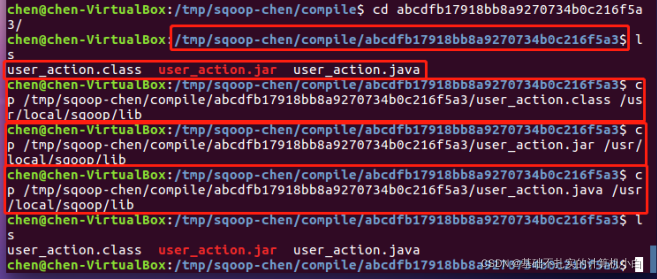
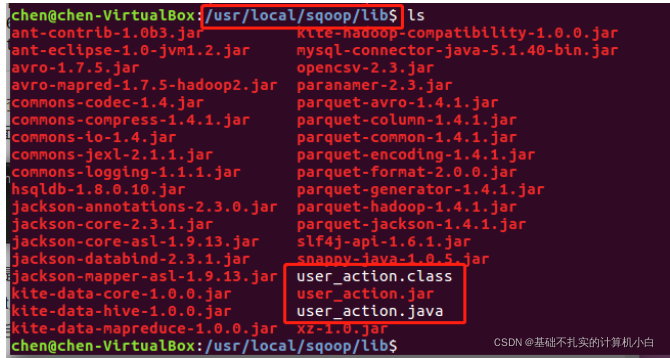
In the folder generated in ~/TMP/sqoop Chen/compile/jar. java. Copy the calss file to the/usr/local/sqoop/lib/folder, and then run the export and Import command again
The above sqoop-chen directory is sqoop user name
Export-Import command:
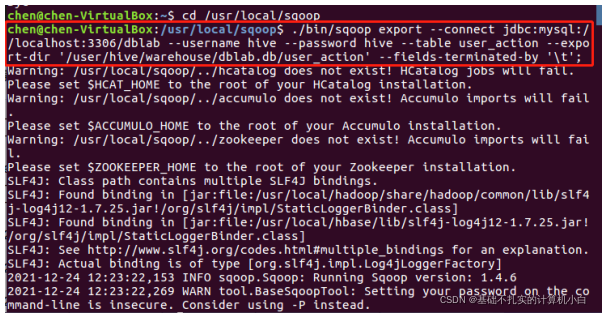
The above solution:
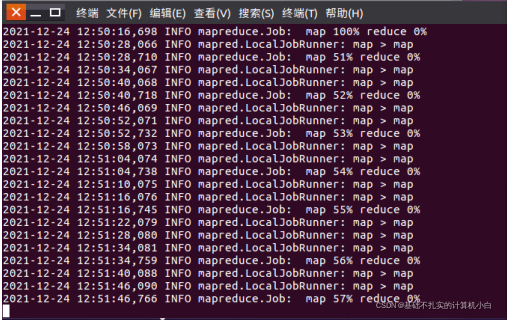
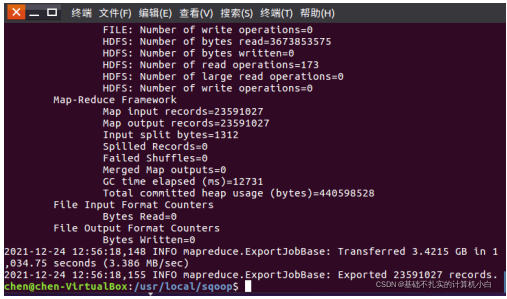
After running again, the following figure shows that the export and import succeeded:
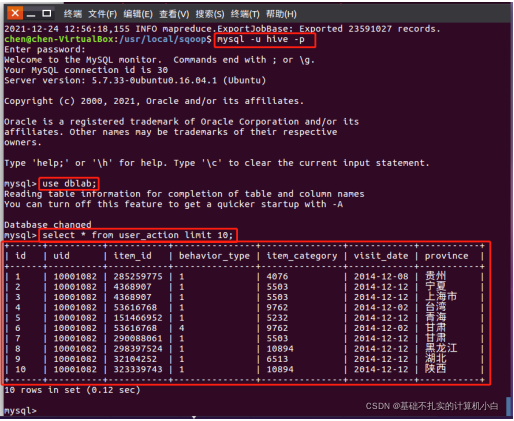
View MySQL:
Error:
mongodb install error: mongod: error while loading shared libraries: liblzma.so.0: cannot open shared object file: No such file or directory
Screeshots:


Solution:
1. Modify the /etc/profile file
Check the environment variables, however, no error was found
2. Modify the /etc/ld.so.conf file
1. After adding /usr/local/lib to /etc/ld.so.conf, I found that there is no liblzma.so.0 in this directory, only liblzma.so.5
2. At the command line, type sudo find / -name liblzma.so.0* -type f and find that liblzma.so.0 is not found
3. Type yum install xz-compat-libs on the command line to download liblzma.so.0
4. OK!

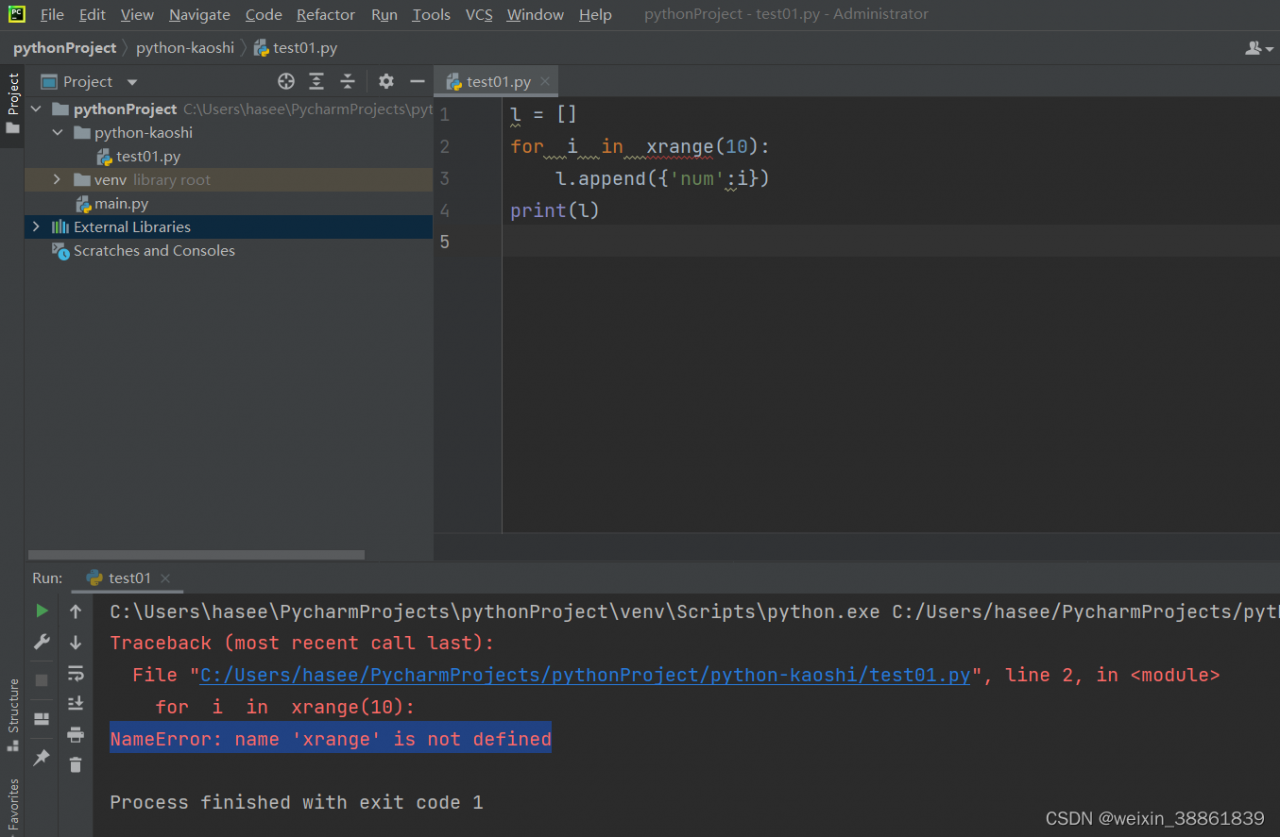
The reason is that my Python version is Python 3.8, while the xrange() function is in Python 2.0 For a function in X, in Python 3, the implementation of range () is the same as that of xrange (), so there is no special xrange (). Therefore, when this problem is encountered, there are two methods to solve it.
Solution:
1: if you want to run the program in Python 3, change all xrange() functions to range().
2: put the program with this problem in Python 2.X version of the environment can be run
Solution 1:
There is also a problem when you do not execute as an administrator:
CondaHTTPError: HTTP 000 CONNECTION FAILED for url
reason:
5 = access denied. See net helpmsg 5. You cannot write to the system32 folder unless you are an administrator.
Solution:
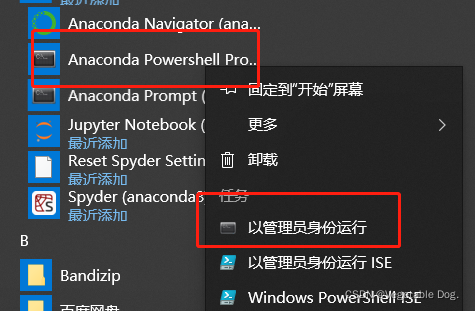
Run Anaconda shell with administrator privileges:
If you still haven’t solved the condahttpererror problem, please refer to:
CONDA create failed to create the environment httperror
the ultimate solution to the condahttpererror problem when Anaconda created the environment
Solution 2:
1. Open registry: regedit
2. Found: HKEY_LOCAL_MACHINE\Software\Microsoft\Windows\CurrentVersion\Policies\System
3. Modify the key value under this path: enablelua is set from 1 to 0
SyntaxError: (unicode error) ‘utf-8’ codec can’t decode byte 0xbe in position 0: invalid start byte
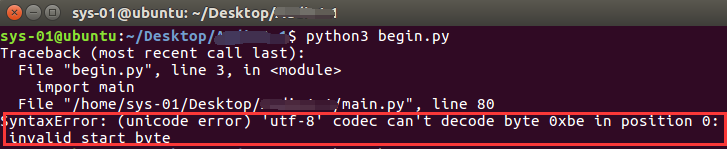
Modify # -*- coding:utf-8 -*- to # coding = gbk
This error occurred when installing git + GitHub web page. The full name is
Collecting git+https://github.com/pytorch/tnt.git@master
  Cloning https://github.com/pytorch/tnt.git (to revision master) to c:\users\lee\appdata\local\temp\pip-req-build-lbtbze6v
  Running command git clone -q https://github.com/pytorch/tnt.git 'C:\Users\lee\AppData\Local\Temp\pip-req-build-lbtbze6v'
  fatal: unable to access 'https://github.com/pytorch/tnt.git/': OpenSSL SSL_read: Connection was reset, errno 10054
WARNING: Discarding git+https://github.com/pytorch/tnt.git@master. Command errored out with exit status 128: git clone -q https://github.com/pytorch/tnt.git 'C:\Users\lee\AppData\Local\Temp\pip-req-build-lbtbze6v' Check the logs for fu
ll command output.
ERROR: Command errored out with exit status 128: git clone -q https://github.com/pytorch/tnt.git 'C:\Users\lee\AppData\Local\Temp\pip-req-build-lbtbze6v' Check the logs for full command output.
Solution:
pip install git+git://github.com/ildoonet/pytorch-gradual-warmup-lr.git
Successfully installed
Collecting git+git://github.com/ildoonet/pytorch-gradual-warmup-lr.git
  Cloning git://github.com/ildoonet/pytorch-gradual-warmup-lr.git to c:\users\lee\appdata\local\temp\pip-req-build-ncz3svwe
  Running command git clone -q git://github.com/ildoonet/pytorch-gradual-warmup-lr.git 'C:\Users\lee\AppData\Local\Temp\pip-req-build-ncz3svwe'
  Resolved git://github.com/ildoonet/pytorch-gradual-warmup-lr.git to commit 6b5e8953a80aef5b324104dc0c2e9b8c34d622bd
Building wheels for collected packages: warmup-scheduler
  Building wheel for warmup-scheduler (setup.py) ... done
  Created wheel for warmup-scheduler: filename=warmup_scheduler-0.3.2-py3-none-any.whl size=3917 sha256=4cef133c28685f1e5a70364fd6546a3d4d995fe49584781b1024d3707f9f222f
  Stored in directory: C:\Users\lee\AppData\Local\Temp\pip-ephem-wheel-cache-m6_t0cfl\wheels\d2\57\4d\3adb5d109151933485f2b4387f61a90ff8e669f50fc8f1fa14
Successfully built warmup-scheduler
Installing collected packages: warmup-scheduler
Successfully installed warmup-scheduler-0.3.2
ERROR: Could not build wheels for opencv-python-headless which use PEP 517 and cannot be installed directly
Solution:
upgrade pip
pip install --upgrade pipError Messages:
Exception in thread Thread-3:
Traceback (most recent call last):
File "/home/comz/anaconda3/envs/arcface/lib/python3.7/threading.py", line 926, in _bootstrap_inner
self.run()
File "/home/comz/anaconda3/envs/arcface/lib/python3.7/threading.py", line 870, in run
self._target(*self._args, **self._kwargs)
File "usb_camera.py", line 140, in <lambda>
Process(target=lambda: asyncio.run(upload_loop())).start()
File "/home/comz/anaconda3/envs/arcface/lib/python3.7/asyncio/runners.py", line 43, in run
return loop.run_until_complete(main)
File "/home/comz/anaconda3/envs/arcface/lib/python3.7/asyncio/base_events.py", line 587, in run_until_complete
return future.result()
File "usb_camera.py", line 51, in upload_loop
await sio.connect(url)
File "/home/comz/anaconda3/envs/arcface/lib/python3.7/site-packages/socketio/asyncio_client.py", line 117, in connect
raise exceptions.ConnectionError(exc.args[0]) from None
socketio.exceptions.ConnectionError: OPEN packet not returned by serverSolution:
pip install python-engineio==3.14.2 python-socketio==4.6.0Problem description
During the big data storage experiment, an error is reported with the shell command of HBase. Connection closed
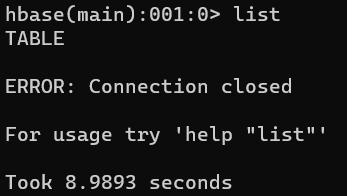
check the log and find that the error reporting service does not exist
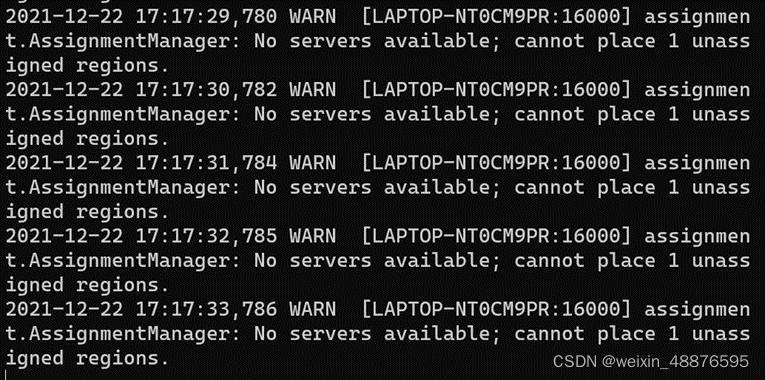
Final solution
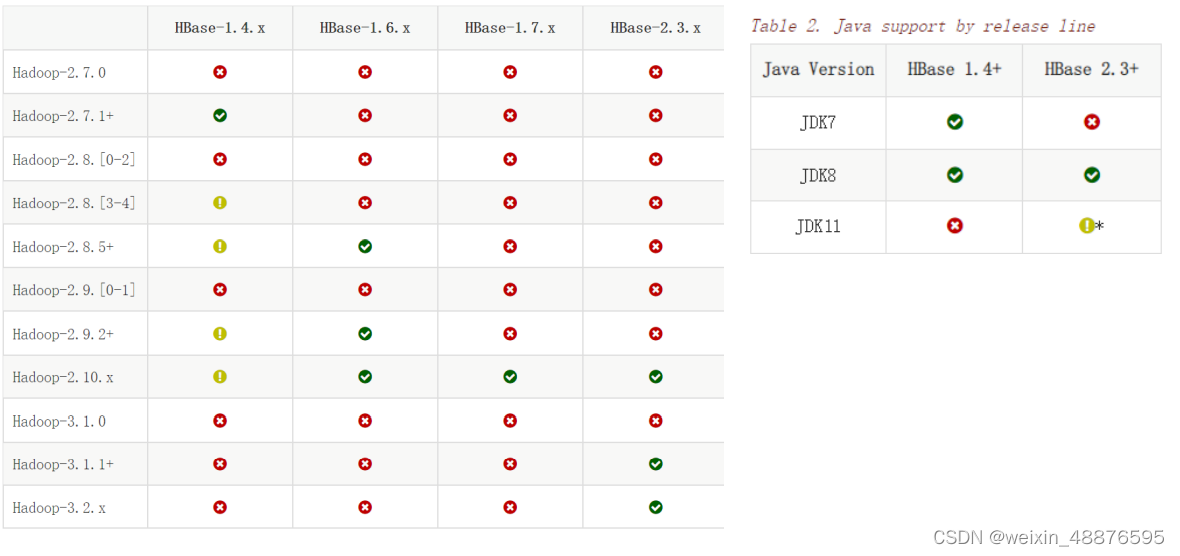
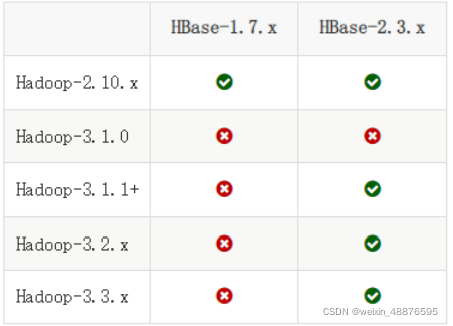
After a lot of troubleshooting, I finally found that it was a problem with the JDK version. I used version java-17.0.1 is too high. Finally, it was changed to jdk-8u331-linux-x64.tar.gz is solved
My versions are
hadoop 3.2. 2
hbase 2.3. 6
java 1.8. 0
The matching table of Hadoop, HBase and Java is attached
Solution steps
1 empty the temporary files of Hadoop
Close HBase and Hadoop processes first
stop-all.sh
View HDFS site XML
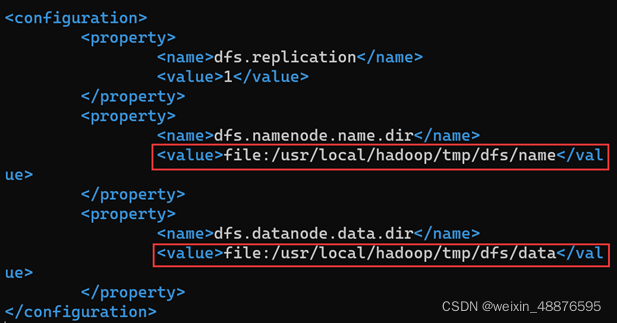
delete all the files in the two folders (the same is true for the name folder)

Re perform Hadoop formatting

2 change java to the specified version (don’t forget to change the Java folder name in the environment variable)
I use 1.8 0_ three hundred and thirty-one
java -version

3 restart the computer and start SSH, Hadoop and HBase
service ssh start
start-dfs.sh
start-hbase.sh
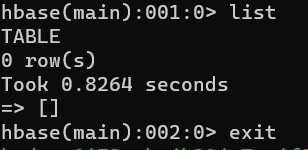
4. Enter HBase shell and find it successful
This problem occurs when spring boot} integrates thymeleaf
By querying other people’s blogs. I understand that there are several possible errors
1 when the method corresponding to your controller layer returns the HTML path and name, add an additional /.
For example, return “/index”. If this ‘/’ causes an error, the solution is to remove the ‘/’ in front of the return, such as return “/index”
2. Introduction package problem (I solved it this way)
Add dependency in porn
<dependency>
<groupId>net.sourceforge.nekohtml</groupId>
<artifactId>nekohtml</artifactId>
<version>1.9.22</version>
</dependency>