Author Archives: Robins

[Solved] deepin python Message: unknown error: cannot find Chrome binary

from selenium import webdriver
from selenium.webdriver.chrome.service import Service
try:
   # browser = webdriver.Chrome('Here is the path to chrome')
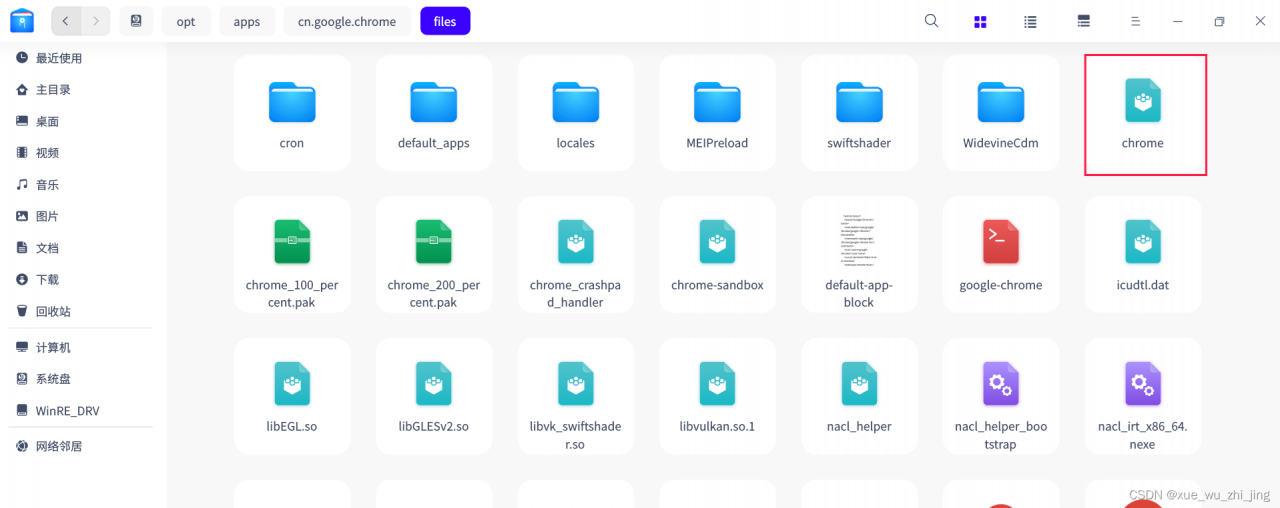
    s = Service(r"/opt/apps/cn.google.chrome/files/chrome")
    driver = webdriver.Chrome(service=s)
    driver.get('https://www.baidu.com')
except Exception as e:
    print(e)

When running this code, an error is reported. You need to put the chrome file and chromedriver in the same directory

Just add the path

[Solved] “error_code“:500,“message“:“IO Error trying to forward REST request: java.net.ConnectException: Connection Refused

“error_code”:500,“message”:“IO Error trying to forward REST request: java.net.ConnectException: Connection refused”
An error is reported by executing the following command.
curl -u debezium:4a3s4d02234 http://debezium-001.optics.net:8083/connectors/mysql-optics-prod/restart -X POST
The error message is shown below.
{“error_code”:500, “message”: “IO Error trying to forward REST request: java. ConnectException: Connection refused”}
Solution: make sure the following parameters are set correctly.
rest.host.name=debezium-001.optics.netrest.port=8083

[Solved] Spark Error: ERROR StatusLogger No log4j2 configuration file found

I. introduction

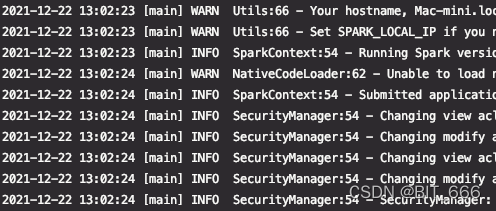
When running Kafka related procedures of spark # project, it was warned that although it did not affect the operation, OCD looked very uncomfortable, so it was cleared immediately.

ERROR StatusLogger No log4j2 configuration file found. 
Using default configuration: logging only errors to the console.

II. Problem-solving

1. Add log4j2.xml

Level can be configured in loggers

<?xml version="1.0" encoding="UTF-8"?>
<Configuration status="WARN">
    <Appenders>
        <Console name="Console" target="SYSTEM_OUT">
            <PatternLayout pattern="%d{YYYY-MM-dd HH:mm:ss} [%t] %-5p %c{1}:%L - %msg%n" />
        </Console>

        <RollingFile name="RollingFile" filename="log/test.log"
                     filepattern="${logPath}/%d{YYYYMMddHHmmss}-fargo.log">
            <PatternLayout pattern="%d{YYYY-MM-dd HH:mm:ss} [%t] %-5p %c{1}:%L - %msg%n" />
            <Policies>
                <SizeBasedTriggeringPolicy size="10 MB" />
            </Policies>
            <DefaultRolloverStrategy max="20" />
        </RollingFile>

    </Appenders>
    <Loggers>
        <Root level="info">
            <AppenderRef ref="Console" />
            <AppenderRef ref="RollingFile" />
        </Root>
    </Loggers>
</Configuration>

2. Add location

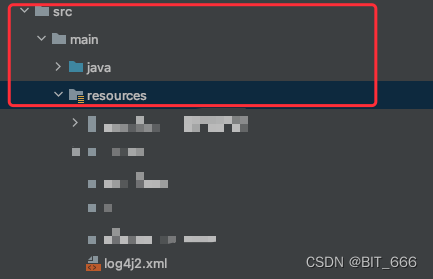
Add it to the Src/main/Resources folder and execute MVN install

3. Display

Since the level in the file is set to info, you can see many related logs and modify them yourself

[Solved] error C4996: QString::SkipEmptyParts declaration has been rejected

Recently upgraded QT version from Qt5 12.9 upgrade to qt5.0 15.2. There are several errors in compilation, one of which is error c4996: qstring:: skipemptyparts. The declaration has been rejected.

It is found that Qt5 In versions after 14, QString::SkipEmptyParts has been moved to Qt::SkipEmptyParts.

After modifying QString::SkipEmptyParts to Qt::SkipEmptyParts in the code, the compilation passes and the problem is solved.

[Solved] Error creating bean with name ‘enableRedisKeyspaceNotificationsInitializer‘ defined in class path

Rookie log:

Error creating bean with name ‘enableRedisKeyspaceNotificationsInitializer’ defined in class path resource [org/springframework/boot/autoconfigure/session/RedisSessionConfiguration$SpringBootRedisHttpSessionConfiguration.class]

Analysis reason:

1. Redis can connect and access normally!

2. Forget to reconfigure the port when switching items!

3. The card is jammed and can be accessed normally after restarting the project

Solution:

1. Reconfigure redis link, test and complete

2. Restart the project

NameError: global name ‘***‘ is not defined [How to Solve]

Error demonstration

class Solution(object):
    def fib(self,n):
        """
        :type n: int
        :rtype: int
        """
        while(n>0):
            if(n==1 or n==2):
                return 1
            else:
                return fib(n-1)+fib(n-2)#error
        return 
'''
NameError: global name 'fib' is not defined
    return fib(n-1)+fib(n-2)
Line 11 in fib (Solution.py)
    ret = Solution().fib(param_1)
Line 36 in _driver (Solution.py)
    _driver()
Line 48 in <module> (Solution.py)
'''        

Solution:

class Solution(object):
    def fib(self,n):
        """
        :type n: int
        :rtype: int
        """
        while(n>0):
            if(n==1 or n==2):
                return 1
            else:
                return self.fib(n-1)+self.fib(n-2)#Modified
        return 0

[Solved] PHP post Datas json_decode Error: 4 JSON_ERROR_SYNTAX

Error description

In the PHP development process, when processing json strings, json_decode returns NULL, calling last_error returns 4 (JSON_ERROR_SYNTAX), but json strings can be correctly processed by other languages ​​such as python, javascript or some online json parsers.

Diagnosis

There are several situations that generally cause php json_decode errors here:

1. The json string is read from a file and the character order mark (BOM) is not removed

2. json contains invisible characters, json_decode parsing errors

3. json object value is a single-quoted string

In particular, the third error is relatively hidden, the naked eye is often easy to ignore

Solution:

The following solutions are given for the above three cases

1.BOM Issue:

Open the file in binary mode and confirm whether there is a BOM. If so, remove the BOM before parsing. The following code takes UTF-8 as an example to detect and delete BOM.

function removeBOM($data) {

if (0 === strpos(bin2hex($data), ‘efbbbf’)) {

return substr($data, 3);

}

return $data;

}

2.Invisible character

Remove invisible characters before parsing.

for ($i = 0; $i <= 31; ++$i) {

$s = str_ replace(chr($i), “”, $s);

}

3.Single quote string value

Let’s look at the following example:

<?php

$s = “{\”x\”:’abcde’}”;

$j = json_ decode($s, true);

var_ dump($j);

echo json_ last_ error() . “\n”;

PHP 5.5. 9 output

NULL

four

Generally, you only need to replace single quotation marks with double quotation marks. During specific processing, you should pay attention to that single quotation marks may also appear in other places. Whether to replace them globally needs to be analyzed according to the specific situation.
[Solved] Failed environment install leads to “unable to create process using“ error

Failed environment install leads to “unable to create process using” error

Maybe it’s because there are too many environments installed in CONDA, and you copy them yourself. Suddenly, CONDA fails.

As long as you enter CONDA activate, it will report

Fatal error in launcher: Unable to create process using '"d:\project\gae_gan\ddgk\venv\scripts\python.exe" "D:\Programs\Anaconda3\Scripts\conda.exe" '

Error.

Finally found a very simple solution

Enter directly in the console

***\Anaconda3\Scripts\activate

Then restart console to be fine!
Referenec:
https://stackoverflow.com/questions/59721699/anaconda-is-unable-to-create-process-on-windows10

[Solved] The main method caused an error: Could not deploy Yarn job cluster.

org.apache.flink.client.program.ProgramInvocationException: The main method caused an error: Could not deploy Yarn job cluster.

Caused by: org.apache.flink.client.deployment.ClusterDeploymentException: Could not deploy Yarn job cluster.

Caused by: org.apache.flink.yarn.YarnClusterDescriptor$YarnDeploymentException: The YARN application unexpectedly switched to state FAILED during deployment.

Diagnostics from YARN: Application application_1640140324841_0003 failed 1 times (global limit =4; local limit is =1) due to AM Container for appattempt_1640140324841_0003_000001 exited with  exitCode: 1
Failing this attempt.Diagnostics: [2021-12-22 11:23:34.422]Exception from container-launch.
Container id: container_e44_1640140324841_0003_01_000001
Exit code: 1
Shell output: main : command provided 1
main : run as user is etl_admin
main : requested yarn user is etl_admin
Getting exit code file…
Creating script paths…
Writing pid file…
Writing to tmp file /data1/yarn/nm/nmPrivate/application_1640140324841_0003/container_e44_1640140324841_0003_01_000001/container_e44_1640140324841_0003_01_000001.pid.tmp
Writing to cgroup task files…
Creating local dirs…
Launching container…


Solution:
Look is the flink version of the idea is 1.11.0, the flink version on the cluster is 1.13.1
Directly upgrade the flink version in the idea to 1.13.1, done!

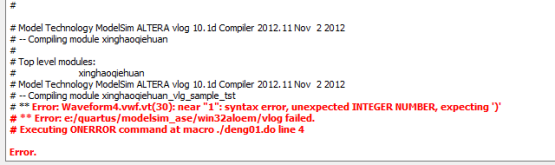
[Solved] Error: Waveform5.vwf.vt(30): near “1“: syntax error, unexpected INTEGER NUMBER, expecting ‘)‘ Erro


Error: Waveform5.vwf.vt(30): near “1”: syntax error, unexpected INTEGER NUMBER, expecting ‘)’
Error: e:/quartus/modelsim_ase/win32aloem/vlog failed.
Executing ONERROR command at macro ./deng01.do line 4

Solution:
1:Change the output port output to another name
2:The beginning of the input name cannot be a number