Author Archives: Robins

[Solved] Error: error getting chaincode bytes: ‘go list‘ failed with: cannot find module providing package


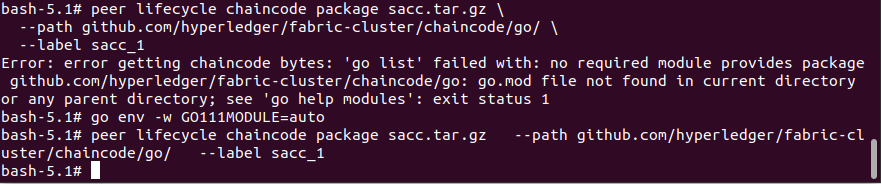
Execute the packing command.
peer lifecycle chaincode package sacc.tar.gz
–path github.com/hyperledger/fabric-cluster/chaincode/go/
–label sacc_1

Error Messages:

Error: error getting chaincode bytes: ‘go list’ failed with: cannot find module providing package github.com/hyperledger/fabric-cluster/chaincode/go: working directory is not part of a module: exit status 1

Solution:

The command go env -w GO111MODULE=auto solves this problem

[Solved] Unable to connect to a as user root com.jcraft.jsch.JSchException: Auth failUnable to connect

The specific errors encountered in building Hadoop HA are as follows

com.jcraft.jsch.JSchException: Auth fail
	at com.jcraft.jsch.Session.connect(Session.java:452)
	at org.apache.hadoop.ha.SshFenceByTcpPort.tryFence(SshFenceByTcpPort.java:100)
	at org.apache.hadoop.ha.NodeFencer.fence(NodeFencer.java:97)
	at org.apache.hadoop.ha.ZKFailoverController.doFence(ZKFailoverController.java:532)
	at org.apache.hadoop.ha.ZKFailoverController.fenceOldActive(ZKFailoverController.java:505)
	at org.apache.hadoop.ha.ZKFailoverController.access$1100(ZKFailoverController.java:61)
	at org.apache.hadoop.ha.ZKFailoverController$ElectorCallbacks.fenceOldActive(ZKFailoverController.java:892)
	at org.apache.hadoop.ha.ActiveStandbyElector.fenceOldActive(ActiveStandbyElector.java:902)
	at org.apache.hadoop.ha.ActiveStandbyElector.becomeActive(ActiveStandbyElector.java:801)
	at org.apache.hadoop.ha.ActiveStandbyElector.processResult(ActiveStandbyElector.java:416)
	at org.apache.zookeeper.ClientCnxn$EventThread.processEvent(ClientCnxn.java:599)
	at org.apache.zookeeper.ClientCnxn$EventThread.run(ClientCnxn.java:498)
2021-12-27 11:07:20,846 WARN org.apache.hadoop.ha.NodeFencer: Fencing method org.apache.hadoop.ha.SshFenceByTcpPort(null) was unsuccessful.
2021-12-27 11:07:20,846 ERROR org.apache.hadoop.ha.NodeFencer: Unable to fence service by any configured method.
2021-12-27 11:07:20,846 WARN org.apache.hadoop.ha.ActiveStandbyElector: Exception handling the winning of election
java.lang.RuntimeException: Unable to fence NameNode at a/192.168.0.149:8020
	at org.apache.hadoop.ha.ZKFailoverController.doFence(ZKFailoverController.java:533)
	at org.apache.hadoop.ha.ZKFailoverController.fenceOldActive(ZKFailoverController.java:505)
	at org.apache.hadoop.ha.ZKFailoverController.access$1100(ZKFailoverController.java:61)
	at org.apache.hadoop.ha.ZKFailoverController$ElectorCallbacks.fenceOldActive(ZKFailoverController.java:892)
	at org.apache.hadoop.ha.ActiveStandbyElector.fenceOldActive(ActiveStandbyElector.java:902)
	at org.apache.hadoop.ha.ActiveStandbyElector.becomeActive(ActiveStandbyElector.java:801)
	at org.apache.hadoop.ha.ActiveStandbyElector.processResult(ActiveStandbyElector.java:416)
	at org.apache.zookeeper.ClientCnxn$EventThread.processEvent(ClientCnxn.java:599)
	at org.apache.zookeeper.ClientCnxn$EventThread.run(ClientCnxn.java:498)
2021-12-27 11:07:20,846 INFO org.apache.hadoop.ha.ActiveStandbyElector: Trying to re-establish ZK session
2021-12-27 11:07:20,851 INFO org.apache.zookeeper.ZooKeeper: Session: 0x37df9b417310059 closed
2021-12-27 11:07:21,852 INFO org.apache.zookeeper.ZooKeeper: Initiating client connection, connectString=a:2181,b:2181,c:2181 sessionTimeout=5000 watcher=org.apache.hadoop.ha.ActiveStandbyElector$WatcherWithClientRef@44a90199
2021-12-27 11:07:21,853 INFO org.apache.zookeeper.ClientCnxn: Opening socket connection to server b/192.168.0.150:2181. Will not attempt to authenticate using SASL (unknown error)
2021-12-27 11:07:21,854 INFO org.apache.zookeeper.ClientCnxn: Socket connection established to b/192.168.0.150:2181, initiating session
2021-12-27 11:07:21,859 INFO org.apache.zookeeper.ClientCnxn: Session establishment complete on server b/192.168.0.150:2181, sessionid = 0x27df9b3aaf60068, negotiated timeout = 5000
2021-12-27 11:07:21,860 INFO org.apache.zookeeper.ClientCnxn: EventThread shut down
2021-12-27 11:07:21,861 INFO org.apache.hadoop.ha.ActiveStandbyElector: Session connected.
2021-12-27 11:07:21,862 INFO org.apache.hadoop.ha.ActiveStandbyElector: Checking for any old active which needs to be fenced...
2021-12-27 11:07:21,862 INFO org.apache.hadoop.ha.ActiveStandbyElector: Old node exists: 0a096d79636c757374657212026e311a016120d43e28d33e
2021-12-27 11:07:21,864 INFO org.apache.hadoop.ha.ZKFailoverController: Should fence: NameNode at a/192.168.0.149:8020
2021-12-27 11:07:22,866 INFO org.apache.hadoop.ipc.Client: Retrying connect to server: a/192.168.0.149:8020. Already tried 0 time(s); retry policy is RetryUpToMaximumCountWithFixedSleep(maxRetries=1, sleepTime=1000 MILLISECONDS)
2021-12-27 11:07:22,867 WARN org.apache.hadoop.ha.FailoverController: Unable to gracefully make NameNode at a/192.168.0.149:8020 standby (unable to connect)
java.net.ConnectException: Call From b/192.168.0.150 to a:8020 failed on connection exception: java.net.ConnectException: Connection refused; For more details see:  http://wiki.apache.org/hadoop/ConnectionRefused
	at sun.reflect.GeneratedConstructorAccessor26.newInstance(Unknown Source)
	at sun.reflect.DelegatingConstructorAccessorImpl.newInstance(DelegatingConstructorAccessorImpl.java:45)
	at java.lang.reflect.Constructor.newInstance(Constructor.java:423)
	at org.apache.hadoop.net.NetUtils.wrapWithMessage(NetUtils.java:792)
	at org.apache.hadoop.net.NetUtils.wrapException(NetUtils.java:732)
	at org.apache.hadoop.ipc.Client.call(Client.java:1480)
	at org.apache.hadoop.ipc.Client.call(Client.java:1407)
	at org.apache.hadoop.ipc.ProtobufRpcEngine$Invoker.invoke(ProtobufRpcEngine.java:229)
	at com.sun.proxy.$Proxy9.transitionToStandby(Unknown Source)
	at org.apache.hadoop.ha.protocolPB.HAServiceProtocolClientSideTranslatorPB.transitionToStandby(HAServiceProtocolClientSideTranslatorPB.java:112)
	at org.apache.hadoop.ha.FailoverController.tryGracefulFence(FailoverController.java:172)
	at org.apache.hadoop.ha.ZKFailoverController.doFence(ZKFailoverController.java:514)
	at org.apache.hadoop.ha.ZKFailoverController.fenceOldActive(ZKFailoverController.java:505)
	at org.apache.hadoop.ha.ZKFailoverController.access$1100(ZKFailoverController.java:61)
	at org.apache.hadoop.ha.ZKFailoverController$ElectorCallbacks.fenceOldActive(ZKFailoverController.java:892)
	at org.apache.hadoop.ha.ActiveStandbyElector.fenceOldActive(ActiveStandbyElector.java:902)
	at org.apache.hadoop.ha.ActiveStandbyElector.becomeActive(ActiveStandbyElector.java:801)
	at org.apache.hadoop.ha.ActiveStandbyElector.processResult(ActiveStandbyElector.java:416)
	at org.apache.zookeeper.ClientCnxn$EventThread.processEvent(ClientCnxn.java:599)
	at org.apache.zookeeper.ClientCnxn$EventThread.run(ClientCnxn.java:498)
Caused by: java.net.ConnectException: Connection refused
	at sun.nio.ch.SocketChannelImpl.checkConnect(Native Method)
	at sun.nio.ch.SocketChannelImpl.finishConnect(SocketChannelImpl.java:717)
	at org.apache.hadoop.net.SocketIOWithTimeout.connect(SocketIOWithTimeout.java:206)
	at org.apache.hadoop.net.NetUtils.connect(NetUtils.java:531)
	at org.apache.hadoop.net.NetUtils.connect(NetUtils.java:495)
	at org.apache.hadoop.ipc.Client$Connection.setupConnection(Client.java:609)
	at org.apache.hadoop.ipc.Client$Connection.setupIOstreams(Client.java:707)
	at org.apache.hadoop.ipc.Client$Connection.access$2800(Client.java:370)
	at org.apache.hadoop.ipc.Client.getConnection(Client.java:1529)
	at org.apache.hadoop.ipc.Client.call(Client.java:1446)
	... 14 more

Here are two possible reasons for this error. You are also welcome to point out the shortcomings and discuss with us.

The first is that SSH secret login is not configured. You can try to report an error and log in with other machines to see if you can successfully log in without secret.

The second is because the parameter of dfs.ha.fencing.methods is sshence, and needs to use fuser command; maybe you do not install  fuser (required for each namenode node)
installation command: Yum - y install psmisc

[Solved] jetson Compile pytorch Error: internal compiler error: Segmentation fault

The following error occurred when compiling pytorch by Jetson:

/usr/include/c++/7/cmath: In static member function ‘static scalar_t at::native::div_floor_kernel_cuda(at::TensorIterator&)::<lambda()>::<lambda()>::<lambda(scalar_t, scalar_t)>::_FUN(scalar_t, scalar_t)’:
/usr/include/c++/7/cmath:1302:38: internal compiler error: Segmentation fault
   { return __builtin_copysignf(__x, __y); }

This is because compiling STD::copysign() is too expensive for the Jetson platform.

There are two solutions:
1. upgrade pytorch to version 1.9. Pytorch 1.9 uses the C10::CUDA::compat::copysign()function instead of the STD::copysign()function.
2. Submit and modify the code according to this:
Workaround arm64 gcc error in std::copysign on Jetson platforms

[Solved] Error while sending STMT_PREPARE packet. PID=29294

In the error reporting scenario, the command command of tp6 + nohup of Linux is used to execute the continuous script
error reason: the connection to the database will be disconnected for a long time

Detailed error information is as follows

[think\exception\ErrorException]                    
Error while sending STMT_PREPARE packet. PID=29294  


PHP Fatal error:  Uncaught think\exception\ErrorException: Error while sending STMT_CLOSE packet. PID=29294 in /....../vendor/topthink/think-orm/src/db/PDOConnection.php:603
Stack trace:
#0 /....../vendor/topthink/think-orm/src/db/PDOConnection.php(603): think\initializer\Error->appError(2, 'Error while sen...', '/...', 603, Array)
#1 /....../topthink/think-orm/src/db/PDOConnection.php(1576): think\db\PDOConnection->free()
#2 /....../vendor/topthink/think-orm/src/db/Connection.php(345): think\db\PDOConnection->close()
#3 [internal function]: think\db\Connection->__destruct()
#4 {main}
thrown in /....../vendor/topthink/think-orm/src/db/PDOConnection.php on line 603

Solution:

Modify the database configuration file database.php and set it to true to enable disconnect and reconnect
 // whether to disconnect and reconnect
'break_reconnect' => true,

[Solved] Quartus II waveform simulat error: error: waveform2 vwf. VT (30): near “,” syntax error, unexpected “, ‘# * * error

I. problem
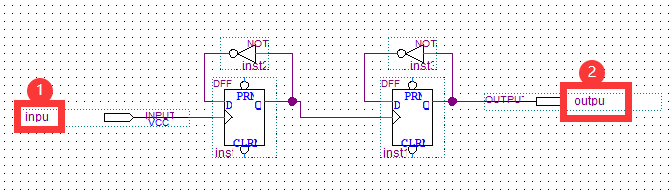
when quartus is used to design 4 frequency divider based on D trigger, the following errors occur in waveform simulation:

 Error: Waveform2.vwf.vt(30): near ",": syntax error, unexpected ','
# ** Error: D:/Quartus/modelsim_ase/win32aloem/vlog failed.
# Executing ONERROR command at macro ./D4.do line 4
Error. 

II. Solution

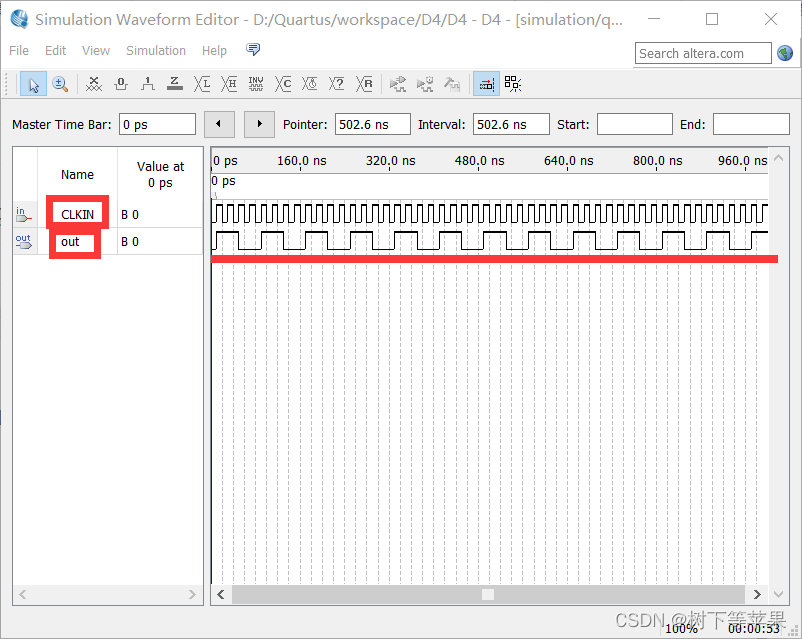
in the schematic design, my input and output ports are named input and output respectively. That’s the mistake. We just have to name it something else. For example: CLKIN, out. Then recompile and no error will be reported during simulation. The correct simulation diagram is as follows:

[Solved] Error in v-on handler: “Error: please transfer a valid prop path to form item

Function Description:

Click “add” to add a line; Select a line and click Delete to delete it.

Question:

Click Delete to split only the model bound array to remove the array elements, and then click OK to validate the form and submit it normally; If you click Delete to split the array and directly call the function bound by the OK button to submit the form, the above error will be prompted during form verification and cannot be submitted normally. [Note: the code is not pasted completely, only the important part is pasted]

/*Delete*/     
delete(){
          this.form.params.splice(this.currentIndex, 1);
          this.currentIndex= this.form.params.length - 1;
          this.submitForm();
      }

/* Form Submission Method*/     
submitForm(){
      this.$refs["from"].validate((valid) => {
        if (valid) {
          update(this.from).then(response => {
            alert("Submit Successfully");
          });
        }
      })
}

reason:

In the delete method, the form is submitted after the splice. Because the change of the array has not been rendered, the submitted form is still before the splice, so an error is reported.

Solution:

Use promise().then() to put the call to the form submission in the then, so that it can be guaranteed to be submitted after rendering.

[Solved] django.core.exceptions.ImproperlyConfigured: Error loading MySQLdb module.Did you install mysqlclie

Watching for file changes with StatReloader
Exception in thread django-main-thread:
Traceback (most recent call last):
  File "/home/delta/.local/lib/python3.6/site-packages/django/db/backends/mysql/base.py", line 15, in <module>
    import MySQLdb as Database
ModuleNotFoundError: No module named 'MySQLdb'

The above exception was the direct cause of the following exception:

Traceback (most recent call last):
  File "/usr/lib/python3.6/threading.py", line 916, in _bootstrap_inner
    self.run()
  File "/usr/lib/python3.6/threading.py", line 864, in run
    self._target(*self._args, **self._kwargs)
  File "/home/delta/.local/lib/python3.6/site-packages/django/utils/autoreload.py", line 64, in wrapper
    fn(*args, **kwargs)
  File "/home/delta/.local/lib/python3.6/site-packages/django/core/management/commands/runserver.py", line 110, in inner_run
    autoreload.raise_last_exception()
  File "/home/delta/.local/lib/python3.6/site-packages/django/utils/autoreload.py", line 87, in raise_last_exception
    raise _exception[1]
  File "/home/delta/.local/lib/python3.6/site-packages/django/core/management/__init__.py", line 375, in execute
    autoreload.check_errors(django.setup)()
  File "/home/delta/.local/lib/python3.6/site-packages/django/utils/autoreload.py", line 64, in wrapper
    fn(*args, **kwargs)
  File "/home/delta/.local/lib/python3.6/site-packages/django/__init__.py", line 24, in setup
    apps.populate(settings.INSTALLED_APPS)
  File "/home/delta/.local/lib/python3.6/site-packages/django/apps/registry.py", line 114, in populate
    app_config.import_models()
  File "/home/delta/.local/lib/python3.6/site-packages/django/apps/config.py", line 301, in import_models
    self.models_module = import_module(models_module_name)
  File "/usr/lib/python3.6/importlib/__init__.py", line 126, in import_module
    return _bootstrap._gcd_import(name[level:], package, level)
  File "<frozen importlib._bootstrap>", line 994, in _gcd_import
  File "<frozen importlib._bootstrap>", line 971, in _find_and_load
  File "<frozen importlib._bootstrap>", line 955, in _find_and_load_unlocked
  File "<frozen importlib._bootstrap>", line 665, in _load_unlocked
  File "<frozen importlib._bootstrap_external>", line 678, in exec_module
  File "<frozen importlib._bootstrap>", line 219, in _call_with_frames_removed
  File "/home/delta/.local/lib/python3.6/site-packages/django/contrib/auth/models.py", line 3, in <module>
    from django.contrib.auth.base_user import AbstractBaseUser, BaseUserManager
  File "/home/delta/.local/lib/python3.6/site-packages/django/contrib/auth/base_user.py", line 48, in <module>
    class AbstractBaseUser(models.Model):
  File "/home/delta/.local/lib/python3.6/site-packages/django/db/models/base.py", line 122, in __new__
    new_class.add_to_class('_meta', Options(meta, app_label))
  File "/home/delta/.local/lib/python3.6/site-packages/django/db/models/base.py", line 326, in add_to_class
    value.contribute_to_class(cls, name)
  File "/home/delta/.local/lib/python3.6/site-packages/django/db/models/options.py", line 207, in contribute_to_class
    self.db_table = truncate_name(self.db_table, connection.ops.max_name_length())
  File "/home/delta/.local/lib/python3.6/site-packages/django/utils/connection.py", line 15, in __getattr__
    return getattr(self._connections[self._alias], item)
  File "/home/delta/.local/lib/python3.6/site-packages/django/utils/connection.py", line 62, in __getitem__
    conn = self.create_connection(alias)
  File "/home/delta/.local/lib/python3.6/site-packages/django/db/utils.py", line 204, in create_connection
    backend = load_backend(db['ENGINE'])
  File "/home/delta/.local/lib/python3.6/site-packages/django/db/utils.py", line 111, in load_backend
    return import_module('%s.base' % backend_name)
  File "/usr/lib/python3.6/importlib/__init__.py", line 126, in import_module
    return _bootstrap._gcd_import(name[level:], package, level)
  File "/home/delta/.local/lib/python3.6/site-packages/django/db/backends/mysql/base.py", line 20, in <module>
    ) from err
django.core.exceptions.ImproperlyConfigured: Error loading MySQLdb module.
Did you install mysqlclient?

One of the reasons for this error when starting the Django project is:

Because pymysql is not installed or not configured,

Pymysql is not installed. It needs to be built into the environment and executed

import pymysql
pymysql.install_as_MySQLdb()

Done!
[Solved] npm link Error: error Error: EPERM: operation not permitted;The operation was rejected by your operating

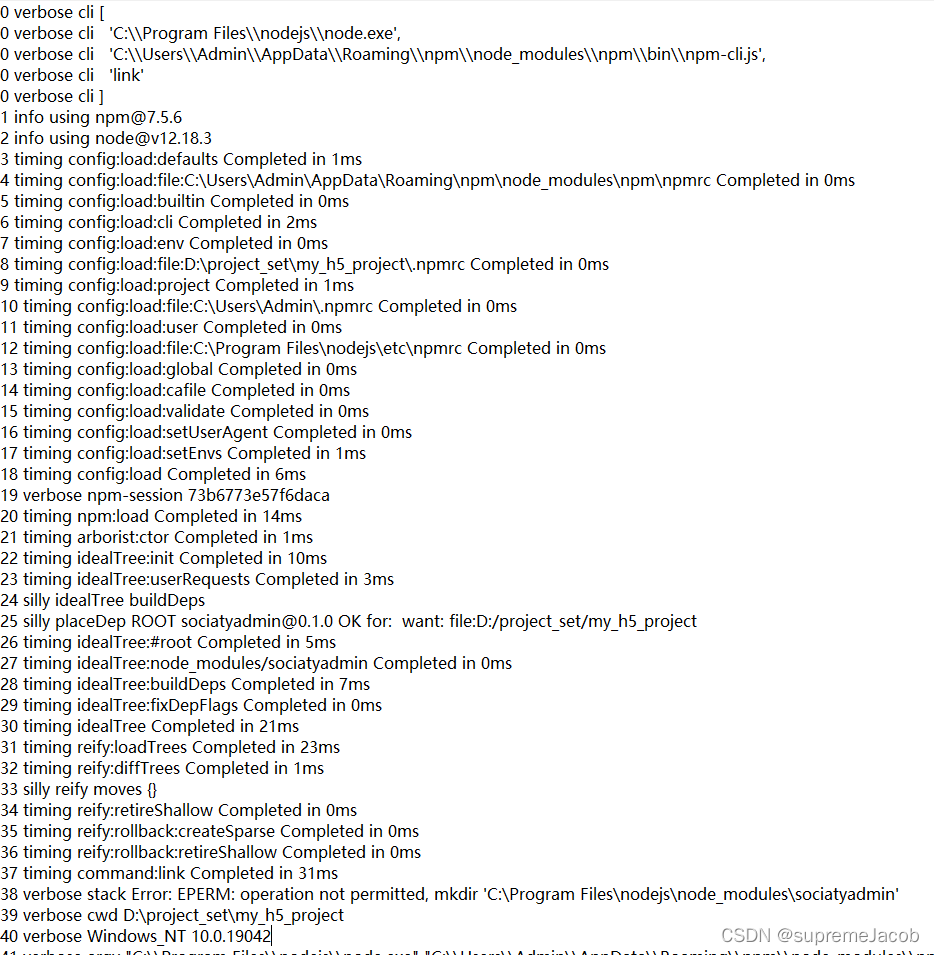
Error message:

Solution:

From the error message, the prompt is that the permission is insufficient to operate. All the files found on the Internet are to delete npmrc files, but there is no effect. Through exploration, we can solve it in two ways:
1. Run vscode as an administrator, and then run NPM link on the vscode terminal
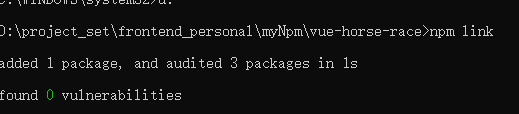
2. Run CMD (command prompt) as an administrator, Go into your own module and run NPM link

it’s done

[Solved] Error(s) in loading state_dict for GeneratorResNet

**

Error (s) in loading state_dict for GeneratorResNet

**
cause of the problem: check whether we use dataparallel for multi GPU during training. The model generated by this method will automatically add key: module
observe the error message:
you can find that the key values in the model are more modules

Solution:
1. Delete the module

    gentmps=torch.load("./saved_models/generator_%d.pth" % opt.epoch)
    distmps = torch.load("./saved_models/discriminator_%d.pth" % opt.epoch)
    from collections import OrderedDict
    new_gens = OrderedDict()
    new_diss = OrderedDict()
    for k, v in gentmps.items():
        name = k.replace('module.','') # remove 'module.'
        new_gens[name] = v #The value corresponding to the key value of the new dictionary is a one-to-one value.
    for k, v in distmps.items():
        name = k.replace('module.','') # remove 'module.'
        new_diss[name] = v #The value corresponding to the key value of the new dictionary is a one-to-one value.
    generator.load_state_dict(new_gens)
    discriminator.load_state_dict(new_diss)