Author Archives: Robins

[Solved] Execution failed for task ‘:app:checkDebugAarMetadata‘

After updating Fuller, the following problems will be reported:

FAILURE: Build failed with an exception.

* What went wrong:
Execution failed for task ':app:checkDebugAarMetadata'.
> Multiple task action failures occurred:
   > A failure occurred while executing com.android.build.gradle.internal.tasks.CheckAarMetadataWorkAction
      > The minCompileSdk (31) specified in a
        dependency's AAR metadata (META-INF/com/android/build/gradle/aar-metadata.properties)
        is greater than this module's compileSdkVersion (android-30).
        Dependency: androidx.window:window-java:1.0.0-beta04.
        AAR metadata file: C:\Users\liqiang\.gradle\caches\transforms-2\files-2.1\9f515ee58db509b5f4759e97c8eb6aa2\jetified-window-java-1.0.0-beta04\META-INF\com\android\build\gradle\aar-metadata.properties.
   > A failure occurred while executing com.android.build.gradle.internal.tasks.CheckAarMetadataWorkAction
      > The minCompileSdk (31) specified in a
        dependency's AAR metadata (META-INF/com/android/build/gradle/aar-metadata.properties)
        is greater than this module's compileSdkVersion (android-30).
        Dependency: androidx.window:window:1.0.0-beta04.
        AAR metadata file: C:\Users\liqiang\.gradle\caches\transforms-2\files-2.1\a909ff21160c236fa8213aba5c707997\jetified-window-1.0.0-beta04\META-INF\com\android\build\gradle\aar-metadata.properties.
* Try:
Run with --stacktrace option to get the stack trace. Run with --info or --debug option to get more log output. Run with --scan to get full insights.

* Get more help at https://help.gradle.org

BUILD FAILED in 4s
Exception: Gradle task assembleDebug failed with exit code 1

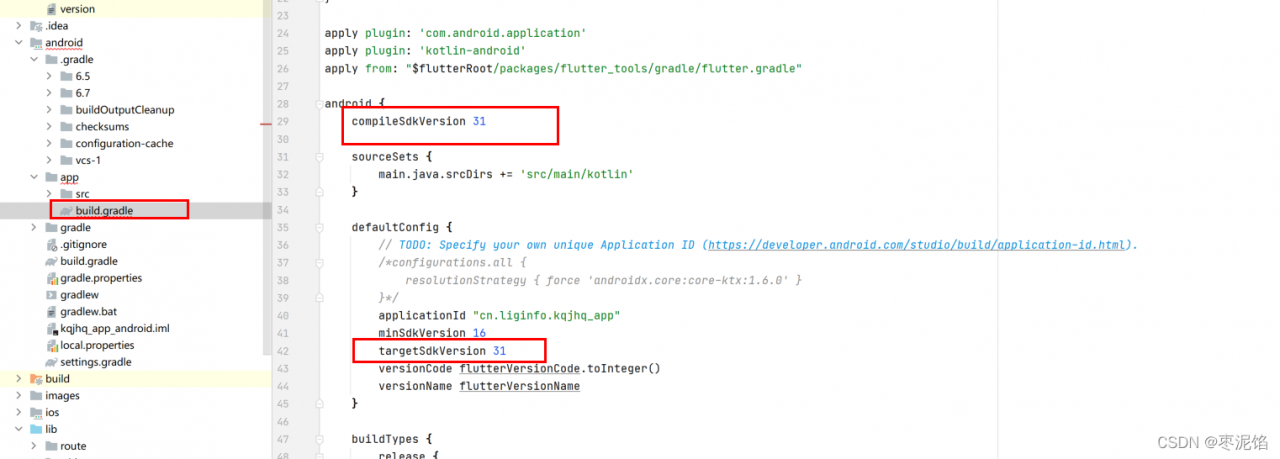
According to the error message The minCompileSdk (31) specified, the final sdk needs to be version 31, but our current sdk version is 30, which is greater than this version, so we need to modify the following configuration to 31
android {
    compileSdkVersion 31

    sourceSets {
        main.java.srcDirs += 'src/main/kotlin'
    }

    defaultConfig {
        // TODO: Specify your own unique Application ID (https://developer.android.com/studio/build/application-id.html).
        /*configurations.all {
            resolutionStrategy { force 'androidx.core:core-ktx:1.6.0' }
        }*/
        applicationId "cn.liginfo.kqjhq_app"
        minSdkVersion 16
        targetSdkVersion 31
        versionCode flutterVersionCode.toInteger()
        versionName flutterVersionName
    }

    buildTypes {
        release {
            // TODO: Add your own signing config for the release build.
            // Signing with the debug keys for now, so `flutter run --release` works.
            signingConfig signingConfigs.debug
        }
    }
}

After modification, because there is no version 31 sdk, it will download automatically, but after downloading, the following error message appears again

Flutter assets will be downloaded from https://storage.flutter-io.cn. Make sure you trust this source!
Launching lib\main.dart on sdk gphone x86 arm in debug mode...
Running Gradle task 'assembleDebug'...
e: C:/Users/liqiang/.gradle/caches/transforms-2/files-2.1/0dd39ff9faeeb501ffb52162e269003e/jetified-kotlin-stdlib-1.5.31.jar!/META-INF/kotlin-stdlib.kotlin_module: Module was compiled with an incompatible version of Kotlin. The binary version of its metadata is 1.5.1, expected version is 1.1.15.
e: C:/Users/liqiang/.gradle/caches/transforms-2/files-2.1/2ea246a87a592f122121cfd0846ffbea/jetified-kotlin-stdlib-jdk7-1.5.30.jar!/META-INF/kotlin-stdlib-jdk7.kotlin_module: Module was compiled with an incompatible version of Kotlin. The binary version of its metadata is 1.5.1, expected version is 1.1.15.
e: C:/Users/liqiang/.gradle/caches/transforms-2/files-2.1/9234cfcee40ec23fc2213363e9726513/jetified-window-1.0.0-beta04-api.jar!/META-INF/window_release.kotlin_module: Module was compiled with an incompatible version of Kotlin. The binary version of its metadata is 1.5.1, expected version is 1.1.15.
e: C:/Users/liqiang/.gradle/caches/transforms-2/files-2.1/9af1d6ff9000d18681a83cd875960957/jetified-kotlinx-coroutines-core-jvm-1.5.2.jar!/META-INF/kotlinx-coroutines-core.kotlin_module: Module was compiled with an incompatible version of Kotlin. The binary version of its metadata is 1.5.1, expected version is 1.1.15.
e: C:/Users/liqiang/.gradle/caches/transforms-2/files-2.1/b0b1eecff74e71ed1ef092403ad1018c/jetified-kotlin-stdlib-common-1.5.31.jar!/META-INF/kotlin-stdlib-common.kotlin_module: Module was compiled with an incompatible version of Kotlin. The binary version of its metadata is 1.5.1, expected version is 1.1.15.
e: C:/Users/liqiang/.gradle/caches/transforms-2/files-2.1/d91778f7878bf943ae593906c9fd7c75/jetified-kotlin-stdlib-jdk8-1.5.30.jar!/META-INF/kotlin-stdlib-jdk8.kotlin_module: Module was compiled with an incompatible version of Kotlin. The binary version of its metadata is 1.5.1, expected version is 1.1.15.
e: C:/Users/liqiang/.gradle/caches/transforms-2/files-2.1/df6880e9350e429186aa0973bbf49093/jetified-window-java-1.0.0-beta04-api.jar!/META-INF/window-java_release.kotlin_module: Module was compiled with an incompatible version of Kotlin. The binary version of its metadata is 1.5.1, expected version is 1.1.15.
e: C:/Users/liqiang/.gradle/caches/transforms-2/files-2.1/e484fc5cda5fe73d156ca3b50e47d38e/jetified-kotlinx-coroutines-android-1.5.2.jar!/META-INF/kotlinx-coroutines-android.kotlin_module: Module was compiled with an incompatible version of Kotlin. The binary version of its metadata is 1.5.1, expected version is 1.1.15.

FAILURE: Build failed with an exception.

* What went wrong:
Execution failed for task ':app:compileDebugKotlin'.
> Compilation error. See log for more details

* Try:
Run with --stacktrace option to get the stack trace. Run with --info or --debug option to get more log output. Run with --scan to get full insights.

* Get more help at https://help.gradle.org

BUILD FAILED in 7s

┌─ Flutter Fix ────────────────────────────────────────────────────────────────────────────────┐
│ [!] Your project requires a newer version of the Kotlin Gradle plugin.                       │
│ Find the latest version on https://kotlinlang.org/docs/gradle.html#plugin-and-versions, then │
│ update D:\javadeveloping\Android\workspace\kqjhq_app\android\build.gradle:                   │
│ ext.kotlin_version = '<latest-version>'                                                      │
└──────────────────────────────────────────────────────────────────────────────────────────────┘
Exception: Gradle task assembleDebug failed with exit code 1

From the error message, it is said that the version of kotlin is wrong, and a specific solution is given

Your project requires a newer version of the Kotlin Gradle plugin.                       │
│ Find the latest version on https://kotlinlang.org/docs/gradle.html#plugin-and-versions, then │
│ update D:\javadeveloping\Android\workspace\kqjhq_app\android\build.gradle:                   │
│ ext.kotlin_version = '<latest-version>'   

You need an up-to-date plugin named kotlin gradle, Find the recent version in https://kotlinlang.org/docs/gradle.html#plugin-and-versions and update the the latest-version value in ext.kotlin_version = ‘’ of the D:\javadeveloping\Android\workspace\kqjhq_app\android\build.gradle file.
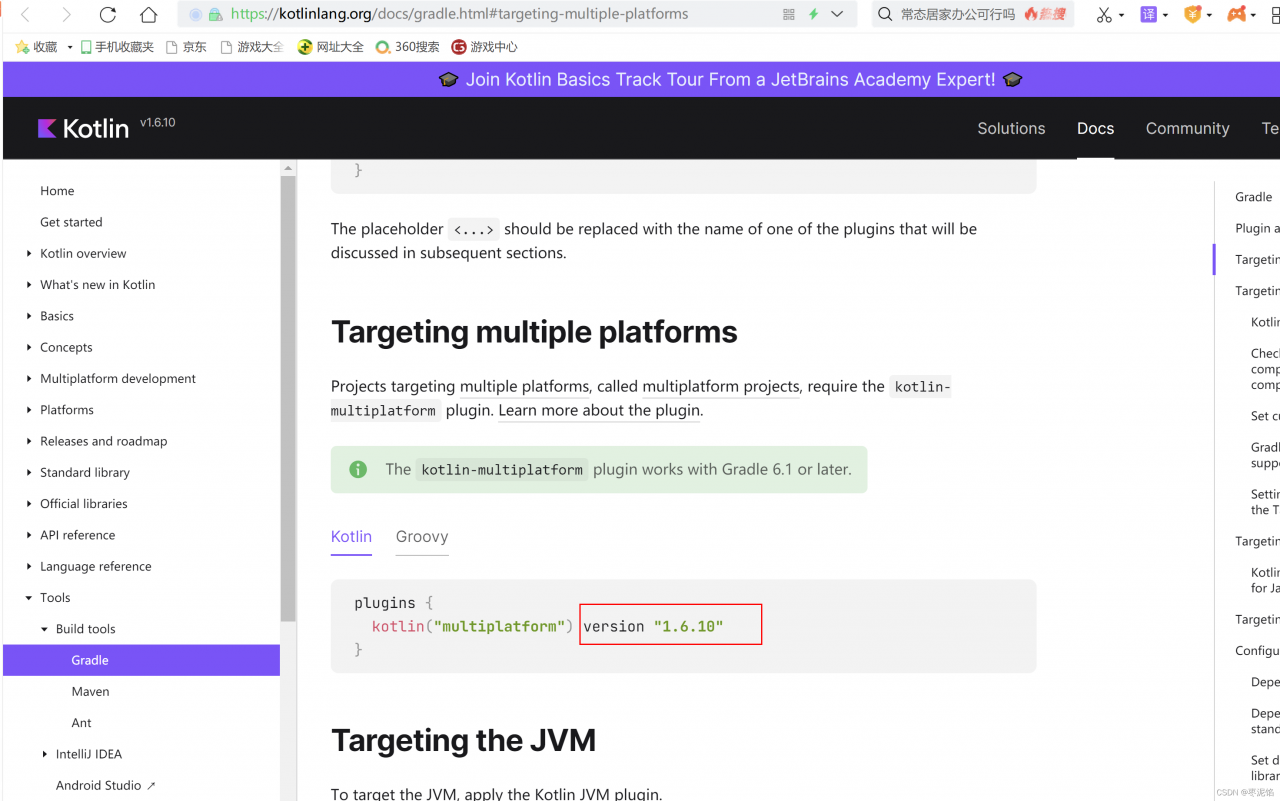
after opening the web page, we found that the latest version is 1.6.10, while our previous version is 1.3.5:
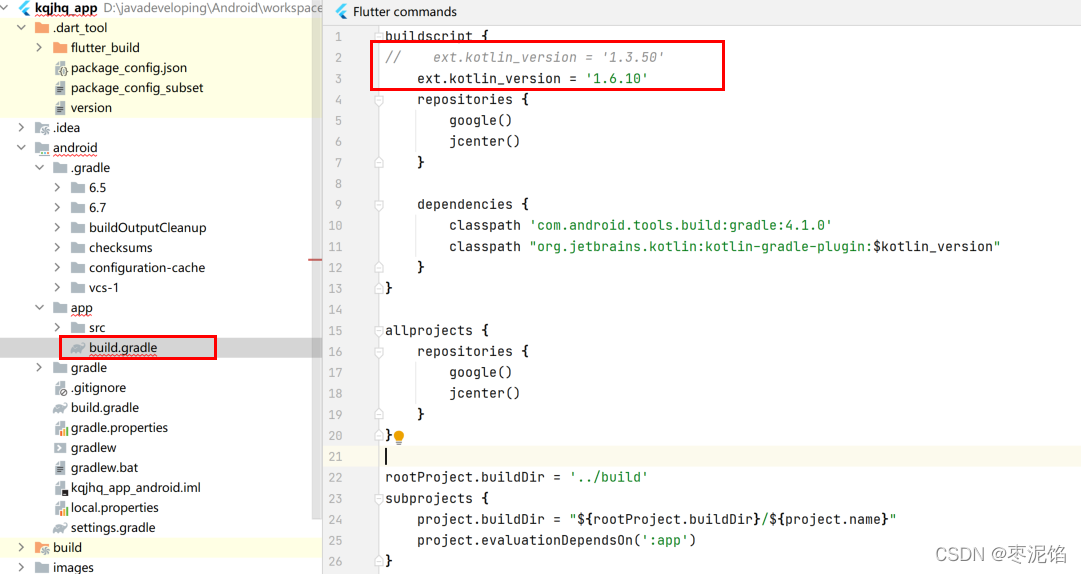
just change to 1.6.10 and package normally


[Solved] Angular12 ng build Error: Index html generation failed.

When using angular12 (version 12.0.3) to develop a project, the debugging will run normally, but an error message will appear when calling ng build to publish.

Tip: index HTML generation failed undefined:6:720366 missing ‘}’

Or: index HTML generation failed Undefined: 6:720366 missing ‘:’ etc.

The solution is to modify the angular.json configuration file, Add an optimization node under the build -> configurations ->production node:

            "optimization": {
                "scripts": true,
                "fonts": {
                  "inline": true
                },
                "styles": {
                  "minify": true,
                  "inlineCritical": false
                }
              }

The complete node path is:

{
    ...,
    "projects":{
        "myapp":{
           ...,
           "architect":{
               ...,
                "build":{
                    ...,
                    "configurations":{
                        ...,
                        "production": {
                            ..., 
                            "optimization": {
                                "scripts": true,
                                "fonts": {
                                  "inline": true
                                },
                                "styles": {
                                  "minify": true,
                                  "inlineCritical": false
                                }
                              }                       
                        }                                           
                    },
                    ...                                    
                },
                ...                          
           },
           ...         
        }            
    },
    ...
}

Repo init Error: [SSL: CERTIFICATE_VERIFY_FAILED] certificate verify failed

Repo init reports an error [SSL: certificate_verify_failed] certificate verify failed

The complete error information is shown in the figure below:

According to the online method, I tried export pythonhttsverify = 0 and still reported an error

Try the following method to set the environment variable SSL_CERT_Dir, problem solving, you might as well try it.

$ sudo update-ca-certificates --fresh
$ export SSL_CERT_DIR=/etc/ssl/certs

[Solved] NVIDIA-SMI has failed because it couldn‘t communicate with the NVIDIA driver.

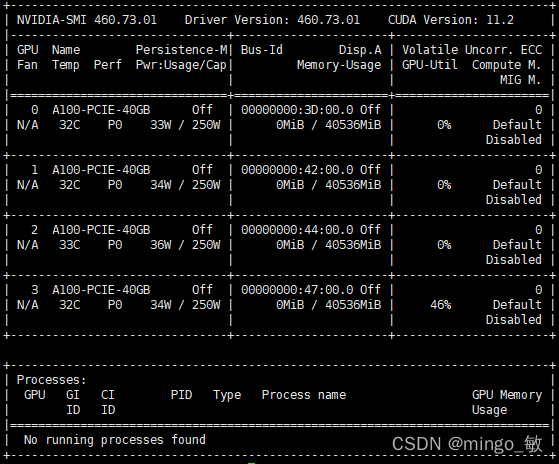
After restarting the server, the NVIDIA driver cannot be connected.

NVIDIA-SMI has failed because it couldn't communicate with the NVIDIA driver. Make sure that the latest NVIDIA driver is installed and running.

Solution:
check the version number of NVIDIA driver installed before

ls /usr/src | grep nvidia

Output

sudo apt install dkms
sudo dkms install -m nvidia -v 460.73.01

Finally, The familiar interface is back

Apache Altas Compile Error: [ERROR] Failed to execute goal on project atlas-testtools: Could not resolve

preface

Recently compiled version of Apache Altas 1.1 . There are many errors in the compilation process. Here you can sort them out and record them.

Error reporting information

[INFO] ------------------< org.apache.atlas:atlas-testtools >------------------
[INFO] Building Apache Atlas Test Utility Tools 1.1.0                    [3/37]
[INFO] --------------------------------[ jar ]---------------------------------
[INFO] ------------------------------------------------------------------------
[INFO] Reactor Summary:
[INFO] 
[INFO] Apache Atlas Server Build Tools 1.0 ................ SUCCESS [  0.431 s]
[INFO] apache-atlas 1.1.0 ................................. SUCCESS [  1.152 s]
[INFO] Apache Atlas Test Utility Tools 1.1.0 .............. FAILURE [  0.117 s]
[INFO] Apache Atlas Integration 1.1.0 ..................... SKIPPED
[INFO] Apache Atlas Common 1.1.0 .......................... SKIPPED
[INFO] Apache Atlas Client 1.1.0 .......................... SKIPPED
[INFO] atlas-client-common 1.1.0 .......................... SKIPPED
[INFO] atlas-client-v1 1.1.0 .............................. SKIPPED
[INFO] Apache Atlas Server API 1.1.0 ...................... SKIPPED
[INFO] Apache Atlas Notification 1.1.0 .................... SKIPPED
[INFO] atlas-client-v2 1.1.0 .............................. SKIPPED
[INFO] Apache Atlas Graph Database Projects 1.1.0 ......... SKIPPED
[INFO] Apache Atlas Graph Database API 1.1.0 .............. SKIPPED
[INFO] Graph Database Common Code 1.1.0 ................... SKIPPED
[INFO] Apache Atlas JanusGraph DB Impl 1.1.0 .............. SKIPPED
[INFO] Apache Atlas Graph Database Implementation Dependencies 1.1.0 SKIPPED
[INFO] Shaded version of Apache hbase client 1.1.0 ........ SKIPPED
[INFO] Shaded version of Apache hbase server 1.1.0 ........ SKIPPED
[INFO] Apache Atlas Authorization 1.1.0 ................... SKIPPED
[INFO] Apache Atlas Repository 1.1.0 ...................... SKIPPED
[INFO] Apache Atlas UI 1.1.0 .............................. SKIPPED
[INFO] Apache Atlas Web Application 1.1.0 ................. SKIPPED
[INFO] Apache Atlas Documentation 1.1.0 ................... SKIPPED
[INFO] Apache Atlas FileSystem Model 1.1.0 ................ SKIPPED
[INFO] Apache Atlas Plugin Classloader 1.1.0 .............. SKIPPED
[INFO] Apache Atlas Hive Bridge Shim 1.1.0 ................ SKIPPED
[INFO] Apache Atlas Hive Bridge 1.1.0 ..................... SKIPPED
[INFO] Apache Atlas Falcon Bridge Shim 1.1.0 .............. SKIPPED
[INFO] Apache Atlas Falcon Bridge 1.1.0 ................... SKIPPED
[INFO] Apache Atlas Sqoop Bridge Shim 1.1.0 ............... SKIPPED
[INFO] Apache Atlas Sqoop Bridge 1.1.0 .................... SKIPPED
[INFO] Apache Atlas Storm Bridge Shim 1.1.0 ............... SKIPPED
[INFO] Apache Atlas Storm Bridge 1.1.0 .................... SKIPPED
[INFO] Apache Atlas Hbase Bridge Shim 1.1.0 ............... SKIPPED
[INFO] Apache Atlas Hbase Bridge 1.1.0 .................... SKIPPED
[INFO] Apache Atlas Kafka Bridge 1.1.0 .................... SKIPPED
[INFO] Apache Atlas Distribution 1.1.0 .................... SKIPPED
[INFO] ------------------------------------------------------------------------
[INFO] BUILD FAILURE
[INFO] ------------------------------------------------------------------------
[INFO] Total time:  2.323 s
[INFO] Finished at: 2022-02-17T15:24:45+05:30
[INFO] ------------------------------------------------------------------------
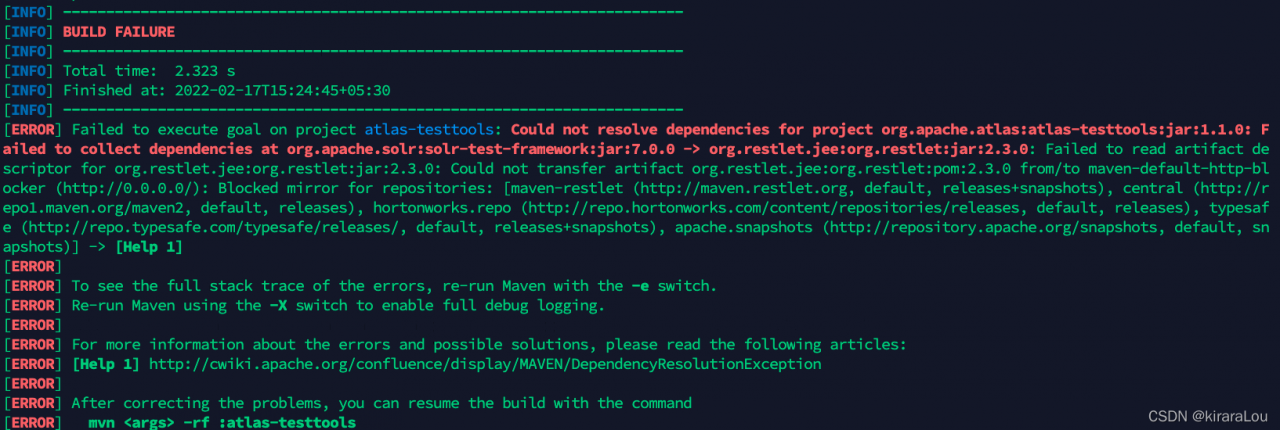
[ERROR] Failed to execute goal on project atlas-testtools: Could not resolve dependencies for project org.apache.atlas:atlas-testtools:jar:1.1.0: Failed to collect dependencies at org.apache.solr:solr-test-framework:jar:7.0.0 -> org.restlet.jee:org.restlet:jar:2.3.0: Failed to read artifact descriptor for org.restlet.jee:org.restlet:jar:2.3.0: Could not transfer artifact org.restlet.jee:org.restlet:pom:2.3.0 from/to maven-default-http-blocker (http://0.0.0.0/): Blocked mirror for repositories: [maven-restlet (http://maven.restlet.org, default, releases+snapshots), central (http://repo1.maven.org/maven2, default, releases), hortonworks.repo (http://repo.hortonworks.com/content/repositories/releases, default, releases), typesafe (http://repo.typesafe.com/typesafe/releases/, default, releases+snapshots), apache.snapshots (http://repository.apache.org/snapshots, default, snapshots)] -> [Help 1]

Cause of problem:

The solution of package cannot be found in Maven main warehouse (e.g. org.restlet.jee not found)

Solution:

Enter the error reporting project vim test tools/pom.xml

Add the following content at the end of POM file

<repositories>
  <repository>
    <id>maven-restlet</id>
    <name>Restlet repository</name>
    <url>https://maven.restlet.talend.com</url>
  </repository>
</repositories>

Ansible Use yum module to install rpm Error: Request failed: <urlopen error [SSL: CERTIFICATE_VERIFY_FAILED] certificate v

Project scenario:

Today I used Ansible to install postgresql-13 and wrote the following test script from the official installation tutorial.

- hosts: postgresql
  gather_facts: false
  tasks:
    - name: install pg repo
      yum:
        name: https://download.postgresql.org/pub/repos/yum/reporpms/EL-7-x86_64/pgdg-redhat-repo-latest.noarch.rpm
        state: present
    - name: install pg
      yum:
        name: postgresql13-server
        state: present
    - name:
      stat:
        path: "/var/lib/pgsql/data/pg_hba.conf"
      register: postgres_data
    - name:
      shell: "/usr/pgsql-13/bin/postgresql-13-setup initdb"
      when: not postgres_data.stat.exists
    - name:
      systemd:
        name: postgresql-13
        enabled: yes
        daemon_reload: yes
        state: started

Problem Description:

the following error occurs when running the script:

fatal: [172.17.200.2]: FAILED! => {"ansible_facts": {"discovered_interpreter_python": "/usr/bin/python"}, "changed": false, "msg": "Failure downloading https://download.postgresql.org/pub/repos/yum/reporpms/EL-7-x86_64/pgdg-redhat-repo-latest.noarch.rpm, Request failed: <urlopen error [SSL: CERTIFICATE_VERIFY_FAILED] certificate verify failed (_ssl.c:618)>"}

Solution:

Just modify https to http in https://download.postgresql.org/pub/repos/yum/reporpms/EL-7-x86_64/pgdg-redhat-repo-latest.noarch.rpm

Debug Error: Failed to fetch current robot state [How to Solve]

Problem: when I write my own code to debug the manipulator, there is a problem after the rosrun node, as shown in the figure below

Solution: add the following two sentences at the entrance of the main function

ros::NodeHandle nh;
ros::AsyncSpinner spinner(1);

The reason is that movegroupinterface depends on ROS spinning, so just add the above two sentences before movegroupinterface

MacOS rvictl -s Error: Starting device failed [How to Solve]

After mac os big sur, the security of Apple system is improved, which causes rvictl -s to fail to create a virtual network card.

Solution:

Restart the mac in recovery mode.
1. After booting, press and hold command + r until you enter the boot page
2. Select terminal in the upper left menu bar, type csrutil disable, and then select reboot in the upper left menu bar.
3. After rebooting, go to Security and Privacy, open the small lock in the lower left corner, there is an Apple. The computer will restart automatically.
3. Run rvictl -s device udid again and it will work.

[Solved] Laravel Upload Files Verificate Error: The file failed to upload.

Cause of error

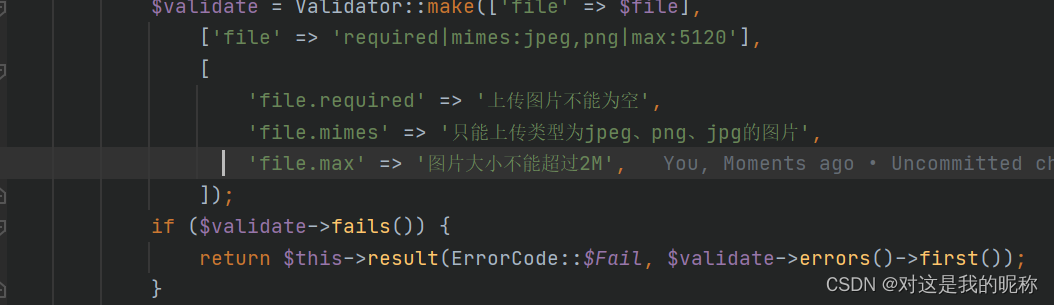
This is the verification code I wrote based on the verification component of laravel:

In most cases, it is normal, but when the front end uploads pictures, it occasionally reports the inexplicable error of the file failed to upload. You know, there is no prompt about this error in my code. After many investigations, it can be basically determined that the error is caused by the size of the picture.

First of all, the size of the uploaded file configured by PHP by default is 2m, which can be found in PHP.ini configuration file;

upload_max_filesize=2M
post_max_size=8M

Secondly, the size limit in my laravle validation is also 2M, and laravel by default internally calls the validation based on the configuration of php, so this validation I made did not take effect at all, and the error reported was also called internally by the laravel framework.

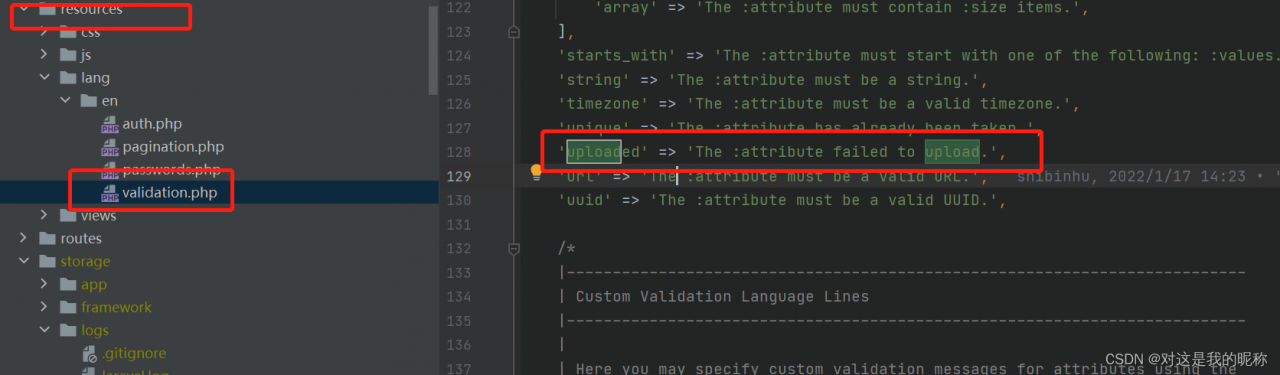
The 422 exception thrown by the system function form validation class: The file failed to upload. and by looking at the resources/lang/en/validation file we can see that the actual framework layer is calling the uploaded validation.

Solution:

After modifying the php default configuration and changing the upload image limit size, the image upload problem was successfully solved, I changed it to 20M here, you can modify it according to the actual situation of the project.

upload_max_filesize=20M
post_max_size=20M

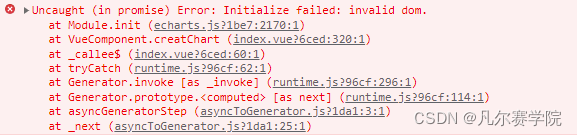
[Solved] Echarts Error: Uncaught (in promise) Error: Initialize failed: invalid dom.

Problem screenshot: the reason for

Cause: After entering the chart page and calling the Get Chart Data interface, the interface jumps away from the chart page before returning the data, and then the data is returned and the chart is created, but after jumping away from the chart page, the container element is not available, so an error is reported and the chart creation fails.

Solution:
1. Instead of using the native js method to get the container element (e.g. document.getElementById()), use this.$refs instead.
2. If the chart page is a cached page and you want the chart to load after jumping back to the chart page, you need to write the width and height of the container (in px) in the in-line style of the chart container. (For cached pages there is also another solution: execute the create chart method in the activated life cycle of the component)

<div ref="chinaMapChart" style="width: 770px; height: 560px" />

------

const myChart = echarts.init(this.$refs.chinaMapChart)

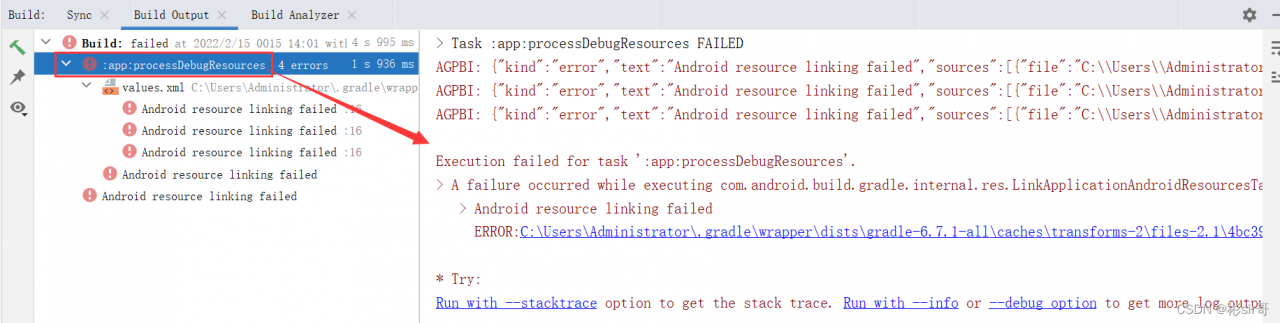
[Solved] Execution failed for task ‘:app:processDebugResources‘. > A failure occurred while executing com.and

Error message of Android Studio:

> Task :app:processDebugResources FAILED
AGPBI: {"kind":"error","text":"Android resource linking failed","sources":[{"file":"C:\\Users\\Administrator\\.gradle\\wrapper\\dists\\gradle-6.7.1-all\\caches\\transforms-2\\files-2.1\\4bc395114f57931320ace6dae20d2b04\\support-compat-27.1.1\\res\\values\\values.xml","position":{"startLine":15,"startColumn":4,"startOffset":880,"endLine":18,"endColumn":207,"endOffset":1240}}],"original":"ERROR:C:\\Users\\Administrator\\.gradle\\wrapper\\dists\\gradle-6.7.1-all\\caches\\transforms-2\\files-2.1\\4bc395114f57931320ace6dae20d2b04\\support-compat-27.1.1\\res\\values\\values.xml:16:5-19:208: AAPT: error: resource android:attr/fontStyle not found.\n    ","tool":"AAPT"}
AGPBI: {"kind":"error","text":"Android resource linking failed","sources":[{"file":"C:\\Users\\Administrator\\.gradle\\wrapper\\dists\\gradle-6.7.1-all\\caches\\transforms-2\\files-2.1\\4bc395114f57931320ace6dae20d2b04\\support-compat-27.1.1\\res\\values\\values.xml","position":{"startLine":15,"startColumn":4,"startOffset":880,"endLine":18,"endColumn":207,"endOffset":1240}}],"original":"ERROR:C:\\Users\\Administrator\\.gradle\\wrapper\\dists\\gradle-6.7.1-all\\caches\\transforms-2\\files-2.1\\4bc395114f57931320ace6dae20d2b04\\support-compat-27.1.1\\res\\values\\values.xml:16:5-19:208: AAPT: error: resource android:attr/font not found.\n    ","tool":"AAPT"}
AGPBI: {"kind":"error","text":"Android resource linking failed","sources":[{"file":"C:\\Users\\Administrator\\.gradle\\wrapper\\dists\\gradle-6.7.1-all\\caches\\transforms-2\\files-2.1\\4bc395114f57931320ace6dae20d2b04\\support-compat-27.1.1\\res\\values\\values.xml","position":{"startLine":15,"startColumn":4,"startOffset":880,"endLine":18,"endColumn":207,"endOffset":1240}}],"original":"ERROR:C:\\Users\\Administrator\\.gradle\\wrapper\\dists\\gradle-6.7.1-all\\caches\\transforms-2\\files-2.1\\4bc395114f57931320ace6dae20d2b04\\support-compat-27.1.1\\res\\values\\values.xml:16:5-19:208: AAPT: error: resource android:attr/fontWeight not found.\n    ","tool":"AAPT"}

Execution failed for task ':app:processDebugResources'.
> A failure occurred while executing com.android.build.gradle.internal.res.LinkApplicationAndroidResourcesTask$TaskAction
   > Android resource linking failed
     ERROR:C:\Users\Administrator\.gradle\wrapper\dists\gradle-6.7.1-all\caches\transforms-2\files-2.1\4bc395114f57931320ace6dae20d2b04\support-compat-27.1.1\res\values\values.xml:16:5-19:208: AAPT: error: resource android:attr/fontStyle not found.

* Try:
Run with --stacktrace option to get the stack trace. Run with --info or --debug option to get more log output. Run with --scan to get full insights.


It seems that the error message may be the problem of dependent packages
I just added dependent packages:

implementation 'com.github.bumptech.glide:glide:4.7.1'

This dependency package version 4.7.1 may refer to the androidx library, 4.7.1 back to which version (Just google to find the corresponding version) to refer to the android library, there should be no problem

[Solved] Elasticsearch.service failed after enable elasticsearch security features

When kibana is started, it fails to start all the time, and the error elasticsearch is reported service failed after enable elasticsearch security features

Solution:

1. Stop Kibana, stop ES

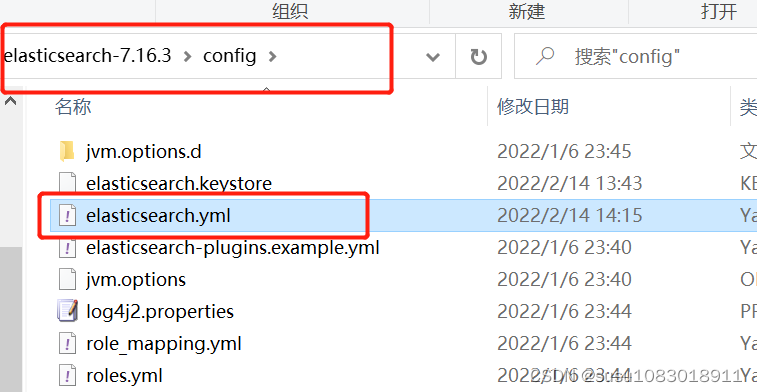
2. Open elasticsearch.yml file, configure disable security option xpack.security.enabled

xpack.security.enabled: false

3. Restart Elasticsearch and Kibana