Author Archives: Robins

[Solved] Mysql Close safe-updates Mode Error: Error Code: 1175

When this problem occurs in MySQL database:

Error Code: 1175. You are using safe update mode and you tried to update a table without a
WHERE  that uses a KEY column To disable safe mode, toggle the option in Preferences -> SQL 
Editor and reconnect.

MySQL has entered the safe mode, which is the safe updates mode

Solution:


SHOW VARIABLES like 'sql_safe_updates';  # Query the status of the current safe-updates mode
SET sql_safe_updates=0; # Turn off safe-updates mode

[Solved] ERROR: commit 60acc70: missing Change-Id in message footer

When merging multiple commits, I accidentally deleted the Change-Id, resulting in push failure

remote: Processing changes: refs: 1        
remote: Processing changes: refs: 1, done            
remote: ERROR: commit 60acc70: missing Change-Id in message footer        
remote: 
remote: Hint: to automatically insert a Change-Id, install the hook:        
remote:   gitdir=$(git rev-parse --git-dir); scp -p -P 29418 [email protected]:hooks/commit-msg ${gitdir}/hooks/        
remote: and then amend the commit:        
remote:   git commit --amend --no-edit        
remote: Finally, push your changes again        
remote: 
error: failed to push some refs to 'ssh://[email protected]/project'

Solution:

1. Use the amend option to generate a Change-Id:
If the missing Change-Id is the last (head) commit, use the following command to fix it:

$ git commit –amend
This command will open the default commit message editor, usually vi.

At this point, you don’t need to change anything, just save and exit (:wq).

If you check the git log again, you will see that the missing Change-Id has been filled in. Just git push again.

2. reset method
The reset command undoes your commit to the workspace, and you can recommit

If the missing Change-Id commit is the second commit in your git log, you can use the git reset command to roll back your local branch to that commit.

First, run git log, find the commit with the missing Change-Id, and copy its commit-id:

Find the second commit that is missing the Change-Id. Reset the code to that commit, and execute amend:

$ git reset 1a9096a34322885ac101175ddcac7dab4c52665d
$ git commit --amend

The next step is to recommit the code that was undone by git reset, and then push it:

$ git add ......
$ git commit -m "The log you Submitted"
$ git push review HEAD:refs /for/master
 

Reference link: https://blog.csdn.net/liuxu0703/article/details/54343096

[Solved] ROS fatal error: NvInferRuntimeCommon. h: No such file or directory

The header file of tensorrt package was not found during translation

Solution:

Add the path to the Tensorrt package in CMakeList.txt

Find the location of the package and get the location of trt

locate   NvInferRuntimeCommon.h

Then add the path to the Tensorrt package in CMakeList.txt, here I added the absolute path

include_directories("/home/b502/tensorrt/TensorRT-7.2.1.6/include")

[Solved] Mac homebrew error: Error: homebrew-core is a shallow clone.

Mac command line execution:

brew update 

The following error is reported:

Error: 
  homebrew-core is a shallow clone.
To `brew update`, first run:
  git -C /usr/local/Homebrew/Library/Taps/homebrew/homebrew-core fetch --unshallow
This command may take a few minutes to run due to the large size of the repository.
This restriction has been made on GitHub's request because updating shallow
clones is an extremely expensive operation due to the tree layout and traffic of
Homebrew/homebrew-core and Homebrew/homebrew-cask. We don't do this for you
automatically to avoid repeatedly performing an expensive unshallow operation in
CI systems (which should instead be fixed to not use shallow clones). Sorry for
the inconvenience!

The cause of this problem is usually the problem caused by the system update.

Solution: delete the homebrew core and then update it

cd /usr/local/Homebrew/Library/Taps/homebrew
rm -rf homebrew-core
brew upgrade

[Solved] NO ST-LINK detected/ST-LINK USB communication error

Here is a simple method to solve error: NO ST-LINK detected/ST-LINK USB communication


Solution:
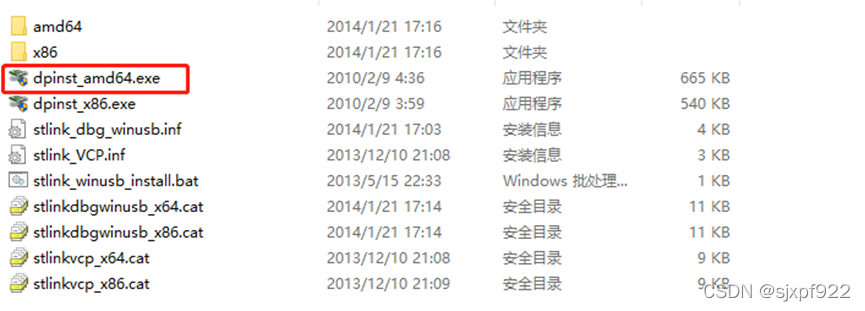
① download and install STLINK driver

② update STLINK firmware

③Find stlink_winusb_uninstall.bat in your keil5 installation directory>ARM>STLink>USBDriver directory and click to execute it (i.e. uninstall first), then execute stlink_winusb_install.bat again (i.e. reinstall)

[Solved] ffmpeg Error: fatal error: zlib.h: Not having that file or directory

Environmental Science:

Ubuntu18. 04×86-64

Error phenomenon:

When compiling ffmpeg code, the following errors sometimes occur:

libavformat/http.c:25:10: fatal error: zlib.h: Not having that file or directory
 #include <zlib.h>

Solution:

Enter the following on the command line

sudo apt-get install zlib1g-dev

Press enter to execute, and the following output appears:

Reading the package list... Done
Analyzing the dependency tree of the package       
Reading status information... Done       
The following [new] packages will be installed.
  zlib1g-dev
0 packages upgraded, 1 new package installed, 0 packages to uninstall, and 316 packages not upgraded.
176 kB of archives need to be downloaded.
Unpacking will consume 457 kB of additional space.
Get:1 http://cn.archive.ubuntu.com/ubuntu bionic/main amd64 zlib1g-dev amd64 1:1.2.11.dfsg-0ubuntu2 [176 kB]
Downloaded 176 kB in 2 seconds (82.2 kB/s)  
Unselected package zlib1g-dev:amd64 is being selected.
(Database is being read ... The system currently has 149705 files and directories installed.)
Preparing to unpack ... /zlib1g-dev_1%3a1.2.11.dfsg-0ubuntu2_amd64.deb ...
Unpacking zlib1g-dev:amd64 (1:1.2.11.dfsg-0ubuntu2) ...
Setting up zlib1g-dev:amd64 (1:1.2.11.dfsg-0ubuntu2) ...
Working on triggers for man-db (2.8.3-2ubuntu0.1) ...

Problem solving

[Solved] RuntimeError: unexpected EOF, expected 73963 more bytes. The file might be corrupted.

RuntimeError: unexpected EOF, expected 73963 more bytes. The file might be corrupted.

Problem Description:

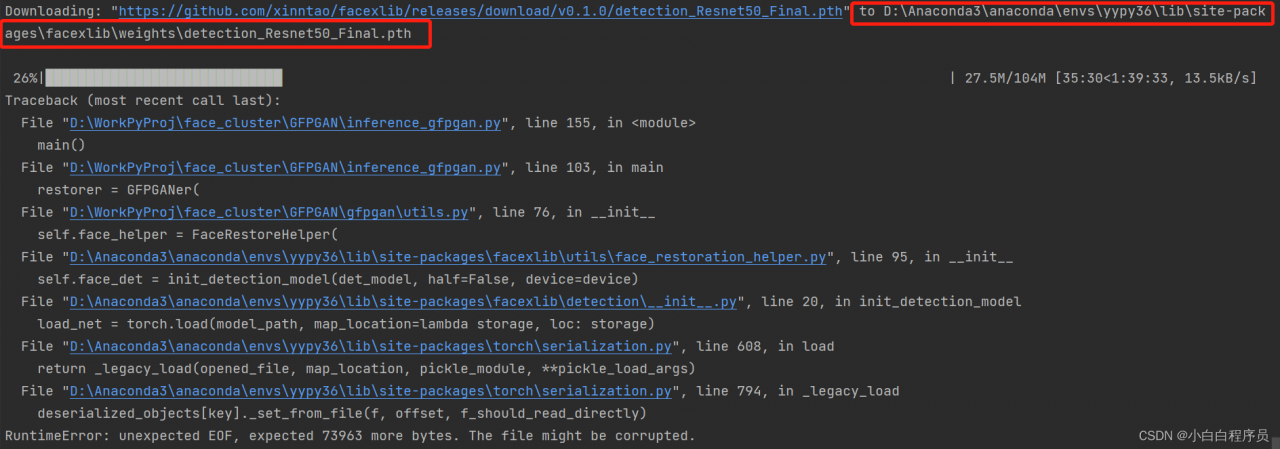
When the project executes Python script, when downloading the pre training model weight of pytorch, if the weight is not downloaded due to network instability and other reasons, an error will be reported runtimeerror: unexpected EOF, expected xxxxx more bytes The file might be corrupted.


Cause analysis:

This error indicates that the downloaded weight file may be damaged. You need to delete the damaged weight file and execute the code to download again.


Solution:

To find the location where the downloaded weight file is saved, this paper analyzes three situations:

1. Windows System & Anaconda Environment

The path of download is D:\Anaconda3\anaconda\envs\yypy36\Lib\site-packages\facexlib\weightsdetection_Resnet50_Final.pt, so you need go to this folder and delete the weight file as the screenshot below:
2. Windows system & Python environment:

The code automatically downloads the model weights file and saves it to the C:\Users\username/.cache\torch\checkpoints folder. Note that .cache may be a hidden file, you need to view the hidden file to see it, just delete the weight file.

3. Linux systems:
Linux system weights files are usually saved under: \home\username\.cache\torch. Note that .cache is a hidden folder and will only be shown if you press ctrl+Alt+H in winSCP; or, in the home directory, use ls -a to show it. root mode, the default path for downloaded weight files is under: /root/.cache/torch/checkpoints. Just delete the weight file.

In the above three cases, after deleting the weight file, execute the code again to download again.

Additional:

If the execution program downloads the code too slowly or the network stability is not good, we can directly download it manually from the website where the weight file is located and put it in the specified location. The Linux system can adopt WGet method.

wget -P Local path where the weights are saved Address of the weights

If the download is interrupted, WGet supports continuous transmission at breakpoints. Add a parameter - C :

wget -P Local path where weights are saved -c Address of weights

eg:

wget -P /home/20220222Proj/pretrained_models -c https://github.com/xinntao/Real-ESRGAN/releases/download/v0.2.1/RealESRGAN_x2plus.pth

Ubuntu18.04 Compile Error: android 7 FAILED [How to Solve]

Upgrade to Ubuntu 18.04. Compilation error. Make a backup.

The error message is as follows

FAILED: /bin/bash -c "prebuilts/misc/linux-x86/flex/flex-2.5.39 -oout/target/product/bullhead/obj/STATIC_LIBRARIES/libedify_intermediates/lexer.cpp bootable/recovery/edify/lexer.ll"
flex-2.5.39: loadlocale.c:130:_nl_intern_locale_data: ??'cnt < (sizeof (_nl_value_type_LC_TIME)/sizeof (_nl_value_type_LC_TIME[0]))' ???
Aborted (core dumped)

Solution:

Adding export LC_ALL=C before compiling will solve the problem.

import statsmodels.api as sm Error: ImportError: DLL load failed while importing _arpack: The specified program could not be found.


import statsmodels. API as SM reports the following errors:
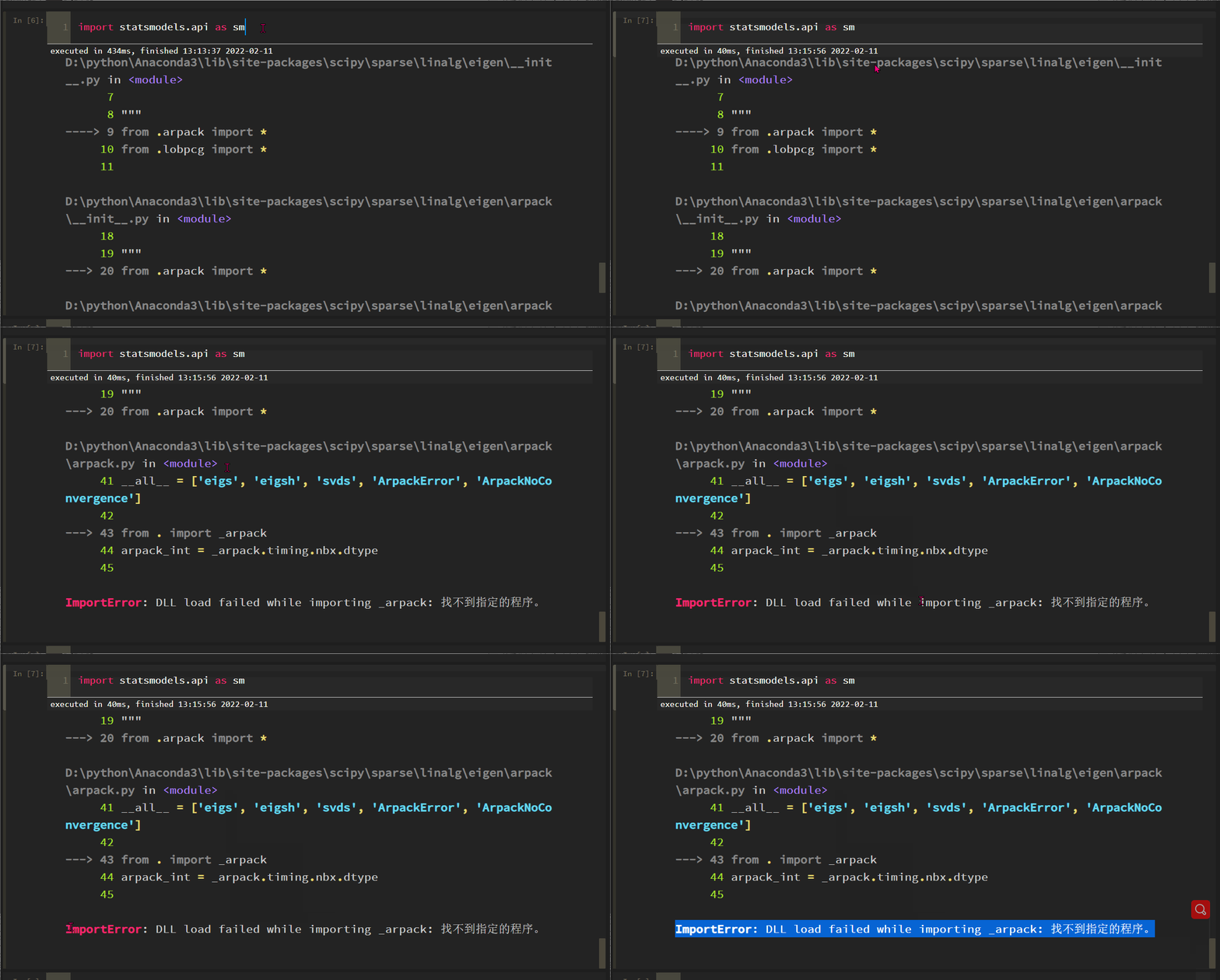
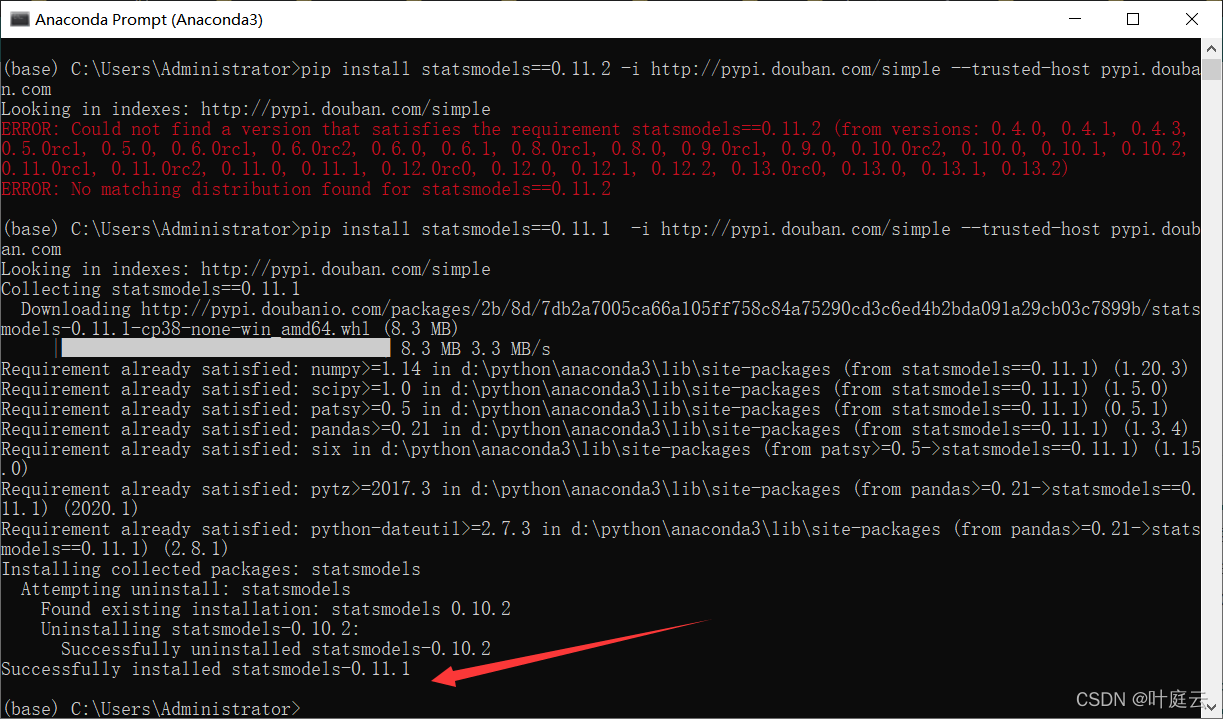
The solution process is tortuous. Roughly, the SciPy version is incompatible with some methods of statsmodels. After scipy==1.6.0, the problem is solved:


(base) C:\Users\Administrator>pip uninstall statsmodels
Found existing installation: statsmodels 0.11.1
Uninstalling statsmodels-0.11.1:
  Would remove:
    d:\python\anaconda3\lib\site-packages\statsmodels-0.11.1.dist-info\*
    d:\python\anaconda3\lib\site-packages\statsmodels\*
Proceed (y/n)?y
  Successfully uninstalled statsmodels-0.11.1

(base) C:\Users\Administrator>pip install statsmodels==0.12.0 -i http://pypi.douban.com/simple --trusted-host pypi.douban.com
Looking in indexes: http://pypi.douban.com/simple
Collecting statsmodels==0.12.0
  Downloading http://pypi.doubanio.com/packages/37/22/959fdc710b6b384ad21a876130000557163978880dc50e16ba5d4ce35c18/statsmodels-0.12.0-cp38-none-win_amd64.whl (9.2 MB)
     |████████████████████████████████| 9.2 MB 6.4 MB/s
Requirement already satisfied: scipy>=1.1 in d:\python\anaconda3\lib\site-packages (from statsmodels==0.12.0) (1.5.0)
Requirement already satisfied: numpy>=1.15 in d:\python\anaconda3\lib\site-packages (from statsmodels==0.12.0) (1.20.3)
Requirement already satisfied: pandas>=0.21 in d:\python\anaconda3\lib\site-packages (from statsmodels==0.12.0) (1.3.4)
Requirement already satisfied: patsy>=0.5 in d:\python\anaconda3\lib\site-packages (from statsmodels==0.12.0) (0.5.1)
Requirement already satisfied: python-dateutil>=2.7.3 in d:\python\anaconda3\lib\site-packages (from pandas>=0.21->statsmodels==0.12.0) (2.8.1)
Requirement already satisfied: pytz>=2017.3 in d:\python\anaconda3\lib\site-packages (from pandas>=0.21->statsmodels==0.12.0) (2020.1)
Requirement already satisfied: six in d:\python\anaconda3\lib\site-packages (from patsy>=0.5->statsmodels==0.12.0) (1.15.0)
Installing collected packages: statsmodels
Successfully installed statsmodels-0.12.0

(base) C:\Users\Administrator>pip show scipy
Name: scipy
Version: 1.5.0
Summary: SciPy: Scientific Library for Python
Home-page: https://www.scipy.org
Author: None
Author-email: None
License: BSD
Location: d:\python\anaconda3\lib\site-packages
Requires: numpy
Required-by: -tatsmodels, xgboost, wxgl, sweetviz, stldecompose, statsmodels, sesd, seaborn, scikit-learn, scikit-image, resampy, pyod, mplsoccer, missingno, lightgbm, librosa, imgaug, imbalanced-learn, gensim, filterpy, factor-analyzer, combo, category-encoders, catboost, bayesian-optimization, albumentations

(base) C:\Users\Administrator>pip uninstall scipy
Found existing installation: scipy 1.5.0
Uninstalling scipy-1.5.0:
  Would remove:
    d:\python\anaconda3\lib\site-packages\scipy-1.5.0.dist-info\*
    d:\python\anaconda3\lib\site-packages\scipy\*
Proceed (y/n)?y
  Successfully uninstalled scipy-1.5.0
ERROR: Exception:
Traceback (most recent call last):
  File "D:\python\Anaconda3\lib\site-packages\pip\_internal\cli\base_command.py", line 188, in _main
    status = self.run(options, args)
  File "D:\python\Anaconda3\lib\site-packages\pip\_internal\commands\uninstall.py", line 89, in run
    uninstall_pathset.commit()
  File "D:\python\Anaconda3\lib\site-packages\pip\_internal\req\req_uninstall.py", line 450, in commit
    self._moved_paths.commit()
  File "D:\python\Anaconda3\lib\site-packages\pip\_internal\req\req_uninstall.py", line 290, in commit
    save_dir.cleanup()
  File "D:\python\Anaconda3\lib\site-packages\pip\_internal\utils\temp_dir.py", line 196, in cleanup
    rmtree(self._path)
  File "D:\python\Anaconda3\lib\site-packages\pip\_vendor\retrying.py", line 49, in wrapped_f
    return Retrying(*dargs, **dkw).call(f, *args, **kw)
  File "D:\python\Anaconda3\lib\site-packages\pip\_vendor\retrying.py", line 212, in call
    raise attempt.get()
  File "D:\python\Anaconda3\lib\site-packages\pip\_vendor\retrying.py", line 247, in get
    six.reraise(self.value[0], self.value[1], self.value[2])
  File "D:\python\Anaconda3\lib\site-packages\pip\_vendor\six.py", line 703, in reraise
    raise value
  File "D:\python\Anaconda3\lib\site-packages\pip\_vendor\retrying.py", line 200, in call
    attempt = Attempt(fn(*args, **kwargs), attempt_number, False)
  File "D:\python\Anaconda3\lib\site-packages\pip\_internal\utils\misc.py", line 135, in rmtree
    shutil.rmtree(dir, ignore_errors=ignore_errors,
  File "D:\python\Anaconda3\lib\shutil.py", line 737, in rmtree
    return _rmtree_unsafe(path, onerror)
  File "D:\python\Anaconda3\lib\shutil.py", line 610, in _rmtree_unsafe
    _rmtree_unsafe(fullname, onerror)
  File "D:\python\Anaconda3\lib\shutil.py", line 610, in _rmtree_unsafe
    _rmtree_unsafe(fullname, onerror)
  File "D:\python\Anaconda3\lib\shutil.py", line 615, in _rmtree_unsafe
    onerror(os.unlink, fullname, sys.exc_info())
  File "D:\python\Anaconda3\lib\shutil.py", line 613, in _rmtree_unsafe
    os.unlink(fullname)
PermissionError: [WinError 5] Denied to Access: 'D:\\python\\Anaconda3\\Lib\\site-packages\\~cipy\\fft\\_pocketfft\\pypocketfft.cp38-win_amd64.pyd'

(base) C:\Users\Administrator>pip install scipy --user -i http://pypi.douban.com/simple --trusted-host pypi.douban.com
Looking in indexes: http://pypi.douban.com/simple
Collecting scipy
  Downloading http://pypi.doubanio.com/packages/56/a3/591dbf477c35f173279afa7b9ba8e13d9c7c3d001e09aebbf6100aae33a8/scipy-1.8.0-cp38-cp38-win_amd64.whl (36.9 MB)
     |████████████████████████████████| 36.9 MB 3.3 MB/s
Requirement already satisfied: numpy<1.25.0,>=1.17.3 in d:\python\anaconda3\lib\site-packages (from scipy) (1.20.3)
Installing collected packages: scipy
Successfully installed scipy-1.8.0

(base) C:\Users\Administrator>python
Python 3.8.3 (default, Jul  2 2020, 17:30:36) [MSC v.1916 64 bit (AMD64)] :: Anaconda, Inc. on win32
Type "help", "copyright", "credits" or "license" for more information.
>>> import statsmodels.api as sm
Traceback (most recent call last):
  File "<stdin>", line 1, in <module>
  File "D:\python\Anaconda3\lib\site-packages\statsmodels\api.py", line 27, in <module>
    from .tsa import api as tsa
  File "D:\python\Anaconda3\lib\site-packages\statsmodels\tsa\api.py", line 31, in <module>
    from .filters import api as filters
  File "D:\python\Anaconda3\lib\site-packages\statsmodels\tsa\filters\api.py", line 6, in <module>
    from .filtertools import miso_lfilter, convolution_filter, recursive_filter
  File "D:\python\Anaconda3\lib\site-packages\statsmodels\tsa\filters\filtertools.py", line 18, in <module>
    from scipy.signal.signaltools import _centered as trim_centered
ImportError: cannot import name '_centered' from 'scipy.signal.signaltools' (C:\Users\Administrator\AppData\Roaming\Python\Python38\site-packages\scipy\signal\signaltools.py)
>>> exit
Use exit() or Ctrl-Z plus Return to exit
>>> exit()

(base) C:\Users\Administrator>pip install scipy==1.6 --user -i http://pypi.douban.com/simple --trusted-host pypi.douban.co
Looking in indexes: http://pypi.douban.com/simple
WARNING: The repository located at pypi.douban.com is not a trusted or secure host and is being ignored. If this repository is available via HTTPS we recommend you use HTTPS instead, otherwise you may silence this warning and allow it anyway with '--trusted-host pypi.douban.com'.
ERROR: Could not find a version that satisfies the requirement scipy==1.6 (from versions: none)
ERROR: No matching distribution found for scipy==1.6

(base) C:\Users\Administrator>pip install scipy==1.6.0 --user -i http://pypi.douban.com/simple --trusted-host pypi.douban.com
Looking in indexes: http://pypi.douban.com/simple
Collecting scipy==1.6.0
  Downloading http://pypi.doubanio.com/packages/a1/05/9b41f6a969a0d6ad36732bdd3c936434228dafaa829932be5a51574e4958/scipy-1.6.0-cp38-cp38-win_amd64.whl (32.7 MB)
     |████████████████████████████████| 32.7 MB 3.2 MB/s
Requirement already satisfied: numpy>=1.16.5 in d:\python\anaconda3\lib\site-packages (from scipy==1.6.0) (1.20.3)
Installing collected packages: scipy
  Attempting uninstall: scipy
    Found existing installation: scipy 1.8.0
    Uninstalling scipy-1.8.0:
      Successfully uninstalled scipy-1.8.0
Successfully installed scipy-1.6.0

(base) C:\Users\Administrator>python
Python 3.8.3 (default, Jul  2 2020, 17:30:36) [MSC v.1916 64 bit (AMD64)] :: Anaconda, Inc. on win32
Type "help", "copyright", "credits" or "license" for more information.
>>> import statsmodels.api as sm
>>>

After the problem is solved, restart the jupyter notebook and enter it for normal use.

Android Phone Record Screen Error: failed to get surface

As long as it is recorded on the screen, it is difficult to report errors. The common causes and solutions are summarized as follows:

1. Determine the storage permission. Note that Android 10, 11, 12, etc. the storage permission policy of Android has changed. Set the output path to ensure that it is under the path with read-write permission

File file=new File(getExternalFilesDir("")+"/Ansen_");
if(!file.exists()){
    file.mkdirs();
}
//Set the video output path
mMediaRecorder.setOutputFile(file.getAbsolutePath() + "/Ansen_" + curTime + ".mp4");

2. Correctly set the size of the recording screen, here note that this size is not necessarily the screen size, through the following method is not necessarily the same as the actual resolution, such as a plus phone, originally 1920 * 1080, in fact, through the following measurement results are not, this will require developers to get through the Camera.

 //Set the video size
 mMediaRecorder.setVideoSize(ScreenUtils.getScreenWidth(this), ScreenUtils.getScreenHeight(this));

Conventional method for obtaining the size of mobile phone (not necessarily accurate, inconsistent with the recording screen):

    /**
     * Get the width of the screen px
     */
    public static int getScreenWidth(Context context) {
        WindowManager windowManager = (WindowManager) context.getSystemService(Context.WINDOW_SERVICE);
        DisplayMetrics outMetrics = new DisplayMetrics();
        windowManager.getDefaultDisplay().getMetrics(outMetrics);
        return outMetrics.widthPixels;
    }

    /**
     * Get the width of the screen px
     */
    public static int getScreenHeight(Context context) {
        WindowManager windowManager = (WindowManager) context.getSystemService(Context.WINDOW_SERVICE);
        DisplayMetrics outMetrics = new DisplayMetrics();
        windowManager.getDefaultDisplay().getMetrics(outMetrics);
        return outMetrics.heightPixels;
    }

To get the resolution supported by the camera, just select a group from the following.

        Camera camera = Camera.open();
        Parameters parameters = camera.getParameters();
        List<Size> supportedPreviewSizes = parameters.getSupportedPreviewSizes();

        for (int i = 0; i < supportedPreviewSizes.size(); i++) {
            supportedPreviewSizes.get(i).width;
            supportedPreviewSizes.get(i).height;
        }
        List<Size> supportedPictureSizes = parameters.getSupportedPictureSizes();
        for (int i = 0; i < supportedPictureSizes.size(); i++) {
            supportedPictureSizes.get(i).widt;
            supportedPictureSizes.get(i).height;
        }

3. Determine the setting sequence, which will affect

setAudioSource()

setVideoSource()

setOutputFormat()

setAudioEncoder()

setVideoEncoder()

setVideoSize()

setVideoFrameRate()

setOutputFile()

setVideoEncodingBitRate()

prepare()

start()