Author Archives: Robins

[Solved] IOS Error: Command MergeSwiftModule failed with a nonzero exit code

environment

Xcode13. 2 the first project created is set. The minimum version of IOS is 15.2, which has been compiled several times. The minimum IOS version of the switching project is IOS 10.0 After 0, the following errors appear:

error: Command MergeSwiftModule failed with a nonzero exit code

Solution:

Method 1: clean (Command + Shift + k)

Method 2: Change (Project -> target -> builfsetting -> compilation mode -> debug -> switch to whole module) (but this may slow down subsequent compilation)

[Solved] JAVA Mail Sent Error: Sending the email to the following server failed

Htmlemail uses QQ corporate email to send problem summary

After the local mail sending test is passed according to the parameter information on htmlemail, deploy the service on the ECs to test the mail sending. The first error is reported:

Sending the email to the following server failed : smtp.exmail.qq.com:25

Ping smtp.com directly on the ECS exmail. qq. COM domain name found that the external network on the server is not connected. After opening the external network permission, the above error still exists.
browse the document and try to switch smtpport to port 465:

HtmlEmail.setSmtpPort(465);

Error still reported:

Sending the email to the following server failed : smtp.exmail.qq.com:465
Could not connect SMTP host:smtp.exmail.qq.com, port 465, response: -1

It is found that sslonconnect needs to be set to true when switching to port 465

HtmlEmail.setSSLOnConnect(true);

After modification, the error information is changed to:

Invalid address

Finally, switch smtpport to 587:

HtmlEmail.setSmtpPort(587);

Finally, no error is reported. Record it for review later.

[Solved] Manifest merger failed with multiple errors, see logs

Adding a dependent library is an error when running, because the current project version is lower than the minimum trial version of the third-party dependent library

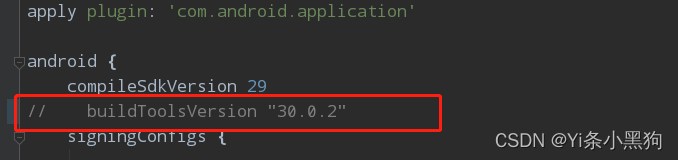
1. As shown in the current project’s build.gradle without setting the buildToolsVersion.

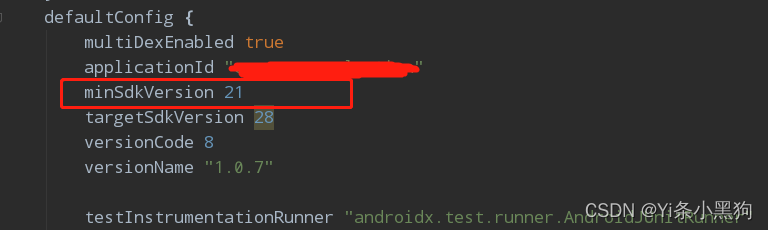
2. Set minSdkVersion to the minimum version of the dependency library in the current project’s build.gradle as shown here.

Failed to transform file ‘xxx‘ to match attributes [How to Solve]

Failed to transform file ‘xxx’ to match attributes when opening previous projects.

I opened the previous project and encountered a Failed to transform file ‘xxx’ to match attributes error.

There is a problem with the added dependency cache

Solution:

C:\Users\Administrator\.gradle\caches\modules-2\files-2.1 directory, find the conflicting files, delete them, and recompile

Supplement:

If an error is reported:

Null extracted folder for artifact: ResolvedArtifact(componentIdentifier=cn.jiguang.sdk:janalytics:2.0.0, variantName=null, artifactFile=C:\Users\dell\.gradle\caches\modules-2\files-2.1\cn.jiguang.sdk\janalytics\2.0.0\4abdfc462a6164fa5629301f8682a8adb7d3d332\janalytics-2.0.0.aar, extractedFolder=null, dependencyType=ANDROID, isWrappedModule=false, buildMapping={__current_build__=D:\Android\project\build\。。}, mavenCoordinatesCache=com.android.build.gradle.internal.ide.dependencies.MavenCoordinatesCacheBuildService$Inject@5859a341)

This error is also caused by file conflicts

[Solved] WSL error: wslregisterdistribution failed with error: 0x800701bc

1. Introduction

For the new computer, WSL has installed Ubuntu. When entering Ubuntu, an error occurs

WslRegisterDistribution failed with error: 0x800701bc

2. Solution

This is because the wsl2 kernel is not updated

Enter the administrator permission command line, WSL — update

wsl --update
Checking for updates...
Downloading updates...
Installing the update...
This change will take effect the next time WSL is fully rebooted. To force a reboot, run "wsl --shutdown".
Kernel version: 5.10.60.1

Then force restart

wsl --shutdown

[Solved] Invocation of init method failed; nested exception is java.lang.NoSuchMethodError:

Running error

***************************
APPLICATION FAILED TO START
***************************

Description:

An attempt was made to call a method that does not exist. The attempt was made from the following location:

    org.springframework.scheduling.quartz.SchedulerAccessor.registerListeners(SchedulerAccessor.java:351)

The following method did not exist:

    org.quartz.Scheduler.getListenerManager()Lorg/quartz/ListenerManager;

The method's class, org.quartz.Scheduler, is available from the following locations:

    jar:file:/D:/repository/org/opensymphony/quartz/quartz/1.6.1/quartz-1.6.1.jar!/org/quartz/Scheduler.class

It was loaded from the following location:

    file:/D:/repository/org/opensymphony/quartz/quartz/1.6.1/quartz-1.6.1.jar


Action:

Correct the classpath of your application so that it contains a single, compatible version of org.quartz.Scheduler

Analysis: it worked well before, but suddenly it didn’t work. Reading the report incorrectly may be caused by the jar package conflict of the scheduled task

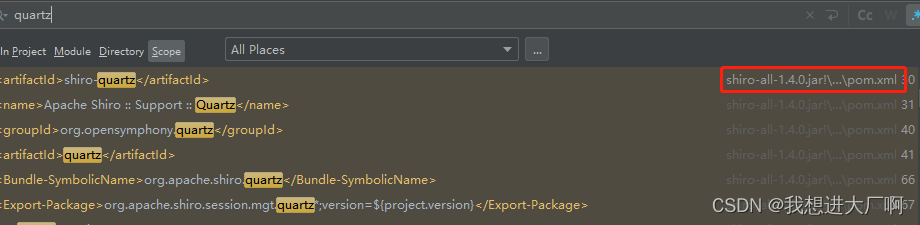
1. A global check reveals that shiro-all has introduced this jar package
Solution:

When querying the dependency, I found that it is an optional part of shiro, so I exclude it directly.

<dependency>
    <groupId>org.apache.shiro</groupId>
    <artifactId>shiro-all</artifactId>
    <version>1.4.0</version>
    <exclusions>
        <exclusion>
            <groupId>org.apache.shiro</groupId>
            <artifactId>shiro-quartz</artifactId>
        </exclusion>
    </exclusions>
</dependency>

If the shiro-all package is introduced in a jar package, the following code can be placed under the parent package introduced by the project

     <exclusions>
        <exclusion>
            <groupId>org.apache.shiro</groupId>
            <artifactId>shiro-quartz</artifactId>
        </exclusion>
    </exclusions>

 

[Solved] elasticsearch Error: Failed: 1: this action would add [6] total shards, but this cluster currently has [2

Error reporting information

[WARN ][o.e.x.m.e.l.LocalExporter] [es03.kpt.rongtime.aliapse5.id] unexpected error while indexing monitoring documentorg.elasticsearch.xpack.monitoring.exporter.ExportException: RemoteTransportException[[es01.kpt.rongtime.aliapse5.id][10.107.0.247:29300][indices:admin/create]]; nested: IllegalArgumentException[Validation Failed: 1: this action would add [6] total shards, but this cluster currently has [2998]/[3000] maximum shards open;];
        at org.elasticsearch.xpack.monitoring.exporter.local.LocalBulk.lambda$throwExportException$2(LocalBulk.java:125) ~[x-pack-monitoring-7.4.2.jar:7.4.2]        at java.util.stream.ReferencePipeline$3$1.accept(ReferencePipeline.java:195) ~[?:?]        at java.util.stream.ReferencePipeline$2$1.accept(ReferencePipeline.java:177) ~[?:?]
        at java.util.Spliterators$ArraySpliterator.forEachRemaining(Spliterators.java:948) ~[?:?]
        at java.util.stream.AbstractPipeline.copyInto(AbstractPipeline.java:484) ~[?:?]
        at java.util.stream.AbstractPipeline.wrapAndCopyInto(AbstractPipeline.java:474) ~[?:?]
        at java.util.stream.ForEachOps$ForEachOp.evaluateSequential(ForEachOps.java:150) ~[?:?]
        at java.util.stream.ForEachOps$ForEachOp$OfRef.evaluateSequential(ForEachOps.java:173) ~[?:?]
        at java.util.stream.AbstractPipeline.evaluate(AbstractPipeline.java:234) ~[?:?]
        at java.util.stream.ReferencePipeline.forEach(ReferencePipeline.java:497) ~[?:?]
        at org.elasticsearch.xpack.monitoring.exporter.local.LocalBulk.throwExportException(LocalBulk.java:126) [x-pack-monitoring-7.4.2.jar:7.4.2]
        at org.elasticsearch.xpack.monitoring.exporter.local.LocalBulk.lambda$doFlush$0(LocalBulk.java:108) [x-pack-monitoring-7.4.2.jar:7.4.2]
        at org.elasticsearch.action.ActionListener$1.onResponse(ActionListener.java:62) [elasticsearch-7.4.2.jar:7.4.2]
        at org.elasticsearch.action.support.ContextPreservingActionListener.onResponse(ContextPreservingActionListener.java:43) [elasticsearch-7.4.2.jar:7.4.2]        at org.elasticsearch.action.support.TransportAction$1.onResponse(TransportAction.java:70) [elasticsearch-7.4.2.jar:7.4.2]
        at org.elasticsearch.action.support.TransportAction$1.onResponse(TransportAction.java:64) [elasticsearch-7.4.2.jar:7.4.2]        at org.elasticsearch.action.support.ContextPreservingActionListener.onResponse(ContextPreservingActionListener.java:43) [elasticsearch-7.4.2.jar:7.4.2]
        at org.elasticsearch.action.ActionListener.lambda$map$2(ActionListener.java:145) [elasticsearch-7.4.2.jar:7.4.2]
        at org.elasticsearch.action.ActionListener$1.onResponse(ActionListener.java:62) [elasticsearch-7.4.2.jar:7.4.2]
        at org.elasticsearch.action.ActionListener$1.onResponse(ActionListener.java:62) [elasticsearch-7.4.2.jar:7.4.2]
        at org.elasticsearch.action.bulk.TransportBulkAction$BulkOperation.doRun(TransportBulkAction.java:421) [elasticsearch-7.4.2.jar:7.4.2]
        at org.elasticsearch.common.util.concurrent.AbstractRunnable.run(AbstractRunnable.java:37) [elasticsearch-7.4.2.jar:7.4.2]
        at org.elasticsearch.action.bulk.TransportBulkAction.executeBulk(TransportBulkAction.java:551) [elasticsearch-7.4.2.jar:7.4.2]
        at org.elasticsearch.action.bulk.TransportBulkAction$1.onFailure(TransportBulkAction.java:287) [elasticsearch-7.4.2.jar:7.4.2]        at org.elasticsearch.action.support.TransportAction$1.onFailure(TransportAction.java:79) [elasticsearch-7.4.2.jar:7.4.2]
        at org.elasticsearch.action.support.ContextPreservingActionListener.onFailure(ContextPreservingActionListener.java:50) [elasticsearch-7.4.2.jar:7.4.2]

Cause of problem

[indices:admin/create]]; nested: IllegalArgumentException[Validation Failed: 1: this action would add [6] total shards, but this cluster currently has [2998]/[3000] maximum shards open;];

For elasticsearch7 and above, only 3000 shards are allowed by default, which is caused by the insufficient number of available shards in the cluster.

Solution:

PUT /_cluster/settings
{
  "transient": {
    "cluster": {
      "max_shards_per_node":10000
    }
  }
}

[Solved] Some index files failed to download.They have been ignored, or old ones used instead

sudo apt-get updateerror:

Err:1 http://ppa.launchpad.net/wireshark-dev/stable/ubuntu bionic InRelease
  Temporary failure resolving 'ppa.launchpad.net'
Err:2 http://security.ubuntu.com/ubuntu bionic-security InRelease
  Temporary failure resolving 'security.ubuntu.com'
Err:3 http://archive.ubuntu.com/ubuntu bionic InRelease
  Temporary failure resolving 'archive.ubuntu.com'
Err:4 http://archive.ubuntu.com/ubuntu bionic-updates InRelease
  Temporary failure resolving 'archive.ubuntu.com'
Err:5 http://archive.ubuntu.com/ubuntu bionic-backports InRelease
  Temporary failure resolving 'archive.ubuntu.com'
Reading package lists... Done
W: Failed to fetch http://archive.ubuntu.com/ubuntu/dists/bionic/InRelease  Temporary failure resolving 'archive.ubuntu.com'
W: Failed to fetch http://archive.ubuntu.com/ubuntu/dists/bionic-updates/InRelease  Temporary failure resolving 'archive.ubuntu.com'
W: Failed to fetch http://archive.ubuntu.com/ubuntu/dists/bionic-backports/InRelease  Temporary failure resolving 'archive.ubuntu.com'
W: Failed to fetch http://security.ubuntu.com/ubuntu/dists/bionic-security/InRelease  Temporary failure resolving 'security.ubuntu.com'
W: Failed to fetch http://ppa.launchpad.net/wireshark-dev/stable/ubuntu/dists/bionic/InRelease  Temporary failure resolving 'ppa.launchpad.net'
W: Some index files failed to download. They have been ignored, or old ones used instead.

Use Ping www.google.comtest the network. If it appears: Ping: www.google.com: temporary failure in name resolution is a network problem,

Solution:

first

sudo vim /etc/systemd/resolved.conf

Modify DNS as follows:

[Resolve]
DNS=8.8.8.8
#FallbackDNS=
#Domains=
#LLMNR=no
#MulticastDNS=no
#DNSSEC=no
#Cache=yes
#DNSStubListener=yes

Modify the following configuration file

vim /etc/resolv.conf 

Add the following:

nameserver 8.8.8.8

Then restart:

reboot

Just update the source after restart:

sudo apt-get update

Ubuntu 20.04 Desktop Install sublime-text Error: “Certificate verification failed”

Sublime is the editor I am used to. I want to download it after reinstalling the system recently, but according to the download method on the official website, the following error will appear:

@ubuntu:~$ wget -qO - https://download.sublimetext.com/sublimehq-pub.gpg | sudo apt-key add -
OK
@ubuntu:~$ echo "deb https://download.sublimetext.com/ apt/stable/" | sudo tee /etc/apt/sources.list.d/sublime-text.list
deb https://download.sublimetext.com/ apt/stable/
@ubuntu:~$ sudo apt update && sudo apt install sublime-text
Hit:1 http://us.archive.ubuntu.com/ubuntu focal InRelease                      
Hit:2 http://security.ubuntu.com/ubuntu focal-security InRelease               
Hit:3 http://us.archive.ubuntu.com/ubuntu focal-updates InRelease              
Ign:4 https://download.sublimetext.com apt/stable/ InRelease                   
Hit:5 http://us.archive.ubuntu.com/ubuntu focal-backports InRelease            
Err:6 https://download.sublimetext.com apt/stable/ Release 
  Certificate verification failed: The certificate is NOT trusted. The certificate chain uses expired certificate.  Could not handshake: Error in the certificate verification. [IP: 104.236.0.104 443]
Reading package lists... Done                             
E: The repository 'https://download.sublimetext.com apt/stable/ Release' does not have a Release file.
N: Updating from such a repository can't be done securely, and is therefore disabled by default.
N: See apt-secure(8) manpage for repository creation and user configuration details.

The reason is that a software package called “ca-certificates” is not installed. After installation, you can execute the installation instruction of sublime from the beginning.

@ubuntu:~$ sudo apt install ca-certificates

[Solved] Android Studio APK install Error: INSTALL_FAILED_CONFLICTING_PROVIDER

Application installation failure: the installation failure is due to the conflict of Providers (generally speaking, the same program has been installed before, with conflict)

Four places need to be modified
(There may be some places that do not have to be modified, but it is still recommended to modify together)
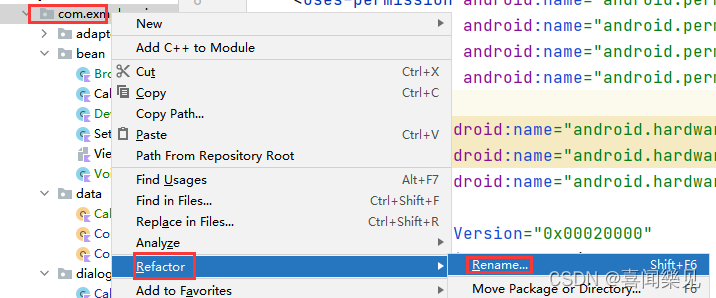
1. There are three places to modify in AndroidManifest.xml

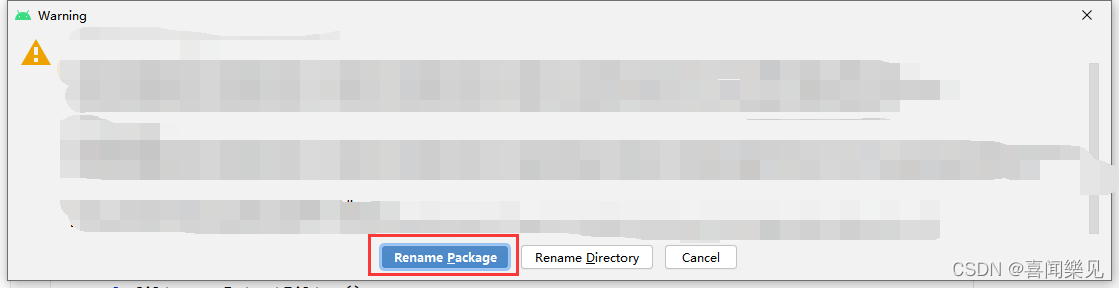
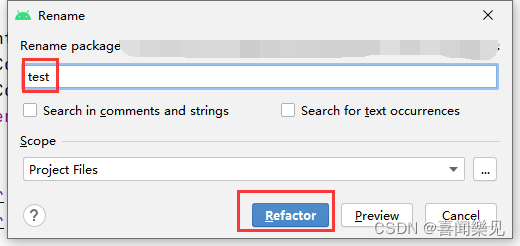
Modify package name

After modifying the package name, you should also modify it
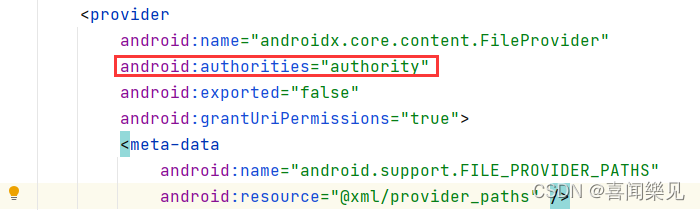
to the same as above

There is a modification of the word: authorities

2. In build.gradle(:app)

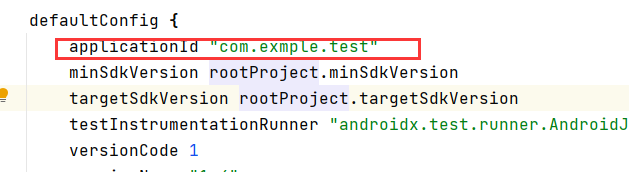
Applicationid modify the same
as the package name, and then Sync Now