Author Archives: Robins

Mac monterey Reinstall System Error: pkdownloaderror 8

Error:

If you want to reinstall the Monterey system on the M1 chip Mac, you repeatedly encounter the error ‘pkdownloader error 8’

Solution:

Download the installation package manually: InstallAssistant.pkg

1. After entering [option], menu bar -> Utilities -> Terminal

2、cd /Volumes/Macintosh HD

3、mkdir private/tmp

4, cp -R /Install/macOS monterey.app private/tmp (here is able to tab out, if the tab does not come out, it means the path is written wrong)

5、cd private/tmp

6、mkdir Contents/SharedSupport

7、curl -L -o Contents/SharedSupport/SharedSupport.dmg https://swcdn.apple.com/content/downloads/39/60/002-23774-A_KNETE2LDIN/ 4ll6ahj3st7jhqfzzjt1bjp1nhwl4p4zx7/InstallAssistant.pkg

8, and then wait for the download to complete, the process may also fail to download, it does not matter more than a few times on the good, my first time to about 80% error ‘error: RPC failed; curl 92 HTTP/2 stream 0 was not closed cleanly: INTERNAL_…’ Then I re-downloaded it once, and it worked!

9. After downloading, cd /Volumes/Macintosh HD/private/tmp

10, . /Contents/MacOS/InstallAssistant_springboard to execute the installation process, then follow the instructions in the graphical interface step by step

Oracle Database Cannot Open mount Mode Error: ORA-01102

Error in opening mount mode of database: ora-01102: cannot mount database in exclusive mode

SQL> startup nomount;
 
ORACLE instance started.

Total System Global Area 1073741824 bytes
Fixed Size		    2932632 bytes
Variable Size		  427819112 bytes
Database Buffers	  629145600 bytes
Redo Buffers		   13844480 bytes
SQL> SQL> alter database mount;
 
alter database mount
*
ERROR at line 1:
ORA-01102: cannot mount database in EXCLUSIVE mode

Reason: There is a “sgadef.dbf” file in the “ORACLE_HOME/dbs” directory and Oracle processes (pmon, smon, lgwr, and dbwr) still exist – even if the database is closed, the shared memory segments and semaphores still exist – there is an “ORACLE_HOME/dbs/lk” file “lk” and “sgadef. There is an “ORACLE_HOME/dbs/lk” file “lk” and “sgadef. dbf ” files for locking shared memory. It seems that even if no memory is allocated, Oracle thinks the memory is still locked.
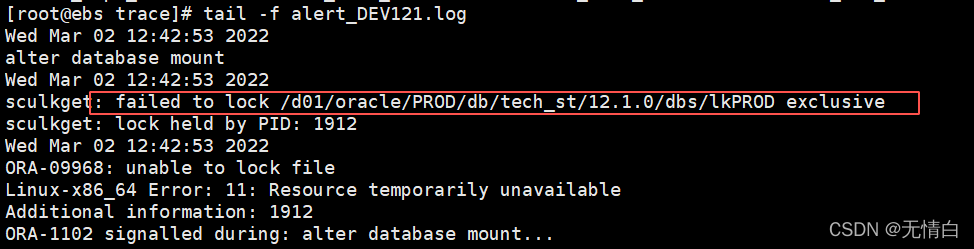
To view the startup log:


Solution.
1. Go to /d01/oracle/PROD/db/tech_st/12.1.0/dbs/ directory
2. Delete the lkPOD file

rm -rf  lkPROD

3. Make sure Oracle has no background processes: ps -ef |grep ora_ |grep PROD|grep ora_dbw0_PROD

if there is a background process, please use the command “kill” to delete it.

[oracle@ebs ~]$  kill -9 1912

Log in again using mount mode

[oracle@ebs ~]$ sqlplus/as sysdba

SQL*Plus: Release 12.1.0.2.0 Production on Wed Mar 2 12:52:42 2022

Copyright (c) 1982, 2014, Oracle.  All rights reserved.

Connected to an idle instance.

SQL> startup mount
ORACLE instance started.

Total System Global Area 1073741824 bytes
Fixed Size		    2932632 bytes
Variable Size		  427819112 bytes
Database Buffers	  629145600 bytes
Redo Buffers		   13844480 bytes
Database mounted.

Successfully resolved.

go sync.Mutex Lock Examples

package main

import (
	"fmt"
	"sync"
	"time"
)

var (
	m = make(map[int]uint64)
	lock sync.Mutex
)

type task struct {
	n int
}

func calc(t *task) {
	var sum uint64
	sum = 1
	for i := 1; i <= t.n; i++ {
		sum *= uint64(i)
	}
	lock.Lock()
	m[t.n] = sum
	lock.Unlock()
}

func main() {
	for i := 0; i < 10; i++ {
		t := &task{n:i}
		go calc(t)
	}
	time.Sleep(1 * time.Second)

	lock.Lock()
	for k, v := range m {
		fmt.Printf("%d! = %v\n", k, v)
	}
}


Echarts-for-React Example (Install, Import and Effect)

Install

npm install echarts-for-react –save


Import

import ReactEcharts from “echarts-for-react”;


Example Codes:

import React from 'react'
import ReactEcharts from 'echarts-for-react'
class Demon extends React.Component {
  state = {option: {}};
  render () {
    return (
      <>
        <ReactEcharts option={this.state.option} />
      </>
    );
  }
  componentDidMount () {
    let option = {
      xAxis: {
        type: 'category',
        data: ['Mon', 'Tue', 'Wed', 'Thu', 'Fri', 'Sat', 'Sun']
      },
      yAxis: {
        type: 'value'
      },
      series: [
        {
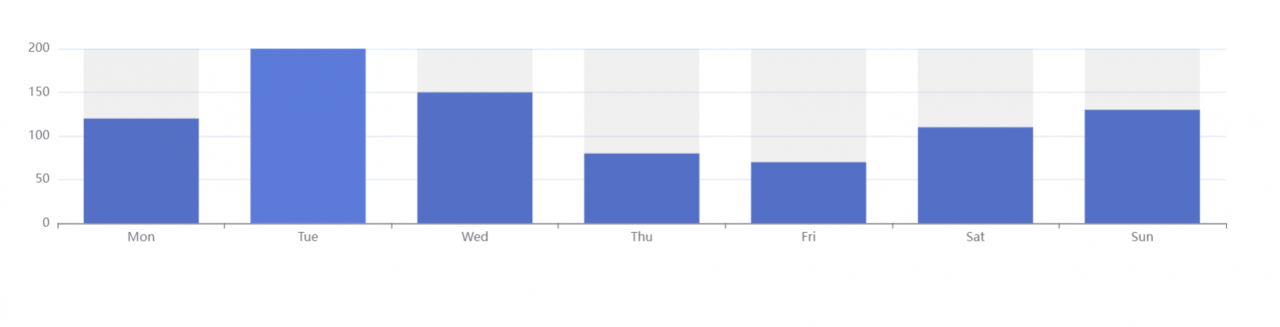
          data: [120, 200, 150, 80, 70, 110, 130],
          type: 'bar',
          showBackground: true,
          backgroundStyle: {
            color: 'rgba(180, 180, 180, 0.2)'
          }
        }
      ]
    };
    this.setState({option})
  }
}
export default Demon;


Effect:


Note:

The x-axis in the grid of the xAxis indicator

yAxis indicator coordinate system y-axis in grid

series series chart configuration He decides which type of chart to display

[Solved] UNABLE TO START SERVLETWEBSERVERAPPLICATIONCONTEXT DUE TO MISSING SERVLETWEBSERVERFACTORY BEAN

In Spring Boot projects, this error occurs in two ways.

1. you forgot to add @SpringBootApplication in the class where the main method is located

2. the dependency is missing, just add it

<dependency>
    <groupId>org.springframework.boot</groupId>
    <artifactId>spring-boot-starter-web</artifactId>
</dependency>


How to Download File via Response (Example Code)

Here is an example code for you to use Response to download files.

@Override
protected void doGet(HttpServletRequest req, HttpServletResponse resp) throws ServletException, IOException {
    // 1.Get the file path
    String realPath = "D:\\project\\\servlet-main\\\\response\\\src\\\main\\\resources\\\\avatar.jpg";
    // 2. Get the file name
    String fileName = realPath.substring(realPath.lastIndexOf("\\\") + 1);
    // 3. Set the request header (Content-Disposition of the header to support file download)
    resp.setHeader("Content-Disposition", "attachment;filename=" + URLEncoder.encode(fileName, "UTF-8"));
    // 4. Get the input stream of the downloaded file: FileInputStream
    FileInputStream inputStream = new FileInputStream(realPath);
    // 5. Create buffer
    int length = 0;
    byte[] buffer = new byte[1024];
    // 6. Get the input stream object: OutputStream
    ServletOutputStream outputStream = resp.getOutputStream();
    // 7. Write the stream to the buffer and use the OutputStream to output the data in the buffer to the client
    while ((length = inputStream.read(buffer)) > 0) {
        outputStream.write(buffer, 0, length);
    }
    inputStream.close();
    outputStream.close();
}

[Solved] Syntax Error: Error: Node Sass does not yet support your current environment:

Error Messages:

 ERROR  Failed to compile with 1 error                                               AM11:47:18
error  in ./src/assets/styles/fat.scss
Syntax Error: Error: Node Sass does not yet support your current environment: Windows 64-bit withFor more information on which environments are supported please see:
https://github.com/sass/node-sass/releases/tag/v4.14.1

@ ./src/assets/styles/fat.scss 4:14-291 15:3-20:5 16:22-299
@ ./src/main.js
@ multi ./node_modules/[email protected]@webpack-dev-server/client?http://192.168.30.251:80&sockPath=/sockjs-node (webpack)/hot/dev-server.js ./src/main.js

Solution:

 The node scss version does not match the current environment and needs to be uninstalled and reinstalled
Uninstall command: npm uninstall –save node-sass
Install command: npm install –save node-sass

Kylin arm64 linux configure: error: cannot guess build type; you must specify one

error

uname -m = aarch64
uname -r = 4.19.90-23.8.v2101.ky10.aarch64
uname -s = Linux
uname -v = #1 SMP Mon May 17 17:07:38 CST 2021

/usr/bin/uname -p = aarch64
/bin/uname -X     = 

hostinfo               = 
/bin/universe          = 
/usr/bin/arch -k       = 
/bin/arch              = aarch64
/usr/bin/oslevel       = 
/usr/convex/getsysinfo = 

UNAME_MACHINE = aarch64
UNAME_RELEASE = 4.19.90-23.8.v2101.ky10.aarch64
UNAME_SYSTEM  = Linux
UNAME_VERSION = #1 SMP Mon May 17 17:07:38 CST 2021
configure: error: cannot guess build type; you must specify one

Solution:

./configure --build=aarch64-unknown-linux

effect

...
checking whether to include histogram support... no
checking whether to include dirty support... no
checking whether to include demo support... no
checking whether to include Unix-domain socket tests... no
checking whether to include DLPI tests... no
checking whether to include DCCP tests... no
checking whether to include OMNI tests... yes
checking whether to include XTI tests... no
checking whether to include SDP tests... no
checking whether to include ICSC-EXS tests... no
checking whether to include SCTP tests... no
checking whether to include paced send (intervals) support... no
checking whether paced sends should spin... no
checking whether to include initial burst support in _RR tests... yes
checking which CPU utilization measurement type to use... "procstat - auto"
configure: creating ./config.status
config.status: creating Makefile
config.status: creating src/netperf_version.h
config.status: creating src/Makefile
config.status: creating src/missing/Makefile
config.status: creating src/missing/m4/Makefile
config.status: creating doc/Makefile
config.status: creating doc/examples/Makefile
config.status: creating netperf.spec
config.status: creating config.h
config.status: config.h is unchanged
config.status: executing depfiles commands

Centos7.2 Install vscode Error: error while loading shared libraries: libxkbcommon.so.0: cannot open shared pro

1. I recently needed to install vscode on centos 7.2, and after installing it, I ran it and found that it kept reporting the following error

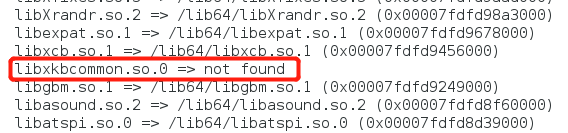
2. Using the #ldd code command, I found that libxkbcommon.so.0 is indeed missing

3. Then install libxkbcommon

yum install libxkbcommon

4. The following problems occur during operation

5. Then install NSS

yum install nss

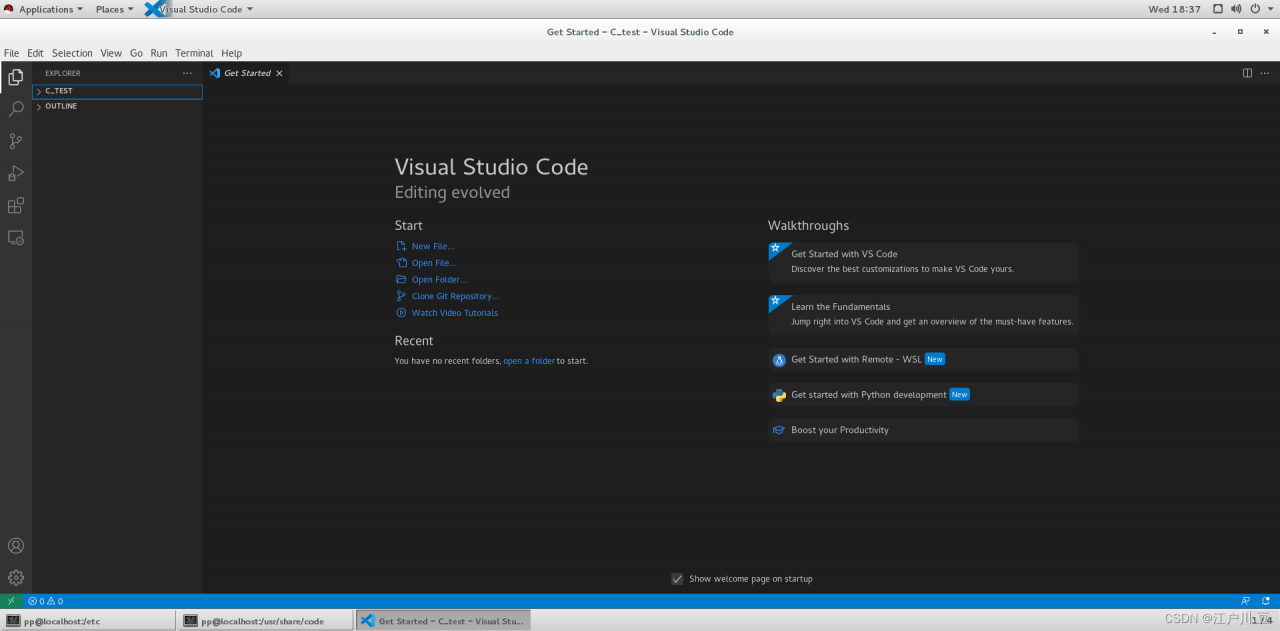
6. Running, OK

Error in value[[3L]](cond) : Package ‘rhdf5‘ version 2.36.0 cannot be unloaded:

library(rhdf5)
Error in value[[3L]](cond) : Package 'rhdf5' version 2.36.0 cannot be unloaded:Error in unloadNamespace(package) : namespace 'rhdf5' is imported by 'HDF5Array', 'MOFA2' so cannot be unloaded

This is caused by importing packages from two places

Solution:

unloadNamespace('MOFA2')
unloadNamespace('HDF5Array')
library(rhdf5)

success