Error Message:
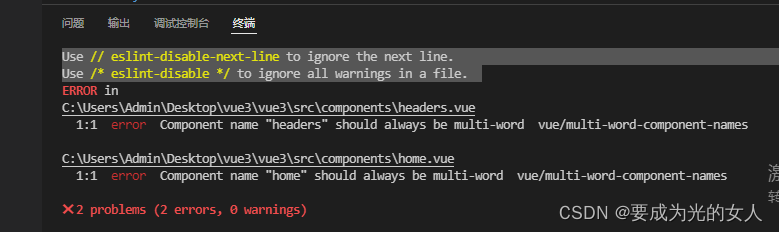
Solution:
Find a vue.config.js file in the project root directory, create one in the root directory if you don’t have one, write the code marked below, save it, and recompile it. The project will run normally.
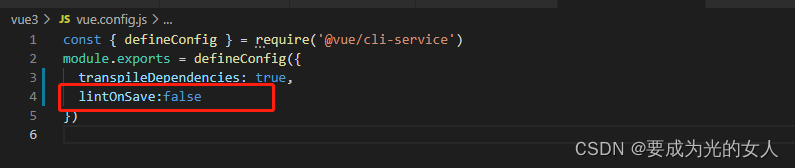
Error Message:
Solution:
Find a vue.config.js file in the project root directory, create one in the root directory if you don’t have one, write the code marked below, save it, and recompile it. The project will run normally.
Error Message: AttributeError: module 'asyncio' has no attribute 'run'
Solution:
pip uninstall uvicorn
pip install uvicorn==0.16.0
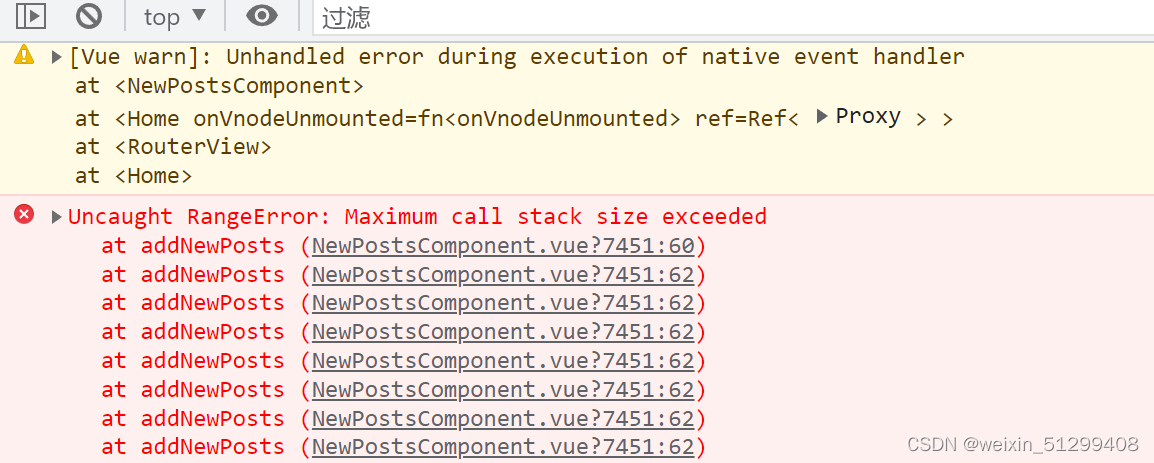
Occurrence reason: Duplicate variable name
Solution: Check the variables and remove the duplicates.
In short: The reason for the occurrence is that your variables have duplicate definitions, resulting in a dead loop
Error:
linux-5.10>$ dtc -I dts -O dtb arch/arm64/boot/dts/freescale/fsl-ls1046a-rdb.dts -o fsl-ls1046a-rdb.dtb
Error: fsl-ls1046a-rdb.dts:13.1-9 syntax error
FATAL ERROR: Unable to parse input tree
Solution:
linux-5.10>$ export ARCH=arm64
linux-5.10>$ export CROSS_COMPILE=aarch64-linux-gnu-
linux-5.10>$ make defconfig
linux-5.10>$ make dtbs or
linux-5.10>$ make freescale/fsl-ls1046a-rdb.dtb
Error Messages:
CategoryInfo : SecurityError: (😃 [], PSSecurityException + FullyQualifiedErrorId : UnauthorizedAccess
Solution:
Run the following code directly under the project terminal
Set-ExecutionPolicy Unrestricted -Scope CurrentUser
When the browser executes document.getElementById(‘chart’), because the dom object with the id of main has not been created, it reports an error Initialize failed: invalid dom.
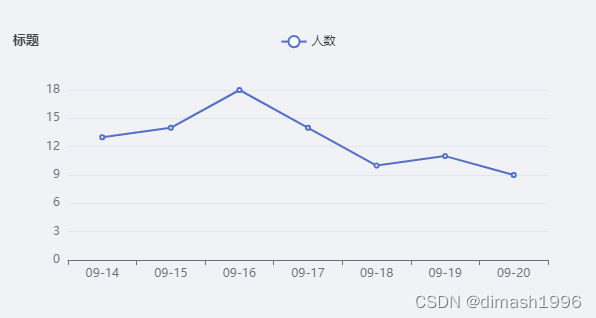
The solution is to delay the execution of the code for initializing the charts in echarts, which is fast and does not affect the display of the effect and does not feel stuck.
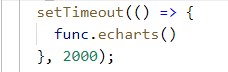
func.echarts() for the initialization of the chart function , code and effects are as follows (a vue3.0 project of a page used)
     echarts: () => {
        let myChart = echarts.init(document.getElementById("chart"));
        let option = {
          title: {
            text: '标题',
            textStyle: {
              fontSize: 13
            },
          },
          toolbox: {
            show: true,
            feature: {
              saveAsImage: {
                show: false
              }
            },
          },
          legend: {
            data: ['人数']
          },
          xAxis: {
            data: ['09-14', '09-15', '09-16', '09-17', '09-18', '09-19', '09-20']
          },
          yAxis: {},
          series: [{
            name: '人数',
            type: 'line',
            data: ['13', '14', '18', '14', '10', '11', '9'],
          }]
        };
        myChart.setOption(option);
      },
    })
1. Question
IntelliJ idea command line is too long solution
error content:
error running 'servicestarter': command line is too long Shorten command line for ServiceStarter or also for Application default configuration.
2. Solution
Modify item .idea\workspace.xml, find the tag and add a line to the tag
<property name="dynamic.classpath" value="true" />
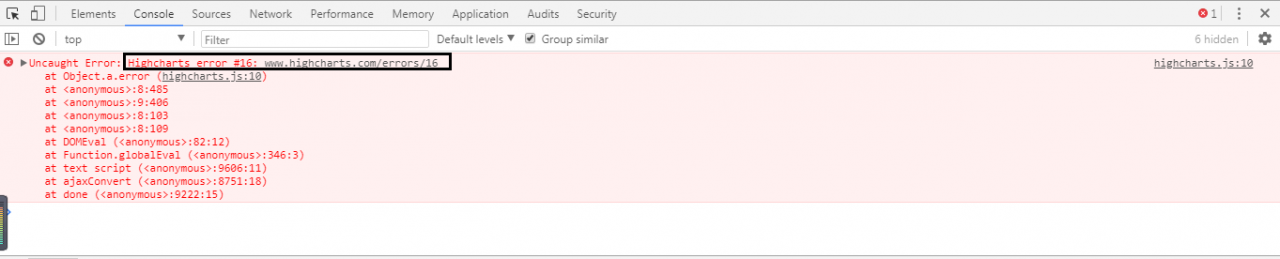
Highcharts error #16 is due to duplicate Highcharts definitions. The reason for this error is that the namespace of Highcharts is duplicated.
The namespace of Highcharts actually exists in the Highcharts.js file that we refer to when we use Highcharts.
Solution
Remove the Highcharts.js from the nested subpages and leave only the reference to the main page, and the error will not be reported.
Conclusion
Referencing Highcharts.js on the main page and referencing Highcharts.js on the sub-page nested in it will cause duplicate Highcharts definitions whenever the sub-page is loaded.
Enter the installation directory D:\Program Files\leidian\LDPlayer4
powershell
.\adb
cmd
adb
if it appears
adb shell
error: more than one device and emulator
In this case, the first thing to check is whether there are really multiple devices or emulators.
adb devices
List of devices attached
emulator-5554 device
127.0.0.1:5555 device
It is found that there are multiple devices, then you need to specify the serial number of the device for the ADB command.
adb -s emulator-5554 shell
That is, as shown above, just add the -s parameter to the command!
If there is actually only one device or simulator, and the offline status is found;
it means that it is caused by a bug in ADB itself, and it needs to be dealt with as follows:
adb kill-server
taskkill /f /im adb The first command of .exe
is to kill the ADB service, and the second command is to kill the ADB process!
If the first one doesn’t work, consider using the second one to try again!
Finally execute this command to
set the proxy,
.\adb -s 127.0.0.1:5555 shell settings put global http_proxy 192.168.0.72:8888
remove the proxy
adb shell settings delete global http_proxy&adb shell settings delete global global_http_proxy_host&adb shell settings delete global global_http_proxy_port
or when there is no delete command
adb shell settings put global http_proxy :0
Here is a simple guide on how to check the appPackage and appActivity in apk.
Option 1:
Option 2:
Background
The webservice service is used for interface communication in the project. In the specific application, the caller does not access the service directly, but forwards the request through a proxy to achieve access.
Problem
The client code generated by using apache axis1.4 tool to invoke the service can be accessed normally; the client code generated by using apache cxf tool reports an error: 2 counts of InaccessibleWSDLException.
Reason
The client code of axis is written with service name, port type and other information fixed in the generated code, while the client code of cxf is parsed by GET to get the wsdl file and bind service name and port name and other information before calling the interface.
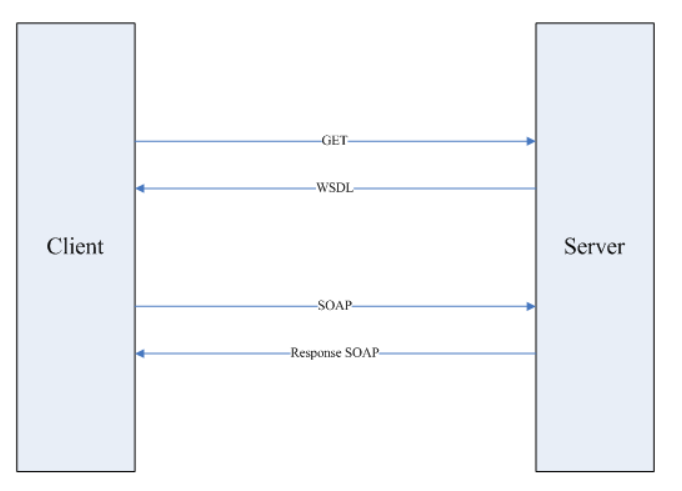
In the project, because the proxy redirection interface address is used, the wsdl file cannot be directly obtained through GET for parsing, so an error is reported.
Solution:
<service name="xxxService">
   <port binding="xxxSOAPBinding" name="xxxSOAPPort">
      <soap:address location="http://yourActualAddress/xxxService"/>
   </port>
</service>
xxxService ss = new xxxService(null, SERVICE_NAME);
XXXServicePortType port = ss.getPort(xxxServicePortType.class);

BindingProvider bindingProvider = (BindingProvider) port;
bindingProvider.getRequestContext()
  .put(BindingProvider.ENDPOINT_ADDRESS_PROPERTY,
    "http://www.example.com/real_endpoint_url_goes_here");
Response res = port.yourMethods(...);Problem phenomenon
sudo apt install nvidia-340
Reading package lists... Done
Building dependency tree
Reading state information... Done
The following packages were automatically installed and are no longer required:
  libargtable2-0 libass5 libavcodec-ffmpeg56 libavdevice-ffmpeg56
  libavfilter-ffmpeg5 libavformat-ffmpeg56 libavresample-ffmpeg2
  libavutil-ffmpeg54 libbluray1 libboost-random1.58.0 libboost-regex1.58.0
  libboost-thread1.58.0 libcryptopp-dev libethereum libfdk-aac0 libjsoncpp1
  libjsonrpccpp-client0 libjsonrpccpp-common0 libjsonrpccpp-server0
  libleveldb1v5 libmicrohttpd10 libmicrohttpd12 libnvidia-common-396
  libopencv-core2.4v5 libopencv-imgproc2.4v5 libopenjpeg5 libpostproc-ffmpeg53
  libschroedinger-1.0-0 libsdl-ttf2.0-0 libswresample-ffmpeg1
  libswscale-ffmpeg3 libtbb2 libva1 libx264-148 libx265-79 miniupnpc
  nvidia-kernel-common-396 nvidia-kernel-source-396 nvidia-prime php7.1-common
Use 'sudo apt autoremove' to remove them.
The following NEW packages will be installed:
  nvidia-340
0 upgraded, 1 newly installed, 0 to remove and 0 not upgraded.
2 not fully installed or removed.
Need to get 0 B/51,9 MB of archives.
After this operation, 274 MB of additional disk space will be used.
(Reading database ... 345463 files and directories currently installed.)
Preparing to unpack .../nvidia-340_340.107-0ubuntu0~gpu18.04.1_amd64.deb ...
diversion of /usr/lib/x86_64-linux-gnu/libGL.so.1 to /usr/lib/x86_64-linux-gnu/libGL.so.1.distrib by nvidia-340
Removing 'diversion of /usr/lib/x86_64-linux-gnu/libGL.so.1 to /usr/lib/x86_64-linux-gnu/libGL.so.1.distrib by nvidia-340'
diversion of /usr/lib/i386-linux-gnu/libGL.so.1 to /usr/lib/i386-linux-gnu/libGL.so.1.distrib by nvidia-340
Removing 'diversion of /usr/lib/i386-linux-gnu/libGL.so.1 to /usr/lib/i386-linux-gnu/libGL.so.1.distrib by nvidia-340'
diversion of /usr/lib/x86_64-linux-gnu/libGL.so to /usr/lib/x86_64-linux-gnu/libGL.so.distrib by nvidia-340
Removing 'diversion of /usr/lib/x86_64-linux-gnu/libGL.so to /usr/lib/x86_64-linux-gnu/libGL.so.distrib by nvidia-340'
diversion of /usr/lib/i386-linux-gnu/libGL.so to /usr/lib/i386-linux-gnu/libGL.so.distrib by nvidia-340
Removing 'diversion of /usr/lib/i386-linux-gnu/libGL.so to /usr/lib/i386-linux-gnu/libGL.so.distrib by nvidia-340'
diversion of /usr/lib/x86_64-linux-gnu/libEGL.so.1 to /usr/lib/x86_64-linux-gnu/libEGL.so.1.distrib by nvidia-340
Removing 'diversion of /usr/lib/x86_64-linux-gnu/libEGL.so.1 to /usr/lib/x86_64-linux-gnu/libEGL.so.1.distrib by nvidia-340'
diversion of /usr/lib/i386-linux-gnu/libEGL.so.1 to /usr/lib/i386-linux-gnu/libEGL.so.1.distrib by nvidia-340
Removing 'diversion of /usr/lib/i386-linux-gnu/libEGL.so.1 to /usr/lib/i386-linux-gnu/libEGL.so.1.distrib by nvidia-340'
diversion of /usr/lib/x86_64-linux-gnu/libEGL.so to /usr/lib/x86_64-linux-gnu/libEGL.so.distrib by nvidia-340
Removing 'diversion of /usr/lib/x86_64-linux-gnu/libEGL.so to /usr/lib/x86_64-linux-gnu/libEGL.so.distrib by nvidia-340'
diversion of /usr/lib/i386-linux-gnu/libEGL.so to /usr/lib/i386-linux-gnu/libEGL.so.distrib by nvidia-340
Removing 'diversion of /usr/lib/i386-linux-gnu/libEGL.so to /usr/lib/i386-linux-gnu/libEGL.so.distrib by nvidia-340'
diversion of /usr/lib/x86_64-linux-gnu/libGLESv2.so to /usr/lib/x86_64-linux-gnu/libGLESv2.so.distrib by nvidia-340
Removing 'diversion of /usr/lib/x86_64-linux-gnu/libGLESv2.so to /usr/lib/x86_64-linux-gnu/libGLESv2.so.distrib by nvidia-340'
diversion of /usr/lib/i386-linux-gnu/libGLESv2.so to /usr/lib/i386-linux-gnu/libGLESv2.so.distrib by nvidia-340
Removing 'diversion of /usr/lib/i386-linux-gnu/libGLESv2.so to /usr/lib/i386-linux-gnu/libGLESv2.so.distrib by nvidia-340'
diversion of /usr/lib/x86_64-linux-gnu/libGLESv2.so.2 to /usr/lib/x86_64-linux-gnu/libGLESv2.so.2.distrib by nvidia-340
Removing 'diversion of /usr/lib/x86_64-linux-gnu/libGLESv2.so.2 to /usr/lib/x86_64-linux-gnu/libGLESv2.so.2.distrib by nvidia-340'
diversion of /usr/lib/i386-linux-gnu/libGLESv2.so.2 to /usr/lib/i386-linux-gnu/libGLESv2.so.2.distrib by nvidia-340
Removing 'diversion of /usr/lib/i386-linux-gnu/libGLESv2.so.2 to /usr/lib/i386-linux-gnu/libGLESv2.so.2.distrib by nvidia-340'
Adding 'diversion of /usr/lib/x86_64-linux-gnu/libGL.so.1 to /usr/lib/x86_64-linux-gnu/libGL.so.1.distrib by nvidia-340'
Adding 'diversion of /usr/lib/i386-linux-gnu/libGL.so.1 to /usr/lib/i386-linux-gnu/libGL.so.1.distrib by nvidia-340'
Adding 'diversion of /usr/lib/x86_64-linux-gnu/libGL.so to /usr/lib/x86_64-linux-gnu/libGL.so.distrib by nvidia-340'
Adding 'diversion of /usr/lib/i386-linux-gnu/libGL.so to /usr/lib/i386-linux-gnu/libGL.so.distrib by nvidia-340'
Adding 'diversion of /usr/lib/x86_64-linux-gnu/libEGL.so.1 to /usr/lib/x86_64-linux-gnu/libEGL.so.1.distrib by nvidia-340'
Adding 'diversion of /usr/lib/i386-linux-gnu/libEGL.so.1 to /usr/lib/i386-linux-gnu/libEGL.so.1.distrib by nvidia-340'
Adding 'diversion of /usr/lib/x86_64-linux-gnu/libEGL.so to /usr/lib/x86_64-linux-gnu/libEGL.so.distrib by nvidia-340'
Adding 'diversion of /usr/lib/i386-linux-gnu/libEGL.so to /usr/lib/i386-linux-gnu/libEGL.so.distrib by nvidia-340'
Adding 'diversion of /usr/lib/x86_64-linux-gnu/libGLESv2.so to /usr/lib/x86_64-linux-gnu/libGLESv2.so.distrib by nvidia-340'
Adding 'diversion of /usr/lib/i386-linux-gnu/libGLESv2.so to /usr/lib/i386-linux-gnu/libGLESv2.so.distrib by nvidia-340'
Adding 'diversion of /usr/lib/x86_64-linux-gnu/libGLESv2.so.2 to /usr/lib/x86_64-linux-gnu/libGLESv2.so.2.distrib by nvidia-340'
Adding 'diversion of /usr/lib/i386-linux-gnu/libGLESv2.so.2 to /usr/lib/i386-linux-gnu/libGLESv2.so.2.distrib by nvidia-340'
Unpacking nvidia-340 (340.107-0ubuntu0~gpu18.04.1) ...
dpkg: error processing archive /var/cache/apt/archives/nvidia-340_340.107-0ubuntu0~gpu18.04.1_amd64.deb (--unpack):
 trying to overwrite '/lib/udev/rules.d/71-nvidia.rules', which is also in package nvidia-kernel-common-396 396.45-0ubuntu0~gpu18.04.2
dpkg-deb: error: paste subprocess was killed by signal (Broken pipe)
Errors were encountered while processing:
 /var/cache/apt/archives/nvidia-340_340.107-0ubuntu0~gpu18.04.1_amd64.deb
E: Sub-process /usr/bin/dpkg returned an error code (1)
Solution:
sudo dpkg -i --force-overwrite /var/cache/apt/archives/nvidia-340_340.107-0ubuntu0~gpu18.04.1_amd64.deb
This will resolve “the trying to overwrite error” with the mighty force of dpkg. 😃
Then run:
sudo apt -f install
to fix if any broken packages.