Author Archives: Robins

How to Solve Vue3 jweixin-module Error

Use in vue3:

var jweixin = require('jweixin-module');

It will be compiled with the error: require is not defined, there is no require module, change to import, because jweixin-module does not support export writing, so the introduction can not succeed.

Solution:
Use a third-party wrapper jdk: weixin-js-sdk

npm install weixin-js-sdk -S

import jweixin from 'weixin-js-sdk'

Python Error: OSError: cannot open resource [How to Solve]

Question:

  File "D:\Windows_DL_Environment\anaconda3\envs\py37\lib\site-packages\PIL\ImageFont.py", line 852, in freetype
    return FreeTypeFont(font, size, index, encoding, layout_engine)
  File "D:\Windows_DL_Environment\anaconda3\envs\py37\lib\site-packages\PIL\ImageFont.py", line 212, in __init__
    font, size, index, encoding, layout_engine=layout_engine
OSError: cannot open resource

This class is a common font problem. In Windows environment, fonts are generally located in the C:\windows\fonts folder. In this folder, users can check whether the font specified in the python program exists.

fnt = ImageFont.truetype('Pillow/Tests/fonts/FreeMono.ttf', 50)

Solution 1:

Change the font that exists on the computer

ImageFont.truetype("Pillow/Tests/fonts/arial.ttf", 50)

Solution 2:

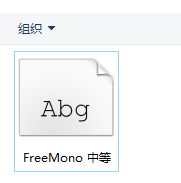
Found no freemono in the computer Ttf font, so you need to download
https://fontmeme.com/ziti/freemono-font/

After downloading, unzip it into the fonts folder

finally. Restart the computer to execute.

How to Solve Ceres library Error when compiling A-LOAM

The C++ version in the CMakeLists for direct download of the A-LOAM library is 11, as follows:

cmake_minimum_required(VERSION 2.8.3)
project(aloam_velodyne)

set(CMAKE_BUILD_TYPE "Release")
set(CMAKE_CXX_FLAGS "-std=c++11")
set(CMAKE_CXX_FLAGS_RELEASE "-O3 -Wall -g")

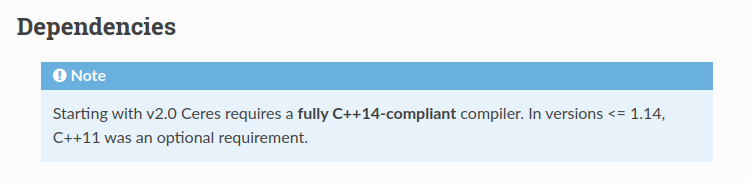
But Ceres 2.0 and above requires C++14 compiler, so you just need to change the C++ compiler to 14

cmake_minimum_required(VERSION 2.8.3)
project(aloam_velodyne)

set(CMAKE_BUILD_TYPE "Release")
set(CMAKE_CXX_FLAGS "-std=c++14")
set(CMAKE_CXX_FLAGS_RELEASE "-O3 -Wall -g")

[Solved] vite package Error: globalThis is not defined

Problem:
browser version 65
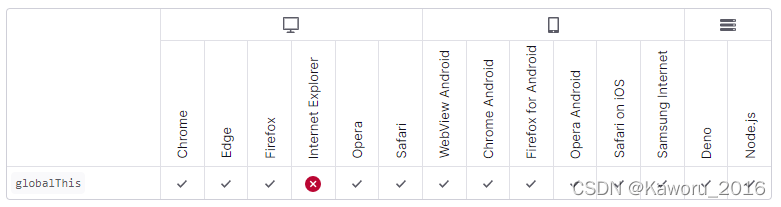
globalthis requires chrome 71 or above

vite + vue3.0 after the project is packaged, the browser prompts globalthis is not defined.

How to Solve:
Modify vite.config.js
Add plugin @vitejs/plugin-legacy

import legacy from '@vitejs/plugin-legacy'

export default defineConfig({
	plugins: [
		legacy({
			targets: ['Chrome 63'],
			additionalLegacyPolyfills: ['regenerator-runtime/runtime'],
			modernPolyfills: true
		})
	],
	build:{
   		target:'es2015'
	}
})

Just repack it

linux(aarch64): How to Fix kettle Startup Error Issue

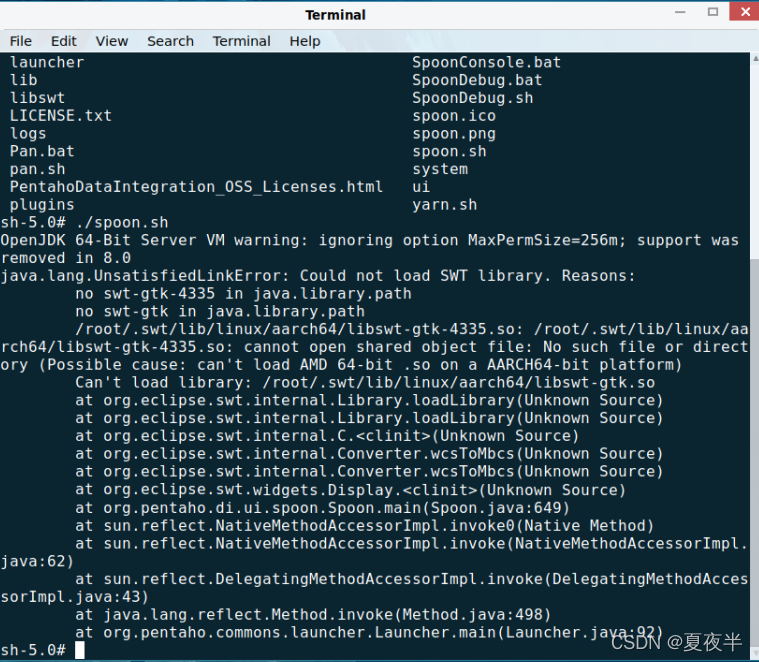
Because of the work requirements, recently have been engaged in kettle-related business, in the deployment environment is not known to be linux (in the standard Kirin), has been doing conversions and operations under windows, on the recent to deploy to production, the problem is also exposed, in the environment to start kettle when the error reported:

Solution.
According to the error message: SWT package could not be loaded, so go online and search for downloading swt.jar .
Place the downloaded jar package under the kettle path of the installation: data-integration/libswt/linux/aarch64/
If there is no aarch64 folder, create one and put it there.
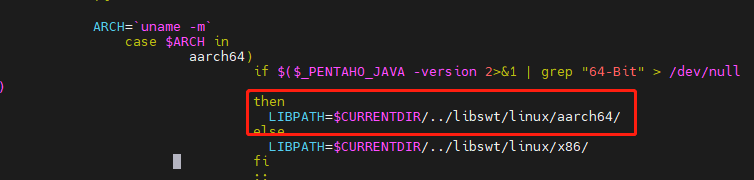
Then modify the spoon.sh configuration information:

When you’re done, restart ./spoon.sh and you’re done!

Uniapp Use vant Weapp icon Module Error [How to Fix]

1. Abnormal information

11:43:21.725 Module build failed (from ./node_modules/postcss-loader/src/index.js):
11:43:21.725 SyntaxError
11:43:21.735 (36:10521) Unclosed bracket
11:43:21.736   34 | 
11:43:21.741   35 | 
11:43:21.742 > 36 | @import '../common/index.css';.van-icon{text-rendering:auto;-webkit-font-smoothing:antialiased;font:normal normal normal 14px/1


Solution:

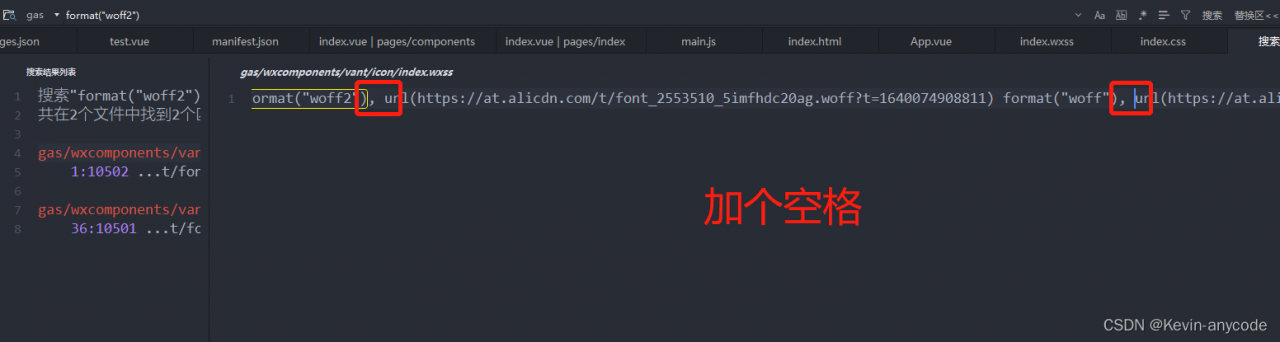
Modify /wxcomponents/vant/icon/index wxss

The following figure in the format (“woff2”) after the url in front of a space, you need to modify two places

Linux useradd Error: Creating mailbox file: File exists

If you get the error Creating mailbox file: File exists when you add a user with useradd under linux

It is possible that userdel xxx did not add -r when deleting the user, so only the user was deleted, but not the user’s configuration file

For example, the path of the configuration file is in /var/spool/mail/xxx

# userdel -r
Usage: userdel [options] LOGIN

Options:
  -f, --force                   force some actions that would fail otherwise
                                e.g. removal of user still logged in
                                or files, even if not owned by the user
  -h, --help                    display this help message and exit
  -r, --remove                  remove home directory and mail spool
  -R, --root CHROOT_DIR         directory to chroot into
  -Z, --selinux-user            remove any SELinux user mapping for the user

[Solved] Found bindings for the following environments

When running the previously written vue project, I encountered the following error.
It should be caused by incompatible version upgrade
Error:

Module build failed: ModuleBuildError: Module build failed: Error: Missing binding E:\SVN\32IDPW\04-project\03-source\02-web\briefing\node_modules\node-sass\vendor\win32-x64-64\binding.node
Node Sass could not find a binding for your current environment: Windows 64-bit with Node.js 10.x
Found bindings for the following environments:
- Windows 64-bit with Node.js 8.x


Solution:

npm rebuild node-sass

npm update

npm run dev

How to Solve m_gshhs_i Error

I encountered a small problem when running m_gshhs_i after installing High Precision Shoreline GSHHS

First, review the installation method:

Step1:
Download GSHHS coastlines and WDBII rivers/borders in native binary format ( zip archive )‘gshhs+wdbii_2.2.0.zip’ from http://www.soest.Hawaii.edu/pwessel/gshhs/

Step 2:
unzip the zip file to the (……\MATLAB\toolbox\m_map\private) path

If there is no problem using m_gshhs_i in matlab after the above two steps, then there is no need to perform the operation and just use it normally. If the error is reported using m_gshhs_i as follows.

WARNING: Coastline file private/gshhs_i.b not found \n(Have you installed it?See the M_Map User's Guide for details)\n ---Using default coastline instead 

Then we need to go to ……\MATLAB\toolbox\m_map\path to find the m_gshhs.m file, open it and find

FILNAME='private/gshhs_i.b';

Modify it with:

FILNAME='private\';

After saving, use m_gshhs_i again and find that it works fine. If it does not work properly after modification, then try modifying it to

FILNAME='The path to matlab on your computer\MATLAB\toolbox\m_map\private\';

At this time, it can be used normally m_gshhs_i.
[Solved] IDEA2020 Error: Cannot resolve symbol ‘Servlet‘

Reason: no servlet-api.jar package

I tried all the methods on the Internet and found that it was the problem with my servlet-api.jar package

It was not placed under the Lib package of tomcat9. Another one was downloaded online and placed on disk D

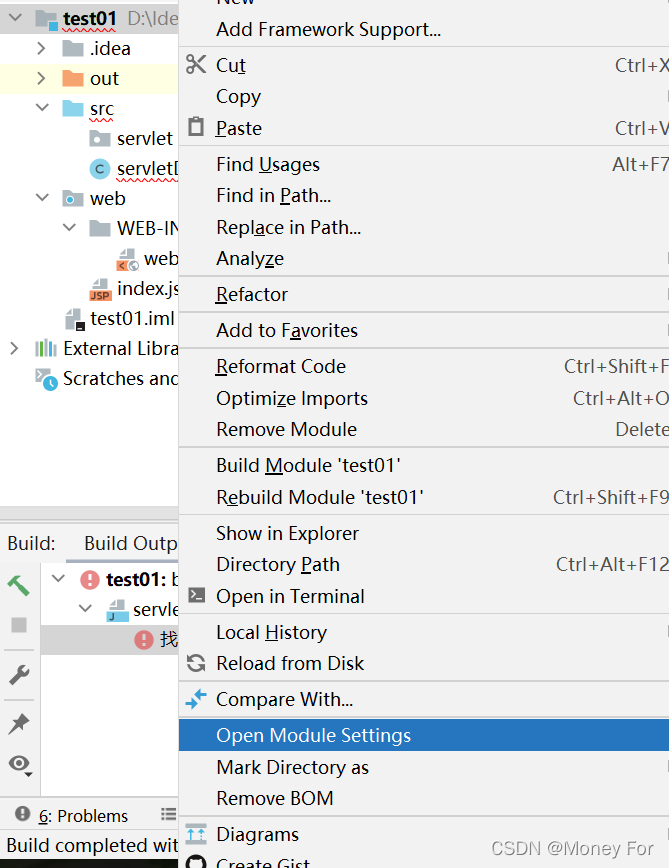
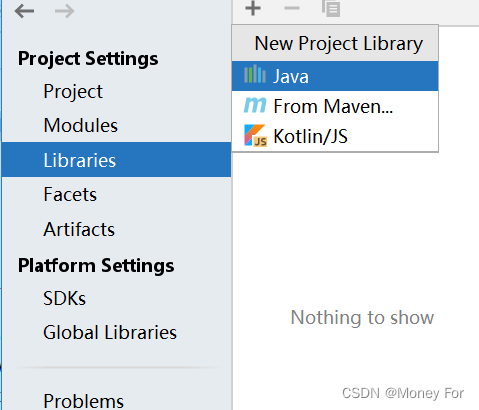
Solution:

Right-click item — Open Module Settings

Libraries – + — Java – — find servlet-api.jar package, add it to the project, and click apply

[Solved] Pychart breakpoint error: frames are not available

Today when I use pycharm again, the problem of frames are not available after setting the menu bar File->Settings->Editor->File Encodings


Modify Project Encodind to UTF-8, but still not, then menu bar File->Settings->Build,Execution,Deployment->Python Debugger


I unchecked PyQt compatible, but it didn’t work. Finally, I hit a few more breakpoints on the code to solve the problem.