Author Archives: Robins

How to Solve LeetCode Error: AddressSanitizer:DEADLYSIGNAL

LeetCode Error: AddressSanitizer:DEADLYSIGNAL
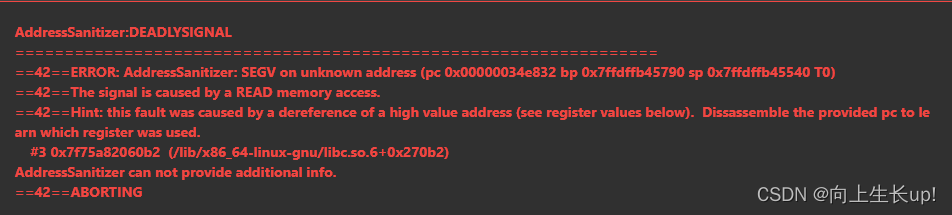
AddressSanitizer:DEADLYSIGNAL

AddressSanitizer:DEADLYSIGNAL
42ERROR: AddressSanitizer: SEGV on unknown address (pc 0x00000034e832 bp 0x7ffdffb45790 sp 0x7ffdffb45540 T0)
42The signal is caused by a READ memory access.
42Hint: this fault was caused by a dereference of a high value address (see register values below). Dissassemble the provided pc to learn which register was used.
#3 0x7f75a82060b2 (/lib/x86_64-linux-gnu/libc.so.6+0x270b2)
AddressSanitizer can not provide additional info.
42ABORTING


class Solution {
public:
    bool isValid(string s) {
          int n = s.size();
          if(n % 2 == 1){
              return false;
          }
          unordered_map<char, char> pairs = {
              {')','('},//key value
              {']','['},
              {'}','{'}
          };
          stack<char> stk;
          for(char ch:s){
              if(pairs.count(ch)){//Intrinsically check whether the pairs have elements with the given key ch
                  if(stk.top() != pairs[ch] || stk.empty()){
                      return false;
                  }
                  stk.pop();
              }else{
                  stk.push(ch);
              }
          }
          return stk.empty();
    }
};

Error reporting:

modification:

if(stk.empty() || stk.top() != pairs[ch])

VSCode Terminal Execute tsc Commands Error [Solved]

1. Problem description

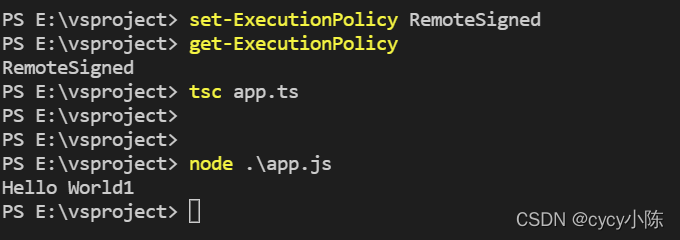
When the vscode terminal executes the TSC instruction to compile the TS document, an error is reported as follows:

2. Causes of problems

Vscode terminal cannot use command

3. Solutions

1. Right click the vscode icon and select run as administrator;

2. Run code on vscode terminal

get-ExecutionPolicy

Restricted is displayed, indicating that the terminal is prohibited from using the command;

3. Rerun the code

set-ExecutionPolicy RemoteSigned

4. Execute again at this time

get-ExecutionPolicy

If remotesigned is displayed, it means that the terminal command can be used

4. Implementation effect

Mybatis Error: All elements are null [How to Solve]

Console error: your MySQL server version for the right syntax to use near ”at line 1

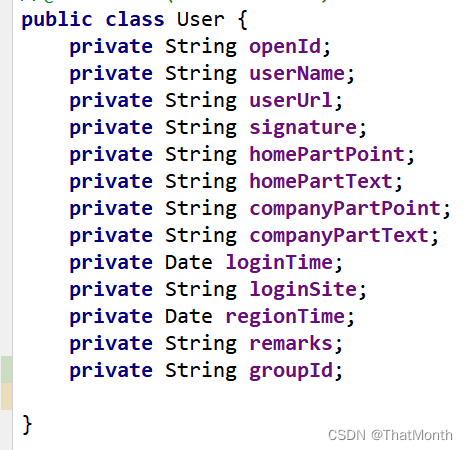
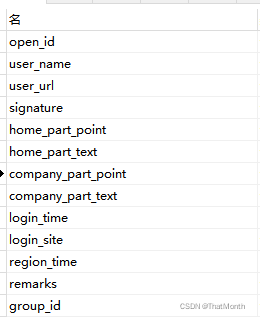
Reason: the database field and entity class field are inconsistent

The in the database is underlined, and the entity class uses the hump naming method.

Solution:

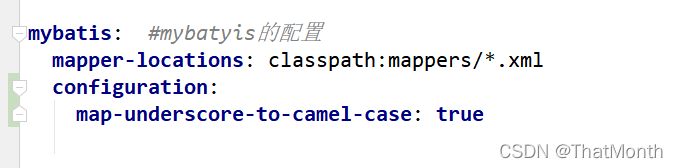
In the application.yml configuration file, turn on mybatis’ camel nomenclature conversion settings

The problem is solved

How to Solve QML Settings Error (QML FileDialog)

When we want to use the file dialog box in the interface, we can use the FileDialog component with the following code:

import QtQuick 2.12
import QtQuick.Window 2.12
import QtQuick.Dialogs 1.3

Window {
    visible: true
    width: 640
    height: 480
    title: qsTr("")
    
    Button {
        id:openFile
        text: qsTr("Open the Files")
        backgroundDefaultColor: "#5A6268"
        onClicked:  {
            fileDialog.open()
        }
    }

    FileDialog {
        id: fileDialog
        title: qsTr("Please choose a file")
        nameFilters: ["Photo Files", "Image Files (*.jpg *.png *.gif *.bmp *.ico)", "*.*"]
        onAccepted: {
            _filePath.text = String(fileUrl)
            var filepath = new String(fileUrl)
        }
    }
}

Error Message:

file:///D:/Qt/Qt5.12.6/5.12.6/msvc2017_64/qml/QtQuick/Dialogs/DefaultFileDialog.qml:102:33: QML Settings: Failed to initialize QSettings instance. Status code is: 1
file:///D:/Qt/Qt5.12.6/5.12.6/msvc2017_64/qml/QtQuick/Dialogs/DefaultFileDialog.qml:102:33: QML Settings: The following application identifiers have not been set: QVector("organizationName", "organizationDomain")


Solution:
Add a line of code to the main function of main.cpp.

QCoreApplication::setOrganizationName("appName.org");//appName.org can be set at will

[Solved] Yum Install Software Error: Invalid configuration value: failovermethod=priority…

Error 1:

Invalid configuration value: failovermethod=priority in /etc/yum.repos.d/CentOS-Linux-BaseOS.repo; Configuration: OptionBinding with id "failovermethod" does not exist
CentOS Linux 8 - AppStream                                                 6.3 kB/s | 2.3 kB     00:00    
Errors during downloading metadata for repository 'appstream':
  - Status code: 404 for http://mirrors.cloud.aliyuncs.com/centos/8/AppStream/x86_64/os/repodata/repomd.xml (IP: 100.100.2.148)
Error: Failed to download metadata for repo 'appstream': Cannot download repomd.xml: Cannot download repodata/repomd.xml: All mirrors were tried

The current environment is:

[root@iZ2vc5xk901ftf2vfscwc1Z yum.repos.d]# uname -srm
Linux 4.18.0-348.2.1.el8_5.x86_64 x86_64

CentOS version:

[root@iZ2vc5xk901ftf2vfscwc1Z yum.repos.d]# cat /etc/redhat-release
CentOS Linux release 8.5.2111

Solution:

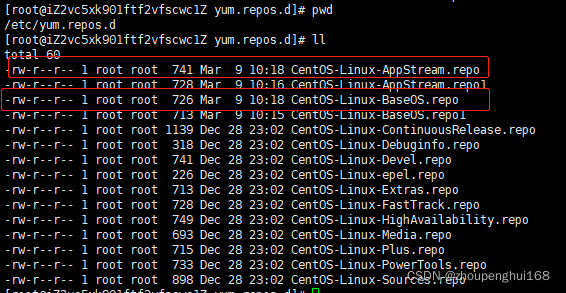
1. Find CentOS related directory, backup CentOS-AppStream, CentOS-Base files, generally CentOS directory is under /etc/yum.repos.d folder, as follows:

Backup:

cp CentOS-Linux-AppStream.repo CentOS-Linux-AppStream.repo1
cp CentOS-Linux-BaseOS.repo CentOS-Linux-BaseOS.repo1

2. Edit the files CentOS-Linux-AppStream.repo,CentOS-Linux-BaseOS.repo for string replacement:

vi CentOS-Linux-BaseOS.repo
# esc 键盘 : 命令模式下执行:
%s/mirrors.cloud.aliyuncs.com/mirrors.aliyun.com/g 
# 继续执行:
%s/$releasever/$releasever-stream/g

vi CentOS-Linux-AppStream.repo
# esc 键盘 : 命令模式下执行:
%s/mirrors.cloud.aliyuncs.com/mirrors.aliyun.com/g 
# 继续执行:
%s/$releasever/$releasever-stream/g

3. Execute the order:

yum makecache
yum update

Command execution effect:

[root@iZ2vc5xk901ftf2vfscwc1Z yum.repos.d]# yum update
Invalid configuration value: failovermethod=priority in /etc/yum.repos.d/CentOS-Linux-epel.repo; Configuration: OptionBinding with id "failovermethod" does not exist
Last metadata expiration check: 0:01:22 ago on Wed 09 Mar 2022 10:20:01 AM CST.
Error: 
 Problem: package centos-stream-release-8.6-1.el8.noarch requires centos-stream-repos, but none of the providers can be installed
  - package centos-linux-repos-8-3.el8.noarch conflicts with centos-repos(8) provided by centos-stream-repos-8-2.el8.noarch
  - package centos-stream-repos-8-2.el8.noarch conflicts with centos-repos(8) provided by centos-linux-repos-8-3.el8.noarch
  - package centos-linux-repos-8-3.el8.noarch conflicts with centos-repos(8) provided by centos-stream-repos-8-3.el8.noarch
  - package centos-stream-repos-8-3.el8.noarch conflicts with centos-repos(8) provided by centos-linux-repos-8-3.el8.noarch
  - package centos-linux-repos-8-3.el8.noarch conflicts with centos-repos(8) provided by centos-stream-repos-8-4.el8.noarch
  - package centos-stream-repos-8-4.el8.noarch conflicts with centos-repos(8) provided by centos-linux-repos-8-3.el8.noarch
  - cannot install the best update candidate for package centos-linux-release-8.5-1.2111.el8.noarch
  - problem with installed package centos-linux-repos-8-3.el8.noarch
(try to add '--allowerasing' to command line to replace conflicting packages or '--skip-broken' to skip uninstallable packages or '--nobest' to use not only best candidate packages)

Execute the command Yum install * expect * again, and the results are as follows:

[root@iZ2vc5xk901ftf2vfscwc1Z yum.repos.d]# yum install *expect*
Invalid configuration value: failovermethod=priority in /etc/yum.repos.d/CentOS-Linux-epel.repo; Configuration: OptionBinding with id "failovermethod" does not exist
Last metadata expiration check: 0:07:00 ago on Wed 09 Mar 2022 10:20:01 AM CST.
Package python3-pexpect-4.3.1-3.el8.noarch is already installed.
Dependencies resolved.
===========================================================================================================
 Package                       Architecture         Version                     Repository            Size
===========================================================================================================
Installing:
 expect                        x86_64               5.45.4-5.el8                baseos               267 k
 python3-aexpect               noarch               1.6.2-1.el8                 epel                  93 k
Installing dependencies:
 tcl                           x86_64               1:8.6.8-2.el8               baseos               1.1 M

Transaction Summary
===========================================================================================================
Install  3 Packages

Total download size: 1.5 M
Installed size: 5.2 M
Is this ok [y/N]: y
Downloading Packages:
(1/3): python3-aexpect-1.6.2-1.el8.noarch.rpm                              467 kB/s |  93 kB     00:00    
(2/3): expect-5.45.4-5.el8.x86_64.rpm                                      282 kB/s | 267 kB     00:00    
(3/3): tcl-8.6.8-2.el8.x86_64.rpm                                          351 kB/s | 1.1 MB     00:03    
-----------------------------------------------------------------------------------------------------------
Total                                                                      461 kB/s | 1.5 MB     00:03     
Running transaction check
Transaction check succeeded.
Running transaction test
Transaction test succeeded.
Running transaction
  Preparing        :                                                                                   1/1 
  Installing       : tcl-1:8.6.8-2.el8.x86_64                                                          1/3 
  Running scriptlet: tcl-1:8.6.8-2.el8.x86_64                                                          1/3 
  Installing       : expect-5.45.4-5.el8.x86_64                                                        2/3 
  Installing       : python3-aexpect-1.6.2-1.el8.noarch                                                3/3 
  Running scriptlet: python3-aexpect-1.6.2-1.el8.noarch                                                3/3 
  Verifying        : expect-5.45.4-5.el8.x86_64                                                        1/3 
  Verifying        : tcl-1:8.6.8-2.el8.x86_64                                                          2/3 
  Verifying        : python3-aexpect-1.6.2-1.el8.noarch                                                3/3 

Installed:
  expect-5.45.4-5.el8.x86_64       python3-aexpect-1.6.2-1.el8.noarch       tcl-1:8.6.8-2.el8.x86_64      

Complete!

OK, you can install yum

Note: in actual use, if there is no CentOS-AppStream.repo related files, do not operate on them

Eg: install git:

[root@iZ2vc5xk901ftf2vfscwc1Z yum.repos.d]# yum -y install git
Invalid configuration value: failovermethod=priority in /etc/yum.repos.d/CentOS-Linux-epel.repo; Configuration: OptionBinding with id "failovermethod" does not exist
Last metadata expiration check: 0:07:51 ago on Wed 09 Mar 2022 10:20:01 AM CST.
Dependencies resolved.
===========================================================================================================
 Package                      Architecture       Version                       Repository             Size
===========================================================================================================
Installing:
 git                          x86_64             2.31.1-2.el8                  appstream             161 k
Installing dependencies:
 git-core                     x86_64             2.31.1-2.el8                  appstream             4.7 M
 git-core-doc                 noarch             2.31.1-2.el8                  appstream             2.6 M
 perl-Error                   noarch             1:0.17025-2.el8               appstream              46 k
 perl-Git                     noarch             2.31.1-2.el8                  appstream              78 k
 perl-TermReadKey             x86_64             2.37-7.el8                    appstream              40 k

Transaction Summary
===========================================================================================================
Install  6 Packages

Total download size: 7.7 M
Installed size: 38 M
Downloading Packages:
(1/6): git-2.31.1-2.el8.x86_64.rpm                                         299 kB/s | 161 kB     00:00    
(2/6): perl-Error-0.17025-2.el8.noarch.rpm                                 185 kB/s |  46 kB     00:00    
(3/6): perl-Git-2.31.1-2.el8.noarch.rpm                                    290 kB/s |  78 kB     00:00    
(4/6): perl-TermReadKey-2.37-7.el8.x86_64.rpm                              148 kB/s |  40 kB     00:00    
(5/6): git-core-doc-2.31.1-2.el8.noarch.rpm                                385 kB/s | 2.6 MB     00:07    
(6/6): git-core-2.31.1-2.el8.x86_64.rpm                                    394 kB/s | 4.7 MB     00:12    
-----------------------------------------------------------------------------------------------------------
Total                                                                      640 kB/s | 7.7 MB     00:12     
Running transaction check
Transaction check succeeded.
Running transaction test
Transaction test succeeded.
Running transaction
  Preparing        :                                                                                   1/1 
  Installing       : git-core-2.31.1-2.el8.x86_64                                                      1/6 
  Installing       : git-core-doc-2.31.1-2.el8.noarch                                                  2/6 
  Installing       : perl-TermReadKey-2.37-7.el8.x86_64                                                3/6 
  Installing       : perl-Error-1:0.17025-2.el8.noarch                                                 4/6 
  Installing       : perl-Git-2.31.1-2.el8.noarch                                                      5/6 
  Installing       : git-2.31.1-2.el8.x86_64                                                           6/6 
  Running scriptlet: git-2.31.1-2.el8.x86_64                                                           6/6 
  Verifying        : git-2.31.1-2.el8.x86_64                                                           1/6 
  Verifying        : git-core-2.31.1-2.el8.x86_64                                                      2/6 
  Verifying        : git-core-doc-2.31.1-2.el8.noarch                                                  3/6 
  Verifying        : perl-Error-1:0.17025-2.el8.noarch                                                 4/6 
  Verifying        : perl-Git-2.31.1-2.el8.noarch                                                      5/6 
  Verifying        : perl-TermReadKey-2.37-7.el8.x86_64                                                6/6 

Installed:
  git-2.31.1-2.el8.x86_64             git-core-2.31.1-2.el8.x86_64   git-core-doc-2.31.1-2.el8.noarch    
  perl-Error-1:0.17025-2.el8.noarch   perl-Git-2.31.1-2.el8.noarch   perl-TermReadKey-2.37-7.el8.x86_64  

Complete!
[root@iZ2vc5xk901ftf2vfscwc1Z yum.repos.d]# git --version
git version 2.31.1

Error 2:

Invalid configuration value: failovermethod=priority in /etc/yum.repos.d/CentOS-Linux-epel.repo; Configuration: OptionBinding with id "failovermethod" does not exist
Repository extras is listed more than once in the configuration
CentOS Linux 8 - AppStream                                                 6.7 kB/s | 2.3 kB     00:00    
Errors during downloading metadata for repository 'appstream':
  - Status code: 404 for http://mirrors.cloud.aliyuncs.com/centos/8/AppStream/x86_64/os/repodata/repomd.xml (IP: xxx.xxx.xxx.xxx)
Error: Failed to download metadata for repo 'appstream': Cannot download repomd.xml: Cannot download repodata/repomd.xml: All mirrors were tried

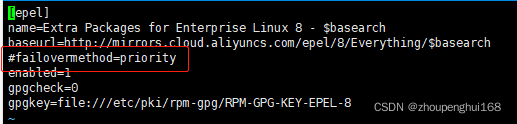
Solution

Enter the file /etc/yum.repos.d/CentOS-Epel.repo, and comment out  failovermethod=priority :

OK, you can also install yum

Leetcode error: AddressSanitizer:DEADLYSIGNAL [How to Solve]

leetcode error:

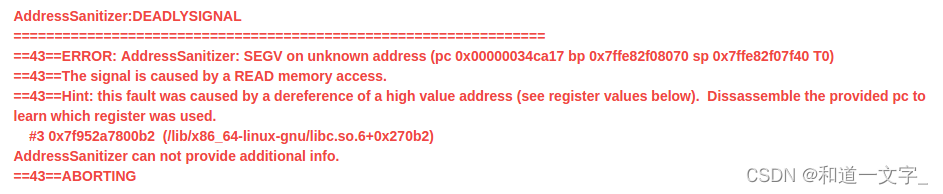
AddressSanitizer:DEADLYSIGNAL ================================================================= ==43==ERROR: AddressSanitizer: SEGV on unknown address (pc 0x00000034ca17 bp 0x7ffe82f08070 sp 0x7ffe82f07f40 T0) ==43==The signal is caused by a READ memory access. ==43==Hint: this fault was caused by a dereference of a high value address (see register values below). Dissassemble the provided pc to learn which register was used. #3 0x7f952a7800b2 (/lib/x86_64-linux-gnu/libc.so.6+0x270b2) AddressSanitizer can not provide additional info. ==43==ABORTING

As you can see, the unknown address was accessed.
Reason:
The code accesses the top element of the stack for an empty stack

else if(s[i] == '}')
{
    if(st.top() == '{')
    {
       st.pop();
    }else
    {
       return false;
    }
}

Solution:

Just join the blank judgment

else if(s[i] == '}')
{
    if(!st.empty() && st.top() == '{')
    {
        st.pop();
    }else
    {
        return false;
    }
}

[Solved] Pycham Error: non zero exit code (2)

preface

When using pycharm to install a third-party package in the python virtual environment in Python interpreter settings, it is likely to report an error: non zero exit code (2), as shown in the figure:
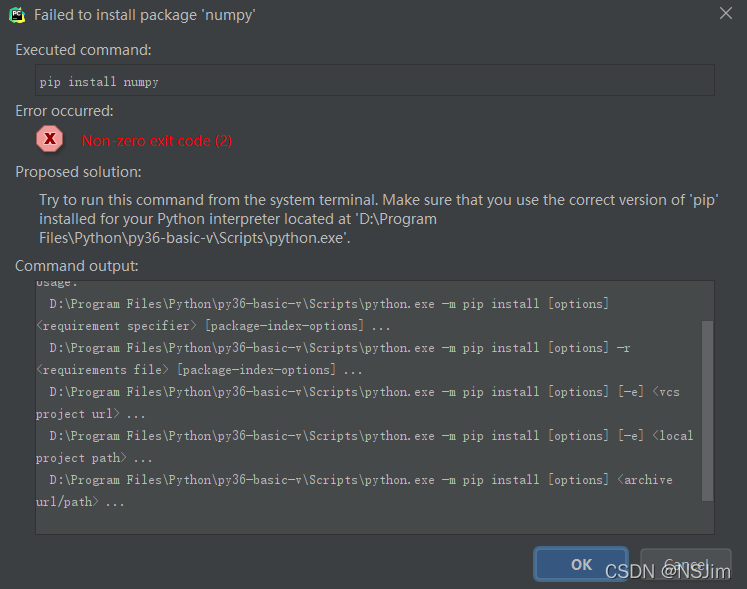
even upgrading pip will report an error, as shown in the figure:
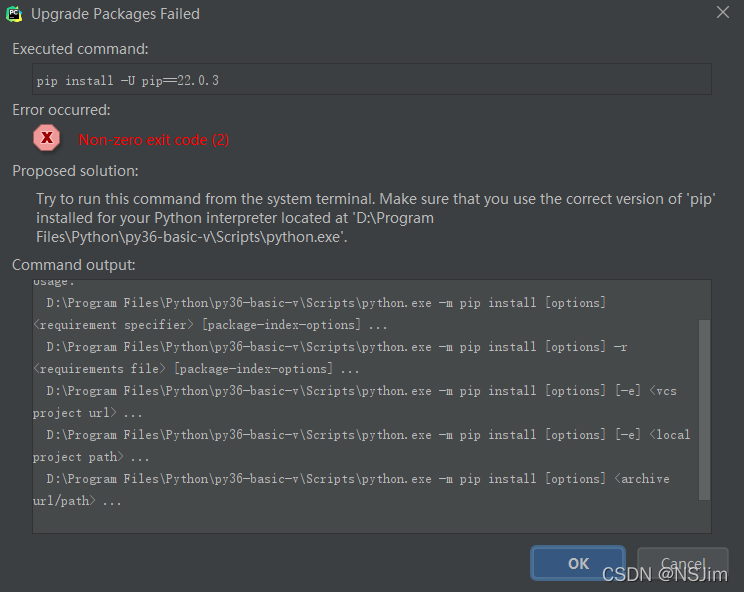
Tips are as follows:

Try to run this command from the system terminal. 
Make sure that you use the correct version of 'pip' installed for your Python interpreter located at 
'D:\Program Files\Python\py36-basic-v\Scripts\python.exe'.

As above belongs, the official says the possible reason is that pip is not installed in the specified directory of the virtual environment, and suggests running the pip command in the terminal to install the third-party package.

The official hint has a certain degree of reasonableness, but it does not try all cases, you can check whether the pip module exists in the directory of the virtual environment, if it does not exist, the pip module can be installed in the specified directory; if it exists, it is not the problem of the pip module path, so what exactly is the reason?

After investigation, it is the problem of pip version, my Python version is 3.6, pip version is 21.3.1, this version of pip will definitely appear the problem, the solution is also very simple, the pip version can be downgraded to 20.2.4, operation method see the following program 2: Downgrade pip version. (It is not recommended to upgrade pip, because new versions of pip may have the same problem)

Solution 1 (recommended): install the third-party package using the terminal terminal

Click Terminal at the bottom of pycharm toolbar , as shown in the following figure:
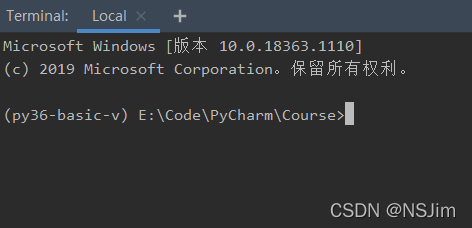
enter the PIP install command to install the third-party package, as shown in the figure:
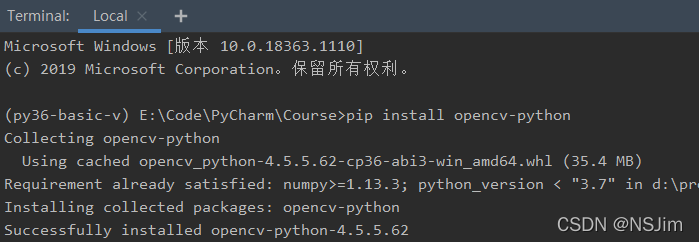
But this solution treats the symptom but not the root cause, the problem is not solved, only the installation of third-party packages by alternative methods, if you want to solve the problem at all, please see solution 2 below.

Solution 2 (fundamental solution): downgrade the PIP version

First, open a project using pycharm. If there is no Python environment, you need to create a virtual environment first, as shown in the following figure:
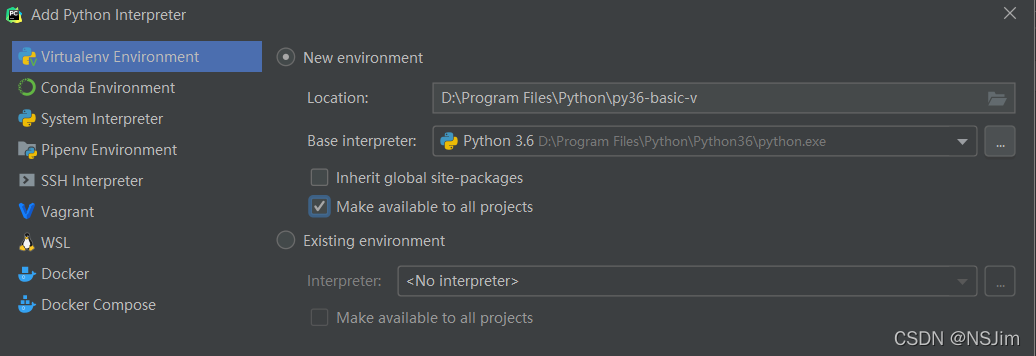
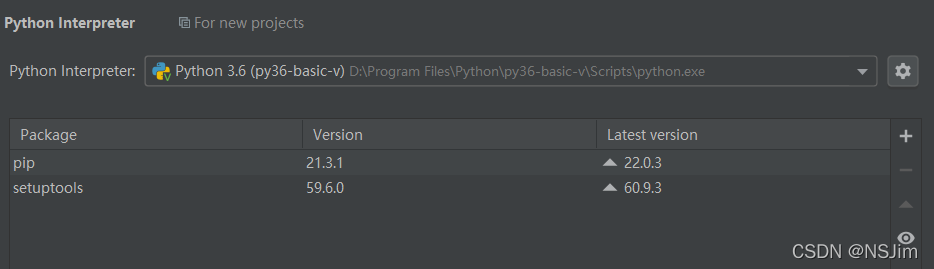
In file - Settings - Python interpreter, we can see that the version of PIP in Python virtual environment is 21.3.1. As shown in the figure below, we need to downgrade the version of Pip to 20.2.4
Click Terminal on the toolbar at the bottom of pychart, as shown in the following figure:

enter the following command. Note that there must be Python -m, otherwise there is no permission:

python -m pip install pip==20.2.4

After entering the command, the following prompt appears to prove that the downgrade is successful:
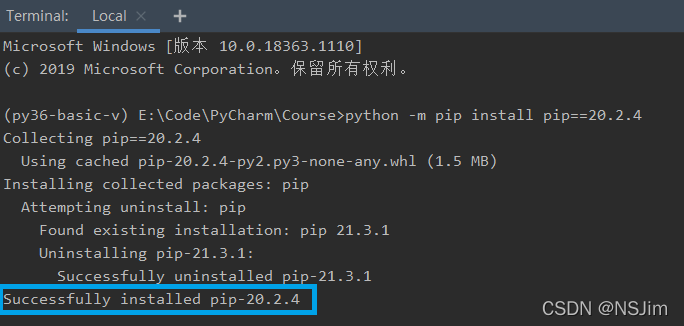
enter the command PIP - V to view the current PIP version, as shown in the following figure:
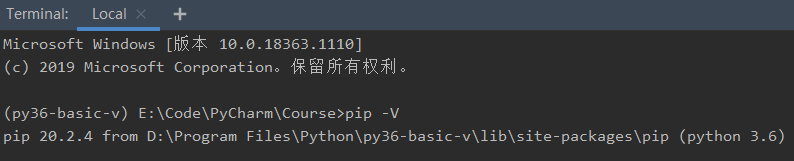
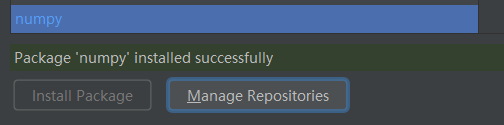
the problem has been successfully solved so far. The third-party package can be successfully installed in Settings, as shown in the following figure:
[Solved] RHEL 7.6 Use yum Error: Could not contact any CDS load balancers

Problem description

The following error was encountered when executing yum update after booting an EC2 instance from MarketPlace with RHEL 7.6’s AMI:

[ec2-user@ip-172-31-43-28 ~]$ sudo yum update
Loaded plugins: amazon-id, rhui-lb, search-disabled-repos


Could not contact any CDS load balancers: https://rhui3.cn-northwest-1.aws.ce.redhat.com/pulp/content/.

Cause of the problem
According to the official RHEL lifecycle statement: Red Hat Enterprise Linux Life Cycle RHEL 7.6 Extended Update Support Add-on all ended on May 31, 2021, while the RedHat official website states: RHUI 3 Takes Over in AWS, Bringing New DNS Data

Since RHEL 7.6 still uses the rh-amazon-rhui-client with version 2 by default, checking the repo configuration files starting with /etc/yum.repo.d/redhat-rhui, you can see that they all start with the address: https://rhui2-cds01.REGION.aws.ce.redhat.com.

After upgrading to RHUI 3 in July 2020, the hostname and IP address were changed, which means that the original repo cannot be used anymore.

With the transition to RHUI 3, new host names and IP addresses are used. If you have firewall rules, proxy settings etc. that worked with the original RHUI 2 host names or their original IP addresses, you are likely affected, and will need to change these rules or settings to allow the new host names or IP addresses.

Solution:

      1. Start a new instance using the last major release of RHEL 7, I’m using RHEL-7.9_HVM-20211005-x86_64-0-Hourly2-GP2 – ami-0196d703168979cc6
      1. SSH to this instance, use the following command to download the latest version of the rh-amazon-rhui-client.noarch package
sudo yum install --downloadonly --downloaddir=/home/ec2-user/ rh-amazon-rhui-client.noarch

Disconnect the SSH connection, use the SCP command on the local computer to download the installation package locally, and then transfer it to the problematic 7.6 instance


scp -i .\xxx.pem ec2-user@[RHEL 7.9的IP]:/home/ec2-user/rh-amazon-rhui-client-3.0.45-1.el7.noarch.rpm ./Desktop/

scp -i .\xxx.pem .\Desktop\rh-amazon-rhui-client-3.0.45-1.el7.noarch.rpm ec2-user@[RHEL 7.6的IP]:/home/ec2-user/

Connect SSH to the 7.6 instance and execute the following command to update RH Amazon rhui client

# Uninstall the old client and beta versions that came with 7.6
sudo yum remove -y rh-amazon-rhui-client rh-amazon-rhui-client-beta
# Manually install the downloaded new version of the rpm package
sudo rpm -ivh --nodeps ~/rh-amazon-rhui-client-3.0.45-1.el7.noarch.rpm
# Resolve the package dependencies by reinstalling them again via yum
sudo yum reinstall -y rh-amazon-rhui-client
# Refresh the cache and repo information
sudo yum clean all
sudo yum repolist
sudo yum list

How to Solve the jump error after Spring Security Login

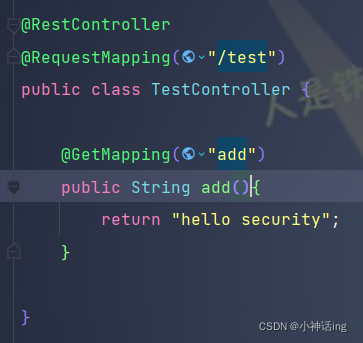
Controller layer

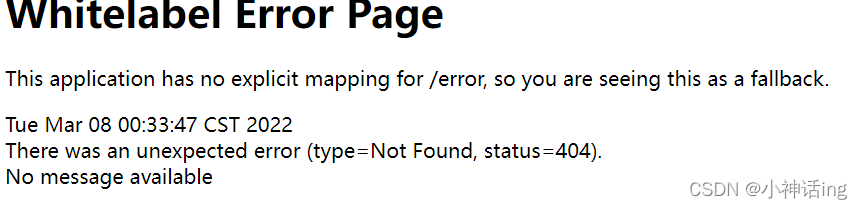
Appears when the login is complete

First, comment out the security dependency and restart the project

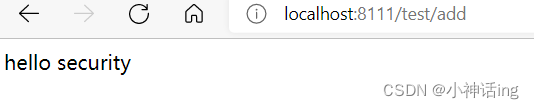
Then access the interface of the controller layer and the access is successful

Then open the security dependency and restart the project

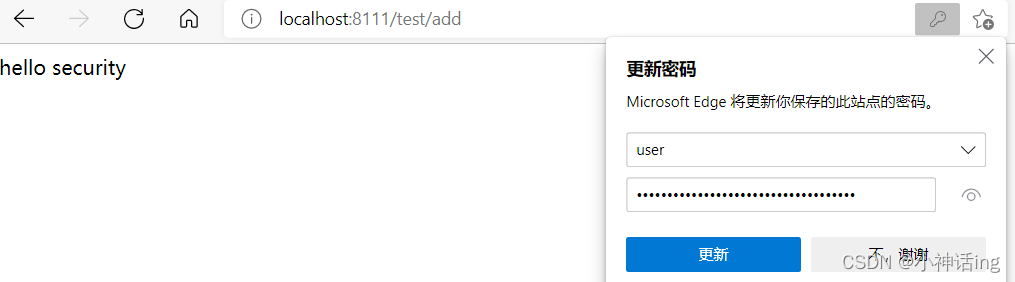
Visit the page again and you can jump

The reason for this may be that the cache is not loaded

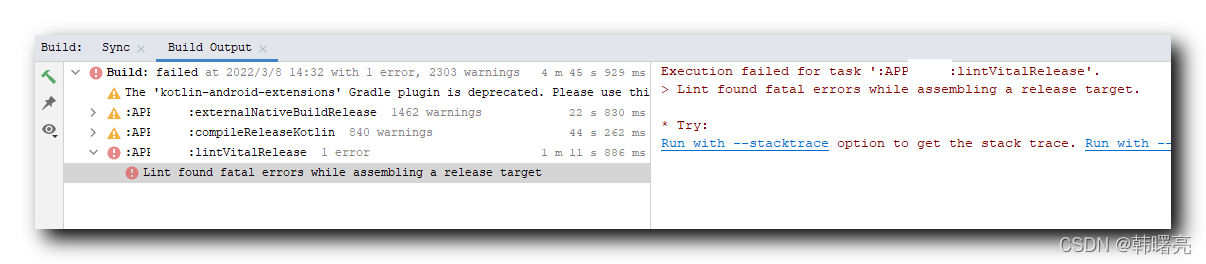
[Solved] Android Studio Compile Error: Execution failed for task ‘:APP_MIDI:lintVitalRelease‘.

1. Error reporting information

When compiling Android application, the following error is reported:

Execution failed for task ':app:lintVitalRelease'.
> Lint found fatal errors while assembling a release target.

* Try:
Run with --stacktrace option to get the stack trace. Run with --info or --debug option to get more log output. Run with --scan to get full insights.


2. Solution

Method I

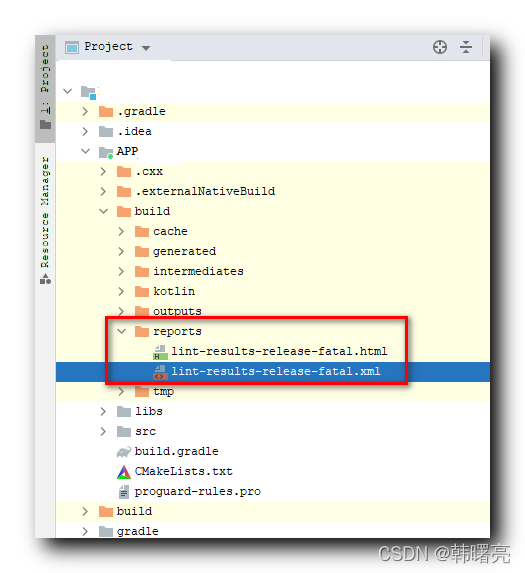
lint checks for errors, which are output in the build/reports/lint-results-release-fatal.xml file, and can be changed by changing the error message in the file to modify the syntax error;

Example of error message:

<?xml version="1.0" encoding="UTF-8"?>
<issues format="5" by="lint 4.1.0">

    <issue
        id="NotSibling"
        severity="Fatal"
        message="`@+id/button` is not a sibling in the same `RelativeLayout`"
        category="Correctness"
        priority="6"
        summary="Invalid Constraints"
        explanation="Layout constraints in a given `ConstraintLayout` or `RelativeLayout` should reference other views within the same relative layout (but not itself!)"
        errorLine1="        android:layout_below=&quot;@+id/button&quot;"
        errorLine2="        ~~~~~~~~~~~~~~~~~~~~~~~~~~~~~~~~~~~~~~">
        <location
            file="D:\Application\app\src\main\res\layout\activity_main.xml"
            line="836"
            column="9"/>
    </issue>

</issues>

Method II:

Configure in build.gradle to remove lint checks:

android{
    lintOptions {
        checkReleaseBuilds false
        abortOnError false
    }
}