Author Archives: Robins

[Solved] GBase 8a MPP Database Loading Error: Unsupported version

Problem:
field loading failed with error:

[ERROR 2018-07-03 14:32:21.612 c.z.u.c.p.l.DataLoadingService:122 pool-16-thread-1] (GBA-01EX-700) Gbase general error: Task 780837 failed,
193.168.199.14:5050Failed to query in gnode:DETAIL: (GBA-01EX-700) Gbase general error:
(gns_host: 193.168.199.15) Unsupported version (not an attribute), or file does not exist: ./pm/metadata/a_l_cell_mm_stat_n4.GED/C00045.ctl.S


Solution:
There are a large number of ctl.S files in the metadata section of this node. It is confirmed that ctl.S is a temporary file during the disk write operation, which will be cleaned up after the write operation is completed, and the residual ctl.S can be regarded as dirty data and needs to be deleted manually.
After deleting the ctl.S file, it loads normally.

[Solved] Elasticsearch 7.10 Startup Error: bootstrap checks failed

Error Messages:

ERROR: [1] bootstrap checks failed
[1]: max file descriptors [4096] for elasticsearch process is too low, increase to at least [65535]
[2]: max number of threads [3795] for user [es] is too low, increase to at least [4096]
[3]: max virtual memory areas vm.max_map_count [65530] is too low, increase to at least [262144]


Problem Cause.
es higher versions of resource requirements, linux system default configuration can not meet its requirements, so it needs to be configured separately
Solution.
[1]: max file descriptors [4096] for elasticsearch process is too low, increase to at least [65535]
Modify the vi /etc/security/limits.conf file and add the configuration

* hard nofile 65535  # *can be es start user
* soft nofile 65535

[2]: max number of threads [3795] for user [es] is too low, increase to at least [4096]
Modify the vi /etc/security/limits.conf file and add the configuration

es - nproc 4096 # es is my start user

After the above two configuration items are changed, ES start the user and login again will take effect;

[3]: max virtual memory areas vm. max_map_count [65530] is too low, increase to at least [262144]

Modify /etc/sysctl.config file, add the following configuration

vi /etc/sysctl.conf 

vm.max_map_count=262144

Execute the order with immediate effect

/sbin/sysctl -p
vm.max_map_count = 262144

​

Start successful

[Solved] AOP Error: BeanPostProcessor before instantiation of bean failed

Error Messages:

org.springframework.beans.factory.BeanCreationException: Error creating bean with name ‘xxx’ defined in file [xxx]:BeanPostProcessor before instantiation of bean failed; nested exception is org.springframework.beans.factory.BeanCreationException: Error creating bean with name ‘org.springframework.aop.support.DefaultBeanFactoryPointcutAdvisor#0’: Initialization of bean failed; nested exception is java.lang.NoClassDefFoundError: org/aspectj/weaver/reflect/ReflectionWorld$ReflectionWorldException


Reason:
Did not import the aspectjweaver.jar package. I had imported the aspectj-1.9.5.jar package and still reported an error, after importing the aspectjweaver.jar it can execute the program normally.

SpringCloud Use openFeign Multipartfile to Upload Files Error: Current request is not a multipart request

Error reporting information

feign MultipartException: Current request is not a multipart request


On the premise of introducing and configuring openfeign

1. Create FeignMultipartSupportConfig.class configuration file

Just copy and paste it directly

import feign.codec.Encoder;
import feign.form.spring.SpringFormEncoder;
import org.springframework.context.annotation.Bean;
import org.springframework.context.annotation.Configuration;
import org.springframework.context.annotation.Primary;
import org.springframework.context.annotation.Scope;

@Configuration
public class FeignMultipartSupportConfig {

    @Bean
    @Primary
    @Scope("prototype")
    public Encoder multipartFormEncoder() {
        return new SpringFormEncoder();
    }

    @Bean
    public feign.Logger.Level multipartLoggerLevel() {
        return feign.Logger.Level.FULL;
    }

}

2. Modify postmapping

    1. 1. MultipartFile type parameters use @RequestPart annotation, string parameters use annotation @RequestParam
    1. 2. Add consumes = MediaType.MULTIPART_FORM_DATA_VALUE
@FeignClient(value = "mk-other", fallback = MkOtherFeignFallBack.class)
public interface MkOtherFeign {
    @PostMapping(value = "/file/pic/upload",consumes = MediaType.MULTIPART_FORM_DATA_VALUE)
    public ResponseResult picUpload(@RequestPart("file") MultipartFile file);
}

Reference link

Vue3.X Attribute Inheritance error [How to Solve]

When writing Vue components, the following warnings are reported inexplicably:

[Vue warn]: Extraneous non-props attributes (border, style) were passed to component but could not be automatically inherited because component renders fragment or text root nodes.
at XXXX (Location of the component where the problem occurred)
at

Solution:
The border, style property was added to the custom component and the custom component did not bother to receive it internally, hence the warning.
So, either add the properties to be received inside the component. If it is in the third party library UI library, it is recommended to remove these attributes directly.

How to Solve Yum Error: db5 error(30973)

Problem error: failed to open rpmdb. db5 error(30973)

error: rpmdb: BDB0113 Thread/process 8442/140713489532992 failed: BDB1507 Thread died in Berkeley DB library
error: db5 error(-30973) from dbenv->failchk: BDB0087 DB_RUNRECOVERY: Fatal error, run database recovery
error: cannot open Packages index using db5 -  (-30973)
error: cannot open Packages database in /var/lib/rpm
CRITICAL:yum.main:

Error: rpmdb open failed
[root@VM-0-6-centos ~]# yum-config-manager --add-repo http://mirrors.aliyun.com/docker-ce/linux/centos/docker-ce.repo
error: rpmdb: BDB0113 Thread/process 8442/140713489532992 failed: BDB1507 Thread died in Berkeley DB library
error: db5 error(-30973) from dbenv->failchk: BDB0087 DB_RUNRECOVERY: Fatal error, run database recovery
error: cannot open Packages index using db5 -  (-30973)
error: cannot open Packages database in /var/lib/rpm
CRITICAL:yum.cli:Yum Error: Error: rpmdb open failed

The reason why rpm is damaged: the database needs to be rebuilt.

Solution: clear the original link through the command and re-establish it.

[root@localhost ~]# rm -rf /var/lib/rpm/_db*  #Delete the original
[root@localhost ~]# rpm --rebuilddb # New
[root@localhost ~]# yum clean all # Clear all yum caches

It can be used normally at present

[Solved] Decision tree error: Graphviz’s executables not found

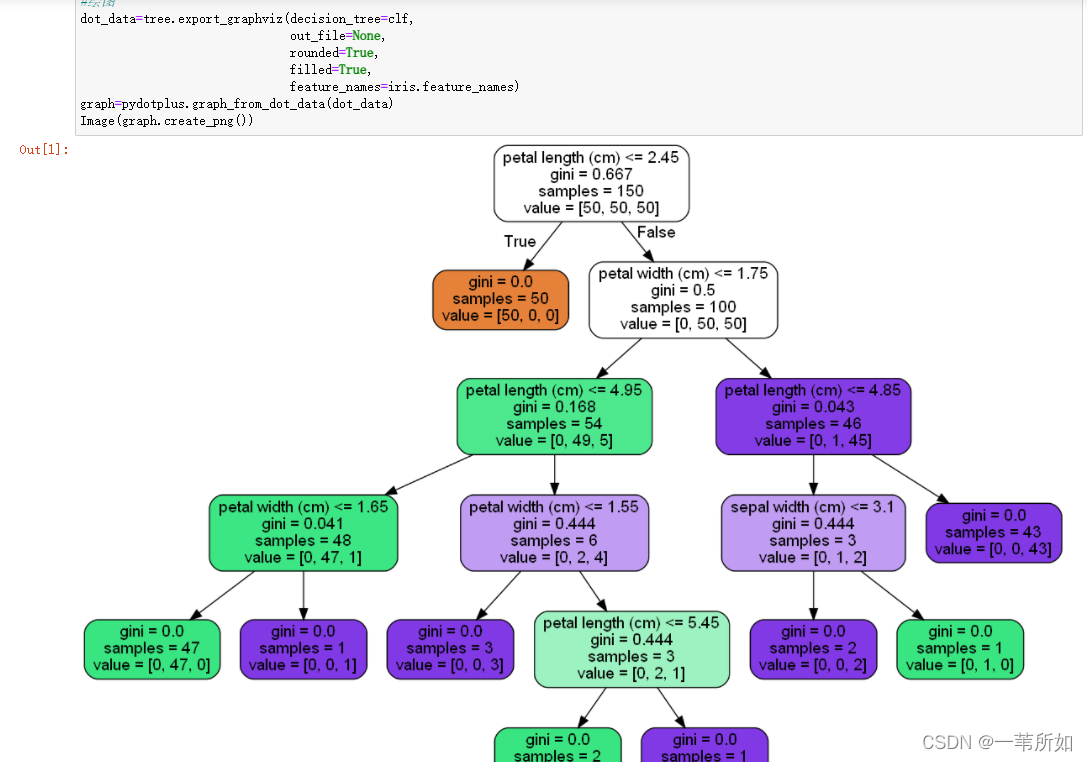
Decision tree code

from sklearn.datasets import load_iris
import pydotplus
from IPython.display import Image
from sklearn import tree
#Training Model
iris=load_iris()
clf=tree.DecisionTreeClassifier()
clf=clf.fit(iris.data,iris.target)

#Drawing
dot_data=tree.export_graphviz(decision_tree=clf,
                              out_file=None,
                              rounded=True,
                              filled=True,
                              feature_names=iris.feature_names)
graph=pydotplus.graph_from_dot_data(dot_data)
Image(graph.create_png())

Installation

Install pydotplus

pip install pydotplus

Running error: graphviz’s executables not found

Installing graphviz

pip install graphviz

Graphviz’s executables not found

After consulting the data, graphviz belongs to an independent software, which needs to be downloaded and installed on the official website

Website: http://www.graphviz.org/Download

Add environment variable

There are two methods, and the second one is recommended for personal test

Method 1: add the path of graphviz’s bin directory in environment variable.

Method 2: OS method

CMD

python

Enter Python environment

imoprt os
os.environ["PATH"]+= os.pathsep+"C:/Program Files/Graphviz/bin"  # change to your path of Graphviz

Done!

Operation results

If it is used in jupyter notebook like me, you need to restart jupyter notebook

[Solved] JS Error: cannot set property xxx of undefined

case1

Error code

quizList[index] = currentQuiz;
quizList[index].learningItem = item;

Error content

Cannot read properties of undefined (reading 'learningItem')

Error reporting reason

currentQuiz object may be undefined, if you add the property learningItem to the undefined object quizList[index] dynamically, it will cause the error “cannot set property xxx of undefined”.

Solution:

quizList[index] = currentQuiz == undefined ?{} : currentQuiz;
quizList[index].learningItem = item;

Just judge whether the quizlist [index] is undefined


case2

Error code

quiz.finishedstudent.forEach(item => {
	if (item.score < 80) {
		errorNum++;
	}
})

Error content

Cannot read properties of undefined (reading 'forEach')

Solution:

if (quiz.finishedstudent != undefined) {
	quiz.finishedstudent.forEach(item => {
		if (item.score < 80) {
			errorNum++;
		}
	})
}

xxx is assigned a value but never used [How to Solve]

XXX is assigned a value but never used


Solution:

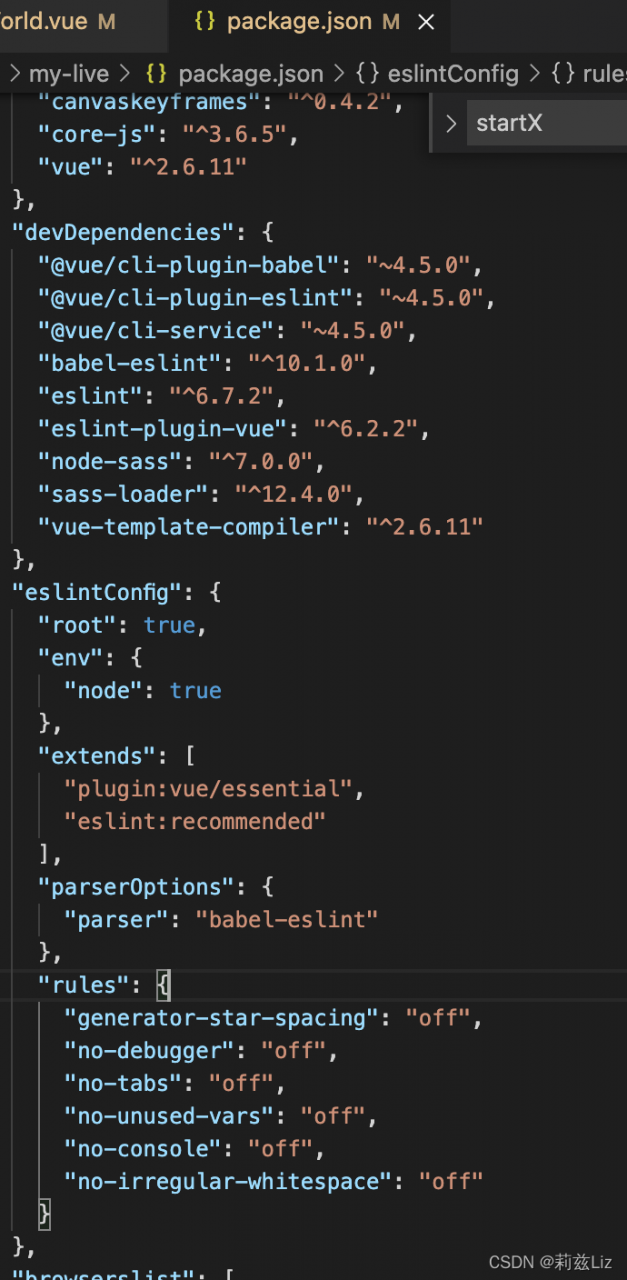
Find the path
package.json file -> devDependencies -> rules

Add the following code

	"rules": {
      "generator-star-spacing": "off",
      "no-debugger": "off",
      "no-tabs": "off",
      "no-unused-vars": "off",
      "no-console": "off",
      "no-irregular-whitespace": "off"
    }

The code is located in the page

it will be normal to open it again

How to Solve ModuleNotFoundError Error After pip-autoremove Installed

The pip-autoremove tool is very convenient for managing the dependencies in the environment, when uninstalling a Package, you can uninstall it together with the dependencies installed at that time. However, after version 0.10.0, using pip-autoremove will report an error:

pip-autoremove packege_name
> ModuleNotFoundError: No module named 'pip_autoremove'

This is because in this version, pip-autoremove is treated as a Module. now there is a new commit on github that fixes this problem, but at the moment the direct installation via pip still does not work. In this case, you can force the installation of the fixed version to solve the problem.

pip3 install --force git+https://github.com/imba-tjd/pip-autoremove@ups

[Solved] Android Gradle configure error: Location: Class buildconfig

Error message:

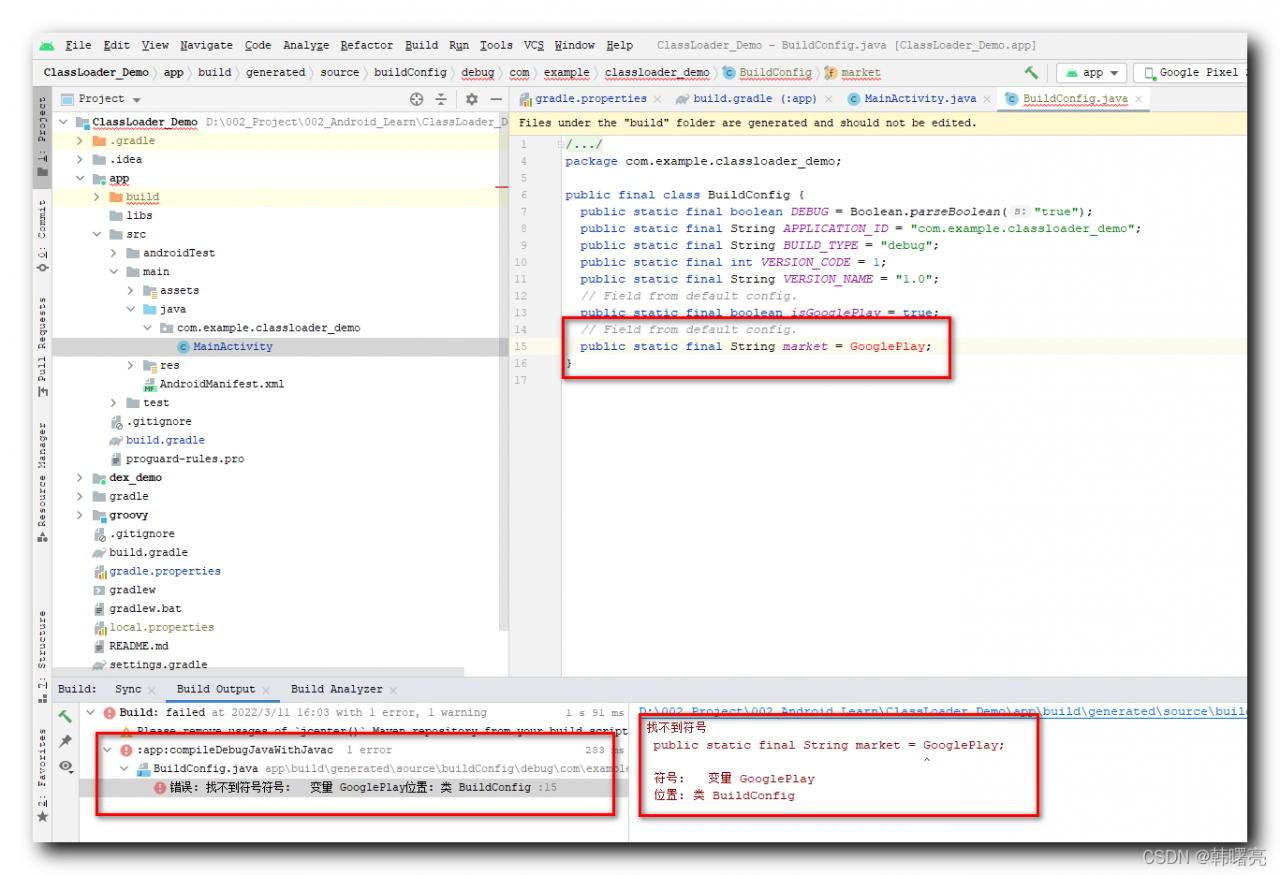
D:\002_Project\002_Android_Learn\ClassLoader_Demo\app\build\generated\source\buildConfig\debug\com\example\classloader_demo\BuildConfig.java:15: Error: Symbol not found
  public static final String market = GooglePlay;
                                      ^
  Symbol: Variable GooglePlay
  Location: Class BuildConfig
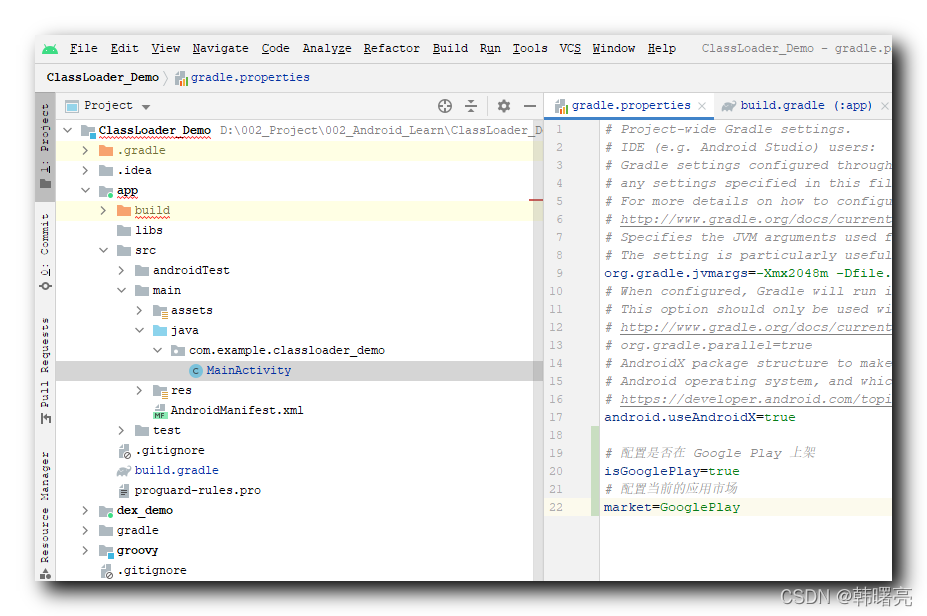
In the gradle.properties configuration file in the root of the Android Studio project, configure as:

# Configure whether to be on Google Play
isGooglePlay=true
# Configure the current app marketplace
market=GooglePlay
The corresponding configuration in build.gradle is as follows :

android {

    defaultConfig {
        // Whether the app is available on Google Play
        buildConfigField("boolean", "isGooglePlay", isGooglePlay)
        // The current app marketplace
        buildConfigField("String", "market", market)
    }
}

The generated BuildConfig.java configuration is as follows :

/**
 * Automatically generated file. DO NOT MODIFY
 */
package com.example.classloader_demo;

public final class BuildConfig {
  public static final boolean DEBUG = Boolean.parseBoolean("true");
  public static final String APPLICATION_ID = "com.example.classloader_demo";
  public static final String BUILD_TYPE = "debug";
  public static final int VERSION_CODE = 1;
  public static final String VERSION_NAME = "1.0";
  // Field from default config.
  public static final boolean isGooglePlay = true;
  // Field from default config.
  public static final String market = GooglePlay;
}

The last googleplay string has no double quotation marks, resulting in an error;


2. Solution

use

buildConfigField("String", "market", "\"${market}\"")

Groovy code , you can generate the following configuration in BuildConfig.java :

public static final String market = "GooglePlay";

The double quotes in the string need to be added with their own escape characters, otherwise they are invalid;

The first level of double quotes in “\”${market}\”” is because the buildConfigField function requires three string variables to be passed in, and the third parameter must be a string;

The second double-quote \” \”” uses the transfer character, which is the double-quote displayed in BuildConfig, and the internal ${market} is the GooglePlay configuration content ;

[Solved] PCL Compile Error: undefined reference to `pcl::PCLBase<pcl::PointXYZRGBA>:: XXX

Environment:
Ubuntu 20.04, PCL 1.11.0
when compiling PCL with cmake, an error is reported:

/usr/bin/ld: CMakeFiles/MYSLAM.dir/src/voslam.cpp.o:(.data.rel.ro._ZTVN3pcl7PCLBaseINS_12PointXYZRGBAEEE[_ZTVN3pcl7PCLBaseINS_12PointXYZRGBAEEE]+0x20): undefined reference to `pcl::PCLBase<pcl::PointXYZRGBA>::setInputCloud(std::shared_ptr<pcl::PointCloud<pcl::PointXYZRGBA> const> const&)'
/usr/bin/ld: CMakeFiles/MYSLAM.dir/src/voslam.cpp.o:(.data.rel.ro._ZTVN3pcl7PCLBaseINS_12PointXYZRGBAEEE[_ZTVN3pcl7PCLBaseINS_12PointXYZRGBAEEE]+0x28): undefined reference to `pcl::PCLBase<pcl::PointXYZRGBA>::setIndices(std::shared_ptr<std::vector<int, std::allocator<int> > > const&)'
/usr/bin/ld: CMakeFiles/MYSLAM.dir/src/voslam.cpp.o:(.data.rel.ro._ZTVN3pcl7PCLBaseINS_12PointXYZRGBAEEE[_ZTVN3pcl7PCLBaseINS_12PointXYZRGBAEEE]+0x30): undefined reference to `pcl::PCLBase<pcl::PointXYZRGBA>::setIndices(std::shared_ptr<std::vector<int, std::allocator<int> > const> const&)'
/usr/bin/ld: CMakeFiles/MYSLAM.dir/src/voslam.cpp.o:(.data.rel.ro._ZTVN3pcl7PCLBaseINS_12PointXYZRGBAEEE[_ZTVN3pcl7PCLBaseINS_12PointXYZRGBAEEE]+0x38): undefined reference to `pcl::PCLBase<pcl::PointXYZRGBA>::setIndices(std::shared_ptr<pcl::PointIndices const> const&)'
/usr/bin/ld: CMakeFiles/MYSLAM.dir/src/voslam.cpp.o:(.data.rel.ro._ZTVN3pcl7PCLBaseINS_12PointXYZRGBAEEE[_ZTVN3pcl7PCLBaseINS_12PointXYZRGBAEEE]+0x40): undefined reference to `pcl::PCLBase<pcl::PointXYZRGBA>::setIndices(unsigned long, unsigned long, unsigned long, unsigned long)'
/usr/bin/ld: CMakeFiles/MYSLAM.dir/src/voslam.cpp.o:(.data.rel.ro._ZTVN3pcl6FilterINS_12PointXYZRGBAEEE[_ZTVN3pcl6FilterINS_12PointXYZRGBAEEE]+0x20): undefined reference to `pcl::PCLBase<pcl::PointXYZRGBA>::setInputCloud(std::shared_ptr<pcl::PointCloud<pcl::PointXYZRGBA> const> const&)'
/usr/bin/ld: CMakeFiles/MYSLAM.dir/src/voslam.cpp.o:(.data.rel.ro._ZTVN3pcl6FilterINS_12PointXYZRGBAEEE[_ZTVN3pcl6FilterINS_12PointXYZRGBAEEE]+0x28): undefined reference to `pcl::PCLBase<pcl::PointXYZRGBA>::setIndices(std::shared_ptr<std::vector<int, std::allocator<int> > > const&)'
/usr/bin/ld: CMakeFiles/MYSLAM.dir/src/voslam.cpp.o:(.data.rel.ro._ZTVN3pcl6FilterINS_12PointXYZRGBAEEE[_ZTVN3pcl6FilterINS_12PointXYZRGBAEEE]+0x30): undefined reference to `pcl::PCLBase<pcl::PointXYZRGBA>::setIndices(std::shared_ptr<std::vector<int, std::allocator<int> > const> const&)'
/usr/bin/ld: CMakeFiles/MYSLAM.dir/src/voslam.cpp.o:(.data.rel.ro._ZTVN3pcl6FilterINS_12PointXYZRGBAEEE[_ZTVN3pcl6FilterINS_12PointXYZRGBAEEE]+0x38): undefined reference to `pcl::PCLBase<pcl::PointXYZRGBA>::setIndices(std::shared_ptr<pcl::PointIndices const> const&)'
/usr/bin/ld: CMakeFiles/MYSLAM.dir/src/voslam.cpp.o:(.data.rel.ro._ZTVN3pcl6FilterINS_12PointXYZRGBAEEE[_ZTVN3pcl6FilterINS_12PointXYZRGBAEEE]+0x40): undefined reference to `pcl::PCLBase<pcl::PointXYZRGBA>::setIndices(unsigned long, unsigned long, unsigned long, unsigned long)'
/usr/bin/ld: CMakeFiles/MYSLAM.dir/src/voslam.cpp.o:(.data.rel.ro._ZTVN3pcl9VoxelGridINS_12PointXYZRGBAEEE[_ZTVN3pcl9VoxelGridINS_12PointXYZRGBAEEE]+0x20): undefined reference to `pcl::PCLBase<pcl::PointXYZRGBA>::setInputCloud(std::shared_ptr<pcl::PointCloud<pcl::PointXYZRGBA> const> const&)'
/usr/bin/ld: CMakeFiles/MYSLAM.dir/src/voslam.cpp.o:(.data.rel.ro._ZTVN3pcl9VoxelGridINS_12PointXYZRGBAEEE[_ZTVN3pcl9VoxelGridINS_12PointXYZRGBAEEE]+0x28): undefined reference to `pcl::PCLBase<pcl::PointXYZRGBA>::setIndices(std::shared_ptr<std::vector<int, std::allocator<int> > > const&)'
/usr/bin/ld: CMakeFiles/MYSLAM.dir/src/voslam.cpp.o:(.data.rel.ro._ZTVN3pcl9VoxelGridINS_12PointXYZRGBAEEE[_ZTVN3pcl9VoxelGridINS_12PointXYZRGBAEEE]+0x30): undefined reference to `pcl::PCLBase<pcl::PointXYZRGBA>::setIndices(std::shared_ptr<std::vector<int, std::allocator<int> > const> const&)'
/usr/bin/ld: CMakeFiles/MYSLAM.dir/src/voslam.cpp.o:(.data.rel.ro._ZTVN3pcl9VoxelGridINS_12PointXYZRGBAEEE[_ZTVN3pcl9VoxelGridINS_12PointXYZRGBAEEE]+0x38): undefined reference to `pcl::PCLBase<pcl::PointXYZRGBA>::setIndices(std::shared_ptr<pcl::PointIndices const> const&)'
/usr/bin/ld: CMakeFiles/MYSLAM.dir/src/voslam.cpp.o:(.data.rel.ro._ZTVN3pcl9VoxelGridINS_12PointXYZRGBAEEE[_ZTVN3pcl9VoxelGridINS_12PointXYZRGBAEEE]+0x40): undefined reference to `pcl::PCLBase<pcl::PointXYZRGBA>::setIndices(unsigned long, unsigned long, unsigned long, unsigned long)'
/usr/bin/ld: CMakeFiles/MYSLAM.dir/src/voslam.cpp.o:(.data.rel.ro._ZTVN3pcl9VoxelGridINS_12PointXYZRGBAEEE[_ZTVN3pcl9VoxelGridINS_12PointXYZRGBAEEE]+0x48): undefined reference to `pcl::VoxelGrid<pcl::PointXYZRGBA>::applyFilter(pcl::PointCloud<pcl::PointXYZRGBA>&)'
/usr/bin/ld: CMakeFiles/MYSLAM.dir/src/pointcloudmapping.cpp.o: in function `PointCloudMapping::PointCloudMapping(double)':
pointcloudmapping.cpp:(.text+0x1ac): undefined reference to `pcl::PCLBase<pcl::PointXYZRGBA>::PCLBase()'
/usr/bin/ld: CMakeFiles/MYSLAM.dir/src/pointcloudmapping.cpp.o: in function `PointCloudMapping::viewer()':
pointcloudmapping.cpp:(.text+0x1626): undefined reference to `pcl::visualization::CloudViewer::CloudViewer(std::__cxx11::basic_string<char, std::char_traits<char>, std::allocator<char> > const&)'
/usr/bin/ld: pointcloudmapping.cpp:(.text+0x1d39): undefined reference to `pcl::PCLBase<pcl::PointXYZRGBA>::setInputCloud(std::shared_ptr<pcl::PointCloud<pcl::PointXYZRGBA> const> const&)'
/usr/bin/ld: pointcloudmapping.cpp:(.text+0x1d66): undefined reference to `pcl::PCLBase<pcl::PointXYZRGBA>::initCompute()'
/usr/bin/ld: pointcloudmapping.cpp:(.text+0x1db5): undefined reference to `pcl::VoxelGrid<pcl::PointXYZRGBA>::applyFilter(pcl::PointCloud<pcl::PointXYZRGBA>&)'
/usr/bin/ld: pointcloudmapping.cpp:(.text+0x1dbd): undefined reference to `pcl::PCLBase<pcl::PointXYZRGBA>::deinitCompute()'
/usr/bin/ld: pointcloudmapping.cpp:(.text+0x1ff7): undefined reference to `pcl::visualization::CloudViewer::showCloud(std::shared_ptr<pcl::PointCloud<pcl::PointXYZRGBA> const> const&, std::__cxx11::basic_string<char, std::char_traits<char>, std::allocator<char> > const&)'
/usr/bin/ld: pointcloudmapping.cpp:(.text+0x24dd): undefined reference to `pcl::VoxelGrid<pcl::PointXYZRGBA>::applyFilter(pcl::PointCloud<pcl::PointXYZRGBA>&)'
/usr/bin/ld: pointcloudmapping.cpp:(.text+0x263d): undefined reference to `pcl::visualization::CloudViewer::~CloudViewer()'
/usr/bin/ld: pointcloudmapping.cpp:(.text+0x2798): undefined reference to `pcl::visualization::CloudViewer::~CloudViewer()'
collect2: error: ld returned 1 exit status

Solution:
manually specify the header file and link library of PCL:

# find_package(PCL 1.11.0 EXACT REQUIRED) 
# add_definitions( ${PCL_DEFINITIONS} )

-------Modify---:
file(GLOB PCL_LIBRARIES /usr/local/lib/libpcl_*)
set(PCL_INCLUDE_DIRS /usr/local/include/pcl-1.11)

INCLUDE_DIRECTORIES(${PROJECT_NAME} ${PCL_INCLUDE_DIRS})
TARGET_LINK_LIBRARIES(${PROJECT_NAME} ${PCL_LIBRARIES})