Author Archives: Robins

Android studio configurate intent-filter and compile error [Solved]

The error contents are as follows:

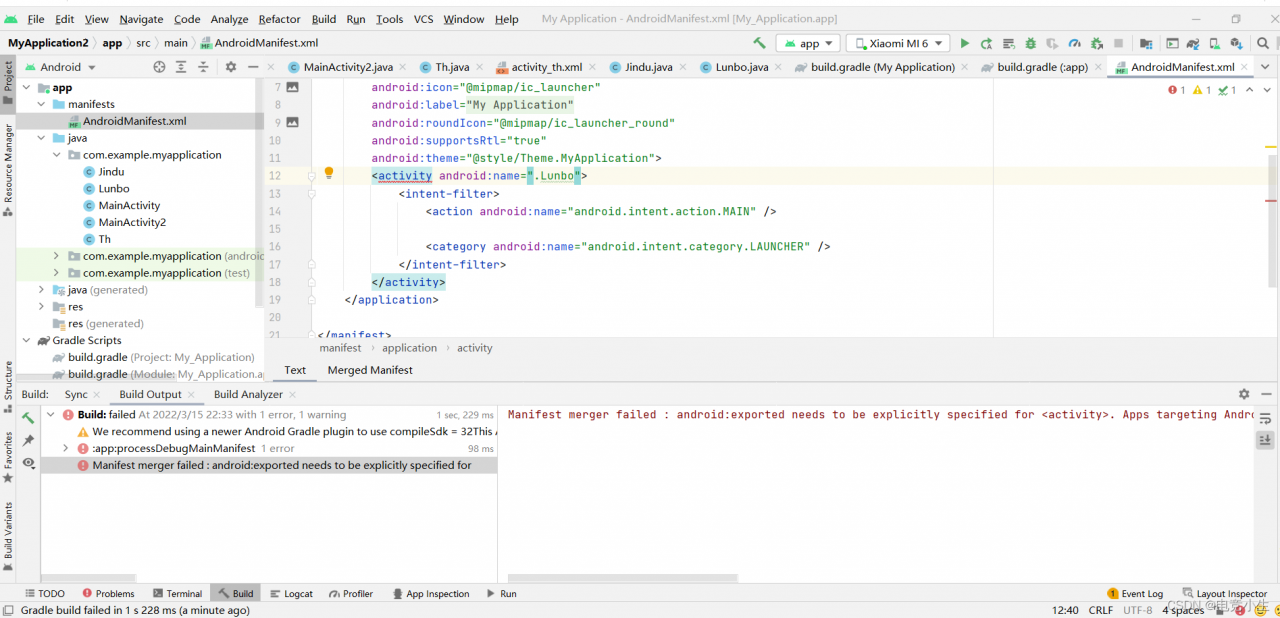
Manifest merger failed : android:exported needs to be explicitly specified for <activity>. Apps targeting Android 12 and higher are required to specify an explicit value for `android:exported` when the corresponding component has an intent filter defined.


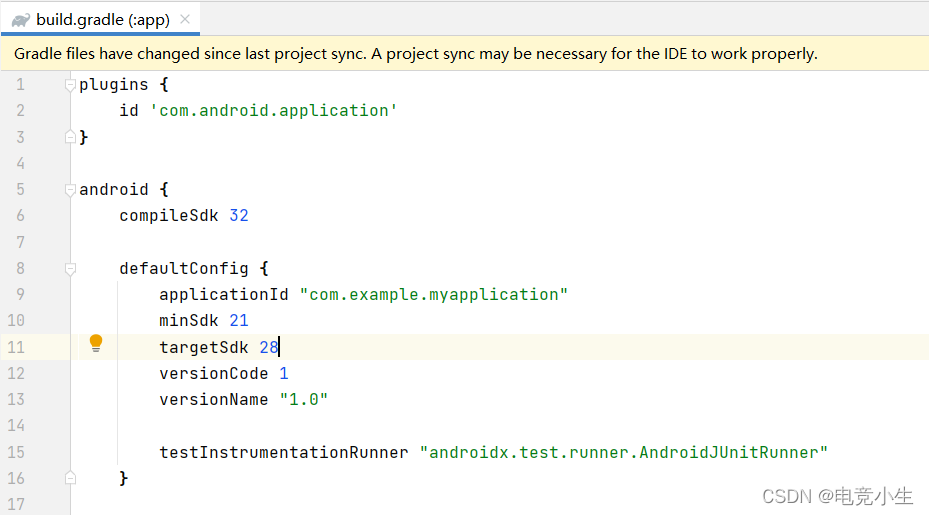
When targeting is greater than or equal to Android 12, if some activities are configured with intent-filter, the exported property must be configured at the same time.

According to the error report, there are two solutions:

1. Modify the targetSdk of build.gradle less than 30.

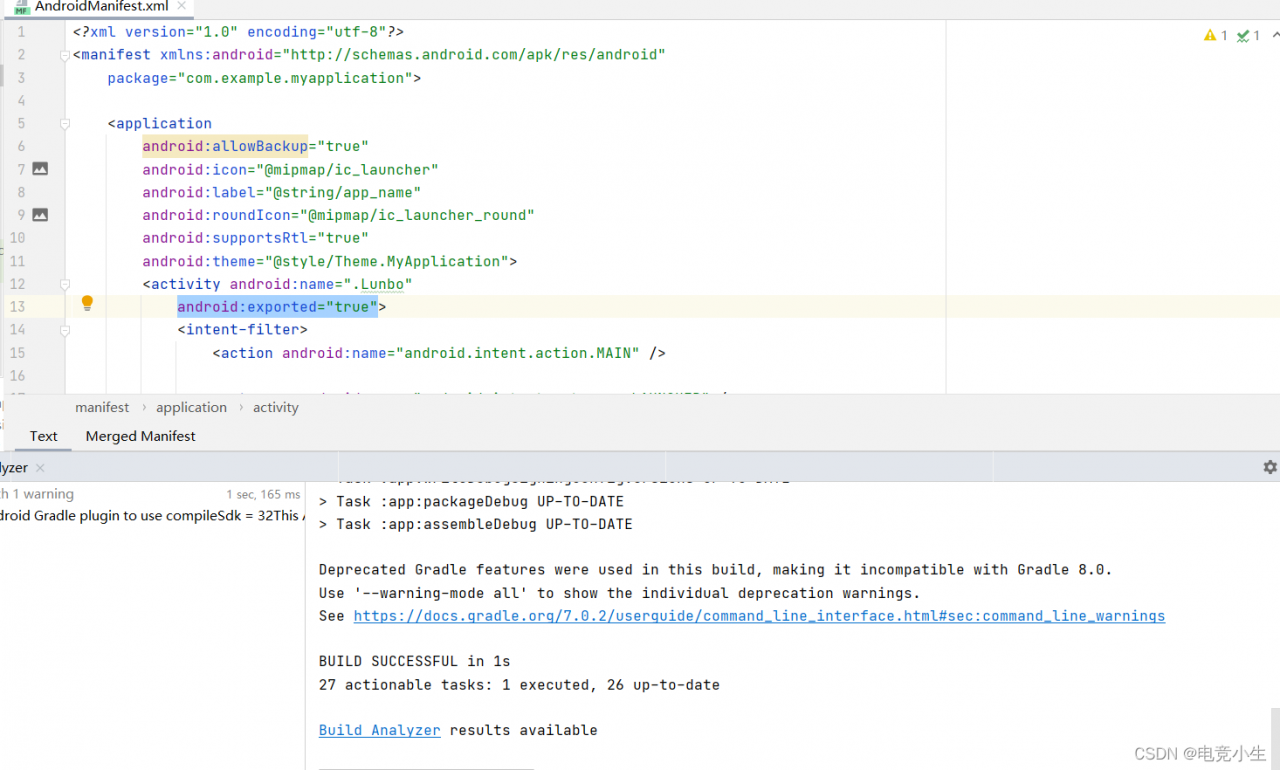
2. Or add the export attribute to the <Intent-filter> tag in AndroidManifest.xml and assign it to true

Last hammer

No problem!

Mybatis-plus automatically generates code error [Solved]

09:39:23.593 [main] DEBUG com.baomidou.mybatisplus.generator.AutoGenerator - ==========================准备生成文件...==========================
Exception in thread "main" java.lang.NoClassDefFoundError: freemarker/template/Configuration
at com.baomidou.mybatisplus.generator.engine.FreemarkerTemplateEngine.init(FreemarkerTemplateEngine.java:41)
at com.baomidou.mybatisplus.generator.engine.FreemarkerTemplateEngine.init(FreemarkerTemplateEngine.java:34)
at com.baomidou.mybatisplus.generator.AutoGenerator.execute(AutoGenerator.java:103)
at com.dream.road.CodeGenerator.main(CodeGenerator.java:136)
Caused by: java.lang.ClassNotFoundException: freemarker.template.Configuration
at java.net.URLClassLoader.findClass(URLClassLoader.java:381)
at java.lang.ClassLoader.loadClass(ClassLoader.java:424)
at sun.misc.Launcher$AppClassLoader.loadClass(Launcher.java:335)
at java.lang.ClassLoader.loadClass(ClassLoader.java:357)

Solution:

Dependencies that need to be imported for automatic code generation

        <!--mybatis-plus automatically generates code-->
        <dependency>
            <groupId>com.baomidou</groupId>
            <artifactId>mybatis-plus-generator</artifactId>
            <version>3.5.1</version>
        </dependency>
        <dependency>
            <groupId>org.apache.velocity</groupId>
            <artifactId>velocity-engine-core</artifactId>
            <version>2.2</version>
        </dependency>
        <dependency>
            <groupId>org.freemarker</groupId>
            <artifactId>freemarker</artifactId>
            <version>2.3.28</version>
            <scope>compile</scope>
        </dependency>

How to Solve Spring integrate Seata startup error

This error was found in the startup project for a long time, that is, the dependency is not correct
factory method 'globaltransactionscanner' threw exception; nested exception is io. seata. common. exception. NotSupportYetException: not support register type: null

My spring dependent version

			
			<dependency>
                <groupId>org.springframework.boot</groupId>
                <artifactId>spring-boot-dependencies</artifactId>
                <version>2.1.10.RELEASE</version>
                <type>pom</type>
                <scope>import</scope>
            </dependency>
            <dependency>
                <groupId>org.springframework.cloud</groupId>
                <artifactId>spring-cloud-dependencies</artifactId>
                <version>Greenwich.RELEASE</version>
                <type>pom</type>
                <scope>import</scope>
            </dependency>
            <dependency>
                <groupId>com.alibaba.cloud</groupId>
                <artifactId>spring-cloud-alibaba-dependencies</artifactId>
                <version>2.1.0.RELEASE</version>
                <type>pom</type>
                <scope>import</scope>
            </dependency>

Replace the Seata dependency with this one and start successfully

		
		<dependency>
            <groupId>com.alibaba.cloud</groupId>
            <artifactId>spring-cloud-starter-alibaba-seata</artifactId>
            <exclusions>
                <exclusion>
                    <groupId>io.seata</groupId>
                    <artifactId>seata-spring-boot-starter</artifactId>
                </exclusion>
            </exclusions>
        </dependency>
        <dependency>
            <groupId>com.alibaba.cloud</groupId>
            <artifactId>spring-cloud-alibaba-seata</artifactId>
            <version>2.1.0.RELEASE</version>
            <exclusions>
                <exclusion>
                    <groupId>io.seata</groupId>
                    <artifactId>seata-all</artifactId>
                </exclusion>
            </exclusions>
        </dependency>
        <dependency>
            <groupId>io.seata</groupId>
            <artifactId>seata-all</artifactId>
            <version>1.4.2</version>
        </dependency>
        <dependency>
            <groupId>io.seata</groupId>
            <artifactId>seata-spring-boot-starter</artifactId>
            <version>1.4.2</version>
        </dependency>

eslint Error: Delete `␍` [How to Solve]

reason

Due to the end of line style configuration, endoofline configuration has the following four options:
lf – line feed only (\n), which is common in Linux, MacOS and git repos
CRLF – carriage return + line feed character (\r \n), and windows
CR – carriage return character only (\r), Rarely use
auto – keep the existing end of the line (the mixed values in a file are standardized by looking at the content used after the first line)


Solution:

Configure endOfLine: ‘auto’ in prettier.config.js:

module.exports = {
  semi: false, // unterminated semicolon
  singleQuote: true, // single quotes
  quoteProps: 'as-needed',
  trailingComma: 'none', // final comma
  
 // The point is that this one should be configured as auto
  endOfLine: 'auto'
}

[Solved] webService Error: webservice Interface call error reported.

webservice Interface call error reported.

org.apache.axis2.AxisFault: Unmarshalling Error: Unexpected element (uri: "http://service
s.bingosoft.net/", local: "arg1"). The required elements are <{}arg5>,<{}arg4>,<{}arg3>,<{}arg2>,
<{}arg1>,<{}arg0>

Solution:
When the return parameter is hashMap, the error is reported, not to return hashMap successful call, did not understand what the reason, the webService underlying is not introduced hashMap
return Map can write a map in the entity class will return normally

vue.config.js build Package UglifyJsPlugin to clear console and print console.log Error: `warnings` is not a supported option

We want to log out all the printing functions. It is certainly unrealistic to log out one by one. It is a waste of energy and time, and there will be omissions

Here we implement it with the help of uglifyjs-webpack-plugin

install

cnpm i uglifyjs-webpack-plugin --save-dev

vue.config.js

// vue.config.js

const UglifyJsPlugin = require('uglifyjs-webpack-plugin')

module.exports = {
...
configureWebpack: config => {
    if (process.env.NODE_ENV == 'production') {
    
      config.mode = 'production'
      config.optimization.minimizer = [
        new UglifyJsPlugin({
          uglifyOptions: {
			output: {
				comments: false
			},
			// deleteconsole debugger
			compress: {     
				warnings: false,	//	error
				drop_console: true, // console
				drop_debugger: false,
				pure_funcs: ['console.log']// 移除console
			}
          }
        })
      ]
    } else {
      config.mode = 'development'
    }
   }


...

}

warnings is not a supported option

Here is a knowledge point. Warnings will report errors.

Some UglifyJsPlugin versions do not support setting the warnings parameter in the compress of the uglifyOptions object, but directly set warnings as a property in the uglifyOptions object.

If an error is reported. Then write warnings as the uglifyOptions attribute in the following way

// vue.config.js

const UglifyJsPlugin = require('uglifyjs-webpack-plugin')

module.exports = {
...
configureWebpack: config => {
    if (process.env.NODE_ENV == 'production') {
    
      config.mode = 'production'
      config.optimization.minimizer = [
        new UglifyJsPlugin({
          uglifyOptions: {
			output: {
				comments: false
			},
			// delete console debugger
			compress: {     
				drop_console: true, // console
				drop_debugger: false,
				pure_funcs: ['console.log']// remove console
			}, 
			warnings: false,	//	error
          }
        })
      ]
    } else {
      config.mode = 'development'
    }
   }


...

}

IDEA Create Web Project with maven Error: The desired archetype does not exista…

When I use idea to create a simple web project, there are no SRC, webapp files and so on under the project. And the following errors are reported:

The desired archetype does not exista (org.apache. maven archetypes :maven- archetype webapp:RELEASE)

The specific errors are as follows:

[WARNING] The metadata D:\apache-maven-3.6.1\maven-repository\org\apache\maven\archetypes\maven-archetype-webapp\maven-metadata-alimaven.xml is invalid: entity reference name can not contain character ='


Solution:

1. Find the error path (such as the path indicated in bold and underlined above) through the error information above, and find the maven-archetype-webapp folder in your local warehouse

2. Delete files other than folders (such as XML files), and only keep version folders (such as 4.1 folder, 3.1 folder, etc.)

3. Reload the project (or rebuild the project).

How to Solve vtk error (vtkInteractorStyleSwitchBase & vtkWin32OpenGLRenderWin Error)

python3. 7.10
vtk9. one

Error 1

Core code

from vtkmodules.qt.QVTKRenderWindowInteractor import QVTKRenderWindowInteractor

self.lb = QVTKRenderWindowInteractor(self)
self.gridLayout_G.addWidget(self.lb, 0, 0, 0, 0)
self.lb.GetRenderWindow().GetInteractor().Start()

Complete code

#!/usr/bin/env python
# _*_ coding:utf-8 _*_
import sys

from PyQt5 import QtWidgets
from PyQt5.QtGui import QIcon
from PyQt5.QtWidgets import QApplication

from vtkmodules.qt.QVTKRenderWindowInteractor import QVTKRenderWindowInteractor

from SliceViewPanel import Ui_Widget


class SliceViewPanelWidget(QtWidgets.QWidget, Ui_Widget):
    four_views_path = 'resources/dl_fourviews.png'

    def __init__(self, parent=None, plane_name='', icon_path=''):
        super(SliceViewPanelWidget, self).__init__(parent)
        self.setupUi(self)
        self.lb = None
        self.plane_name = plane_name
        self.icon_path = icon_path
        print(plane_name)
        self.var_init()

    def set_tool_icon(self, four_views):
        """
        Set the label of the Show/Hide button
        :param four_views: Hide True/Show False
        """
        if four_views:
            self.toolButton.setIcon(QIcon(SliceViewPanelWidget.four_views_path))
        else:
            self.toolButton.setIcon(QIcon(self.icon_path))

    def var_init(self):
        """
        Clear variables
        """
        self.lb = QVTKRenderWindowInteractor(self)
        self.gridLayout_G.addWidget(self.lb, 0, 0, 0, 0)
        self.G.setTitle(self.plane_name)
        self.set_tool_icon(False)
        self.lb.GetRenderWindow().GetInteractor().Start()

    def close(self):
        """
        Close
        """
        print('close {}'.format(self.plane_name))
        if self.lb is not None:
            self.lb.Finalize()

    def closeEvent(self, event):
        """
        Close event
        :param event: event
        """
        self.close()


if __name__ == '__main__':
    app = QApplication(sys.argv)
    my_widget = SliceViewPanelWidget(parent=None, plane_name='Transverse', icon_path='resources/dl_axial.png')
    my_widget.show()
    sys.exit(app.exec_())

report errors

Warning: In C:\glr\builds\vtk\vtk-ci-ext\0\Rendering\Core\vtkInteractorStyleSwitchBase.cxx, line 37
vtkInteractorStyleSwitchBase (0000021133F56FF0): Warning: Link to vtkInteractionStyle for default style selection.

Solution:

Method 1

These two sentences
and those two sentences are annotated in order not to make pycharm think these two sentences are useless

# noinspection PyUnresolvedReferences
import vtkmodules.vtkInteractionStyle
# noinspection PyUnresolvedReferences
import vtkmodules.vtkRenderingOpenGL2

Method 2

In fact, the essence is the same as method 1

# noinspection PyUnresolvedReferences
import vtkmodules.all as vtk

Complete code

#!/usr/bin/env python
# _*_ coding:utf-8 _*_
import sys

from PyQt5 import QtWidgets
from PyQt5.QtGui import QIcon
from PyQt5.QtWidgets import QApplication
# noinspection PyUnresolvedReferences
import vtkmodules.all as vtk
from vtkmodules.qt.QVTKRenderWindowInteractor import QVTKRenderWindowInteractor

from SliceViewPanel import Ui_Widget


class SliceViewPanelWidget(QtWidgets.QWidget, Ui_Widget):
    four_views_path = 'resources/dl_fourviews.png'

    def __init__(self, parent=None, plane_name='', icon_path=''):
        super(SliceViewPanelWidget, self).__init__(parent)
        self.setupUi(self)
        self.lb = None
        self.plane_name = plane_name
        self.icon_path = icon_path
        print(plane_name)
        self.var_init()

    def set_tool_icon(self, four_views):
        """
        Set the label of the Show/Hide button
        :param four_views: Hide True/Show False
        """
        if four_views:
            self.toolButton.setIcon(QIcon(SliceViewPanelWidget.four_views_path))
        else:
            self.toolButton.setIcon(QIcon(self.icon_path))

    def var_init(self):
        """
        Clear variables
        """
        self.lb = QVTKRenderWindowInteractor(self)
        self.gridLayout_G.addWidget(self.lb, 0, 0, 0, 0)
        self.G.setTitle(self.plane_name)
        self.set_tool_icon(False)
        self.lb.GetRenderWindow().GetInteractor().Start()

    def close(self):
        """
        Colose
        """
        print('close {}'.format(self.plane_name))
        if self.lb is not None:
            self.lb.Finalize()

    def closeEvent(self, event):
        """
        Close event
        :param event: event
        """
        self.close()


if __name__ == '__main__':
    app = QApplication(sys.argv)
    my_widget = SliceViewPanelWidget(parent=None, plane_name='Transverse', icon_path='resources/dl_axial.png')
    my_widget.show()
    sys.exit(app.exec_())

Error report 2

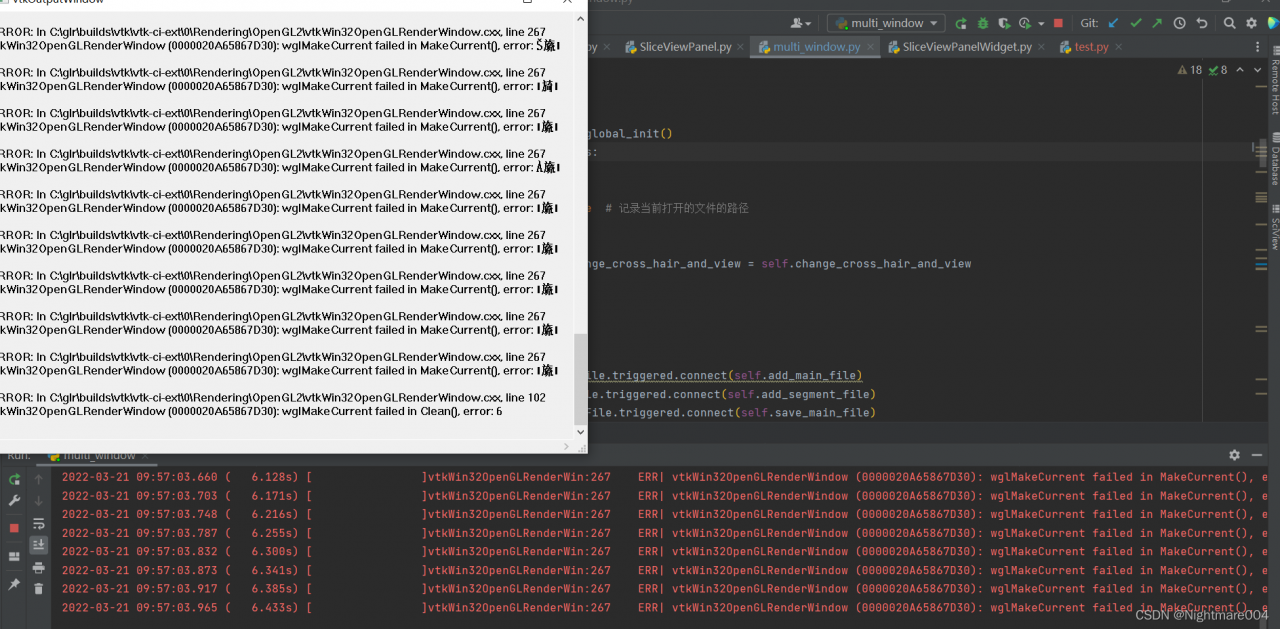
vtkWin32OpenGLRenderWin:267    ERR| vtkWin32OpenGLRenderWindow (00000169B85B09C0): wglMakeCurrent failed in MakeCurrent(), error:
vtkWin32OpenGLRenderWin:102    ERR| vtkWin32OpenGLRenderWindow (00000169B85B09C0): wglMakeCurrent failed in Clean()
Solution:

First point
this code is called repeatedly in my code
that is, repeated initialization

    def var_init(self):
        self.lb = QVTKRenderWindowInteractor(self)
        self.gridLayout_G.addWidget(self.lb, 0, 0, 1, 1)
        self.lb.GetRenderWindow().GetInteractor().Start()

In fact, just initialize it once

The second point
You should call finalize at the end of the QVTKRenderWindowInteractor program

# self.lb = QVTKRenderWindowInteractor(self)
self.lb.Finalize()
buildroot SIGSTKSZ Error: make[5]: *** [Makefile:1915: c-stack.o] Error 1

Project scenario:

Error when compiling builderoot:

Problem description:

Error when compiling builderoot:

PATH="/home/dlxy/sambashare/LicheepiNano/buildroot-2018.02.5/output/host/bin:/home/dlxy/sambashare/LicheepiNano/buildroot-2018.02.5/output/host/sbin:/usr/local/sbin:/usr/local/bin:/usr/sbin:/usr/bin:/sbin:/bin:/usr/games:/usr/local/games:/snap/bin:/snap/bin:/opt/gcc-linaro-7.2.1-2017.11-x86_64_arm-linux-gnueabi/bin" PKG_CONFIG="/home/dlxy/sambashare/LicheepiNano/buildroot-2018.02.5/output/host/bin/pkg-config" PKG_CONFIG_SYSROOT_DIR="/" PKG_CONFIG_ALLOW_SYSTEM_CFLAGS=1 PKG_CONFIG_ALLOW_SYSTEM_LIBS=1 PKG_CONFIG_LIBDIR="/home/dlxy/sambashare/LicheepiNano/buildroot-2018.02.5/output/host/lib/pkgconfig:/home/dlxy/sambashare/LicheepiNano/buildroot-2018.02.5/output/host/share/pkgconfig"  /usr/bin/make -j2  -C /home/dlxy/sambashare/LicheepiNano/buildroot-2018.02.5/output/build/host-m4-1.4.18/

/usr/bin/make  all-recursive

Making all in .

make[4]: Nothing to be done for 'all-am'.

Making all in examples

make[4]: Nothing to be done for 'all'.

Making all in lib

/usr/bin/make  all-am

  CC       c-stack.o

  CC       clean-temp.o

In file included from /usr/include/signal.h:328,

                 from ./signal.h:52,

                 from c-stack.c:49:

c-stack.c:55:26: error: missing binary operator before token "("

   55 | #elif HAVE_LIBSIGSEGV && SIGSTKSZ < 16384

      |                          ^~~~~~~~

make[5]: *** [Makefile:1915: c-stack.o] Error 1


Solution:

Locate c-stack.c file in the builderoot folder
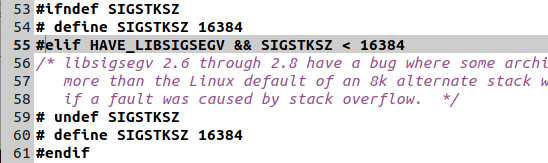
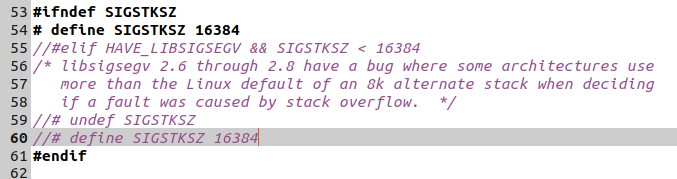
line 55:

comment out the following contents, and the results are as follows: