Author Archives: Robins

[Solved] G2o pointer error: error: no matching function for call to ‘g2o::BlockSolver

G2o pointer error

1. Problem description I

error: no matching function for call to ‘g2o::BlockSolver<g2o::BlockSolverTraits<-1, -1> >::BlockSolver(SlamLinearSolver*&)

And prompt

std::unique_ptr

The reason for the pointer may be a repeated reference.

G2oSolver::G2oSolver()
{
  // Step 1: Create a linear solver LinearSolver
  SlamLinearSolver *linearSolver = new SlamLinearSolver();
  linearSolver->setBlockOrdering(false);
  // Step 2: Create the BlockSolver and initialize it with the linear solver defined above
  SlamBlockSolver *blockSolver = new SlamBlockSolver(linearSolver);
  // Step 3: Create the total solver solver and select one from GN, LM, DogLeg and initialize it with the block solver BlockSolver defined above
  g2o::OptimizationAlgorithmLevenberg *solver = new g2o::OptimizationAlgorithmLevenberg(blockSolver);
  // Step 4: Create the sparse optimizer (SparseOptimizer)
  mOptimizer.setAlgorithm(solver);
}

Modified code:

G2oSolver::G2oSolver()
{
  // Step 1: Create a linear solver LinearSolver
  SlamLinearSolver *linearSolver = new SlamLinearSolver();
  linearSolver->setBlockOrdering(false);
  // Step 2: Create the BlockSolver and initialize it with the linear solver defined above
  SlamBlockSolver *blockSolver=new SlamBlockSolver(std::unique_ptr<SlamLinearSolver>(linearSolver));
  // Step 3: Create the total solver solver and select one from GN, LM, DogLeg and initialize it with the above block solver BlockSolver
  g2o::OptimizationAlgorithmLevenberg *solver = new g2o::OptimizationAlgorithmLevenberg(std::unique_ptr<SlamBlockSolver>( blockSolver));
  // Step 4: Create the Sparse Optimizer (SparseOptimizer)
  mOptimizer.setAlgorithm(solver);
}

2. Problem description II

fatal error: cs.h: No such file or directory

the error is in /usr/local/include/g2o/solvers/csparse/csparse_extension.h:

#include <cs.h>

Install
CSparse

sudo apt-get install libsuitesparse-dev

Find the header file

/usr/include/suitesparse/cs.h

add the header files in CMakeLists.txt:

include_directories("/usr/include/suitesparse") 
target_link_libraries(${PROJECT_NAME}_karto_slam_node
  ${catkin_LIBRARIES}
  ${Boost_LIBRARIES}
  sba
  ${CERES_LIBRARIES}
  gtsam

  ${G2O_LIBRARIES}
  ${SUITESPARSE_LIBRARIES}
)
[Solved] npm Install vuex Error: npm ERR! code ERESOLVE

Question

The following error is reported when NPM install vuex — save is used on the command line

npm ERR! code ERESOLVE
npm ERR! ERESOLVE unable to resolve dependency tree
npm ERR! 
npm ERR! While resolving: [email protected]
npm ERR! Found: [email protected]
npm ERR! node_modules/vue
npm ERR!   vue@"^2.5.2" from the root project
npm ERR! 
npm ERR! Could not resolve dependency:
npm ERR! peer vue@"^3.0.2" from [email protected]
npm ERR! node_modules/vuex
npm ERR!   vuex@"*" from the root project
npm ERR! 
npm ERR! Fix the upstream dependency conflict, or retry
npm ERR! this command with --force, or --legacy-peer-deps
npm ERR! to accept an incorrect (and potentially broken) dependency resolution.
npm ERR! 
npm ERR! See C:\Users\admin\AppData\Local\npm-cache\eresolve-report.txt for a full repor
t.

This problem occurs because the version of NPM is too high

Solution:

Install the specified version of vuex
view the installable version of vuex

C:\Users\admin>npm view vuex versions --json
[
  "0.1.0",
  "0.2.0",
  "0.3.0",
  "0.4.0",
  "0.4.1",
  "0.4.2",
  "0.5.0",
  "0.5.1",
  "0.6.1",
  "0.6.2",
  "0.6.3",
  "0.7.0",
  "0.7.1",
  "0.8.0",
  "0.8.1",
  "0.8.2",
  "1.0.0-rc",
  "1.0.0-rc.2",
  "1.0.0",
  "1.0.1",
  "2.0.0-rc.1",
  "2.0.0-rc.3",
  "2.0.0-rc.4",
  "2.0.0-rc.5",
  "2.0.0-rc.6",
  "2.0.0",
  "2.1.0",
  "2.1.1",
  "2.1.2",
  "2.1.3",
  "2.2.0",
  "2.2.1",
  "2.3.0",
  "2.3.1",
  "2.4.0",
  "2.4.1",
  "2.5.0",
  "3.0.0",
  "3.0.1",
  "3.1.0",
  "3.1.1",
  "3.1.2",
  "3.1.3",
  "3.2.0",
  "3.3.0",
  "3.4.0",
  "3.5.0",
  "3.5.1",
  "3.6.0",
  "3.6.1",
  "3.6.2",
  "4.0.0-alpha.1",
  "4.0.0-beta.1",
  "4.0.0-beta.2",
  "4.0.0-beta.3",
  "4.0.0-beta.4",
  "4.0.0-rc.1",
  "4.0.0-rc.2",
  "4.0.0",
  "4.0.1",
  "4.0.2"
]

Install the specified version of vuex

npm install [email protected] --save

[Solved] Pandas rename Error: ValueError: operands could not be broadcast together with shapes (1,2) (3,) (1,2)

Pandas rename reported an error valueerror

error message

ValueError: operands could not be broadcast together with shapes (1,2) (3,) (1,2) 

Solution:

The initial investigation is that the pandas version is low, and the pandas version needs to be updated.初步排查是pandas版本较低导致,需要更新pandas版本。

Reference version

Current version: Pandas 1.1.3 updated version: Pandas 1.4.1

mybatis “case when” Error: Failed to process, please exclude the tableName or statementId.

Encountered when using case when in mybatis for condition filtering judgment

Failed to process, please exclude the tableName or statementId.

Such error messages are syntax errors
but I have no problem running SQL statements on the MySQL command line

//case when
WHERE dept.type = 1
AND 
(
CASE agent.dept_type
WHEN "agent" THEN dept.id=30
END
)
//When the agent's dept_type is "agent", the judgment that dept.id = 30 will be added

There is no problem running this SQL statement on the command line, but an error will be reported if it is executed on mybatis

//Modified
WHERE dept.type = 1
AND dept.id=
(
CASE agent.dept_type
WHEN "agent" THEN 30
END
)

Later, put dept.id outside to solve this problem

20190718 – Supplementary record: another problem is encountered. If the dept table is associated query, there may be no data. When the dept has no data, we can’t assign any parameters to dept.id and can’t affect the query of the data in the original table. I changed it to the following:

//Modified
WHERE dept.type = 1
AND (dept.id=
(
CASE agent.dept_type
WHEN "agent" THEN 30
ELSE 0
END
) or dept.id is null)

Add the judgment that dept.id is empty
(there are many ways to solve it in MySQL statements, but an error will be reported on mybatis – – |)

2019-7-30-supplementary notes:
if it is an empty string, you can’t use "" but change it to single quotation mark ''

CASE WHEN *** THEN ***
ELSE ""  =>Need to change to=> ELSE''

Go build package error: TARGET_OS_MAC & IOMasterPort

Go build packaging Error:

TARGET_OS_MAC & IOMasterPort


#github.com/shirou/gopsutil/cpu
../../../../go/pkg/mod/github.com/shirou/[email protected]+incompatible/cpu/cpu_darwin_cgo.go:13:5: 
warning: 'TARGET_OS_MAC' is not defined, evaluates to 0 [-Wundef-prefix=TARGET_OS_]


#github.com/shirou/gopsutil/disk
iostat_darwin.c:28:2: 
warning: 'IOMasterPort' is deprecated: first deprecated in macOS 12.0 [-Wdeprecated-declarations]

/Library/Developer/CommandLineTools/SDKs/MacOSX.sdk/System/Library/Frameworks/IOKit.framework/Headers/IOKitLib.h:132:1: 
note: 'IOMasterPort' has been explicitly marked deprecated here

I don’t know the cause of the problem at present. It may be caused by the upgrade of the MAC system

My version is MacOS Monterey 12.3

Solution (not necessarily effective)

Modify CGO_ENABLED,default is CGO_ENABLED="1"

go env -w CGO_ENABLED="0"

How to Solve Xcode M1 simulator Error

Error reported by Xcode M1 simulator

Operation error:

1.building for iOS Simulator, but linking in object file built for iOS, for architecture arm64
2.The linked framework ‘Pods.framework’ is missing one or more architectures required by this target: arm64

Solution:
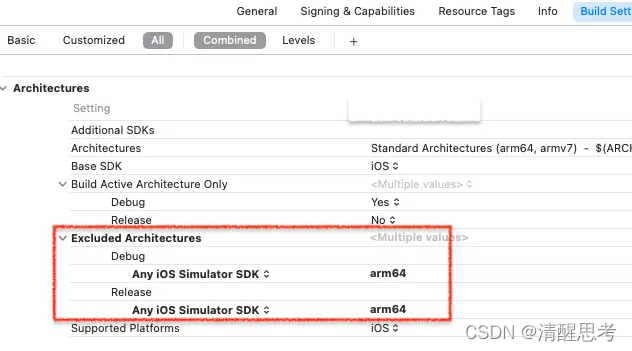
1 Build settings change:

2 Podfile add:

 post_install do |installer|
   installer.pods_project.build_configurations.each do |config|
     config.build_settings["EXCLUDED_ARCHS[sdk=iphonesimulator*]"] = "arm64"
   end
 end

3.xcode clean;
4. pod install

Pod installation errors:

sudo arch -x86_64 gem install ffi
gem install ffi --version 1.13.1 --user-install
arch -x86_64 pod install

[Solved] flitter Name Route Error: Could not find a generator for route RouteSettings(“XXX”, null) in the _WidgetsAppState

A bug encountered in the configuration of the flutter route: an error is reported: Could not find a generator for route RouteSettings(“XXX”, null) in the _WidgetsAppState.

reason:

Use “/” as the root path when using named routes in the project,
// configure routes
final routes={
‘/’:(context)=>Tabs(),
‘/appBarDemo’:(context)=>AppBarDemoPage(),
‘/tabBarController’:(context)=>TabBarControllerPage()
};

Use home:Tabs() in the root file,


Solution:

Change home: tabs() to
onGenerateRoute: onGenerateRoute,
initialRoute: ‘/’,

[Solved] dockerfile Build Image Error: Error: Failed to download metadata for repo ‘appstream’…

Error content

Error: Failed to download metadata for repo 'appstream': Cannot prepare internal mirrorlist: No URLs in mirrorlist

Solution:

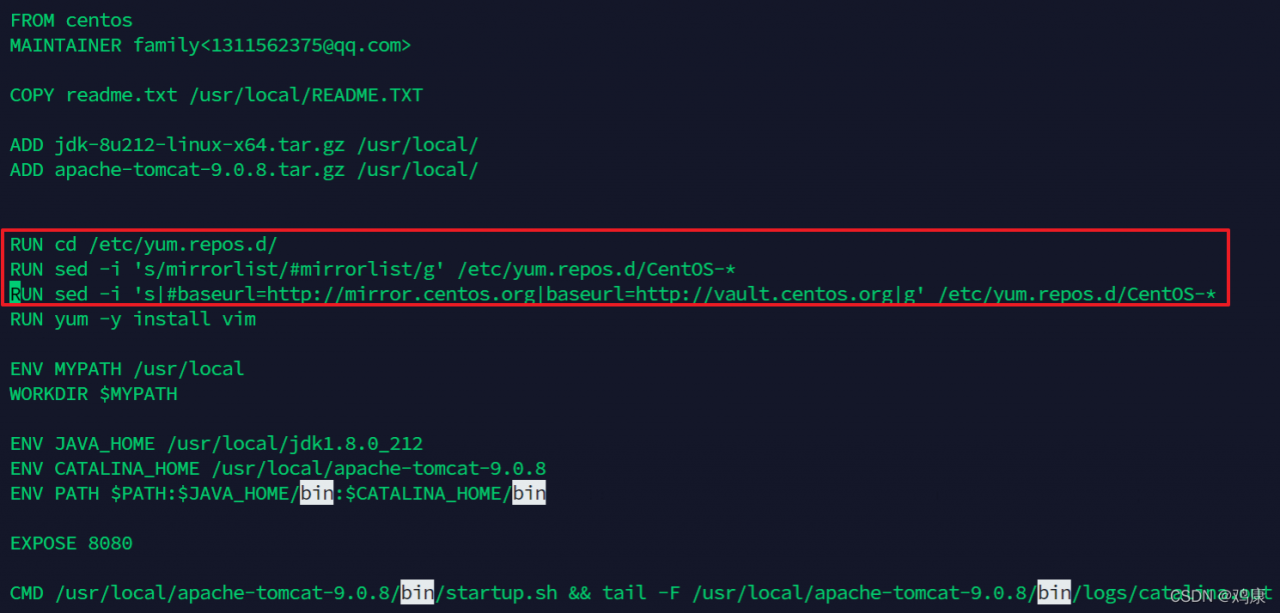
Modify the dockerfile file and add the following red box content
Finally, the docker image is successfully built
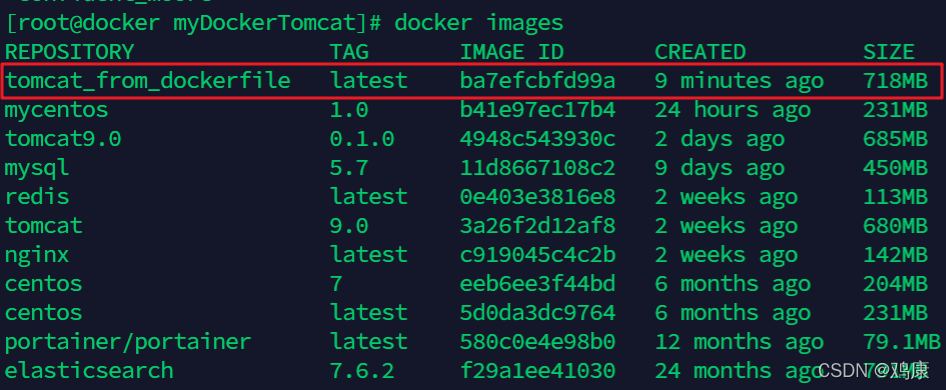
It is estimated that there is a problem with some Yum sources of centos8
Reference
https://stackoverflow.com/questions/70963985/error-failed-to-download-metadata-for-repo-appstream-cannot-prepare-internal

How to Solve Starrocks Various Error

Question 1:

Question:

{"status":"FAILED","msg":"There is no 100-continue header"}

reason:

This prompt appears because the CSV file is empty. In fact, it will not be affected.

Solution:

Add a request header to the command

-H "expect:100-continue"

curl –location-trusted -u root: -H “column_separator:|” -H “columns:__op=‘upsert’” -H “expect:100-continue” -T /home/zw/insert_sr_file/ip_basic.csv http://127.0.0.1:8030/api/zw/ip_basic/_stream_load


Question 2:

Question

There is data in the CSV file, but the error is still reported
CSV data

reason:

This error occurs because the corresponding data in the file does not correspond to the table field

Solution:

Receipt can be performed according to the fields specified in columns
usage:

-H "columns:pid,ip_val,area_id......"

Syntax use case:

curl --location-trusted -u root: \
-H "column_separator:|" \
-H "columns:pid,ip_val,area_id,udate,ftime,utime,ip,bip,cip,oui,mac,cname,user,depart,comp,place,os,os_sub,os_version,host_name,detail,m_type,m_sub_type,bip_val,cip_val,is_asset,is_controlled,source,domain,network_type,insert_unixtime,country_code,__op='upsert'" \
-T /home/zw/insert_sr_file/ip_basic.csv \
http://172.16.130.184:8030/api/zw/ip_basic/_stream_load


Question 3

problem

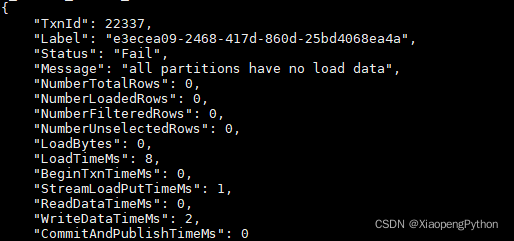
all partitions have no load data

reason

Caused by an empty file

solve

Don’t take it seriously. It won’t prompt if it’s not an empty file. Not affect

Pytorch Run Error: BrokenPipeError [How to Solve]

The problem occurs when doing machine learning training.

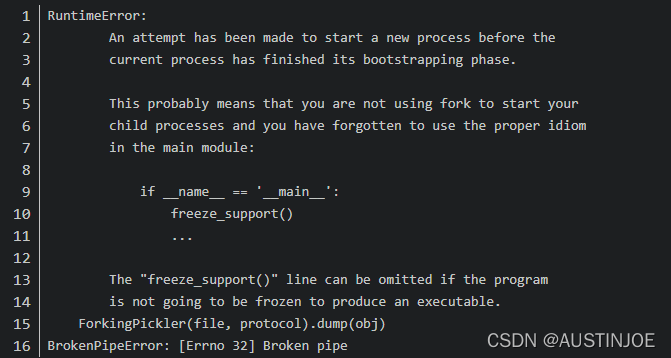
Reason for the error: The problem is due to multi-threading under windows, and is related to the DataLoader class. Just change the number of num_workers to 0. This is a bug in windows.

The error code can be referred to:

trainLoader=torch.utils.data.DataLoader(trainSet,batch_size=Bach_Size,shuffle=True,num_workers=2)
testLoader=torch.utils.data.DataLoader(testSet,batch_size=Bach_Size,shuffle=True,num_workers=2)

Set The number of num_ workers to 0

trainLoader=torch.utils.data.DataLoader(trainSet,batch_size=Bach_Size,shuffle=True,num_workers=0)
testLoader=torch.utils.data.DataLoader(testSet,batch_size=Bach_Size,shuffle=True,num_workers=0)