Author Archives: Robins

SSH Connect Service Error: Could not connect to ‘xxx.xxx.xx.xx‘ (port 22): Connection failed.

It was strange to report an error when connecting to SSH service this morning

I have searched a lot of information from Baidu. Now I collect and sort out some useful solutions for you

1. Restart CentOS
2 Restart VMware
3 Firewall problem:
solution:
(1) check the firewall: Service iptables status
(2) close the firewall first: /etc/init.d/iptables stop
(3) open firewall: Service iptables start
Start: systemctl start firewalld (centos7 user)
Close: systemctl stop firewalld (centos7 user)
4 Query whether port 22 is enabled

Query all open port commands

  firewall-cmd --zone=public --list-ports

Permanently open port 22

  firewall-cmd --zone=public --add-port=80/tcp --permanent 

Reload

firewall-cmd --reload

5. Query whether SSH is installed on the Linux server

yum install openssh-server

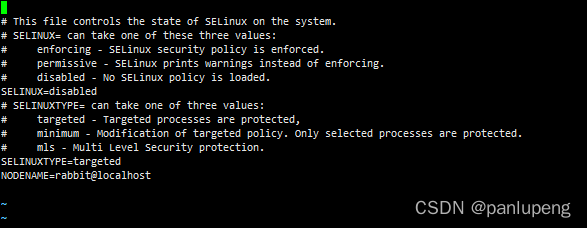
6. Query whether SELinux is started
modify the file in /etc/selinux/config and set SELINUX = disabled:

Execution failed for task ‘:app:kaptDebugKotlin‘ [How to Solve]

Error compiling project with kotlin:

Execution failed for task ‘:app:kaptDebugKotlin’.
A failure occurred while executing org.jetbrains.kotlin.gradle.internal.KaptExecution
java.lang.reflect.InvocationTargetException (no error message)
various kotlin annotation errors will be reported

The problem is that the version of kotlin plug-in is inconsistent with that in build

buildscript {
    ext.kotlin_version = '1.3.50'
    repositories {
        google()
        jcenter()
        
    }
    dependencies {
        classpath 'com.android.tools.build:gradle:3.5.3'
        classpath "org.jetbrains.kotlin:kotlin-gradle-plugin:$kotlin_version"
    }
}

Check the version of the org.jetbrains.kotlin:kotlin-gradle-plugin is consistent with the version of the kotlin that the module depends on or not.

Failed to configure a DataSource: ‘url‘ attribute is not specified and no embedded datasource could [Solved]

Failed to configure a DataSource: ‘url’ attribute is not specified and no embedded datasource could be configured.
Error Messages:

***************************
APPLICATION FAILED TO START
***************************

Description:

Failed to configure a DataSource: 'url' attribute is not specified and no embedded datasource could be configured.

Reason: Failed to determine a suitable driver class


Action:

Consider the following:
	If you want an embedded database (H2, HSQL or Derby), please put it on the classpath.
	If you have database settings to be loaded from a particular profile you may need to activate it (no profiles are currently active).


Solution:

You need to add a configuration in your project’s POM file

<build>
	<resources>
        <!-- Resolving mapper binding exceptions -->
        <resource>
            <directory>src/main/java</directory>
            <includes>
                <include>**/*.yml</include>
                <include>**/*.xml</include>
            </includes>
            <filtering>false</filtering>
        </resource>
        <!-- Resolve profile exceptions such as data source not found -->
        <resource>
            <directory>src/main/resources</directory>
            <includes>
                <include>**/*.yml</include>
            </includes>
        </resource>
    </resources>
</build>

[Solved] webrtc Compile Error: ERROR: The installation of the Chrome OS default fonts failed.

Installing Chrome OS fonts.
Installing Chrome OS fonts to /usr/local/share/fonts/chromeos.
  % Total    % Received % Xferd  Average Speed   Time    Time     Time  Current
                                 Dload  Upload   Total   Spent    Left  Speed
  0     0    0     0    0     0      0      0 --:--:--  0:02:09 --:--:--     0curl: (7) Failed to connect to commondatastorage.googleapis.com port 443: 连接超时
Traceback (most recent call last):
  File "./build/linux/install-chromeos-fonts.py", line 120, in <module>
    sys.exit(main(sys.argv[1:]))
  File "./build/linux/install-chromeos-fonts.py", line 67, in main
    subprocess.check_call(['curl', '-L', url, '-o', tarball])
  File "/usr/lib/python2.7/subprocess.py", line 541, in check_call
    raise CalledProcessError(retcode, cmd)
subprocess.CalledProcessError: Command '['curl', '-L', 'https://commondatastorage.googleapis.com/chromeos-localmirror/distfiles/notofonts-20161129.tar.bz2', '-o', '/usr/local/share/fonts/chromeos/notofonts-20161129.tar.bz2']' returned non-zero exit status 7
ERROR: The installation of the Chrome OS default fonts failed.
This is expected if your repo is installed on a remote file system.
It is recommended to install your repo on a local file system.
You can skip the installation of the Chrome OS default founts with
the command line option: --no-chromeos-fonts.

Compile webrtc configuration report error: ERROR: The installation of the Chrome OS default fonts failed.
This means that the installation of the Chrome fonts failed, so far found that this has any effect on the use of webrtc later, you can add -no-chromeos-fonts after the command as prompted, meaning not to install the fonts.

./build/install-build-deps.sh --no-chromeos-fonts

Failed to Connect NVIDIA Driver: NVIDIA-SMI has failed because it couldn‘t communicate with the NVIDIA driver

nvidia-smi
error
NVIDIA-SMI has failed because it couldn't communicate with the NVIDIA driver

Reason: the Ubuntu kernel has been updated, which is inconsistent with the kernel when the graphics card driver was installed

Solution 1
reduce the system kernel, select low kernel in the boot preference, or change the configuration file to automatically select low version kernel by default boot. Refer to the link for the method

Solution 2
update the graphics card driver

view the installed driver version

ls /usr/src

Display my graphics driver for nvidis-470 reinstall updated graphics driver

sudo apt install --reinstall nvidia-driver-470

After the update is successful, restart the computer

nvidia-smi

It can be displayed normally

Thu Mar 24 10:18:37 2022       
+-----------------------------------------------------------------------------+
| NVIDIA-SMI 470.103.01   Driver Version: 470.103.01   CUDA Version: 11.4     |
|-------------------------------+----------------------+----------------------+
| GPU  Name        Persistence-M| Bus-Id        Disp.A | Volatile Uncorr. ECC |
| Fan  Temp  Perf  Pwr:Usage/Cap|         Memory-Usage | GPU-Util  Compute M. |
|                               |                      |               MIG M. |
|===============================+======================+======================|
|   0  NVIDIA GeForce ...  Off  | 00000000:01:00.0 Off |                  N/A |
| N/A   37C    P0    N/A/ N/A |    439MiB/ 4046MiB |      0%      Default |
|                               |                      |                  N/A |
+-------------------------------+----------------------+----------------------+
                                                                               
+-----------------------------------------------------------------------------+
| Processes:                                                                  |
|  GPU   GI   CI        PID   Type   Process name                  GPU Memory |
|        ID   ID                                                   Usage      |
|=============================================================================|
|    0   N/A  N/A      3149      G   /usr/lib/xorg/Xorg                193MiB |
|    0   N/A  N/A      3314      G   /usr/bin/gnome-shell               70MiB |
|    0   N/A  N/A      4010      G   /usr/lib/firefox/firefox          171MiB |
+-----------------------------------------------------------------------------+

ST-LINK Download Program Error: flash download failed – ‘cortex m4‘

Possible cause: Project testing using ST-link download program debugging, before all good to download the program, after some tests such as power-down storage may make the chip locked up
Tried solutions: I have looked for some solutions, but most of them are not add in the programming algorithm of flash download in debug, but they don’t seem to work for me.
Final solution: Download the STM32 ST-LINK Utility software to handle the problem.

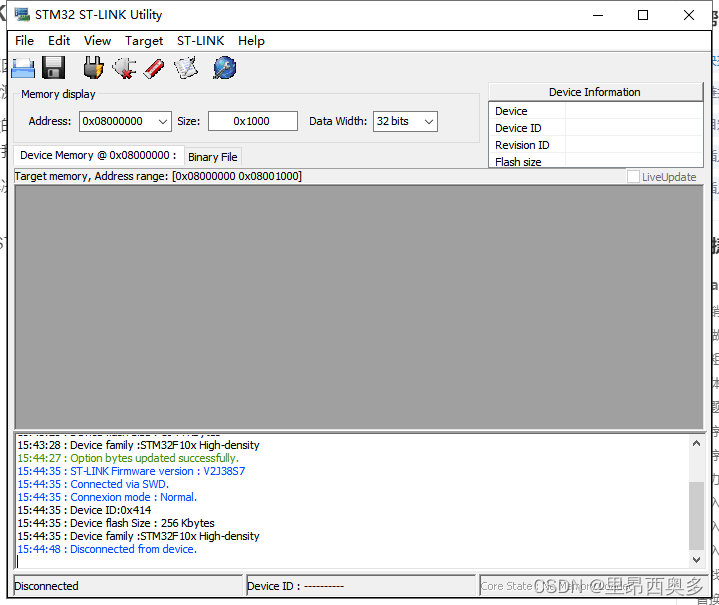
1. Connect the board to the computer using ST-LINK and open the STM32 ST-LINK Utility.

2. Click Option Bytes in Target
You don’t need to click connect in Target here, just click Option Bytes directly after opening the software, otherwise mine will prompt a can’t read memory error.
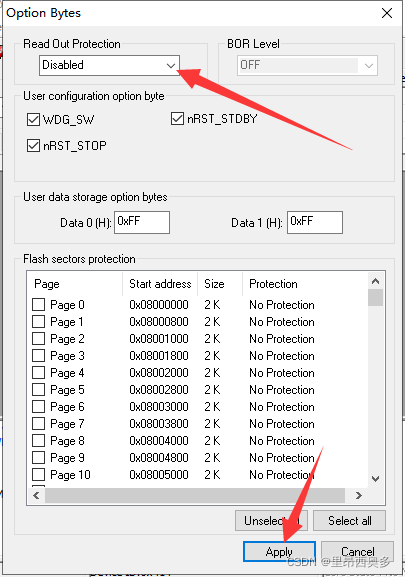
3. Change this to disable, and click apply.


4. After that, you can download the program normally in keil5.

[Solved] failed to req API:localhost:8848/nacos/v1/ns/instance. code:500 msg: java.net.ConnectException

1. Error Messages
nacos connect error:

2022-03-23 10:06:48 |ERROR |main |SpringApplication.java:826 |org.springframework.boot.SpringApplication |Application run failed
java.lang.IllegalStateException: failed to req API:/nacos/v1/ns/instance after all servers([localhost:8848]) tried: failed to req API:localhost:8848/nacos/v1/ns/instance. code:500 msg: java.net.ConnectException: Connection refused: connect
    at com.alibaba.nacos.client.naming.net.NamingProxy.reqAPI(NamingProxy.java:467)
    at com.alibaba.nacos.client.naming.net.NamingProxy.reqAPI(NamingProxy.java:389)
    at com.alibaba.nacos.client.naming.net.NamingProxy.registerService(NamingProxy.java:191)
    at com.alibaba.nacos.client.naming.NacosNamingService.registerInstance(NacosNamingService.java:207)
    at com.alibaba.cloud.nacos.registry.NacosServiceRegistry.register(NacosServiceRegistry.java:64)
    at org.springframework.cloud.client.serviceregistry.AbstractAutoServiceRegistration.register(AbstractAutoServiceRegistration.java:239)
    at com.alibaba.cloud.nacos.registry.NacosAutoServiceRegistration.register(NacosAutoServiceRegistration.java:76)
    at org.springframework.cloud.client.serviceregistry.AbstractAutoServiceRegistration.start(AbstractAutoServiceRegistration.java:138)
    at org.springframework.cloud.client.serviceregistry.AbstractAutoServiceRegistration.bind(AbstractAutoServiceRegistration.java:101)
    at org.springframework.cloud.client.serviceregistry.AbstractAutoServiceRegistration.onApplicationEvent(AbstractAutoServiceRegistration.java:88)
    at org.springframework.cloud.client.serviceregistry.AbstractAutoServiceRegistration.onApplicationEvent(AbstractAutoServiceRegistration.java:47)
    at org.springframework.context.event.SimpleApplicationEventMulticaster.doInvokeListener(SimpleApplicationEventMulticaster.java:172)
    at org.springframework.context.event.SimpleApplicationEventMulticaster.invokeListener(SimpleApplicationEventMulticaster.java:165)
    at org.springframework.context.event.SimpleApplicationEventMulticaster.multicastEvent(SimpleApplicationEventMulticaster.java:139)
    at org.springframework.context.support.AbstractApplicationContext.publishEvent(AbstractApplicationContext.java:403)
    at org.springframework.context.support.AbstractApplicationContext.publishEvent(AbstractApplicationContext.java:360)
    at org.springframework.boot.web.servlet.context.ServletWebServerApplicationContext.finishRefresh(ServletWebServerApplicationContext.java:165)
    at org.springframework.context.support.AbstractApplicationContext.refresh(AbstractApplicationContext.java:553)
    at org.springframework.boot.web.servlet.context.ServletWebServerApplicationContext.refresh(ServletWebServerApplicationContext.java:141)
    at org.springframework.boot.SpringApplication.refresh(SpringApplication.java:747)
    at org.springframework.boot.SpringApplication.refreshContext(SpringApplication.java:397)
    at org.springframework.boot.SpringApplication.run(SpringApplication.java:315)
    at org.springframework.boot.SpringApplication.run(SpringApplication.java:1226)
    at org.springframework.boot.SpringApplication.run(SpringApplication.java:1215)
    at com.atguigu.guli.service.edu.ServiceEduApplication.main(ServiceEduApplication.java:15)


2. Solution
1.Check whether nacos is open
2.Check whether nacos is open properly
3.  nacos and eureka are not the same, eureka is part of the project, nacos is more like a partner relationship.

         ,--.
       ,--.'|
   ,--,:  : |                                         
,`--.'`|  ' :                       ,---.               
|   :  :  | |                      '   ,'\   .--.--.   
:   |   \ | :  ,--.--.     ,---. / /  |//   '   
|   : '  '; |/      \  /    \.   ; ,. :|  :  /`./   
'   ' ;.    ;.--.  .-. |/  /''   | |: :|  :  ;_
|   | | \   | \__\/: . ..    '/'   | .; : \  \    `.      
'   : |  ; .' ," .--.; |'   ; :__|   :    |  `----.   \
|   | '`--' // ,.  |'   | '.'|\   \ // /`--'  /
'   : |     ;  :   .'   \   :    : `----'  '--'.     /
;   |.'     |  ,     .-./\   \ /           `--'---'
'---'        `--`---'     `----'

4. If Nacos starts normally, restart the project, or not

(1) Check annotation @enablediscoveryclient

(2) Check configuration file

# Note the space position
  cloud:
    nacos:
      discovery:
        server-addr: localhost:8848 # nacos server location

Oracle11g Startup Database Error: ORA-27154: post/wait create failed

ORA-27154: post/wait create failed
This error is due to the failure of obtaining the OS semaphore (semaphore can be understood as memory lock) during the startup process, and the process needs to obtain the semaphore before requesting memory for use.
Generally, the processes parameter in oracle is set to processes*2+15 during installation is safer.

Usually the error ORA-27154: post/wait create failed is accompanied by the following errors.
ORA-27300: OS system dependent operation:semget failed with status: 28
ORA-27301: OS failure message: No space left on device
ORA-27302: failure occurred at: sskgpcreates
These errors are caused by the fact that the processed is too large and the amount of signals to be acquired is not enough.

Check the current settings
[oracle@ebsse oracle]$ cat /proc/sys/kernel/sem
250 32000 100 128

The 4 data items correspond to SEMMSL SEMMNS SEMOPM SEMMNI
Instead of explaining the meaning of the data, let's just talk about the modification.

Change the value of sem to: 5010 641280 5010 128

For automatic application at boot time, add to /etc/sysctl.conf:
kernel.sem =5010 641280 5010 128

sysctl -p

[Solved] Job for mysqld.service failed because the control process exited with error code.

Install mysql8 in centos8 environment by using yum. The following error messages are reported:

Job for mysqld.service failed because the control process exited with error code.

See "systemctl status mysqld.service" and "journalctl -xe" for details.


Because VIM/etc/my.cnf file Is configured before installation, specifying the directory /var/log/mysqld.log

The actual log directory is /var/log/MySQL/mysqld.log

After modifying the directory, restart OK