Author Archives: Robins

Solve the error: gpg: keyserver receive failed: No dirmngr

My personal blog: Zhang0Peter’s personal blog


Today’s error in using Add-apt-Repository is as follows:

gpg: keybox '/tmp/tmpnh5y5w9a/pubring.gpg' created
gpg: failed to start the dirmngr '/usr/bin/dirmngr': No such file or directory
gpg: connecting dirmngr at '/run/user/0/gnupg/d.rkeyjbdrrh3u6cjumf59ra5t/S.dirmngr' failed: No such file or directory
gpg: keyserver receive failed: No dirmngr

The reason for this error is that GPG is not installed on Linux:

apt install dirmngr

An error to solve

Bug:Install Microsoft Visual C++ 2008 Redistributable (x86) Failed Installation aborted, Result=1603

This problem occurred when installing 3dMax software:
There seems to be a problem with the c++2008 library.
Uninstall the library on your computer, but the application management did not find the package, do not know how to uninstall.
The article goes on to say that it can be reloaded:
https://knowledge.autodesk.com/zh-hans/search-result/caas/sfdcarticles/sfdcarticles/CHS/2011-Troubleshooting-Error-1603-in-AutoCAD-Map-3D.html
So I wanted to reinstall it, but encountered the problem with Error1935,
Then follow:

Solved, installed 2008C ++ can continue to install 3dMax.

Some problems encountered in the development of ReportViewer

http://blog.csdn.net/hebeijg/article/details/7329019

1. The number of rows displayed per page is determined by the Report’s Interactivesize-height attribute. The rule is Height = row number *0.63492 row Height
2. How to display the table header, choose to open the report file in XML format, in
< TablixRowHierarchy>
& lt; TablixMembers>
& lt; TablixMember>
& lt; KeepWithGroup> After< /KeepWithGroup>
& lt; RepeatOnNewPage> true< /RepeatOnNewPage> // Just add this sentence.
<
<
<
<
< /TablixMember>
& lt; TablixMember>
& lt; Group Name=”Details” />
& lt; /TablixMember>
& lt; /TablixMembers>
& lt; /TablixRowHierarchy> PageCountModel property
has two values, Actual and Estimate, after adding the ReportView control to the page.
Actual is the Actual number of pages
Estimate is also the estimated page, with a question mark
4. If through the page loaded so
< LocalReport ReportPath = “Rdlc \ CopyRecordRdlc Rdlc” & gt;
& lt; /LocalReport>
is in the upper right corner of the page with control points triangular load RDLC files, so there is no problem in winform, but there is no data problem will appear in the Web, the correct way is to load in query button rvCopyRecord. LocalReport. ReportPath = @ “RDLC \ CopyRecordRdlc RDLC”;
so you don’t have that hint
5. Add parameters in the report,
increase total cost in the report, right-click under the parameter folder in the report toolbox, create a new parameter AllCost, drag this parameter into the report, pass the value on the page,
double AllCost =0;
ReportDataSource ReportDataSource = GetData(out allCost);
ReportParameter r = new ReportParameter(“AllCost”, allcost.tostring ());
rvCopyRecord. LocalReport. SetParameters (r);
this allows the total expenses to be passed into the report

6. Statistical function must be an int or a decimal field serving can be added, and other fields is first
the last line of the selected statements, increased Group of Blow in increase the bottom line, enter a meaningless in the GroupBy parameter, this will show only a line, if you choose meaningful field will appear many lines (don’t know why). Right click on the last column of the last row, select Fx, go to the expression page, go to Database, list all the fields that can be counted, int or Decimal is Sum and the rest is FIrst, double click on the Sum field, so an expression is automatically generated in the input box above, and the statistics function is generated.
 
7. Pie chart percentage,
Percentage in the pie chart shows the time display, the default is to display the decimal (vs2010) as 0.2, but want to show the percentage, the series label a Number attribute in the propertys, inside can set the percentage attributes, but don’t know what is Microsoft’s bug or I did not study, anyway setting percentage is not successful, each open again into a default value, namely the decimal,
Provide two ways to display percentages,
1), select the percentage number on the PieChart, select series label propertys, select fx in the label Data and add as follows = FormatPercent(CountRows()/CountRows(“PieChart”),2) (PieChart is the name of your PieChart, default is Chart1). This will show the percentage.
2), select the number property in Series Label Propertys and it will become default every time it is opened, but it can be set in the bar chart. By comparing THE XML files, the difference is found. Open the XML file of the pie chart with XML format, and there is a ChartDataLabel node under the ChartDataPoint node, and add the following code inside
< Style >
& lt; Format> 0.00% & lt; /Format>
& lt; /Style>
This will show you as a percentage.
8. How to display links in pie charts
If you want to click open the page on each scale, then pass in a parameter
Select the label on the pie chart and then select Series Label Propertys, select action in the URL, select URL, click FX, write, =”http://www.baidu.com?Id=”+Fields! Paremare.Value.
Note that the following code must be added where the RDLC file is referenced when using the URL
rvCopyRecord.LocalReport.EnableHyperlinks = true;
Otherwise no error will be reported at compile time, but no error will be reported at run time
9. How do I get the pie percentage to be on the outside of the pie and show the lines
Select the dataLable on the pie chart, then select the property on the right, CustomerAttirbutes inside, and set Pielabelstyle =outside, Pielablecolor =”color” to do the job
10. Problem with subReport control, place a subReport control in the parent report and set the reportName property to the name of the child report to be displayed.
Data retrieval failed for the subreport, ‘Subreport1’, located at: D:\Work\ ReportService\ReportService.Web\Rdlc\ProductDetail. Rdlc. Please check the log files for more information.
The problem is that there is no data source for the subreport,
In display report events add reportViewer1. LocalReport. SubreportProcessing + = new SubreportProcessingEventHandler (LocalReport_SubreportProcessing);
Void LocalReport_SubreportProcessing (object sender, SubreportProcessingEventArgs e)
{
the DataSet DataSet = null;
Try
{
// Load the data from the XML file
ReportDataSource ReportDataSource = GetData ();
///Supply a DataTable corresponding to each report dataset. The dataset name must match The name in The main report stream
// (in The name attribute of) the < DataSets> \< DataSet> Element.
e.D ataSources. Add (reportDataSource);

} finally
{
if (the dataSet. = null)
the dataSet. The Dispose ();

}}

 

Connection for controluser as defined in your configuration failed phpmyadmin xampp

Use XMAPP to configure mysql on Mac!!
Maybe I had installed mysql before, and started the installation of XAMPP5.6.12. But after the installation, I found that I could not start mysql. I was so surprised.
Connection for Controluser as defined in your Configuration Failed phpmyadmin Xampp, followed by a long what check Hostname, User, Password do not pull ~~
Various online search answers, stackflow, CSDN turned over, what config. Inc. PHP setting is wrong, set permissions ah,
Sudo rm/Applications/XAMPP/xamppfiles/bin/mysql server
Wait, I’ve tried them all, but it hasn’t worked…
Later, I realized that it was not phpmyAdmin configuration, but mysql that used the same port, so I uninstalled and deleted all the files of XMApp, and just reinstalled the magic one.
Hopefully this will be helpful for new installers, don’t tinker with configuration files!

Win10 UEFI+BMR losslessly changed to UEFI+GPt

UEFI+BMR to UEFI+GPt win10 under the installation of ubuntu16.04 dual system
UEFI+MBR lossless conversion to UEFI+GPt
First when the installation of Win10 non personal operation, resulting in the setting of UEFI+BMR neither fish nor fish. Although in principle it is possible to install UEFI+BMR with Rufus, ocD requires that you change to the most reasonable partitioning method and do not change or take advantage of subsequent installations of Ubuntu.
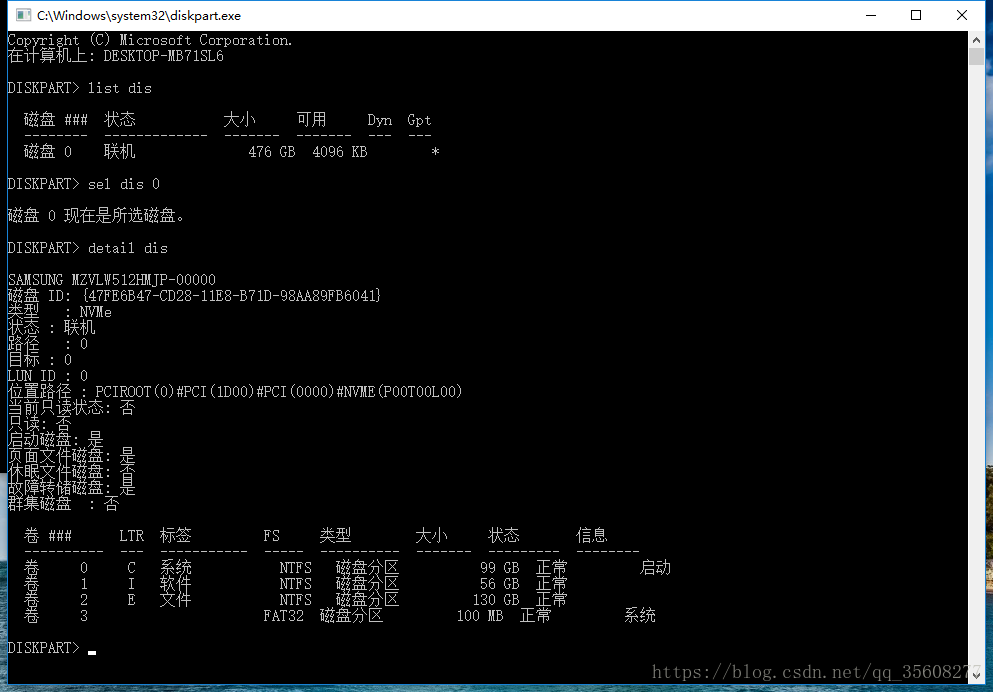
1.1 View the partitioning method:
1. Open the command prompt CMD (win+r, type CMD)
2. Type diskpart.exe
3. List dis
4. Sel dis 0
5. Detail dis

(It is strongly recommended to use Rufus to make ios image. Ultro in floppy disk does not set the partitioning mode, but there are actually differences between traditional legacy (corresponding to easyBCD,), UEFI+MBR, and UEFI+GPI, which will bring unnecessary error report when installing Ubuntu system)
Traditional Legacy USES easyBCD to set up boot and boot, but if it is UEFI, it does not need to download easyBCD, and it cannot be used.
So the first step is to change the hard disk partition mode to GPT
1.2 Partition helper changes disk information
Use Windows 10 with MBR2GPT
There are several prerequisites that may not be met:
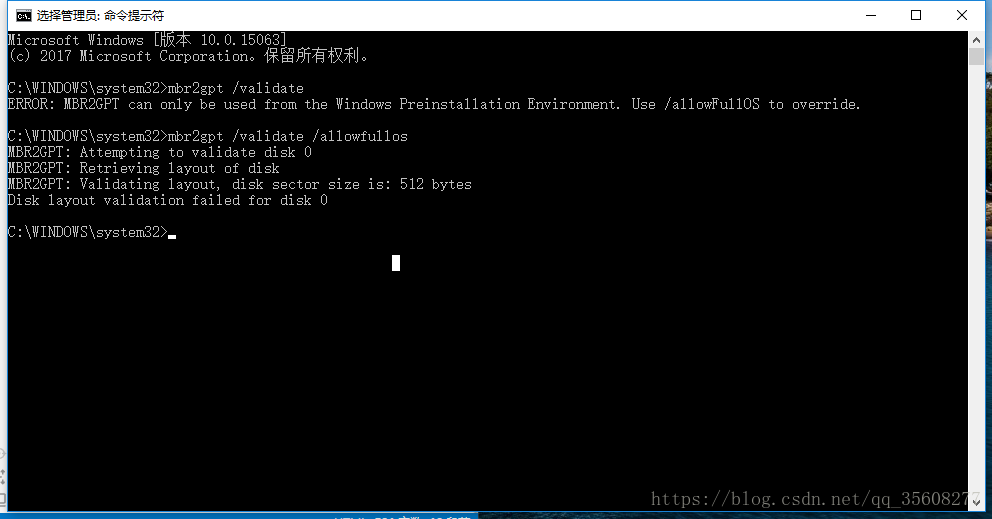
is primary except for the system partition. No more than three primary partitions at a time. Otherwise, the error is as follows.
Disk layout validation failed for disk 0
So the premises have to be met. Nondestructive changes to the hard disk partition are required.

How to do this: Make partition and primary partition changes to the disk yourself using partition Helper 6.3.
partition helper can split the disk and divide the disk space for Ubuntu. But do not split it until you have changed GPT.
if in addition to the system partition, more than 3, need to right merge partition first (later can be divided out again).
if the partition is a logical partition, right-click to convert the primary partition.
Just follow the instructions and go on. (It is better to make a copy of the software and run under C:\Program Files, otherwise the disk will be prompted to be occupied when processing)
Disk management is also possible
1.3 Windows 10 comes with MBR2GPR
After conversion, mBR2GPT should be normal.
step:
open CMD, input:
1.mbr2gpt /validate /allowfullos
2.mbr2gpt /convert /allowfullos
The conversion process automatically creates the EFI partition (100M) required for the UEFI + GPT partition format
Note:
this will encounter a problem:
before the boot menu option still exists, that is, there are two Windows boot manager.
boot will default when the MBR generated boot item, but can not start.
so in the case of single system need to enter uefi BIOS mode manual selection, very troublesome problem.
But when Ubuntu is installed and booted, there is no such problem.

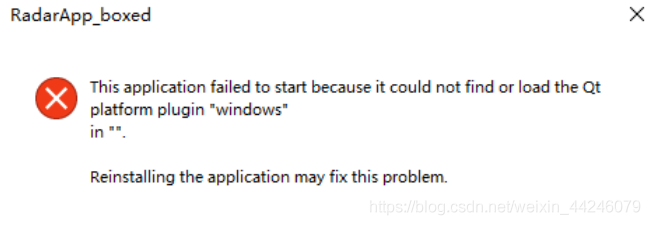
This application failed to start because it could not find or load the Qt platform plugin “windows”.

When running the file, prompt:
This Application failed to start because it could not find or load the Qt Platform plugin “Windows”.
Reinstalling the application may fix this problem.

solution:
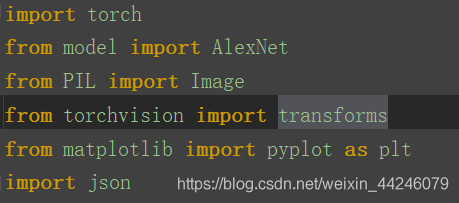
1. Comment out the code related to matplotlib and find that the above error disappears, indicating that there is a problem with the package matplotlib, re-install
2 in conda environment. This Application failed to start because it could not find or load the Qtplatform Plugin… The version is too low, Upgrade pytorch
enter the anaconda prompt
activate environment conda activate pytorch
to upgrade PIP install --upgrade pytorch torchvision
to wait for installation conda install pytorch torchvision-c pytorch

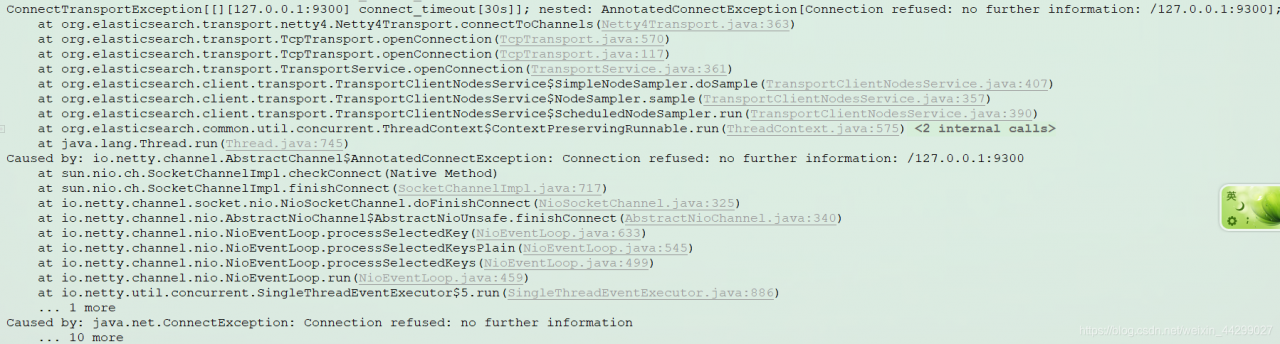
Caused by: io.netty.channel.AbstractChannel$AnnotatedConnectException: Connection refused: no furthe

Phenomenon:
When starting the project today, this project used Elasticsearch service. This error was found in the background:
Under Caused by: io.net ty. Channel. AbstractChannel $AnnotatedConnectException: Connection refused: no further information:/127.0.0.1:9300
The error message prompts as follows:

The reason:
This project USES Elasticsearch search service. In the error message, elasticSearch.transport and other key information are shown. In fact, this error is caused by Elasticsearch service which failed to launch successfully.
Solutions:
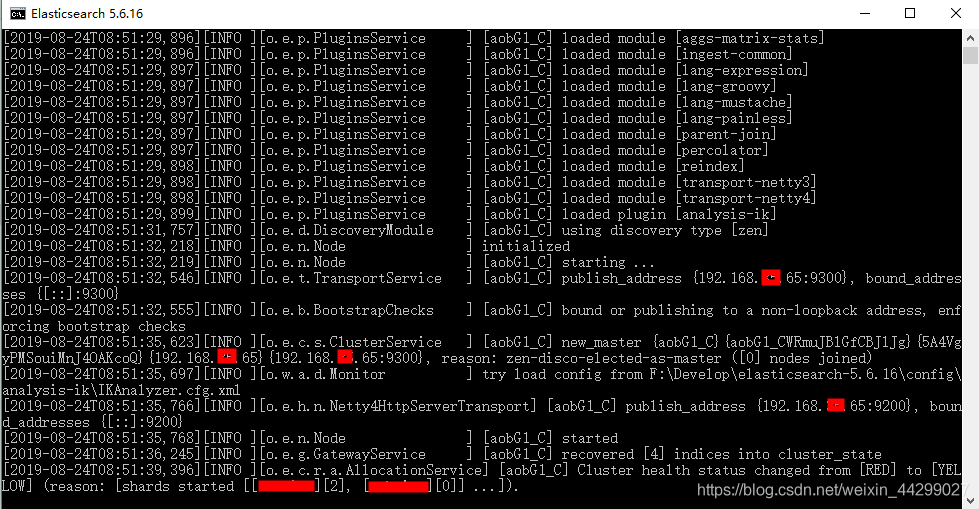
Restart the Elasticsearch service (if it doesn’t work at one time, try shutting it down and restarting it again).

I rebooted it several times before It worked. Don’t lose heart

The Excel connection manager is not supported in the 64-bit version of SSIS [Switch]

Microsoft SQL Server 2008 R2 — & GT; SQL SERVER Business Intelligence Development Studio
Using the EXCEL data source or target reported the following error
Start the SSIS Package “package.dTSx”.
message: 0x4004300A, located in data flow task, ssis. Pipeline: validation phase is beginning.
error: 0xC00F9304, located in the Package, connection manager “Excel connection manager 1” : SSIS error code DTS_E_OLEDB_EXCEL_NOT_SUPPORTED: because there is no OLEDB access interface available, Excel connection manager is not supported in the 64-bit version of SSIS.
error: 0 xc020801c, located in the data flow task, Excel source [89] : SSIS DTS_E_CANNOTACQUIRECONNECTIONFROMCONNECTIONMANAGER error code. The AcquireConnection method call to connection manager “Excel Connection Manager 1” failed with error code 0xC00F9304. An error message may have been sent prior to this, providing detailed information about why the AcquireConnection method call failed.
error: 0xC0047017, located in data flow task, ssis. Pipeline: component “Excel source” (89) fails validation, returns error code 0xC020801C.
error: 0xC004700C, on data flow task, ssis. Pipeline: one or more components fail validation.
error: 0xC0024107, error occurs during data flow task: task validation.
SSIS Package “package.dtsx” completed: failed.
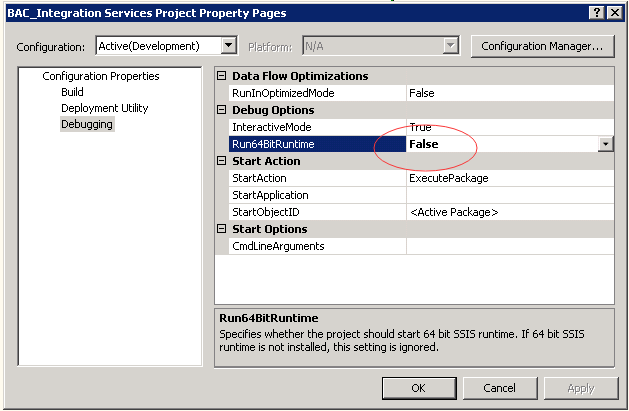
Solution: Select the item, right-click the properties shown in the figure, and change Run64BitRuntime to FALSE
[Excel Destination [31]] Error: SSIS Error Code DTS_E_CANNOTACQUIRECONNECTIONFROMCONNECTIONMANAGER. The AcquireConnection method call to the connection manager “Excel Connection Manager” failed with error code 0xC00F9304. There may be error messages posted before this with more information on why the AcquireConnection method call failed.
Error: SSIS Error Code DTS_E_OLEDB_EXCEL_NOT_SUPPORTED: The Excel Connection Manager is not supported in the 64-bit version of SSIS, as no OLE DB provider is available.


Reproduced in: https://www.cnblogs.com/qiangshu/p/5238161.html

VUEJS Failed to execute ‘removeChild’ on ‘Node’: The node to be removed is not a child of

Failed to execute ‘removeChild’ on ‘Node’ : The Node to be removed is not a child of this Node.

in my previous post
VUEJS project practice 5 Dialog pop-up box MessageBox (very nice bootstrap style)
has introduced a MesageBox style combined with bootstrap style
Then in the previous post
VUEJS project practice 4 custom keyboard instructions (keystrokes to get focus)
introduced a way for keystrokes to automatically get focus and trigger events.
Now when MessageBox binds Enter, an error
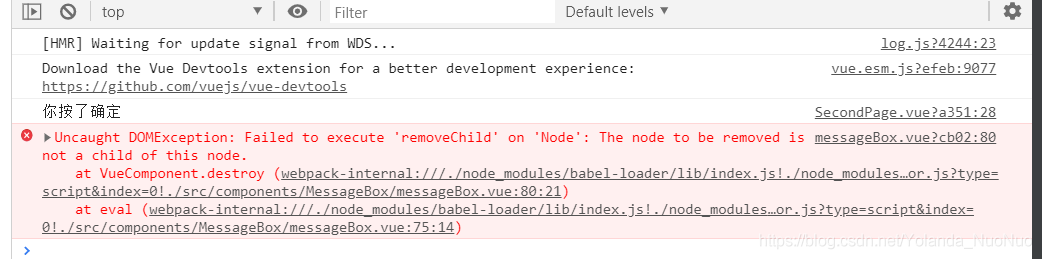
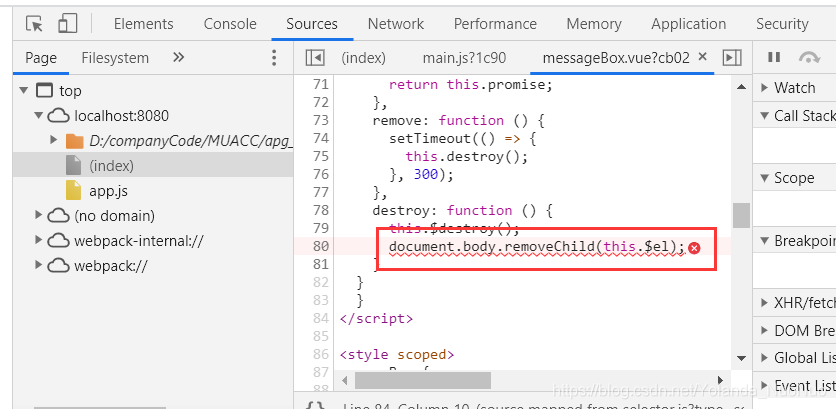
messagebox.vue?Cb02 :80 Uncaught DOMException: Failed to execute ‘removeChild’ on ‘Node’ : The Node to be removed is not a child of this Node.

First post the message.vue file

<template>
  <div v-key-bind-listen>
      <div class="msgBox" v-show="isShowMessageBox">
        <div class="msgBox_header">
          <div class="msgBox_title">
            <h3>{{ title }}</h3>
          </div>
        </div>

        <div class="msgBox_content">
          <p>{{ content }}</p>
        </div>

        <div class="msgBox_btns">
          <button type="button" class="btn btn-lime btn-lg" id="confirmBtn" @click="confirm"  bind_key="ENTER">确定</button>
          <button type="button" class="btn btn-dark btn-lg" id="cancelBtn" @click="cancel"  bind_key="ESC">取消</button>

        </div>

      </div>
  </div>
</template>

<script>
  export default {
    name: 'messageBox',
    data(){
      return {
        title: '',
        content: '',
        isShowMessageBox: false,
        resolve: '',
        reject: '',
        promise: '' // 保存promise对象
      }
    },
    methods: {
      close(state){
        this.model.show = false;
        if(this.model.callback){
          this.model.callback(state);
        }
      },
    // 确定,将promise断定为resolve状态
    confirm: function () {
      this.isShowMessageBox = false;
      this.resolve('confirm');
      this.remove();
    },
    // 取消,将promise断定为reject状态
    cancel: function () {
      this.isShowMessageBox = false;
      this.reject('cancel');
      this.remove();
    },
    // 弹出messageBox,并创建promise对象
    showMsgBox: function () {
      this.isShowMessageBox = true;
      this.promise = new Promise((resolve, reject) => {
        this.resolve = resolve;
        this.reject = reject;
      });
      // 返回promise对象
      return this.promise;
    },
    remove: function () {
      setTimeout(() => {
        this.destroy();
      }, 300);
    },
    destroy: function () {
      this.$destroy();
      document.body.removeChild(this.$el);
    }
  }
  }
</script>

<style scoped>
  .msgBox {
    position: fixed;
    z-index: 4;
    left: 50%;
    top: 35%;
    transform: translateX(-50%);
    width: 420px;
    background-color: black;
    opacity: 0.55;
  }

  .msgBox_header {
    padding: 20px 20px 0;
  }

  .msgBox_title {
    padding-left: 0;
    margin-bottom: 0;
    font-size: 26px;
    font-weight: 800;
    height: 18px;
    color: #fff;
  }

  .msgBox_content {
    padding: 30px 20px;
    color: #fff;
    font-size: 18px;
    font-weight: 200;
  }

  .msgBox_btns {
    padding: 10px 20px 15px;
    text-align: right;
    overflow: hidden;
  }

  @keyframes show-messageBox {
    from {
      opacity: 0;
    }
    to {
      opacity: 1;

    }
  }

  @keyframes bounce-in {
    from {
      opacity: 0;
    }
    to {
      opacity: 1;

    }
  }


</style>

The V-key-bind-listen instruction defined here is used for key listening. For details, please refer to the previous blog. It would be boring to write it again.
VUEJS project practice four custom keyboard commands (keys to get focus)
When you press ESC to cancel, there is no problem
when you press ENTER to confirm, the error will appear in the newspaper
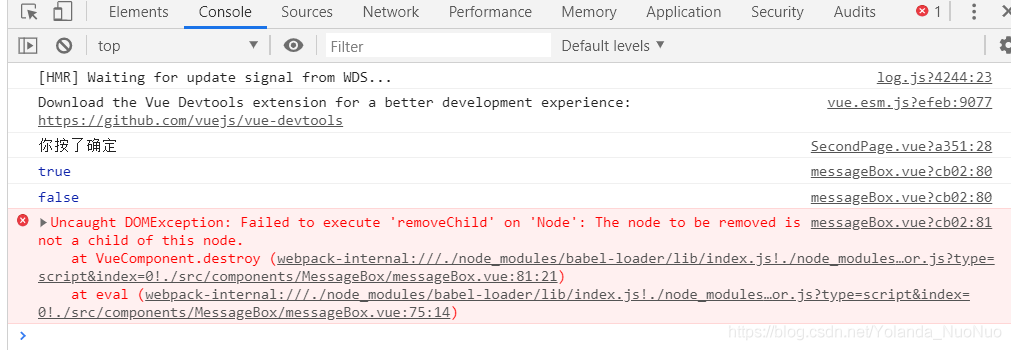
messagebox.vue?Cb02:80 Uncaught DOMException: Failed to execute ‘removeChild’ on ‘Node’ : The Node to be removed is not a child of this Node.
Error is located via console.

>
add a line of logs in the destroy method. The console prints this.$el.

console.log(this.$el)

Add a line of logs to determine if this.$el is a child of the body

console.log(document.body.contains(this.$el))

1716438 – Error :” Failed to load database information Details: The Database connector crdb_bwquery.

symptom (of an illness)

Error: “Failed to load database information details: database connector crdb_bwquery.dll could not be loaded” in Crystal Reports 2011 with old report. The newly created report works fine using the “SAP BW MDX Query Driver”.


environment

Crystal Reports 2011 SAP BW 7.x

Copy this question

Start Crystal Reports 2011 Designer and connect to SAP BW system, the report is saved in step 2 Refresh the report. i Display the error message “Failed to load database information details: database connector crdb_bwquery.dll could not be loaded”.

result in

crdb_bwquery. dll is used by the legacy SAP BW query drivers that are no longer available from Crystal Reports 2011. They were provided in CR 2008 so that already created reports using the legacy drivers can still be used, and the reports can be recreated using the new drivers. “SAP BW MDX Query Driver”

resolutions

    1. Open the report in the Crystal Reports 2008 or 2011 designer. Browse Database -> Set the data source location. Create a new connection using the “SAP BW MDX Query Driver”. Under the newly created connection, browse to the query used in the current reportClick update. If there are variables in the query, they will be prompted. Map the required fields that are handled or fetched differently by the new driver. Execute the report. </ ol>
    Note: Mapping fields can be complicated because the two drivers treat back-end objects like hierarchies differently, and in some cases, re-creating the report is the only option. In some cases, field names and types also change, so some formulas may need to be type-converted before the report can fetch data.

keywords

crdb_bwquery. crdb_bwquery. cr2011 database error, sap bw mdx query driver, sap bw query driver

symptom (of an illness)

Error: “Failed to load database information details: database connector crdb_bwquery.dll could not be loaded” in Crystal Reports 2011 with old report. The newly created report works fine using the “SAP BW MDX Query Driver”.

environment

Crystal Reports 2011 SAP BW 7.x

Copy this question

Start Crystal Reports 2011 Designer and connect to SAP BW system, the report is saved in step 2 Refresh the report. i Display the error message “Failed to load database information details: database connector crdb_bwquery.dll could not be loaded”.

result in

crdb_bwquery. dll is used by the legacy SAP BW query drivers that are no longer available from Crystal Reports 2011. They were provided in CR 2008 so that already created reports using the legacy drivers can still be used, and the reports can be recreated using the new drivers. “SAP BW MDX Query Driver”

resolutions

    1. Open the report in the Crystal Reports 2008 or 2011 designer. Browse Database -> Set the data source location. Create a new connection using the “SAP BW MDX Query Driver”. Under the newly created connection, browse to the query used in the current reportClick update. If there are variables in the query, they will be prompted. Map the required fields that are handled or fetched differently by the new driver. Execute the report.
    Note: Mapping fields can be complicated because the two drivers treat back-end objects like hierarchies differently, and in some cases, re-creating the report is the only option. In some cases, field names and types also change, so some formulas may need to be type-converted before the report can fetch data.

keywords

crdb_bwquery. crdb_bwquery. cr2011 database error, sap bw mdx query driver, sap bw query driver