ERROR: transport error 202: connect failed: Connection refused
ERROR: JDWP Transport dt_socket failed to initialize, TRANSPORT_INIT(510)
JDWP exit error AGENT_ERROR_TRANSPORT_INIT(197): No transports initialized [debugInit.c:750]
<forked VM failed with exit code 2>
<stdout last='20 lines'>
</stdout>
<stderr last='20 lines'>
ERROR: transport error 202: connect failed: Connection refused
ERROR: JDWP Transport dt_socket failed to initialize, TRANSPORT_INIT(510)
JDWP exit error AGENT_ERROR_TRANSPORT_INIT(197): No transports initialized [debugInit.c:750]
Solution: run it by command instead of directly running the
MVN clean package
java-jar target/benchmarks. Jar at idea
If the Maven project generation JAR runtime prompts “No main listing properties”, the entry class (that is, the class where the main function resides) cannot be found
Modify the POm.xml file by adding the following configuration item to specify the entry class:
<build>
  <plugins>
    <plugin>
        <groupId>org.apache.maven.plugins</groupId>
        <artifactId>maven-shade-plugin</artifactId>
        <version>1.2.1</version>
        <executions>
            <execution>
                <phase>package</phase>
                <goals>
                        <goal>shade</goal>
                </goals>
                    <configuration>
                        <transformers>
                            <transformer implementation="org.apache.maven.plugins.shade.resource.ManifestResourceTransformer">
                                <mainClass>com.jesper.jmh.FirstBenchmark</mainClass>
                            </transformer>
                        </transformers>
                    </configuration>
            </execution>
        </executions>
     </plugin>
  </plugins>
</build>
R load(xxx.Rdata) Error bad restore file magic number (file may be corrupted) — no data loaded

Error in load(file) :
bad restore file magic number (file may be able) — no data loaded
in addition: Warning message:
file ‘Deng.Rdata’ has magic number ‘RDX3’
Use of save versions prior to 2 is deprecated
my Rdata was saved with R3.6 and loaded with R3.4
This occurs when the R version used is greater than or equal to 3.5.0 version, and the R version used to read the file is less than 3.5.0
It should be the R version mismatch
Solution: Add version= when saving Rdata and specify the R version at read time
Solution to abnormal errors during startup of Python’s Anaconda
Anaconda
A very good Python distribution.
Question raising
One day, suddenly found that after starting Spyder, has been in Connecting to Kernel, Loading endless, in essence is not connected.
when IPython is started, the following error message is reported:
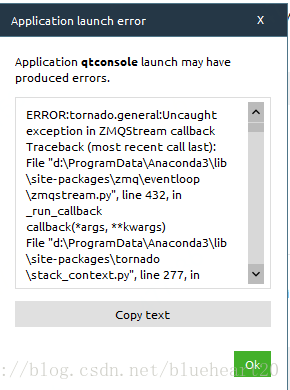
ERROR:tornado.general:Uncaught exception in ZMQStream callback
Traceback (most recent call last):
File "d:\ProgramData\Anaconda3\lib\site-packages\zmq\eventloop\zmqstream.py", line 432, in _run_callback
callback(*args, **kwargs)
File "d:\ProgramData\Anaconda3\lib\site-packages\tornado\stack_context.py", line 277, in null_wrapper
return fn(*args, **kwargs)
File "d:\ProgramData\Anaconda3\lib\site-packages\ipykernel\kernelbase.py", line 283, in dispatcher
return self.dispatch_shell(stream, msg)
File "d:\ProgramData\Anaconda3\lib\site-packages\ipykernel\kernelbase.py", line 233, in dispatch_shell
self.pre_handler_hook()
File "d:\ProgramData\Anaconda3\lib\site-packages\ipykernel\kernelbase.py", line 248, in pre_handler_hook
self.saved_sigint_handler = signal(SIGINT, default_int_handler)
File "d:\ProgramData\Anaconda3\lib\signal.py", line 47, in signal
handler = _signal.signal(_enum_to_int(signalnum), _enum_to_int(handler))
ValueError: signal only works in main thread
ERROR:tornado.general:Uncaught exception in zmqstream callback
Traceback (most recent call last):
File "d:\ProgramData\Anaconda3\lib\site-packages\zmq\eventloop\zmqstream.py", line 450, in _handle_events
self._handle_recv()
File "d:\ProgramData\Anaconda3\lib\site-packages\zmq\eventloop\zmqstream.py", line 480, in _handle_recv
self._run_callback(callback, msg)
File "d:\ProgramData\Anaconda3\lib\site-packages\zmq\eventloop\zmqstream.py", line 432, in _run_callback
callback(*args, **kwargs)
File "d:\ProgramData\Anaconda3\lib\site-packages\tornado\stack_context.py", line 277, in null_wrapper
return fn(*args, **kwargs)
File "d:\ProgramData\Anaconda3\lib\site-packages\ipykernel\kernelbase.py", line 283, in dispatcher
return self.dispatch_shell(stream, msg)
File "d:\ProgramData\Anaconda3\lib\site-packages\ipykernel\kernelbase.py", line 233, in dispatch_shell
self.pre_handler_hook()
File "d:\ProgramData\Anaconda3\lib\site-packages\ipykernel\kernelbase.py", line 248, in pre_handler_hook
self.saved_sigint_handler = signal(SIGINT, default_int_handler)
File "d:\ProgramData\Anaconda3\lib\signal.py", line 47, in signal
handler = _signal.signal(_enum_to_int(signalnum), _enum_to_int(handler))
ValueError: signal only works in main thread
ERROR:tornado.application:Exception in callback functools.partial(.null_wrapper at 0x0000000005B33488>)
Traceback (most recent call last):
File "d:\ProgramData\Anaconda3\lib\site-packages\tornado\ioloop.py", line 605, in _run_callback
ret = callback()
File "d:\ProgramData\Anaconda3\lib\site-packages\tornado\stack_context.py", line 277, in null_wrapper
return fn(*args, **kwargs)
File "d:\ProgramData\Anaconda3\lib\site-packages\zmq\eventloop\zmqstream.py", line 536, in
self.io_loop.add_callback(lambda : self._handle_events(self.socket, 0))
File "d:\ProgramData\Anaconda3\lib\site-packages\zmq\eventloop\zmqstream.py", line 450, in _handle_events
self._handle_recv()
File "d:\ProgramData\Anaconda3\lib\site-packages\zmq\eventloop\zmqstream.py", line 480, in _handle_recv
self._run_callback(callback, msg)
File "d:\ProgramData\Anaconda3\lib\site-packages\zmq\eventloop\zmqstream.py", line 432, in _run_callback
callback(*args, **kwargs)
File "d:\ProgramData\Anaconda3\lib\site-packages\tornado\stack_context.py", line 277, in null_wrapper
return fn(*args, **kwargs)
File "d:\ProgramData\Anaconda3\lib\site-packages\ipykernel\kernelbase.py", line 283, in dispatcher
return self.dispatch_shell(stream, msg)
File "d:\ProgramData\Anaconda3\lib\site-packages\ipykernel\kernelbase.py", line 233, in dispatch_shell
self.pre_handler_hook()
File "d:\ProgramData\Anaconda3\lib\site-packages\ipykernel\kernelbase.py", line 248, in pre_handler_hook
self.saved_sigint_handler = signal(SIGINT, default_int_handler)
File "d:\ProgramData\Anaconda3\lib\signal.py", line 47, in signal
handler = _signal.signal(_enum_to_int(signalnum), _enum_to_int(handler))
ValueError: signal only works in main thread
Judging from the error message, it must be a version conflict for one of the packages.
Problem solving
After searching the Internet, I decided to try the following:
conda uninstall jupyter tornado
Solving environment: done


==> WARNING: A newer version of conda exists. <==
  current version: 4.4.6
  latest version: 4.5.9

Please update conda by running

    $ conda update -n base conda


## Package Plan ##

  environment location: D:\ProgramData\Anaconda3

  removed specs:
    - jupyter
    - tornado


The following packages will be REMOVED:

    anaconda-project: 0.8.0-py36h8b3bf89_0
    jupyter:          1.0.0-py36h422fd7e_2
    jupyter_console:  5.2.0-py36h6d89b47_1
    seaborn:          0.8.0-py36h62cb67c_0
    tornado:          4.5.3-py36_0

Proceed ([y]/n)?y

Preparing transaction: done
Verifying transaction: done
Executing transaction: done
After uninstalling, reinstall:
conda install jupyter tornado
The information output during installation is as follows:
Solving environment: done


==> WARNING: A newer version of conda exists. <==
  current version: 4.4.6
  latest version: 4.5.9

Please update conda by running

    $ conda update -n base conda


## Package Plan ##

  environment location: D:\ProgramData\Anaconda3

  added/updated specs:
    - jupyter
    - tornado


The following packages will be downloaded:

    package                    |            build
    ---------------------------|-----------------
    ipykernel-4.8.2            |           py36_0         146 KB
    ipywidgets-7.4.0           |           py36_0         150 KB
    jupyter_client-5.2.3       |           py36_0         188 KB
    nbconvert-5.3.1            |           py36_0         422 KB
    widgetsnbextension-3.4.0   |           py36_0         1.7 MB
    tornado-5.1                |   py36hfa6e2cd_0         669 KB
    jupyter-1.0.0              |           py36_5           6 KB
    jupyter_console-5.2.0      |           py36_1          53 KB
    ------------------------------------------------------------
                                           Total:         3.3 MB

The following NEW packages will be INSTALLED:

    jupyter:            1.0.0-py36_5
    jupyter_console:    5.2.0-py36_1
    tornado:            5.1-py36hfa6e2cd_0

The following packages will be UPDATED:

    ipykernel:          4.6.1-py36hbb77b34_0 --> 4.8.2-py36_0
    ipywidgets:         7.0.0-py36h2e74ada_0 --> 7.4.0-py36_0
    jupyter_client:     5.2.2-py36_0         --> 5.2.3-py36_0
    nbconvert:          5.3.1-py36h8dc0fde_0 --> 5.3.1-py36_0
    widgetsnbextension: 3.0.2-py36h364476f_1 --> 3.4.0-py36_0

Proceed ([y]/n)?y


Downloading and Extracting Packages
ipykernel 4.8.2: ################################################################
ipywidgets 7.4.0: ###############################################################
jupyter_client 5.2.3: ###########################################################
nbconvert 5.3.1: ################################################################
widgetsnbextension 3.4.0: #######################################################
tornado 5.1: ####################################################################
jupyter 1.0.0: ##################################################################
jupyter_console 5.2.0: ##########################################################
Preparing transaction: done
Verifying transaction: done
Executing transaction: done
conclusion
Often walk from the river, occasionally wet shoes, these tools will occasionally report errors, if there is a problem, just try to solve it.
Syntax error, annotations are only available if source level is 1.5 or greater
How to Fix webpack Module build failed Error: The node API for ‘babel’ has been moved to babel-core
Red when webpack is packaged:
Module build failed: Error: The node API for 'babel' has been moved to babel-coreThere is nothing available on the web,
so delete the entire node_modules folder,
download the dependency package again:
npm init;
cnpm install --save babel-loader babel-preset-es2015 babel-preset-react babel-core
And to pack:
webpakOk, perfect!
Solve the problem of There was an unexpected error (type=Internal Server Error, status=500) (using Thymeleaf to report an error)
Error details
Today, when I was watching a video and writing a small demo, I used the Thymeleaf framework to build the front end and started the SpringBoot project. I reported the error 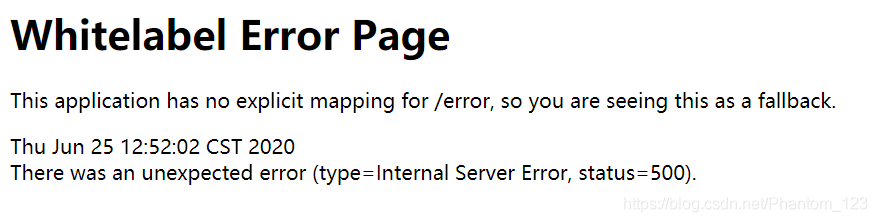 as shown in the figure below
Find the problem
Checked the database query and other code after a series of tests, found that there are no mistakes, then find a large number of blogs, online to tell you the truth, really didn’t find out how many useful things, perhaps because the problem is not the same, however, also good finally found two useful blog on their own, although the problem is a bit different, but it solved my problem.
the first blog is mainly about the problem of dependence
springboot+thymeleaf view mapping error: There was an unexpected error (type=Not Found, status=404)
the second blog mainly used the thymeleaf pit
to solve the thymeleaf There was an unexpected error (type=Internal Server error, status=500).
To solve
1. First of all, I checked my thymeleaf grammar problems, and after all of them were found, I started the project after deploying the project again or reported an error
2. Then I referred to the first blog and added the related dependence of thymeleaf (as shown below), there was no problem in starting the project again.
<dependency>
       <groupId>org.springframework.boot</groupId>
        <artifactId>spring-boot-starter-thymeleaf</artifactId>
</dependency>
= = = = = = = = = = = = = = = = = = = = = = = = = = = = = = = = = = = = = = = = =
if blogs have write wrong place, welcome to pointed out.
finally, I just want to make a silent joke, why the video did not add this dependency run project is no problem, then I have a problem???If there is any elder brother know, trouble points a ha.
[Qt] error: call to non-static member function without an object argument

error: calls a non-static member function with no object arguments.
this error occurs because the class is not instantiated with .
Take a chestnut, for example:
 class Student
 {
 public:
 int getAge();
 };
The reason for this error may be that when you call the function getAge(), you are doing this:
Student::getAge();
Or do it this way:
Student.getAge();
This means that the member function is called without instantiating the class Student.
Fix one: Instantiate an object first
 Student XiaoWang;
 int age = XiaoWang.getAge();
Correction 2: Declare member functions as static functions
 class Student
 {
 public:
static  int getAge();
 };

 Student::getAge();
Take chestnuts, for example:
QDir::mkpath(Path);
Error: Calling a non-static member function with no object arguments.
the reasons for this error is that the class does not instantiate and call mkpath function need to first class instantiation,
to:
   QDir tempDir;
    tempDir.mkpath(Path);
That’s right.
If you write your own class, you can also add the static keyword before the function’s declaration in the class body to declare the function as a static member and call it without instantiation.
such as:
QMessageBox::warning(this,tr("Warning"),tr("No Exist"));
Static member functions can be called directly with “ class :: function name “.
(Emitted value instead of an instance of Error) Error compiling template:
Conclusion: Find out if templent contains a script and remove it
Error: (Emitted value instead of an instance of Error)
Error compiling. template:
also has a paragraph Error:
Templates should only be responsible for mapping the state to the UI. Avoid placing tags with side-effects in your templates, such as
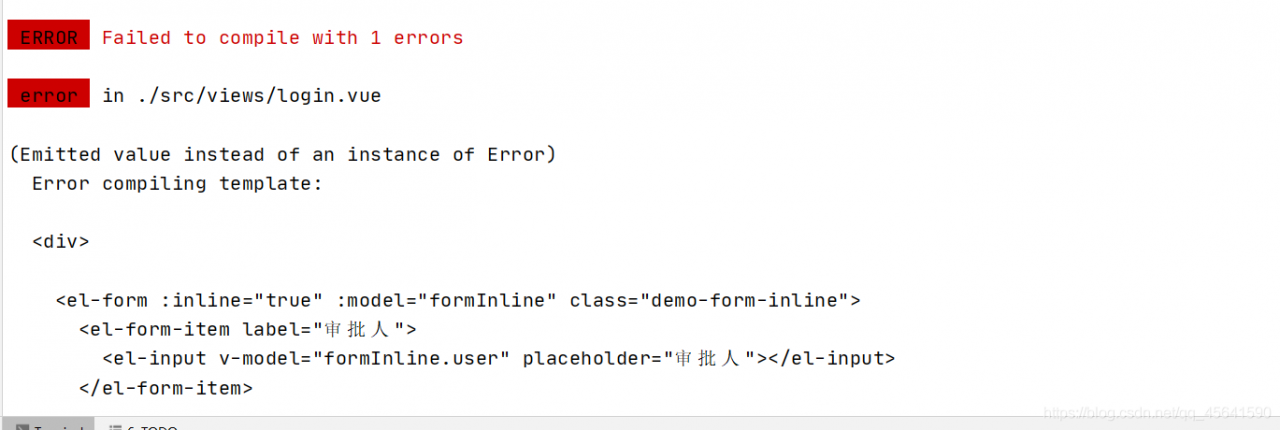
Reason: Error packaging vUE with elementUI for the first time
Algorithm error: LaTex error: \caption outside float
When writing a paper with a template, algorithm error was found:
LaTex error: \caption outside float
should be algorithm in the CLS file of the template itself, resulting in a conflict, so the following package was added:
\usepackage[algo2e,ruled,vlined]{algorithm2e}
And clearly
\begin{algorithm2e}

\end{algorithm2e}
Can be solved!
devtools Error: Could not find package root
Main reasons:
The problem is not the root package, but that the current path is not in the directory where the R package was developed
Error: Could not find package root.
Solutions:
Setwd ()
just go back to the directory where you developed the R package.
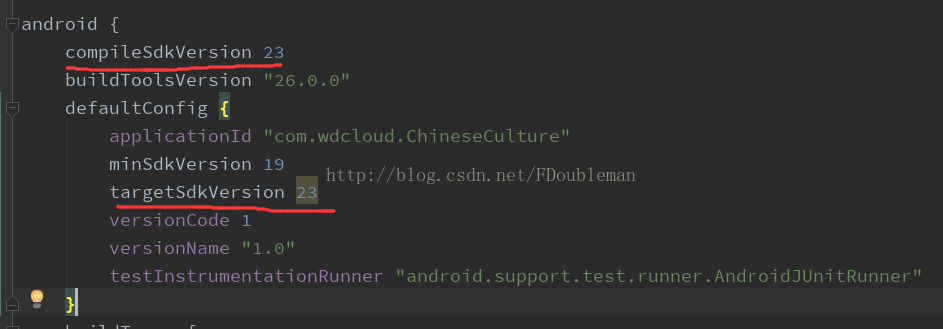
26、Error:No resource identifier found for attribute ’roundIcon’ in package ‘android’
During the development of the project, the following changes were made:
CompileSdkVersion and targetSdkVersion were adjusted from 25 to 23,
The result is tragic, direct report such error;
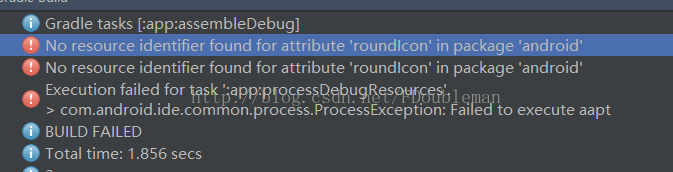
Ii. Cause of the problem:
After analysis:
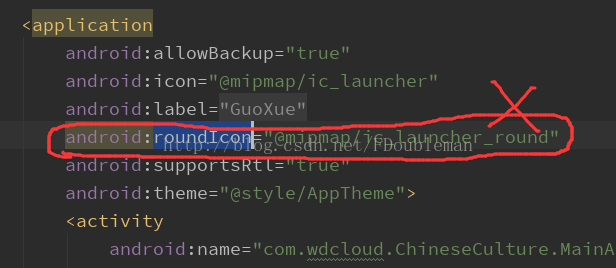
Under the Application node in the AndroidManifest file
Android: roundIcon = “@ mipmap/ic_launcher_round”,
Version 23 does not support roundness. Android :roundIcon is a new feature in version 25.
Iii. Problem Solving:
Directly remove Android :roundIcon, successfully solved
Xcode Error: Embedded binary’s bundle identifier is not prefixed with the parent app’s bundle identifier
1. If it is a project directly downloaded from the Internet, first check whether the Bundle Identifier on Project TARGETS has been set. If it is a demo project from the SDK, the Bundle Identifier is usually blank and needs to be filled in manually. Then select the developer account in the Signing team below. The same setting is also done in the TARGETS project accordingly in the Test project.
2. Xcode + iwatch debugging error
under the three Targets of the project (the project name is my) : my, my Watchkit app, my Watchkit extention
General -> The Bundle Identifier under Identity is written in a fixed way, so don’t change it.
for example:
com. XXX. My
com. XXX. My. Watchkitapp
com. XXX. My. Watchkitapp. Watchkitextension