Author Archives: Robins

How to Fix RTL8188 “Set Mode” (8B06) Error

To get 8188 into Monitor mode while using RTL8188, use the following setup instructions:

iwconfig ra0 mode monitor

But the print appears as follows:

Error for wireless request "Set Mode" (8B06) :
    SET failed on device ra0 ; Operation not supported.
device ra0 entered promiscuous mode

Note that this operation is not supported because iwconfig does not support it, but check that iwconfig supports setting modes

~ # iwconfig --help
Usage: iwconfig [interface]
                interface essid {NNN|any|on|off}
                interface mode {managed|ad-hoc|master|...}
                interface freq N.NNN[k|M|G]
                interface channel N
                interface bit {N[k|M|G]|auto|fixed}
                interface rate {N[k|M|G]|auto|fixed}
                interface enc {NNNN-NNNN|off}
                interface key {NNNN-NNNN|off}
                interface power {period N|timeout N|saving N|off}
                interface nickname NNN
                interface nwid {NN|on|off}
                interface ap {N|off|auto}
                interface txpower {NmW|NdBm|off|auto}
                interface sens N
                interface retry {limit N|lifetime N}
                interface rts {N|auto|fixed|off}
                interface frag {N|auto|fixed|off}
                interface modulation {11g|11a|CCK|OFDMg|...}
                interface commit 
       Check man pages for more details.
~ # 

Then I looked at the driver source code and found that the driver source code turned off Monitor mode by default, as follows:

CONFIG_WIFI_MONITOR = n

Rewrite N to Y, then recompile the driver, burn it to the device, and the test can be set to Monitor mode as normal.

Python error: permissionerror: [errno 13] permission denied solution details

Error message
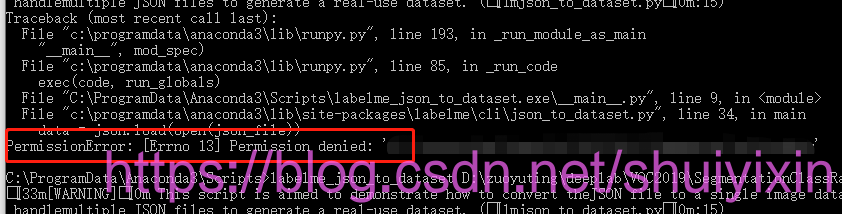
During the process of using Python to make a data set, the following error was reported:

The reason for the error
The error translates as:

Permission error: [Errno 13] permission denied:

The error occurs when the file cannot be opened. It can occur when the file cannot be found, is occupied, has no access, or is opened not to a file but to a directory.
The solution
The solution is as follows:

1. Check whether the file under the corresponding path exists and is occupied. If the file does not exist, just find the corresponding file; If the file exists and is occupied, the occupying program is temporarily closed.
2. Modify the permissions of CMD to run as administrator.
3. Check if the folder is open.


error C2137: empty character constant

Number: C2137
Null character definition.
Error analysis:
The reason is that two single quotes are used together without any characters in between. In general, single quotes represent character constants. Single quotes must have, and can only have, one character (when an escape character is used, the character represented by the escape character is treated as a character). Nothing between two single quotes is not allowed.
Case study:

#include<stdio.h>
int main()
{
    const char a='';
	printf("%c",a);
	return 0;
}

Rselenium packet capture chain home network (Part 2: data storage and fault tolerance management)

To continue
The previous RSelenium package crawls HOME LINK (above: simulated clicks and page crawls) focused on the issue of automatic clicking on web pages. The code can also capture the full data, but only if there is no error or warning to interrupt the capture. Since both LinkinfoFunc and HouseinfoFunc are encapsulated functions, once interrupted, the data captured before the interruption cannot be written to the data box or list.
When the amount of data to be captured is large and time consuming, various problems such as network interruption will inevitably occur. Therefore, this article builds on the previous one by adding a for loop that introduces the tryCatch function to perform simple error handling. The two comparative changes are as follows:

    page preparation, Step1 code unchanged Step2 delete the data box result, transfer the data storage task to Step 3Step3 add for loop, and introduce tryCatch function

In addition, repeated code is not commented.


Page to

library(rvest)
library(stringr)
library(RSelenium)
remDr <- remoteDriver(browserName = "chrome")
base1 <- "https://hui.lianjia.com/ershoufang/"
base2 <- c("danshui", "huiyangqu", "nanzhanxincheng")
url   <- paste(base1, base2, "/", sep = "")

Step1: Encapsulate the function LinkinfoFunc

LinkinfoFunc <- function(remDr, url) {
  result <- data.frame()
  remDr$open()
  for (i in seq_along(url)) {
    remDr$navigate(url[i])
    j = 0
    while (TRUE) {
      j = j + 1
      destination <- remDr$getPageSource()[[1]] %>% read_html()
      link        <- destination %>% html_nodes("li.clear div.title a") %>% html_attr("href")
      pageinfo    <- destination %>% html_nodes("div.house-lst-page-box") %>% 
                     html_attr("page-data") %>% str_extract_all(., ":[\\d]+") %>% 
                     unlist() %>% gsub(":", "", .)
      totalpage   <- pageinfo[1]
      curpage     <- pageinfo[2]
      data        <- data.frame(link, stringsAsFactors = FALSE)
      result      <- rbind(result, data)
      if (curpage != totalpage) {
        cat(sprintf("The [%d] area of the [%d] page capture success", i, j), sep = "\n")
        remDr$executeScript("arguments[0].click();", 
                            list(remDr$findElement("css", "div.house-lst-page-box a.on+a")))
      } else {
        cat(sprintf("The [%d] area of the [%d] page capture success", i, j), sep = "\n")
        break
      }
    }
    cat(sprintf("The [%d] area was successfully captured.", i), sep = "\n")
  }
  remDr$close()
  cat("All work is done!", sep = "\n")
  return(result)
}

Executive function

linkinfo  <- LinkinfoFunc(remDr, url) %>% unlist()
# Execute function LinkinfoFunc, get linkinfo (list form)

Step2: package function HouseinfoFunc

HouseinfoFunc <- function(link) {
    destianation <- read_html(link, encoding = "UTF-8")
    location     <- destianation %>% html_nodes("a.no_resblock_a") %>% html_text()
    unit         <- destianation %>% html_nodes(".price span.unit") %>% html_text()
    totalprice   <- destianation %>% html_nodes(".price span.total:nth-child(1)") %>%
                    html_text() %>% paste(., unit, sep = "")
    downpayment  <- destianation %>% html_nodes(".taxtext span") %>% html_text() %>% .[1]
    persquare    <- destianation %>% html_nodes("span.unitPriceValue") %>% html_text()
    area         <- destianation %>% html_nodes(".area .mainInfo") %>% html_text()
    title        <- destianation %>% html_nodes(".title h1") %>% html_text()
    subtitle     <- destianation %>% html_nodes(".title div.sub") %>% html_text()
    room         <- destianation %>% html_nodes(".room .mainInfo") %>% html_text()
    floor        <- destianation %>% html_nodes(".room .subInfo") %>% html_text()
    data         <- data.frame(location, totalprice, downpayment, persquare, 
                               area, title, subtitle, room, floor)
    return(data)
}

The Step3: for loop and tryCatch functions catch exceptions

result <- list()
# or result <- vector("list", length(linkinfo))
# Create an empty list of results to be used later for loading data
for (i in seq_along(linkinfo)) {
  if (! (linkinfo[i] %in% names(result)) {
  # If the current linkinfo[i] data has not been written to result, continue with the following command
  # Used to determine if the linkinfo[i] to be fetched has already been fetched to avoid repeated fetching.
    cat(paste("Doing", i, linkinfo[i], "..."))
    # Output a message that says "The link is currently being fetched".
    ok <- FALSE
    # Set initial logical values    
    counter <- 0
    # Set the initial value of counter for the number of connection attempts.
    while (ok == FALSE & counter < 5) {
    # The initial value is FALSE, and when the data is captured, the value will be changed to TRUE and the while loop will pop up.
    The setting of # counter is used to handle exceptions to linkinfo[i], with an initial value of 1. When an error occurs, it returns to the while loop for the 2nd... The fifth reconnection
      counter <- counter + 1
      # Start the first connection
      output <- tryCatch({                  
        HouseinfoFunc(linkinfo[i])
        # Execute the HouseinfoFunc function on linkinfo[i] to implement the crawl.
      },
      error=function(e){
      # If you get an error
        Sys.sleep(2)
        # Rest for 2s
        e
        # Output error messages
      }
      )
      if ("error" %in% class(output)) {
      # If the output type of the output is error
        cat("NA...")
        # then "NA..." and return to the while loop for the second... Reconnect for the 5th time.
      } else {
      # If the output is the captured data, not an error
        ok <- TRUE
        # then the logical value becomes TRUE, out of the while loop.
        cat("Done.")
        # Output the "Done" prompt
      }
    }
    cat("\n")
    result[[i]] <- output
    # Each time the for loop is run, get the value of output and write it to result.
    names(result)[[i]] <- linkinfo[i]
    # Name the i-th vector in result to the corresponding house link (URL)
  }
} 
# The result (in list form) collected in this step includes both the error message returned by the 404 not found page and the target data, which needs to be further separated.

Data separation and extraction

result <- lapply(result, function(x) {
  if (unlist(x) %>% length() == 9) {
    return(x)
  } else {
    return(NULL)
  }
})
# Expand the vectors in the result one by one, and since the target data contains 9 variables, the length of the target vector should be equal to 9 when it is expanded
# Use this feature to leave the target vector and set the non-target vector value to NULL.
result <- result[!sapply(result, is.null)]
# Remove the NULL vector, leaving only the target vector for result.
houseinfo <- do.call(rbind, result)
# Operate the target vector with rbind to get houseinfo (in data.frame form).
View(houseinfo)
write.table(houseinfo, row.names = FALSE, sep = ",", "houseinfo.csv")
# View() function to view data and export it locally

conclusion
Although LinkinfoFunc, the encapsulation function of Step 2, can catch all house links LinkInfo (list form), each link has timeliness. After the house is removed from the shelves, the page will return 404 not Found. Not only can’t the contents of the page be captured, but the subsequent fetching will also be interrupted. Therefore, the function of Step 3 is mainly implemented as follows:

    1. for loop through each linkinfo, for each linkinfo, execute the tryCatch function once, determine and catch the abnormal linkinfo[I] for the abnormal linkinfo[I], execute the while loop to try to recapture, a total of 5 times, and wait 2 seconds each time if the loop is manually interrupted, if (! (linkinfo [I] % % in names (result))) statement can eliminate the link that has been fetching, again, when performing a for loop directly from the intermitting position abnormal action again to hold the data link, the write data box default is NULL (set in Step 3 is written to the error message), and subsequent make rbind operation, should remove these invalid NULL values, can appear otherwise inconsistent length can’t rbind error </ ol> operation result and error of sample:
    1. [For links that are normally connected or captured, the for loop prompts are as follows]
Doing 1 https://hui.lianjia.com/ershoufang/105101098943.html ...Done.
Doing 2 https://hui.lianjia.com/ershoufang/105101085455.html ...Done.

[For links that cannot be properly connected or captured (5 attempts), the for loop prompt and Warining alert are as follows]

Doing 3 https://hui.lianjia.com/ershoufang/105101261413.html ...NA...NA...NA...NA...NA...
Doing 4 https://hui.lianjia.com/ershoufang/105112912491.html ...NA...NA...NA...NA...NA...
Warning messages:
1: closing unused connection 11 (https://hui.lianjia.com/ershoufang/105101261413.html) 
2: closing unused connection 10 (https://hui.lianjia.com/ershoufang/105101261413.html) 
3: closing unused connection 9 (https://hui.lianjia.com/ershoufang/105101261413.html) 
4: closing unused connection 8 (https://hui.lianjia.com/ershoufang/105101261413.html) 
5: closing unused connection 7 (https://hui.lianjia.com/ershoufang/105101261413.html) 

[(Step 3) The result obtained contains both target vectors (the first two) and non-target vectors (the last two)]

$`https://hui.lianjia.com/ershoufang/105101098943.html`
          location totalprice downpayment   persquare       area                                            title
1 Huizhou South Station, South and North Transparent, full five only, sincere and sincere sale at any time.
                                                  subtitle room floor
1 This house is the only one with full five, less taxes, mid-high floor, square, owner sincere sale 3 room 2 hall mid floor / 11 stories

$`https://hui.lianjia.com/ershoufang/105101085455.html`
  location totalprice downpayment   persquare      area                                          title
1 Pengcheng City 1,050,000 down payment 320,000 RMB 9981 yuan/sqm 105.2 sqm full five the only one Lin Shen area District government central location next to Metro Line 14.
                                                subtitle room floor
1 This house is full five only, no VAT tax, living room out of the balcony to see the garden, unobstructed. 3 Bedrooms 2 Bedrooms Mid floor/28 floors

$`https://hui.lianjia.com/ershoufang/105101261413.html`
<simpleError in open.connection(x, "rb"): HTTP error 404.>

$`https://hui.lianjia.com/ershoufang/105112912491.html`
<simpleError in open.connection(x, "rb"): HTTP error 404.>

[If rbind is performed on result directly, the following error will occur.]

Error in rbind(deparse.level, ...) : 
  There's an error in the series parameter: all variables should be the same length

<Human Resources>

Reference:
Iterate RV scratch function as: “Error in open. Connection(x, ” rb “):Arrival timeout.”
Solve the problem of “internal error” in “iis7.iiserver”

An error occurred while configuring the web site with the windows7 operating system IIS.
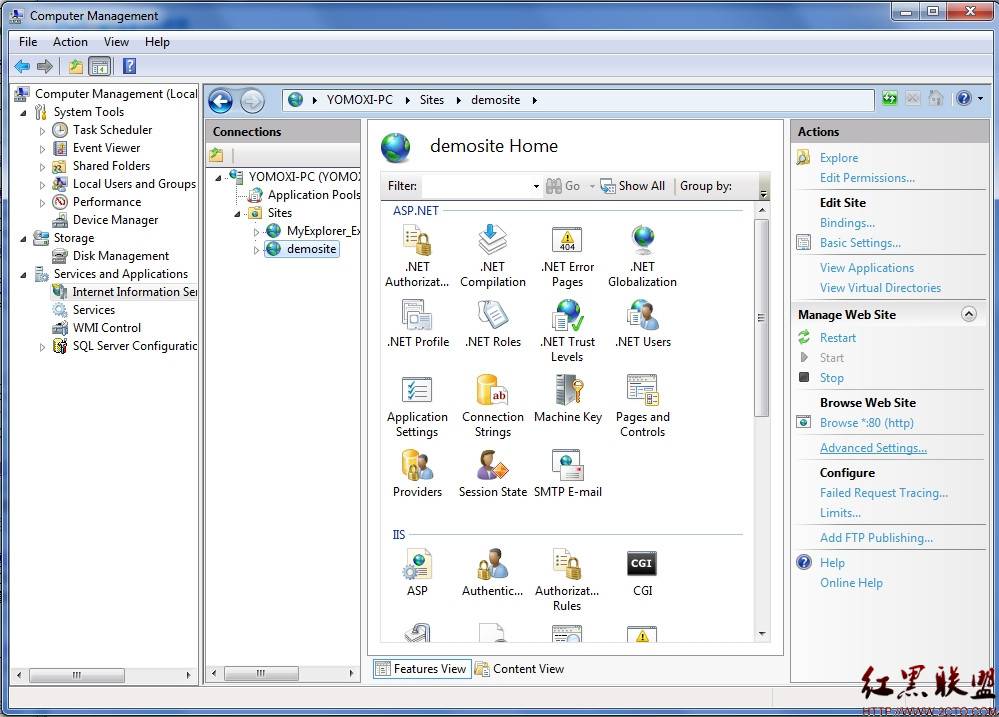
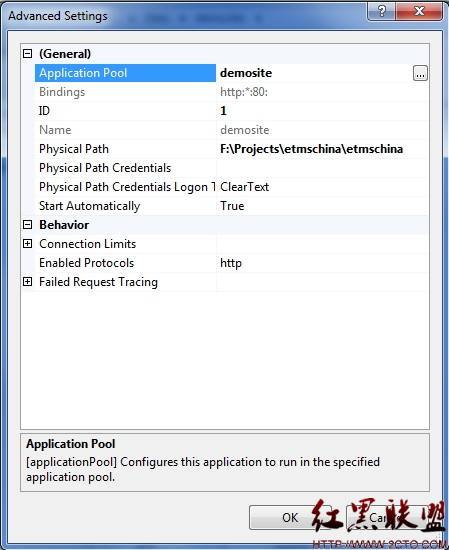
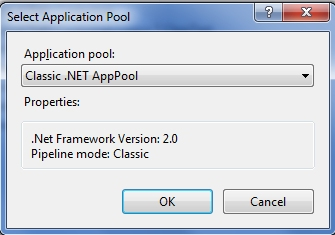
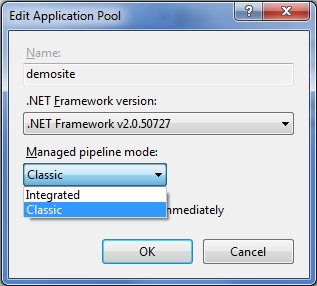
Here, except that IIS is to be installed and everything in the Internet Information service is checked, after the website is configured and the default website page is configured, click the advanced Settings on the right to change the Application Pool to Classic.Net AppPool
With this configuration, the site is ready to run.


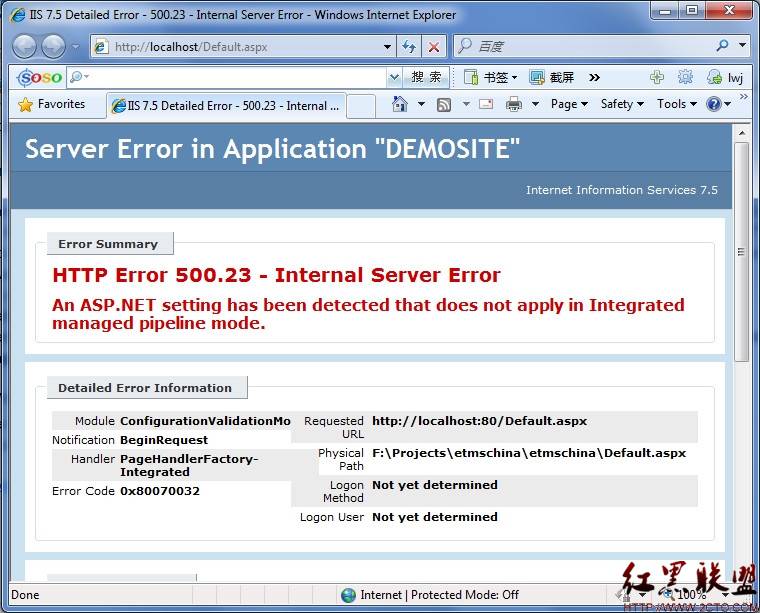
Resolution of “HTTP Error 500.23-Internal Server Error” in IIS7
I ran into this problem today when I deployed the site in IIS7.5, running the development environment all the way to Windows7. Now post my solution.


Solution: 1. Open the ISS and enter


Go to “Advanced Setting” in the list on the right and open it. Go to the “Application Pool” column.


Here are two solutions:
First, set the Application Pool to “Classic.net AppPool”.


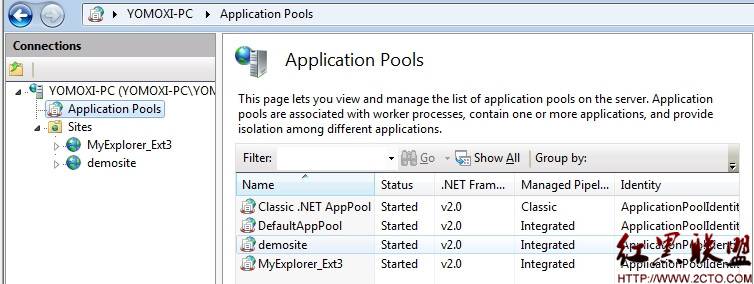
Second, find the name of the corresponding Application pool, in my case demosite

On the IIS home page, find “Application Pools”


Open “Demosite” in the middle list and change the Managed Pipeline Mode from Integrated to Classic, as shown below


Problem solved!

Android Development notes — mediaplayer error (1, – 2147483648)

Today, I recorded a pit. When I used MediaPlayer to play the video, the screen went black. Then, I saw that the system log output by the console contained a “MediaPlayer Error (1, -2147483648)”.
Then I went to the source code and found this

public interface OnErrorListener
    {
        /**
         * Called to indicate an error.
         *
         * @param mp      the MediaPlayer the error pertains to
         * @param what    the type of error that has occurred:
         * <ul>
         * <li>{@link #MEDIA_ERROR_UNKNOWN}
         * <li>{@link #MEDIA_ERROR_SERVER_DIED}
         * </ul>
         * @param extra an extra code, specific to the error. Typically
         * implementation dependent.
         * <ul>
         * <li>{@link #MEDIA_ERROR_IO}
         * <li>{@link #MEDIA_ERROR_MALFORMED}
         * <li>{@link #MEDIA_ERROR_UNSUPPORTED}
         * <li>{@link #MEDIA_ERROR_TIMED_OUT}
         * <li><code>MEDIA_ERROR_SYSTEM (-2147483648)</code> - low-level system error.
         * </ul>
         * @return True if the method handled the error, false if it didn't.
         * Returning false, or not having an OnErrorListener at all, will
         * cause the OnCompletionListener to be called.
         */
        boolean onError(MediaPlayer mp, int what, int extra);
    }

So the problem I have is the error “MEDIA_ERROR_SYSTEM”, the reason is “system version is too low error”… Then I looked it up on the Internet and found that video files are usually in MP4, AVI, etc., but even if they are in the same file format, they may have different encoding formats. For example, common coding formats are: H.264, H.263 and so on. However, many Andorid devices can only support partial encoding, which results in some videos that cannot be played on Andorid devices. If you have to play these videos, it involves the complicated operation of video transcoding… I haven’t learned this skill yet, so I’ll dig a hole and fill it up later

“Operation now in progress” appears when mounting CIFS

Copyright notice: This article is originally written by Yuesichiu. It should not be reproduced without permission of the blogger.
http://blog.csdn.net/yuesichiu/article/details/77839875

Recently developed to use in the CIFS, according to the online reference tutorial (http://blog.csdn.net/stelalala/article/details/16827611), the mount CIFS newspaper “mount: mounting// 192.168.1.102/CIFS on/MNT/CIFS failed: Operation now in progress”.

Copyright notice: This article is originally written by Yuesichiu. It should not be reproduced without permission of the blogger.
http://blog.csdn.net/yuesichiu/article/details/77839875

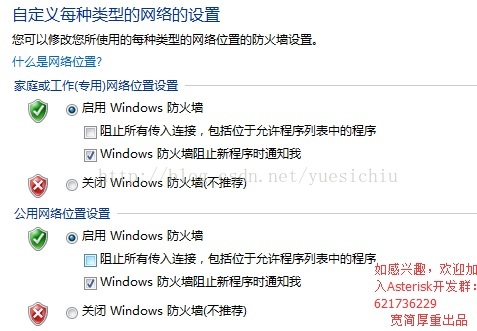
The problem should be that the firewall on the PC to be mounted (Windows 7) was not turned off, resulting in “Operation Now in Progress” being reported all the time. The solution is to turn off the Windows 7 firewall.

Copyright notice: This article is originally written by Yuesichiu. It should not be reproduced without permission of the blogger.
http://blog.csdn.net/yuesichiu/article/details/77839875

Error note 404 error


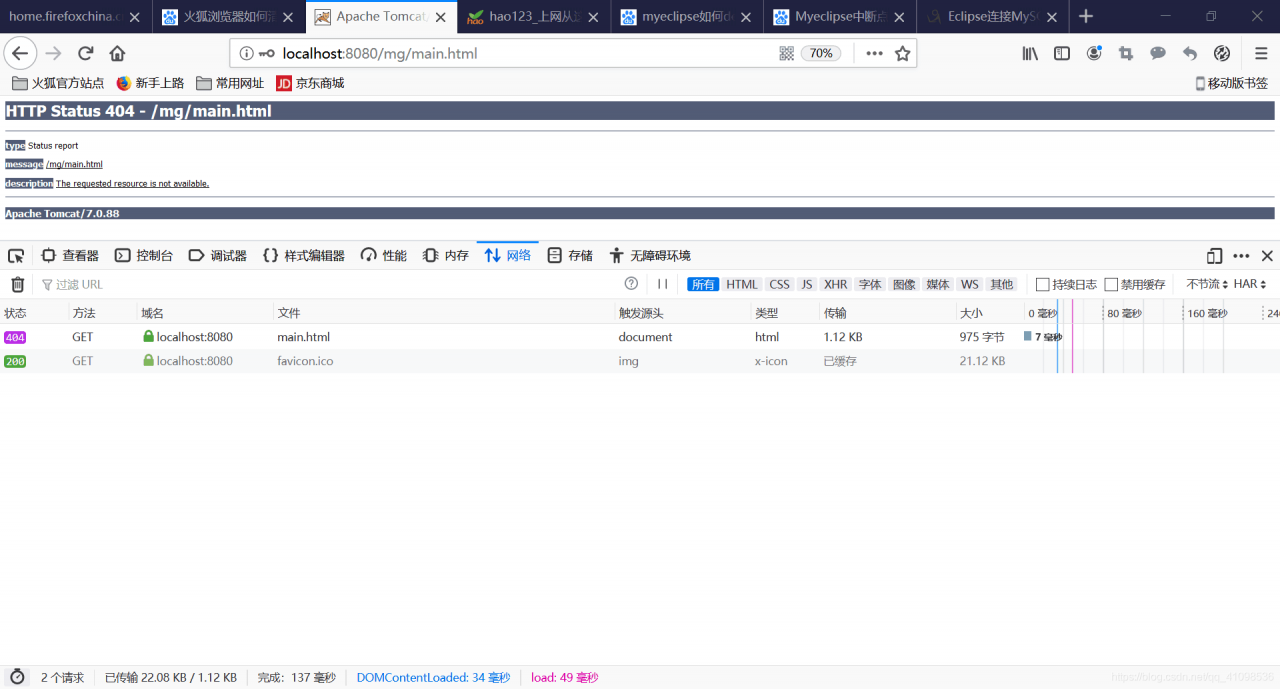
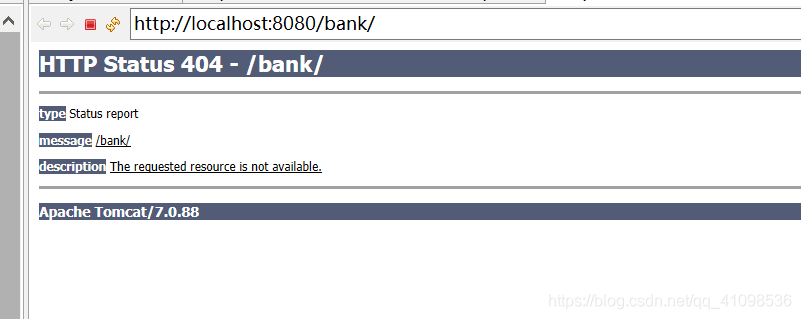
got a 404 error when I was running the login interface. At the beginning, I thought it was a database error (because there was no database information printed in the background), so I made crazy mistakes for the database. Generally, a large probability of database error is a statement error, so be careful!
and then the database frame package has a problem (of course, is a very small probability)
carefully compared to find that the database driver has, the database statement is also right, but I wrote the redirection is clearly main.jsp, but he kept skipping main.html.
Then Baidu 404 error reason for the path error, but the path configuration did not find the problem.
Finally, the boss corrected my mistake and found that the click event written on the submit button was: &western nclick = “javascript: window. Location = ‘main. HTML'”, and to have written form form the from, if the words in the wrong circumstances in the submit written &western nclick = “javascript: window. Location = ‘main. HTML'” will perform, form the action in the form will not work, it is only by priority or load sequence, thus can jump in the main. All the time only HTML web page,
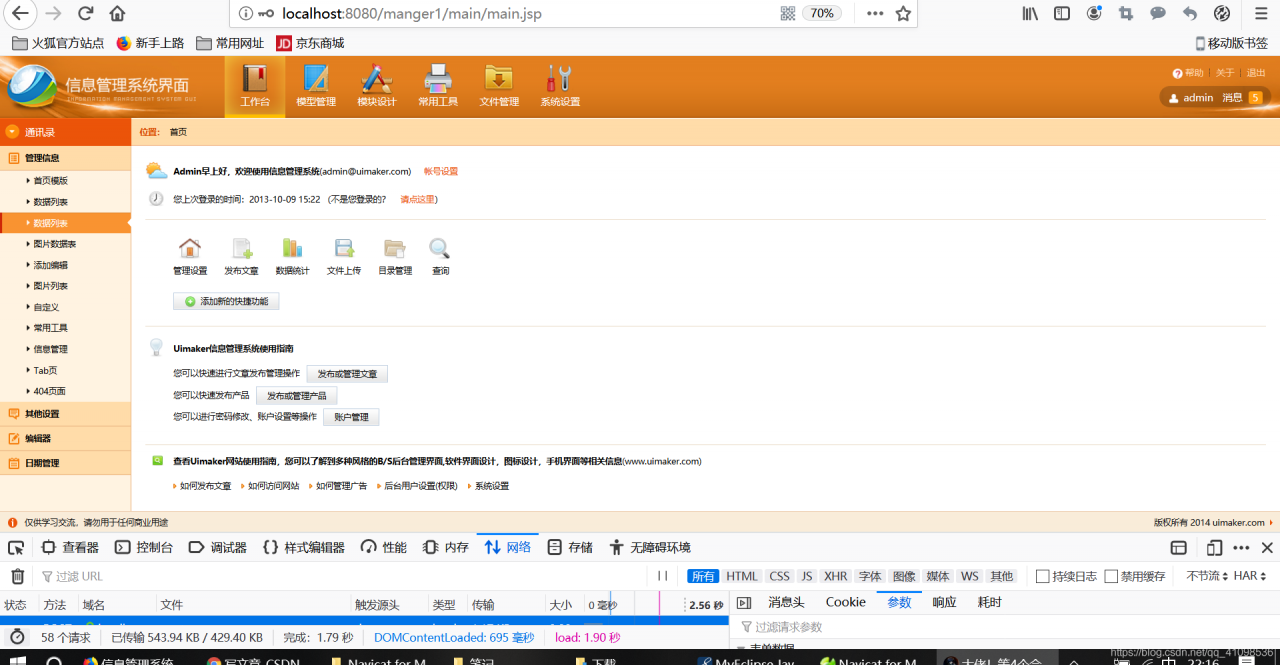
and finally the successful login screen.

to review the web. By the way in the XML configuration file:

https://www.cnblogs.com/xxoome/p/5954633.html get ✔
On September 6, another 404 error

was also found after a series of comparison in the database
The big guy’s solution is to clean the project. For efficiency, Eclipse doesn’t check the plug-in every time you start the project. Clean forces Eclipse to check the installed plug-in. We all know that.Java files are run by compiling to.class files, and clean deletes the compiled and generated.class files and redeploys the project.
because the previously incorrect class file is always in the project, the execution is always wrong

Error importing keras in jupyter Notebook: modulenotfounderror: no module named ‘keras’ solution

For the first time using Jupyter encountered some problems, a simple record.
I use anaconda comes with jupyter notebook, directly in the terminal input

jupyter notebook

The page just pops up. Or you can install it with PIP.
default is open C disk directory, if you want to open C disk outside the path, you can open the required directory in the terminal, then open jupyter notebook, or directly after the command to add a path, such as:

jupyter notebook D:\xxx\xxx

Can.
When I was running the code, I encountered a ModuleNotFoundError: No module named ‘Keras’.
the solution is as follows:
1, enter the configured virtual environment in the terminal

activate keras

2. Execute the following command:

conda install nb_conda

3, after installation, then start the Jupyter Notebook, it is OK.
need to restart jupyter notebook after every environment update, as I do.
Reference: 1, https://zhuanlan.zhihu.com/p/29564719

2
3, https://www.bbsmax.com/A/A7zgNovPd4/, https://stackoverflow.com/questions/38221181/no-module-named-tensorflow-in-jupyter

(Fixed) workbench MySQL Error Code: 2013. Lost connection to MySQL server during query

When creating a new table in MySQL, the problem of Lost Connection to MySQL occurred. Many methods were found on the Internet to modify timeout, max_allowed_packet.
One way is to change the value in CMD, but the default value will be restored after I restart mysql. Here is how to change the value.
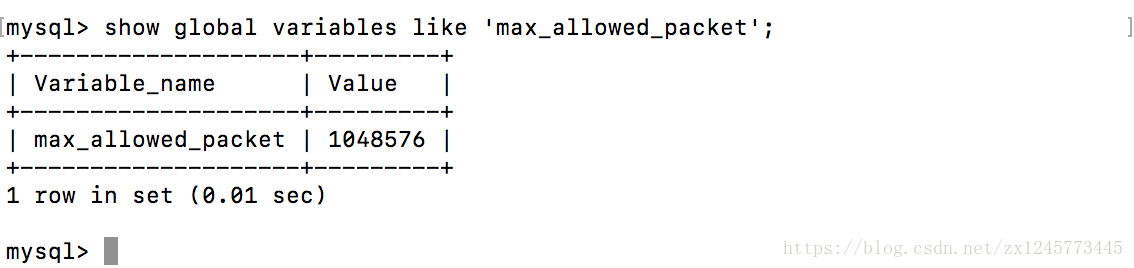
Show Global variables like ‘max_allowed_packet’; If you look at the space, the current space is only 1048576 bytes, 1M

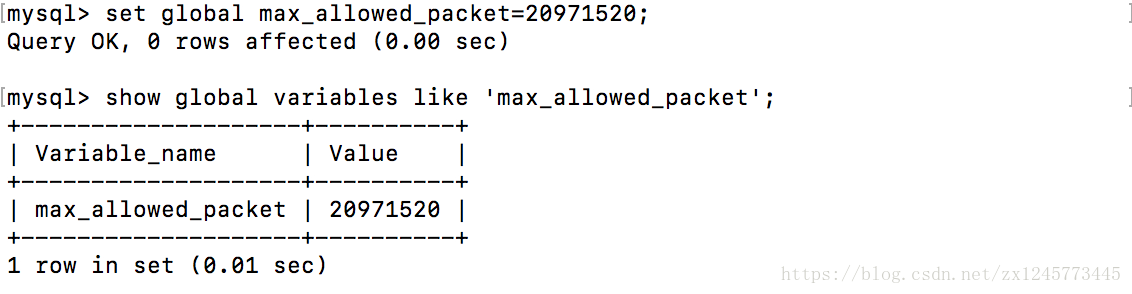
Use the set global max_allowed_packet = 20971520; Can be used to set the size of the space, here set to 20M

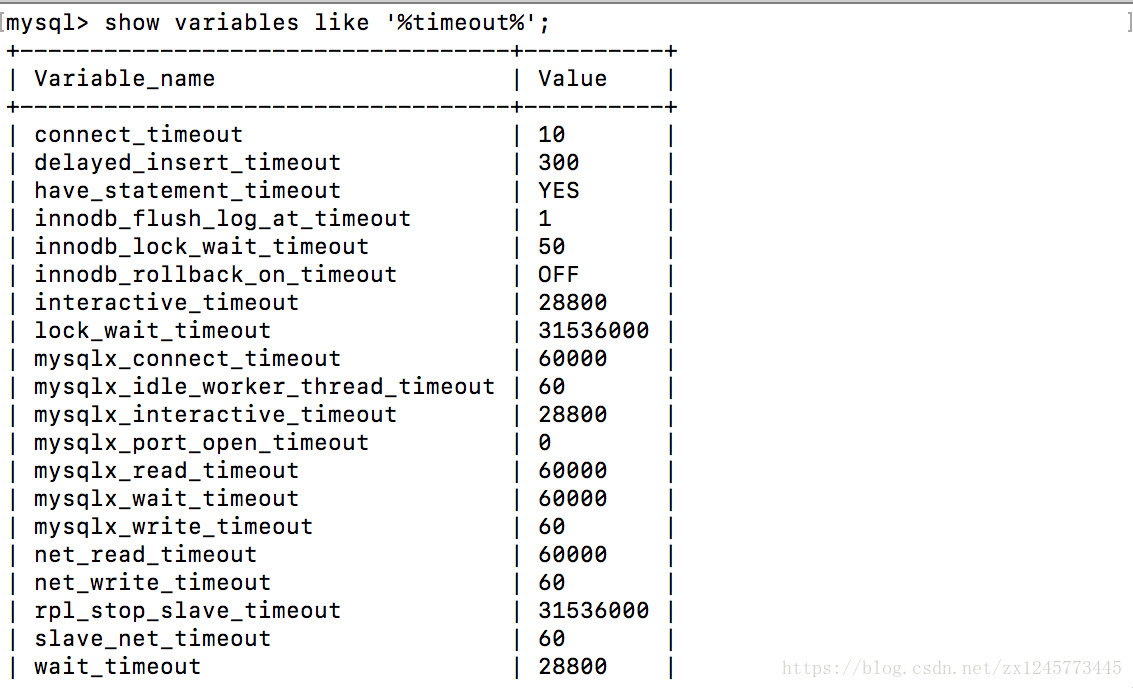
Use this command to view timeout and modify value in the same way as above
The second method is modified in /etc/my.cnf. This method will not revert to the default value after MySQL is restarted. I have extended the timeout, but the program still ends at 30s.
All of the above methods didn’t work, and later I read other blogs that there was a problem with the MySQL UI interface and data connection, so I finally executed the create Table statement in CMD successfully!

Uncaught typeerror: cannot set property ‘of null error resolution

This is a common bug in front-end page development, and it’s not the first time I’ve encountered it. But since I don’t often write front-end code, I have to remember the reason and the solution every time I encounter it again, so write it down in case I encounter it again.
Bug back
The project USES an Ext component, requiring an image to be displayed on the page and the image address passed in as a parameter from the previous page. My simple idea is to create a new Pannel and write an HTML code block inside it. The code block looks like this

"<img id='qrImage' src='com/system/empty.bmp' width='100%' height='100%'>"

The initial address of the image is a temporary image. When we get the image address we need to display, we will use the DOM of the operation page to set it to the new address. The address length is set as follows:

document.getElementById("qrImage").src = filePath;

It looks like there is no problem, but when the page loads, an error is reported. The error is in the above statement, and the error message is:

Uncaught TypeError: Cannot set property 'src' of null 

solution
Not often write the front end suddenly scared, my first reaction turned out to be that there was something wrong with the method to get ID, such as misspelling of letter case and so on. After all, she was a careless girl. However, the harsh reality is that the W3C told me there was nothing wrong with the approach.
since not get property method no problem (actually it can’t be a method name write wrong, or the browser will report is not a function), it must be written the dom itself has a problem. The most intuitive way is of course debug, bug is also relatively simple, follow up to find the problem.
why
“Document.getelementbyid (” qrImage”) “here, the code does not get an element whose Id is” qrImage “, so it is null. Null does not have a set attribute, so the browser will throw this error:

Uncaught TypeError: Cannot set property 'src' of null 

Then the rendering of the page will stop and the page will report an error.
The solution
The solution is to make sure that the element qrImage is rendered and available to the browser before the properties are set, so that no errors are reported. My project actually USES the Ext component and USES ExtBuilder to simplify development (in case my writing doesn’t work in other situations) by replacing the code with:

var infoPanel = Ext.getCmp("saveQR");
infoPanel.html = "<img id='qrImage' src=\"" + url+ "\" width='100%' height='100%'>";

The problem can be solved.
tips
For those who are not using Ext or Ext development components, you can use window.load or AfterRender methods to make sure that the page is loaded before you do anything with it.