UnicodeEncodeError: ‘GBK’ codec can’t encode character ‘\ue615’ in position 488084: Illegal Multibyte Sequence
with open('baidu.html', 'w', encoding='utf-8') as f:
    f.write(data)
UnicodeEncodeError: ‘GBK’ codec can’t encode character ‘\ue615’ in position 488084: Illegal Multibyte Sequence
with open('baidu.html', 'w', encoding='utf-8') as f:
f.write(data)
UnicodeEncodeError: ‘ASCII’ Codec can’t encode characters in position 0-2: ordinal not in range(128
Solution:
(1) set the environment variable LANG
, modify ~/.profile file, and execute:
export LANG=“en_US.UTF-8” >> ~/.profile
source ~/.bash_profile
(2) Add UTF-8 to the Python execution command, execute:
export PYTHONIOENCODING=utf-8 >> ~/.bashrc
source ~/.bashrc
Transfer: https://www.cnblogs.com/beile/p/12980149.html
Project github address: bitcarmanlee easy-algorithm-interview-and practice
welcome to star, message, study and progress together
PIP is a common Python package management tool, similar to Java’s Maven. If you use Python, you can’t do without PIP.
when trying to install PIP using home-brew on the new MAC, there were some minor problems:
bogon:~ wanglei$ brew install pip
Error: No available formula with the name "pip"
Homebrew provides pip via: `brew install python`. However you will then
have two Pythons installed on your Mac, so alternatively you can install
pip via the instructions at:

  https://pip.readthedocs.org/en/stable/installing/#install-pip
As you can see, PIP is installed with Python in home-BREW.
Another way:
bogon:~ wanglei$ sudo easy_install pip
Password:
Searching for pip
Reading https://pypi.python.org/simple/pip/
...
Just a moment, PIP is installed…
Topic link
https://leetcode.com/problems/merge-two-sorted-lists/
The questions in the original
Merge two sorted linked lists and return it as a new list. The new list should be made by splicing together the nodes of the first two lists.
The title translation
Merge the two ordered lists and return the new list. The new list should be the result of splicing two old lists.
Thinking method
Thinking a
After merging, the linked list is still in order. Two linked lists can be traversed at the same time. Each time, the nodes with smaller values in the two lists are selected and connected in turn to obtain the final linked list.
code
# Definition for singly-linked list.
# class ListNode(object):
#     def __init__(self, x):
#         self.val = x
#         self.next = None

class Solution(object):
    def mergeTwoLists(self, l1, l2):
        """
        :type l1: ListNode
        :type l2: ListNode
        :rtype: ListNode
        """
        if not l1 or not l2:
            return l1 or l2
        head = cur = ListNode(0)
        while l1 and l2:
            if l1.val < l2.val:
                cur.next = l1
                l1 = l1.next
            else:
                cur.next = l2
                l2 = l2.next
            cur = cur.next
        cur.next = l1 or l2
        return head.next
Idea 2
Similar idea one, you can take the linked list with a smaller head node as a reference, and insert the nodes in another linked list into the linked list according to the size, forming a large ordered linked list
code
# Definition for singly-linked list.
# class ListNode(object):
#     def __init__(self, x):
#         self.val = x
#         self.next = None

class Solution(object):
    def mergeTwoLists(self, l1, l2):
        """
        :type l1: ListNode
        :type l2: ListNode
        :rtype: ListNode
        """
        if not l1 or not l2:
            return l1 or l2
        head = small = l1 if l1.val < l2.val else l2
        big = l1 if l1.val >= l2.val else l2
        pre = None
        while big:
            if not small:
                pre.next = big
                break
            if big.val >= small.val:
                pre = small
                small = small.next
            else:
                tmp = big.next
                pre.next = big
                pre = big
                big.next = small
                big = tmp
        return head
Thought three
Let’s think recursively.
code
# Definition for singly-linked list.
# class ListNode(object):
#     def __init__(self, x):
#         self.val = x
#         self.next = None

class Solution(object):
    def mergeTwoLists(self, l1, l2):
        """
        :type l1: ListNode
        :type l2: ListNode
        :rtype: ListNode
        """
        if not l1 or not l2:
            return l1 or l2
        if l1.val < l2.val:
            l1.next = self.mergeTwoLists(l1.next, l2)
            return l1
        else:
            l2.next = self.mergeTwoLists(l1, l2.next)
            return l2
PS: The novice brush LeetCode, the new handwriting blog, write wrong or write unclear please help point out, thank you!
reprint please indicate the: http://blog.csdn.net/coder_orz/article/details/51529359
When Python executes an import sys statement, it looks for the sys.py module in the directory listed in the sys.path variable. If the file is found, the statements in the module’s main block will be run, and the module will be available to you. Note that the initialization process takes place only when we first enter the module. Also, “sys” is short for “system”.
Sys has so many module functions that I can only list a few that I think are useful. Using jack Ma’s saying to find employees, “find the most suitable rather than the most talented”, I personally think I can adapt to it in many aspects, and it is no problem to learn. Sys modules do have a lot of features, but we should focus on those features that are most suitable for us. For this reason, the functions I have listed are those That I think are more suitable for my future development.
(1)sys.argv
A lot of people think, how do I pass parameters outside of my program?This one, you can do it. Such as:
Tesy.py
Import sys
Print sys.argv[number]
In general, the number 0 is the name of the script, 1,2… Is the argument passed under the command line. Such as:
Test.py script content:
import sys
print sys.argv[0]
print sys.argv[1]
print sys.argv[2]
print sys.argv[3]
then
[root@databak scripts]# python test.py arg1 arg2 arg3
test.py
arg1
arg2
arg3
See, what’s the corresponding relationship?
The argv variable in the SYS module is indicated by the use of a dot — sys.argv — one advantage of this method is that the name does not conflict with any argv variables used in your program. In addition, it makes it clear that the name is part of the SYS module. The
sys.argv variable is a list of strings (the list is explained in more detail in a later section). In particular, sys.argv contains a list of command-line arguments that are passed to your program using the command line. Here, when we execute python using_sys.py we are arguments, we use the python command to run the using_sys.py module, which is then passed to the program as arguments. Python stores it for us in the sys.argv variable. Remember that the name of the script is always the first argument in the list of sys.argv. So here, ‘using_sys.py’ is sys.argv[0], ‘we’ is sys.argv[1], ‘are’ is sys.argv[2], and ‘arguments’ is sys.argv[3]. Note that Python counts from zero, not one.
(2)sys.platform
As you all know, today’s programs are more popular across platforms. Simply put, the program can run on Windows, Linux or without modification, and it sounds great. So that’s where this function comes in handy.
Let’s say we want to implement a clear terminal, clear for Linux and CLS for Windows
Ostype=sys.platform()
If the or ostype ostype = = “Linux” = = “linux2” :
Cmd = “clear”
Else:
Cmd = “CLS”
(3) sys. Exit (n)
At the end of the main program, the interpreter exits automatically, but if you need to exit the program halfway, you can call the sys.exit function, which returns an optional integer argument to the calling program. This means that you can capture the call to sys.exit from the main program. (Note: 0 is normal exit, others are abnormal, abnormal events can be thrown for capture!)
Sys. exit from the Python program will raise a systemExit exception, which you can do to clear out. The default normal exit status of this optional parameter is 0, and the range of numerical parameters is 0-127. There’s another type, which is the strings object type that’s shown here.
(4)sys.path
You all know something about modules, right?Do you need to import one of the modules before you can use it?The answer is yes. A: Then import, import__import__ the order need not be carried. So what happens inside Python when you execute import module_name?Simply put, search for module_name. Search module.name based on the path of sys.path
> > > sys.path
[‘ ‘, ‘/ usr/local/lib/python24. Zip’, ‘/ usr/local/lib/python2.4’, ‘/ usr/local/lib/python2.4/platt – freebsd4’, ‘/ usr/local/lib/python2.4/lib – tk’, ‘/ usr/local/lib/python2.4/lib – dynload’, ‘/ usr/local/lib/python2.4/site – packages’]
You later write the module can be put above a directory, you can search correctly. You can also add your own module path. Sys. Path. Append (” mime the module path “).
Sys. path contains a list of directory names for input modules. You can observe that the first string of sys.path is empty — this empty string indicates that the current directory is also part of sys.path, which is the same as the PYTHONPATH environment variable. This means that you can directly enter the module located in the current directory. Otherwise, you will have to place your modules in one of the directories listed on sys.path. First, we enter the SYS module using an import statement. Basically, this statement tells Python that we want to use this module. The SYS module contains functions related to the Python interpreter and its environment.
(5)sys.modules
This is a dictionary that maps module names to modules which have already been loaded. This can be manipulated to force reloading of modules and other tricks.
Python.org
That’s pretty clear in the manual.
For names in sys.modules.keys():
If names ! = “sys” :
…
(6)sys.stdin,sys.stdout,sys.stderr
Stdin, stdout, and stderr variable contains corresponding with the standard I/O flow stream objects. If you need to better control the output, and the print can’t meet your request, they may be just what you need. You’ll also be able to replace them, then you can redirect output and input to the other devices (device), or in a standard way of dealing with them
When Python executes an import sys statement, it looks for the sys.py module in the directory listed in the sys.path variable. If the file is found, the statements in the module’s main block will be run, and the module will be available to you. Note that the initialization process takes place only when we first enter the module. Also, “sys” is short for “system”.
sys module argv variables are indicated by using the dot notation — sys. Argv — one advantage of this method is that the name does not conflict with any argv variables used in your program. In addition, it makes it clear that the name is part of the SYS module. The
sys.argv variable is a list of strings (the list will be explained in more detail in a later section). In particular, sys.argv contains a list of command-line arguments that are passed to your program using the command line.
if you are using an IDE to write and run these programs, look in the menu for a way to specify the command line parameters of the program. Here, when we execute python using_sys.py we are arguments, we use the python command to run the using_sys.py module, which is then passed to the program as arguments. Python stores it for us in the sys.argv variable.
remember that the name of the script is always the first argument in the list of sys.argv. So here, ‘using_sys.py’ is sys.argv[0], ‘we’ is sys.argv[1], ‘are’ is sys.argv[2], and ‘arguments’ is sys.argv[3]. Note that Python counts from zero, not one.
sys.path contains a list of directory names for the input modules. You can observe that the first string of sys.path is empty — this empty string indicates that the current directory is also part of sys.path, which is the same as the PYTHONPATH environment variable. This means that you can directly enter the module located in the current directory. Otherwise, you will have to place your modules in one of the directories listed on sys.path.
def __str__(self):
return “this is in str”
Literally, ___ is called by the print function, usually return something. This thing should be in the form of a string. If you don’t want to use the STR () function. If you print a class, print first calls each ___ by str__, such as STR. Py
#!/usr/bin/env python

class strtest:
    def __init__(self):
        print "init: this is only test"
    def __str__(self):
        return "str: this is only test"

if __name__ == "__main__":
    st=strtest()
    print st
$./str.pyinit: this is only test
str: this is only test
As you can see from the above example, the function with ___ is called when you print an instance of STRtest st.
By default, the python objects almost always have the __str__ function used by print. S the dictionary with ___, see the red part:
> > > dir({})
[‘__class__’, ‘__cmp__’, ‘__contains__’, ‘__delattr__’, ‘__delitem__’, ‘__doc__’, ‘__eq__’, ‘__format__’, ‘__ge__’, ‘__getattribute__’, ‘__getitem__’, ‘__gt__’, ‘__hash__’, ‘__init__’, ‘__iter__’, ‘__le__’, ‘__len__’, ‘__lt__’, ‘__ne__’, ‘__new__’, ‘__reduce__’, ‘__reduce_ex__’, ‘__repr__’, ‘__setattr__’, ‘__setitem__’, ‘__sizeof__’, ‘__str__’, ‘__subclasshook__’, ‘clear’, ‘copy’, ‘fromkeys’, ‘get’, ‘has_key’, ‘items’, ‘iteritems’, ‘iterkeys’, ‘itervalues’, ‘keys’, ‘pop’, ‘popitem’, ‘setdefault’, ‘update’, ‘values’]
> > > t={}
> > > t[‘1’] = “hello”
> > > t[‘2’] = “world”
> > > t
# is equal to print t
{‘1’: ‘hello’, ‘2’: ‘world’}
> > > t.__str__()
“{‘1’: ‘hello’, ‘2’: ‘world’}”
You can see a dictionary, print t and t. str__() are the same. Simply output the contents of the dictionary as a string.
If it’s not a string returned in the function ___, see str1.py
#!/us/bin/env/python
#__metaclass__ = type
#if __name__ == "__main__":
class strtest:
    def __init__(self):
        self.val = 1
    def __str__(self):
        return self.val

if __name__ == "__main__":
    st=strtest()
    print st
$./str1.py
Traceback (most recent call last):
File “./ STR. Py “, line 12, in < module>
print st
TypeError: ___, returned non-string (type int)
Error message with: ___ returned a non-string. Here’s what we should do: see str2. Py
#!/usr/bin/env python
#__metaclass__ = type
#if __name__ == "__main__":
class strtest:
    def __init__(self):
        self.val = 1
    def __str__(self):
        return str(self.val)

if __name__ == "__main__":
    st=strtest()
    print st
$./str2.py
1
We used STR () to change the integer to a character.
1. Open the terminal
2. Python2.7 comes with the Mac, and if PIP is not installed on the Mac, you install PIP first. PIP is a Python package management tool that is used to install packages on PyPI instead of the easy_install tool.
install command: sudo easy_install PIP
install successfully, it appears as follows:
Installed /Library/Python/2.7/site-packages/pip-9.0.1-py2.7.egg
Processing dependencies for PIP
Finished Processing dependencies for PIP
3. Install Flask
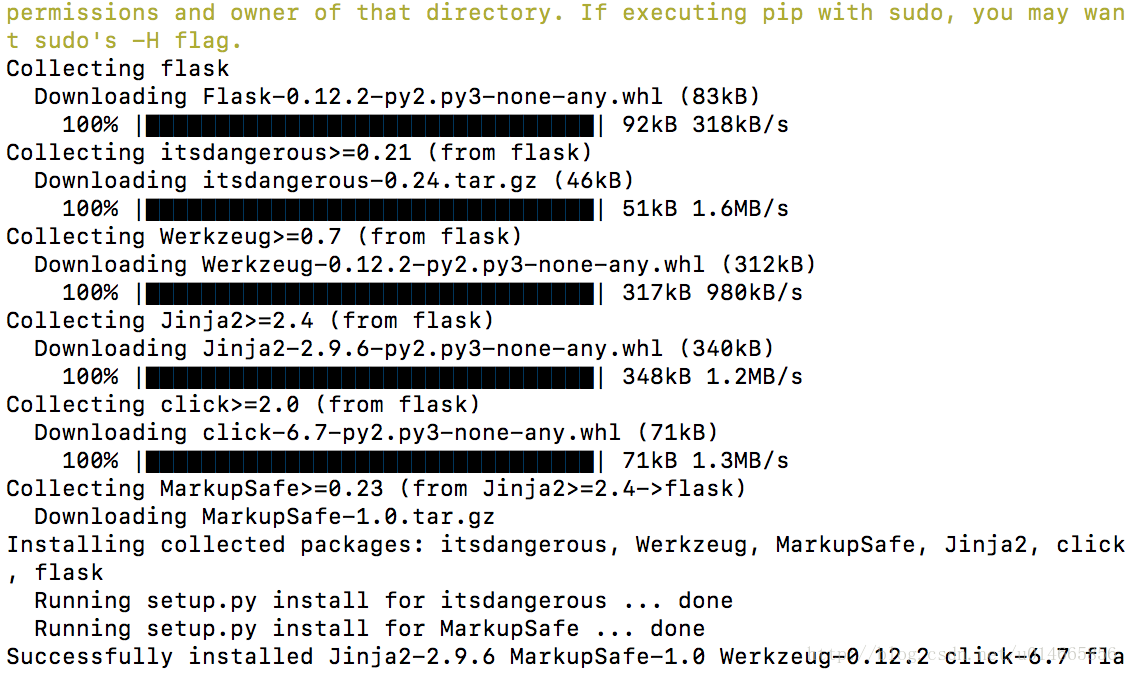
terminal input command: sudo PIP install Flask as shown in the picture:
4. View
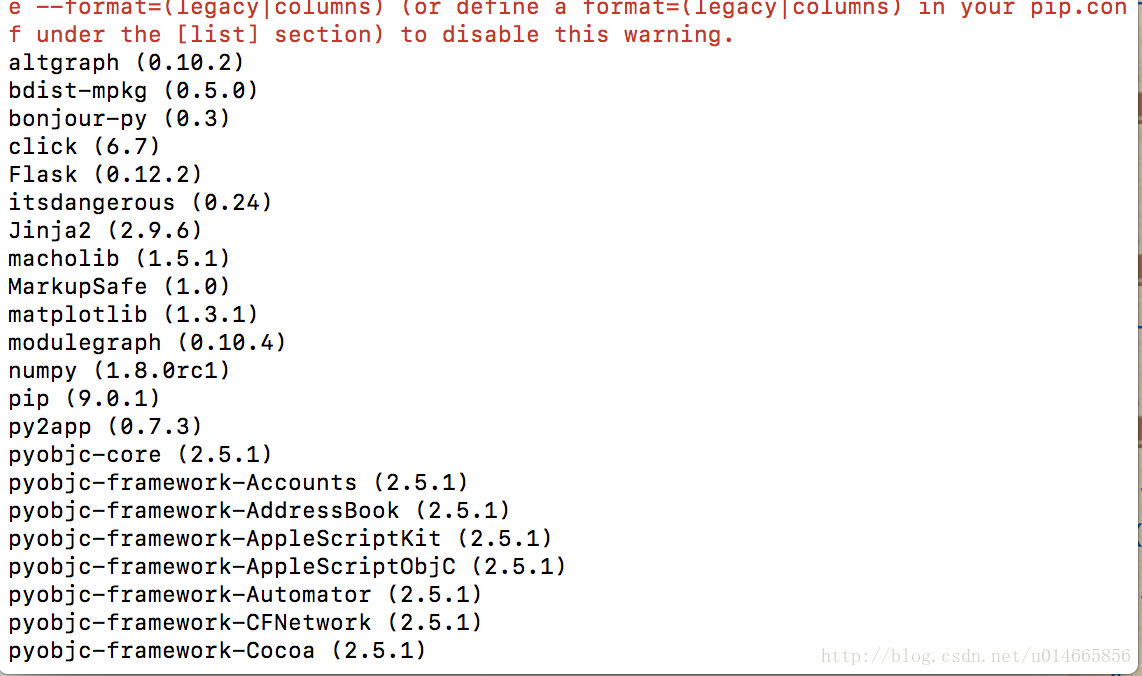
input command: PIP list as follows:
5.
the success of the installation under pyhton, input the import flask as shown below, is installed successfully

Project github address: bitcarmanlee easy-algorithm-interview-and practice
welcome to star, message, study and progress together
When you call model_selection for Sklearn, you find a module with no Model_selection in Sklearn. Upon inspection, the SkLearn version in Anaconda was found to be too low, at version 0.17. So sklearn started to upgrade.
1. View the original version
First use the conda list command to check the existing version:
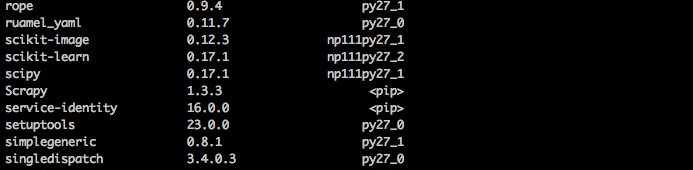
Sure enough, version 0.17.1 was too low, so it was time to upgrade.
2. Upgrade to the latest version
Use the conda update scikit-learn command to update the version of sklearn. Before you update, you will be prompted for what version to update to.
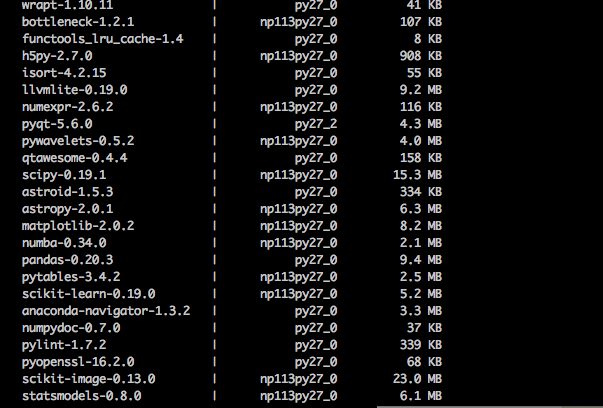
As you can see, the latest version is 0.19.0
Then confirm and start updating.
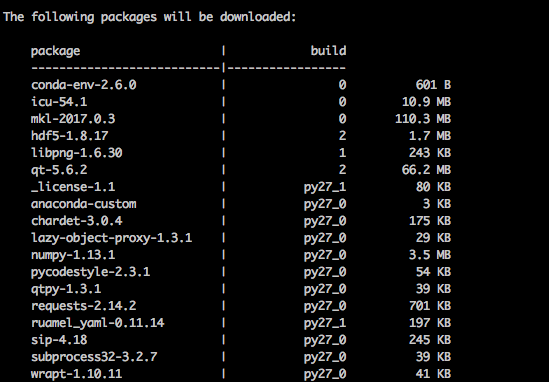
Due to the large number of packages that need to be updated this time, it will take quite a long time…
Once the update is complete, then use the Model_Selection package, and it’s OK to use 1
Now there is a better way, this method can only run the default py interpreter, please click [https://mp.csdn.net/mdeditor/84959016#] to check the new method
Introduction:
Atom is a very useful editor, but it can’t run a terminal, so let’s see how to run A Python program on Atom.
In [307]: data
Out[307]:
     a    b  c    d
0  bar  one  z  1.0
1  bar  two  y  2.0
2  foo  one  x  3.0
3  foo  two  w  4.0

In [308]: indexed1 = data.set_index('c')

In [309]: indexed1
Out[309]:
     a    b    d
c
z  bar  one  1.0
y  bar  two  2.0
x  foo  one  3.0
w  foo  two  4.0

In [310]: indexed2 = data.set_index(['a', 'b'])

In [311]: indexed2
Out[311]:
         c    d
a   b
bar one  z  1.0
    two  y  2.0
foo one  x  3.0
    two  w  4.0
2.reset_index
Reset_index
dataframe.reset_index (level=None, drop=False, inplace=False, col_level=0, col_fill= “)
level controls the index of the specific level to be restored
drop to False, the index column will be restored to the normal column, otherwise it will be lost
In [318]: data
Out[318]:
         c    d
a   b
bar one  z  1.0
    two  y  2.0
foo one  x  3.0
    two  w  4.0

In [319]: data.reset_index()
Out[319]:
     a    b  c    d
0  bar  one  z  1.0
1  bar  two  y  2.0
2  foo  one  x  3.0
3  foo  two  w  4.0
The following is the operation of using NLTK for word segmentation and then removing stop_words, but when it runs, it is prompted to download PUNkt.
from nltk.corpus import stopwords
from nltk.tokenize import word_tokenize

example_sent = "This is a sample sentence, showing off the stop words filtration."

stop_words = set(stopwords.words('english'))

word_tokens = word_tokenize(example_sent)

filtered_sentence = [w for w in word_tokens if not w in stop_words]

filtered_sentence = []

for w in word_tokens:
    if w not in stop_words:
        filtered_sentence.append(w)

print(word_tokens)
print(filtered_sentence)
Our output here:
['This', 'is', 'a', 'sample', 'sentence', ',', 'showing', 'off', 'the', 'stop', 'words', 'filtration', '.']
['This', 'sample', 'sentence', ',', 'showing', 'stop', 'words', 'filtration', '.']
After several attempts, it turned out to be False. 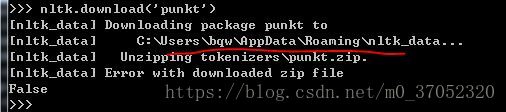
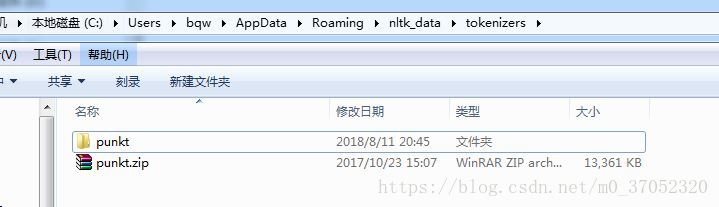
changed other people’s machine, it’s good…
I want to copy the directory to the failed directory on my machine:
Topic link
https://leetcode.com/problems/reverse-integer/
The questions in the original
Reverse digits of an integer.
Example1: x = 123, return 321
Example2: x = -123, return -321
The title translation
Reverses the number in an integer.
example 1: given x=123, return 321; Example 2: Given x=-123, return -321.
If x is equal to 10 or x is equal to 100, then both returns 1. 2. What happens to overflow after the original integer is reversed?– For example, if x=1000000003, reverse overflow, then the specified overflow results will return 0.
Thinking method
Here, Python’s handling of integers doesn’t actively overflow and actually causes problems, requiring special handling.
Thinking a
Loop through the modulus of 10 to get the tail number, step by step multiply 10 to construct a new flipped integer. However, it is important to first judge the positive and negative of the original number, and finally judge whether the result is overflow.
code
class Solution(object):
    def reverse(self, x):
        """
        :type x: int
        :rtype: int
        """
        flag = 1 if x >= 0 else -1
        new_x, x = 0, abs(x)
        while x:
            new_x = 10 * new_x + x % 10
            x /= 10
        new_x = flag * new_x
        return new_x if new_x < 2147483648 and new_x >= -2147483648 else 0
Idea 2
Python string reversal is used to reverse an integer, and the reversed string is converted back to an integer. As above, pay attention to positive and negative and overflow situations.
code
class Solution(object):
    def reverse(self, x):
        """
        :type x: int
        :rtype: int
        """
        x = int(str(x)[::-1]) if x >= 0 else - int(str(-x)[::-1])
        return x if x < 2147483648 and x >= -2147483648 else 0
PS: The novice brush LeetCode, the new handwriting blog, write wrong or write unclear please help point out, thank you!
reprint please indicate the: http://blog.csdn.net/coder_orz/article/details/52039990