Tag Archives: python

Index error: invalid index to scalar variable

IndexError: invalid index to scalar variable.
invalid index
generally appears in the np array index error
Here are some examples:

    a = np.array([[1, 2], [3, 4], [5, 6]])
    print(a[0][0][1])

After running, report an error:

IndexError: invalid index to scalar variable.

Therefore, when the above error occurs, we should check whether the index is wrong, such as the original two-dimensional array, using three levels of index.

Configure QT designer in pychar

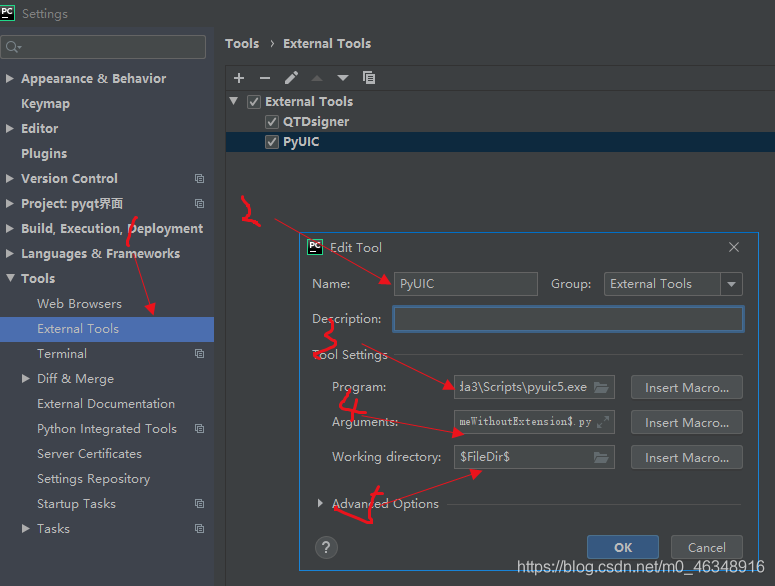
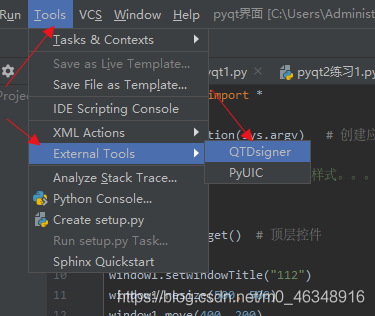
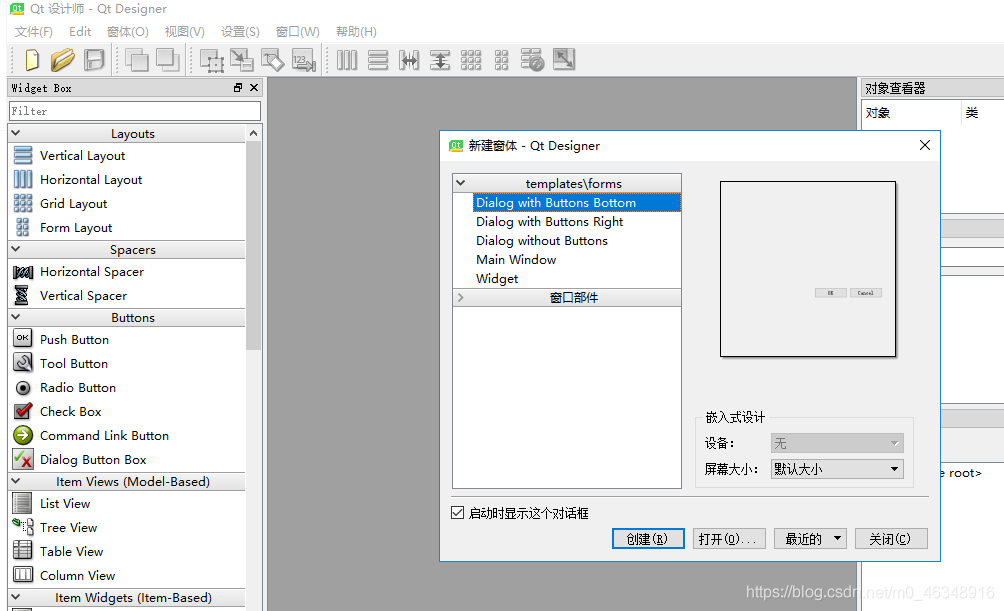
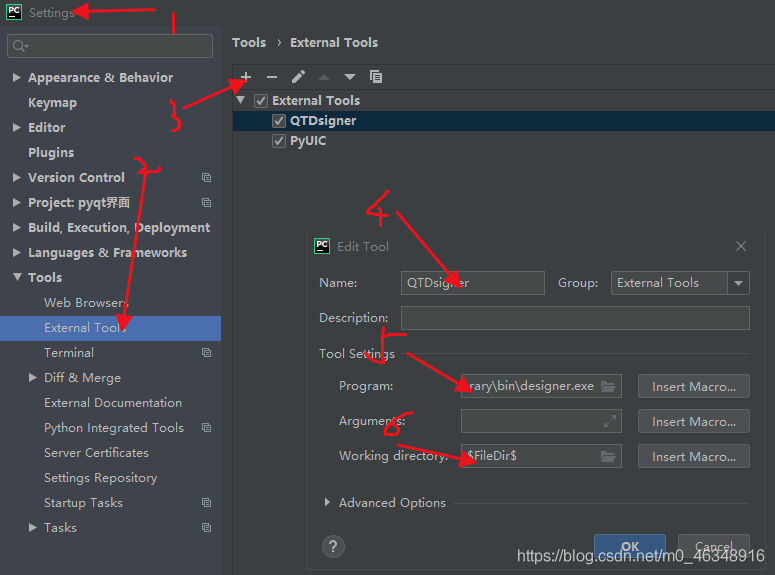
Then configure Qt Designer in Pycharm
1. First install Qt and Qt Dsigner PIP Install PyQt5 PIP install PyqT5-Tools

5 in pycharm is D:\anaconda3\Library\bin\designer. Exe means the path to install designer.
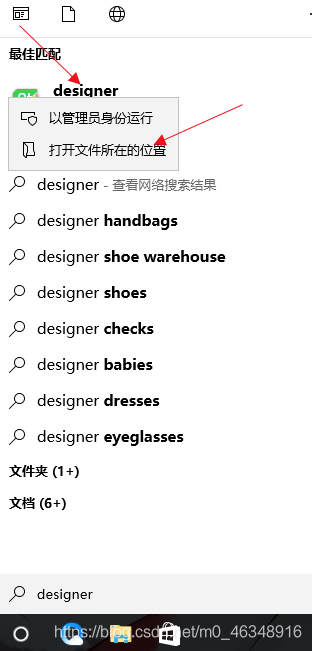
do not know their own installation path:
win+s
enter designer, right click display path can

and then configure:

3 D:\anaconda3\Scripts\pyuic5 exe the same for their own installation program path
4 for:

F

i

l

e

N

a

m

e

FileName

FileName-o

F

i

l

e

N

a

m

e

W

i

t

h

o

u

t

E

x

t

e

n

s

i

o

n

FileNameWithoutExtension

FileNameWithoutExtension. Py
click ok below.


How to add directory plug-ins to jubyter notebook

This part of the content is in accordance with the experience of baidu on the operation of the article records, in accordance with the steps of the operation can be, there is no problem. The article addresses is:
https://jingyan.baidu.com/article/9c69d48f5bb44552c8024e65.html
The steps are as follows:

    first close the running jupyter notebook plug-in package:
pip3 install jupyter_contrib_nbextensions
    configuration nbextension:

       jupyter contrib nbextension install --user --skip-running-check
    

    After

      is equipped, we launch jupyter; at that moment, we see the nbexlogo appearing on the menu bar, that is, the installation is successful; and then, we click on the configuration to enter nbexschematic; and we see that there are many items; after the modification, click on TableOfContents to update the webpage or restart jupyter; that is,

Pandas get column name

Getting the column name of DataFrame is a simple operation with the following methods:
Column for column in df]
2. Df.columns. Values return array
3. List (df)
4. Df.columns return Index (tolist(), or list(array)

import pandas as pd
from numpy.random import randint
df = pd.DataFrame(columns=list('abcdefghij'))

%timeit [column for column in df]

%timeit list(df.columns.values)

%timeit list(df)

%timeit list(df.columns)
# 100000 loops, best of 3: 2.24 µs per loop

%timeit df.columns.tolist()
# 1000000 loops, best of 3: 1.77 µs per loop

Implementation of Python switch / case statements

It struck me as odd that, unlike languages such as Java, C\C++, Switch /case statements are not available in Python. We can implement the switch/ Case statement in several ways.
Use the if… Elif… Elif… Else to realize the switch/case
You can use if… Elif… elif.. An else sequence instead of a switch/case statement is the easiest way to think about it. However, with more branches and frequent modifications, this alternative is not easy to debug and maintain.
Use a dictionary to implement switch/ Case
A dictionary can be used to implement switch/ Case in a way that is easy to maintain and reduces the amount of code. The following is a switch/ Case implementation using a dictionary simulation:


def num_to_string(num):
    numbers = {
        0 : "zero",
        1 : "one",
        2 : "two",
        3 : "three"
    }

    return numbers.get(num, None)

if __name__ == "__main__":
    print num_to_string(2)
    print num_to_string(5)

The execution results are as follows:

two
None

The Python dictionary can also include functions or Lambda expressions, as follows:

def success(msg):
    print msg

def debug(msg):
    print msg

def error(msg):
    print msg

def warning(msg):
    print msg

def other(msg):
    print msg

def notify_result(num, msg):
    numbers = {
        0 : success,
        1 : debug,
        2 : warning,
        3 : error
    }

    method = numbers.get(num, other)
    if method:
        method(msg)

if __name__ == "__main__":
    notify_result(0, "success")
    notify_result(1, "debug")
    notify_result(2, "warning")
    notify_result(3, "error")
    notify_result(4, "other")

The execution results are as follows:

success
debug
warning
error
other

The above example shows that the Switch /case statement can be fully implemented with a Python dictionary, and is flexible enough. is especially handy at run time to add or remove a switch/case option from a dictionary.
Switch/Case can be implemented in a class using scheduling methods
If you are not sure which method to use in a class, you can use a scheduling method at run time to determine. The code is as follows:

class switch_case(object):

    def case_to_function(self, case):
        fun_name = "case_fun_" + str(case)
        method = getattr(self, fun_name, self.case_fun_other)
        return method

    def case_fun_1(self, msg):
        print msg

    def case_fun_2(self, msg):
        print msg

    def case_fun_other(self, msg):
        print msg


if __name__ == "__main__":
    cls = switch_case()
    cls.case_to_function(1)("case_fun_1")
    cls.case_to_function(2)("case_fun_2")
    cls.case_to_function(3)("case_fun_other")

The execution results are as follows:

case_fun_1
case_fun_2
case_fun_other

conclusion
Personally, using a dictionary to implement the switch/case is the most flexible, but it is also difficult to understand.

Three ways of single line and multi line comment in Python

Method 1:
One-line comments: Shift + # (enter at the top of the code and comment unselected code)
Multi-line comment: Enter Shift +# at the beginning of each line as if it were a single line
Method 2:
Single-line and multi-line: Ctr+/ (if the code you want to comment is selected)
Method 3:
Type “” or “”” “”” “”, and insert the code to be commented in the middle

Modify the default file location of the Jupiter notebook

Modify the default file location for Jupyter notebook
After installing Anaconda and Jupyter Notebook, open the Jupyter notebook will find that there are some folders displayed, but the exact location is not clear. To facilitate future file editing and saving, you need to modify the default file location of the Jupyter Notebook.
The detailed modification steps verified by practical operation are as follows:
1. Generate configuration files through the Anaconda Prompt command window: find and open the Anaconda Prompt in the start menu, type the following command, and then execute:
— generation-config.
2, open the configuration file generated in the previous step, it is generally in the following position: C:\Users\admin. Jupyter \jupyter \jupyter_notebook_config.py.
this file path is the default path for jupyter.
3, in the start menu to find jupyter notebook, and the previously generated configuration files with jupyter open, there are two ways to open:
(1) can be opened by dragging the configuration file to the notebook window;
(2) click on the Upload in the upper right corner of the notebook window, then find the configuration file and open it using the path described above.
Notebook_dir = ‘”
before the change: # c.notebookapp.notebook_dir =’
before the change: # c.notebookapp.notebook_dir = ‘
after the change: remove the # prefix and enter the default location in the single quotation marks, such as: c.notebookapp.notebook_dir =’ E:/Python_notebook ‘. Note: \ cannot be used in the Python file path, but /.
5, click save under file in the menu above the notebook window to save the changes, and use this saved file to overwrite the originally generated configuration file under C disk (this is very important, be sure to overwrite, otherwise the changes will not take effect), that is, to overwrite the configuration file at the following location:
C:\Users\admin.jupyter\ notebook_config.py.
6. From the Start menu, find Jupyter Notebook, right mouse button & GT; > Property & gt; > Shortcut & GT; > Target, delete the end “%USERPROFILE%/” in the box after the target.
After the above modification, finally finished. After restarting the Jupyter Notebook, the default file location has been changed to the desired location, which is: E:\Python_notebook.

fix yahoo finance

Get the Yahoo data in Python

18:42:54, June 11, 2018

Reading count: 71

I learned machine learning in Python. I found a practical tutorial online. I needed to get stock data from Yahoo. The problems and solutions are given below.
Programming environment: Linux Ubuntu16, python3.6, anaconda 1.6.14, conda 4.5.4, pandas 0.23
= = = = = = = = = = = = = = = = = = = = = = = = = = = = = = = = = = = = = = = = = = = = = = = = = = = = = = = = = = = = = = = = = = = = = = = = = = = =
Problem 1: An environment interpretation error occurred while downloading Pandas _datareader
Because the Yahoo data needs to be retrieved through the Pandas _datareader module, you need to download and install the package
Environment parse error occurs with Conda Install Pandas _datareader (conda installation is used because anaconda is used to build the Python compile and edit environment) :

python@ubuntu:~$ conda install pandas_datareader
Solving environment: failed

PackagesNotFoundError: The following packages are not available from current channels:

  - pandas_datareader

Current channels:

  - https://repo.anaconda.com/pkgs/main/linux-64
  - https://repo.anaconda.com/pkgs/main/noarch
  - https://repo.anaconda.com/pkgs/free/linux-64
  - https://repo.anaconda.com/pkgs/free/noarch
  - https://repo.anaconda.com/pkgs/r/linux-64
  - https://repo.anaconda.com/pkgs/r/noarch
  - https://repo.anaconda.com/pkgs/pro/linux-64
  - https://repo.anaconda.com/pkgs/pro/noarch

To search for alternate channels that may provide the conda package you're
looking for, navigate to

    https://anaconda.org

and use the search bar at the top of the page.

Solution 1: Then change to PIP Install safari _datareader to install successfully!
Solution two: Later, I found that when I was using Conda to install the module, there were jupyter Notebook still running, so I tried to close it and then used Conda install Rebuild _datareader to find it could be successfully installed.
 
Question 2: ImportError: Cannot import name ‘is_list_like’ when using import pandas_datareader as PDR
I found many methods on the Internet, including the case column on StackFlow, but I still couldn’t find one suitable for me.
Solution one: Then give up searching for a solution online and start groping instead. Because the error message is that the module named ‘is_list_like’ cannot be imported, the code to find the error is in the first line from pandas.core.common.data import is_list_like in the fred.py module. Because the common folder and the modules under that folder cannot be found in the environment, the path to import is_list_like is wrong.
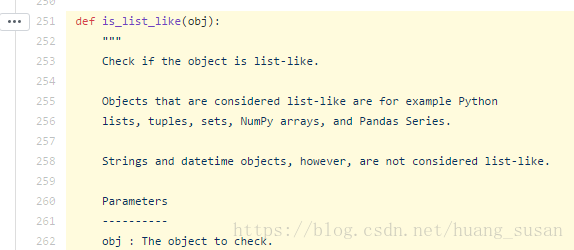
Then, Baidu search: panda IS_list_like finds the official API document of Pandas, and click Source to enter the source code module. It turns out that IS_list_like exists as a method of in the following path

Finally, I get rid of the Fred. Py the first line of the import path into: from pandas. Core. Dtype. Inference import is_list_like, import pandas_datareader modules again success!
 
Question 3: run the following code, appear ImmediateDeprecationError, namely the Yahoo! Finance no longer exists because in 2017 Yahoo! It was bought by Verizon

Yahoo Daily has been immediately deprecated due to large breaks in the API without the  
introduction of a stable replacement

The code is as follows:


    import pandas as pd


    import datetime


    import pandas_datareader.data as web


    start = datetime.datetime(
    2010,1,1)


    end = datetime.datetime(
    2017,1,1)


    df = web.get_data_yahoo(
    ‘SPY’,’yahoo’,start, end)

Baidu has found one solution in the CSDN blog: install Fix_yahoo_finance (PIP Install) and then run the following code before retrieving the data.


    import fix_yahoo_finance as fy


    fy.pdr_override()

Reproduced in: https://www.cnblogs.com/ziheIT/p/9249676.html

Parsing the difference between “R” and “RB” patterns of text files (Python)

Difference between a text file in r and rb mode
what’s the Difference between r and rb in fopen
0. EOL (end-of-line)
The difference is mainly in the treatment of EOL. For different operating systems,
Unix: \nMac: \rWindows: \r\n
For the Python language, the query is performed using the following statement:

>> import os
>> os.linesep
'\r\n'

1. Different operating systems
For Windows systems, having b (rb, wb, r+b) means to open files in binary form. Python on Windows handles text files differently than binary files,
2. Python 2 vs Python 3
For Python 3 environments:
r : Python returns STR rb : binary mode, read() returns 0 bytes1

Installation and unloading of Python module

Using the PIP command
If there are multiple versions of the system, use the corresponding PIP version to remove the corresponding Python version of the module
In python2.7 use pip3 above PIP python3.0
Installation module:
The python3 version USES the pip3 install module name
Such as installing python3 version of pygame

xubin@xubindeMBP:~/Python$ pip3 install pygame
Collecting pygame
  Using cached https://files.pythonhosted.org/packages/b9/89/aca02f8771727c2713c11a39c1cc295e4deb60be322be19ad7460570f978/pygame-1.9.4-cp37-cp37m-macosx_10_11_intel.whl
Installing collected packages: pygame
Successfully installed pygame-1.9.4

Unloading module:
The python3 version USES the pip3 uninstall module name
Such as uninstalling pygame in python3

xubin@xubindeMBP:~/Python$ pip3 uninstall pygame
Uninstalling pygame-1.9.4:
  Would remove:
    /usr/local/include/python3.7m/pygame/_camera.h
    /usr/local/include/python3.7m/pygame/_pygame.h
    /usr/local/include/python3.7m/pygame/_surface.h
    /usr/local/include/python3.7m/pygame/bitmask.h
    /usr/local/include/python3.7m/pygame/camera.h
    /usr/local/include/python3.7m/pygame/fastevents.h
    /usr/local/include/python3.7m/pygame/font.h
    /usr/local/include/python3.7m/pygame/freetype.h
    /usr/local/include/python3.7m/pygame/mask.h
    /usr/local/include/python3.7m/pygame/mixer.h
    /usr/local/include/python3.7m/pygame/pgarrinter.h
    /usr/local/include/python3.7m/pygame/pgbufferproxy.h
    /usr/local/include/python3.7m/pygame/pgcompat.h
    /usr/local/include/python3.7m/pygame/pgopengl.h
    /usr/local/include/python3.7m/pygame/pygame.h
    /usr/local/include/python3.7m/pygame/scrap.h
    /usr/local/include/python3.7m/pygame/surface.h
    /usr/local/lib/python3.7/site-packages/pygame-1.9.4.dist-info/*
    /usr/local/lib/python3.7/site-packages/pygame/*
Proceed (y/n)?y
  Successfully uninstalled pygame-1.9.4


Python bug: cannot install ‘Django’. It is a distutils installed project and thus we cannot

Cannot uninstall 'django'. It is a distutils installed project and thus we cannot accurately determine which files belong to it which would lead to only a partial uninstall.

Installed dependent packages have errors:
you can add – ignore-installed after the PIP command to ignore the installed libraries and install the latest ones

pip install django --ignore-installed

Removing stop words —— Python Data Science CookBook

In text processing, we are interested in words or phrases that will help us differentiate the given text from the other text in the corpus. Let’s call these words or phrases as 
key 
phrases. Every text mining application needs a way to find out the key phrases. An information retrieval application needs key phrases for the easy retrieval and ranking of search results. A text classification system needs key phrases as its features that are to be fed to a classifier. This is where stop words come into the picture. “
Sometimes, some extremely common words which would appear to be of little value in helping select documents matching a user need are excluded from the vocabulary entirely. These words are called 
stop words. ” Introduction to Information Retrieval By Christopher D. Manning, Prabhakar Raghavan, and Hinrich Schütze.

Tip Remember that stop word removal is contextual and based on the application. If you are working on a sentiment analysis application on mobile or chat room text, emoticons are highly useful. You don’t remove them as they form a very good feature set for the downstream machine learning application. Typically, in a document, the frequency of stop words is very high. However, there may be other words in your corpus that may have a very high frequency. Based on your context, you can add them to your stop word list.
The Python NLTK library provides us with a default stop word corpus that we can leverage, as follows:

>>> from nltk.corpus import stopwords
>>> stopwords.words('english')
[u'i', u'me', u'my', u'myself', u'we', u'our', u'ours', u'ourselves',
u'you', u'your', u'yours', u'yourself', u'yourselves', u'he', u'him',
u'his', u'himself', u'she', u'her', u'hers', u'herself', u'it', u'its',
u'itself', u'they', u'them', u'their', u'theirs', u'themselves', u'what',
u'which', u'who', u'whom', u'this', u'that', u'these', u'those', u'am',
u'is', u'are', u'was', u'were', u'be', u'been', u'being', u'have', u'has',
u'had', u'having', u'do', u'does', u'did', u'doing', u'a', u'an', u'the',
u'and', u'but', u'if', u'or', u'because', u'as', u'until', u'while', u'of',
u'at', u'by', u'for', u'with', u'about', u'against', u'between', u'into',
u'through', u'during', u'before', u'after', u'above', u'below', u'to',
u'from', u'up', u'down', u'in', u'out', u'on', u'off', u'over', u'under',
u'again', u'further', u'then', u'once', u'here', u'there', u'when',
u'where', u'why', u'how', u'all', u'any', u'both', u'each', u'few',
u'more', u'most', u'other', u'some', u'such', u'no', u'nor', u'not',
u'only', u'own', u'same', u'so', u'than', u'too', u'very', u's', u't',
u'can', u'will', u'just', u'don', u'should', u'now']

example:

#!/usr/bin/env python2
# -*- coding: utf-8 -*-
"""
@author: snaildove
"""
# Load libraries
from nltk.corpus import stopwords
from nltk.tokenize import word_tokenize
import string
text = "Text mining, also referred to as text data mining, roughly equivalent to text analytics,refers to the process of deriving high-quality information from text. Highquality information is typically derived through the devising of patterns and trends through means such as statistical pattern learning. Text mining usually involves the process of structuring the input text (usually parsing, along with the addition of some derived linguistic features and the removal of others, and subsequent insertion into a database), deriving patterns within the structured data, and finally evaluation and interpretation of the output. 'High quality' in text mining usually refers to some combination of relevance, novelty, and interestingness.Typical text mining tasks include text categorization, text clustering, concept/entity extraction, production of granular taxonomies, sentiment analysis, document summarization, and entity relation modeling (i.e., learning relations between named entities).Text analysis involves information retrieval, lexical analysis to study word frequency distributions, pattern recognition, tagging/annotation,information extraction, data mining techniques including link and association analysis, visualization, and predictive analytics. The overarching goal is,essentially, to turn text into data for analysis, via application of natural language processing (NLP) and analytical methods.A typical application is to scan a set of documents written in a natural language and either model the document set for predictive classification purposes or populate a database or search index with the information extracted."
#Let’s now demonstrate the stop words removal process:
#we will tokenize the input text into words using the word_tokenize function. The words is now a list of all the words tokenized from the input.
words = word_tokenize(text)
# 2.Let us get the list of stopwords from nltk stopwords english corpus.
stop_words = stopwords.words('english')
print "Number of words = %d"%(len(words))
# 3. Filter out the stop words.
words = [w for w in words if w not in stop_words]
print "Number of words,without stop words = %d"%(len(words))
#Here, we will run another list comprehension in order to remove punctuations from our words.
words = [w for w in words if w not in string.punctuation]
print "Number of words,without stop words and punctuations = %d"%(len(words))

output :

Number of words = 257
Number of words,without stop words = 193
Number of words,without stop words and punctuations = 155

Tip Remember that
stop word removal is contextual and based on the application. If you are working on a sentiment analysis application on mobile or chat room text, emoticons are highly useful. You don’t remove them as they form a very good feature set for the downstream machine learning application. Typically, in a document, the frequency of stop words is very high. However, there may be other words in your corpus that may have a very high frequency. Based on your context, you can add them to your stop word list.