Tag Archives: python

[solved] pychar starts to report internal error after updating version 2020.1

Problem description

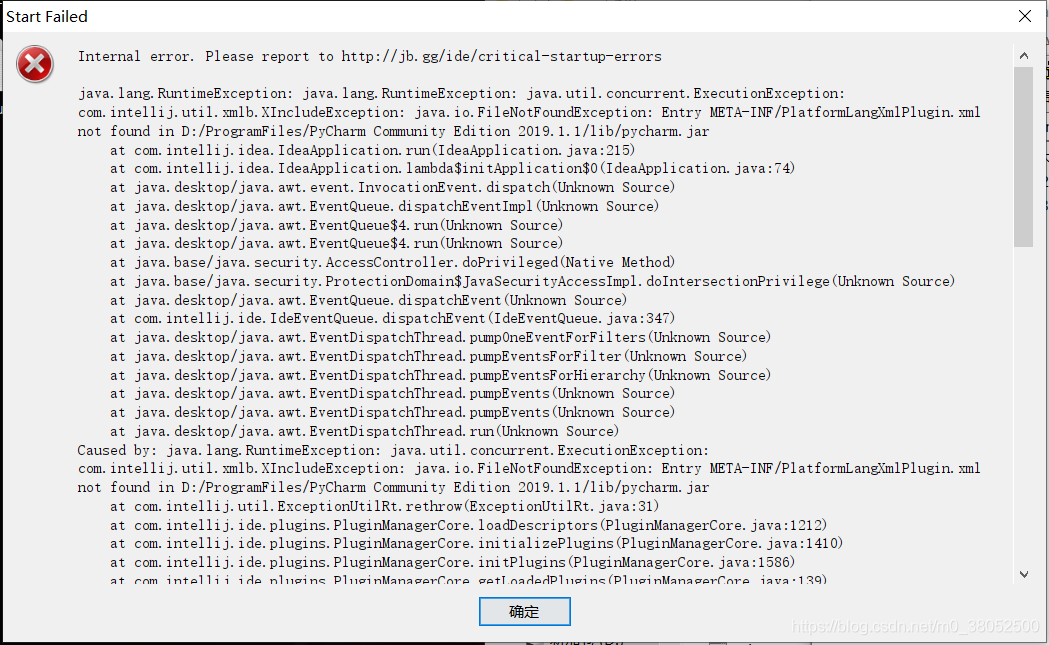
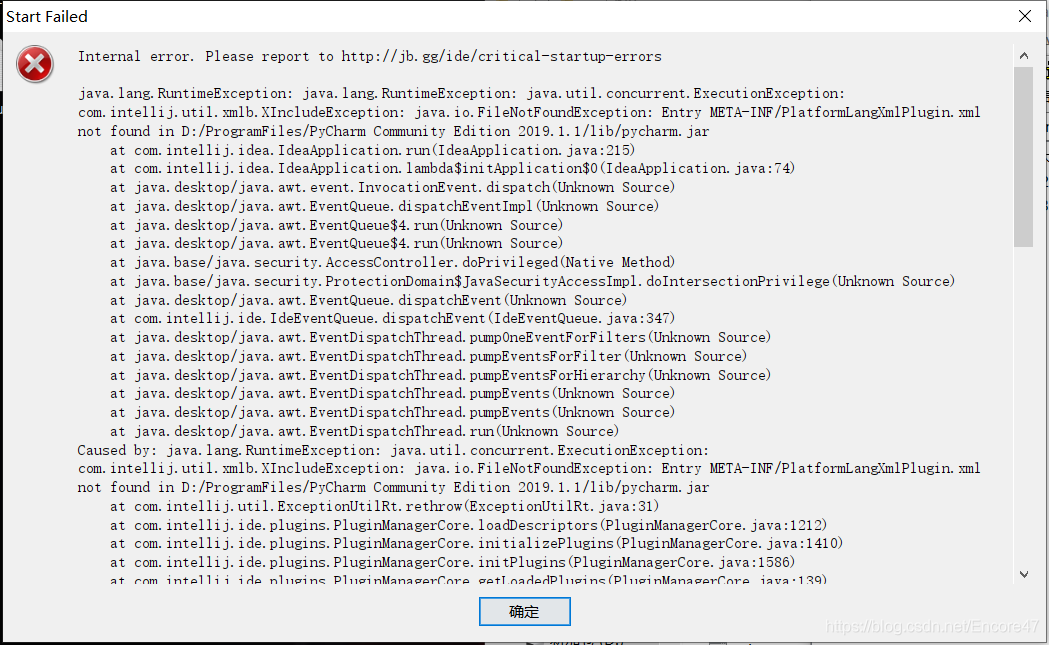
Today, I have nothing to do to update pychar community 2020.1, and then start it up. I found that I directly reported an error

(I forgot to take a screenshot of the source network)

Cause of error

I don’t quite understand the details, but maybe it’s a plug-in conflict?

resolvent

Refer to the answer to this question
pcharm community: internal error

The issue is known https://youtrack.jetbrains.com/issue/IDEA-237012 , please upvote and feel free to leave comments.Right now, you could either downgrade to 2019.3.4 or start IDE with default settings by renaming/removing the configuration and plugins folders https://www.jetbrains.com/help/pycharm/directories-used-by-the-ide-to-store-settings-caches-plugins-and-logs.html

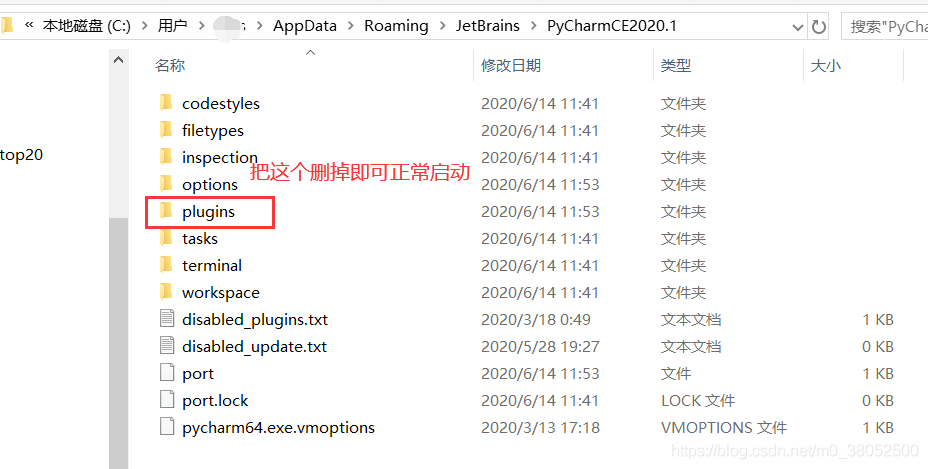
Just as he said, delete the plugin directory during installation and you can start it normally!!

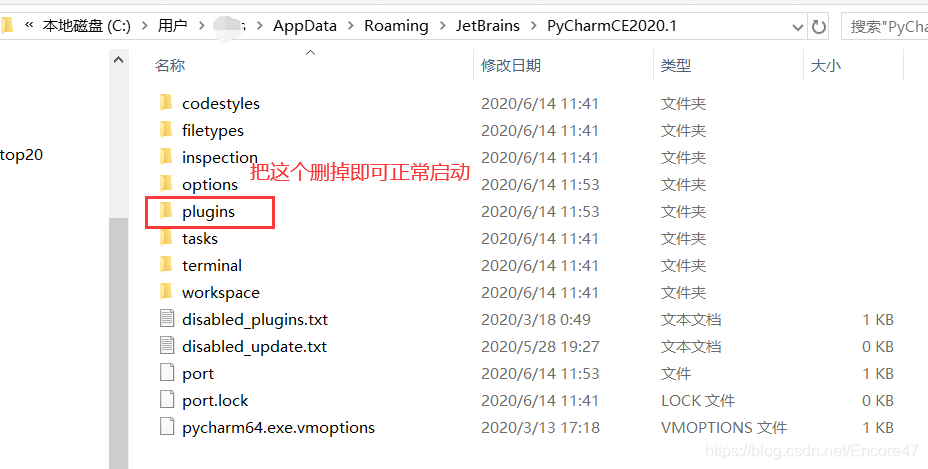
The path of plugins directory
win10 system is as follows
syntax

%APPDATA%\JetBrains<product>\plugins

Example

C:\Users\JohnS\AppData\Roaming\JetBrains\PyCharm2020.1\plugins

In my computer, it is

To solve Anaconda error: command error out with exit status 1

Development environment:

win10 x64

cuda10.0

anaconda4.0.0


catalog

1. PIP error: cannot open D: anaconda3/scripts/pip- script.py

2. PIP switches domestic sources

3. Solve SciPy error: importerror: cannot import name ‘show_ config’ from ‘numpy’ (unknown location) 

4. Solve the problem of error: command error out with exit status 1

5. After installing scikit learn, it can be imported, but the running error is: importerror: DLL load failed: the specified program cannot be found


—————————————————————————————————————————————————————-


This error is due to the dependency package version is too high (too new).

Phenomenon restore: install scikit learn with anaconda, and then install Matplotlib to report the above error.

Solution: the installed version of Matplotlib is too high, and it can be solved by reducing the version.


However, this is not the end. Generally, scikit learn installed with the CONDA command may import normally, but it is easy to report an error when using it

The solution is to uninstall sklearn, and then use pip to install it again. However, if you directly use the PIP install scikit learn command to install it, there may be errors, and the process of installing again will be very complicated

See:

After installing sklearn, it can be imported normally, but an error is reported


Welcome to my personal blog: the road of machine learning


Uiautomatiorviewer connect to the machine and click to report unexpected error while observing UI hierarchy


Method 1: recommend method 2

reference resources: https://www.cnblogs.com/lucky0425/p/10955252.html

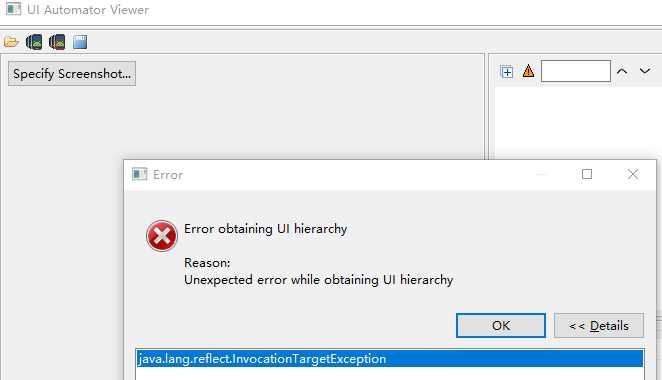
Run Android uiautomatorviewer.bat , open and connect the mobile phone. The error is as follows:

Tangled for a long time, and finally solved with the method of a great God, although I don’t understand the principle, but has solved my problem, the principle later slowly study

1. Create in the e-root directory app.png text file

2. Create in the e-root directory app.uix text file

3. Perform the following ADB naming:

                  adb shell uiautomator dump /sdcard/ app.uix

                  adb pull /sdcard/ app.uix E:/ app.uix

                  adb shell screencap -p /sdcard/ app.png

                  adb pull /sdcard/ app.pngE :/ app.png

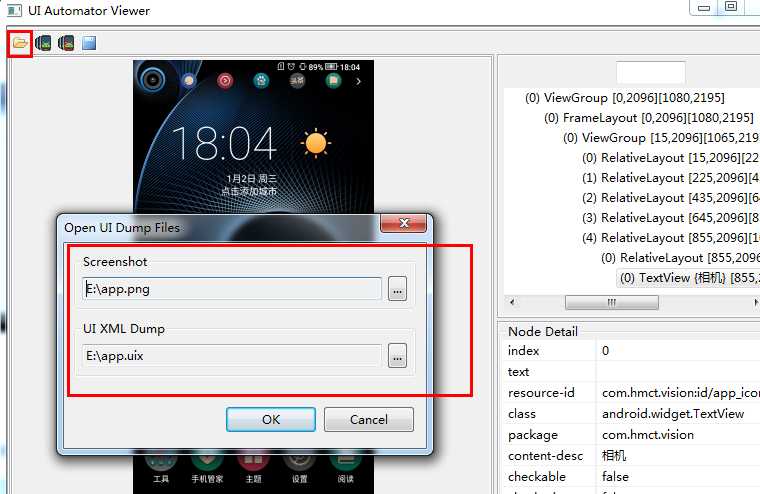
4. Operation uiautomatorviewer.bat , import file

5. Connect the mobile phone again, you can see the screen capture page of the mobile phone, but there is only one picture, which can’t run the app completely


Method 2

reference resources: https://blog.csdn.net/qq_ 42559334/article/details/83862323

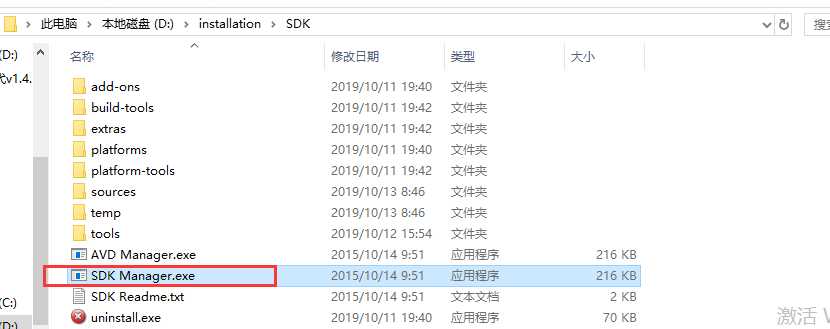
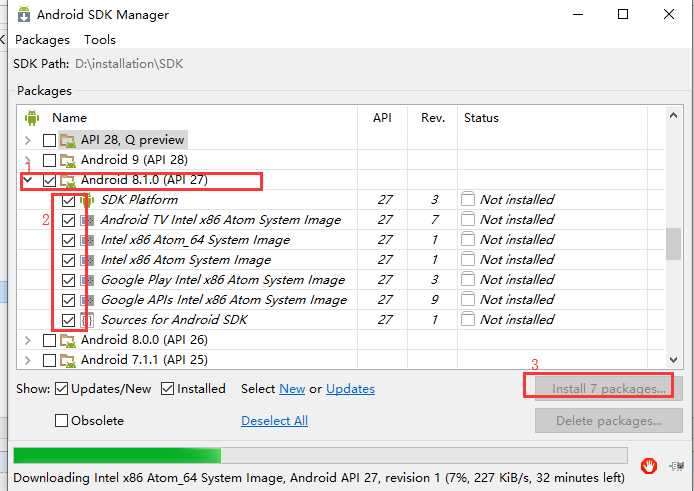
1. In the directory of installing Android SDK, find the SDK Manager.exe , click to enter


2. Select the Android version number of the real machine, check the installation package, and click Install


3. After installation, restart uiautomatorviewer.bat

http://www.shangdixinxi.com/detail-1098954.html  

https://github.com/yaming116/uiautomatorview

PIP installation error: Microsoft Visual C + + 14.0 is required perfect solution

In the process of using Python development, we often need to install various modules, but we often encounter various errors in the installation process, such as: error: Microsoft Visual C + + 14.0 is required, this error is due to the lack of C + + compiler components.

There are two solutions to this problem

One is to directly download the corresponding wheel file for installation, providing three download addresses:

Tsinghua download (domestic site, fast speed) https://pypi.tuna.tsinghua.edu.cn/simple/pip/

Official download: https://pypi.org/project/face-recognition/1.0.0/#files

Python package https://www.lfd.uci.edu/~gohlke/pythonlibs/

Another solution is to install the missing components.

As for the second solution, I believe most people will download a visual studio 201x and install it as I used to. However, installing a vs takes up a lot of space, not to mention the key. Some people find it useless after installation, which is really irritating.

After all kinds of search, it was found that the C + + runtime provided by the government can be directly installed, which can be solved perfectly. The address is Microsoft Visual C + + build tools 2015


After downloading, double-click run to install with default settings. After the installation, go to PIP install XXX to show that the installation is successful.


Welcome to my personal blog: the road of machine learning

Error: Command ‘/ usr / bin / clang’ failed with exit status 1 solution for Mac OS installation

1、 Scene description

The error of installing scrapy (PIP3 install scrapy) in terminal on Mac OS system is as follows

error: command '/usr/bin/clang' failed with exit status 1

2、 Scene analysis

Since clang is used in the compiler for C at the bottom of Mac OS system, Xcode needs to be installed

3、 Solutions

Do the following in terminal

xcode-select --install

Then install scrapy

Note: I use Python 3, so I use PIP3 install sketch

Error: Microsoft Visual C + + 14.0 is required to get it with Microsoft V + + comp

This problem bothered me for three hours, and finally solved. I’m sorry for the three hours of my life if I don’t write it down.

First of all, PIP install sketch, which reports an error

 error: Microsoft Visual C++ 14.0 is required. Get it with "Microsoft Visual C++ Build Tools": http://landinghub.visualstudio.com/visual-cpp-build-tools

When you see the error report, your first reaction is to download the VC + + 14.0 build tools in the prompt.

Open the link and it turns out to be vs2015 build tools. Now I understand that vs 2015 is the VC + + 14.0 in the error report.

Download an online installation package, open it and prepare. Microsoft told me that it needs about 5GB of hard disk space

I already have vs2012 in my computer. This stuff has filled up my C disk. I need to install another vs2015, WTF?

Here, although I have vs2012 in my computer, it is invalid because it requires VC + + 14.0 and the wrong version.

However, it is certain that installing vs2015 build tools can solve the problem. Let’s take a look at the solution of stack overflow

https://stackoverflow.com/questions/29846087/microsoft-visual-c-14-0-is-required-unable-to-find-vcvarsall-bat

Give up this method and start Baidu

Many people said that they could download the WHL file of scrapy and install it offline, so they downloaded one, and the error is still reported.

There is no link here, because this method is invalid.

However, many people succeeded in installing the WHL file, so I began to analyze the error report carefully, and finally found the clue
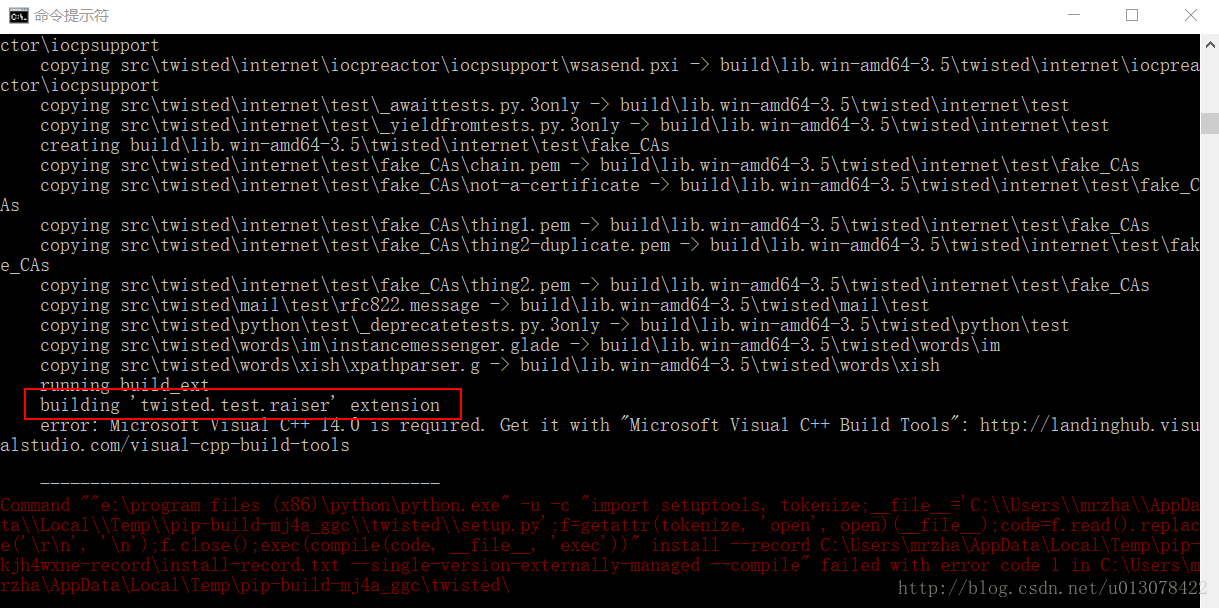
The red box in the figure shows that there is an error in building twisted. Then I can manually install the offline package of twisted?

So in http://www.lfd.uci.edu/~gohlke/pythonlibs Find the twisted installation package

Twisted‑17.9.0‑cp35‑cp35m‑win_ AMD64. WHL directly PIP install this offline WHL, and it was successful.
Finally, PIP install sketch, or install the WHL file of sketch, and it will be successful soon.

The general idea is to report an error when installing a, find the thing B of can’t build, and then manually install the offline WHL of B. If an error is reported during the process of installing B,

Then go to the next level until the installation is successful.
Error creating Django application: error on Python side.Exit code:1.

Due to the need of work, I recently learned Django based web program, but in the actual development, I also encountered a series of problems:
New Django project based on pychar compiler, and the following errors appeared:

the solution given:
1. Django 1.11 above does not seem to support Python 2.7, change to Django 1.10 version
1 2. It’s better to set up the project directory of Django in Chinese
3. It’s better to re install Django in the same directory as Python
PS: it’s just a problem you encounter in your study. You are welcome to give us some advice

Error: Microsoft Visual C + + 14.0 is required. Get it with “Microsoft Visual C”++

The error is as follows:

error: Microsoft Visual C++ 14.0 is required. Get it with “Microsoft Visual C++ Build Tools”: https://visualstudio.microsoft.com/downloads/

    —————————————-
Command “e:\soft\python3.6_ x64\ python.exe -u -c “import setuptools, tokenize;__ file__ =’C:\\Users\\RJ-TR19\\AppData\\Local\\Temp\\pip-build-q2fmqstd\\pycrypto\\ setup.py ‘;f=getattr(tokenize, ‘open’,
 open)(__ file__ );code=f.read().replace(‘\r\n’, ‘\n’);f.close();exec(compile(code, __ file__ , ‘exec’))” install –record C:\Users\RJ-TR19\AppData\Local\Temp\pip-dchg89ka-record\install- record.txt —
single-version-externally-managed –compile” failed with error code 1 in C:\Users\RJ-TR19\AppData\Local\Temp\pip-build-q2fmqstd\pycrypto\

The last pycrypto instruction is missing the package and needs to be installed

Method 1: choose according to the situation. This method is not very recommended. Otherwise, you have to download a file to install every time you can’t run into it

1. Download pycrypto-2.6.1-cp36-cp36m-win_ Amd64.whl file (the file is currently backed up in your own system)

Copy the file to the local Python installation package e:// soft/Python 3.6_ Then open the CMD window in the scripts directory and run the

pip install pycryptosat‑0.2.0‑cp36‑cp36m‑win_amd64.whl

2. Access to other plug-ins https://www.lfd.uci.edu/~gohlke/pythonlibs/ Search inside to find the version, install the same way

Download Microsoft Visual C + + 14.0

Choose the default way to install, the computer does not need to restart, directly PIP install the required plug-ins on the line

Address: https://download.csdn.net/download/weixin_ 41996632/12264862

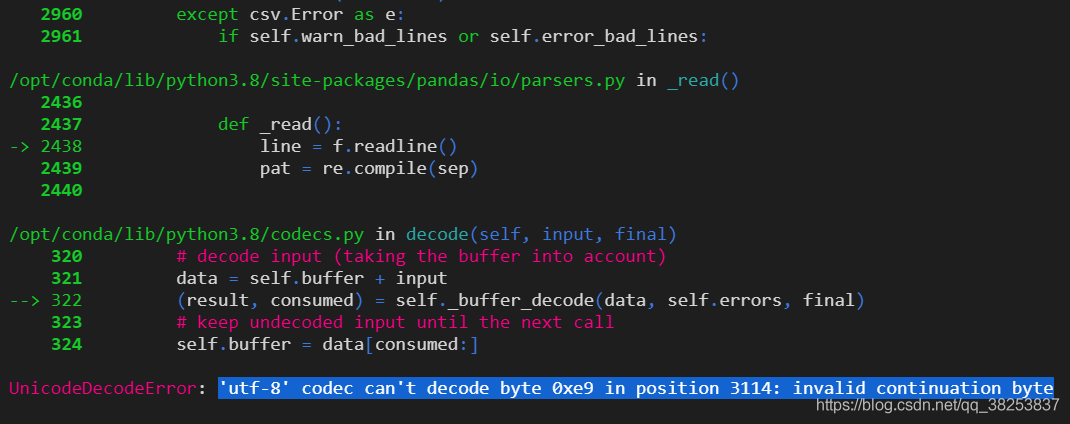
Solve the ‘UTF-8’ codec can’t decode byte 0xe9 in position 3114: invalid continuation byte error

Today, when using Python to open a file, the following error was reported:

the code is as follows:

movies = pd.read_table('../../dataset/ml-1m/movies.dat', sep='::', header=None, engine='python', encoding='utf-8').to_numpy()

Solution:
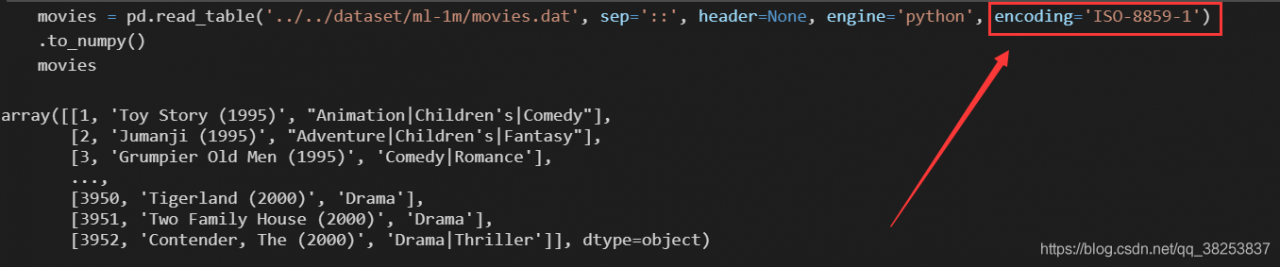
change the code to: iso-8859-1 just

movies = pd.read_table('../../dataset/ml-1m/movies.dat', sep='::', header=None, engine='python', encoding='ISO-8859-1').to_numpy()

After the model is instantiated by keras, the result returns nonetype

terms of settlement

Uninstall keras and then re install:

pip uninstall keras
pip install -i pip install -i https://pypi.tuna.tsinghua.edu.cn/simple/ keras

Analysis of the cause of error report

The probability of this kind of problem is that you directly use pychar to install keras . There is something wrong with pychar, the installation package of keras!

Pycharm2020.3 startup error internal error

For the content of the text, please refer to the article [solved] pychar starts internal error after updating version 2020.1.

Problem description

Today, I have nothing to do to update pychar community 2020.1, and then I found that I directly reported an error when I started

Cause of error

I don’t quite understand the details, but maybe it’s a plug-in conflict?

resolvent

Refer to the answer to this question
pcharm community: internal error

The issue is known https://youtrack.jetbrains.com/issue/IDEA-237012 , please upvote and feel free to leave comments.Right now, you could either downgrade to 2019.3.4 or start IDE with default settings by renaming/removing the configuration and plugins folders https://www.jetbrains.com/help/pycharm/directories-used-by-the-ide-to-store-settings-caches-plugins-and-logs.html

According to what he said, delete the plugin directory during installation and you can start it normally!!

The path of plugins directory
win10 system is as follows
syntax

%APPDATA%\JetBrains\plugins

Example

C:\Users\JohnS\AppData\Roaming\JetBrains\PyCharm2020.1\plugins

In my computer,