Tag Archives: python

Error from Python installation Library: Microsoft Visual C + + 14.0 is required

Error: Microsoft Visual C + + 14.0 is required. Get it with Microsoft Visual C + +

Error: Microsoft Visual C + + 14.0 is required. Get it with “build tools for visual studio”: https://visualstudio.microsoft.com/downloads/

Finally, a Microsoft Visual C + + build tools 2015
is found https://go.microsoft.com/fwlink/?LinkId=691126
The file name is: visual cppbuildtools full, download and install.

Double click visual cppbuilder tools_ full.exe , select the default, click Install, and wait about 10 minutes to complete the installation.
Then install the PIP library.

Jupyter failed to run websocket error

Juputer cannot connect

There is a problem with the websocket connection, the browser console reports an error, and the WS connection is abnormal

WebSocket connection to 'ws:// localhost:8888/api/kernels/f8809bf9-988f-4666-b183-e01bed63fa76/channels?session_ id=e49c21f065e64e7a89847a0859d689dd' failed: Error during WebSocket handshake: Unexpected response code: 200

Solution

Refer to https://github.com/jupyter/notebook/issues/4399

Uninstall tornado 6 and re install tornado 5.

pip uninstall tornado
pip install tornado==5.1.1

Solving windows error: [error 87] classification: problem summary

Today’s implementation B= webdriver.Firefox () is an error report. My version is 19.0 for Firefox and 2.37 for selenium.

In the following two cases: A, B,

All of them are caused by the incompatibility between the firebox version and selenium version http://docs.seleniumhq.org/about/platforms.jsp Page to view the version information of Microsoft supported by selenium

(it is found that selenium does not support firebox version 19.0)

A.

Traceback (most recent call last):

  File “C:\Users\tomet\Desktop\a.py”, line 10, in <module>

    b =  webdriver.Firefox ()

  File “C:\Python27\lib\site-packages\selenium\webdriver\firefox\ webdriver.py “, line 59, in __ init__

     self.binary , timeout),

File “C:\Python27\lib\site-packages\selenium\webdriver\firefox\extension_ connection.py “, line 47, in __ init__

     self.binary.launch_ browser( self.profile )

  File “C:\Python27\lib\site-packages\selenium\webdriver\firefox\firefox_ binary.py “, line 61, in launch_ browser

    self._ wait_ until_ connectable()

  File “C:\Python27\lib\site-packages\selenium\webdriver\firefox\firefox_ binary.py “, line 105, in _ wait_ until_ connectable

     self.profile.path , self._ get_ firefox_ output()))

WebDriverException: Message: “Can’t load the profile. Profile Dir: c:\\users\\chengh~1.qun\\appdata\\local\\temp\\tmpqdnfky Firefox output: *** LOG  addons.xpi : startup\r\n*** LOG  addons.xpi : Skipping unavailable install location app-system-local\r\n*** LOG  addons.xpi : Skipping unavailable install location app-system-sha re\r\n*** LOG  addons.xpi : checkForChanges\r\n”

B.

startupinfo() error 87

Copyright notice: This article is the original article of the blogger and cannot be reproduced without the permission of the blogger.

Reproduced in: https://www.cnblogs.com/think1988/p/4627912.html
Solution: windowserror: [error 2]

There is a problem when renaming a file by using the rename() function of python, which prompts windows error: [error 2]. The initial code is as follows:

def renameFile(filename):
    filePre = "D:\\FileDemo\\Python\\pt.py"
    os.rename(filePre, filename)
    print os.listdir(filePre)

if __name__ == '__main__':
    fileNew = "D:\\FileDemo\\Python\\Test.py"
   renameFile(fileNew)

Later, after repeated attempts, the problem was solved~

Before rename, you need to use the chdir() function to enter the path of the target file to tell the python compiler where the file to be renamed is, and then you can modify it;

Python is not a terrible terminator. In fact, she is very young. She can’t find the file herself. We need to tell her where to find the path in detail and patiently os.path.dirname () function

import os
from nt import chdir

def renameF(preName, newName):
    chdir(os.path.dirname(preName))
    os.rename(preName, newName)

if __name__ == '__main__':
    filePre = "D:\FileDemo\Python\PT.py"
    fileNew = "D:\FileDemo\Python\Test.txt"
    renameF(filePre, fileNew)

The code is very simple. You can rename any file by modifying filepre and FileNew.

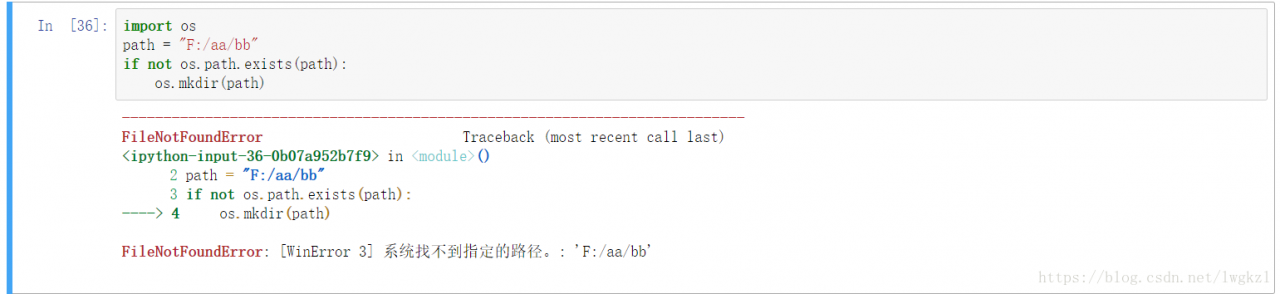
Python windows error: [error 3] and common windows error errors

1、 The common causes and solutions of error3 are as follows

1. The MKDIR function creates several directories in succession. In other words, there is no f/AA/originally. If you need to create f/AA/BB, you will get this error,

Solution, layer by layer detection, or directly use the makedirs function.

2. Lisdir enumerates directories that do not exist.

Solution: before enumerating, judge whether the changed path exists.

3. Creating a file in a read-only folder will also produce the above error.

4. Coding problem: pay attention to the coding format of the file, and modify it in the first line of Py file.

2、 Common windows error and its causes

Windows error: [error 2] does not exist

Windows error: [error 3] does not have this path

Windows error: [error 5] permission problem

Windows error: [error 13] this document is occupied by other programs and cannot be processed

Windows error: [error 123] path syntax error
error

Windows error: [error 145] the directory is not empty. It often appears when deleting a non empty directory

io.UnsupportedOperation : not writable exception resolution

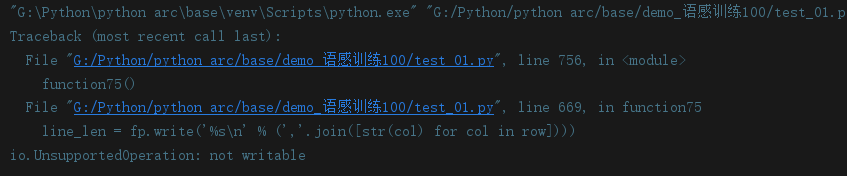
Today, when doing Python language sense exercise, I reported the following exception:

is the red exception
this is the red exception io.UnsupportedOperation : not writable

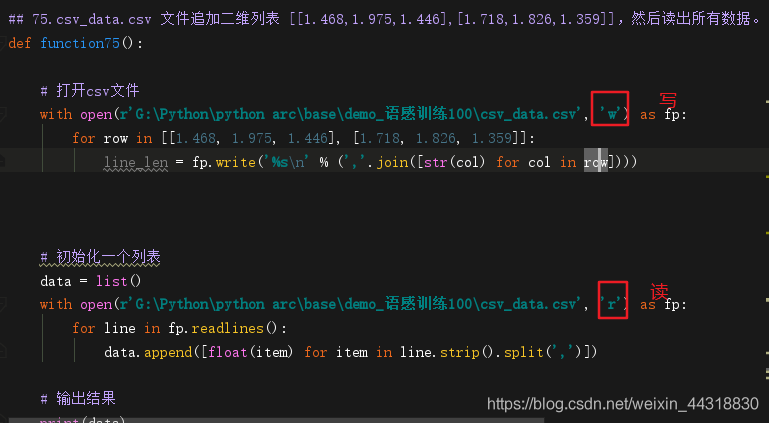
Write permission is not supported. After a careful inspection, I found that I forgot to set the permissions when I opened the file for the first time, so after I added it, the program ran successfully!!!

ModuleNotFoundError: No module named ‘tensorboardX‘

Yesterday, I was trying to run the code that I didn’t run through, so I tossed it on my own machine and virtual machine. As a result, I made a mistake in the environment variable. Here I record it. The error prompt says that I didn’t find ‘tensorboardx’. I checked the command and found that there was also ‘tensorboardx’. So I tried to run the python environment manually and found that the code was running normally, so If you find a similar error, don’t start to install the software as soon as you run, but see if you have installed the software correctly.

Solution pandas.errors.ParserError : Error tokenizing data. C error: Buffer overflow caught

When using the panda package, pd.read_ csv(r’.\data\ data.csv ’, encoding =’utf-8 ‘, header = none,)
error message: pandas.errors.ParserError : Error tokenizing data. C error: Buffer overflow caught – possible malformed input file.

I read some blogs and said that the parameter error was added_ bad_ Lines = false
but it’s no use trying

After reading another blog, I said that it might be caused by modifying the suffix of the file. I did change the suffix of. Xlsx to. CVS
so you can change the suffix back to. Xlsx and use pd.read_ Excel () function can be
or you can create a new table with Excel, copy the data, and then save it as a. CSV file

There will also be coding problems, which you can see in my previous blog posts

Python TypeError: ‘newline’ is an invalid keyword argument for this function

Write a code saved as a CSV file

 with open(outputFile, 'w', newline='') as csvfile:
     writer = csv.writer(csvfile)
     for item in sortsim:
         writer.writerow([item[0], item[1], item[2]])

Something’s wrong

Traceback (most recent call last):
  File "/data/ml/shan-als.py", line 54, in <module>
    with open(outputFile, 'w', newline='') as csvfile:
TypeError: 'newline' is an invalid keyword argument for this function

Guess is the reason for the version, plus the version of judgment.
Py2 can use ‘WB’, PY3 can use newline = ‘.

    import sys
    if sys.version >= '3':
        with open(outputFile, 'w', newline='') as csvfile:
            writer = csv.writer(csvfile)
            for item in sortsim:
                writer.writerow([item[0], item[1], item[2]])
    else:
        with open(outputFile, 'wb') as csvfile:
            writer = csv.writer(csvfile)
            for item in sortsim:
                writer.writerow([item[0], item[1], item[2]])

Must have equal len keys and value when setting with an Iterable

Error type

When writing the crawler program, the following prompt appears:

Must have equal len keys and value when setting with an iterable

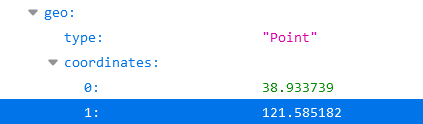
The types of data read are as follows:

Error code:

df.loc[m,'geo']=s['geo']

reason

The reason is that the object crawled is a list, and the key values on the left and right sides are not equal, so an error message appears!

modify

if s['geo']!=None:
    df.loc[m,'geo']=str(s['geo']['coordinates'][1])+','+str(s['geo']['coordinates'][0])
else:
    df.loc[m,'geo']=''

The problem was solved successfully after modification


Python json.dumps () json.dump The difference between ()

Dumps is to convert dict to STR format, loads is to convert STR to dict format. Dump and load are similar functions, but they are combined with file operation.

Code example:

import json

dic_a = {'name': 'wang', 'age': 29}
str_b = json.dumps(dic_a)
print(type(str_b),str_b) #<class 'str'> {"name": "wang", "age": 29}


dic_c = json.loads(str_b)
print(type(dic_c),dic_c) #<class 'dict'> {'name': 'wang', 'age': 29}

Then we will see the difference between dump and dumps. See the code:

import json

dic_a = {'name': 'wang', 'age': 29}
str_b = json.dumps(dic_a)
print(type(str_b),str_b) #<class 'str'> {"name": "wang", "age": 29}

#c = json.dump(dic_a)
# TypeError: dump() missing 1 required positional argument: 'fp'

c = json.dump(dic_a)

Dump needs a parameter similar to a file pointer (not a real pointer, it can be called a file like object), which can be combined with file operation, that is, you can convert dict into STR and then store it in a file; dumps directly gives STR, that is, you can convert dictionary into str.

See the code for an example (pay attention to some small details of file operation)

import json

dic_a = {'name': 'wang', 'age': 29}
str_b = json.dumps(dic_a)
print(type(str_b),str_b) #<class 'str'> {"name": "wang", "age": 29}

#c = json.dump(dic_a)
# TypeError: dump() missing 1 required positional argument: 'fp'

c = json.dump(dic_a,open('str_b.txt','w'))

Note: dump is rarely used in practice.  

Reproduced in: https://my.oschina.net/u/3486061/blog/3065779