Tag Archives: python

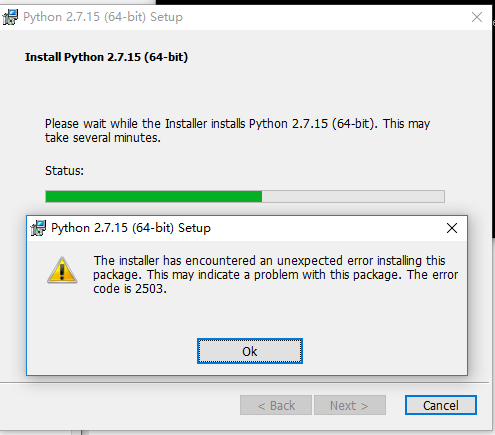
Windows 10 installation python.msi Error 2502 / 2503 solution

Error 2502/2503 also appeared when I installed msi files in windows10
I also solved the specific steps through the previous methods as follows (click to view) :
Win10 installation mSI prompt 2502, 2503 error code (successfully resolved)
However, when I installed Python today, I could not solve it according to the previous methods. I searched again by myself, and finally solved the following problems:
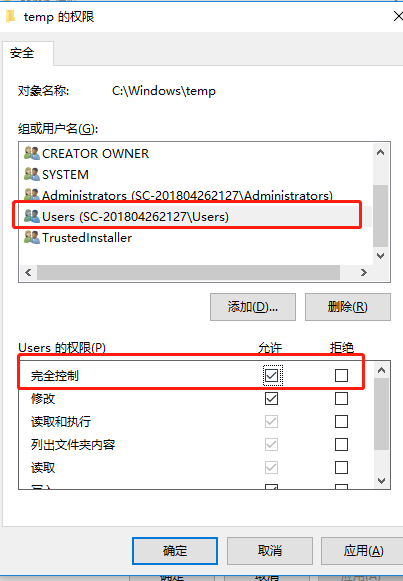
The reason is that the C:\Windows\Temp folder NTFS has the wrong permissions. It is OK to change its User permissions to full control.

I changed the full control permission of the TEMp myself

And then just reinstall it

Python calls DLL and reports an error windowserror: [error 126]

The calling code
 
Note: C++ files (CPP) : (Add extern “C” modifiers to function declarations) otherwise the method name will not be recognized by Python
Load it depending on what convention the function you’re going to call conforms to. Windll and CDLL are objects of the windll and CDLL classes, respectively
Stdcall calling convention:
Objdll = ctypes. Windll. LoadLibrary (” dllpath “)
Objdll = ctypes. Windll (” dllpath “)
Cdecl calling convention:
Objdll = ctypes.cdl. LoadLibrary(“dllpath”)
Objdll = ctypes.cdll (“dllpath”)
After the call, you can use the functions in the DLL
print Objdll.Add(1, 102)

Objdll = ctypes.cdl.loadlibrary (“D:\\ DLL \\ \PosterDetector. DLL “)
An error

USES python to call C++ DLL to report an error

Traceback (most recent call last):
File “E:/work/proc/video_web/application.py”, line 157, in < module>
Objdll = ctypes.cdl.loadlibrary (os.path.join(APP_ROOT,” DLL “,”PosterDetector. DLL “)
File “d:\python27\Lib\ctypes\ init__. Py “, line 444, In LoadLibrary
return self._dlltype(name)
File “d:\ Lib\ctypes\ ___, init__ “, line 366, in ___
self._handle = _dlopen(self._name, mode)
WindowsError: [Error 126]
To solve
The reason is that PosterDetector also relies on other DLLS,
Simply putting the two DLL files in the same directory doesn’t work, because the Python process didn’t start on the same directory as PosterDetector.

put the other DLLS and the current PosterDetector. DLL in the same folder and add the code:
os.chdir(D:\\ DLL “))

【Bug-python】IndexError: list index out of range

IndexError: list index out of range
Error message:

The code is as follows:
with open(“linux_Yue_01.txt”,”r”) as testFile:
testfileList = [splitFileNameAndLabel(filename = v) for v testFile.read().split(“\n”)]
The picture is as follows:

Error analysis:
The “IndexError: list index out of range” error typically occurs in two ways:
The first possible case:
List [index] Index is out of range
The second possibility:
The list is empty, with no elements
Listing [0] will report this error.
Typically, there is a problem with externally entered data, so it is usually processed once after readlines or read.
This avoids empty lines, insufficient fields, and type-casting errors.
Solutions:
For the first case, check the code through debugging, not much to say.
In the second case, there are two ways:
The first: check the data read in is there a problem, such as read in the TXT file whether there is a blank line and so on, but I more advocate the second solution, in the code error correction.
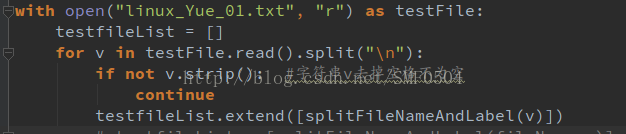
with open(“linux_Yue_01.txt”,”r”) as testFile:
testfileList = []
for v testFile.read().split(“\n”)
If not v.strip(): # string remove the space is not empty
continue
testfileList.extend([splitFileNameAndLabel(v)])
Note: [splitFileNameAndLabel(v)] is square again, otherwise it would not be a nested list in a list
The picture is as follows:

Error Kernel Pattern

2019 Unicorn enterprise heavily recruited Python engineer standard & GT; > >

Because I saw the word “Error Kernel Pattern” when looking at Akka’s materials, I wanted to check the meaning of the materials.
The concept of Error Kernel is introduced in Roland Kuhn’s Reactive Design Patterns book.
Let me translate this:

“In a supervisory hierarchy, keep important application state or functionality near the root directory while delegating dangerous operations to the leaves.”
This pattern, built on the Simple Component pattern, is suitable for combining components with different failure probabilities and reliability requirements anywhere in a larger system or application — some features of the system must never fail, while others must fail. Applying the simple component pattern usually puts you in this position, so you need to be familiar with the error kernel pattern.
This pattern has been built into The Erlang program for decades, and was one of JonasBoner’s main inspirings for implementing the Actor frame-Akka on the JVM. The name Akka was originally thought to be a palindrome from the Actor Kernel, referring to this core design pattern.

Since this pattern is designed according to the simple component pattern, translate what the author wrote.

“A component can only do one thing, but do it all.”
This pattern applies anywhere the system performs multiple functions, or it performs functions that are so complex that they need to be broken down into different components. An example is a text editor that includes spell checking: two separate functions (editing can be done without spell checking, and spelling can be done on finished text without editing), but on the other hand, these functions are simple.
The simple component pattern originates from the principle of single responsibility proposed by Tom DeMarco in his 1979 book “Structural Analysis and System Specification” (Prentice Hall). In its abstract form, it requires “maximizing cohesion and minimizing coupling.” Applied to object-oriented software design, it is generally stated as follows: “A class should have only one reason to change.”


Reference: https://www.reactivedesignpatterns.com/patterns/error-kernel.html

Reproduced in: https://my.oschina.net/u/2277632/blog/2934056

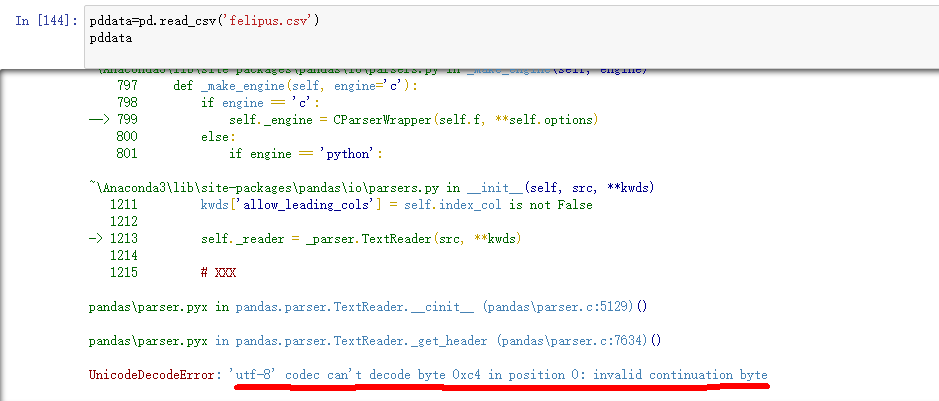
Solution of Unicode decodeerror -‘utf-8 ‘codec can’t decode byte 0xc4 in position 0 – invalid continuation byte


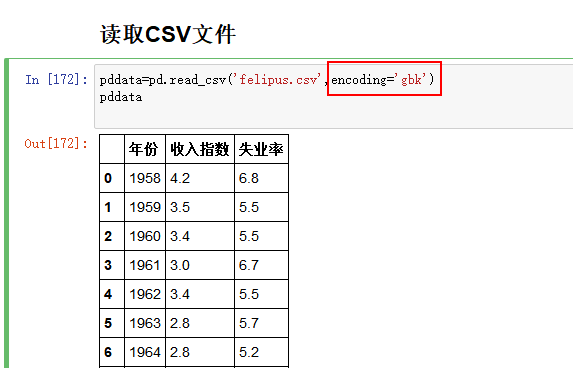
Reading CSV document with Pandas is an error that cannot be read because there is Chinese in the document. The error is due to the failure of the 'utf-8' codec to decode the 0 bit byte 0xc4

Solutions:
After reading the file, add encoding=’ GBK ‘,
such as: pddata=pd. Read_csv (' felipe.csv ',encoding=' GBK ')


Interested to continue to see the reason!
As you know, the default encoding we use in Python is UTF-8. For an introduction to coding, I recommend taking a look at Liao Da’s Python tutorial, “Strings and Coding.” Since UTF-8 format cannot correctly read CSV files with Chinese characters, it would be a good idea to select a format that can read Chinese characters.
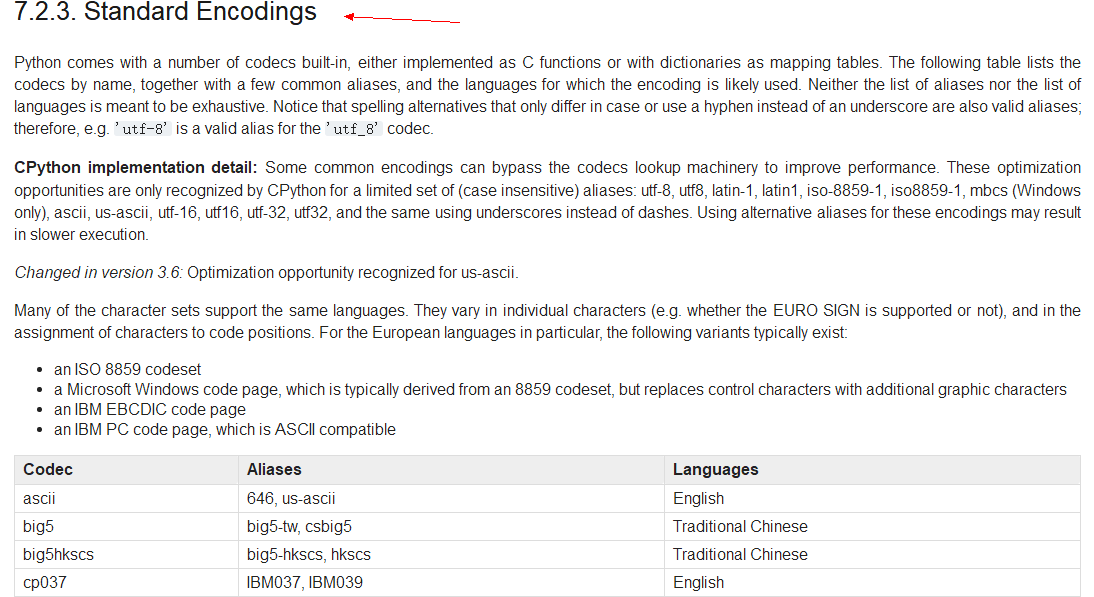
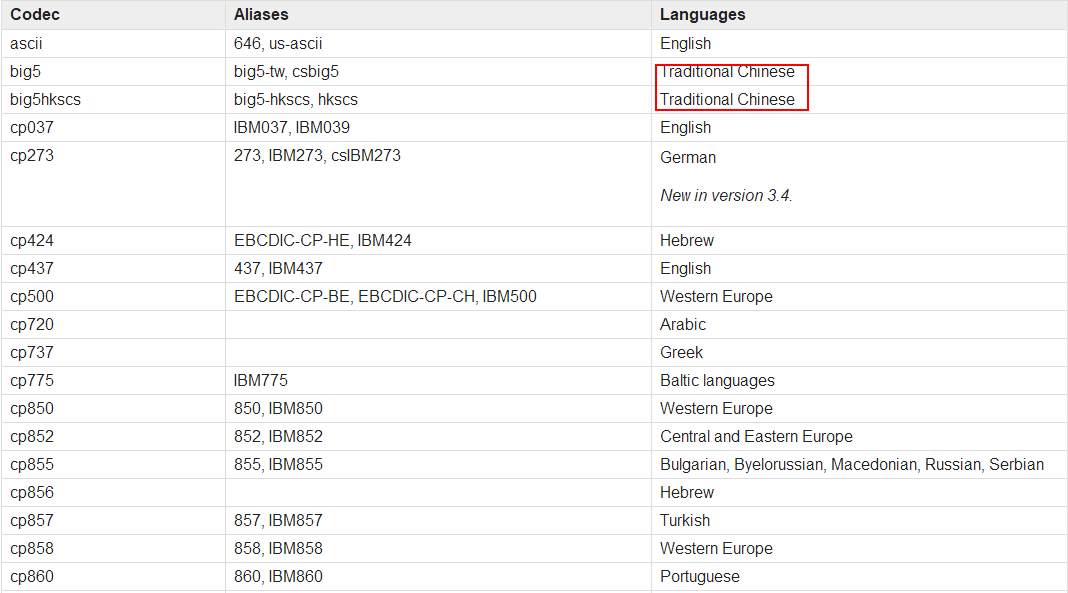
So what format can read Chinese characters?We open the Python3 official website: find the section on standard characters. The diagram below:

So what format do you want to change?You can see that the third column of the table, Language, represents what Language the encoding supports. So let’s find out.
!
I’m not going to show you the table here, but if you’re interested, go to the website. Anyway, under my careful search, there is big5; Big5hkscs; Gb2312; GBK; Gb18030. Hz; The five formats iso2022_jp_2 may support Chinese. After my test, I found gb2312; GBK; Gb18030 can read CSV files with Chinese smoothly. (Since all three are ok, let’s have a good GBK.)

It works!

Socket Error 104 bug

Description of the bug
Technology stack
nginxuwsgibottle
Error details
Alarm robots often have the following warnings:

<27>1 2018-xx-xxT06:59:03.038Z 660ece0ebaad admin/admin 14 - - Socket Error: 104
<31>1 2018-xx-xxT06:59:03.038Z 660ece0ebaad admin/admin 14 - - Removing timeout for next heartbeat interval
<28>1 2018-xx-xxT06:59:03.039Z 660ece0ebaad admin/admin 14 - - Socket closed when connection was open
<31>1 2018-xx-xxT06:59:03.039Z 660ece0ebaad admin/admin 14 - - Added: {'callback': <bound method SelectConnection._on_connection_start of <pika.adapters.select_connection.SelectConnection object at 0x7f74752525d0>>, 'only': None, 'one_shot': True, 'arguments': None, 'calls': 1}
<28>1 2018-xx-xxT06:59:03.039Z 660ece0ebaad admin/admin 14 - - Disconnected from RabbitMQ at xx_host:5672 (0): Not specified
<31>1 2018-xx-xxT06:59:03.039Z 660ece0ebaad admin/admin 14 - - Processing 0:_on_connection_closed
<31>1 2018-xx-xxT06:59:03.040Z 660ece0ebaad admin/admin 14 - - Calling <bound method _CallbackResult.set_value_once of <pika.adapters.blocking_connection._CallbackResult object at 0x7f74752513f8>> for "0:_on_connection_closed"

The debug process
Determine the error location
If you have a log, it’s easy to do. First of all, look at where the log is typed.
Our own code
No.
Uwsgi code
root@660ece0ebaad:/# uwsgi –version
2.0.14
from github co down, no.
Python Library code
Execute in the container

>>> import sys
>>> sys.path
['', '/usr/lib/python2.7', '/usr/lib/python2.7/plat-x86_64-linux-gnu', '/usr/lib/python2.7/lib-tk', '/usr/lib/python2.7/lib-old', '/usr/lib/python2.7/lib-dynload', '/usr/local/lib/python2.7/dist-packages', '/usr/lib/python2.7/dist-packages', '/usr/lib/python2.7/dist-packages/PILcompat', '/usr/lib/python2.7/dist-packages/gtk-2.0']

Under these directories, grep is found in pika

root@660ece0ebaad:/usr/local/lib/python2.7# grep "Socket Error" -R .
Binary file ./dist-packages/pika/adapters/base_connection.pyc matches
./dist-packages/pika/adapters/base_connection.py:            LOGGER.error("Fatal Socket Error: %r", error_value)
./dist-packages/pika/adapters/base_connection.py:            LOGGER.error("Socket Error: %s", error_code)

Determine the PIKA version.

>>> import pika
>>> pika.__version__
'0.10.0'

Error determination logic
It can be seen from the code that the Socket Error is the Error code of errno, and it is determined that the meaning of the Error code is that RST is sent to the opposite end.

>>> import errno
>>> errno.errorcode[104]
'ECONNRESET'

Suspected rabbitmq server address error, an unlistened port will return RST, after verification found that it is not.
then suspected link timeout break without notifying the client, etc. Take a look at the RabbitMQ Server logs and find a large number of:

=ERROR REPORT==== 7-Dec-2018::20:43:18 ===
closing AMQP connection <0.9753.18> (172.17.0.19:27542 -> 192.168.44.112:5672):
missed heartbeats from client, timeout: 60s
--
=ERROR REPORT==== 7-Dec-2018::20:43:18 ===
closing AMQP connection <0.9768.18> (172.17.0.19:27544 -> 192.168.44.112:5672):
missed heartbeats from client, timeout: 60s

It is found that all the links between RabbitMQ Server and Admin Docker have been broken

root@xxxxxxx:/home/dingxinglong# netstat -nap | grep 5672  | grep "172.17.0.19"

So why does RabbitMQ Server kick out piKA’s links?Look at the PIKA code comment:

    :param int heartbeat_interval: How often to send heartbeats.
                              Min between this value and server's proposal
                              will be used. Use 0 to deactivate heartbeats
                              and None to accept server's proposal.

We did not pass in the heartbeat interval, so in theory we should use the server default 60S. In fact, the client has never sent heartbeat packets.
verifies that a HeartbeatChecker object has been successfully created and a timer has been successfully created by printing, but the timer has never been called back.
follows through the code using blocking_connections, as seen in its add_timeout comment:

def add_timeout(self, deadline, callback_method):
    """Create a single-shot timer to fire after deadline seconds. Do not
    confuse with Tornado's timeout where you pass in the time you want to
    have your callback called. Only pass in the seconds until it's to be
    called.

    NOTE: the timer callbacks are dispatched only in the scope of
    specially-designated methods: see
    `BlockingConnection.process_data_events` and
    `BlockingChannel.start_consuming`.

    :param float deadline: The number of seconds to wait to call callback
    :param callable callback_method: The callback method with the signature
        callback_method()

The timer is triggered by process_data_Events and we are not calling it. So the client heartbeat is never triggered. Simply turn off heartbeat to solve this problem.
Specific trigger point

follows the code of basic_publish interface.
receives RST when sending, and finally prints socket_error in base_connection.py:452, _handle_error function.

def connect_mq():
    mq_conf = xxxxx
    connection = pika.BlockingConnection(
        pika.ConnectionParameters(mq_conf['host'],
                                  int(mq_conf['port']),
                                  mq_conf['path'],
                                  pika.PlainCredentials(mq_conf['user'],
                                                        mq_conf['pwd']),
                                  heartbeat_interval=0))
    channel = connection.channel()
    channel.exchange_declare(exchange=xxxxx, type='direct', durable=True)
    return channel

channel = connect_mq()

def notify_xxxxx():
    global channel

    def _publish(product):
        channel.basic_publish(exchange=xxxxx,
                              routing_key='xxxxx',
                              body=json.dumps({'msg': 'xxxxx'}))
An import error is reported in the python. The solution to setting. Pylintrc is invalid

/. Pylintrc problem

because of vs code
, unable to import, searched the pylint setting on the Internet and used the Suggestions in many articles
Pylintrc . Pylintrc set init-hook initialization sys.path method. But no matter how you set it up, those errors don’t go away. Out of the spirit of not giving up until solving the problem, I finally found:

Originally I put the source code on the desktop, python with conda configured virtual environment. Then I ignorantly put . Pylintrc in the folder Scripts and pylint.exe.
Put the RC file on the desktop and solve the problem.

init-hook='import sys; sys.path.append("C:/MySoftware/Miniconda3/envs/tf_env/Lib/site-packages/")'

Just to make fun of how detailed the tutorials are and how elaborate the stuff behind init-hook is without making it clear how the working folder is related to the RC file, resulting in the RC file being set up but not being found by Pylint. Misbehaving! In the official website, the order of pylint to find RC files is clearly written, but it is too inconspicuous, so I searched for a long time.
I like the idea of putting it in a working folder so that each code file can personalize the path it is looking for.

Solve fatal error: ‘FFI. H’ file not found

Error installing Rumps in Python:

Modules/objc/libffi_support.h:4:10: fatal error: 'ffi.h' file not found
#include "ffi.h"
         ^
1 error generated.
error: Setup script exited with error: command 'cc' failed with exit status 1

The reason is the lack of libffi library, using BREW can be installed.

$ brew install pkg-config libffi
$ export PKG_CONFIG_PATH=/usr/local/Cellar/libffi/3.0.13/lib/pkgconfig/
$ pip install bcrypt

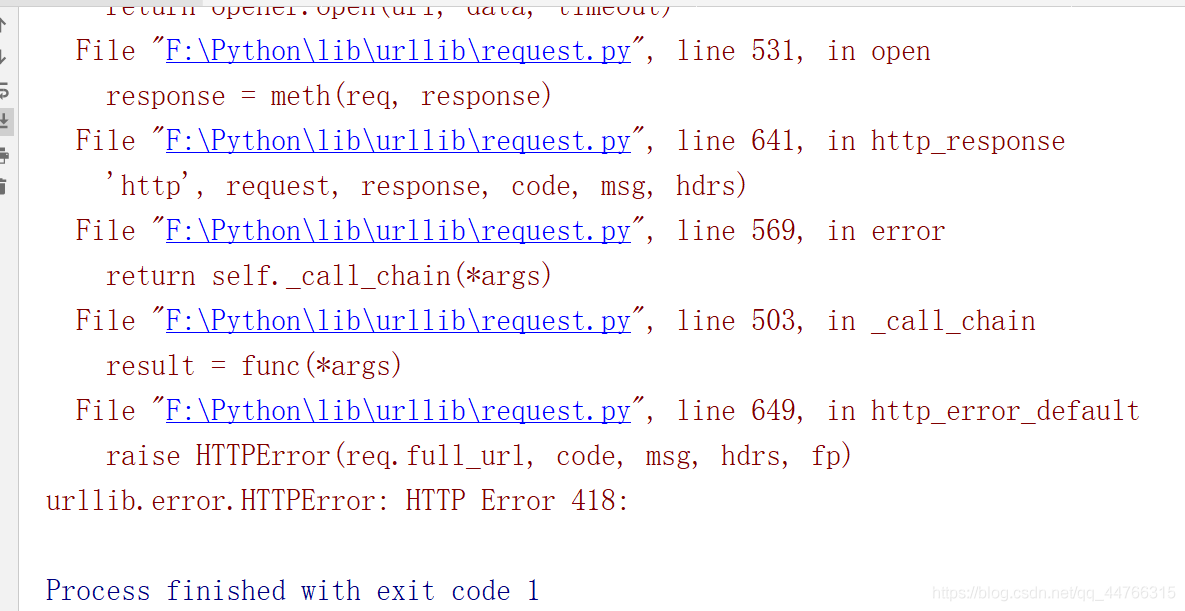
Python crawler urllib.error.HTTPError : HTTP Error 418:

HTTPError: HTTP error 418:

>

>

>

>

>

>

>

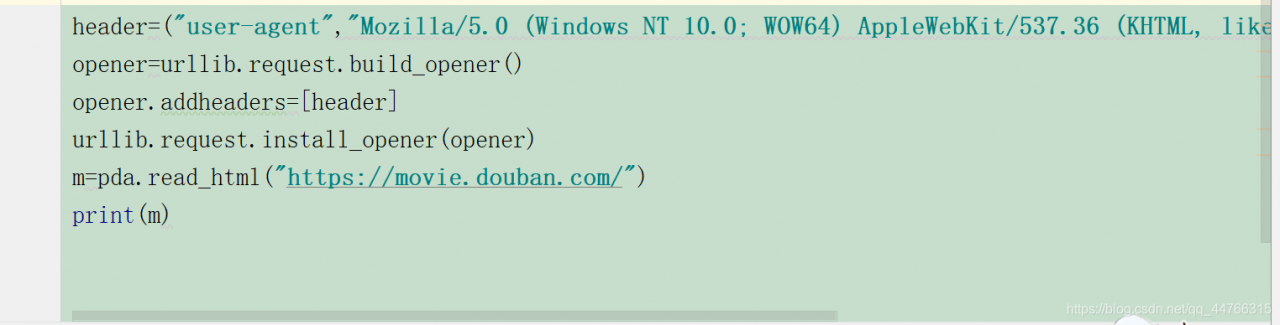
> ‘s disguise code is as follows:
‘s many partners go to user-agent every time they do a crawler project. In fact, it is not necessary, but it is ok to use the previous one. Try to change the last number when tested, and most of the time it works.
and this is what I came up with:
, I hope it’s helpful to you.

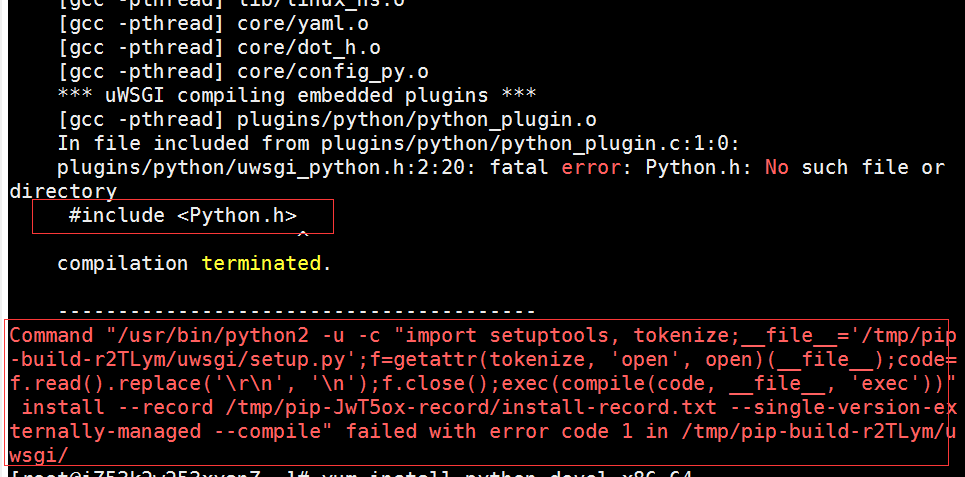
fatal error: Python.h: No such file or directory

Error:
system centos7.4 64-bit
python 2.7.5
plugins/python/uwsgi_python.h:2:20: fatal error: Python.h: No such file or directory
#include < Python.h>
Command “/usr/ bin/python2-u-c” import setuptools, tokenize;
Command “/usr/ bin/python2-u-c” import setuptools, tokenize; The file = ‘/ TMP/PIP – build – r2TLym uwsgi/setup. Py “; F = getattr (tokenize, open, open) (file); Code = f.r ead (). The replace (‘ \ r \ n ‘, ‘\ n’); f.close(); exec(compile(code, file, ‘exec’)) “install –record/TMP/pip-jwt5ox-record /install-record. TXT –single-version –compile” failed with error code 1 in/TMP/pip-build-r2tlym /uwsgi/

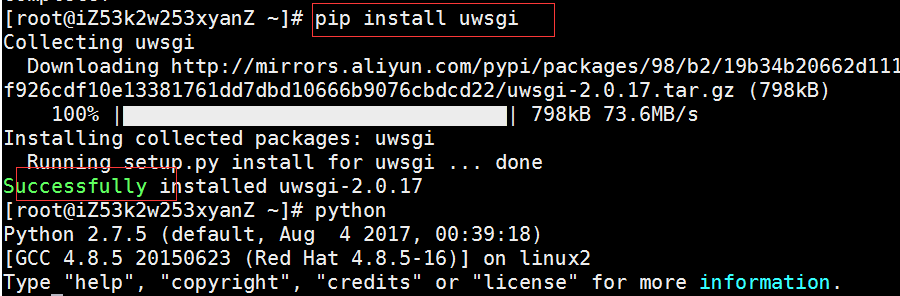
Check the solution:
yum install python-devel.x86_64
Then run the installation and fix the problem.

Package python3.1 + PyQt4 into exe

There are many programs that package Python as an exe, such as Py2exe, PyInstaller, and so on, but so far none of them support Python 3.1 well, so I’ll introduce CX_freeze 4.2.2 here, which also supports cross-platform running on Windows and Linux.
Cx_freeze download site is http://sourceforge.net/projects/cx-freeze/files/, want to undertake choosing according to install python version. For example, I am using python3.1, so I will download the file cx_Freeze- 4.2.2.2.win32-py3.1.msi. After running the installation package, the program is copied to the Python directory. There are two main places, one is C:/Python31/Scripts and the other is C:/Python31/Lib/site-packages/cx_Freeze
 
In previous versions of cx_Freeze, py was converted to exe through the script Freezepython.py, but in 4.2.2 Freezepython.py is gone and the main work is done by the C:/Python 31/scripts cxfree.bat.
There are two main ways to complete python exe packaging using cx_Freeze:
First, run cxfreeze. Bat directly through:
Go to the CMD command line, enter the C:/Python 31/scripts directory, and run cxfreed.bat-h to see its instructions. We can do an experiment with CX_freeze’s own sample.
Go to C :/ Python 31/scripts/ and run
cxfreeze C:/Python31/Lib/site-packages/cx_Freeze/samples/PyQt4/PyQt4app.py –install-dir=d:/123
Pytqt4app.py is packaged as exe, and the libraries it USES are also evaluated in the d:/123 directory.
 
Second, run setup.py:
In the example provided with CXfreeze C:/ python31/lib /site-packages/cx_Freeze/samples/PyQt4, there is a setup.py file. Open this file and we find that it is:

By running this script, packaging can be done automatically:
For example, if you go into C:/ python31/lib /site-packages/cx_Freeze/samples/PyQt4,
run
setup.py build
After that, a build/exe.win32-3.1 directory will appear under this directory, where you can see the packaged exe file. We want to package our script, copy this setup.py over, and put it in
executables = [Executable(“PyQt4app.py”, base = base)])
Change pyqt4app.py to your own script name.
 
Problems during packaging:
For Chinese support, if there is Chinese in the script and the encoding format is not specified, the packaging process will occur: UnicodeDecodeError: ‘utf8’ codec can ‘t decode bytes in the position of 1602: invalid data this kind of mistake, this blog post on http://www.cnblogs.com/xinzaitian/archive/2010/12/10/1902481.html, the author mentioned Chinese must be deleted.
In fact, Chinese characters can be retained by adding the following at the beginning of the script file:
#! /usr/bin/env python
#coding=utf-8
It is ok
 
Another problem is that if the packaged EXE file is run under “desktop” or other Chinese path, a window will pop up showing “Cannot get zipimporter” instance. So far, no good solution has been found