[Solved] unity EditorGUILayer dynamic drawing scrolling list error

The specific error message: ArgumentException: Getting control 0’s position in a group with only 0 controls when doing Repaint A

OnGUI will be called two times each time it draws, the first time to calculate the position of all controls, all EdtorGUILayout control method returns the Rect is 0; the second time to draw all the content based on the position, the control method returns the Rect is the actual coordinates.

BeginScrollView to generate a scrolling list, because I need to display a lot of content, so I made an optimization: pre-calculate the position of each line, when the line is in viewport display content, otherwise display blank.

Generic logging found that the height of each row generated by the system is not the same, generally floating randomly between 19-21, so it is impossible to calculate the position of each row, so instead, when the second call to OnGUI, use the Rect returned by the control method to calculate in real time.


[Solved] jar Run Error: no main manifest attribute

Jar running error no main manifest attribute

Solution:

After investigation, it was found that it was pom.xml is not added in Maven project:

<packaging>jar</packaging>

And the following configurations:

<build>
<!--maven-->
    <plugins>
        <plugin>
            <groupId>org.springframework.boot</groupId>
            <artifactId>spring-boot-maven-plugin</artifactId>
        </plugin>
    </plugins>
  <resources>
  <!-- pom.xml resources -->
    <resource>
      <directory>src/main/java</directory>
      <includes>
        <include>**/*.properties</include>
      </includes>
    </resource>
    <resource>
      <!-- The *.xml file in the java directory will also be packaged when the project is packaged -->
      <directory>src/main/resources</directory>
    </resource>
    <resource>
                <directory>src/main/java</directory>
                <includes>
                    <include>**/*.xml</include>
                </includes>
                <filtering>false</filtering>
            </resource>
  </resources>
</build>

How to Solve UW Microcontroller KEIL _WEAK Error

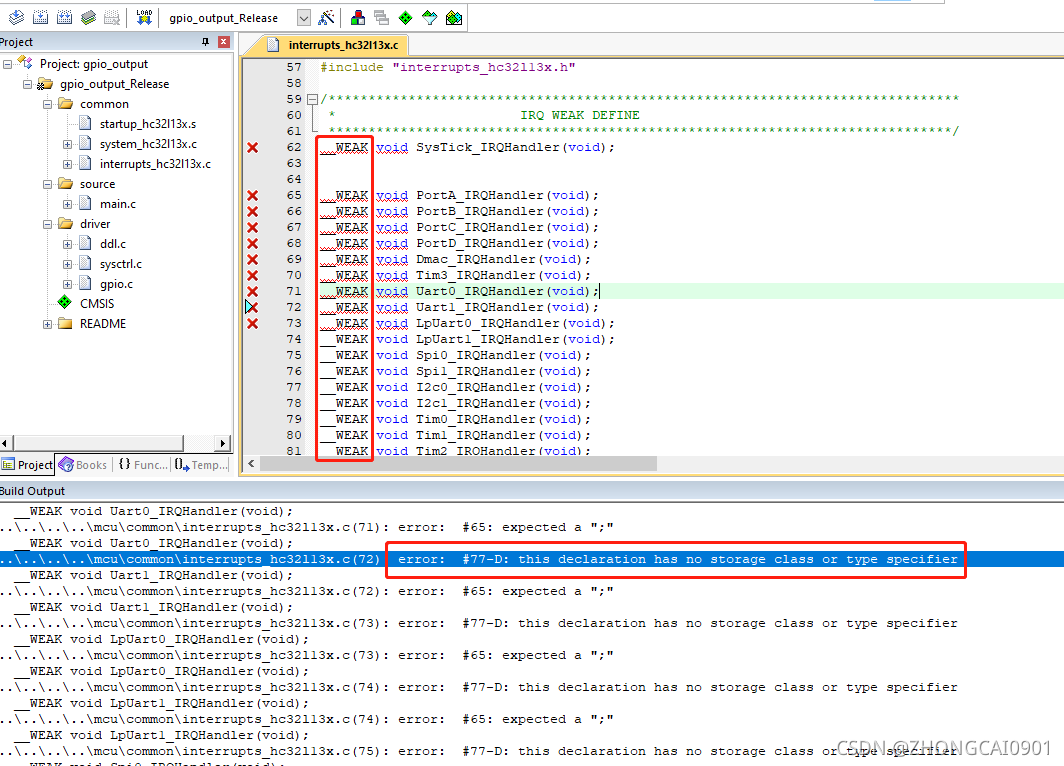
1. The list of problems when __WEAK is not recognized by Keil compilation is as follows.
A screenshot of the problem that sometimes occurs when __WEAK is not recognized when compiling with Keil is as follows.

The error message prompted is as follows:

..\..\..\..\mcu\common\interrupts_hc32l13x.c(72): error:  #77-D: this declaration has no storage class or type specifier
  __WEAK void Uart1_IRQHandler(void);
..\..\..\..\mcu\common\interrupts_hc32l13x.c(72): error:  #65: expected a ";"
  __WEAK void Uart1_IRQHandler(void);
..\..\..\..\mcu\common\interrupts_hc32l13x.c(73): error:  #77-D: this declaration has no storage class or type specifier
  __WEAK void LpUart0_IRQHandler(void);
..\..\..\..\mcu\common\interrupts_hc32l13x.c(73): error:  #65: expected a ";"
  __WEAK void LpUart0_IRQHandler(void);
..\..\..\..\mcu\common\interrupts_hc32l13x.c(74): error:  #77-D: this declaration has no storage class or type specifier
  __WEAK void LpUart1_IRQHandler(void);
..\..\..\..\mcu\common\interrupts_hc32l13x.c(74): error:  #65: expected a ";"
  __WEAK void LpUart1_IRQHandler(void);
..\..\..\..\mcu\common\interrupts_hc32l13x.c(75): error:  #77-D: this declaration has no storage class or type specifier
  __WEAK void Spi0_IRQHandler(void);
..\..\..\..\mcu\common\interrupts_hc32l13x.c(75): error:  #65: expected a ";"

Solution:
Because it needs to be defined as __weak in Keil to be recognized (non-capitalized _WEAK), add the following lines of definition to the header file base_types.h file, and compile it OK!

#if defined (__ICCARM__)
#define __WEAK            __WEAK __ATTRIBUTES
#elif defined (__CC_ARM)
#define __WEAK            __weak
#else
#error    "unsupported compiler!!"
#endif

2. Cause analysis

ARM series compilation tool chain: __CC_ARM__, __ICCARM__, __GNUC__, __TASKING__
In order to solve the problem reported above, __ICCARM__ and __CC_ARM are defined, and a description is made here.

__CC_ARM corresponds to the platform: ARM RealView.
RealView is a set of development tools including compilation, debugging and simulation, which should be used in combination with development environments such as uvision, eclipse or CodeWarrior to form an integrated development environment.

__ICCARM__ corresponds to the platform: IAR EWARM.
Embedded Workbench for ARM is an integrated development environment developed by IARSystems for ARM microprocessors (hereinafter referred to as IAR EWARM). Compared to other ARM development environments, IAR EWARM is easy to start, easy to use, and compact in code.

The corresponding platform of __GNUC__ is: GNU Compiler Collection:
GCC was originally intended to be a compiler written specifically for the GNU operating system, which is thoroughly free software.

[Solved] pytorch loss.backward() Error: RuntimeError: Function AddBackward0 returned an invalid gradient at index 1…

How to Solve pytorch loss.backward() Error

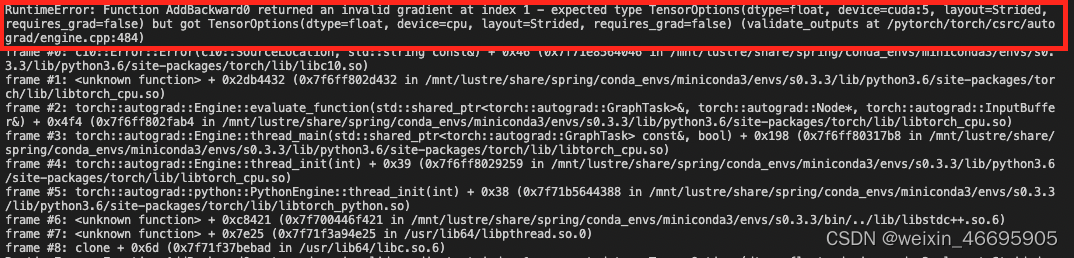
The specific errors are as follows:

In fact, the error message makes it clear that the error is caused by device inconsistency in the backpropagation process.
In the code, we first load all input, target, model, and loss to the GPU via .to(device). But when calculating the loss, we initialize a loss ourselves
loss_1 = torch.tensor(0.0)
This way by default loss_1 is loaded on the CPU.
The final execution loss_seg = loss + loss_1
results in the above error for loss_seg.backward().

Modification method:
Modify
loss_1 = torch.tensor(0.0)
to
loss_1 = torch.tensor(0.0).to(device)
or
loss_1 = torch.tensor(0.0).cuda()

How to Solve dtd Error in MybatisGenerator.xml file

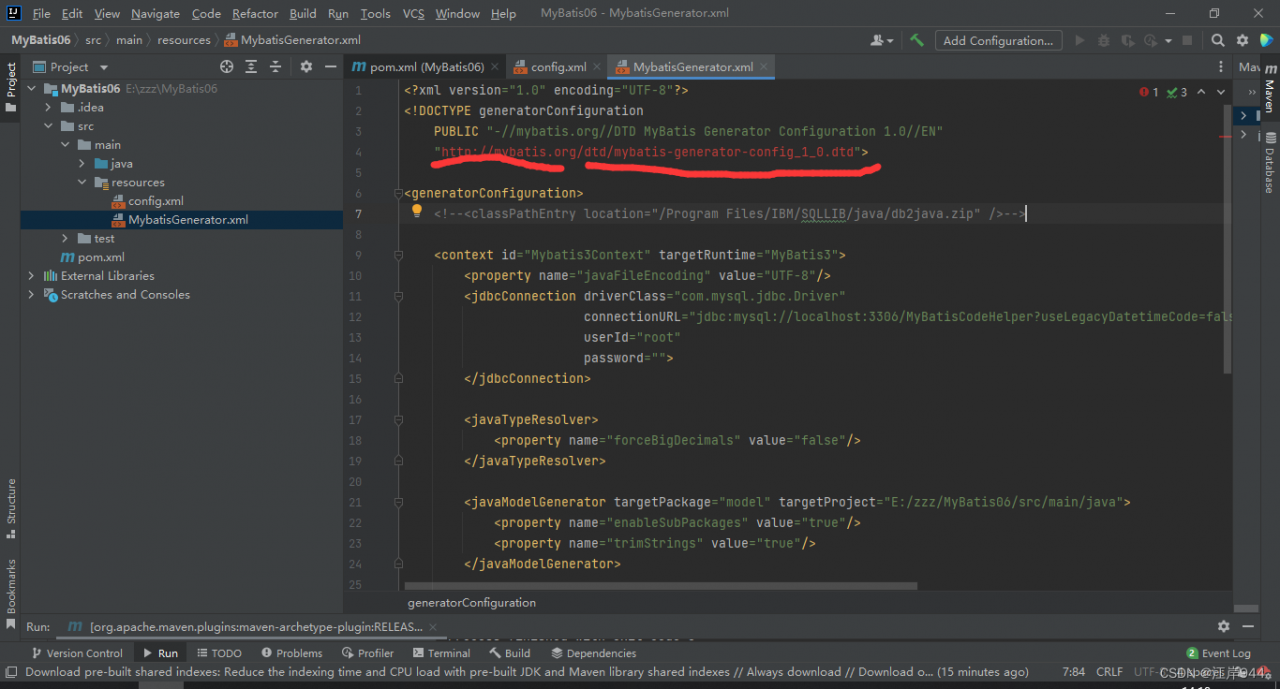
1: when writing mbatisgenerator.xml file, error is reported because the dtd file is not added

2: Add dtd file

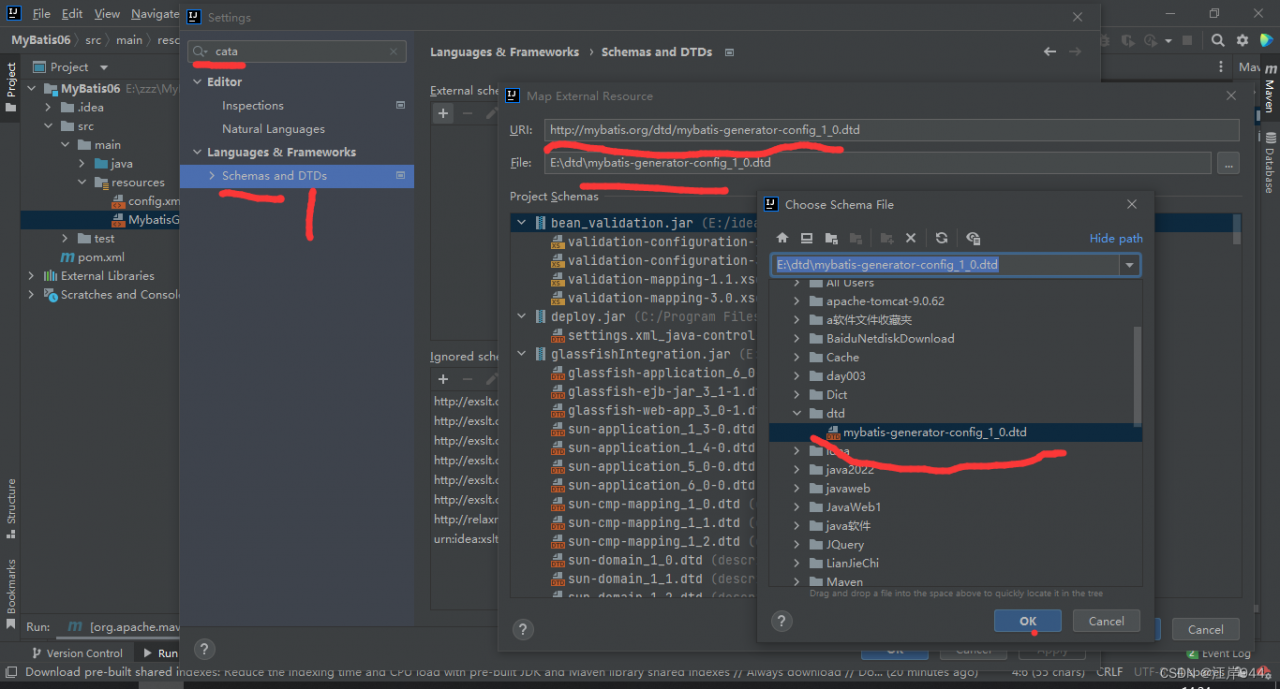
1. Click Settings–2. Click Settings–3. Search for cata in the search box
4. Click Schemas and DTDs–5 Click the + sign under External schemas and DTDs
6. Enter in URL ( http://mybatis.org/dtd/mybatis-generator-config_1_0.dtd )

7. Enter the location of the dtd file in File (this is the location of my dtd file—-E:\dtd\mybatis-generator-config_1_0.dtd)

Open browser download without this file (http://mybatis.org/dtd/mybatis-generator-config_1_0.dtd)


[Solved] Flutter Error: No MediaQuery widget ancestor found.

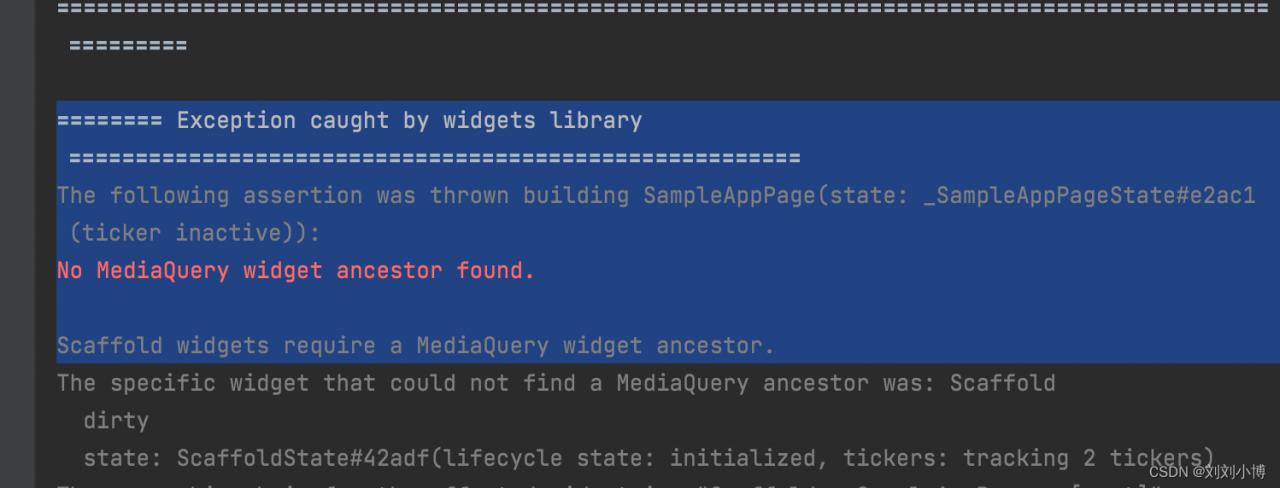
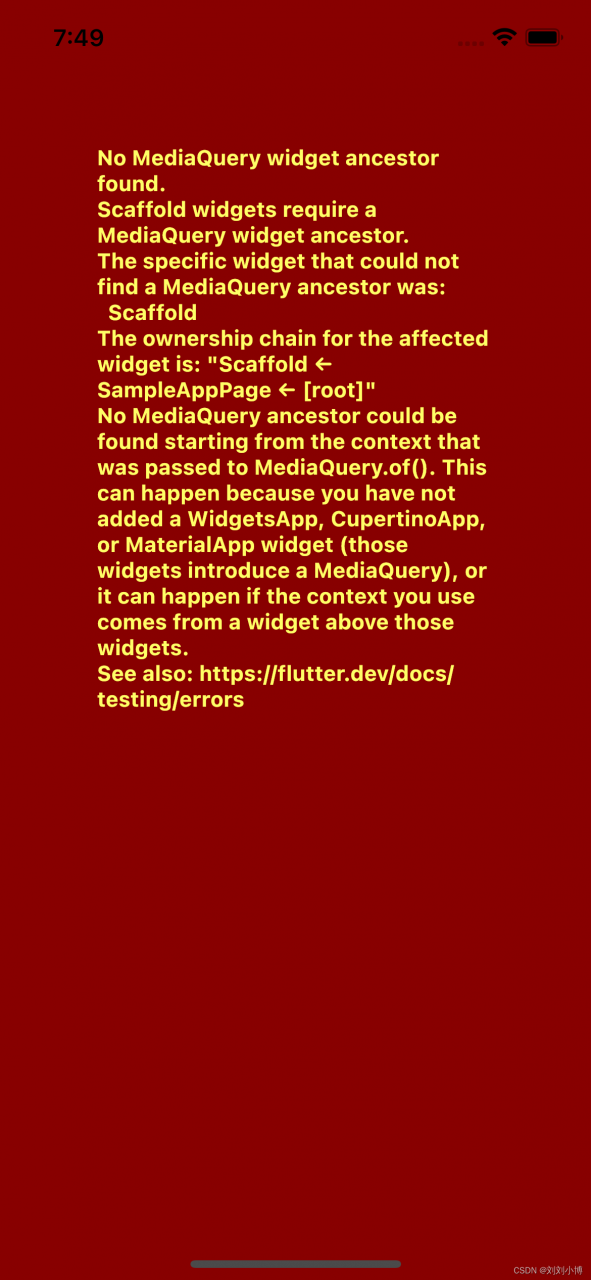
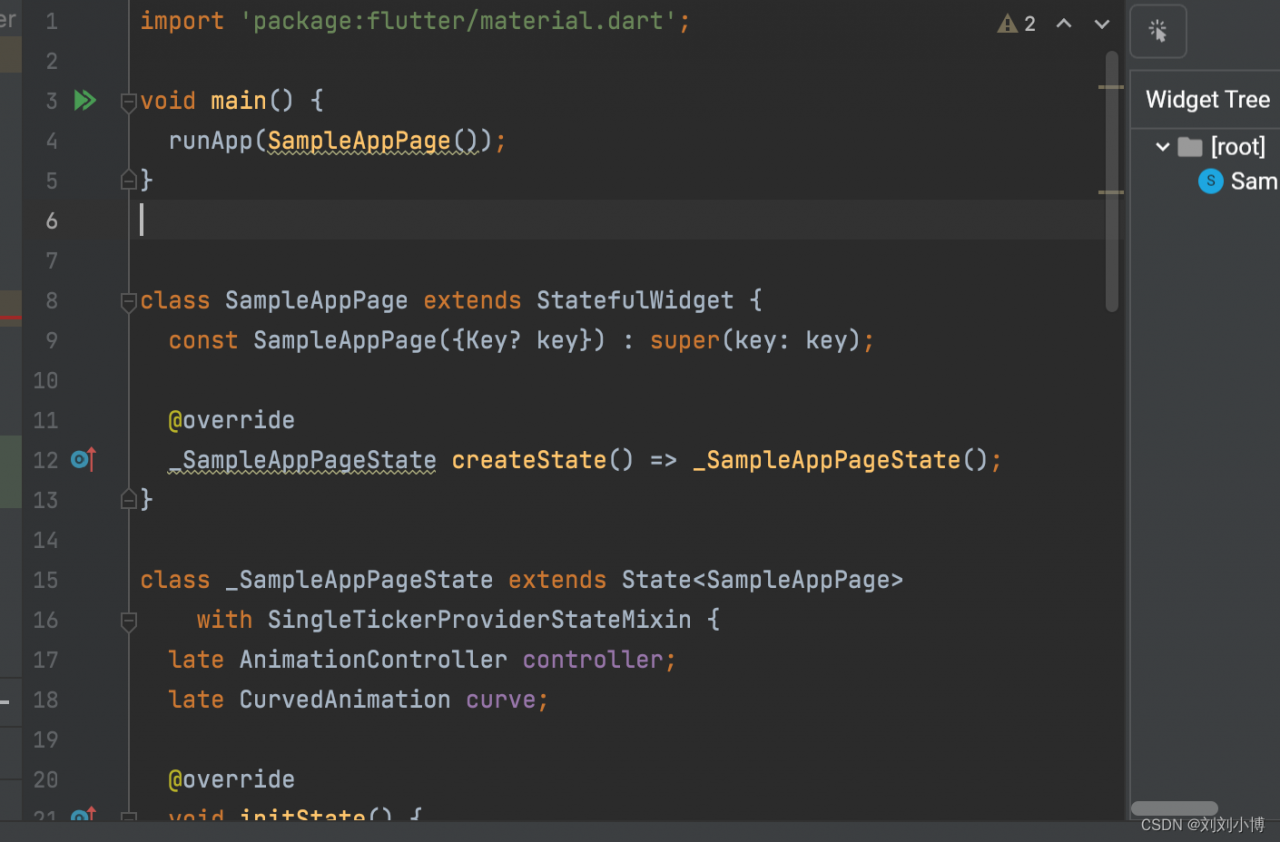
Error reporting is shown in figure

Problem code

import 'package:flutter/material.dart';

void main() {
  runApp(SampleAppPage());
}

class SampleAppPage extends StatefulWidget {
  const SampleAppPage({Key?key}) : super(key: key);

  @override
  _SampleAppPageState createState() => _SampleAppPageState();
}

class _SampleAppPageState extends State<SampleAppPage>
    with SingleTickerProviderStateMixin {
  late AnimationController controller;
  late CurvedAnimation curve;

  @override
  void initState() {
    super.initState();
    controller = AnimationController(
      duration: const Duration(milliseconds: 2000),
      vsync: this,
    );
    curve = CurvedAnimation(
      parent: controller,
      curve: Curves.easeIn,
    );
  }

  @override
  Widget build(BuildContext context) {
    return Scaffold(
      body: Center(
        child: GestureDetector(
          child: RotationTransition(
            turns: curve,
            child: const FlutterLogo(size: 200.0),
          ),
          onDoubleTap: () {
            if (controller.isCompleted) {
              controller.reverse();
            } else {
              controller.forward();
            }
          },
        ),
      ),
    );
  }
}

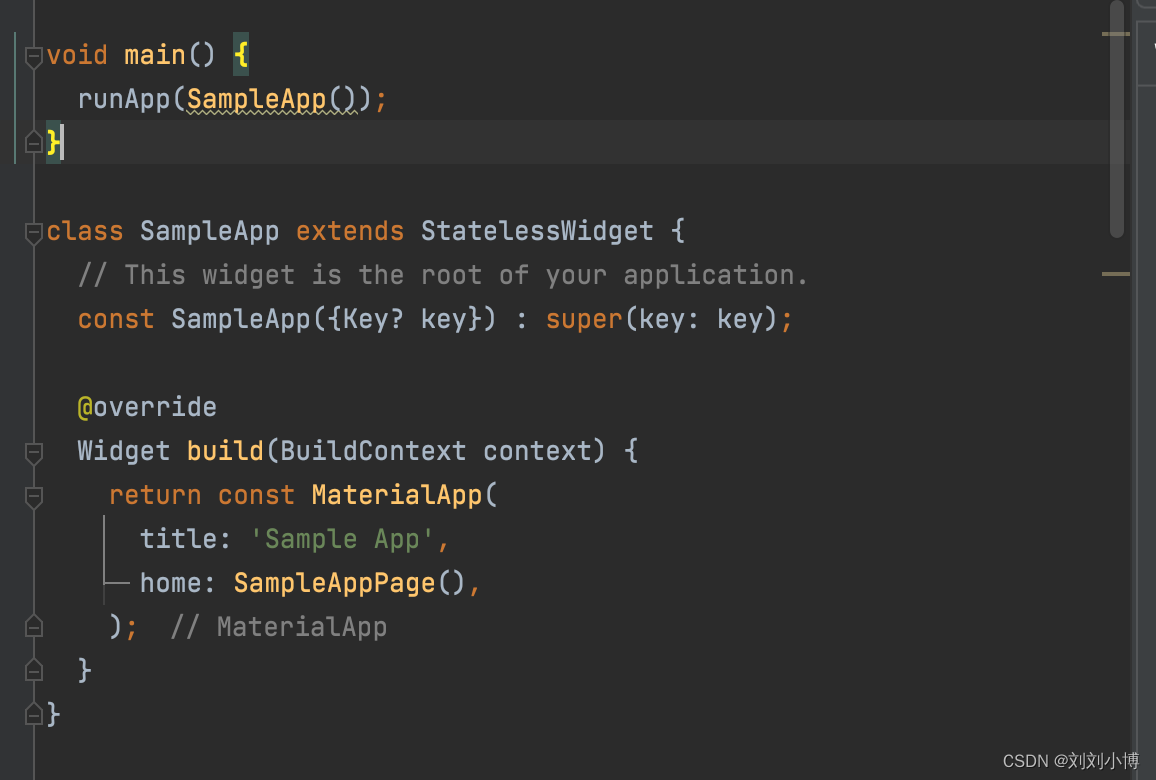
Reason: the root component of the fluent interface must be MaterialApp

Code after repair

import 'package:flutter/material.dart';

void main() {
  runApp(SampleApp());
}

class SampleApp extends StatelessWidget {
  // This widget is the root of your application.
  const SampleApp({Key?key}) : super(key: key);

  @override
  Widget build(BuildContext context) {
    return const MaterialApp(
      title: 'Sample App',
      home: SampleAppPage(),
    );
  }
}

class SampleAppPage extends StatefulWidget {
  const SampleAppPage({Key?key}) : super(key: key);

  @override
  _SampleAppPageState createState() => _SampleAppPageState();
}

class _SampleAppPageState extends State<SampleAppPage>
    with SingleTickerProviderStateMixin {
  late AnimationController controller;
  late CurvedAnimation curve;

  @override
  void initState() {
    super.initState();
    controller = AnimationController(
      duration: const Duration(milliseconds: 2000),
      vsync: this,
    );
    curve = CurvedAnimation(
      parent: controller,
      curve: Curves.easeIn,
    );
  }

  @override
  Widget build(BuildContext context) {
    return Scaffold(
      body: Center(
        child: GestureDetector(
          child: RotationTransition(
            turns: curve,
            child: const FlutterLogo(size: 200.0),
          ),
          onDoubleTap: () {
            if (controller.isCompleted) {
              controller.reverse();
            } else {
              controller.forward();
            }
          },
        ),
      ),
    );
  }
}


[How to Solve] Unexpected space before function parentheses Error

Unexpected space before function parentheses error reporting solution

Unexpected space before function parentheses

this error is the configuration in .eslintrc.js file. Add code to the rules in this file:

"space-before-function-paren": 0

Or the attribute space-before-function-paren already exists in the file. Visit the eslint document
to view the parameters and change them according to the document.

[Solved] C++ reason ncnn model error: Segmentation fault (core dumped)

The reasoning code is as follows:

#include "net.h"
#include <iostream>
#include <fstream>
#include <algorithm>
#include <opencv2/core/core.hpp>
#include <opencv2/highgui/highgui.hpp>
#include <opencv2/imgproc.hpp>
#include <stdio.h>
#include <vector>
#include <opencv2/opencv.hpp>

using namespace std;

void pretty_print(const ncnn::Mat& m)
{
    for (int q=0; q<m.c; q++)
    {
        const float* ptr = m.channel(q);
        for (int y=0; y<m.h; y++)
        {
            for (int x=0; x<m.w; x++)
            {
                printf("%f ", ptr[x]);
            }
            ptr += m.w;
            printf("\n");
        }
        printf("------------------------\n");
    }
}
//main fuction
int main(){
    string img_path = "person1.jpeg";
    cv::Mat img = cv::imread(img_path, cv::IMREAD_COLOR);
    cv::Mat img2;
    int input_width = 512;//Input size specified when going onnx
    int input_height = 512;
    
    cv::resize(img, img2, cv::Size(input_width, input_height));
  

    // Load the converted and quantized alexnet network
    ncnn::Net net;
    // net.opt.num_threads=1;
    net.load_param("cps_simplif.param");
    net.load_model("cps_simplif.bin");
    // Convert opencv mat to ncnn mat
    ncnn::Mat input = ncnn::Mat::from_pixels(img2.data, ncnn::Mat::PIXEL_BGR, img2.cols, img2.rows);
    const float mean_vals[3] = {0.485, 0.456, 0.406};
    const float norm_vals[3] = {0.229, 0.224, 0.225}; //[0.485, 0.456, 0.406]),std=np.array([0.229, 0.224, 0.225]
    input.substract_mean_normalize(mean_vals, norm_vals);
    // ncnn forward calculation
    ncnn::Extractor extractor = net.create_extractor();
    extractor.input("input.1", input);
    ncnn::Mat output0;
    extractor.extract("1035", output0);

    //ncnn::mat ->>>>> cv::mat
    cv::Mat a(input_height,input_width, CV_8UC3);
    output0.to_pixels(a.data, ncnn::Mat::PIXEL_BGR2RGB);
    
    cv::imwrite("ncnninfer.png", a);
    
    // pretty_print(output0);
    // pretty_print(output1);

    cout<<"done"<<endl;
    return 0;
}

Only segmentation fault (core dumped) is reported after running

No core file is generated. Check through ulimit -c, the size of core file is unlimited and there is no problem. This method solves the problem of not generating core file

With core file

Pass under the terminal

apt-get update
apt-get install gdb

Install GDB

Installation completed, passed

gdb ./Execution file name   core

The core here can be modified according to its own core file name.
the error is found at:

Corresponding to the reasoning code above

output0.to_pixels(a.data, ncnn::Mat::PIXEL_BGR2RGB);

It is the code to realize the conversion from ncnn:: mat to cv:mat. After debugging, it is found that the reasoning results of ncnn are all Nan, which leads to the conversion failure

Adjust the previous input, normalization is not done well.

[Solved] Python Error: asyncio RuntimeError: This event loop is already running

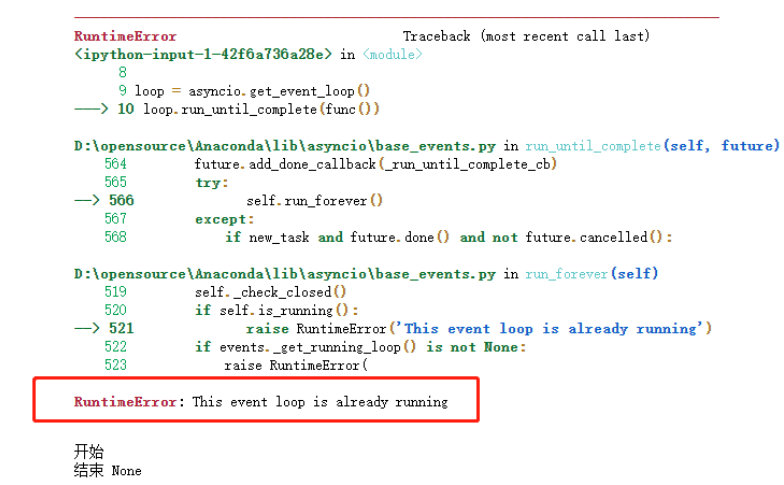
In case of an error, the following diagram is given:

Solution:

# download nest_asyncio
pip3 install nest_asyncio

Add the following two lines at the beginning of the asynchronous collaboration code, or in the code:

import nest_asyncio

nest_asyncio.apply()

After consulting the data, it is found that using the Jupiter notebook environment, it is connected to the IPython kernel, and the IPython kernel itself runs on the event loop, while asyncio does not allow nesting of its event loop, so the error message as shown in the above figure will appear.

nest_asyncio exists as a patch for asynchronous operations.

How to Solve dyn_small_obs_avoidance Compile Error (eigen version Issue)

Problem description

While Compiling dyn_small_obs_avoidance, catkin_make report an error:

/home/xcs/catkin_ws_dyn/src/dyn_small_obs_avoidance/path_searching/src/kinodynamic_astar.cpp:919:61: error: ‘const class Eigen::ArrayWrapper<const Eigen::CwiseUnaryOp<Eigen::internal::scalar_multiple_op<double>, const Eigen::CwiseBinaryOp<Eigen::internal::scalar_difference_op<double>, const Eigen::Matrix<double, 3, 1>, const Eigen::Matrix<double, 3, 1> > > >’ has no member named ‘floor’
   Vector3i idx = ((pt - origin_) * inv_resolution_).array().floor().cast<int>();
                                                             ^~~~~
/home/xcs/catkin_ws_dyn/src/dyn_small_obs_avoidance/path_searching/src/kinodynamic_astar.cpp:919:74: error: expected primary-expression before ‘int’
   Vector3i idx = ((pt - origin_) * inv_resolution_).array().floor().cast<int>();
   dyn_small_obs_avoidance/path_searching/CMakeFiles/path_searching.dir/build.make:62: recipe for target 'dyn_small_obs_avoidance/path_searching/CMakeFiles/path_searching.dir/src/kinodynamic_astar.cpp.o' failed
make[2]: *** [dyn_small_obs_avoidance/path_searching/CMakeFiles/path_searching.dir/src/kinodynamic_astar.cpp.o] Error 1
CMakeFiles/Makefile2:1260: recipe for target 'dyn_small_obs_avoidance/path_searching/CMakeFiles/path_searching.dir/all' failed
make[1]: *** [dyn_small_obs_avoidance/path_searching/CMakeFiles/path_searching.dir/all] Error 2
Makefile:140: recipe for target 'all' failed
make: *** [all] Error 2
Invoking "make -j8 -l8" failed                                                 

Cause analysis:

By modifying the location where the error occurs, it is found that the error still exists, and the judgment error has nothing to do with the code itself
referring to other posts, I found that the previously installed version of eigen is eigen3.2.1, which may be too low
try upgrading the eigen version.


Solution:

1. Uninstall the  eigen

sudo updatedb  
locate eigen3 
sudo rm -rf /usr/include/eigen3 /usr/lib/cmake/eigen3 /usr/share/doc/libeigen3-dev /usr/share/pkgconfig/eigen3.pc /var/lib/dpkg/info/libeigen3-dev.list /var/lib/dpkg/info/libeigen3-dev.md5sums

2. Installation dependency

sudo apt-get install libopenblas-dev
sudo apt-get install --no-install-recommends libboost1.58-all-dev
sudo apt-get install libx11-dev
sudo apt-get install libgl1-mesa-dev 
sudo apt-get install libglu1-mesa-dev 
sudo apt-get install freeglut3-dev
sudo apt-get install doxygen
sudo apt-get install cmake
sudo wget https://nchc.dl.sourceforge.net/project/glew/glew/2.1.0/glew-2.1.0.tgz --no-check-certificate
sudo tar -xzvf glew-2.1.0.tgz
cd glew-2.1.0/
sudo make 
sudo make install
sudo ldconfig -v

Some may not be installed. I will ignore them and continue with the following steps.

3. Download eigen3.3.7, and extract it to the home directory
download address: eigen3.3.7

4. Installing eigen3.3.7

mkdir build
cd build
cmake ..
make
sudo make install
sudo ldconfig -v

5. Map the path of eigen3 to the /usr/include path.

sudo cp -r /usr/local/include/eigen3 /usr/include/eigen3 
sudo ln -s /usr/include/eigen3/Eigen /usr/include/Eigen

6. Re-enter dyn_small_obs_avoidance workspace catkin_make, compiled successfully.

[ 79%] Building CXX object dyn_small_obs_avoidance/path_planning/CMakeFiles/goal_transform.dir/src/goalpoint_transformer.cpp.o
[ 81%] Building CXX object dyn_small_obs_avoidance/path_planning/CMakeFiles/path_planning_node.dir/src/path_planning.cpp.o
[ 93%] Built target livox_ros_driver_node
[ 95%] Linking CXX executable /home/xcs/catkin_ws_dyn/devel/lib/path_planning/goal_transform
[ 95%] Built target goal_transform
[ 97%] Linking CXX executable /home/xcs/catkin_ws_dyn/devel/lib/path_planning/path_planning_node
[ 97%] Built target path_planning_node
[100%] Linking CXX executable /home/xcs/catkin_ws_dyn/devel/lib/fast_lio/loam_laserMapping