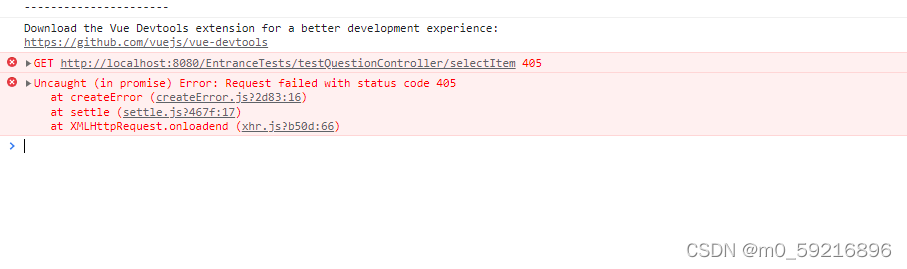
Solution:
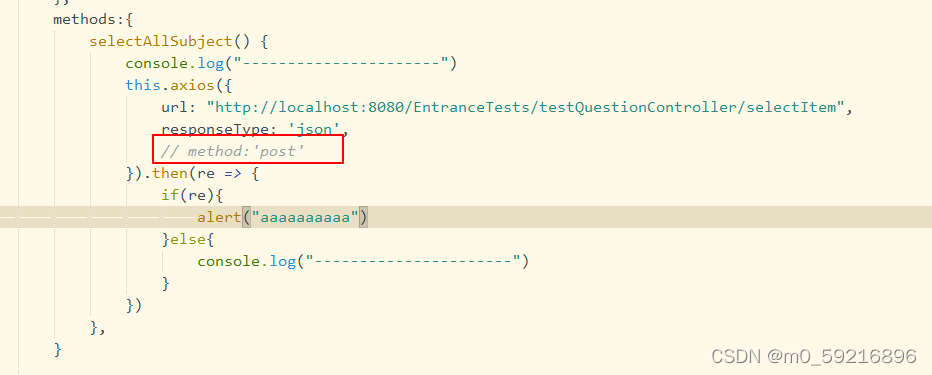
Add:
method:’post’
Solution:
Add:
method:’post’
1. Execute
npm install
The following errors are reported
gyp ERR! configure error
gyp ERR! stack Error: Can't find Python executable "python", you can set the PYTHON env variable.
gyp ERR! stack     at PythonFinder.failNoPython (/home/h5/my-vue/node_modules/node-gyp/lib/configure.js:484:19)
gyp ERR! stack     at PythonFinder.<anonymous> (/home/h5/my-vue/node_modules/node-gyp/lib/configure.js:406:16)
gyp ERR! stack     at F (/home/h5/my-vue/node_modules/which/which.js:68:16)
gyp ERR! stack     at E (/home/h5/my-vue/node_modules/which/which.js:80:29)
gyp ERR! stack     at /home/h5/my-vue/node_modules/which/which.js:89:16
gyp ERR! stack     at /home/h5/my-vue/node_modules/isexe/index.js:42:5
gyp ERR! stack     at /home/h5/my-vue/node_modules/isexe/mode.js:8:5
gyp ERR! stack     at FSReqCallback.oncomplete (fs.js:192:21)
gyp ERR! System Linux 4.18.0-305.19.1.el8_4.x86_64
gyp ERR! command "/home/soft/nodejs/bin/node" "/home/h5/my-vue/node_modules/node-gyp/bin/node-gyp.js" "rebuild" "--verbose" "--libsass_ext=" "--libsass_cflags=" "--libsass_ldflags=" "--libsass_library="
gyp ERR! cwd /home/up/down/122/whxmapp-vue/node_modules/node-sass
gyp ERR! node -v v14.17.5
gyp ERR! node-gyp -v v3.8.0
gyp ERR! not ok
2. Solution:
Update and upgrade NPM
sudo npm install npm@latest -gError: EBUSY: resource busy or locked, lstat ‘D:\DumpStack.log
If there is a SaaS like field in your vscade error report, one reason is that the version number does not match.
cnpm i -D [email protected] --save
cnpm i -D [email protected] --save
I won’t let go of the screenshot that reported an error. At that time, the error mentality collapsed. I may have forgotten the screenshot. I don’t want to make a similar error in the whole. I’m tired. (later found)
In a word, it is much faster to correct the version number first and then change it. The errors caused by other problems will be much faster.
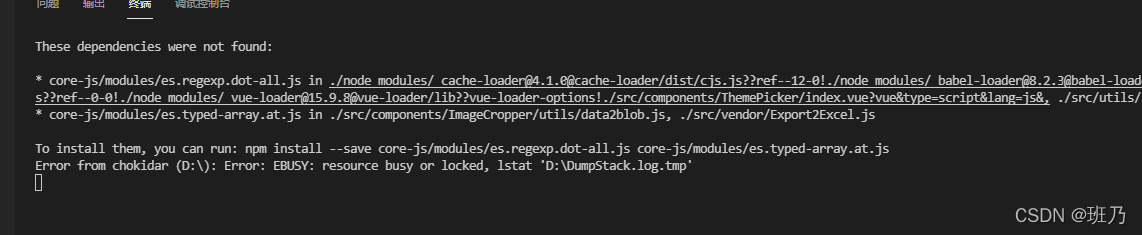
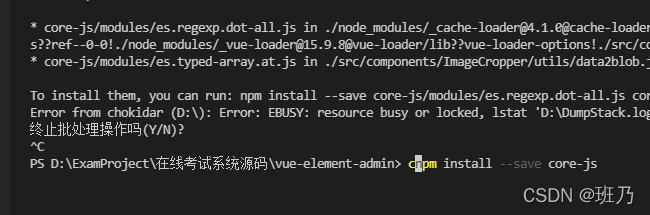
I found the wrong screenshot of the * *

After the two commands are run, the following error reports are much kinder. It’s just that there is no dependency. The problem is not big. Just install it.
Done!
Error in installing Vue devtool
An error occurs when NPM run build is packaged:
lerna ERR! yarn run build exited 1 in '@vue/devtools-api'
lerna ERR! yarn run build stdout:
yarn run v1.22.17
$ rimraf lib && yarn build:esm && yarn build:cjs
$ tsc --module es2015 --outDir lib/esm -d
info Visit https://yarnpkg.com/en/docs/cli/run for documentation about this command.
info Visit https://yarnpkg.com/en/docs/cli/run for documentation about this command.
lerna ERR! yarn run build stderr:
'tsc' �����ڲ����ⲿ���Ҳ���ǿ����еij���
���������ļ���
error Command failed with exit code 1.
error Command failed with exit code 1.
lerna ERR! yarn run build exited 1 in '@vue/devtools-api'
npm ERR! code ELIFECYCLE
npm ERR! [email protected] build: `lerna run build`
npm ERR! Exit status 1
npm ERR!
npm ERR! Failed at the [email protected] build script.
npm ERR! This is probably not a problem with npm. There is likely additional logging output above.
npm ERR! A complete log of this run can be found in:
npm ERR! C:\Users\cy\AppData\Roaming\npm-cache\_logs\2021-12-17T01_31_16_860Z-debug.log
PS D:\Download\devtools-main\devtools-main> yarn build
yarn run v1.22.17
$ lerna run build
lerna notice cli v4.0.0
lerna info Executing command in 9 packages: "yarn run build"
lerna ERR! yarn run build exited 1 in '@vue/devtools-api'
lerna ERR! yarn run build stdout:
$ rimraf lib && yarn build:esm && yarn build:cjs
$ tsc --module es2015 --outDir lib/esm -d
info Visit https://yarnpkg.com/en/docs/cli/run for documentation about this command.
info Visit https://yarnpkg.com/en/docs/cli/run for documentation about this command.
lerna ERR! yarn run build stderr:
'tsc' �����ڲ����ⲿ���Ҳ���ǿ����еij���
���������ļ���
error Command failed with exit code 1.
error Command failed with exit code 1.
lerna ERR! yarn run build exited 1 in '@vue/devtools-api'
error Command failed with exit code 1.
info Visit https://yarnpkg.com/en/docs/cli/run for documentation about this command.
Solution:
Windows cannot use RM
The
RM -RFcommand underlinuxis used, and your computer iswindows
solution: replace theRM -RFcommand with therimrafcommandThe rimraf` package is a `nodejs` package that recursively deletes files, the same as `rm -rf under `Linux`.
Install rimraf, NPM install rimraf — save dev
Search RM – RF to find the package in two locations json :
Replace RM -rf with rimraf
Finally, yarn install, yarn build
It worked~
webpack 5.64.2 compiled successfully in 104506 ms
lerna success run Ran npm script 'build' in 9 packages in 146.2s:
lerna success - @vue/devtools-api
lerna success - @vue-devtools/app-backend-api
lerna success - @vue-devtools/app-backend-core
lerna success - @vue-devtools/app-backend-vue1
lerna success - @vue-devtools/app-backend-vue2
lerna success - @vue-devtools/app-backend-vue3
lerna success - @vue-devtools/shared-utils
lerna success - @vue-devtools/shell-chrome
lerna success - @vue/devtools
Done in 153.65s.
use:
      /**
       * rebuild sheet
       */
      resetForm(formName){
          this.$refs[formName].resetFields();
      },
report errors:
TypeError: Cannot read properties of undefined (reading 'resetFields')
    at VueComponent.resetForm (index.vue?6ced:501)
    at VueComponent.addColumn (index.vue?6ced:487)
    at click (index.vue?5d22:653)
    at invokeWithErrorHandling (vue.runtime.esm.js?2b0e:1854)
    at VueComponent.invoker (vue.runtime.esm.js?2b0e:2179)
    at invokeWithErrorHandling (vue.runtime.esm.js?2b0e:1854)
    at VueComponent.Vue.$emit (vue.runtime.esm.js?2b0e:3888)
    at VueComponent.handleClick (element-ui.common.js?5c96:9441)
    at invokeWithErrorHandling (vue.runtime.esm.js?2b0e:1854)
    at HTMLButtonElement.invoker (vue.runtime.esm.js?2b0e:2179)
Solution:
      /**
       * rebuild sheet
       */
      resetForm(formName) {
        //The purpose of adding if judgment condition is to solve the problem that the console prompt object does not exist
        if (this.$refs[formName] !== undefined) {
          this.$refs[formName].resetFields();
        }
},Solution 1:
Add the following code to the .eslintrc.js file.
rules: {
"no-console": "off",
"no-unused-vars": "off", // important var variables are introduced
"no-debugger": process.env.NODE_ENV === "production" ?"error" : "off",
},
Recently, I wrote a small demo of remote while learning electron. There is such a code:
const BrowserWindow = require("electron").remote.BrowserWindow;An error will be reported, as shown in the following figure:
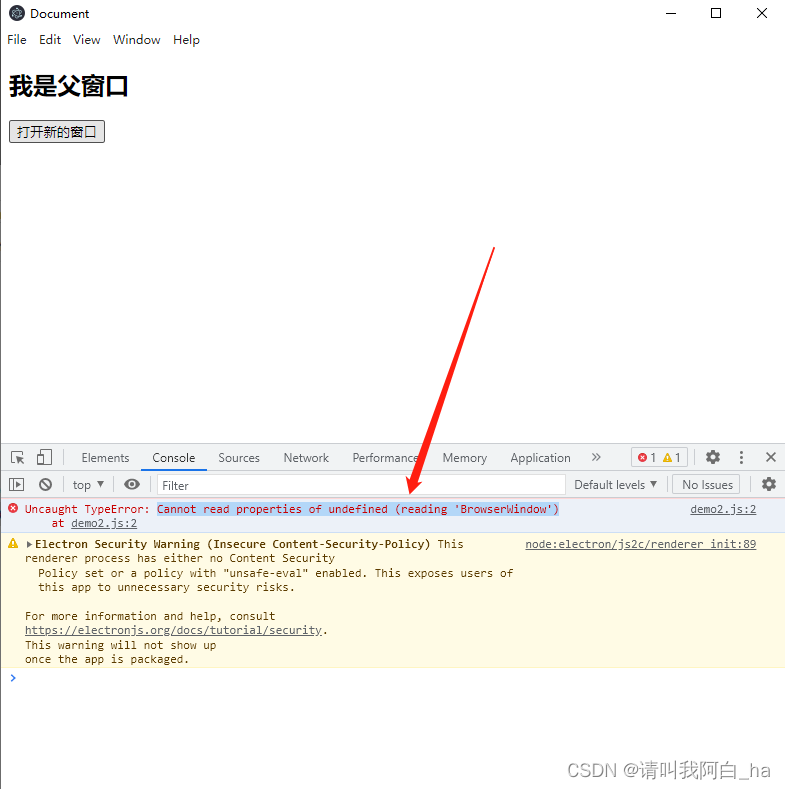
Then I went to the Internet and looked at some articles. It seems to be a problem with the version. My electron is @V16.0.4, and remote abandoned the remote module in electron12, so we need to install the remote package ourselves.
1. First install the @electron/remote package under the project root directory:
npm install @electron/remote --save2. Initialize in the main process:
require("@electron/remote/main").initialize();
require("@electron/remote/main").enable(mainWindow.webContents);
3. And set enableremotemodule and contextisolation in the main process webpreferences:
 webPreferences: {
    nodeIntegration: true,
    contextIsolation: false,
    enableRemoteModule: true, // use remote module
 },
4. Set in the rendering process
const BrowserWindow = require("@electron/remote").BrowserWindow;Well, this is my overall Code:
Main process
var electron = require("electron");
var app = electron.app; // Reference app
var BrowserWindow = electron.
var mainWindow = null; // Specify the main window to open

// When electron has finished initializing and is ready to create a browser window
// This method is called
app.on("ready", () => {
  mainWindow = new BrowserWindow({
    width: 800,
    height: 800,
    webPreferences: {
      nodeIntegration: true,
      contextIsolation: false,
      enableRemoteModule: true, // use remote module
    },
  });

  require("@electron/remote/main").initialize(); // initialize
  require("@electron/remote/main").enable(mainWindow.webContents);
  mainWindow.loadFile("demo2.html"); // load the index.html page
  mainWindow.openDevTools(); // open developer tools

  mainWindow.on("closed", () => {
    mainWindow = null;
  });
});
Subprocess
const btn = this.document.querySelector("#btn");
const BrowserWindow = require("@electron/remote").BrowserWindow;

window.onload = () => {
  btn.onclick = () => {
    newWin = new BrowserWindow({
      width: 500,
      height: 500,
    });

    newWin.loadFile("load.html");
    newWin.on("closed", () => {
      newWin = null;
    });
  };
};
Result display
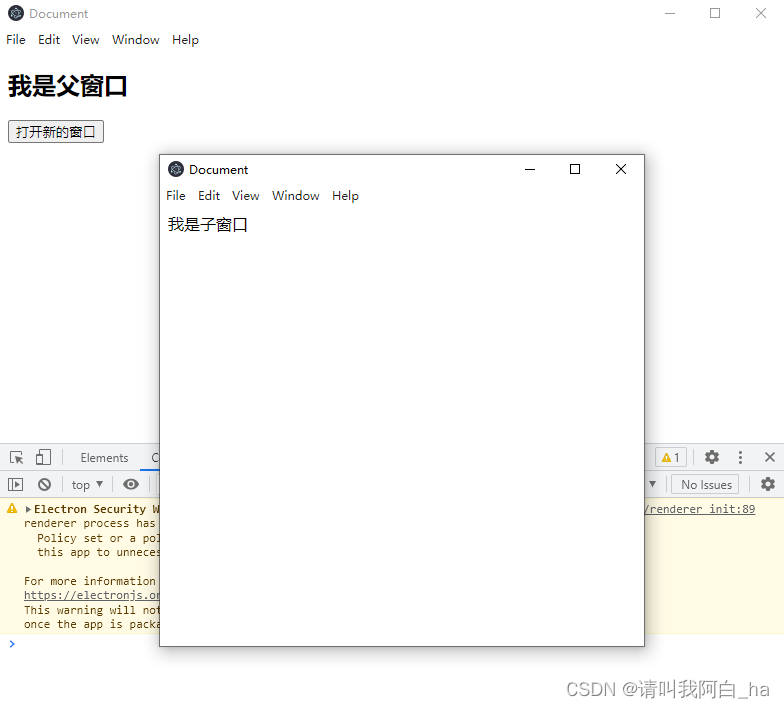
In the project root directory
npm i eslint prettier-eslint eslint-config-prettier --save-dev
This error will appear after installation:
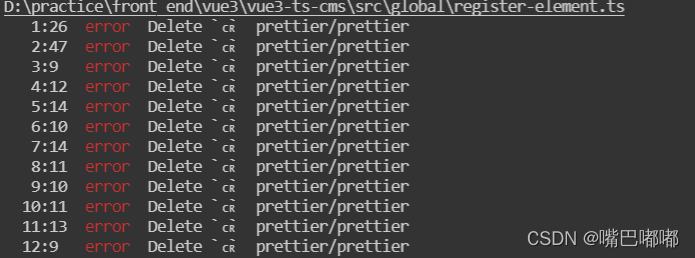
the culprit is a git configuration attribute: core.autocrlf
Due to historical reasons, the line breaks of text files under windows and Linux are inconsistent.
Windows uses both carriage return character Cr (carriage-return character) and line break LF (linefeed character) when wrapping a line
Mac and Linux systems only use the line break: LF
The old MAC system used the carriage return character CR
If it is a Windows system, the file code is UTF-8 and contains Chinese, it is best to set autocrlf to false globally
git config --global core.autocrlf false
When using echart, it is clear that all parameters are passed in, but this. Is used in echart When init() initializes, it reports an error typeerror: axis Getaxesonzeroof is not a function. Through exclusion one by one, it is found that this error will occur when the data in the xaxis attribute is [].
Of course, my problem is not your problem, please analyze the specific problem!!!
My xaxis:
xAxis: {
    type: 'category',
    axisTick: {
      alignWithLabel: true
    },
    data: data
  }
Finally, my solution is:
if (this.data.length) {
  this.dom.setOption(option);
} else {
  this.dom.setOption({});   // Auto replace the first option
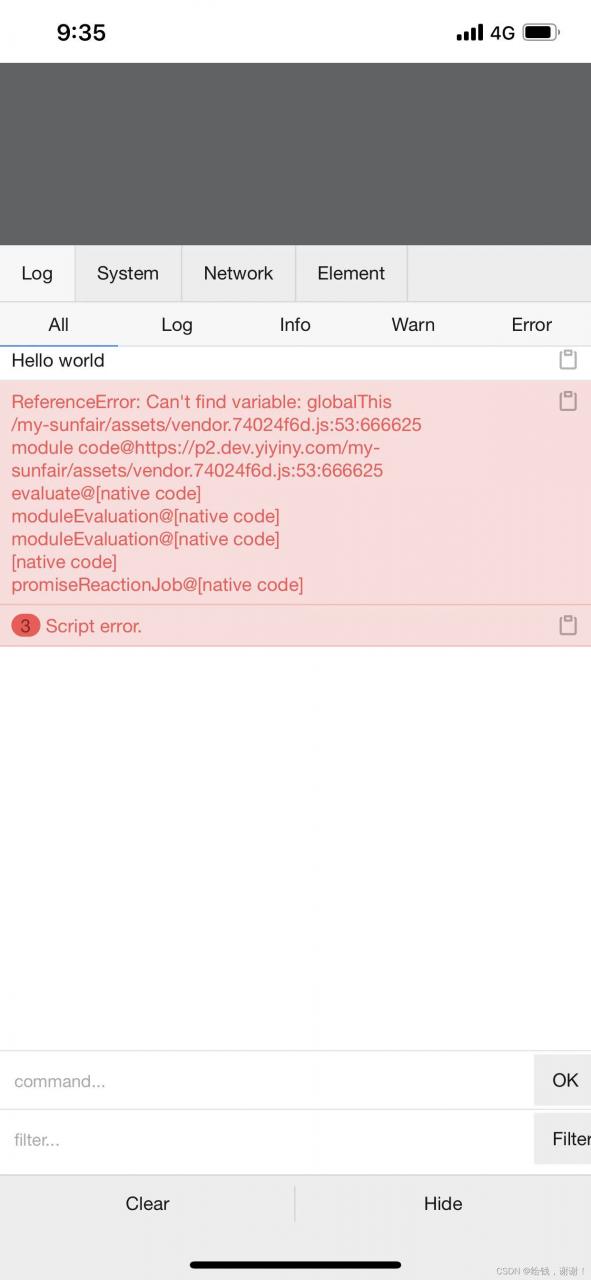
}After the project is packaged, use a browser with a lower version to open it and report an error
Solution
Vue config.js
import { defineConfig } from 'vite';
import vue from '@vitejs/plugin-vue';
import legacy from '@vitejs/plugin-legacy';

// https://vitejs.dev/config/
export default defineConfig({
  base: './',
  plugins: [
    vue(),
    legacy({
      targets: ['> 1%, last 1 version, ie >= 11'],
      additionalLegacyPolyfills: ['regenerator-runtime/runtime'],
    }),
  ],
});
Solution: Add the following codes under shims-vue.d.ts folder:
declare module 'lodash'
All codes
/* eslint-disable */
declare module '*.vue' {
  import type { DefineComponent } from 'vue'
  const component: DefineComponent<{}, {}, any>
  export default component
}

declare module 'lodash'
The console error message is as follows
F:\aaaaa\dice-front\store\tag.js
  1:30  error  Delete `␍`  prettier/prettier
  2:11  error  Delete `␍`  prettier/prettier
  3:3   error  Delete `␍`  prettier/prettier
  4:1   error  Delete `␍`  prettier/prettier
  5:27  error  Delete `␍`  prettier/prettier
Solution 1: automatically identify the end
Add this to the first set in the project .pretierrc file.
"endOfLine": "auto"
Solution 2:
In the project In the .editorconfig file, Change end_of_line to CRLF. (used globally if possible)
Reason: git ends with CRLF and LF on different computers
The newline characters of text files under windows and Linux are inconsistent.
During line feed
windows uses both carriage return character Cr (carriage return character) and line feed character LF (linefeed character)
Mac and Linux systems only use the line feed LF
the old MAC system used the carriage return CR.