Category Archives: JavaScript

Node.js Error: Error: Cannot find module ‘express‘ [How to Solve]

Error:

D:\work\nodejs\1helloword>node helloword3.js
node:internal/modules/cjs/loader:936
throw err;
^

Error: Cannot find module ‘express’
Require stack:
– D:\work\nodejs\1helloword\helloword3.js
[90m    at Function.Module._resolveFilename (node:internal/modules/cjs/loader:933:15)[39m
[90m    at Function.Module._load (node:internal/modules/cjs/loader:778:27)[39m
[90m    at Module.require (node:internal/modules/cjs/loader:1005:19)[39m
[90m    at require (node:internal/modules/cjs/helpers:102:18)[39m
at Object.<anonymous> (D:\work\nodejs\1helloword\helloword3.js:2:15)
[90m    at Module._compile (node:internal/modules/cjs/loader:1101:14)[39m
[90m    at Object.Module._extensions..js (node:internal/modules/cjs/loader:1153:10)[39m
[90m    at Module.load (node:internal/modules/cjs/loader:981:32)[39m
[90m    at Function.Module._load (node:internal/modules/cjs/loader:822:12)[39m
[90m    at Function.executeUserEntryPoint [as runMain] (node:internal/modules/run_main:81:12)[39m {
code: [32m’MODULE_NOT_FOUND'[39m,
requireStack: [ [32m’D:\\work\\nodejs\\1helloword\\helloword3.js'[39m ]
}

Solution:

D:\work\nodejs\1helloword>npm install express

added 50 packages in 2s

[Vue warn]: Error in mounted hook: “Error: please transfer a valid prop path to form item“

Problem generation

I encountered some problems when writing the project. Although it has little impact on the project, a red report looks uncomfortable, so I’ll see how to solve it and report the following errors

[Vue warn]: Error in mounted hook: “Error: please transfer a valid prop path to form item!”

English:
[Vue warning]: mounting hook error: “error: please pass a valid prop path to form an item!”

Causes of problems

In the Chinese translation, we can clearly know that there is an error in the mounting hook, that is, the value of prop is wrong

Solution:

Modify :prop = "'domains.'+ index +'.value '" to :prop = "domain.fieldname"

<a-form-model-item
  v-for="(domain, index) in model.configDetails"
  :key="index"
  :label="index === 0 ?'Add field' : ''"
  :prop="'domains.' + index + '.value'"
  :rules="{
    required: true,
    message: 'Can not be empty!',
    trigger: 'blur',
  }"
>
  <a-input v-model="domain.fieldName" placeholder="Enter field name" style="width: 40%; margin-right: 8px" />
  ~
  <a-input v-model="domain.fieldValue" placeholder="Enter field value" style="width: 40%; margin-right: 8px" />
  <a-button v-if="model.configDetails.length >= 1" @click="removeDomain(domain)">删除</a-button>
</a-form-model-item>

After modification

<a-form-model-item
  v-for="(domain, index) in model.configDetails"
  :key="index"
  :label="index === 0 ?'Add field' : ''"
  :prop="domain.fieldName"
  :rules="{
    required: true,
    message: 'Can not be empty!',
    trigger: 'blur',
  }"
>
  <a-input v-model="domain.fieldName" placeholder="Enter field name" style="width: 40%; margin-right: 8px" />
  ~
  <a-input v-model="domain.fieldValue" placeholder="Enter field value" style="width: 40%; margin-right: 8px" />
  <a-button v-if="model.configDetails.length >= 1" @click="removeDomain(domain)">删除</a-button>
</a-form-model-item>

Expand

When the form is verified, prop specifies that the attribute to be verified must be the attribute name of the corresponding object in the form model attribute

[Solved] Vue Project Error: Error: Cannot find module ‘webpack‘ Require stack以及Error: Rule can only have one resource so

Error 1: NPM run serve reports an error when Vue project is started: error: cannot find module ‘webpack’ require stack

After the project is pulled down and the dependencies are installed normally, start the project and report error: cannot find module ‘webpack’ require stack. It is found that the webpack module is missing,

Error: Cannot find module 'webpack'
Require stack:
  at Function.Module._load (internal/modules/cjs/loader.js:725:27)
    at Module.require (internal/modules/cjs/loader.js:952:19)
    at require (internal/modules/cjs/helpers.js:88:18)

However, I have already installed webpack. Here, I need to re open CMD to install webpack globally

reason:

even if you installed webpack before, it must be a non global installation

Solution:

npm install  -g webpack

After the installation is complete, I start the project and find that it reports an error again!
Reported error: Error: Rule can only have one resource source (provided resource and test + include + exclude) in


Error 2: Project Error: Error: Rule can only have one resource source (provided resource and test + include + exclude) in

Error: Rule can only have one resource source (provided resource and test + include + exclude) in {
  "exclude": [
    null
  ]

reason:

package. Webpack version conflict in JSON

Solution::

delete the webpack and reinstall the previous version

npm uninstall webpack
npm install webpack@^4.0.0 --save-dev

[Solved] electron project Package Error: spawn exe\dll ENOENT

Error after electron packaging: spawn exe enoent error solution.

Today, an error occurred when the project was running after packaging: spawn exe enoent error. When looking for a solution, I thought it should be that the referenced exe program was packaged into the app It is caused by the ASAR file, so the EXE file is not packaged into the app ASAR files should solve the problem.

I packed it with electron builder in Vue config.JS file, in Vue config.JS add the following code

pluginOptions: {
		electronBuilder: {
			builderOptions: {
				asar: true,
				asarUnpack: ['exeFiles'],//The folder where the referenced dll/exe files are stored
				extraFiles: {
					from: 'exeFiles',// the folder where the referenced dll/exe files are stored, my project is in the same directory as vue.config.js
					to: '. /exeFiles'//the location of the folder after packaging, I packaged this way before and after the reference relationship does not change, spawn code will not have to change
				},		
		}
	}

If you use the older version of Vue cli, it should be in package JSON, the principle is similar.

[Solved] Error: Cannot find module ‘@/views/xxx‘ at webpackEmptyContext

When you clone a Vue project from the open source platform, it is reported that the corresponding module cannot be found after logging in.

After searching a lot, it was finally solved.

export const loadView = (view) => {
  return () => import(`@/views/${view}`)
}

Change to the following

export const loadView = (view) => {
  return (resolve) => require([`@/views/${view}`], resolve)
}

It can be solved.

Cause: there is a problem with the webpack version. Dynamic import in webpack 4 does not support variable mode

The project can be seen in the elephant template.

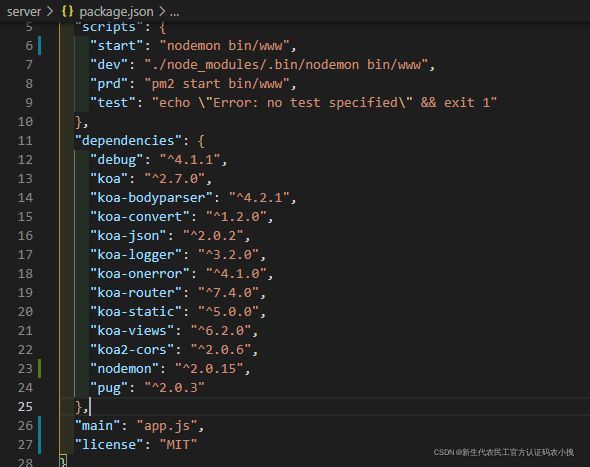
[Solved] bug: error Command failed with exit code 1.

After nodemon is installed, the data is updated,

Instead, an error was reported.

I tried to search for a solution, but I couldn’t solve it,

Tell me about my own operation,

Finally, it is handled:

Main here I have a look. It turned into index.js

Now it’s changed to app.js, that is, the background entry file.

Then it’s all right.

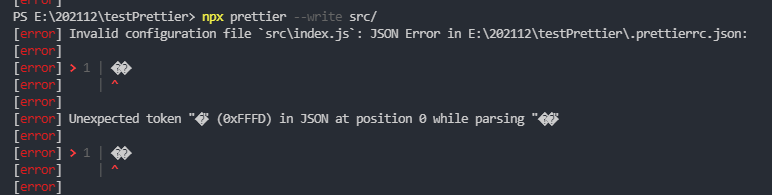
[Solved] Prittier format code error: JSON Error in…

Error screenshot

[error] Invalid configuration file `src\index.js`: JSON Error in E:\202112\testPrettier\.prettierrc.json: 
[error]
[error] > 1 | ��
[error]     | ^
[error]
[error] Unexpected token "�" (0xFFFD) in JSON at position 0 while parsing "��"
[error]
[error] > 1 | ��
[error]     | ^
[error]

Installation process

Install prettier

yarn add --dev --exact prettier

Create .Prettier.json

echo {}> .prettierrc.json

Create .prettierignore

echo {}> .prettierignore
# write content
src/assets
**/*.md
**/*.svg
**/*.html
**/*.ejs
**/*.png
**/*.eot
**/*.woff
**/*.ttf
**/*.gif
**/*.jpg
**/*.jpeg
package.json

Execute yarn prettier --write ., an error will be report:

Check the index.js in prettier as following:

searchPlaces: ["package.json", ".prettierrc", ".prettierrc.json", ".prettierrc.yaml", ".prettierrc.yml", ".prettierrc.json5", ".prettierrc.js", ".prettierrc.cjs", "prettier.config.js", "prettier.config.cjs", ".prettierrc.toml"],
loaders: {
      ".toml": loadToml,
      ".json5": loadJson5
    }

More than one name was found prettierrc.JSON format file

Solution:

Replace  prettier.json file with pretierrc.config.js  file and write its internal contents in the following way:

module.exports = {
    trailingComma: "es5",
    tabWidth: 4,
    semi: false,
    singleQuote: true,
};

You can format the file. I don’t understand why.

Combined with husky, the project automatically formats the code before submitting GIT

Premise: the project must be git controlled, otherwise the following will report an error and install lint staged

npx mrm@2 lint-staged

This is a relatively simple and fast way

How to Solve electron import page Error

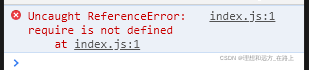
Uncaught ReferenceError: require is not defined
at index. js:1

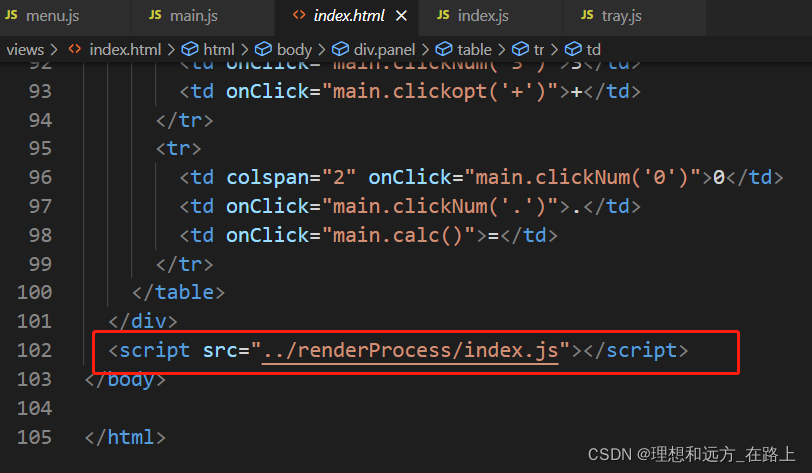
index. Index. HTML file js

The following is index.js file

index.JS error

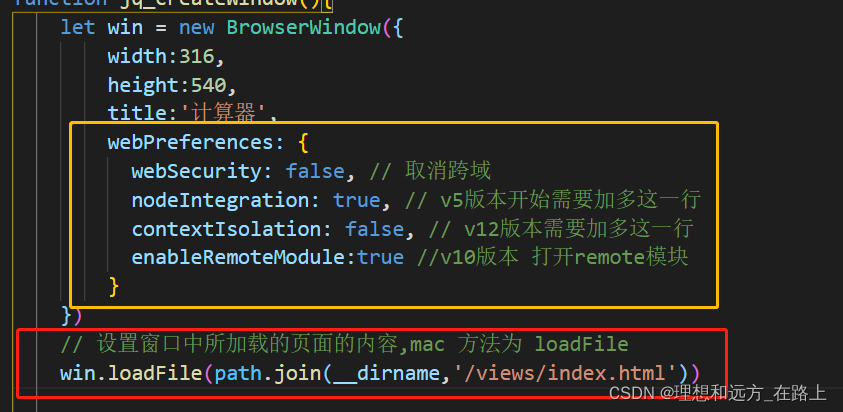
You need to add the following code in the created window: see the first figure for details

 webPreferences: {
    webSecurity: false, // Cancel cross-domain
    nodeIntegration: true, // v5 version requires this line
    contextIsolation: false, // v12 version needs to add this line
    enableRemoteModule:true // v10 version Turn on remote module
}

How to Solve Webpack packag iconfont font error

ERROR in ./src/fontsize/iconfont.css 1:0
Module parse failed: Unexpected character '@' (1:0)
You may need an appropriate loader to handle this file type, currently no loaders are configured to process this file. See https://webpack.js.org/concepts#loaders
> @font-face {
|   font-family: "iconfont"; /* Project id 2969850 */
|   src: url('iconfont.woff2?t=1638862344321') format('woff2'),
 @ ./src/index.js 2:0-32


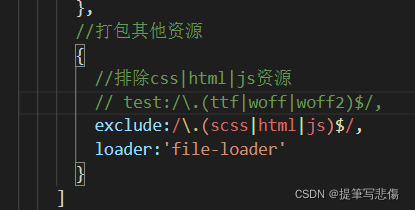
Solution: The webpack.config.js file is wrong, the configuration file should be