Vue reports an error using ‘NPM run dev’
Solution:
execute NPM install webpack-dev-server -D
If the change command fails, install webpack globally first
execute NPM install webpack-cli -g
Vue reports an error using ‘NPM run dev’
Solution:
execute NPM install webpack-dev-server -D
If the change command fails, install webpack globally first
execute NPM install webpack-cli -g
Error when using meme theme:
Error: Error building site: TOCSS: failed to transform "en/styles/main-rendered.scss" (text/x-scss): SCSS processing failed: file "stdin", line 223, col 17: Invalid CSS after "$fofPoster: url(": expected expression (e.g. 1px, bold), was "<no value>);"
Solution:
① install the extended version Hugo. That is, execute with extended
② in the name
rm config.toml && cp themes/meme/config-examples/en/config.toml config.toml ```
Label pictures are not displayed
Address error
When going to reference local images in the .js file, the path should be introduced in the form of require(), modified as follows
billboard: {
        image: require("../img/boshi.png"),
        pixelOffset: new Cesium.Cartesian2(-120, 0),
        // eyeOffset: new Cesium.Cartesian3(0.0, 0.0, 0.0),
        horizontalOrigin: Cesium.HorizontalOrigin.LEFT,
        verticalOrigin: Cesium.VerticalOrigin.CENTER,
        // scale: 0.25,
        distanceDisplayCondition: new Cesium.DistanceDisplayCondition(100, 20000)
 }
The Vue project reports an error after running NPM run dev/NPM run serve:
Error: Rule can only have one resource source (provided resource and test + include + exclude) in {
  "type": "javascript/auto",
  "include": [
    {}
  ],
  "use": []
}
    at checkResourceSource (D:\Program Files\vue_shop\node_modules\@vue\cli-service\node_modules\webpack\lib\RuleSet.js:167:11)
    at Function.normalizeRule (D:\Program Files\vue_shop\node_modules\@vue\cli-service\node_modules\webpack\lib\RuleSet.js:198:4)
    at D:\Program Files\vue_shop\node_modules\@vue\cli-service\node_modules\webpack\lib\RuleSet.js:110:20
    at Array.map (<anonymous>)
    at Function.normalizeRules (D:\Program Files\vue_shop\node_modules\@vue\cli-
    ```
    Process finished with exit code 1
Cause of problem:
Webpack version conflict.
Webpack version conflict issue.
Some new versions of libraries require webpack@5, and when updating dependencies, webpack@5 is installed as the primary dependency based on the rules of dependency selection. However, @vue/cli relies on webpack@4, and its own webpack configuration is not compatible with webpack@5, so it reports an error and cannot continue to compile. If you’re also using @vue/cli, then don’t upgrade webpack@5 rashly.
Following its solution, I found a conflict between webpack and the previously installed version of less,less-loader
The overall solution is as follows:
//uninstall webpack
npm uninstall webpack
//Install the specified version of webpack
npm install [email protected] --save-dev

npm uninstall less-loader
npm uninstall less

//Install compliant versions of less and less-loader
npm install [email protected] [email protected] --save-dev
MSBUILD : error MSB3428: Could not load the Visual C++ component “VCBuild.exe”.
This problem occurs in the install front-end project
MSBUILD : error MSB3428: Could not load the Visual C++ component “VCBuild.exe”…
Solution:
1. The administrator opens CMD and sets the agent (optional, if you have one)
set HTTP_PROXY=http://127.0.0.1:1080
set HTTPS_PROXY=http://127.0.0.1:1080
2. Install windows build tool
npm install -g --production windows-build-tools
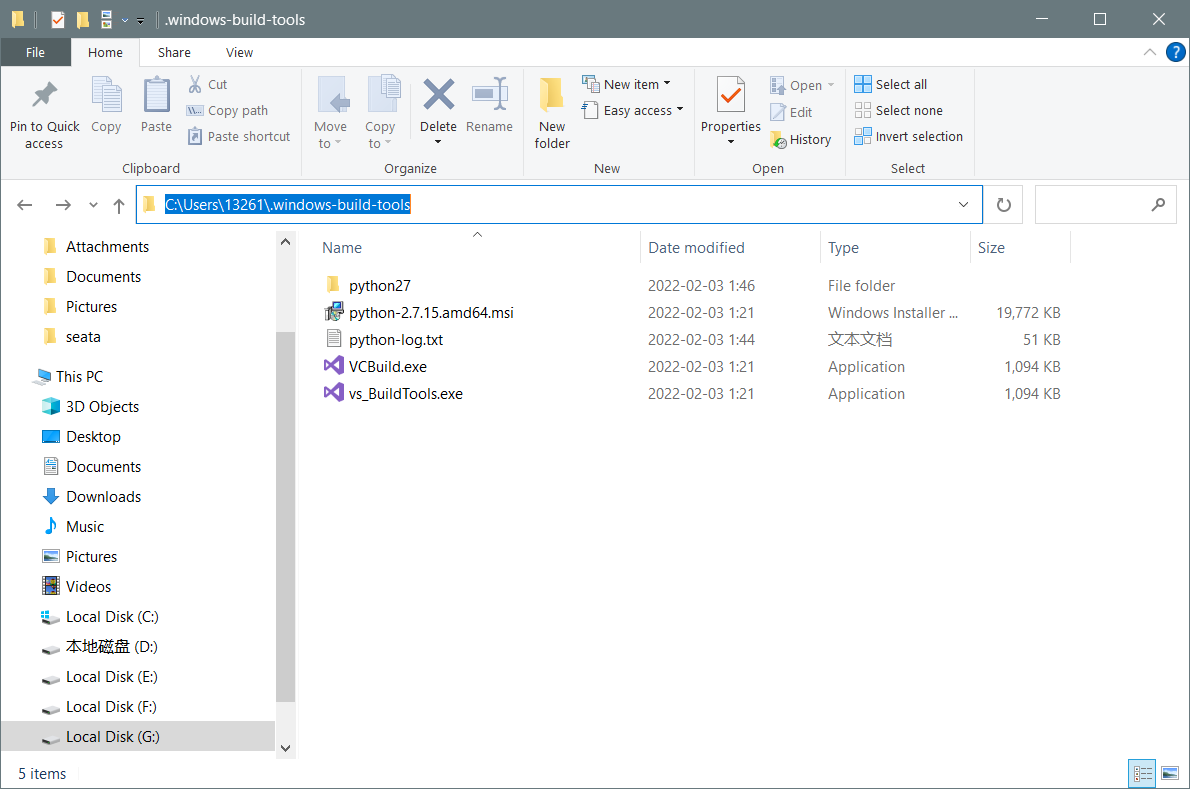
3. If the card is completely stuck, wait for one minute, and then enter C:\Users\Username\.windows-build-tools
If there is a file in the figure below, the download is successful, and if there is no file, the download fails
If the download fails, download it manually and extract it to C:\Users\Username\
The final status is shown in the figure:
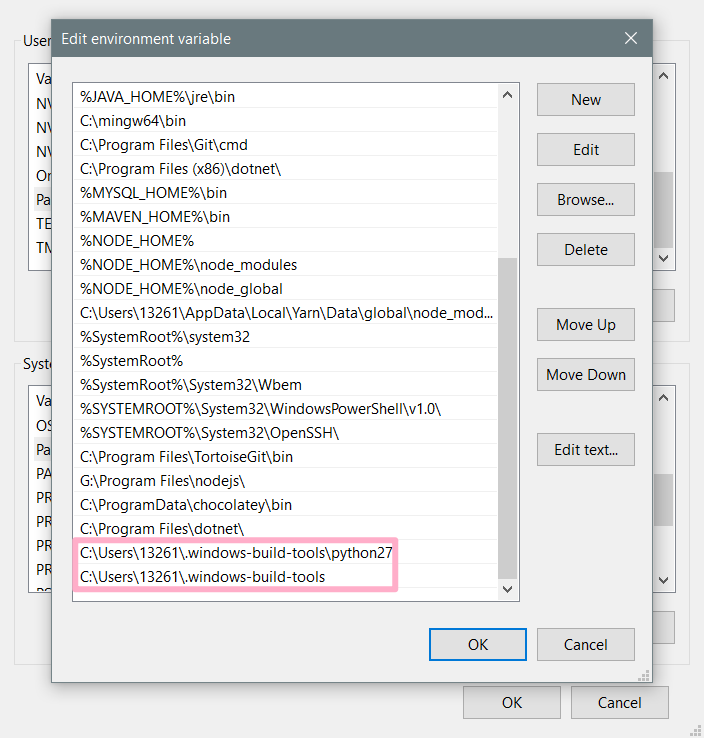
5 Configure system environment variables (Setting -> advanced system settings -> environment variables)
Append to path item
C:\Users\13261.windows-build-tools
C:\Users\13261.windows-build-tools\python27
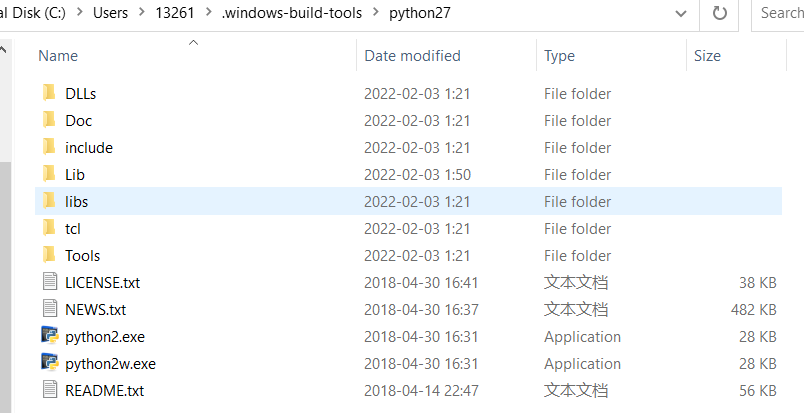
6. change the file name
Because the problem I encountered was MSBUILD : error MSB3428: Could not load the Visual C++ component “VCBuild.exe”…
The project will use the executable file VCBuild.exe to build
So I made a copy of vs_BuildTools.exe and modified it to VCBuild.exe, so that cmd can use “VCBuild”!
Because I have already installed python3 or higher, the command is also “python”
so python2.7 I will also modify the executable to python.exe -> python2.exe, pythonw.exe -> python2w.exe
TIP: If your front-end project will be built with commands like “python2” or “python3” instead of “python” to execute python code, then you also need to rename the executable
Translated with www.DeepL.com/Translator (free version)
vue3 in element component emit pass event error
Report error:
Vue warn]: Extraneous non-emits event listeners (cancel, confirm, modelClose) were passed to component but could not be automatically inherited because component renders fragment or text root nodes. If the listener is intended to be a component custom event listener only, declare it using the “emits” option.
Sub-component throwing events
 emits: ['cancel', 'confirm', 'modelClose'],
  setup (props, context) {
    const { showDialog } = toRefs(props)
    const show = computed(() => {
      return showDialog.value
    })
    const cancel = () => {
      context.emit('cancel')
    }
    const confirm = () => {
      context.emit('confirm')
    }
    const modelClose = () => {
      context.emit('modelClose')
    }
    return {
      show, cancel, confirm, modelClose
    }
Parent component receives events
`<user-info :showDialog="showDialog" @cancel="showDialog=false" @confirm="showDialog=false" @modelClose="showDialog=false"></user-info>

The sass and surrounding ecological versions need to correspond:
yarn add -D @storybook/preset-scss [email protected] sass [email protected] [email protected]
Add the following code In router folder Index.JS :
import VueRouter from 'vue-router';

const originalPush = VueRouter.prototype.push
VueRouter.prototype.push = function push(location) {
    return originalPush.call(this, location).catch(err => err)
}
No error is reported after restart
#Vue project development error
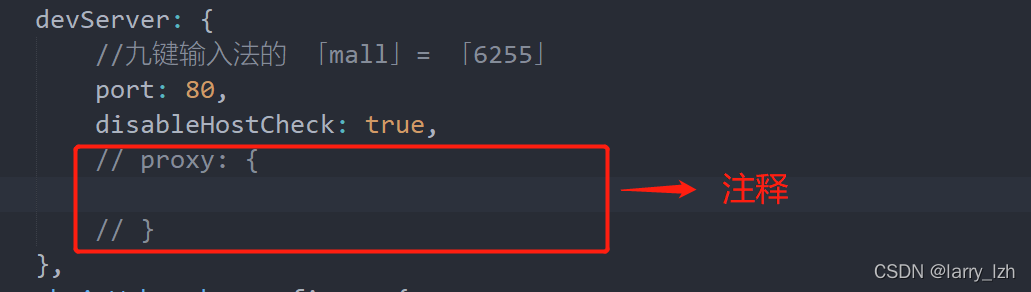
premise: during the development of Vue project, error: validationerror: webpack dev server invalid options appear when the project is started

problem analysis:
according to the problem description, the value of the “agent” object used to solve cross domain problems in the configuration file is empty
Solution:
find webpack.config.JS or Vue.config.JS
then find devserver and comment out the proxy or fill in the complete configuration
Electronic version 16+
There is a problem when using the remote module. The code is as follows:
const BrowserWindow = require(‘electron’). remote. BrowserWindow;
report errors:
Uncaught TypeError: Cannot read property ‘BrowserWindow’ of undefined
Solution:
1. Install remote:
npm install –save @electron/remote
2. demo2.js:
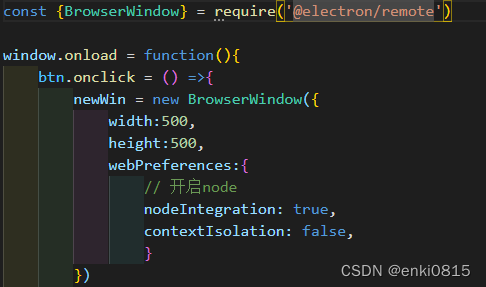
3. main.js:
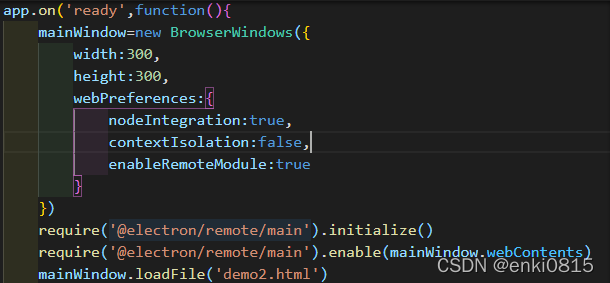
It’s ready to run. The version of electron is updated too fast, and the rules are changed too fast.
Solution: when using Vue 3 script setup, eslint reports the error ‘defineprops’ is not defined
Vue 3’s script setup syntax introduces compiler macros of defineprops, definemits, defineexpose, withdefaults. However, in some cases, eslint will report an error. The above compiler macro functions are not defined.
This article will introduce two solutions to solve this problem (assuming that your project is initialized with Vue CLI).
Step 1. Check the version of eslint-plugin-Vue
npm list eslint-plugin-vue
If the version is in V8 Above 0.0, jump to step 2, otherwise go directly to the content of step 3.
Step 2. Version is V8.0.0+
Open eslintrc.JS file and modify it as follows:
  env: {
    node: true,
    // The Follow config only works with eslint-plugin-vue v8.0.0+
    "vue/setup-compiler-macros": true,
  },
Step 3. Version is V8 Below 0.0
Open eslintrc.JS file and modify it as follows:
  // The Follow configs works with eslint-plugin-vue v7.x.x
  globals: {
    defineProps: "readonly",
    defineEmits: "readonly",
    defineExpose: "readonly",
    withDefaults: "readonly",
  },
If your version of
eslint-plugin-vueis under V8, I don’t recommended you to upgrade the version,especially you had used a lot of ts dependency.
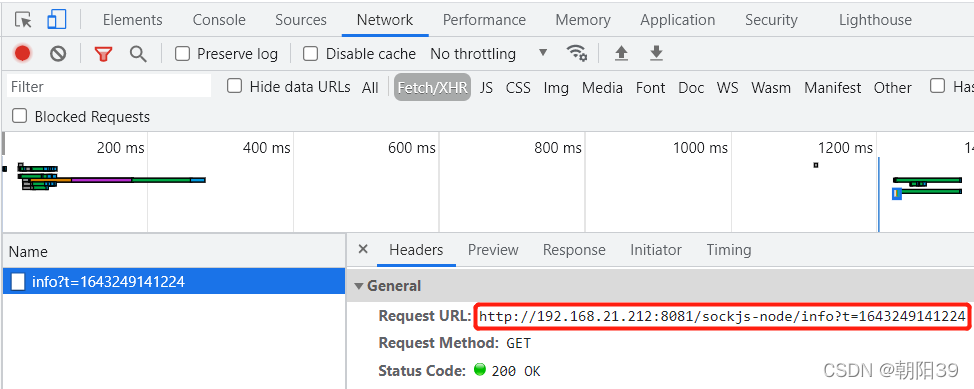
Error reporting description
After running NPM run serve, the interface has been called in the network: http:// * * */sockjs node/info?t=***
Error reporting reason
Sockjs node is a JavaScript library that provides cross browser JavaScript APIs and creates a low latency, full duplex communication channel between browsers and web servers.
There are related calls in the dependent source code
Solution
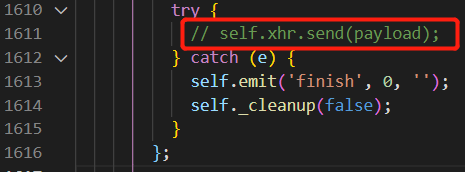
CTRL + P open file node_modules\sockjs-client\dist\sockjs.JS
Ctrl + G jump to line 1611
refer to the figure below, comment out the call of line 1611, and restart the project