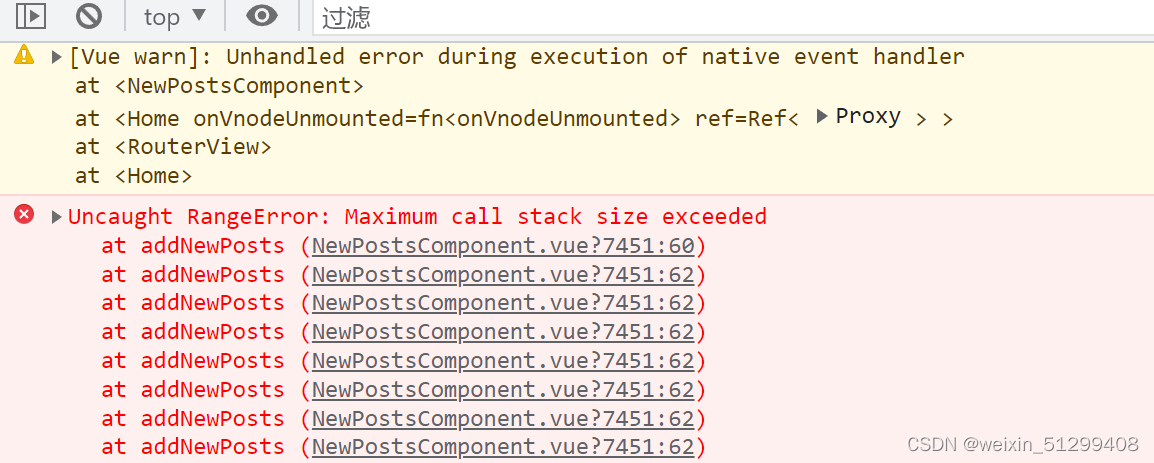
Occurrence reason: Duplicate variable name
Solution: Check the variables and remove the duplicates.
In short: The reason for the occurrence is that your variables have duplicate definitions, resulting in a dead loop
Occurrence reason: Duplicate variable name
Solution: Check the variables and remove the duplicates.
In short: The reason for the occurrence is that your variables have duplicate definitions, resulting in a dead loop

When the browser executes document.getElementById(‘chart’), because the dom object with the id of main has not been created, it reports an error Initialize failed: invalid dom.
The solution is to delay the execution of the code for initializing the charts in echarts, which is fast and does not affect the display of the effect and does not feel stuck.
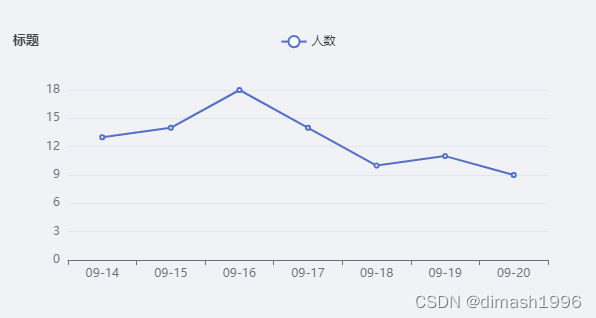
func.echarts() for the initialization of the chart function , code and effects are as follows (a vue3.0 project of a page used)
     echarts: () => {
        let myChart = echarts.init(document.getElementById("chart"));
        let option = {
          title: {
            text: '标题',
            textStyle: {
              fontSize: 13
            },
          },
          toolbox: {
            show: true,
            feature: {
              saveAsImage: {
                show: false
              }
            },
          },
          legend: {
            data: ['人数']
          },
          xAxis: {
            data: ['09-14', '09-15', '09-16', '09-17', '09-18', '09-19', '09-20']
          },
          yAxis: {},
          series: [{
            name: '人数',
            type: 'line',
            data: ['13', '14', '18', '14', '10', '11', '9'],
          }]
        };
        myChart.setOption(option);
      },
    })
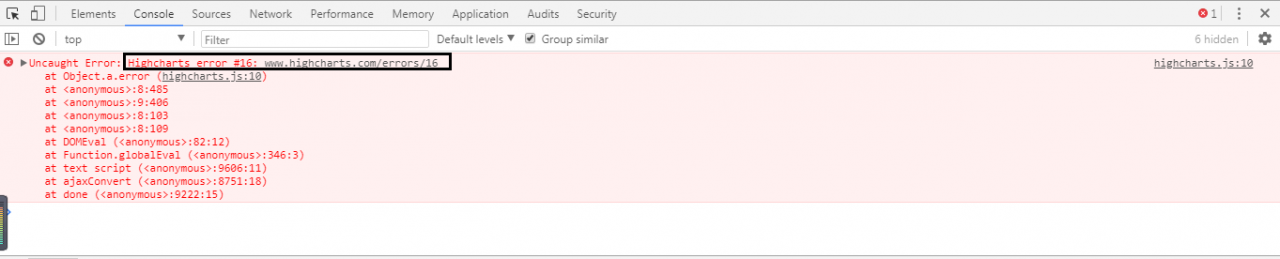
Highcharts error #16 is due to duplicate Highcharts definitions. The reason for this error is that the namespace of Highcharts is duplicated.
The namespace of Highcharts actually exists in the Highcharts.js file that we refer to when we use Highcharts.
Solution
Remove the Highcharts.js from the nested subpages and leave only the reference to the main page, and the error will not be reported.
Conclusion
Referencing Highcharts.js on the main page and referencing Highcharts.js on the sub-page nested in it will cause duplicate Highcharts definitions whenever the sub-page is loaded.
Error: Rule can only have one resource source
(provided resource and test + include + exclude)
Error: Rule can only have one resource source (provided resource and test + include + exclude)
Error: Rule can only have one resource source (provided resource and test + include + exclude) in
 "exclude": [
    null
  ],
  "use": [
    {
      "loader": "/Users/juanpablo/front-treatments/node_modules/cache-loader/dist/cjs.js",
      "options": {
        "cacheDirectory": "/Users/juanpablo/front-treatments/node_modules/.cache/babel-loader",
        "cacheIdentifier": "81fef5a6"
      },
      "ident": "clonedRuleSet-38[0].rules[0].use[0]"
    },
    {
      "loader": "/Users/juanpablo/front-treatments/node_modules/babel-loader/lib/index.js",
      "options": "undefined",
      "ident": "undefined"
    }
  ]
} ````
A complete log of this run can be found in:
0 info it worked if it ends with ok
1 verbose cli [
1 verbose cli   '/Users/juanpablo/.nvm/versions/node/v12.19.0/bin/node',
1 verbose cli   '/Users/juanpablo/.nvm/versions/node/v12.19.0/bin/npm',
1 verbose cli   'run',
1 verbose cli   'serve'
1 verbose cli ]
2 info using [email protected]
3 info using [email protected]
4 verbose run-script [ 'preserve', 'serve', 'postserve' ]
5 info lifecycle [email protected]~preserve: [email protected]
6 info lifecycle [email protected]~serve: [email protected]
7 verbose lifecycle [email protected]~serve: unsafe-perm in lifecycle true
8 verbose lifecycle [email protected]~serve: PATH: /Users/juanpablo/.nvm/versions/node/v12.19.0/lib/node_modules/npm/node_modules/npm-lifecycle/node-gyp-bin:/Users/juanpablo/front-treatments/node_modules/.bin:/Users/juanpablo/.nvm/versions/node/v12.19.0/bin:/usr/local/bin:/usr/bin:/bin:/usr/sbin:/sbin:/Users/juanpablo/.rvm/bin
9 verbose lifecycle [email protected]~serve: CWD: /Users/juanpablo/front-treatments
10 silly lifecycle [email protected]~serve: Args: [ '-c', 'vue-cli-service serve' ]
11 silly lifecycle [email protected]~serve: Returned: code: 1  signal: null
12 info lifecycle [email protected]~serve: Failed to exec serve script
13 verbose stack Error: [email protected] serve: `vue-cli-service serve`
13 verbose stack Exit status 1
13 verbose stack     at EventEmitter.<anonymous> (/Users/juanpablo/.nvm/versions/node/v12.19.0/lib/node_modules/npm/node_modules/npm-lifecycle/index.js:332:16)
13 verbose stack     at EventEmitter.emit (events.js:314:20)
13 verbose stack     at ChildProcess.<anonymous> (/Users/juanpablo/.nvm/versions/node/v12.19.0/lib/node_modules/npm/node_modules/npm-lifecycle/lib/spawn.js:55:14)
13 verbose stack     at ChildProcess.emit (events.js:314:20)
13 verbose stack     at maybeClose (internal/child_process.js:1021:16)
13 verbose stack     at Process.ChildProcess._handle.onexit (internal/child_process.js:286:5)
14 verbose pkgid [email protected]
15 verbose cwd /Users/juanpablo/front-treatments
16 verbose Darwin 19.6.0
17 verbose argv "/Users/juanpablo/.nvm/versions/node/v12.19.0/bin/node" "/Users/juanpablo/.nvm/versions/node/v12.19.0/bin/npm" "run" "serve"
18 verbose node v12.19.0
19 verbose npm  v6.14.8
20 error code ELIFECYCLE
21 error errno 1
22 error [email protected] serve: `vue-cli-service serve`
22 error Exit status 1
23 error Failed at the [email protected] serve script.
23 error This is probably not a problem with npm. There is likely additional logging output above.
24 verbose exit [ 1, true ]
Cause analysis:
Webpack version conflict issue in package.json.
Solution:
Delete the webpack and reinstall the previous version
npm uninstall webpack
npm install webpack@^4.0.0 –save-dev
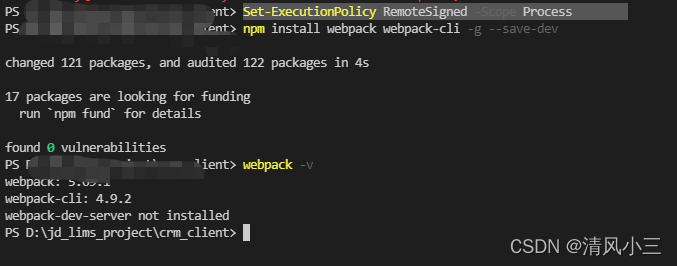
1. error

2. Solution
Set-ExecutionPolicy RemoteSigned

Set-ExecutionPolicy RemoteSigned -Scope Process
Use node JS database module MySQL , connection database query error
Error: connect ECONNREFUSED ::1:3306
reason
I annotated the mapping relationship of /ECT/hosts
# 127.0.0.1 localhost
The original configuration used localhost , so the database could not be connected suddenly
{
  host: 'localhost',
  user: 'root',
  password: '123456',
  database: 'data',
};
Treatment method
Method 1:
Change the mapping relationship of /ECT/hosts
# 127.0.0.1   localhost
127.0.0.1   localhost
Method 2:
You can use 127.0.0.1 instead
{
  // host: 'localhost',
  host: '127.0.0.1',
  user: 'root',
  password: '123456',
  database: 'data',
};
This article mainly explains the error reporting and solution of nested El table in El form
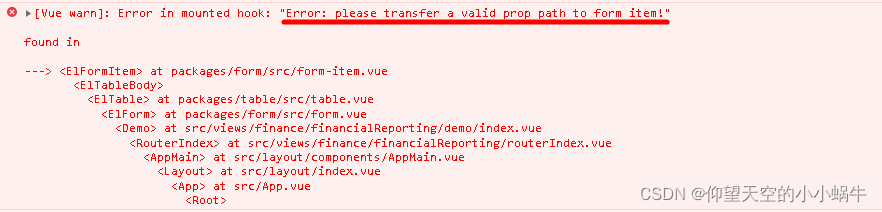
report errors
[Vue warn]: Error in mounted hook: "Error: please transfer a valid prop path to form item!"
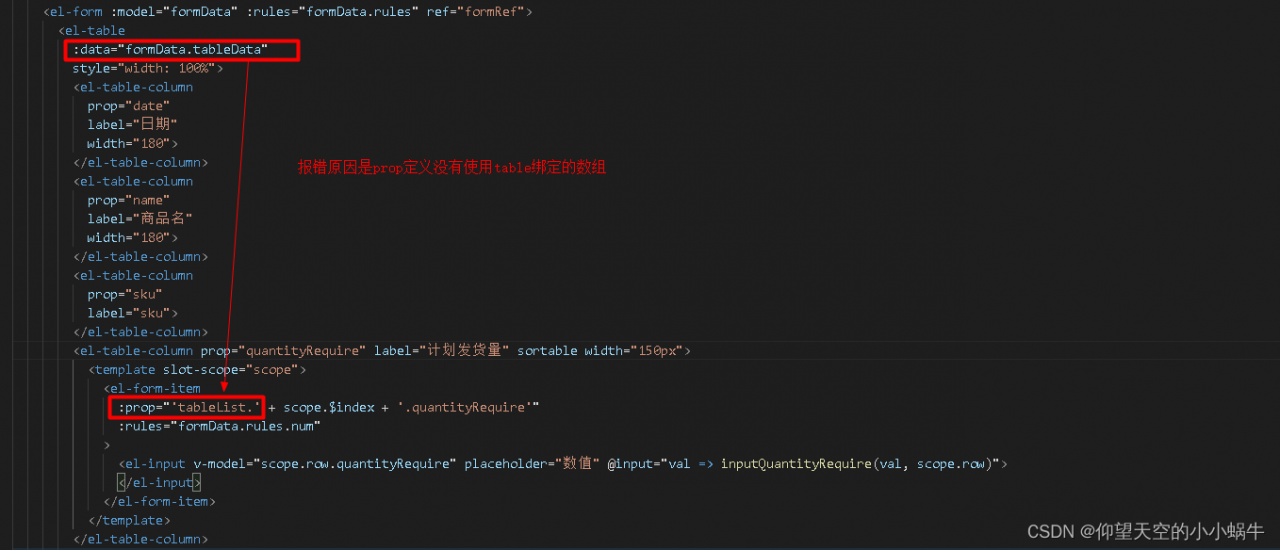
Error reporting reason
The reason for the error is that the prop definition does not use the array name tabledata bound by table
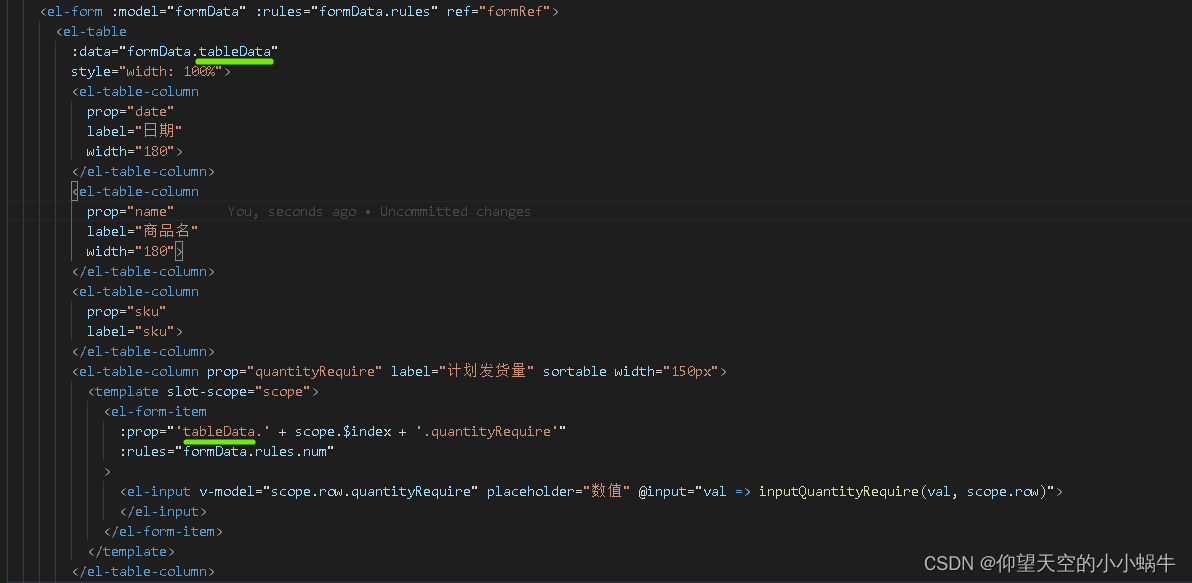
Solution:
Prop uses the array name tabledata bound by table
There is an error using the remote module:
Uncaught Error: @electron/remote is disabled for this WebContents. Call require("@electron/remote/main").enable(webContents) to enable it.
    at IpcMainImpl.<anonymous>
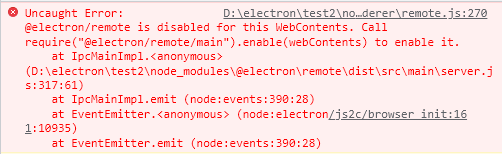
according to the prompt, you need to add a line: require(“@electron/remote/main”).enable(webContents) in main.js, but if it is added directly, the webcontents is not defined error will be displayed.
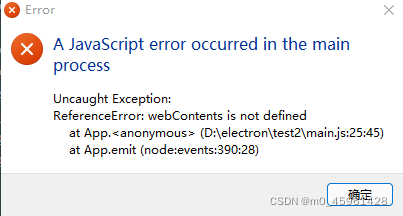
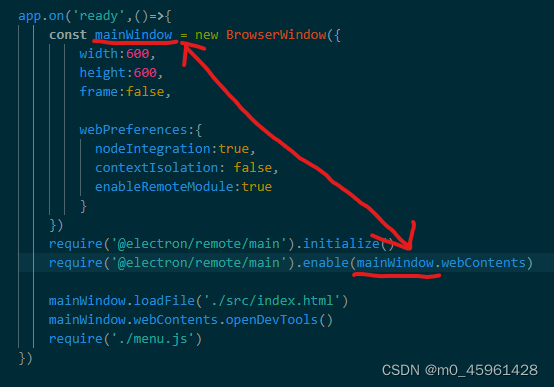
You can’t add it directly, webContents should be preceded by the defined variable name, as follows, webContents should be replaced with mainWindow.webContents.
Problem screenshot: the reason for 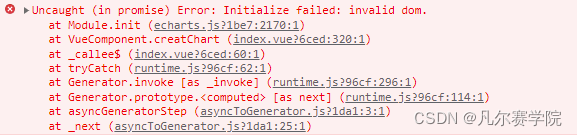
Cause: After entering the chart page and calling the Get Chart Data interface, the interface jumps away from the chart page before returning the data, and then the data is returned and the chart is created, but after jumping away from the chart page, the container element is not available, so an error is reported and the chart creation fails.
Solution:
1. Instead of using the native js method to get the container element (e.g. document.getElementById()), use this.$refs instead.
2. If the chart page is a cached page and you want the chart to load after jumping back to the chart page, you need to write the width and height of the container (in px) in the in-line style of the chart container. (For cached pages there is also another solution: execute the create chart method in the activated life cycle of the component)
<div ref="chinaMapChart" style="width: 770px; height: 560px" />

------

const myChart = echarts.init(this.$refs.chinaMapChart)The console of the background management system of Vue + element UI reports the following error messages
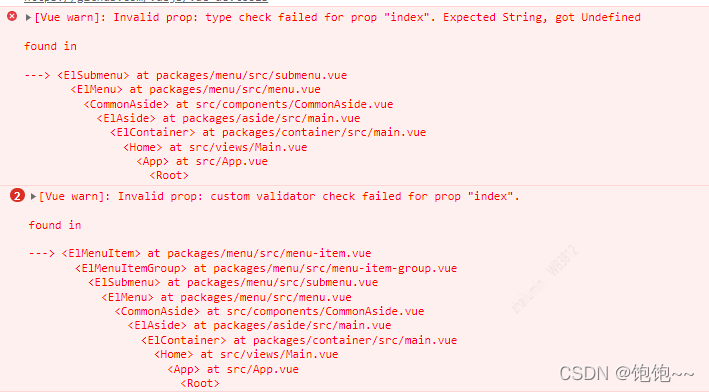
Solution:
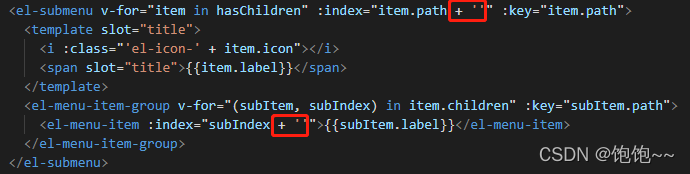
Add ” after the parameter in attribute: index
If let or var variables are used to declare in TS, an error will appear:
Slint: identifier ‘errmsg’ will never be reassigned; Use ‘const’ instead of ‘let’. (prefer const)

code snippet:

Solution:
1. Use const to declare
2. Open tslint.json file under the project, set prefer-const to false.
Uncaught SyntaxError
Uncaught SyntaxError: await is only valid in async functions and the top level bodies of modules
await the top level bodies of modules
Can not Run normally
<script type="text/javascript">
// Uncaught SyntaxError: await is only valid in async functions and the top level bodies of modules
let x = await tools();
console.log(x);
</script>
After modification
reference resources
<script type="text/javascript">
// demo
(async () => {
    let x = await tools();
    console.log(x);
})();
</script>