Category Archives: JavaScript

WPF: How to implement Text Stroke

1. Preface

WPF’s TextBlock provides most of the commonly used text modification methods, which are basically sufficient in daily use. If richer representations are required, WPF also provides other tools that are more complex to use to achieve these requirements. For example, the text stroke described in this article, there are several ways to render it in WPF. This article will briefly introduce the method to achieve text stroke.

2. Convert text to Geometry

The key to achieve text stroke is to use FormattedText to convert the text to Geometry, and then use other techniques to add a border to the Geometry and then draw it.

In WPF, Geometry and its derived classes (EllipseGeometry, LineGeometry, PathGeometry, RectangleGeometry, etc.) are used to describe collection graphics of 2D shapes. The FormattedText BuildGeometryfunction can convert the text into a GeometryGroup (representing a composite geometry composed of other Geometry objects), the code is as follows:

private Geometry CreateTextGeometry()
{
    // Create the formatted text based on the properties set.
    FormattedText formattedText = new FormattedText(
        Text,
        CultureInfo.CurrentCulture,
        FlowDirection.LeftToRight,
        new Typeface(
            FontFamily,
            FontStyle,
            FontWeight,
            FontStretch),
        FontSize,
        System.Windows.Media.Brushes.Black,// This brush does not matter since we use the geometry of the text.
        100);
    // Build the geometry object that represents the text.

    return formattedText.BuildGeometry(new Point(0, 0));
}

After getting the Geometry, there are two ways to draw it.

3. Using DrawingContext

DrawingContext in WPF is a basic drawing object used to draw various graphics. One of the easiest ways to use it is to overload the OnRender method of UIElement, and draw the UI of UIElement in this method:

// Override the OnRender call to add a Background and Border to the OffSetPanel
protected override void OnRender(DrawingContext dc)
{
    SolidColorBrush mySolidColorBrush  = new SolidColorBrush();
    mySolidColorBrush.Color = Colors.LimeGreen;
    Pen myPen = new Pen(Brushes.Blue, 10);
    Rect myRect = new Rect(0, 0, 500, 500);
    dc.DrawRectangle(mySolidColorBrush, myPen, myRect);
}

The sample code above draws a 500 * 500 square using the DrawingContext. In addition to squares, DrawingContext also provides functions such as DrawEllipse, DrawImage, DrawLine, which are used to draw circles, images, lines, etc. You can also use DrawText function to draw text. However, DrawGeometry is a better choice than using DrawText directly, because it can draw the border of the text. In the above code, we have converted the text to a Geometry, and then directly call DrawGeometry and add a border:

protected override void OnRender(DrawingContext drawingContext)
{
    base.OnRender(drawingContext);
    var geometry = CreateTextGeometry();
    // Draw the outline based on the properties that are set.
    drawingContext.DrawGeometry(Foreground, new Pen(Stroke, StrokeThickness), geometry);
}

With Stroke, the StrokeThickness control can control the color and thickness of the text border.

4. Custom Shape

The method described above is from Microsoft’s sample document , but since we have obtained the geometry of the text, isn’t it better to make a custom Shape directly, and Shape can easily play more tricks and more animations. The code for making hollow text with a custom Shape is roughly as follows (some custom dependency properties for text are omitted):

public class TextShape : Shape
{
    private double _height;

    private double _width;

    private Geometry _textGeometry;

    [Localizability(LocalizationCategory.Text)]
    public string Text
    {
        get { return (string)GetValue(TextProperty); }
        set { SetValue(TextProperty, value); }
    }

    protected sealed override Geometry DefiningGeometry
    {
        get
        {
            return _textGeometry ?? Geometry.Empty;
        }
    }

    protected override Size MeasureOverride(Size availableSize)
    {
        this.RealizeGeometry();
        return new Size(Math.Min(availableSize.Width, _width), Math.Min(availableSize.Height, _height));
    }

    private void RealizeGeometry()
    {
        var formattedText = new FormattedText(
                                   Text,
                                   CultureInfo.CurrentCulture,
                                   FlowDirection.LeftToRight,
                                   new Typeface(FontFamily, FontStyle, FontWeight, FontStretch), FontSize, Brushes.Black, 100);

        _height = formattedText.Height;
        _width = formattedText.Width;
        _textGeometry = formattedText.BuildGeometry(new Point());
    }
}

After getting a Shape converted from text, in addition to implementing text strokes, you can also play a lot of animations, such as the following:

5. Finally

This article describes how to implement text strokes. In addition to text strokes, there are many ways to convert text into Shape introduced in the article, and the next article will simply try some of them.
[Solved] vue run serve Error: ValidationError: Progress Plugin Invalid Options

Today, I encountered the following problems when running Vue run serve

ValidationError: Progress Plugin Invalid Options

        options should NOT have additional properties
        options should NOT have additional properties
        options should NOT have additional properties
        options should pass "instanceof" keyword validation
        options should match exactly one schema in oneOf

So I thought yesterday was fine. Why not today? There should be something wrong with my operation today.

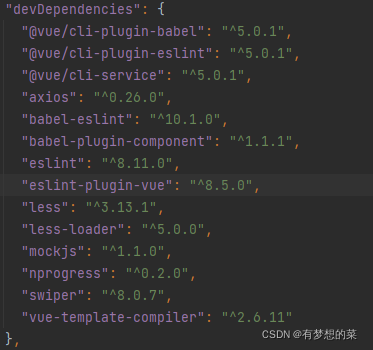
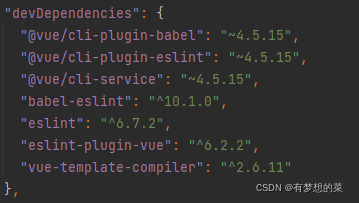
I installed a loader before running the project, so I created a new vue2.x project to comparise What is the difference between the package now and before.

It turned out that vue-cli was upgraded to version 5.0. It turned out that I ran the command NPM audit fix, which will update the loader, but there will be many incompatibilities after the update

2 packages are looking for funding
  run `npm fund` for details

34 vulnerabilities (22 moderate, 11 high, 1 critical)

To address issues that do not require attention, run:
  npm audit fix

To address all issues (including breaking changes), run:
  npm audit fix --force

Run `npm audit` for details.

So I changed the package to the cleanest package inside vue2.x and the project ran successfully

[Solved] uni app TypeError: undefined is not an object (evaluating ‘modules[moduleId].call‘) __ERROR

The project runs normally on H5. When it is debugged and opened with the real machine, the app reports an error and a white screen appears.

Scene reproduction:

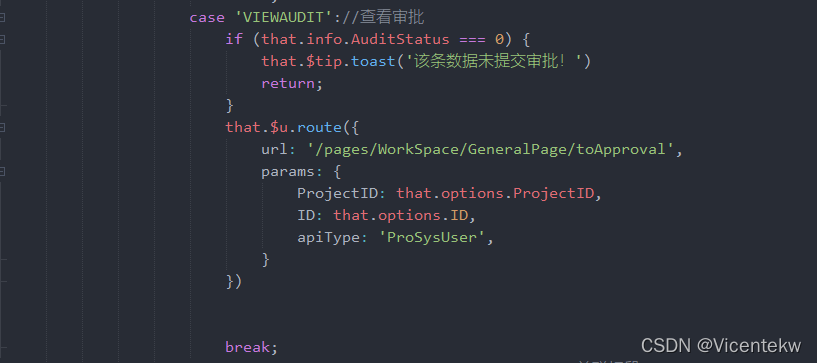
If the route jumps to the toapproval page, the above problem will occur.

Troubleshooting:

After step-by-step positioning and troubleshooting, the problem appears in the component of toapproval page

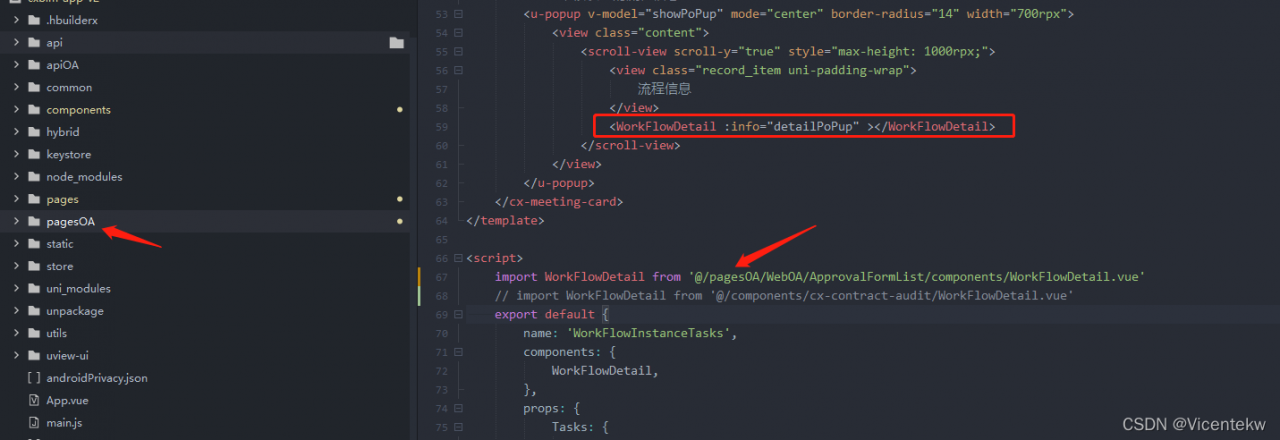
Firstly, the toapproval page is under the main business pages folder, but the workflowdetail component of this page is imported from the subcontracting pagesoa folder. This leads to a white screen in the business jump during real machine debugging. However, it is not so strict in H5 browser, so this problem will not occur and it is not easy to locate the problem.

Solution:

If you find the problem, you can easily solve it. You can change the name of this component, copy it to the components folder, and import it from the components folder again.

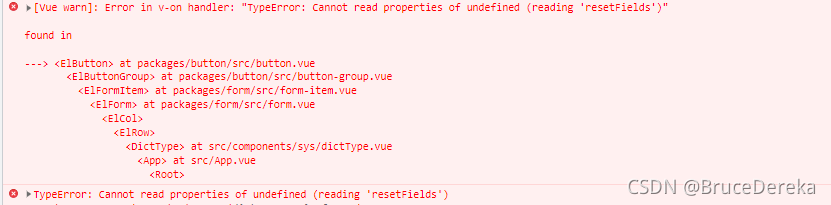
[Solved] Error in v-on handler “TypeError Cannot read properties of undefined (reading ‘resetFields‘)“

In the Vue element project, a new pop-up box function is added. I want to reset the form item every time I click Add
1.
this is used KaTeX parse error: Undefined control sequence:

atposition5:refs\–[formName

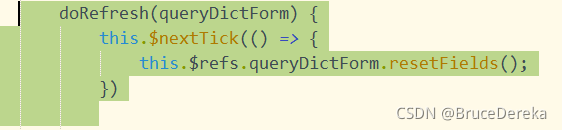
Reset… Refs does not get the dom element, resulting in ‘resetfields’ of undefined

3. Solution:

Add code

this.$nextTick(()=>{
  this.$refs.addForm.resetFields();
})

[Solved] Vue3 Error: Unhandled error during execution of scheduler flush. This is likely a Vue internals bug. P

Unhandled error during execution of scheduler flush. This is likely a Vue internals bug. Please open an issue at https://new-issue.vuejs.org/?repo=vuejs/vue -next

Error reason

An error is reported when vue2 turns to vue3

Error reporting reason

Nested functions are used in the way of global variables. When functions are executed, errors are reported and vue3 direct errors are reported

Check the error position

On the page with problems, correct the errors by commenting the code and quickly find the error location

Solution

The code in the function is written correctly

No error reported!

How to Solve Uncaught (in promise) Error (Two Solutions)

Reporting an uncaught (in promise) error. The solution
There are two Solutions:

1. when using Axios to request an interface, add catch() behind then():

  1. export function stopMCUMixTranscode(params) {
    return new Promise((resolve, reject) => {
    axios
    .post(********, params)
    .then((res) => {
    resolve(res)
    })
    .catch((err) => {
    reject(err)
    })
    })
    }


2. Use return promise Reject (new error (res.msg | ‘error’)) to catch and handle exceptions. It needs to be use .catch(err=>{console.log(err)}) to catch exceptions when the request comes back,

return Promise.reject(error).catch(err=>{console.log(err)}) // Return the error message returned by the interface

Parsing error:x-invalid-end-tag [How to Solve]

Parsing error:x-invalid-end-tag

Reason: When iView renders tags as native html tags, some tags are self-closing, such as input, so having end tags will report an error.
Solution 1: Remove the end tag.
Solution 2: Modify the configuration file to ignore the check.
root directory - eslintrc.js - Rules
add a line: "Vue/no parsing error": [2, {"x-invalid end tag": false}]

[Solved] Error Rule can only have one resource source (provided resource and test + include + exclude)

Error: Rule can only have one resource source
(provided resource and test + include + exclude)

Error: Rule can only have one resource source (provided resource and test + include + exclude)

Error: Rule can only have one resource source (provided resource and test + include + exclude) in
 "exclude": [
    null
  ],
  "use": [
    {
      "loader": "/Users/juanpablo/front-treatments/node_modules/cache-loader/dist/cjs.js",
      "options": {
        "cacheDirectory": "/Users/juanpablo/front-treatments/node_modules/.cache/babel-loader",
        "cacheIdentifier": "81fef5a6"
      },
      "ident": "clonedRuleSet-38[0].rules[0].use[0]"
    },
    {
      "loader": "/Users/juanpablo/front-treatments/node_modules/babel-loader/lib/index.js",
      "options": "undefined",
      "ident": "undefined"
    }
  ]
} ````
A complete log of this run can be found in:
0 info it worked if it ends with ok
1 verbose cli [
1 verbose cli   '/Users/juanpablo/.nvm/versions/node/v12.19.0/bin/node',
1 verbose cli   '/Users/juanpablo/.nvm/versions/node/v12.19.0/bin/npm',
1 verbose cli   'run',
1 verbose cli   'serve'
1 verbose cli ]
2 info using [email protected]
3 info using [email protected]
4 verbose run-script [ 'preserve', 'serve', 'postserve' ]
5 info lifecycle [email protected]~preserve: [email protected]
6 info lifecycle [email protected]~serve: [email protected]
7 verbose lifecycle [email protected]~serve: unsafe-perm in lifecycle true
8 verbose lifecycle [email protected]~serve: PATH: /Users/juanpablo/.nvm/versions/node/v12.19.0/lib/node_modules/npm/node_modules/npm-lifecycle/node-gyp-bin:/Users/juanpablo/front-treatments/node_modules/.bin:/Users/juanpablo/.nvm/versions/node/v12.19.0/bin:/usr/local/bin:/usr/bin:/bin:/usr/sbin:/sbin:/Users/juanpablo/.rvm/bin
9 verbose lifecycle [email protected]~serve: CWD: /Users/juanpablo/front-treatments
10 silly lifecycle [email protected]~serve: Args: [ '-c', 'vue-cli-service serve' ]
11 silly lifecycle [email protected]~serve: Returned: code: 1  signal: null
12 info lifecycle [email protected]~serve: Failed to exec serve script
13 verbose stack Error: [email protected] serve: `vue-cli-service serve`
13 verbose stack Exit status 1
13 verbose stack     at EventEmitter.<anonymous> (/Users/juanpablo/.nvm/versions/node/v12.19.0/lib/node_modules/npm/node_modules/npm-lifecycle/index.js:332:16)
13 verbose stack     at EventEmitter.emit (events.js:314:20)
13 verbose stack     at ChildProcess.<anonymous> (/Users/juanpablo/.nvm/versions/node/v12.19.0/lib/node_modules/npm/node_modules/npm-lifecycle/lib/spawn.js:55:14)
13 verbose stack     at ChildProcess.emit (events.js:314:20)
13 verbose stack     at maybeClose (internal/child_process.js:1021:16)
13 verbose stack     at Process.ChildProcess._handle.onexit (internal/child_process.js:286:5)
14 verbose pkgid [email protected]
15 verbose cwd /Users/juanpablo/front-treatments
16 verbose Darwin 19.6.0
17 verbose argv "/Users/juanpablo/.nvm/versions/node/v12.19.0/bin/node" "/Users/juanpablo/.nvm/versions/node/v12.19.0/bin/npm" "run" "serve"
18 verbose node v12.19.0
19 verbose npm  v6.14.8
20 error code ELIFECYCLE
21 error errno 1
22 error [email protected] serve: `vue-cli-service serve`
22 error Exit status 1
23 error Failed at the [email protected] serve script.
23 error This is probably not a problem with npm. There is likely additional logging output above.
24 verbose exit [ 1, true ]

Cause analysis:

Webpack version conflict in package.json.


Solution:

Delete the webpack and reinstall the previous version
npm uninstall webpack
npm install webpack@^4.0.0 –save-dev

[Solved] NPM Start Project Error: ‘Error: error:0308010C:digital envelope routines::unsupported’

Reason: the version of node is higher than 16, the version of the project is not higher than 16, and OpenSSL is updated after node17.

Solution:

Method 1:

Modify the environment variable at the command line: $env:NODE_OPTIONS="--openssl-legacy-provider"
In the start project: yarn start
Method 2.
Use nvm to modify the node to a version no higher than 16

Vue form validate error: Error in v-on handler “TypeError Cannot read properties of undefined (reading ‘indexOf‘)

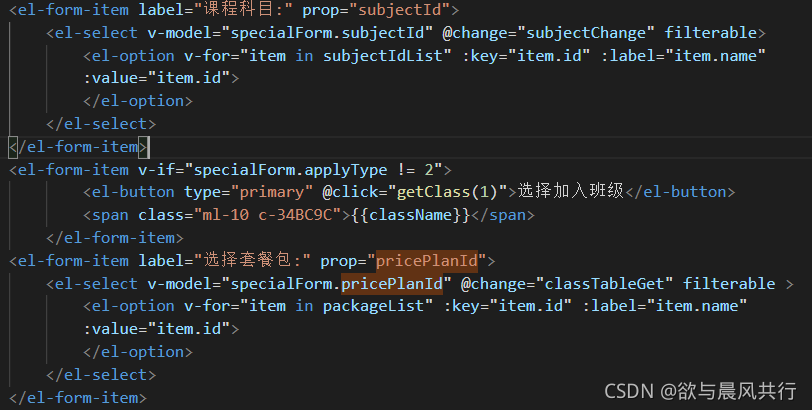
The reason is that the form item uses v-if control and appears to be between two normal el-form-items. As follows.

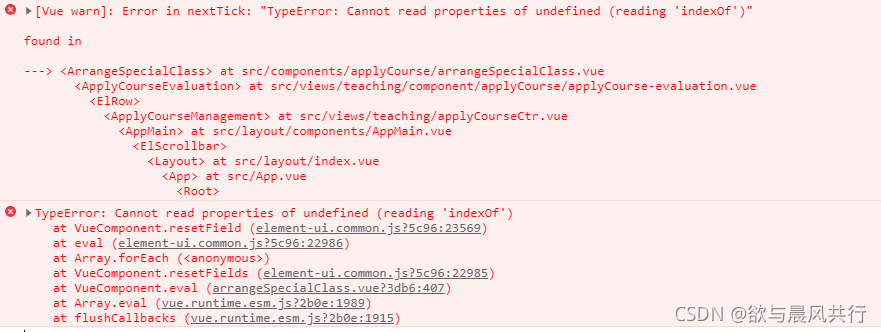
Then when you use this.$refs[“specialForm”].resetFields(); to reset the form, it reports an error:

Solution:
Wrap a div outside el-form-item and use it as an if judgment to avoid it.